Turn CHEVROLET TRAX 2016 1.G Repair Manual
[x] Cancel search | Manufacturer: CHEVROLET, Model Year: 2016, Model line: TRAX, Model: CHEVROLET TRAX 2016 1.GPages: 358, PDF Size: 5.07 MB
Page 112 of 358
Chevrolet TRAX Owner Manual (GMNA-Localizing-U.S./Canada/Mexico-
9159371) - 2016 - crc - 5/21/15
Instruments and Controls 111
Language
This menu is not available while the
vehicle is moving. Press SET/CLR
while the language display is active
and move
w xto change the
language of the displays when
LANG SET is displayed. Select 1 or
2 for the language display. 1 is
Alphabet and 2 is Arabic Numeral.
Press SET/CLR to confirm the
setting.
Compass
See Compass 093 for information
on setting the compass.
Tire Learn
This display allows for matching of
the TPMS sensors. See Tire
Pressure Monitor System 0275 and
Tire Pressure Monitor Operation
0 276.
Vehicle Messages
DIC messages display when the
status of the vehicle has changed
and action may be needed to
correct the condition. Multiple
messages appear one after another.
Press any of the DIC buttons on the
turn signal lever to acknowledge
and clear them from the display.
More urgent messages cannot be
cleared from the DIC display. All
messages should be taken
seriously. Clearing messages will
not correct the problem.
Vehicle messages appear as code
numbers.
25 : Left Front Turn Indicator Failure
26 : Left Rear Turn Indicator Failure
27 : Right Front Turn Indicator
Failure
28 : Right Rear Turn Indicator
Failure
73 : Service All Wheel Drive System
84 : Engine Power Is Reduced
89 : Service Vehicle Soon 125 :
Compass Calibrating —Drive
in Circles
173 : All Wheel Drive Off
Engine Oil Messages
:
% CHANGE
This message displays when the
engine oil needs to be changed.
When changing the engine oil, be
sure to reset the Oil Life System.
See Engine Oil Life System 0240,
Engine Oil 0238, and Maintenance
Schedule 0308.
Tire Messages
LF XX, RF XX, LR XX,
or RR XX
A message displays when the tire
pressure is low. It shows the
location of the low tire and the
approximate pressure of the low tire.
If a tire pressure message appears,
stop as soon as you can. Inflate the
tires by adding air until the tire
pressure is equal to the values
shown on the Tire and Loading
Page 113 of 358
Chevrolet TRAX Owner Manual (GMNA-Localizing-U.S./Canada/Mexico-
9159371) - 2016 - crc - 5/21/15
112 Instruments and Controls
Information label. SeeTires0267,
Vehicle Load Limits 0199, and Tire
Pressure 0273.Trip Computer
The trip computer is located in the
Driver Information Center (DIC).
It provides the driver with driving
information such as average speed,
fuel range, average fuel economy,
and a timer.
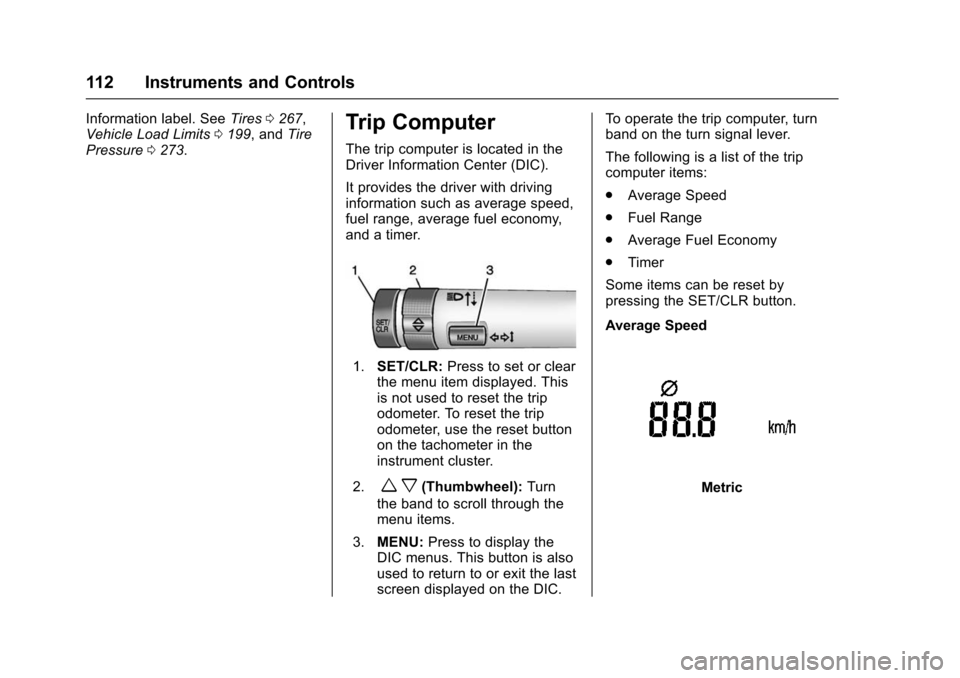
1. SET/CLR: Press to set or clear
the menu item displayed. This
is not used to reset the trip
odometer. To reset the trip
odometer, use the reset button
on the tachometer in the
instrument cluster.
2.
w x(Thumbwheel): Turn
the band to scroll through the
menu items.
3. MENU: Press to display the
DIC menus. This button is also
used to return to or exit the last
screen displayed on the DIC. To operate the trip computer, turn
band on the turn signal lever.
The following is a list of the trip
computer items:
.
Average Speed
. Fuel Range
. Average Fuel Economy
. Timer
Some items can be reset by
pressing the SET/CLR button.
Average SpeedMetric
Page 115 of 358
Chevrolet TRAX Owner Manual (GMNA-Localizing-U.S./Canada/Mexico-
9159371) - 2016 - crc - 5/21/15
114 Instruments and Controls
up to 99:59 hours, after which the
display will return to zero. To reset
the timer to zero, press and hold
SET/CLR.Vehicle
Personalization
Personalization Menu (Radio
without Touchscreen)
The audio system controls and
touchscreen are used to access the
personalization menus for
customizing vehicle features.
The following are all possible
personalization features. Depending
on the vehicle, some may not be
available.
CONFIG (Configuration) :Press to
access the Configuration
Settings Menu.
MENU/TUNE : Turn to scroll
through the menus or setup items.
Press to enter the menus and select
the menu items.
/BACK : Press to exit or return to
the previous screen or menu.
To access a menu:
1. Press the CONFIG button.
2. Turn the MENU/TUNE knob to select the desired menu. 3. Press the MENU/TUNE knob.
Settings menus and functions may
vary depending on vehicle options.
Press the CONFIG button and the
following list of menu items may be
available:
. Languages
. Time and Date Settings
. Radio Settings
. Bluetooth Settings
. Vehicle Settings
Languages
Select Languages, then select from
the available language(s).
Time and Date Settings
See “Setting the Time and Date” in
“Radio without Touchscreen” under
Clock 093.
Radio Settings
Select the Radio Settings menu and
the following may be displayed:
.
Auto Volume
. Maximum Startup Volume
Page 116 of 358
Chevrolet TRAX Owner Manual (GMNA-Localizing-U.S./Canada/Mexico-
9159371) - 2016 - crc - 5/21/15
Instruments and Controls 115
.Radio Favorites
Auto Volume
The auto volume feature
automatically adjusts the radio
volume to compensate for road and
wind noise as the vehicle speeds up
or slows down, so that the volume
level is consistent.
Select the desired value.
Maximum Startup Volume
Select this to manually set the
startup volume of the radio.
Select the desired value.
Radio Favorites
This feature allows for the manual
setting of the number of favorite
pages.
Select the desired number.
Bluetooth Settings
Select and the following may
display:
. Bluetooth
. Return to Factory Settings
Bluetooth
Select and the following may
display:
.Activation
. Device List
. Pair Device
. Change Bluetooth Code
Activation
When on, the system will allow a
Bluetooth device to connect.
Select On or Off.
Device List
This allows the management of a
Bluetooth device.
Select Connect, Separate,
or Delete.
Pair Device
This allows the pairing of a new
Bluetooth device. See “Infotainment
Controls” inBluetooth (Voice
Recognition) 0162 orBluetooth
(Overview) 0153 orBluetooth
(Infotainment Controls) 0154. Change Bluetooth Code
This allows the code to be manually
changed or set.
Return to Factory Settings
Select to return all of the vehicle
personalization to the default
settings.
Select Yes or No.
Vehicle Settings
Select and the following may
display:
.
Comfort and Convenience
. Collision/Detection Systems
. Lighting
. Power Door Locks
. Remote Lock, Unlock, Start
Comfort and Convenience
Select and the following may
display:
.Chime Volume
. Auto Wipe in Reverse Gear
Page 117 of 358
Chevrolet TRAX Owner Manual (GMNA-Localizing-U.S./Canada/Mexico-
9159371) - 2016 - crc - 5/21/15
116 Instruments and Controls
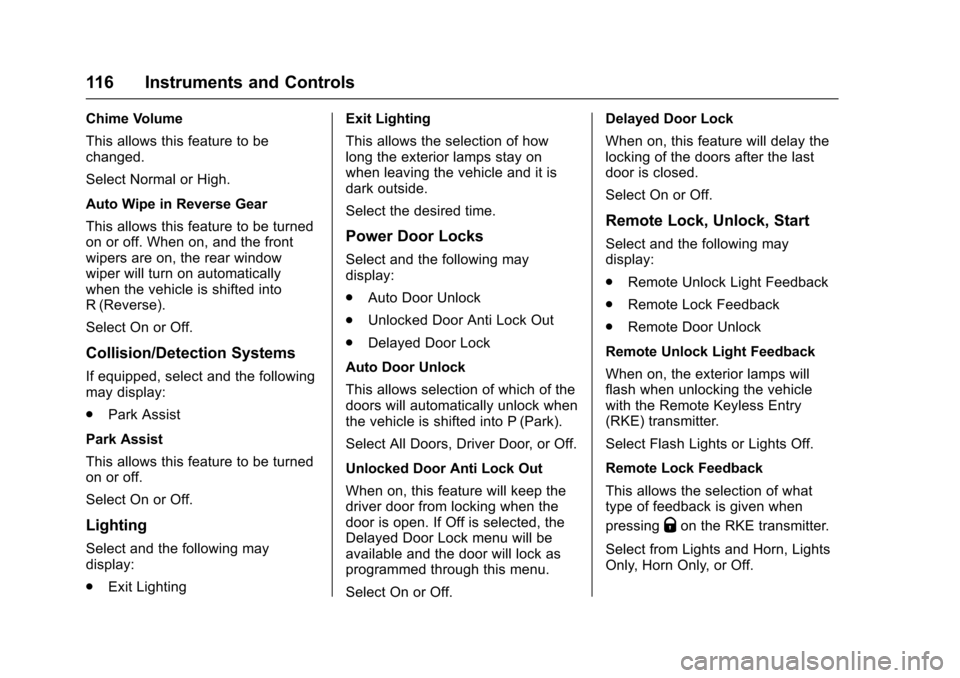
Chime Volume
This allows this feature to be
changed.
Select Normal or High.
Auto Wipe in Reverse Gear
This allows this feature to be turned
on or off. When on, and the front
wipers are on, the rear window
wiper will turn on automatically
when the vehicle is shifted into
R (Reverse).
Select On or Off.
Collision/Detection Systems
If equipped, select and the following
may display:
.Park Assist
Park Assist
This allows this feature to be turned
on or off.
Select On or Off.
Lighting
Select and the following may
display:
. Exit Lighting Exit Lighting
This allows the selection of how
long the exterior lamps stay on
when leaving the vehicle and it is
dark outside.
Select the desired time.
Power Door Locks
Select and the following may
display:
.
Auto Door Unlock
. Unlocked Door Anti Lock Out
. Delayed Door Lock
Auto Door Unlock
This allows selection of which of the
doors will automatically unlock when
the vehicle is shifted into P (Park).
Select All Doors, Driver Door, or Off.
Unlocked Door Anti Lock Out
When on, this feature will keep the
driver door from locking when the
door is open. If Off is selected, the
Delayed Door Lock menu will be
available and the door will lock as
programmed through this menu.
Select On or Off. Delayed Door Lock
When on, this feature will delay the
locking of the doors after the last
door is closed.
Select On or Off.
Remote Lock, Unlock, Start
Select and the following may
display:
.
Remote Unlock Light Feedback
. Remote Lock Feedback
. Remote Door Unlock
Remote Unlock Light Feedback
When on, the exterior lamps will
flash when unlocking the vehicle
with the Remote Keyless Entry
(RKE) transmitter.
Select Flash Lights or Lights Off.
Remote Lock Feedback
This allows the selection of what
type of feedback is given when
pressing
Qon the RKE transmitter.
Select from Lights and Horn, Lights
Only, Horn Only, or Off.
Page 118 of 358
Chevrolet TRAX Owner Manual (GMNA-Localizing-U.S./Canada/Mexico-
9159371) - 2016 - crc - 5/21/15
Instruments and Controls 117
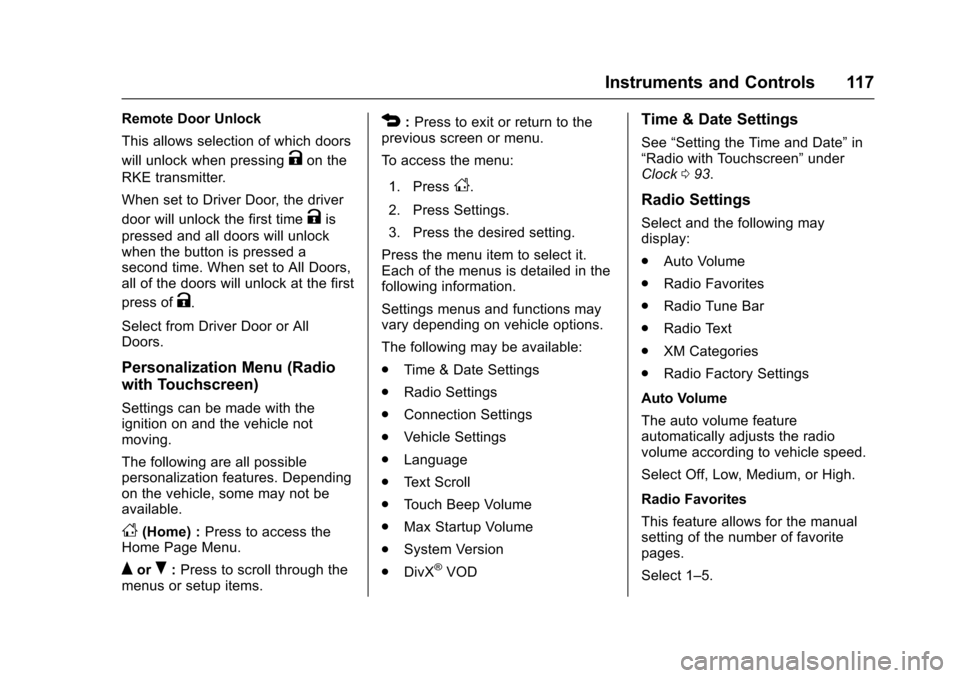
Remote Door Unlock
This allows selection of which doors
will unlock when pressing
Kon the
RKE transmitter.
When set to Driver Door, the driver
door will unlock the first time
Kis
pressed and all doors will unlock
when the button is pressed a
second time. When set to All Doors,
all of the doors will unlock at the first
press of
K.
Select from Driver Door or All
Doors.
Personalization Menu (Radio
with Touchscreen)
Settings can be made with the
ignition on and the vehicle not
moving.
The following are all possible
personalization features. Depending
on the vehicle, some may not be
available.
D(Home) : Press to access the
Home Page Menu.
QorR: Press to scroll through the
menus or setup items.
4: Press to exit or return to the
previous screen or menu.
To access the menu:
1. Press
D.
2. Press Settings.
3. Press the desired setting.
Press the menu item to select it.
Each of the menus is detailed in the
following information.
Settings menus and functions may
vary depending on vehicle options.
The following may be available:
. Time & Date Settings
. Radio Settings
. Connection Settings
. Vehicle Settings
. Language
. Text Scroll
. Touch Beep Volume
. Max Startup Volume
. System Version
. DivX
®VOD
Time & Date Settings
See “Setting the Time and Date” in
“Radio with Touchscreen” under
Clock 093.
Radio Settings
Select and the following may
display:
.
Auto Volume
. Radio Favorites
. Radio Tune Bar
. Radio Text
. XM Categories
. Radio Factory Settings
Auto Volume
The auto volume feature
automatically adjusts the radio
volume according to vehicle speed.
Select Off, Low, Medium, or High.
Radio Favorites
This feature allows for the manual
setting of the number of favorite
pages.
Select 1–5.
Page 120 of 358
Chevrolet TRAX Owner Manual (GMNA-Localizing-U.S./Canada/Mexico-
9159371) - 2016 - crc - 5/21/15
Instruments and Controls 119
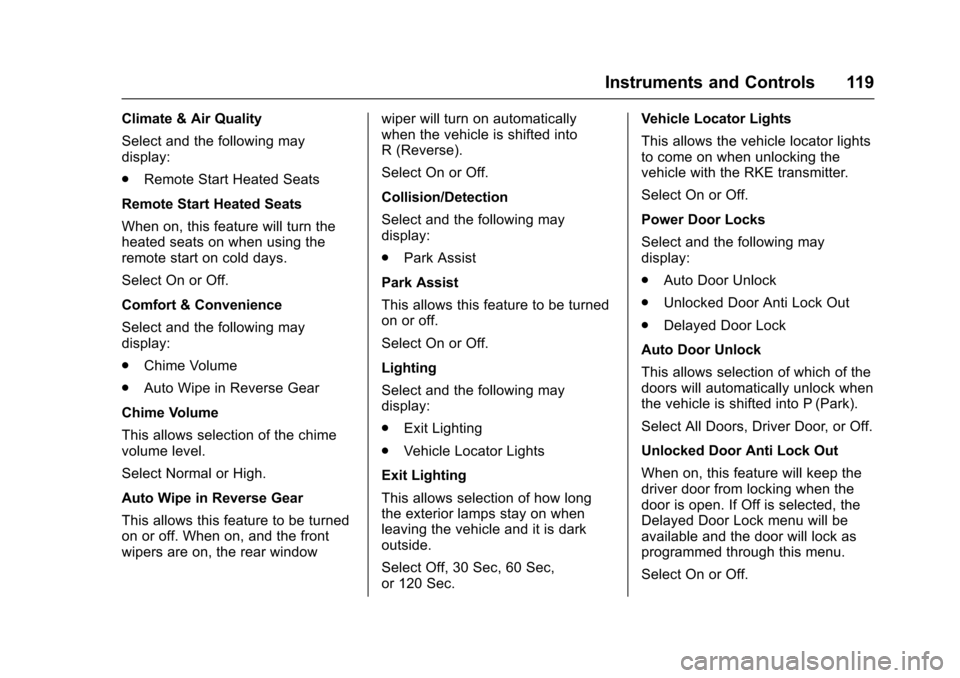
Climate & Air Quality
Select and the following may
display:
.Remote Start Heated Seats
Remote Start Heated Seats
When on, this feature will turn the
heated seats on when using the
remote start on cold days.
Select On or Off.
Comfort & Convenience
Select and the following may
display:
. Chime Volume
. Auto Wipe in Reverse Gear
Chime Volume
This allows selection of the chime
volume level.
Select Normal or High.
Auto Wipe in Reverse Gear
This allows this feature to be turned
on or off. When on, and the front
wipers are on, the rear window wiper will turn on automatically
when the vehicle is shifted into
R (Reverse).
Select On or Off.
Collision/Detection
Select and the following may
display:
.
Park Assist
Park Assist
This allows this feature to be turned
on or off.
Select On or Off.
Lighting
Select and the following may
display:
. Exit Lighting
. Vehicle Locator Lights
Exit Lighting
This allows selection of how long
the exterior lamps stay on when
leaving the vehicle and it is dark
outside.
Select Off, 30 Sec, 60 Sec,
or 120 Sec. Vehicle Locator Lights
This allows the vehicle locator lights
to come on when unlocking the
vehicle with the RKE transmitter.
Select On or Off.
Power Door Locks
Select and the following may
display:
.
Auto Door Unlock
. Unlocked Door Anti Lock Out
. Delayed Door Lock
Auto Door Unlock
This allows selection of which of the
doors will automatically unlock when
the vehicle is shifted into P (Park).
Select All Doors, Driver Door, or Off.
Unlocked Door Anti Lock Out
When on, this feature will keep the
driver door from locking when the
door is open. If Off is selected, the
Delayed Door Lock menu will be
available and the door will lock as
programmed through this menu.
Select On or Off.
Page 121 of 358
Chevrolet TRAX Owner Manual (GMNA-Localizing-U.S./Canada/Mexico-
9159371) - 2016 - crc - 5/21/15
120 Instruments and Controls
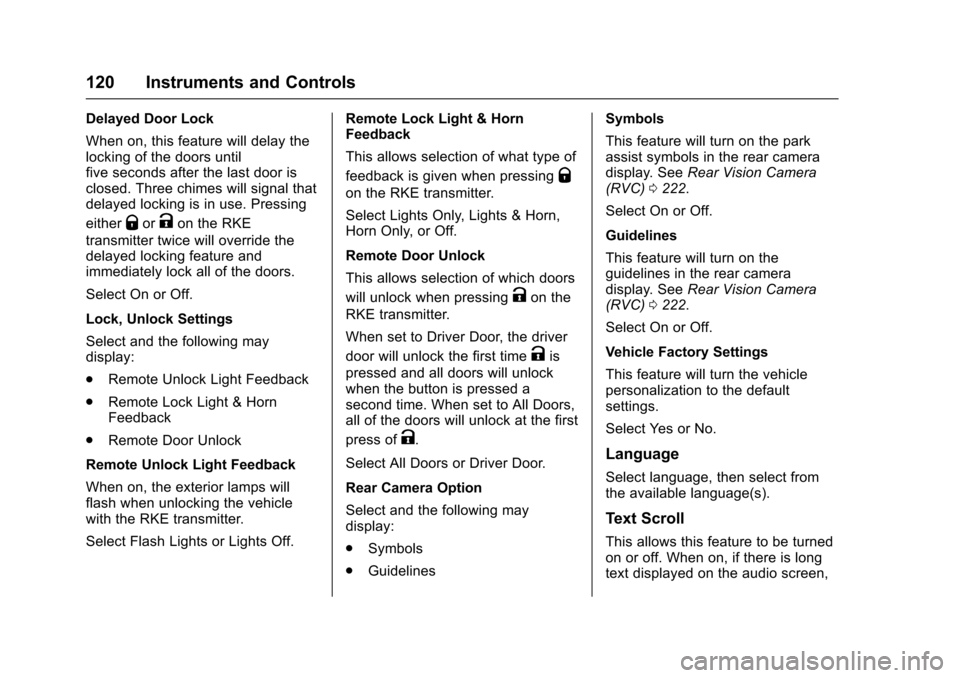
Delayed Door Lock
When on, this feature will delay the
locking of the doors until
five seconds after the last door is
closed. Three chimes will signal that
delayed locking is in use. Pressing
either
QorKon the RKE
transmitter twice will override the
delayed locking feature and
immediately lock all of the doors.
Select On or Off.
Lock, Unlock Settings
Select and the following may
display:
. Remote Unlock Light Feedback
. Remote Lock Light & Horn
Feedback
. Remote Door Unlock
Remote Unlock Light Feedback
When on, the exterior lamps will
flash when unlocking the vehicle
with the RKE transmitter.
Select Flash Lights or Lights Off. Remote Lock Light & Horn
Feedback
This allows selection of what type of
feedback is given when pressing
Q
on the RKE transmitter.
Select Lights Only, Lights & Horn,
Horn Only, or Off.
Remote Door Unlock
This allows selection of which doors
will unlock when pressing
Kon the
RKE transmitter.
When set to Driver Door, the driver
door will unlock the first time
Kis
pressed and all doors will unlock
when the button is pressed a
second time. When set to All Doors,
all of the doors will unlock at the first
press of
K.
Select All Doors or Driver Door.
Rear Camera Option
Select and the following may
display:
. Symbols
. Guidelines Symbols
This feature will turn on the park
assist symbols in the rear camera
display. See
Rear Vision Camera
(RVC) 0222.
Select On or Off.
Guidelines
This feature will turn on the
guidelines in the rear camera
display. See Rear Vision Camera
(RVC) 0222.
Select On or Off.
Vehicle Factory Settings
This feature will turn the vehicle
personalization to the default
settings.
Select Yes or No.Language
Select language, then select from
the available language(s).
Text Scroll
This allows this feature to be turned
on or off. When on, if there is long
text displayed on the audio screen,
Page 122 of 358
Chevrolet TRAX Owner Manual (GMNA-Localizing-U.S./Canada/Mexico-
9159371) - 2016 - crc - 5/21/15
Instruments and Controls 121
the text is scrolled. When off, the
text is scrolled once and displayed
in truncated form.
Select On or Off.
Touch Beep Volume
This allows this feature to be turned
on or off. When on, a beep will be
heard when pressing the screen.
When off, the beep is canceled.
Select On or Off.
Max Startup Volume
This allows the startup volume of
the infotainment system to be set.
Press
SorTto select the desired
volume from 9–21.
System Version
Select to view the version of the
infotainment system.
DivX®VOD
Press DivX®VOD when highlighted.
. DIVX VIDEO: DivX
®is a digital
video format created by DivX,
LLC, a subsidiary of Rovi
Corporation. This is an official DivX Certified
®device that plays
DivX video. See divx.com for
more information and software
tools on how to convert files into
DivX videos.
. DIVX VIDEO-ON DEMAND: This
DivX Certified
®device must be
registered in order to play
purchased DivX
Video-on-Demand (VOD)
movies. To obtain a registration
code, locate the DivX VOD
section in the device setup
menu. See vod.divx.com for
more information on how to
complete the registration.
Page 123 of 358
Chevrolet TRAX Owner Manual (GMNA-Localizing-U.S./Canada/Mexico-
9159371) - 2016 - crc - 5/21/15
122 Lighting
Lighting
Exterior Lighting
Exterior Lamp Controls . . . . . . . 122
Headlamp High/Low-BeamChanger . . . . . . . . . . . . . . . . . . . . 123
Flash-to-Pass . . . . . . . . . . . . . . . . 123
Daytime Running Lamps (DRL) . . . . . . . . . . . . . . . 123
Automatic Headlamp System . . . . . . . . . . . . . . . . . . . . . . 124
Hazard Warning Flashers . . . . . 124
Turn and Lane-Change Signals . . . . . . . . . . . . . . . . . . . . . . 125
Front Fog Lamps . . . . . . . . . . . . . 125
Interior Lighting
Instrument Panel Illumination Control . . . . . . . . . . . . . . . . . . . . . . 126
Courtesy Lamps . . . . . . . . . . . . . . 126
Dome Lamps . . . . . . . . . . . . . . . . . 126
Reading Lamps . . . . . . . . . . . . . . 127
Lighting Features
Battery Load Management . . . 127
Battery Power Protection . . . . . 128
Exterior Lighting
Exterior Lamp Controls
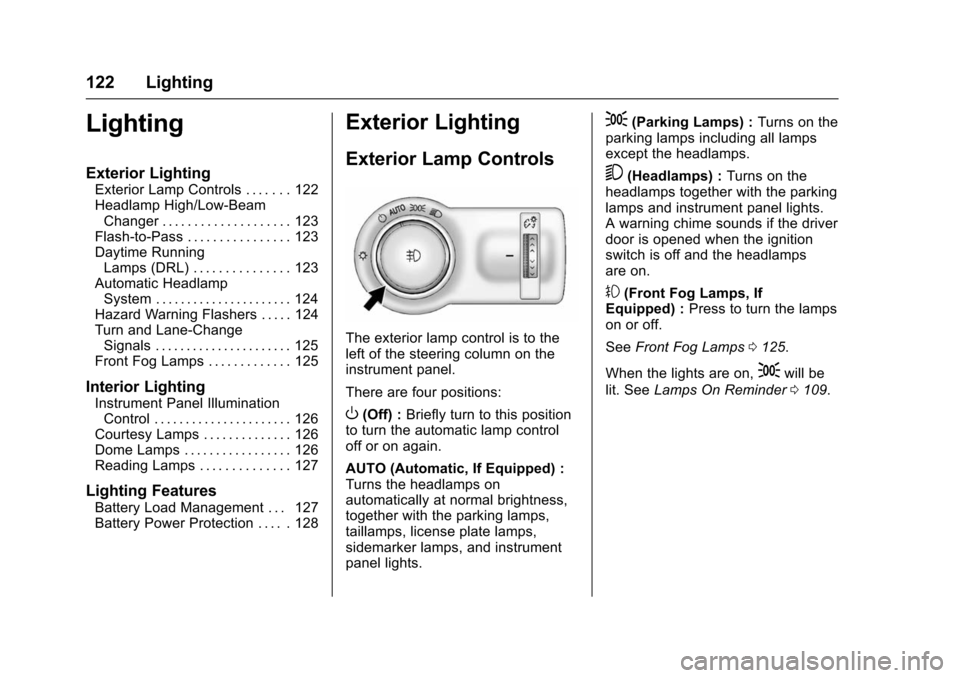
The exterior lamp control is to the
left of the steering column on the
instrument panel.
There are four positions:
O(Off) : Briefly turn to this position
to turn the automatic lamp control
off or on again.
AUTO (Automatic, If Equipped) :
Turns the headlamps on
automatically at normal brightness,
together with the parking lamps,
taillamps, license plate lamps,
sidemarker lamps, and instrument
panel lights.
;(Parking Lamps) : Turns on the
parking lamps including all lamps
except the headlamps.
5(Headlamps) : Turns on the
headlamps together with the parking
lamps and instrument panel lights.
A warning chime sounds if the driver
door is opened when the ignition
switch is off and the headlamps
are on.
#(Front Fog Lamps, If
Equipped) : Press to turn the lamps
on or off.
See Front Fog Lamps 0125.
When the lights are on,
;will be
lit. See Lamps On Reminder 0109.