Ac vent CHEVROLET TRAX 2024 Owner's Guide
[x] Cancel search | Manufacturer: CHEVROLET, Model Year: 2024, Model line: TRAX, Model: CHEVROLET TRAX 2024Pages: 328, PDF Size: 7.3 MB
Page 163 of 328

Chevrolet TRAX Owner Manual (GMNA-Localizing-U.S./Canada/Mexico-
17041293) - 2024 - CRC - 12/2/22
162 Climate Controls
To turn Auto Rear Defog off or on, select
Settings > Climate and Air Quality > Auto
Rear Defog > Select ON or OFF.
When auto rear defog is selected, the rear
window defogger turns on automatically
when the interior temperature is cold and
the outside temperature is about 5 °C (41 °F)
and below. The Auto Rear Defogger turns off
automatically.
If the vehicle is equipped with heated
outside mirrors, they turn on when the rear
window defogger button is on and help to
clear fog or frost from the surface of the
mirror. SeeHeated Mirrors 026
Caution
Do not try to clear frost or other material
from the inside of the front windshield
and rear window with a razor blade or
anything else that is sharp. This may
damage the rear window defogger grid
and affect the radio's ability to pick up
stations clearly. The repairs would not be
covered by the vehicle warranty.
MorL:If equipped, pressMorLto
heat the driver or passenger seat. See
Heated Front Seats 034. Remote Start Climate Control Operation
(If Equipped) :
If the vehicle is equipped
with the remote start feature, the climate
control system may run when the vehicle is
started remotely. The system uses the
driver’s previous settings to heat or cool the
inside of the vehicle. The rear defog may
come on during remote start based on cold
ambient conditions. If the vehicle has heated
seats, they may come on during a remote
start. See Remote Vehicle Start 018 and
Heated Front Seats 034.
Sensors
The solar sensor on top of the instrument
panel near the windshield monitors the solar
heat. The climate control system uses the
sensor information to adjust the
temperature, fan speed, recirculation, and air
delivery mode for best comfort.
Do not cover the sensor; otherwise the
automatic climate control system may not
work properly.
Afterblow Feature
If equipped, under certain conditions, the
fan may stay on or may turn on and off
several times after you turn off and lock the
vehicle. This is normal.
Air Vents
Use the louvers located on the air vents to
change the direction of the airflow.
To open or close off the airflow:
.Move slider knobs away from the
occupant for shut off closing.
Operation Tips
.Clear away any ice, snow, or leaves from
air inlets at the base of the windshield
that could block the flow of air into the
vehicle.
.Clear snow off the hood to improve
visibility and help decrease moisture
drawn into the vehicle, which may
improve long term system performance.
.Keep the path under the front seats clear
of objects to help circulate the air inside
of the vehicle more effectively.
.Use of non-GM approved hood deflectors
can adversely affect the performance of
the system. Check with your dealer
before adding equipment to the outside
of the vehicle.
.Do not attach any devices to the air vent
slats. This restricts airflow and may cause
damage to the air vents.
Page 164 of 328
Chevrolet TRAX Owner Manual (GMNA-Localizing-U.S./Canada/Mexico-
17041293) - 2024 - CRC - 12/2/22
Climate Controls 163
Caution
Use of air fresheners may cause
permanent damage to plastics and
painted surfaces. If an air freshener
comes in contact with any plastic or
painted surface in the vehicle, blot
immediately and clean with a soft cloth
dampened with a mild soap solution.
Damage caused by air fresheners would
not be covered by the vehicle warranty.
Maintenance
Passenger Compartment Air Filter
The filter reduces dust, pollen, and other
airborne irritants from outside air that is
pulled into the vehicle. The filter should be
replaced as part of routine scheduled
maintenance.
SeeMaintenance Schedule 0287.
See your dealer regarding replacement of
the filter.
Service
All vehicles have a label underhood that
identifies the refrigerant used in the vehicle.
The refrigerant system should only be
serviced by trained and certified technicians.
The air conditioning evaporator should never
be repaired or replaced by one from a
salvage vehicle. It should only be replaced
by a new evaporator to ensure proper and
safe operation.
During service, all refrigerants should be
reclaimed with proper equipment. Venting
refrigerants directly to the atmosphere is
harmful to the environment and may also
create unsafe conditions based on
inhalation, combustion, frostbite, or other
health-based concerns.
The air conditioning system requires periodic
maintenance. See Maintenance Schedule
0 287.
Caution
Use only correct Refrigerant and A/C
Compressor Oil shown in Label.
Page 166 of 328

Chevrolet TRAX Owner Manual (GMNA-Localizing-U.S./Canada/Mexico-
17041293) - 2024 - CRC - 12/6/22
Driving and Operating 165
Driving Information
Driver Behavior
Driving is an important responsibility. Driver
behavior, the driving environment, and the
vehicle's design all affect how well a vehicle
performs.
Being aware of these factors can help in
understanding how the vehicle handles and
what can be done to avoid many types of
crashes, including a rollover crash.
Most serious injuries and fatalities to
unbelted occupants can be reduced or
prevented by the use of seat belts. In a
rollover crash, an unbelted person is
significantly more likely to die than a
person wearing a seat belt. In addition,
avoiding excessive speed, sudden or abrupt
turns, and drunken or aggressive driving can
help make trips safer and avoid the
possibility of a crash.
Driving Environment
Be prepared for driving in inclement
weather, at night, or during other times
where visibility or traction may be limited,
such as on curves, slippery roads, or hilly
terrain. Unfamiliar surroundings can also
have hidden hazards.
Vehicle Design
Utility vehicles have a significantly higher
rollover rate than other types of vehicles.
This is because they have a higher ground
clearance and a narrower track or shorter
wheelbase than passenger cars, which makes
them more capable for off-road driving.
While these design characteristics provide
the driver with a better view of the road,
these vehicles do have a higher center of
gravity than other types of vehicles.
A utility vehicle does not handle the same
as a vehicle with a lower center of gravity,
like a car, in similar situations.
Safe driver behavior and understanding of
the environment can help avoid a rollover
crash in any type of vehicle, including utility
vehicles.
Driving for Better Fuel Economy
Driving habits can affect fuel mileage. Here
are some driving tips to get the best fuel
economy possible:
.Set the climate controls to the desired
temperature after the engine is started,
or turn them off when not required.
.Avoid fast starts and accelerate smoothly.
.Brake gradually and avoid abrupt stops.
.Avoid idling the engine for long periods
of time.
.When road and weather conditions are
appropriate, use cruise control.
.Always follow posted speed limits or
drive more slowly when conditions
require.
.Keep vehicle tires properly inflated.
.Combine several trips into a single trip.
.Replace the vehicle's tires with the same
TPC Spec number molded into the tire's
sidewall near the size.
.Follow recommended scheduled
maintenance.
Page 172 of 328
Chevrolet TRAX Owner Manual (GMNA-Localizing-U.S./Canada/Mexico-
17041293) - 2024 - CRC - 12/6/22
Driving and Operating 171
Warning (Continued)
.Open a window about 5 cm (2 in) on
the vehicle side that is away from the
wind, to bring in fresh air.
.Fully open the air outlets on or under
the instrument panel.
.Adjust the climate control system to
circulate the air inside the vehicle and
set the fan speed to the highest
setting. See“Climate Control Systems.”
For more information about CO, see
Engine Exhaust 0183.
To save fuel, run the engine for short
periods to warm the vehicle and then shut
the engine off and partially close the
window. Moving about to keep warm also
helps.
If it takes time for help to arrive, when
running the engine, push the accelerator
pedal slightly so the engine runs faster than
the idle speed. This keeps the battery
charged to restart the vehicle and to signal
for help with the headlamps. Do this as
little as possible, to save fuel.
If the Vehicle Is Stuck
Slowly and cautiously spin the wheels to
free the vehicle when stuck in sand, mud,
ice, or snow.
If stuck too severely for the traction system
to free the vehicle, turn the traction system
off and use the rocking method. See
Traction Control/Electronic Stability Control
0 188.
{Warning
If the vehicle's tires spin at high speed,
they can explode, and you or others
could be injured. The vehicle can
overheat, causing an engine compartment
fire or other damage. Spin the wheels as
little as possible and avoid going above
56 km/h (35 mph).
Rocking the Vehicle to Get it Out
Turn the steering wheel left and right to
clear the area around the front wheels. Turn
off any traction system. Shift back and forth
between R (Reverse) and a low forward gear,
spinning the wheels as little as possible. To
prevent transmission wear, wait until the
wheels stop spinning before shifting gears.
Release the accelerator pedal while shifting, and press lightly on the accelerator pedal
when the transmission is in gear. Slowly
spinning the wheels in the forward and
reverse directions causes a rocking motion
that could free the vehicle. If that does not
get the vehicle out after a few tries, it may
need to be towed out. If the vehicle does
need to be towed out, see
Transporting a
Disabled Vehicle 0274.
Vehicle Load Limits
It is very important to know how much
weight the vehicle can carry. This
weight is called the vehicle capacity
weight and includes the weight of all
occupants, cargo, and all
nonfactory-installed options. Two labels
on the vehicle may show how much
weight it may properly carry, the Tire
and Loading Information label and the
Certification/Tire label.
{Warning
Do not load the vehicle any heavier
than the Gross Vehicle Weight Rating
(GVWR), or either the maximum
front or rear Gross Axle Weight
(Continued)
Page 177 of 328

Chevrolet TRAX Owner Manual (GMNA-Localizing-U.S./Canada/Mexico-
17041293) - 2024 - CRC - 12/6/22
176 Driving and Operating
Retained Accessory Power (RAP) will remain
active. SeeRetained Accessory Power (RAP)
0 181.
A warning chime will sound when the driver
door is opened and the key is in the
ignition.
If equipped with a locking steering column,
the steering can bind with the front wheels
turned off center, which may prevent key
rotation out of LOCK/OFF. If this happens,
move the steering wheel from right to left
while turning the key to ACC/ACCESSORY.
If this does not work, then the vehicle needs
service.
{Warning
Turning off the vehicle while moving may
cause loss of power assist in the brake
and steering systems and disable the
airbags. While driving, only shut the
vehicle off in an emergency.
In an emergency, if the vehicle cannot be
pulled over and must be turned off while
driving: 1. Push the key all the way in toward the steering column, then turn the key to
ACC/ACCESSORY. 2. Brake using firm and steady pressure. Do
not pump the brakes repeatedly. This
may deplete power assist, requiring
increased brake pedal force.
3. Shift the vehicle to N (Neutral). This can be done while the vehicle is moving.
Continue braking and steer the vehicle to
a safe location.
4. Come to a complete stop. Shift to P (Park) with an automatic transmission,
or Neutral with a manual transmission.
Push the key all the way in toward the
steering column, then turn the ignition
to LOCK/OFF.
5. Set the parking brake. See Electric
Parking Brake 0187.Caution
Use the correct key, make sure it is all
the way in —or pushed all the way in
toward the steering column when turning
off the vehicle —and turn it only with
your hand.
1. (ACC/ACCESSORY) : This position allows
features such as the infotainment system
to operate while the vehicle is off. It also
unlocks the steering column, if equipped
with a locking steering column. Use this position if the vehicle must be pushed or
towed. See Retained Accessory Power
(RAP). From ON/RUN, push the key all
the way in toward the steering column,
then turn the key to ACC/ACCESSORY.
If the key is left in ACC/ACCESSORY with
the engine off, the battery could drain
and the vehicle may not start. A warning
chime will sound when the driver door is
opened and the key is in the ignition.
2. (ON/RUN) : This position can be used to
operate the electrical accessories and to
display some instrument cluster warning
and indicator lights. This position can
also be used for service and diagnostics,
and to verify the proper operation of the
malfunction indicator lamp as may be
required for emission inspection
purposes. The switch stays in this
position when the engine is running. The
transmission is also unlocked in this
position on automatic transmission
vehicles.
3. (START) : This is the position that starts
the engine. When the engine starts,
release the key. The ignition returns to
ON/RUN for driving.
Page 179 of 328

Chevrolet TRAX Owner Manual (GMNA-Localizing-U.S./Canada/Mexico-
17041293) - 2024 - CRC - 12/6/22
178 Driving and Operating
If the vehicle cannot be pulled over, and
must be shut off while driving, press and
hold ENGINE START/STOP for longer than
two seconds, or press twice in five seconds.
Accessory (Amber Indicator Light) :This
mode allows some electrical accessories to
be used when the engine is off.
With the ignition off, pressing the button
one time without the brake pedal applied
will place the ignition system in accessory.
The ignition will switch from accessory to
OFF after five minutes to prevent battery
rundown.
ON/RUN/START (Green Indicator Light) : This
mode is for driving and starting. With the
ignition off, and the brake pedal applied,
pressing the button once will turn the
ignition on. Once engine cranking begins,
release the button. Engine cranking will
continue until the engine starts. See Starting
the Engine 0178.
Service Mode
This power mode is available for service and
diagnostics, and to verify the proper
operation of the malfunction indicator lamp
as may be required for emission inspection
purposes. With the vehicle off, and the
brake pedal not applied, pressing and holding the button for more than
five seconds will place the vehicle in Service
Mode. The instruments and audio systems
will operate as they do when the ignition is
on, but the vehicle will not be able to be
driven. The engine will not start in Service
Mode. Press the button again to turn the
ignition off.
Starting the Engine
Move the shift lever to P (Park) or
N (Neutral). The engine will not start in any
other position. To restart the engine when
the vehicle is already moving, use
N (Neutral) only.
Caution
Do not try to shift to P (Park) if the
vehicle is moving. If you do, you could
damage the transmission. Shift to P (Park)
only when the vehicle is stopped.
Caution
If you add electrical parts or accessories,
you could change the way the engine
operates. Any resulting damage would
not be covered by the vehicle warranty.
See
Add-On Electrical Equipment 0214.
Starting Procedure (Key Access)
1. With your foot off the accelerator pedal,
turn the ignition key to START. When
the engine starts, let go of the ignition.
The idle speed will go down as the
engine gets warm. Do not race the
engine immediately after starting it.
Operate the engine and transmission
gently to allow the oil to warm up and
lubricate all moving parts.
Caution
Cranking the engine for long periods of
time, by returning the ignition to the
START position immediately after
cranking has ended, can overheat and
damage the cranking motor, and drain
the battery. Wait at least 15 seconds
between each try, to let the cranking
motor cool down.
2. If the engine does not start after five to 10 seconds, especially in very cold
weather (below −18 °C or 0 °F), it could
be flooded with too much gasoline. Try
pushing the accelerator pedal all the way
to the floor and holding it there as you
hold the key in START for up to a
maximum of 15 seconds. Wait at least
Page 182 of 328
Chevrolet TRAX Owner Manual (GMNA-Localizing-U.S./Canada/Mexico-
17041293) - 2024 - CRC - 12/6/22
Driving and Operating 181
starting the vehicle. An internal thermostat
in the plug end of the cord will prevent
engine coolant heater operation at
temperatures above−18 °C (0 °F).
To Use the Engine Heater 1. Turn off the engine.
2. Remove the heater cord from the rear compartment.
3. Check the heater cord for damage. If it is damaged, do not use it. See your dealer
for a replacement. Inspect the cord for
damage yearly.
4. Plug the cord into the receptacle in the front fascia.
5. Plug the other end of the cord into a normal, grounded 110-volt AC outlet.
{Warning
Improper use of the heater cord or an
extension cord can damage the cord and
may result in overheating and fire.
.Plug the cord into a three-prong
electrical utility receptacle that is
protected by a ground fault detection
function. An ungrounded outlet could
cause an electric shock.
(Continued)
Warning (Continued)
.Use a weatherproof, heavy-duty,
15 amp-rated extension cord if needed.
Failure to use the recommended
extension cord in good operating
condition, or using a damaged heater
or extension cord, could make it
overheat and cause a fire, property
damage, electric shock, and injury.
.Do not operate the vehicle with the
heater cord permanently attached to
the vehicle. Possible heater cord and
thermostat damage could occur.
.While in use, do not let the heater
cord touch vehicle parts or sharp
edges. Never close the hood on the
heater cord.
.Before starting the vehicle, unplug the
cord, reattach the cover to the plug,
and securely fasten the cord. Keep the
cord away from any moving parts.
The length of time the heater should remain
plugged in depends on several factors. Ask a
dealer in the area where you will be parking
the vehicle for the best advice on this.
Retained Accessory Power (RAP)
When the vehicle is turned from on to off,
the following features (if equipped) will
continue to function for up to 10 minutes,
or until the driver door is opened. These
features will also work when the vehicle is
on or in accessory mode:
.Infotainment System
.Power Windows (during RAP this
functionality will be lost when any door
is opened)
.Sunroof (during RAP this functionality will
be lost when any door is opened)
.Auxiliary Power Outlet
.Audio System
.OnStar System
Shifting Into Park
{Warning
It is dangerous to get out of the vehicle
if the shift lever is not fully in P (Park)
with the parking brake set. The vehicle
can roll. (Continued)
Page 183 of 328
Chevrolet TRAX Owner Manual (GMNA-Localizing-U.S./Canada/Mexico-
17041293) - 2024 - CRC - 12/6/22
182 Driving and Operating
Warning (Continued)
Do not leave the vehicle when the engine
is running. If you have left the engine
running, the vehicle can move suddenly.
You or others could be injured. To be
sure the vehicle will not move, even
when you are on fairly level ground,
always set the parking brake and move
the shift lever to P (Park). SeeShifting
Into Park 0181 and
Electric Parking Brake 0187.
To shift into P (Park): 1. Hold the brake pedal down and set the parking brake. See Electric Parking Brake
0 187
2. Hold the button on the shift lever and push the lever toward the front of the
vehicle into P (Park).
3. Turn the ignition off.
Leaving the Vehicle with the Engine
Running
{Warning
It can be dangerous to leave the vehicle
with the engine running. It could
overheat and catch fire.
It is dangerous to get out of the vehicle
if the shift lever is not fully in P (Park)
with the parking brake firmly set. The
vehicle can roll.
Do not leave the vehicle when the engine
is running. If you have left the engine
running, the vehicle can move suddenly.
You or others could be injured. To be
sure the vehicle will not move, even
when you are on fairly level ground,
always set the parking brake and move
the shift lever to P (Park). See Shifting
Into Park 0181.
If you have to leave the vehicle with the
engine running, the vehicle must be in
P (Park) and the parking brake set.
Release the button and check that the shift
lever cannot be moved out of P (Park).
Torque Lock
Torque lock is when the weight of the
vehicle puts too much force on the parking
pawl in the transmission. This happens when
parking on a hill and shifting the
transmission into P (Park) is not done
properly and then it is difficult to shift out
of P (Park). To prevent torque lock, set the
parking brake and then shift into P (Park).
To find out how, see Shifting Into Park0181
listed previously.
If torque lock does occur, the vehicle may
need to be pushed uphill by another vehicle
to relieve the parking pawl pressure, so you
can shift out of P (Park).
Shifting out of Park
To shift out of P (Park):
1. Apply the brake pedal.
2. Turn the ignition on.
3. Press the shift lever button.
4. Move the shift lever.
If you still are unable to shift out of
P (Park): 1. Fully release the shift lever button.
2. Hold the brake pedal down and press the shift lever button again.
Page 184 of 328
Chevrolet TRAX Owner Manual (GMNA-Localizing-U.S./Canada/Mexico-
17041293) - 2024 - CRC - 12/6/22
Driving and Operating 183
3. Move the shift lever.
If you still cannot move the shift lever from
P (Park), see your dealer for service.
Parking over Things That Burn
{Warning
Things that can burn could touch hot
exhaust parts under the vehicle and
ignite. Do not park over papers, leaves,
dry grass, or other things that can burn.
Extended Parking
It is best not to park with the vehicle
running. If the vehicle is left running, be
sure it will not move and there is adequate
ventilation.
See Shifting Into Park 0181 and
Engine Exhaust 0183.
If the vehicle is left parked and running with
the remote key outside the vehicle, it will
continue to run for up to 15 minutes.
If the vehicle is left parked and running with
the remote key inside the vehicle, it will
continue to run for up to 30 minutes. The vehicle could turn off sooner if it is
parked on a hill, due to lack of
available fuel.
The timer will reset if the vehicle is taken
out of P (Park) while it is running.
Engine Exhaust
{
Warning
Engine exhaust contains carbon monoxide
(CO), which cannot be seen or smelled.
Exposure to CO can cause
unconsciousness and even death.
Exhaust may enter the vehicle if:
.The vehicle idles in areas with poor
ventilation (parking garages, tunnels,
deep snow that may block underbody
airflow or tail pipes).
.The exhaust smells or sounds strange
or different.
.The exhaust system leaks due to
corrosion or damage.
.The vehicle exhaust system has been
modified, damaged, or improperly
repaired. (Continued)
Warning (Continued)
.There are holes or openings in the
vehicle body from damage or
aftermarket modifications that are not
completely sealed.
If unusual fumes are detected or if it is
suspected that exhaust is coming into the
vehicle:
.Drive it only with the windows
completely down.
.Have the vehicle repaired immediately.
Never park the vehicle with the engine
running in an enclosed area such as a
garage or a building that has no fresh air
ventilation.
Running the Vehicle While Parked
It is better not to park with the engine
running.
If the vehicle is left with the engine running,
follow the proper steps to be sure the
vehicle will not move. See Shifting Into Park
0 181 and
Engine Exhaust 0183.
Page 187 of 328
Chevrolet TRAX Owner Manual (GMNA-Localizing-U.S./Canada/Mexico-
17041293) - 2024 - CRC - 12/6/22
186 Driving and Operating
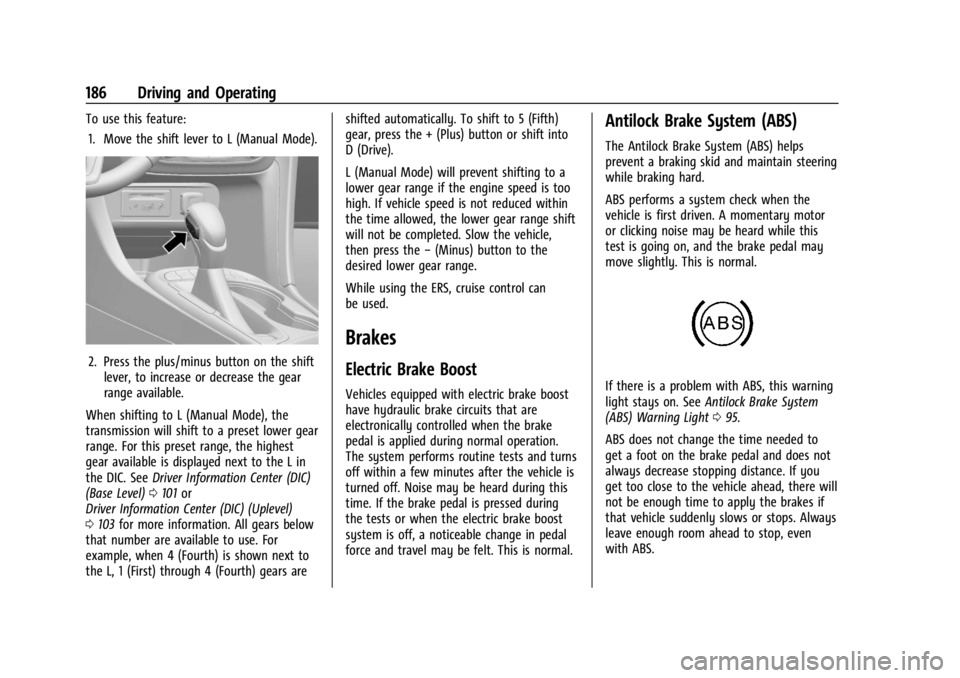
To use this feature:1. Move the shift lever to L (Manual Mode).
2. Press the plus/minus button on the shift lever, to increase or decrease the gear
range available.
When shifting to L (Manual Mode), the
transmission will shift to a preset lower gear
range. For this preset range, the highest
gear available is displayed next to the L in
the DIC. See Driver Information Center (DIC)
(Base Level) 0101 or
Driver Information Center (DIC) (Uplevel)
0 103 for more information. All gears below
that number are available to use. For
example, when 4 (Fourth) is shown next to
the L, 1 (First) through 4 (Fourth) gears are shifted automatically. To shift to 5 (Fifth)
gear, press the + (Plus) button or shift into
D (Drive).
L (Manual Mode) will prevent shifting to a
lower gear range if the engine speed is too
high. If vehicle speed is not reduced within
the time allowed, the lower gear range shift
will not be completed. Slow the vehicle,
then press the
−(Minus) button to the
desired lower gear range.
While using the ERS, cruise control can
be used.
Brakes
Electric Brake Boost
Vehicles equipped with electric brake boost
have hydraulic brake circuits that are
electronically controlled when the brake
pedal is applied during normal operation.
The system performs routine tests and turns
off within a few minutes after the vehicle is
turned off. Noise may be heard during this
time. If the brake pedal is pressed during
the tests or when the electric brake boost
system is off, a noticeable change in pedal
force and travel may be felt. This is normal.
Antilock Brake System (ABS)
The Antilock Brake System (ABS) helps
prevent a braking skid and maintain steering
while braking hard.
ABS performs a system check when the
vehicle is first driven. A momentary motor
or clicking noise may be heard while this
test is going on, and the brake pedal may
move slightly. This is normal.
If there is a problem with ABS, this warning
light stays on. See Antilock Brake System
(ABS) Warning Light 095.
ABS does not change the time needed to
get a foot on the brake pedal and does not
always decrease stopping distance. If you
get too close to the vehicle ahead, there will
not be enough time to apply the brakes if
that vehicle suddenly slows or stops. Always
leave enough room ahead to stop, even
with ABS.