audio CHEVROLET UPLANDER 2007 1.G Workshop Manual
[x] Cancel search | Manufacturer: CHEVROLET, Model Year: 2007, Model line: UPLANDER, Model: CHEVROLET UPLANDER 2007 1.GPages: 592, PDF Size: 3.04 MB
Page 349 of 592
For vehicles with OnStar®:
Press and hold the mute button to activate
OnStar®.
Press and release this button once again to
deactivate OnStar®mode and go to mute
mode.
Press this button twice to return to sound from
the GM Mobile Digital Media system.
For vehicles without OnStar
®:
Press the mute button to silence the system,
press and release this button once again to
turn the sound back on.
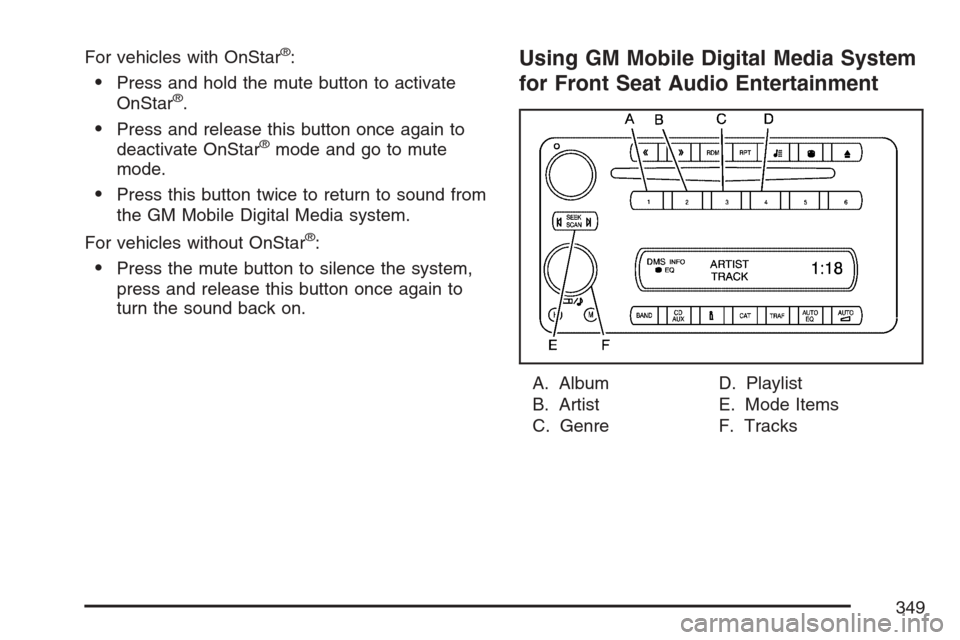
Using GM Mobile Digital Media System
for Front Seat Audio Entertainment
A. Album
B. Artist
C. GenreD. Playlist
E. Mode Items
F. Tracks
349
Page 350 of 592
The GM Mobile Digital Media is controlled through
the radio and steering wheel controls on your
vehicle’s audio system. This system functions
differently than a typical CD changer. The Digital
Media system allows you to switch between
different playback modes. These modes determine
the next song that will play. Using modes, you
can browse through playlists, artists, albums, and
genres while the system reads Voice Index™
names to you while you drive. By selecting Playlist
Mode, you can access the music collection in
the order placed onto the DMS cartridge, or you
can have the system sort the music by Album,
Artist, or Genre by selecting the corresponding
Modes.
Starting the System for Front Seat
Entertainment
The GM Mobile Digital Media system is available
through the DMS mode of your radio. This
system will power on and off automatically and
resume where the system last stopped.To begin playback, follow the instructions listed
below:
1. Insert the DMS cartridge into the GM Mobile
Digital Media player.
2. Turn on your radio and switch to the DMS
mode by pressing the CD/AUX button on
your radio.
3. Press any of the rst four pushbuttons (A-D)
to select different browse modes.
4. Press the left or right SEEK/SCAN arrow (E)
to navigate through the mode items.
5. Turn the tune knob (F) to navigate through
songs in a song list.
350
Page 352 of 592
Changing Song Lists Within a
Browse Mode
Each browse mode contains lists of songs. For
example, Genre mode might contain a list of
Classical songs, a list of Rock songs, and a list of
Country songs.
Once the audio system is set to one of the four
modes, press the SEEK/SCAN button to navigate
through the song lists. For example, press the
right arrow while in Album mode to change to the
next album. Press the left arrow to go back to
the previous Album item.
tSEEK/SCANu:Press the SEEK/SCAN
button once to change to the next song list.
Mode 1 (Album Mode):Press the (1) pushbutton
to put the system into Album mode. Press the
right or left SEEK/SCAN arrow once to change to
the next or previous Album. Albums are listed
alphabetically in groups of Artists.Mode 2 (Artist Mode):Press the (2) pushbutton
to put the system into Artist mode. Press the
right or left SEEK/SCAN arrow once to change to
the next or previous Artist. Artists are listed in
alphabetical order.
Mode 3 (Genre Mode):Press the (3) pushbutton
to put the system into Genre mode. Press the right
or left SEEK/SCAN arrow once to change to the
next or previous Genre in alphabetical order.
Mode 4 (Playlist Mode):Press the (4) pushbutton
to put the system into Playlist mode. Press the
right or left SEEK/SCAN arrow once to change to
the next or previous Playlist in the order the
playlists were saved to the DMS cartridge.
The Album, Artist, and Genre lists are generated
and organized automatically using the
Phatnoise™ Media Manager.
Seeking Through Song List Titles
tSEEK/SCANu:Press and hold the
SEEK/SCAN button for more than 2 seconds to
start seeking through song list titles. Press
this button again to stop on a song list title.
352
Page 353 of 592
The Digital Media system will announce the
following in each mode:
Mode 1 (Album Mode):Album names are
announced.
Mode 2 (Artist Mode):Artist names are
announced. Press and hold the SEEK/SCAN
button until the system announces the rst letter of
each artist name.
Mode 3 (Genre Mode):The rst letter of Artist
names are announced in alphabetical order. Press
and hold the SEEK/SEEK button until the system
announces the rst letter of each artist name.
Mode 4 (Playlist Mode):Seeking through songs
is not available in Playlist Mode.
Finding Songs in a Song List
After nding a playlist, artist, album, or genre,
navigate through the songs by turning the
tune knob.
Using the Fast Forward and Fast Reverse
Buttons
{|(Fast Forward/Fast Reverse):Press and
hold the fast forward or fast reverse arrow to
fast forward or reverse within the current track.
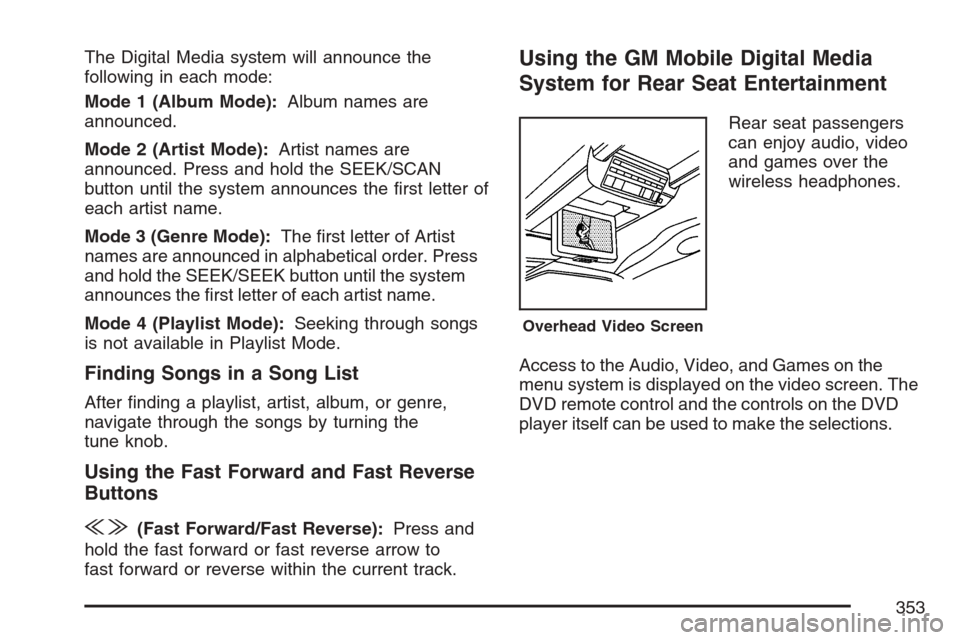
Using the GM Mobile Digital Media
System for Rear Seat Entertainment
Rear seat passengers
can enjoy audio, video
and games over the
wireless headphones.
Access to the Audio, Video, and Games on the
menu system is displayed on the video screen. The
DVD remote control and the controls on the DVD
player itself can be used to make the selections.
Overhead Video Screen
353
Page 354 of 592
Starting the System for Rear Seat
Entertainment
The GM Mobile Digital Media system is available
through the auxiliary mode of the DVD player.
To begin using the system, follow the instruction
list below:
1. Insert the DMS cartridge into the GM Mobile
Digital Media player.
2. Turn on your video screen by pressing the
power button.
3. Switch to the DMS mode by pressing the AUX
button.
Navigating the On-Screen Menus Using
the DVD Remote Control
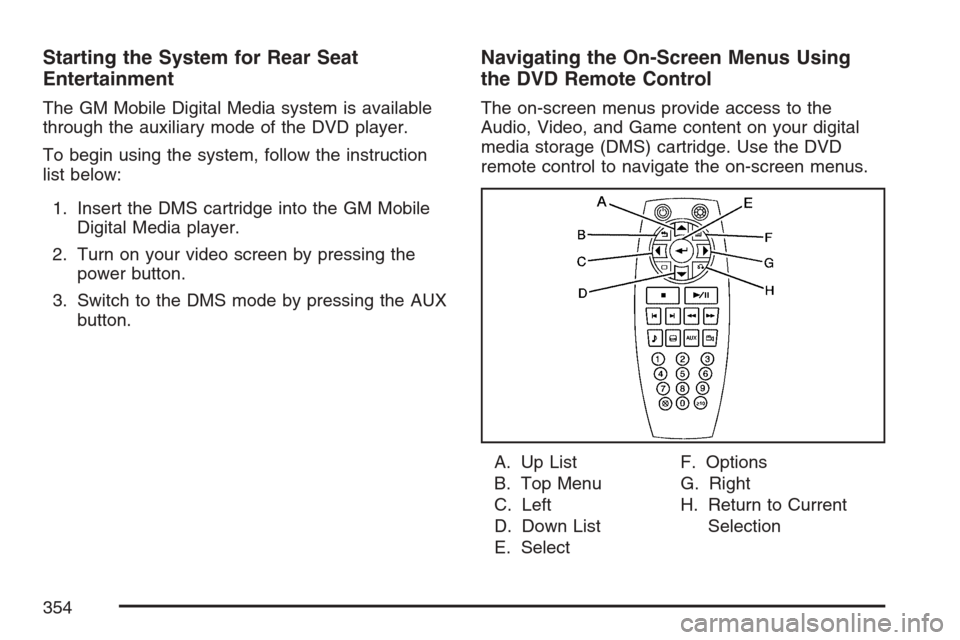
The on-screen menus provide access to the
Audio, Video, and Game content on your digital
media storage (DMS) cartridge. Use the DVD
remote control to navigate the on-screen menus.
A. Up List
B. Top Menu
C. Left
D. Down List
E. SelectF. Options
G. Right
H. Return to Current
Selection
354
Page 355 of 592
n,q,p,o(Up List, Down List, Right, and
Left Directional Arrows):For the GM Mobile
Digital Media system, press the up list or down list
directional arrows (A, D) to move the highlight
area up or down the list of items.
Press the right directional arrow (G) to go further
into the selected item, or press the left directional
arrow (C) to go back one menu level.
r(Enter/Select):For the GM Mobile Digital
Media system, press the enter/select button (E) to
go into any selected menu item.
v(Title/Top Menu):For the GM Mobile Digital
Media system, press the title/top menu button (B) to
jump to the start screen.
q(Return/Current Selection):For the GM
Mobile Digital Media system, if audio is playing or
in the pause mode, press the return/current
selection button (H) to go back to the current
selection.
y(Menu/Options):For the GM Mobile Digital
Media system, press the menu/options button (F)
to display the options list.
c(Stop):For the GM Mobile Digital Media
system, press this button to stop playback of the
selected option.
r/j(Play/Pause):For the GM Mobile Digital
Media system, press this button to start playback
of a selected option. Press this button while
an option is in the play mode to pause it. Press it
again to continue playback of the current
option.
DVD Remote Control Batteries
If the remote control does not seem to be working,
the batteries may need to be replaced. See
Remote Control, “Battery Replacement” in your
vehicle’s owner manual.
355
Page 356 of 592
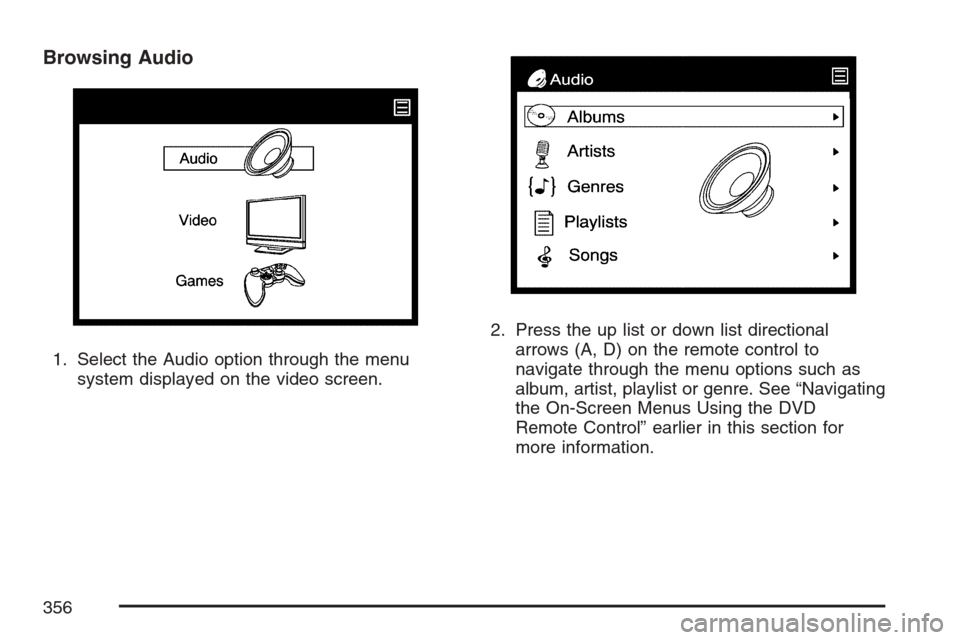
Browsing Audio
1. Select the Audio option through the menu
system displayed on the video screen.2. Press the up list or down list directional
arrows (A, D) on the remote control to
navigate through the menu options such as
album, artist, playlist or genre. See “Navigating
the On-Screen Menus Using the DVD
Remote Control” earlier in this section for
more information.
356
Page 365 of 592
Tips and Troubleshooting Chart (cont’d)
Problem Cause and Solution
No Sound.
Adjust the volume of the head unit.
Make sure the head unit has the Digital Media
player as the active source.
No Sound.
The head unit cannot access the Digital Media system.
File(s) on your cartridge may be corrupt. Run the
PhatNoise DMS Doctor on your computer and follow
the recommendations.
If you have just downloaded new rmware, this is
normal. Wait about seven minutes until the green
light stops blinking, then both lights should go off.
Audio skipping occurs during playback. Many things can cause a “skip”, or any break during
playback. If you are hearing breaks in playback, here
are some things to check:
When you hear a skip, restart the track, or seek
backwards a bit, to hear if the skip is actually in the
music le.
Check to see if you are using the latest rmware
and desktop software. This is very important, as
software is updated frequently. See PhatNoise Music
Manager manual.
Sometimes a heavily fragmented cartridge can skip
due to increased seek times. Defragment the
cartridge for best performance. See PhatNoise
Media Manager™ software instructions for
defragmenting a cartridge.
365
Page 367 of 592
Customer Assistance Center
For customer assistance in the United States, call
1-877-GM-PHATN (877-467-4286) or contact
the Customer Assistance Center through
the internet at gmmobilemediasupportgedas.com
For customer assistance in Canada, see the
Customer Assistance Offices in the index of your
vehicle’s owner manual.
Theft-Deterrent Feature
THEFTLOCK®is designed to discourage theft of
your vehicle’s radio. The feature works
automatically by learning a portion of the Vehicle
Identication Number (VIN). If the radio is
moved to a different vehicle, it will not operate and
LOCKED will appear on the display.
With THEFTLOCK
®activated, the radio will not
operate if stolen.
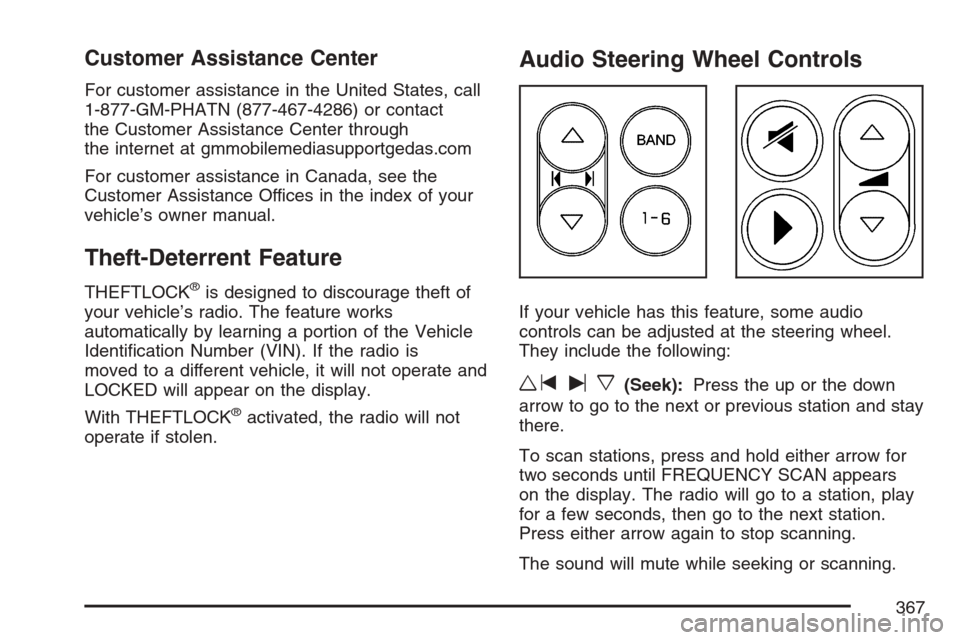
Audio Steering Wheel Controls
If your vehicle has this feature, some audio
controls can be adjusted at the steering wheel.
They include the following:
wtux(Seek):Press the up or the down
arrow to go to the next or previous station and stay
there.
To scan stations, press and hold either arrow for
two seconds until FREQUENCY SCAN appears
on the display. The radio will go to a station, play
for a few seconds, then go to the next station.
Press either arrow again to stop scanning.
The sound will mute while seeking or scanning.
367
Page 578 of 592
Appearance Care (cont.)
Vehicle Care/Appearance Materials.......... 525
Washing Your Vehicle.............................. 521
Weatherstrips........................................... 521
Windshield, Backglass, and
Wiper Blades........................................ 522
Audio System(s).......................................... 284
Audio Steering Wheel Controls................. 367
Care of Your CD and DVD Player............ 369
Care of Your CDs and DVDs................... 369
Chime Level Adjustment........................... 370
Fixed Mast Antenna................................. 370
Mobile Digital Media System.................... 345
Navigation/Radio System, see
Navigation Manual................................ 309
Radio with CD......................................... 286
Rear Seat Audio (RSA)...................340, 343
Setting the Time...................................... 285
Theft-Deterrent Feature............................ 367
Understanding Radio Reception............... 368
XM™ Satellite Radio Antenna System...... 370
Automatic Door Lock................................... 131
Automatic Transaxle
Fluid........................................................ 445
Operation................................................. 155B
Battery........................................................ 465
Electric Power Management..................... 210
Run-Down Protection............................... 211
Before Leaving on a Long Trip.................... 395
Brake
Anti-Lock Brake System (ABS)................. 377
Emergencies............................................ 379
Parking.................................................... 159
System Warning Light.............................. 238
Brakes........................................................ 462
Braking....................................................... 376
Braking in Emergencies............................... 379
Break-In, New Vehicle................................. 150
Bucket Seats, Rear....................................... 13
Built-in Child Restraint................................... 85
Bulb Replacement....................................... 471
Front Turn Signal, Parking and
Daytime Running Lamps....................... 473
Halogen Bulbs......................................... 471
License Plate Lamps................................ 475
Replacement Bulbs.................................. 475
Taillamps, Turn Signal, Stoplamps and
Back-up Lamps..................................... 473
Buying New Tires........................................ 490
578