ignition CHEVROLET UPLANDER 2009 1.G Repair Manual
[x] Cancel search | Manufacturer: CHEVROLET, Model Year: 2009, Model line: UPLANDER, Model: CHEVROLET UPLANDER 2009 1.GPages: 464, PDF Size: 2.59 MB
Page 243 of 464
XM Satellite Radio Service
XM is a satellite radio service that is based in the
48 contiguous United States and 10 Canadian provinces.
XM Satellite Radio has a wide variety of programming
and commercial-free music, coast-to-coast, and in
digital-quality sound. During your trial or when you
subscribe, you will get unlimited access to XM Radio
Online for when you are not in the vehicle. A service fee
is required to receive the XM service. For more
information, contact XM at xmradio.com or call
1-800-929-2100 in the U.S. and xmradio.ca or call
1-877-438-9677 in Canada.
Radio Messages for XM Only
SeeXM Radio Messages on page 3-92later in this
section for further detail.
Playing a CD (Single CD Player)
Insert a CD partway into the slot, label side up. The
player pulls it in and the CD should begin playing.
If the ignition or radio is turned off with a CD in the
player, it stays in the player. When the ignition or radio
is turned on, the CD starts playing where it stopped,
if it was the last selected audio source.
When a CD is inserted, CD and the CD symbol
displays. As each new track starts to play the track
number displays.The CD player can play the smaller 3 inch (8 cm) single
CDs with an adapter ring. Full-size CDs and the
smaller CDs are loaded in the same manner.
Playing a CD(s) (Six-Disc CD Player)
M
(Load):Press to load CDs into the CD player.
This CD player holds up to six CDs.
To insert one CD, do the following:
1. Turn the ignition on.
2. Press and release the load button.
3. When INSERT CD # displays, load a CD. Insert the
CD partway into the slot, label side up. The player
pulls the CD in.
To insert multiple CDs, do the following:
1. Turn the ignition on.
2. Press and hold the load button for two seconds.
A beep sounds and LOAD ALL DISC displays.
3. When INSERT CD # displays, load a CD. Insert the
CD partway into the slot, label side up. The player
pulls the CD in.
Once the CD is loaded, wait for INSERT CD # to
display, then load the next CD. The CD player takes
up to six CDs. Do not try to load more than six.
3-83
Page 245 of 464
If an error displays, see “CD Messages” later in this
section.
X(Eject):Press to eject CD(s). Eject can be activated
with either the ignition or radio off.
To eject the CD that is currently playing, press and
release.
To eject multiple CDs, do the following:
1. Press and hold eject for two seconds. A beep
sounds and EJECT ALL DISCS displays.
2. When REMOVE DISC displays, the CD ejects and
can be removed.
To stop ejecting the CDs, press the load or the
eject button.
If the CD is not removed, after 25 seconds, the CD
automatically pulls it back into the player. If CD
is pushed back into the player, before 25 seconds, the
player senses an error and tries to eject the CD
several times before stopping.
Do not repeatedly press the
Xbutton to eject a CD
after pushing it in manually because the eject timer resets
to 25 seconds after each press of the button. The CD will
eject only after an uninterrupted 25 seconds occurs.
O/e(Tune):Turn to go to the next or previous
track.
{(Fast Reverse):Press and hold to reverse within
the current track.
|(Fast Forward):Press and hold to fast forward
through the current track.
RDM (Random):Press to hear the tracks in random,
rather than sequential order, on one CD or all of
the loaded CDs.
To use random, do one of the following:
Press and release this button until RANDOM DISC
PLAY displays, to play the tracks on a CD in
random order.
Press and release this button until RANDOM ALL
DISCS displays, to play the tracks on all of the
CDs that are loaded in random order.
To turn off random play, press and release the RDM
button until RANDOM OFF displays.
3-85
Page 264 of 464
Tips and Troubleshooting Chart
Problem Recommended Action
No power. The ignition might not be
in ACC/ACCESSORY,
ON/RUN, or Retained
Accessory Power (RAP).
Disc will not play. The system might be off.
The parental control
button might have been
pressed. The power
indicator lights ash.
The system might be in
auxiliary source mode.
Press the DVD AUX
button on the player
faceplate or the AUX
button on the remote to
switch between the DVD
player and the auxiliary
sources. The disc is
upside down or is not
compatible.
Tips and Troubleshooting Chart (cont’d)
Problem Recommended Action
No sound — Wireless
HeadphonesTurn the headphones on.
Make sure the correct
channel is selected on
the wireless headphones.
Check the batteries.
The volume on the
headphones could be too
low, adjust the volume.
No sound — Wired
HeadphonesMake sure the wired
headphones are plugged
in. Adjust the volume.
If RSA is on, DVD audio
is not heard.
No sound — Vehicle
SpeakersIf the DVD system is
being heard through the
vehicle speakers, adjust
the volume on the radio.
Press the CD AUX button
on the radio to make sure
that RSE is enabled. The
rear speakers mute when
RSA is on.
3-104
Page 270 of 464
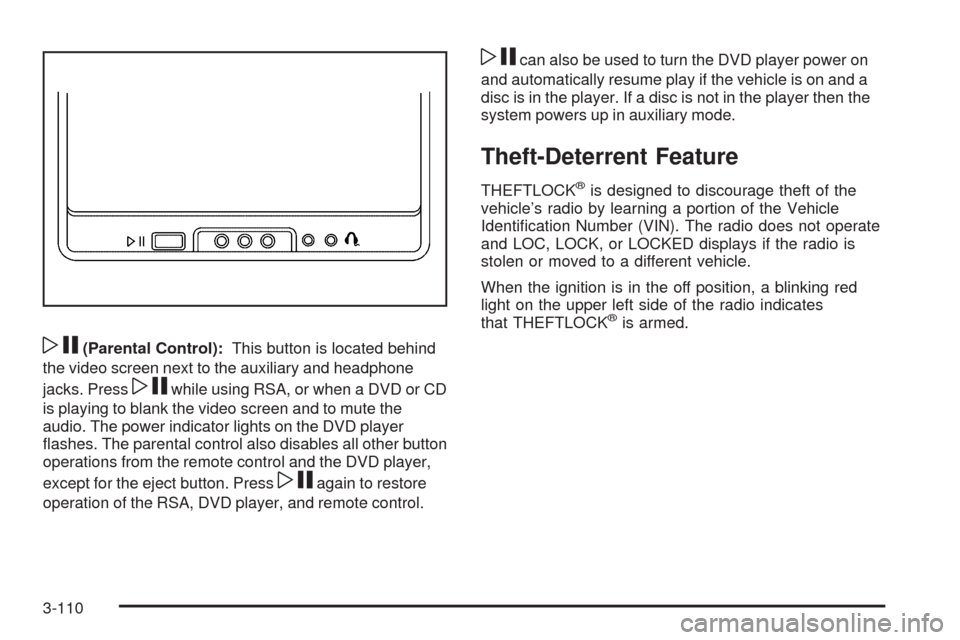
wj(Parental Control):This button is located behind
the video screen next to the auxiliary and headphone
jacks. Press
wjwhile using RSA, or when a DVD or CD
is playing to blank the video screen and to mute the
audio. The power indicator lights on the DVD player
ashes. The parental control also disables all other button
operations from the remote control and the DVD player,
except for the eject button. Press
wjagain to restore
operation of the RSA, DVD player, and remote control.
wjcan also be used to turn the DVD player power on
and automatically resume play if the vehicle is on and a
disc is in the player. If a disc is not in the player then the
system powers up in auxiliary mode.
Theft-Deterrent Feature
THEFTLOCK®is designed to discourage theft of the
vehicle’s radio by learning a portion of the Vehicle
Identication Number (VIN). The radio does not operate
and LOC, LOCK, or LOCKED displays if the radio is
stolen or moved to a different vehicle.
When the ignition is in the off position, a blinking red
light on the upper left side of the radio indicates
that THEFTLOCK
®is armed.
3-110
Page 273 of 464
Fixed Mast Antenna
The xed mast antenna can withstand most car washes
without being damaged as long as it is securely
attached to the base. If the mast becomes slightly bent,
straighten it out by hand. If the mast is badly bent,
replace it.
Occasionally check to make sure the antenna is
tightened to its base. If tightening is required, tighten
by hand until fully seated plus one quarter turn.
XM™ Satellite Radio Antenna
System
The XM Satellite Radio antenna is located on the roof of
the vehicle. Keep the antenna clear of obstructions for
clear radio reception.
Chime Level Adjustment
The radio is used to adjust the vehicle’s chime volume
level. To adjust the chime volume level:
1. Turn the radio off with the ignition in the ON/RUN
position.
2. Press and hold pushbutton 6, the volume level will
change from the normal level to loud, and LOUD
will appear on the radio display.
If the chime volume is at the normal level, it
changes to the loud level and LOUD appears on
the radio display.
If the chime volume is at the loud level, it
changes to the normal level and NORMAL
appears on the radio display.
Removing the radio and not replacing it with a factory
radio or chime module disables the chimes.
3-113
Page 289 of 464
Hill and Mountain Roads
Driving on steep hills or through mountains is different
than driving on at or rolling terrain. Tips for driving
in these conditions include:
Keep the vehicle serviced and in good shape.
Check all uid levels and brakes, tires, cooling
system, and transmission.
Going down steep or long hills, shift to a
lower gear.
{CAUTION:
If you do not shift down, the brakes could get so
hot that they would not work well. You would then
have poor braking or even none going down a hill.
You could crash. Shift down to let the engine
assist the brakes on a steep downhill slope.
{CAUTION:
Coasting downhill in N (Neutral) or with the ignition
off is dangerous. The brakes will have to do all the
work of slowing down and they could get so hot
that they would not work well. You would then
have poor braking or even none going down a hill.
You could crash. Always have the engine running
and the vehicle in gear when going downhill.
Stay in your own lane. Do not swing wide or cut
across the center of the road. Drive at speeds
that let you stay in your own lane.
Top of hills: Be alert — something could be in your
lane (stalled car, accident).
Pay attention to special road signs (falling rocks
area, winding roads, long grades, passing or
no-passing zones) and take appropriate action.
4-15
Page 299 of 464
Dinghy Towing
Your vehicle was not designed to be towed with all of its
wheels on the ground. It can be towed with the two
rear wheels on the ground. See “Dolly Towing” following
for more information.
Dolly Towing
To dolly tow your vehicle, do the following:
1. Put the front wheels on a dolly.
2. Put the vehicle in PARK (P).
3. Set the parking brake.
4. Clamp the steering wheel in a straight-ahead
position with a clamping device designed for towing.
5. Remove the key from the ignition.
6. Secure the vehicle to the dolly.
7. Release the parking brake.
Level Control
On vehicles equipped with automatic level control, the
rear of the vehicle is automatically kept level as you load
or unload your vehicle. However, you should still not
exceed the GVWR or the GAWR. SeeLoading the
Vehicle on page 4-19.
You may hear the compressor operating when you load
or unload your vehicle, and periodically as the system
self-adjusts. This is normal. The compressor should
operate for brief periods of time. If the sound continues
for an extended period of time, your vehicle needs
service.
Using heavier suspension components to get added
durability might not change your weight ratings. Ask your
dealer to help you load your vehicle the right way.
4-25
Page 329 of 464
How to Reset the Engine Oil Life
System
The Engine Oil Life System calculates when to change
the engine oil and lter based on vehicle use. Whenever
the oil is changed, reset the system so it can calculate
when the next oil change is required. If a situation occurs
where you change the oil prior to a CHANGE OIL SOON
message being turned on, reset the system.
1. With the ignition key in ON/RUN but the engine off,
repeatedly push the set/reset button until OIL is
displayed on the Driver Information Center (DIC).
2. Once OIL is displayed, push and hold the set/reset
button for ve seconds. The number will disappear
and be replaced by 100 (indicating 100% oil life
remaining).
3. Turn the key to LOCK/OFF.
If the CHANGE OIL SOON message comes back on
when you start the vehicle, the engine oil life system has
not reset. Repeat the procedure.
What to Do with Used Oil
Used engine oil contains certain elements that can be
unhealthy for your skin and could even cause cancer.
Do not let used oil stay on your skin for very long.
Clean your skin and nails with soap and water, or
a good hand cleaner. Wash or properly dispose
of clothing or rags containing used engine oil.
See the manufacturer’s warnings about the use
and disposal of oil products.
Used oil can be a threat to the environment. If you
change your own oil, be sure to drain all the oil from the
lter before disposal. Never dispose of oil by putting it
in the trash, pouring it on the ground, into sewers, or into
streams or bodies of water. Recycle it by taking it to a
place that collects used oil.
5-19
Page 348 of 464
Notice:If you leave the radio or other accessories
on during the jump starting procedure, they could be
damaged. The repairs would not be covered by the
warranty. Always turn off the radio and other
accessories when jump starting the vehicle.
3. Turn off the ignition on both vehicles. Unplug
unnecessary accessories plugged into the cigarette
lighter or the accessory power outlet. Turn off
the radio and all lamps that are not needed.
This will avoid sparks and help save both batteries.
And it could save the radio!
4. Open the hoods and locate the batteries. Find the
positive (+) and negative (−) terminal locations on
each vehicle.
The battery will not need to be accessed for jump
starting. The vehicle has a remote positive (+) jump
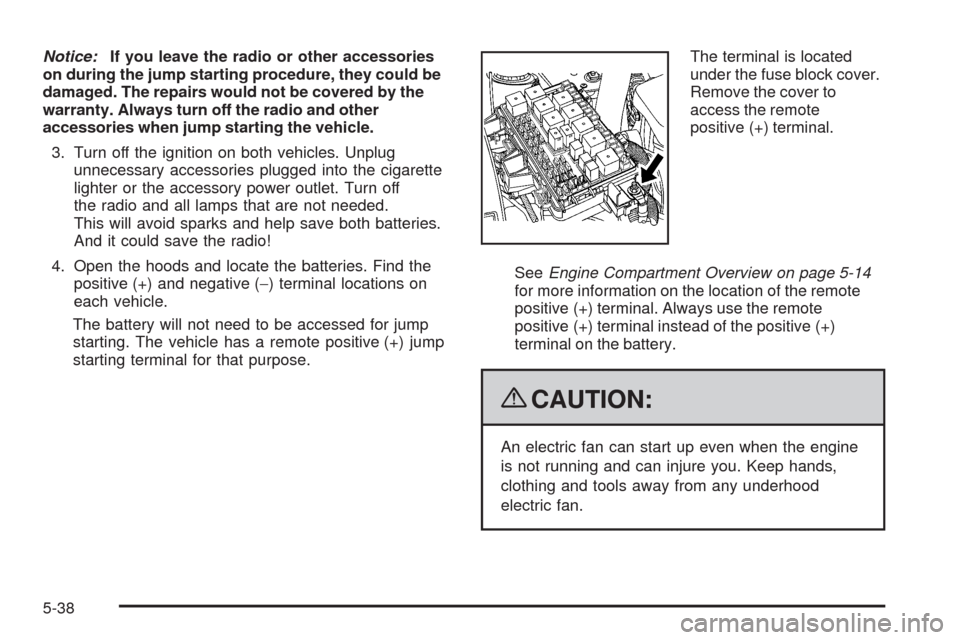
starting terminal for that purpose.The terminal is located
under the fuse block cover.
Remove the cover to
access the remote
positive (+) terminal.
SeeEngine Compartment Overview on page 5-14
for more information on the location of the remote
positive (+) terminal. Always use the remote
positive (+) terminal instead of the positive (+)
terminal on the battery.
{CAUTION:
An electric fan can start up even when the engine
is not running and can injure you. Keep hands,
clothing and tools away from any underhood
electric fan.
5-38
Page 368 of 464
Federal Communications
Commission (FCC) and Industry
and Science Canada
The Tire Pressure Monitor System (TPMS) operates
on a radio frequency and complies with Part 15 of
the FCC Rules. Operation is subject to the following
two conditions:
1. This device may not cause harmful interference.
2. This device must accept any interference received,
including interference that may cause undesired
operation.
The TPMS operates on a radio frequency and complies
with RSS-210 of Industry and Science Canada.
Operation is subject to the following two conditions:
1. This device may not cause interference.
2. This device must accept any interference received,
including interference that may cause undesired
operation of the device.
Changes or modications to this system by other than
an authorized service facility could void authorization to
use this equipment.
Tire Pressure Monitor Operation
Your vehicle may have a Tire Pressure Monitor System
(TPMS) designed to warn the driver when a low tire
pressure condition exists. TPMS sensors are mounted
onto each tire and wheel assembly, excluding the spare
tire and wheel assembly. The TPMS sensors monitor
the air pressure in the vehicle’s tires and transmits
the tire pressure readings to a receiver located in the
vehicle.
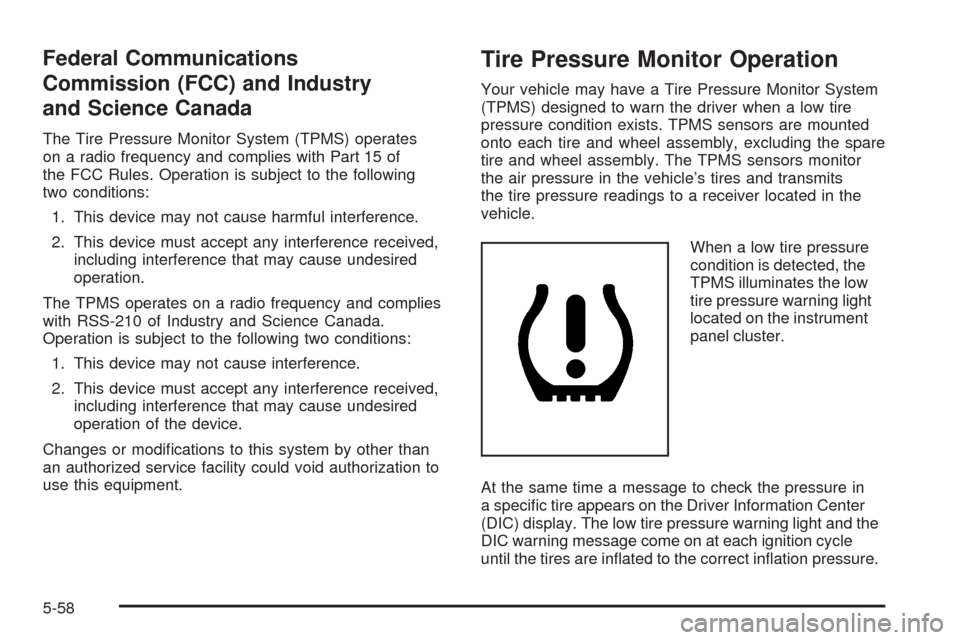
When a low tire pressure
condition is detected, the
TPMS illuminates the low
tire pressure warning light
located on the instrument
panel cluster.
At the same time a message to check the pressure in
a specic tire appears on the Driver Information Center
(DIC) display. The low tire pressure warning light and the
DIC warning message come on at each ignition cycle
until the tires are inated to the correct ination pressure.
5-58