climate control CHEVROLET VENTURE 2003 1.G User Guide
[x] Cancel search | Manufacturer: CHEVROLET, Model Year: 2003, Model line: VENTURE, Model: CHEVROLET VENTURE 2003 1.GPages: 486, PDF Size: 3.3 MB
Page 207 of 486

For quick cool down on hot days, do the following:
1. Select the vent mode.
2. Select the recirculation mode.
3. Select A/C.
4. Select the coolest temperature.
5. Select the highest fan speed.
Using these settings together for long periods of time
may cause the air inside of your vehicle to become too
dry. To prevent this from happening, after the air
inside of your vehicle has cooled, turn the recirculation
mode off.
The air-conditioning system removes moisture from the
air, so you may sometimes notice a small amount of
water dripping underneath your vehicle while idling
or after turning off the engine. This is normal.
Defogging and Defrosting
Fog on the inside of windows is a result of high humidity
(moisture) condensing on the cool window glass. This
can be minimized if the climate control system is
used properly. There are two modes to clear fog or frostfrom your windshield. Use the defog mode to clear the
windows of fog or moisture and warm the passengers.
Use the defrost mode to remove fog or frost from
the windshield more quickly.
Turn the right knob to select the defog or defrost mode.
-(Defog):This mode directs air to the windshield
and the ¯oor outlets. When you select this mode,
the system turns off recirculation and runs the
air-conditioning compressor unless the outside
temperature is at or below freezing. The recirculation
mode cannot be selected while in the defog mode.
0(Defrost):Pressing this button directs most of the
air to the windshield and the side window outlets,
with some air directed to the ¯oor outlets. In this mode,
the system will automatically turn off recirculation
and run the air-conditioning compressor, unless the
outside temperature is at or below freezing.
Recirculation cannot be selected while in the
defrost mode.
Do not drive the vehicle until all the windows are clear.
3-27
Page 209 of 486

Rear Climate Control System
(Without Entertainment System)
Your vehicle may have a rear climate-control system
that allows the driver to adjust the fan speed or a
rear-seat passenger to set a separate temperature and
adjust the fan speed, for the rear-seating area. This
system works with the main climate-control system in
your vehicle.
This knob is located below
the main climate-control
system on the instrument
panel switchbank. Use
this knob to adjust the fan
speed for the rear-seat
passengers, from the
front-seating area.These controls are overhead, on the control panel
located behind the driver's seat. A rear-seat passenger
can use these controls to personally adjust the
temperature and the fan speed for the rear-seating
area.
The fan knob located on the switchbank must be turned
to R (Rear) to allow the rear-seat passengers to use
the controls located on the control panel in the
rear-seating area. Performing this action disables the
fan knob on the switchbank. To return control to
that knob, turn the knob out of R.
3-29
Page 210 of 486

Directing the Air¯ow
To direct the air¯ow to the rear-seating area, use the
right knob located on the main climate-control panel.
·Select vent or bi-level mode to direct air to the
rear of the vehicle through the overhead outlets.
·Select ¯oor, defog or defrost mode to direct air to
the rear of the vehicle through the ¯oor outlets.
Generally the upper outlets are used for air conditioning
and the ¯oor outlets are used for heating.
Selecting the Fan Speed
9
(Fan):Turn the fan knob on either rear fan control
to numeral 1, 2, or 3 to increase or decrease air¯ow
to the rear-seating area. Turn the fan knob on either rear
fan control to 0 or OFF to turn off the fan.
Setting the Temperature
If the driver is adjusting the temperature, do the
following:
To increase or decrease the temperature for the entire
vehicle, use the temperature controls located on the
main climate-control panel.If using the main climate-control panel, then the
air-conditioning system must be on to direct cooled air
to the rear of the vehicle. If it is not on, then the
temperature in the rear of the vehicle will remain at
cabin temperature.
If a rear-seat passenger is adjusting the temperature, do
the following:
Turn the right knob, located on the overhead rear-control
panel, behind the driver's seat, clockwise or
counterclockwise to raise or lower the temperature in
the rear-seating area only.
Rear Air Outlets
To increase air¯ow through the rear ¯oor outlets, place
the left bucket seat in the second row in the forward
position. For more information, see
Rear Seat Operation
on page 1-7.
The outlet behind the left rear seat is the cold air return
outlet. Be sure to keep it free from obstructions.
Also, keep the area around the base of the center
instrument panel console, between and under the front
seats, free of objects that could also obstruct air¯ow
to the rear-seating area.
For more information on how to use the main climate
control system, see ªClimate Control Systemº listed
previously in this section. For information on ventilation,
see ªOutlet Adjustmentº under ªClimate Control
Systemº listed previously in this section.
3-30
Page 211 of 486
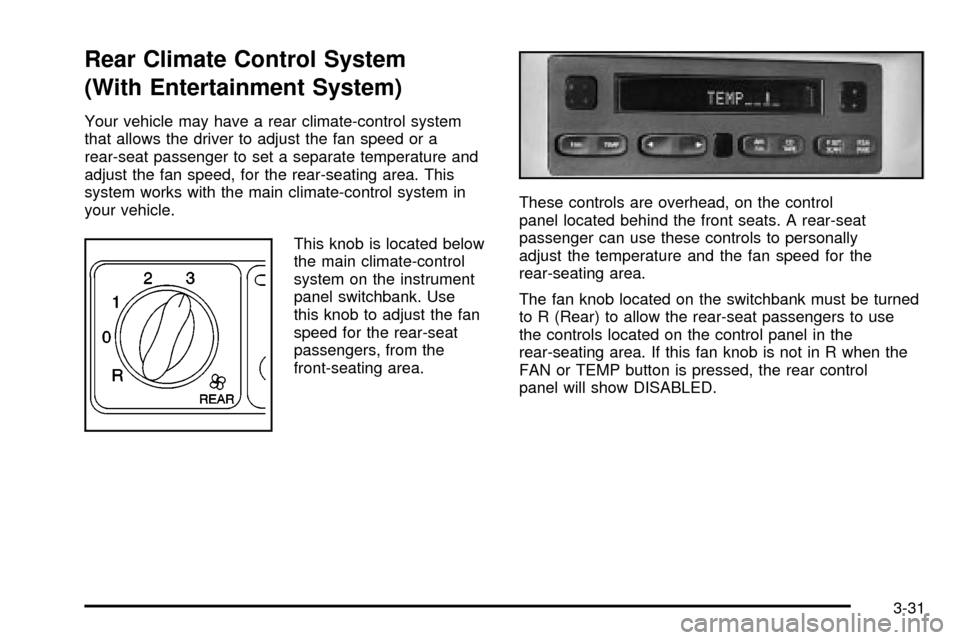
Rear Climate Control System
(With Entertainment System)
Your vehicle may have a rear climate-control system
that allows the driver to adjust the fan speed or a
rear-seat passenger to set a separate temperature and
adjust the fan speed, for the rear-seating area. This
system works with the main climate-control system in
your vehicle.
This knob is located below
the main climate-control
system on the instrument
panel switchbank. Use
this knob to adjust the fan
speed for the rear-seat
passengers, from the
front-seating area.These controls are overhead, on the control
panel located behind the front seats. A rear-seat
passenger can use these controls to personally
adjust the temperature and the fan speed for the
rear-seating area.
The fan knob located on the switchbank must be turned
to R (Rear) to allow the rear-seat passengers to use
the controls located on the control panel in the
rear-seating area. If this fan knob is not in R when the
FAN or TEMP button is pressed, the rear control
panel will show DISABLED.
3-31
Page 212 of 486

Directing the Air¯ow
To direct the air¯ow to the rear-seating area, use the
right knob located on the main climate-control panel.
·Select vent or bi-level mode to direct air to the
rear of the vehicle through the overhead outlets.
·Select ¯oor, defog or defrost mode to direct air to
the rear of the vehicle through the ¯oor outlets.
Generally the upper outlets are used for air conditioning
and the ¯oor outlets are used for heating.
Selecting the Fan Speed
If the driver is adjusting the fan speed, use the following
control:
9(Fan):Turn the fan knob on the rear fan control
located below the main climate-control system on
the switchbank to numeral 1, 2, or 3 to increase or
decrease air¯ow to the rear-seating area. Turn the fan
knob on the rear fan control to 0 to turn off the fan.If a rear-seat passenger is adjusting the fan speed, use
the following control:
FAN:Press the FAN button on the rear control panel.
The display will show the current setting. Press the
left and right arrow buttons to cycle through the available
settings: OFF, LOW, MED and HIGH.
Setting the Temperature
If the driver is adjusting the temperature, do the
following:
To increase or decrease the temperature for the entire
vehicle, use the temperature controls located on the
main climate-control panel.
If using the main climate-control panel, then the
air-conditioning system must be on to direct cooled air
to the rear of the vehicle. If it is not on, then the
temperature in the rear of the vehicle will remain at
cabin temperature.
If a rear-seat passenger is adjusting the temperature, do
the following:
Press the TEMP button on the rear control panel. Use
the left arrow button to make the air cooler. Use the right
arrow button to make the air warmer.
3-32
Page 213 of 486
Rear Air Outlets
To increase air¯ow through the rear ¯oor outlets, place
the left bucket seat in the second row in the forward
position. For more information, see
Rear Seat Operation
on page 1-7.
The outlet behind the left rear seat is the cold air return
outlet. Be sure to keep it free from obstructions.
Also, keep the area around the base of the center
instrument panel console, between and under the front
seats, free of objects that could also obstruct air¯ow
to the rear-seating area.
For more information on how to use the main climate
control system, see ªClimate Control Systemº listed
previously in this section. For information on ventilation,
see ªOutlet Adjustmentº under ªClimate Control
Systemº listed previously in this section.
Passenger Compartment Air Filter
Passenger compartment air, both outside and
recirculated air, is routed through a passenger
compartment ®lter. The ®lter removes certain
contaminants from the air, including pollen and dust
particles. Reductions in air¯ow, which may occur more
quickly in dusty areas, indicate that the ®lter needs
to be replaced early. For how often to change the air
®lter, see
Part A: Scheduled Maintenance Services
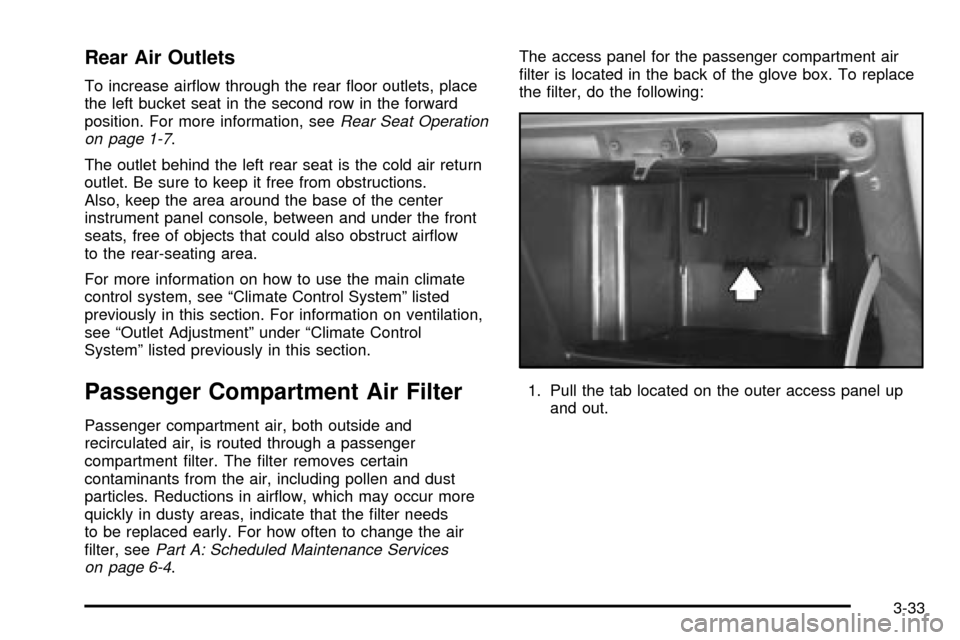
on page 6-4.The access panel for the passenger compartment air
®lter is located in the back of the glove box. To replace
the ®lter, do the following:
1. Pull the tab located on the outer access panel up
and out.
3-33
Page 272 of 486

Compact Disc Messages
CHECK CD:If this message appears on the radio
display, it could be due to one of the following reasons:
·You're driving on a very rough road. When the
road becomes smoother, the disc should play.
·The disc is dirty, scratched, wet or upside down.
·The air is very humid. If so, wait about an hour and
try again.
·There may have been a problem while burning
the CD.
·The label may be caught in the CD player.
If the CD is not playing correctly, for any other reason,
try a known good CD.
If any error occurs repeatedly or if an error can't be
corrected, contact your dealer. If your radio displays an
error message, write it down and provide it to your
dealer when reporting the problem.
Entertainment System
Your vehicle may have an optional Digital Video
Disc (DVD) entertainment system. The entertainment
system works with the vehicle's audio system and
includes a DVD player, a video display screen,
headphones and a remote control. The entertainment
system also integrates the rear climate control and rear
seat audio functions.
Before You Drive
The video entertainment system is for passengers in the
second and third row seats only. The driver cannot
safely view the video screen while driving and should
not try to do so.
In severe or extreme weather conditions your
entertainment system will shut down until the
temperature is within the operating range. This
protection feature will keep your video components from
being damaged while the temperature is below
-4ÉF (-20ÉC) or above 140ÉF (60ÉC). To resume
operation, shut off the entertainment system, pull down
the video screen and then heat or cool the vehicle
until the temperature is within the operating range.
3-92
Page 326 of 486
Driving with a Trailer
{CAUTION:
If you have a rear-most window open and you
pull a trailer with your vehicle, carbon
monoxide (CO) could come into your vehicle.
You can't see or smell CO. It can cause
unconsciousness or death. See ªEngine
Exhaustº in the Index. To maximize your safety
when towing a trailer:
·Have your exhaust system inspected for
leaks, and make necessary repairs before
starting on your trip.
·Keep the rear-most windows closed.
·If exhaust does come into your vehicle
through a window in the rear or another
opening, drive with your front, main
heating or cooling system on and with the
fan on any speed. This will bring fresh,
outside air into your vehicle. Do not use
the climate control setting for maximum air
because it only recirculates the air inside
your vehicle. See ªClimate Controlsº in
the Index.Towing a trailer requires a certain amount of experience.
Before setting out for the open road, you'll want to get
to know your rig. Acquaint yourself with the feel of
handling and braking with the added weight of the trailer.
And always keep in mind that the vehicle you are
driving is now a good deal longer and not nearly as
responsive as your vehicle is by itself.
Before you start, check the trailer hitch and platform
(and attachments), safety chains, electrical connector,
lamps, tires and mirror adjustment. If the trailer has
electric brakes, start your vehicle and trailer moving and
then apply the trailer brake controller by hand to be
sure the brakes are working. This lets you check your
electrical connection at the same time.
During your trip, check occasionally to be sure that the
load is secure, and that the lamps and any trailer
brakes are still working.
4-40
Page 395 of 486

Uniform Tire Quality Grading
Quality grades can be found where applicable on the
tire sidewall between tread shoulder and maximum
section width. For example:
Treadwear 200 Traction AA Temperature A
The following information relates to the system
developed by the United States National Highway
Traffic Safety Administration, which grades tires by
treadwear, traction and temperature performance.
(This applies only to vehicles sold in the United States.)
The grades are molded on the sidewalls of most
passenger car tires. The Uniform Tire Quality Grading
system does not apply to deep tread, winter-type
snow tires, space-saver or temporary use spare tires,
tires with nominal rim diameters of 10 to 12 inches
(25 to 30 cm), or to some limited-production tires.
While the tires available on General Motors passenger
cars and light trucks may vary with respect to these
grades, they must also conform to federal safety
requirements and additional General Motors Tire
Performance Criteria (TPC) standards.
Treadwear
The treadwear grade is a comparative rating based on
the wear rate of the tire when tested under controlled
conditions on a speci®ed government test course.
For example, a tire graded 150 would wear one and
a half (1.5) times as well on the government course as
a tire graded 100. The relative performance of tires
depends upon the actual conditions of their use,
however, and may depart signi®cantly from the norm
due to variations in driving habits, service practices and
differences in road characteristics and climate.
Traction ± AA, A, B, C
The traction grades, from highest to lowest, are AA, A,
B, and C. Those grades represent the tire's ability
to stop on wet pavement as measured under controlled
conditions on speci®ed government test surfaces of
asphalt and concrete. A tire marked C may have poor
traction performance. Warning: The traction grade
assigned to this tire is based on straight-ahead braking
traction tests, and does not include acceleration,
cornering, hydroplaning, or peak traction characteristics.
5-65
Page 433 of 486
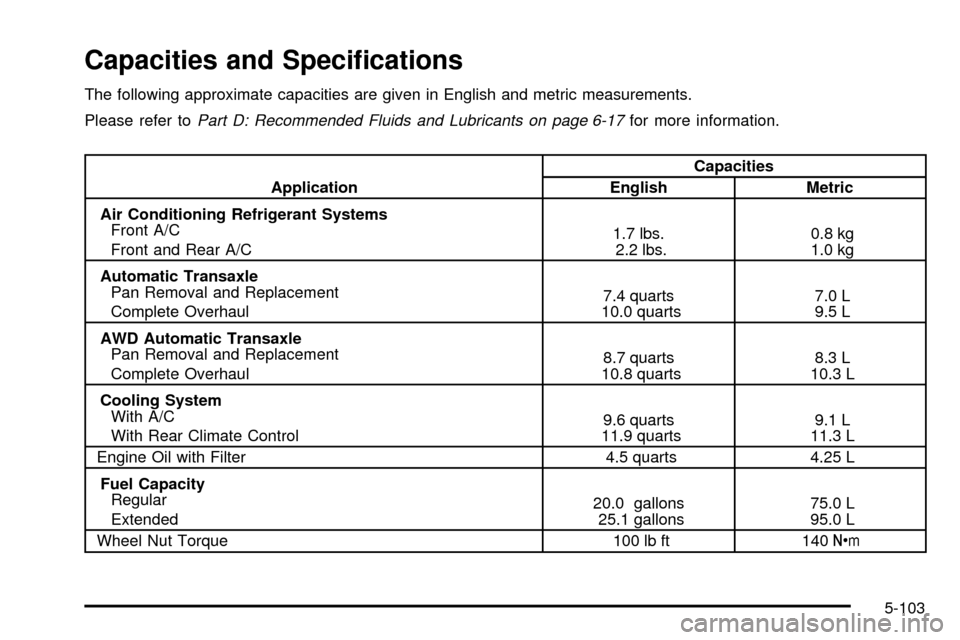
Capacities and Speci®cations
The following approximate capacities are given in English and metric measurements.
Please refer to
Part D: Recommended Fluids and Lubricants on page 6-17for more information.
ApplicationCapacities
English Metric
Air Conditioning Refrigerant Systems
Front A/C
Front and Rear A/C1.7 lbs.
2.2 lbs.0.8 kg
1.0 kg
Automatic Transaxle
Pan Removal and Replacement
Complete Overhaul7.4 quarts
10.0 quarts7.0 L
9.5 L
AWD Automatic Transaxle
Pan Removal and Replacement
Complete Overhaul8.7 quarts
10.8 quarts8.3 L
10.3 L
Cooling System
With A/C
With Rear Climate Control9.6 quarts
11.9 quarts9.1 L
11.3 L
Engine Oil with Filter 4.5 quarts 4.25 L
Fuel Capacity
Regular
Extended20.0 gallons
25.1 gallons75.0 L
95.0 L
Wheel Nut Torque 100 lb ft 140Y
5-103