warning CHEVROLET VENTURE 2003 1.G User Guide
[x] Cancel search | Manufacturer: CHEVROLET, Model Year: 2003, Model line: VENTURE, Model: CHEVROLET VENTURE 2003 1.GPages: 486, PDF Size: 3.3 MB
Page 186 of 486
Hazard Warning Flashers
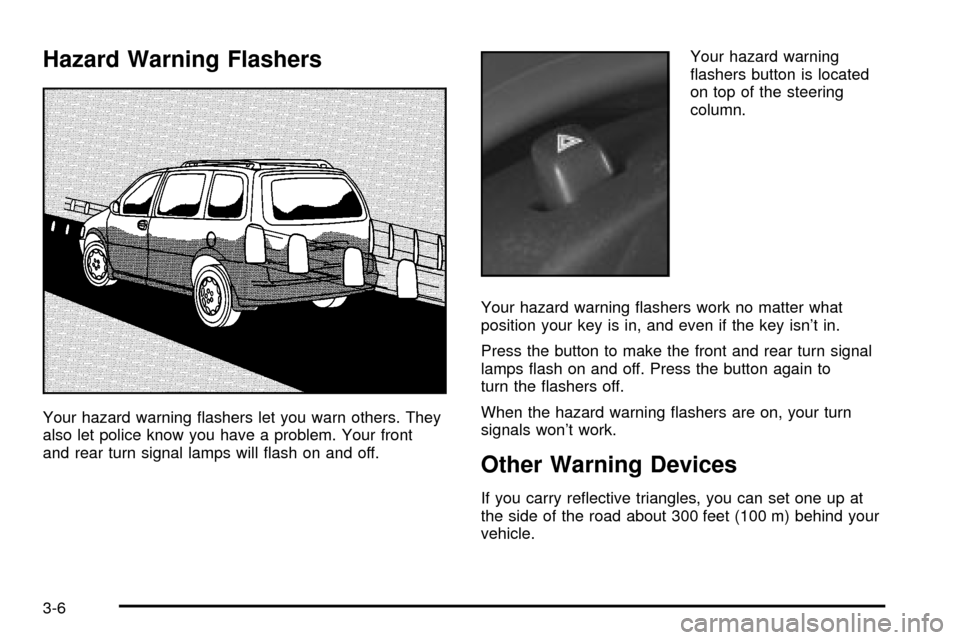
Your hazard warning ¯ashers let you warn others. They
also let police know you have a problem. Your front
and rear turn signal lamps will ¯ash on and off.Your hazard warning
¯ashers button is located
on top of the steering
column.
Your hazard warning ¯ashers work no matter what
position your key is in, and even if the key isn't in.
Press the button to make the front and rear turn signal
lamps ¯ash on and off. Press the button again to
turn the ¯ashers off.
When the hazard warning ¯ashers are on, your turn
signals won't work.
Other Warning Devices
If you carry re¯ective triangles, you can set one up at
the side of the road about 300 feet (100 m) behind your
vehicle.
3-6
Page 195 of 486

Exterior Lamps
The control to the left of the steering column operates
the exterior lamps.
9(Off/Auto):Turning the control to this setting will
activate the automatic headlamps when it is dark
enough outside and turn off all the lamps and
lights during the day except the Daytime Running
Lamps (DRL).
;(Parking Lamps):Turning the control to this
setting turns on the parking lamps together with the
following:
·Sidemarker Lamps
·Taillamps
·Instrument Panel Lights
5(Headlamps):Turning the control to this setting
turns on the headlamps, together with the previously
listed lamps and lights.
Lamps on Reminder
If the driver's door is opened and you turn the ignition to
OFF or LOCK while leaving the lamps on, you will
hear a warning chime.
3-15
Page 215 of 486

Warning Lights, Gages and
Indicators
This part describes the warning lights and gages that
may be on your vehicle. The pictures will help you
locate them.
Warning lights and gages can signal that something is
wrong before it becomes serious enough to cause
an expensive repair or replacement. Paying attention to
your warning lights and gages could also save you
or others from injury.
Warning lights come on when there may be or is a
problem with one of your vehicle's functions. As you will
see in the details on the next few pages, some
warning lights come on brie¯y when you start the
engine just to let you know they're working. If you are
familiar with this section, you should not be alarmed
when this happens.Gages can indicate when there may be or is a problem
with one of your vehicle's functions. Often gages
and warning lights work together to let you know when
there's a problem with your vehicle.
When one of the warning lights comes on and stays on
when you are driving, or when one of the gages
shows there may be a problem, check the section that
tells you what to do about it. Please follow this
manual's advice. Waiting to do repairs can be
costly ± and even dangerous. So please get to know
your warning lights and gages. They're a big help.
Your vehicle also has a message center that works
along with the warning lights and gages. See
Message
Center on page 3-50.
3-35
Page 216 of 486

Instrument Panel Cluster
Your instrument panel cluster is designed to let you know at a glance how your vehicle is running. You'll know how
fast you're going, how much fuel you're using, and many other things you'll need to drive safely and economically. The
indicator warning lights and gages are explained on the following pages.
United States version shown, Canada similar
3-36
Page 219 of 486

Retro-Active Reset
Each of the two trip odometers has a feature called
retro-active reset. This feature can be used to set either
(or both) trip odometer(s) to the number of miles
(kilometers) driven since the ignition was last turned on.
This can be used if you forget to reset your trip
odometer at the beginning of a trip. To use the
retro-active reset feature, press and hold the trip/reset
button for at least three seconds. The trip odometer
will then display the number of miles (kilometers) driven
since the ignition was last turned on and you began
driving. (If you use the retro-active reset feature
after you have started the vehicle, but before you begin
moving, the display will show the number of miles
(kilometers) you drove during the last ignition cycle.)
Once you begin driving, the trip odometer will
accumulate mileage. For example, if you have driven
5.0 miles (8.0 km) since you started your vehicle,
and then activate the retro-active reset feature, the
display will show 5.0 miles (8.0 km). As you drive, the
display will then increase to 5.1 miles (8.2 km), 5.2 miles
(8.4 km), etc. Only the trip odometer that is displayed
will be affected by the retro-active reset so that both trip
odometers can be used separately.
Tachometer
Your vehicle may have a tachometer that displays the
engine speed in revolutions per minute (rpm).
Notice:If you operate the engine with the
tachometer in the shaded warning area, your vehicle
could be damaged, and the damages would not
be covered by your warranty. Do not operate
the engine with the tachometer in the shaded
warning area.
3-39
Page 221 of 486
If the air bag readiness light stays on after you start the
vehicle or comes on when you are driving, your air
bag system may not work properly. Have your vehicle
serviced right away.
{CAUTION:
If the air bag readiness light stays on after you
start your vehicle, it means the air bag system
may not be working properly. The air bags in
your vehicle may not in¯ate in a crash, or they
could even in¯ate without a crash. To help
avoid injury to yourself or others, have your
vehicle serviced right away if the air bag
readiness light stays on after you start your
vehicle.
The air bag readiness light should ¯ash for a few
seconds when you turn the ignition key to RUN. If the
light doesn't come on then, have it ®xed so it will
be ready to warn you if there is a problem.
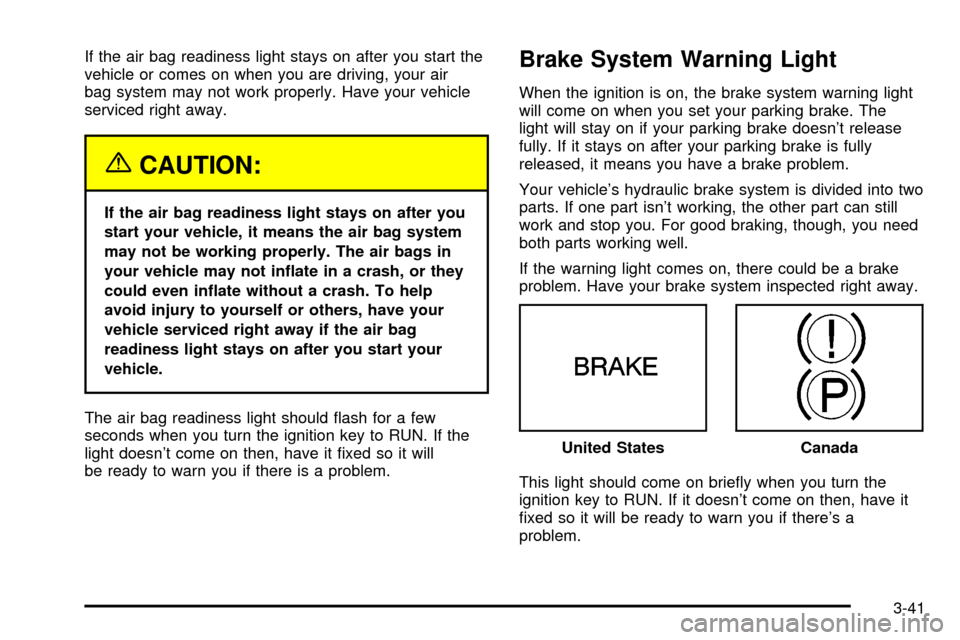
Brake System Warning Light
When the ignition is on, the brake system warning light
will come on when you set your parking brake. The
light will stay on if your parking brake doesn't release
fully. If it stays on after your parking brake is fully
released, it means you have a brake problem.
Your vehicle's hydraulic brake system is divided into two
parts. If one part isn't working, the other part can still
work and stop you. For good braking, though, you need
both parts working well.
If the warning light comes on, there could be a brake
problem. Have your brake system inspected right away.
This light should come on brie¯y when you turn the
ignition key to RUN. If it doesn't come on then, have it
®xed so it will be ready to warn you if there's a
problem.United States
Canada
3-41
Page 222 of 486

If the light comes on while you are driving, pull off the
road and stop carefully. You may notice that the pedal is
harder to push. Or, the pedal may go closer to the
¯oor. It may take longer to stop. If the light is still on,
have the vehicle towed for service. See
Anti-Lock Brake
System Warning Light on page 3-42andTowing Your
Vehicle on page 4-32.
{CAUTION:
Your brake system may not be working
properly if the brake system warning light is
on. Driving with the brake system warning light
on can lead to an accident. If the light is still
on after you have pulled off the road and
stopped carefully, have the vehicle towed
for service.
Anti-Lock Brake System
Warning Light
Your vehicle may have this
light. If it does, the
anti-lock brake system
warning light should come
on for a few seconds
when you turn the ignition
key to RUN.
If the anti-lock brake system warning light stays on
longer than normal after you've started your engine, turn
the ignition off. Or, if the light comes on and stays on
when you're driving, stop as soon as possible and turn
the ignition off. Then start the engine again to reset
the system. If the light still stays on, or comes on again
while you're driving, the anti-lock brake system needs
service and you don't have anti-lock brakes.
The anti-lock brake system warning light should come
on brie¯y when you turn the ignition key to RUN. If
the light doesn't come on then, have it ®xed so it will be
ready to warn you if there is a problem.
3-42
Page 223 of 486

Traction Control System (TCS)
Warning Light
Your vehicle may have a traction control system
warning light. The traction control system warning light
may come on for the following reasons:
·If you turn the system off by pressing the TCS
button located in the instrument panel switchbank
the warning light will come on and stay on. To
turn the system back on, press the button again.
The warning light should go off. See
Traction
Control System (TCS) on page 4-8for more
information.
·If there's a brake system problem that is speci®cally
related to traction control, the traction control
system will turn off and the warning light will come
on. If your brakes begin to overheat, the traction
control system will turn off and the warning light will
come on until your brakes cool down.
·If the traction control system is affected by an
engine-related problem, the system will turn off and
the warning light will come on.
If the traction control system warning light comes on
and stays on for an extended period of time when the
system is turned on, your vehicle needs service. United States
Canada
3-43
Page 229 of 486

When the indicator nears empty, you still have a little
fuel left, but you should get more soon.
If your fuel is low, the warning message in the message
center will come on. See
Low Fuel Warning Message
on page 3-57.Your fuel gage tells you about how much fuel you have
left when the ignition is on.
Here are four things that some owners ask about. All
these things are normal and do not indicate that
anything is wrong with the fuel gage.
·At the gas station, the gas pump shuts off before
the gage reads full.
·It takes a little more (or less) fuel to ®ll up than the
gage reads. For example, the gage reads half full,
but it took more (or less) than half of the tank's
capacity to ®ll it.
·The gage pointer may move while cornering,
braking or speeding up.
·The gage may not indicate empty when the ignition
is turned off. Cluster with Tachometer
Version (United States)
Cluster with Tachometer
Version (Canada)
3-49
Page 230 of 486

Message Center
The message center is located in the instrument panel
cluster. It gives you important safety and maintenance
facts.
Service Traction System Warning
Message
If your vehicle has the traction control system and this
message is displayed when you're driving, there may be
a problem with your traction control system. Your
vehicle may need service.When this message is displayed, the traction control
system will not limit wheel spin. Adjust your driving
accordingly.
The message may appear for the following reasons:
·If there's a brake system problem that is speci®cally
related to traction control, the traction control
system will turn off and the warning message will
come on.
·If your brakes begin to overheat, the traction control
system will turn off and the warning message will
come on until your brakes cool down.
·If the traction control system is affected by an
engine-related problem, the system will turn off and
the warning message will come on.
If the traction control system warning message comes
on and stays on for an extended period of time when the
system is turned on, your vehicle needs service. United States
Canada
3-50