buttons CHEVROLET VENTURE 2003 1.G Owner's Manual
[x] Cancel search | Manufacturer: CHEVROLET, Model Year: 2003, Model line: VENTURE, Model: CHEVROLET VENTURE 2003 1.GPages: 486, PDF Size: 3.3 MB
Page 276 of 486
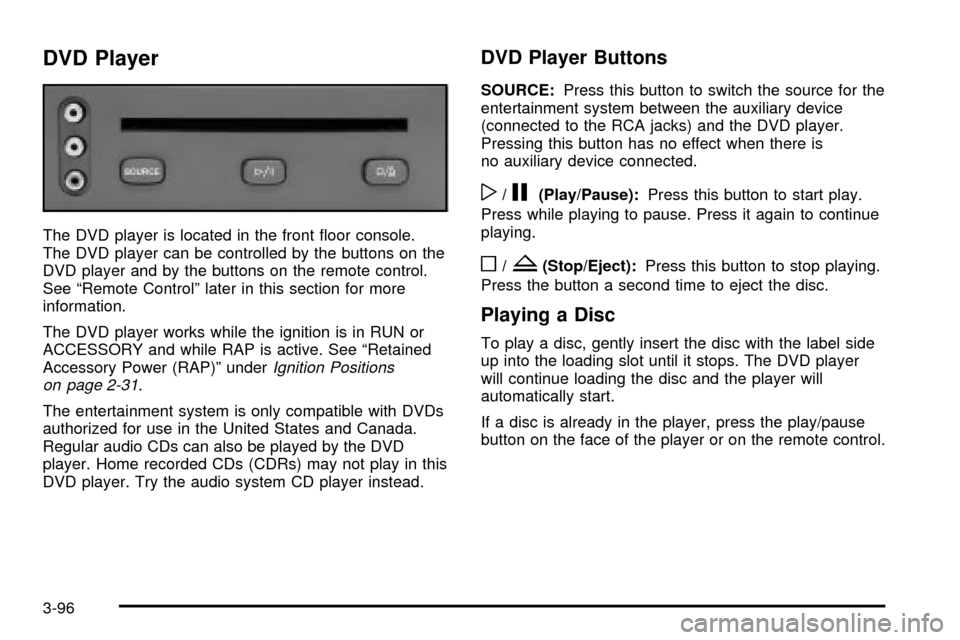
DVD Player
The DVD player is located in the front ¯oor console.
The DVD player can be controlled by the buttons on the
DVD player and by the buttons on the remote control.
See ªRemote Controlº later in this section for more
information.
The DVD player works while the ignition is in RUN or
ACCESSORY and while RAP is active. See ªRetained
Accessory Power (RAP)º under
Ignition Positions
on page 2-31.
The entertainment system is only compatible with DVDs
authorized for use in the United States and Canada.
Regular audio CDs can also be played by the DVD
player. Home recorded CDs (CDRs) may not play in this
DVD player. Try the audio system CD player instead.
DVD Player Buttons
SOURCE:Press this button to switch the source for the
entertainment system between the auxiliary device
(connected to the RCA jacks) and the DVD player.
Pressing this button has no effect when there is
no auxiliary device connected.
w/j(Play/Pause):Press this button to start play.
Press while playing to pause. Press it again to continue
playing.
o/Z(Stop/Eject):Press this button to stop playing.
Press the button a second time to eject the disc.
Playing a Disc
To play a disc, gently insert the disc with the label side
up into the loading slot until it stops. The DVD player
will continue loading the disc and the player will
automatically start.
If a disc is already in the player, press the play/pause
button on the face of the player or on the remote control.
3-96
Page 278 of 486
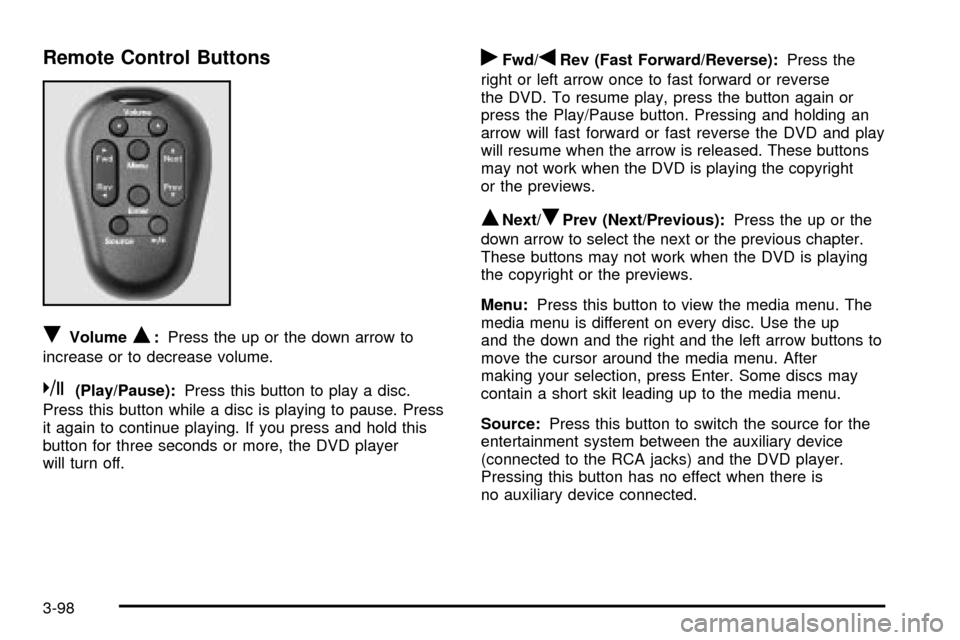
Remote Control Buttons
RVolumeQ:Press the up or the down arrow to
increase or to decrease volume.
k(Play/Pause):Press this button to play a disc.
Press this button while a disc is playing to pause. Press
it again to continue playing. If you press and hold this
button for three seconds or more, the DVD player
will turn off.
rFwd/qRev (Fast Forward/Reverse):Press the
right or left arrow once to fast forward or reverse
the DVD. To resume play, press the button again or
press the Play/Pause button. Pressing and holding an
arrow will fast forward or fast reverse the DVD and play
will resume when the arrow is released. These buttons
may not work when the DVD is playing the copyright
or the previews.
QNext/RPrev (Next/Previous):Press the up or the
down arrow to select the next or the previous chapter.
These buttons may not work when the DVD is playing
the copyright or the previews.
Menu:Press this button to view the media menu. The
media menu is different on every disc. Use the up
and the down and the right and the left arrow buttons to
move the cursor around the media menu. After
making your selection, press Enter. Some discs may
contain a short skit leading up to the media menu.
Source:Press this button to switch the source for the
entertainment system between the auxiliary device
(connected to the RCA jacks) and the DVD player.
Pressing this button has no effect when there is
no auxiliary device connected.
3-98
Page 280 of 486
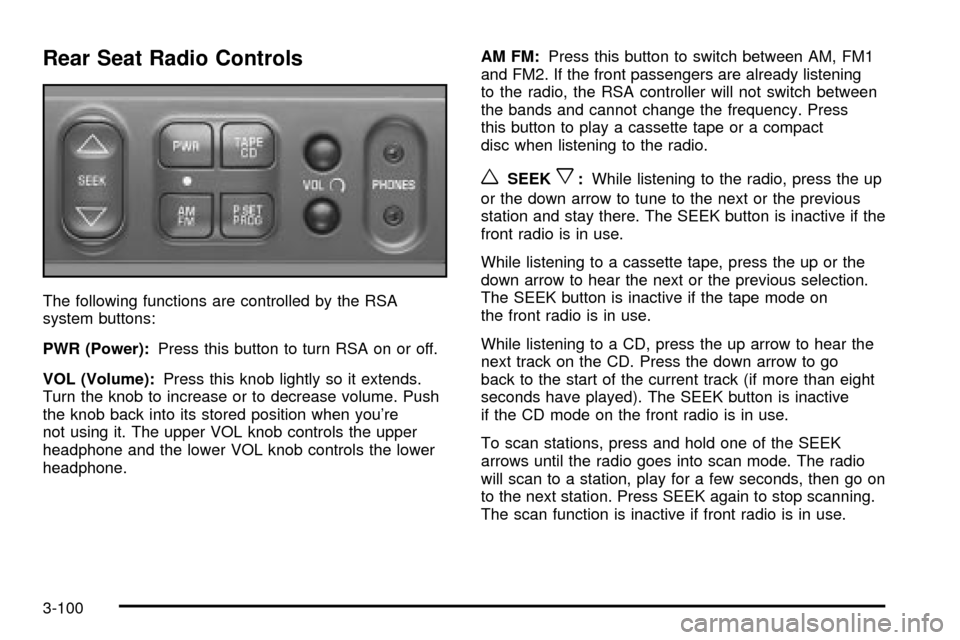
Rear Seat Radio Controls
The following functions are controlled by the RSA
system buttons:
PWR (Power):Press this button to turn RSA on or off.
VOL (Volume):Press this knob lightly so it extends.
Turn the knob to increase or to decrease volume. Push
the knob back into its stored position when you're
not using it. The upper VOL knob controls the upper
headphone and the lower VOL knob controls the lower
headphone.AM FM:Press this button to switch between AM, FM1
and FM2. If the front passengers are already listening
to the radio, the RSA controller will not switch between
the bands and cannot change the frequency. Press
this button to play a cassette tape or a compact
disc when listening to the radio.
wSEEKx:While listening to the radio, press the up
or the down arrow to tune to the next or the previous
station and stay there. The SEEK button is inactive if the
front radio is in use.
While listening to a cassette tape, press the up or the
down arrow to hear the next or the previous selection.
The SEEK button is inactive if the tape mode on
the front radio is in use.
While listening to a CD, press the up arrow to hear the
next track on the CD. Press the down arrow to go
back to the start of the current track (if more than eight
seconds have played). The SEEK button is inactive
if the CD mode on the front radio is in use.
To scan stations, press and hold one of the SEEK
arrows until the radio goes into scan mode. The radio
will scan to a station, play for a few seconds, then go on
to the next station. Press SEEK again to stop scanning.
The scan function is inactive if front radio is in use.
3-100
Page 281 of 486

P.SET PROG (Preset Program):The front passengers
must be listening to something different for each of
these functions to work:
·Press this button to scan through the preset radio
stations set on the pushbuttons on the main radio.
The radio will go to a preset station stored on
your pushbuttons, play for a few seconds, then go
on to the next preset station. Press this button
again to stop scanning presets.
·When a cassette tape is playing, press this button
to go to the other side of the tape.
·When a CD is playing, press this button to select
a disc.
TAPE CD:Press this button to switch between playing
a cassette tape or a compact disc when listening to
the radio. The inactive tape or compact disc will remain
safely inside the radio for future listening.
Rear Seat Audio (RSA) (With
Entertainment System)
This feature allows rear seat passengers to listen to and
control any of the music sources: radio, cassette
tapes and CDs. However, the rear seat passengers can
only control the music sources that the front seat
passengers are not listening to. For example, rear seat
passengers may listen to a cassette tape or CD
through headphones while the driver listens to the radio
through the front speakers. The rear seat passengers
have control of the volume for each set of headphones.
Be aware that the front seat audio controls always
have priority over the RSA controls. If the front seat
passengers switch the source for the main radio
to a remote source, the RSA will play the same remote
source. The rear speakers will be muted when the
RSA power is turned on. You may operate the RSA
functions even when the main radio is off.
3-101
Page 282 of 486
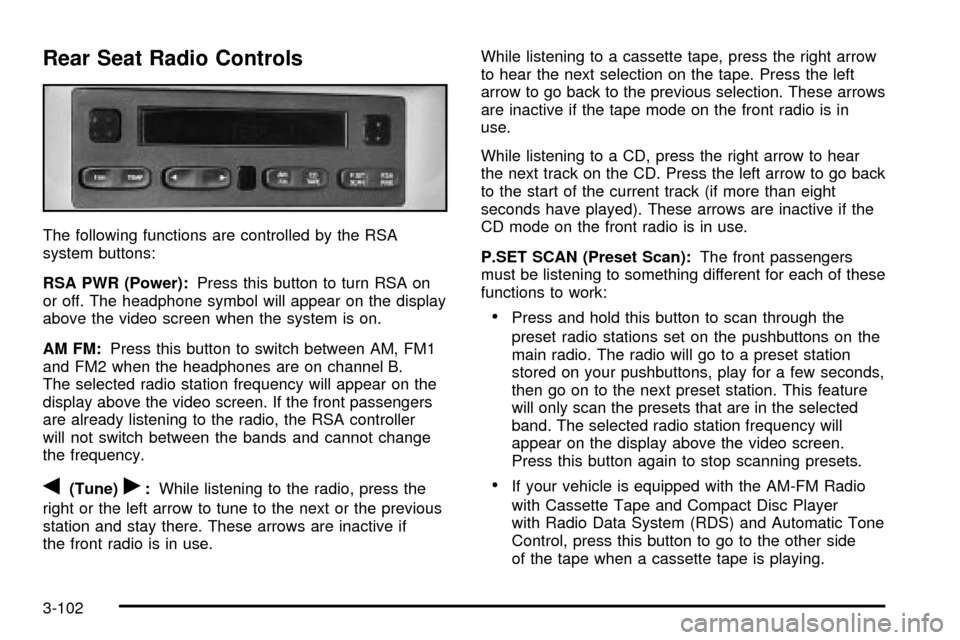
Rear Seat Radio Controls
The following functions are controlled by the RSA
system buttons:
RSA PWR (Power):Press this button to turn RSA on
or off. The headphone symbol will appear on the display
above the video screen when the system is on.
AM FM:Press this button to switch between AM, FM1
and FM2 when the headphones are on channel B.
The selected radio station frequency will appear on the
display above the video screen. If the front passengers
are already listening to the radio, the RSA controller
will not switch between the bands and cannot change
the frequency.
q(Tune)r:While listening to the radio, press the
right or the left arrow to tune to the next or the previous
station and stay there. These arrows are inactive if
the front radio is in use.While listening to a cassette tape, press the right arrow
to hear the next selection on the tape. Press the left
arrow to go back to the previous selection. These arrows
are inactive if the tape mode on the front radio is in
use.
While listening to a CD, press the right arrow to hear
the next track on the CD. Press the left arrow to go back
to the start of the current track (if more than eight
seconds have played). These arrows are inactive if the
CD mode on the front radio is in use.
P.SET SCAN (Preset Scan):The front passengers
must be listening to something different for each of these
functions to work:
·Press and hold this button to scan through the
preset radio stations set on the pushbuttons on the
main radio. The radio will go to a preset station
stored on your pushbuttons, play for a few seconds,
then go on to the next preset station. This feature
will only scan the presets that are in the selected
band. The selected radio station frequency will
appear on the display above the video screen.
Press this button again to stop scanning presets.
·If your vehicle is equipped with the AM-FM Radio
with Cassette Tape and Compact Disc Player
with Radio Data System (RDS) and Automatic Tone
Control, press this button to go to the other side
of the tape when a cassette tape is playing.
3-102
Page 285 of 486

You may also choose a non-scrubbing action, wet-type
cleaner which uses a cassette with a fabric belt to
clean the tape head. This type of cleaning cassette will
not eject on its own. A non-scrubbing action cleaner
may not clean as thoroughly as the scrubbing type
cleaner. The use of a non-scrubbing action, dry-type
cleaning cassette is not recommended.
After you clean the player, press and hold the EJT
button for ®ve seconds to reset the CLEAN indicator.
The radio will display CLEANED to show the indicator
was reset.
Cassettes are subject to wear and the sound quality
may degrade over time. Always make sure the cassette
tape is in good condition before you have your tape
player serviced.
Care of Your CDs and DVDs
Handle discs carefully. Store them in their original cases
or other protective cases and away from direct sunlight
and dust. If the surface of a disc is soiled, dampen
a clean, soft cloth in a mild, neutral detergent solution
and clean it, wiping from the center to the edge.
Be sure never to touch the side without writing when
handling discs. Pick up discs by grasping the outer
edges or the edge of the hole and the outer edge.
Care of Your CD and DVD Player
The use of CD lens cleaner discs is not advised, due to
the risk of contaminating the lens of the CD optics
with lubricants internal to the CD mechanism.
Cleaning Your DVD Player
When cleaning the outside DVD cabinet face and
buttons, use only a clean cloth dampened with clean
water.
Cleaning the Video Screen
When cleaning the video screen, use only a clean cloth
dampened with clean water. Use care when directly
touching or cleaning the screen, as damage may result.
Fixed Mast Antenna
The ®xed mast antenna can withstand most car washes
without being damaged. If the mast should ever
become slightly bent, you can straighten it out by hand.
If the mast is badly bent, you should replace it.
Check occasionally to be sure the mast is still tightened
to the fender. If tightening is required, tighten by
hand, then with a wrench one quarter turn.
3-105
Page 474 of 486

Electrical System (cont.)
Power Windows and Other Power Options......5-96
Windshield Wiper Fuses...............................5-96
Emissions Inspection and Maintenance
Programs...................................................3-48
Engine Coolant Level Check.............................6-10
Engine Oil Additives........................................5-17
Engine Oil and Chassis Lubrication
Scheduled Maintenance................................. 6-6
Engine Oil Level Check...................................6-10
Engine Speci®cations.....................................5-104
Engine..........................................................5-18
Air Cleaner/Filter.........................................5-18
Battery.......................................................5-43
Change Oil Message...................................3-54
Check and Service Engine Soon Light............3-45
Compartment Overview................................5-12
Coolant Heater............................................2-33
Coolant Temperature Gage...........................3-44
Coolant Temperature Warning Message..........3-51
Coolant......................................................5-23
Cooling System Inspection............................6-16
Exhaust.....................................................2-42
Low Oil Level Message................................3-53
Oil .............................................................5-13
Overheating................................................5-26
Starting......................................................2-32
Entering Programming Mode............................2-62
Entertainment System......................................3-92
Cleaning the Video Screen..........................3-105Entertainment System (cont.)
Cleaning Your DVD Player..........................3-105
DVD Distortion..........................................3-103
Entry Lighting.................................................3-18
Erasing HomeLink
žButtons..............................2-50
Exit Lighting...................................................3-19
Exiting Programming Mode...............................2-70
Express-Down Window....................................2-25
Extender, Safety Belt.......................................1-54
Exterior Lamps...............................................3-15
F
Filter.............................................................5-18
Engine Air Cleaner......................................5-18
Finding a PTY Station.....................3-68, 3-75, 3-85
Finding a Station....................3-62, 3-65, 3-73, 3-82
Finish Care....................................................5-91
Finish Damage...............................................5-93
Fixed Mast Antenna.......................................3-105
Flash-to-Pass................................................... 3-9
Flat Tire, Changing.........................................5-71
Flat Tire........................................................5-70
Flip and Fold Rear Seats.................................. 1-7
Fluid.............................................................5-20
Automatic Transaxle.....................................5-20
Power Steering...........................................5-37
Windshield Washer......................................5-38
FM ..............................................................3-104
6