brake light CHEVROLET VOLT 2011 User Guide
[x] Cancel search | Manufacturer: CHEVROLET, Model Year: 2011, Model line: VOLT, Model: CHEVROLET VOLT 2011Pages: 516, PDF Size: 6.61 MB
Page 169 of 516
Black plate (49,1)Chevrolet Volt Owner Manual - 2011
Instruments and Controls 5-49
NO REMOTE DETECTED
This message displays when the
RKE transmitter is not detected
while attempting to start the vehicle.
The transmitter battery may be
weak. See“Starting the Vehicle
with a Low Transmitter Battery”
under Remote Keyless Entry (RKE)
System Operation on page 2‑3 for
more information.
NO REMOTE DETECTED,
PRESS BRAKE TO RESTART
This message displays if the RKE
transmitter is no longer detected
in the vehicle. Press the brake
pedal and the POWER
Obutton
to restart the vehicle, or press the
POWER
Obutton without pressing
the brake pedal to turn the vehicle
off. If the vehicle is turned off and
a valid transmitter is not available,
the vehicle will not restart.
REMINDER: KEY LEFT IN
VEHICLE
This message displays when
leaving the vehicle with the RKE
transmitter still inside.
REPLACE BATTERY IN
REMOTE KEY
This message displays when the
battery in the RKE transmitter needs
to be replaced.
SERVICE KEYLESS START
SYSTEM
This message displays when the
keyless start system needs service.
Take the vehicle to your dealer.
Lamp Messages
AUTOMATIC LIGHT CONTROL
ON OR OFF
A message will display when the
automatic light control has been
turned on or off.
CHECK LAMP or LAMP
FAILURE
Depending on the lamp, one of
these messages may display.
See Bulb Replacement on
page 10‑34.
TURN SIGNAL ON
This message displays if the turn
signal has been left on. Turn off the
turn signal.
Object Detection System
Messages
PARK ASSIST OFF
This message displays when the
park assist system has been turned
off. See Ultrasonic Parking Assist
on page 9‑43.
SERVICE PARKING ASSIST
This message displays if there is a
problem with the park assist system.
Take the vehicle to your dealer for
service.
Page 172 of 516
Black plate (52,1)Chevrolet Volt Owner Manual - 2011
5-52 Instruments and Controls
SERVICE POWER STEERING
This message displays if there is a
problem with the power steering
system. Take the vehicle to your
dealer for service.
SERVICE VEHICLE SOON
This message displays if there is a
problem with the vehicle. Take the
vehicle to your dealer for service.
Depending on the severity of a
crash, this message may come
on along with the airbag readiness
light.
Starting the Vehicle
Messages
PRESS BRAKE TO START
VEHICLE
This message displays when
attempting to start the vehicle
without first pressing the brake
pedal.
PRESS BUTTON AGAIN TO
TURN OFF
This message displays as a
reminder to press the POWER
O
button to turn the vehicle off when
an attempt is made to turn off the
vehicle while it is in motion.
Tire Messages
SERVICE TIRE MONITOR
SYSTEM
This message displays if there is
a problem with the Tire Pressure
Monitor System (TPMS). SeeTire
Pressure Monitor Operation on
page 10‑57 for more information.
TIRE LEARNING ACTIVE
This message displays when
the system is learning new tires.
SeeTire Pressure Monitor
Operation on page 10‑57 for
more information.
TIRE LOW ADD AIR TO TIRE
This message displays when the
pressure in one or more of the tires
is low.
This message also displays
LEFT FRONT, RIGHT FRONT,
LEFT REAR, or RIGHT REAR to
indicate the location of the low tire.
The low tire pressure warning
light will also come on. See Tire
Pressure Light on page 5‑27.
If a tire pressure message appears
on the DIC, stop as soon as you
can. Inflate the tires by adding air
until the tire pressure is equal to
the values shown on the Tire and
Loading Information label. See Tires
on page 10‑48, Vehicle Load Limits
on page 9‑14, and Tire Pressure on
page 10‑54.
You can receive more than one
tire pressure message at a time.
The DIC also shows the tire
pressure values. See Driver
Information Center (DIC) on
page 5‑43.
Page 211 of 516
Black plate (21,1)Chevrolet Volt Owner Manual - 2011
Infotainment System 7-21
Playing an Audio and
Video DVD
To view the DVD video, the vehicle
must be in P (Park) or the parking
brake must be engaged.
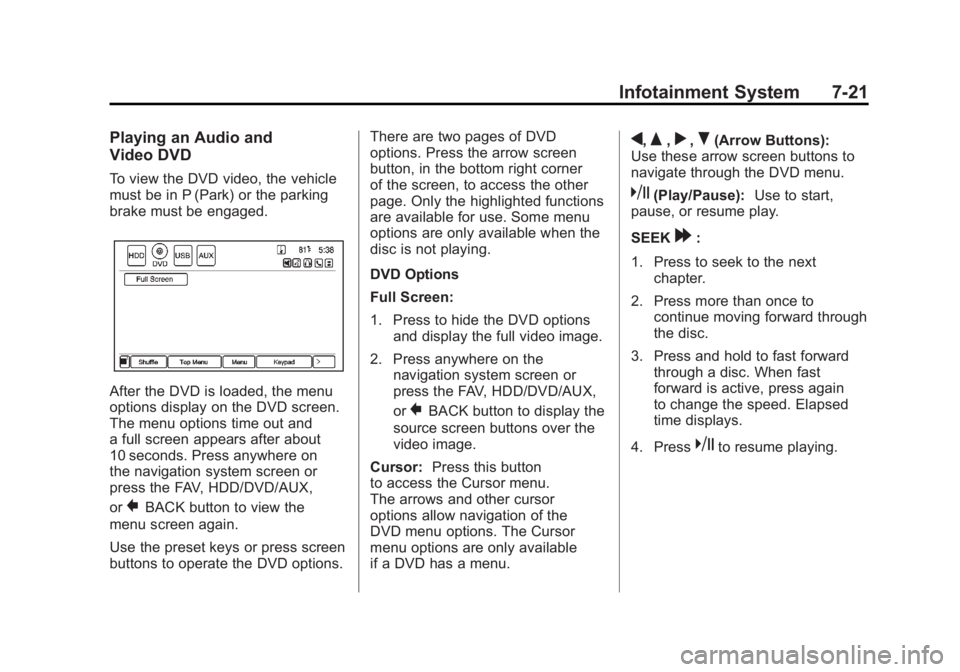
After the DVD is loaded, the menu
options display on the DVD screen.
The menu options time out and
a full screen appears after about
10 seconds. Press anywhere on
the navigation system screen or
press the FAV, HDD/DVD/AUX,
or
}BACK button to view the
menu screen again.
Use the preset keys or press screen
buttons to operate the DVD options. There are two pages of DVD
options. Press the arrow screen
button, in the bottom right corner
of the screen, to access the other
page. Only the highlighted functions
are available for use. Some menu
options are only available when the
disc is not playing.
DVD Options
Full Screen:
1. Press to hide the DVD options
and display the full video image.
2. Press anywhere on the navigation system screen or
press the FAV, HDD/DVD/AUX,
or
}BACK button to display the
source screen buttons over the
video image.
Cursor: Press this button
to access the Cursor menu.
The arrows and other cursor
options allow navigation of the
DVD menu options. The Cursor
menu options are only available
if a DVD has a menu.
q,Q,r,R(Arrow Buttons):
Use these arrow screen buttons to
navigate through the DVD menu.
k(Play/Pause): Use to start,
pause, or resume play.
SEEK
[:
1. Press to seek to the next chapter.
2. Press more than once to continue moving forward through
the disc.
3. Press and hold to fast forward through a disc. When fast
forward is active, press again
to change the speed. Elapsed
time displays.
4. Press
kto resume playing.
Page 305 of 516
Black plate (3,1)Chevrolet Volt Owner Manual - 2011
Driving and Operating 9-3
Drive Mode and PRNDL Selection
Use Normal Mode when possible.
Sport Mode provides more
responsive acceleration than
Normal Mode but can reduce
efficiency.
Use Mountain Mode prior to
climbing long, steep grades in
mountainous areas. Be sure to
engage Mountain Mode before
starting to climb. Mountain Mode
reduces electric range and power
but may be needed to maintain
speeds above 96 km/h (60 mph)
when climbing grades of 5% or
greater.
Use L (Low) in heavy stop‐and‐go
traffic or when traveling downhill.
L (Low) requires less brake
pedal application and provides
a controlled, efficient way to
slow the vehicle down.Climate Setting
Using the heat and air conditioning
systems decreases the energy
available for electric driving.
Optimal energy efficiency is
achieved with the heat, air
conditioning, and fan turned off.
Less energy is used at low fan
speeds. When using the fan:
.Fan Only is the most energy
efficient climate setting as long
as
0is not selected.
.ECO is for moderate air
conditioning and heater
operation and is the next
most energy efficient setting as
long as
0is not selected.
.Comfort provides the most
comfort but is the least energy
efficient.
Use the auto heated seat feature
instead of climate settings. Heating
the seat uses less energy than
heating the vehicle interior. Use remote start to heat or cool the
interior when the vehicle is plugged
in to maximize the electric range by
utilizing electricity from the electrical
outlet.
In hot weather, avoid parking in
direct sunlight or use sunshades
inside the vehicle.
Turn off the front and rear window
defog/defrost when they are no
longer needed.
Avoid driving with the windows open
at highway speeds.
Vehicle Charging/Maintenance
Charging
Keep the vehicle plugged in, even
when fully charged, to keep the
battery temperature ready for the
next drive. This is important when
outside temperatures are extremely
hot or cold.
Page 307 of 516
Black plate (5,1)Chevrolet Volt Owner Manual - 2011
Driving and Operating 9-5
Alcohol affects four things that
anyone needs to drive a vehicle:
judgment, muscular coordination,
vision, and attentiveness.
Police records show that
almost 40 percent of all motor
vehicle-related deaths involve
alcohol. In most cases, these
deaths are the result of someone
who was drinking and driving.
In recent years, more than
17,000 annual motor vehicle-related
deaths have been associated with
the use of alcohol, with about
250,000 people injured.
For persons under 21, it is against
the law in every U.S. state to drink
alcohol. There are good medical,
psychological, and developmental
reasons for these laws.
The obvious way to eliminate the
leading highway safety problem is
for people never to drink alcohol
and then drive.Medical research shows that
alcohol in a person's system
can make crash injuries worse,
especially injuries to the brain,
spinal cord, or heart. This means
that when anyone who has been
drinking
—driver or passenger —is
in a crash, that person's chance of
being killed or permanently disabled
is higher than if the person had not
been drinking.
Control of a Vehicle
The following three systems
help to control the vehicle while
driving —brakes, steering, and
accelerator. At times, as when
driving on snow or ice, it is easy to
ask more of those control systems
than the tires and road can provide.
Meaning, you can lose control of the
vehicle.
Adding non‐dealer accessories
can affect vehicle performance.
See Accessories and Modifications
on page 10‑4.
Braking
See Brake System Warning Light on
page 5‑24.
Braking action involves perception
time and reaction time. Deciding to
push the brake pedal is perception
time. Actually doing it is
reaction time.
Average reaction time is about
three‐fourths of a second. But that
is only an average. It might be less
with one driver and as long as two
or three seconds or more with
another. Age, physical condition,
alertness, coordination, and
eyesight all play a part. So do
alcohol, drugs, and frustration.
But even in three‐fourths of a
second, a vehicle moving at
100 km/h (60 mph) travels 20 m
(66 ft). That could be a lot of
distance in an emergency, so
keeping enough space between
the vehicle and others is important.
Page 310 of 516
Black plate (8,1)Chevrolet Volt Owner Manual - 2011
9-8 Driving and Operating
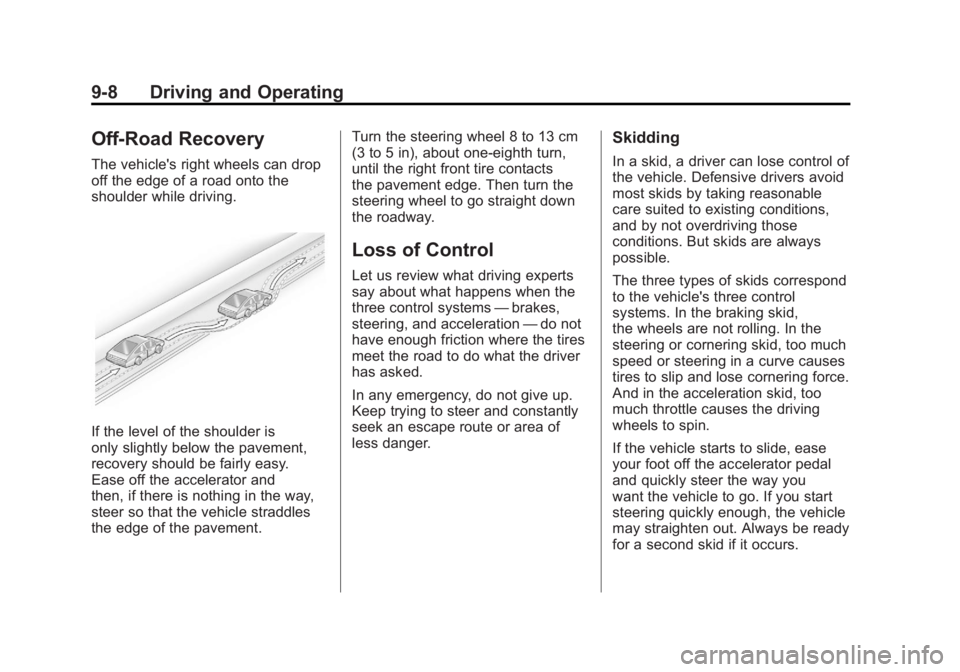
Off-Road Recovery
The vehicle's right wheels can drop
off the edge of a road onto the
shoulder while driving.
If the level of the shoulder is
only slightly below the pavement,
recovery should be fairly easy.
Ease off the accelerator and
then, if there is nothing in the way,
steer so that the vehicle straddles
the edge of the pavement.Turn the steering wheel 8 to 13 cm
(3 to 5 in), about one-eighth turn,
until the right front tire contacts
the pavement edge. Then turn the
steering wheel to go straight down
the roadway.
Loss of Control
Let us review what driving experts
say about what happens when the
three control systems
—brakes,
steering, and acceleration —do not
have enough friction where the tires
meet the road to do what the driver
has asked.
In any emergency, do not give up.
Keep trying to steer and constantly
seek an escape route or area of
less danger.
Skidding
In a skid, a driver can lose control of
the vehicle. Defensive drivers avoid
most skids by taking reasonable
care suited to existing conditions,
and by not overdriving those
conditions. But skids are always
possible.
The three types of skids correspond
to the vehicle's three control
systems. In the braking skid,
the wheels are not rolling. In the
steering or cornering skid, too much
speed or steering in a curve causes
tires to slip and lose cornering force.
And in the acceleration skid, too
much throttle causes the driving
wheels to spin.
If the vehicle starts to slide, ease
your foot off the accelerator pedal
and quickly steer the way you
want the vehicle to go. If you start
steering quickly enough, the vehicle
may straighten out. Always be ready
for a second skid if it occurs.
Page 311 of 516
Black plate (9,1)Chevrolet Volt Owner Manual - 2011
Driving and Operating 9-9
Of course, traction is reduced when
water, snow, ice, gravel, or other
material is on the road. For safety,
slow down and adjust your driving
to these conditions. It is important
to slow down on slippery surfaces
because stopping distance is longer
and vehicle control more limited.
While driving on a surface with
reduced traction, try to avoid
sudden steering, acceleration,
or braking, including reducing
vehicle speed by shifting to a lower
gear. Any sudden changes could
cause the tires to slide. You might
not realize the surface is slippery
until the vehicle is skidding. Learn
to recognize warning clues—such
as enough water, ice, or packed
snow on the road to make a
mirrored surface —and slow
down when you have any doubt.
Remember: Antilock brakes help
avoid only the braking skid.Driving on Wet Roads
Rain and wet roads can reduce
vehicle traction and affect your
ability to stop and accelerate.
Always drive slower in these types
of driving conditions and avoid
driving through large puddles and
deep‐standing or flowing water.
{WARNING
Wet brakes can cause crashes.
They might not work as well in
a quick stop and could cause
pulling to one side. You could
lose control of the vehicle.
After driving through a large
puddle of water or a car/vehicle
wash, lightly apply the brake
pedal until the brakes work
normally.
(Continued)
WARNING (Continued)
Flowing or rushing water creates
strong forces. Driving through
flowing water could cause the
vehicle to be carried away. If this
happens, you and other vehicle
occupants could drown. Do not
ignore police warnings and be
very cautious about trying to
drive through flowing water.
Hydroplaning
Hydroplaning is dangerous. Water
can build up under the vehicle's
tires so they actually ride on the
water. This can happen if the road
is wet enough and you are going
fast enough. When the vehicle is
hydroplaning, it has little or no
contact with the road.
There is no hard and fast rule about
hydroplaning. The best advice is to
slow down when the road is wet.
Page 321 of 516
Black plate (19,1)Chevrolet Volt Owner Manual - 2011
Driving and Operating 9-19
on. The flashing light will eventually
time out. The POWER
Obutton
light is on steady when in ON/RUN
power mode. When the vehicle is
turned off, the POWER
Obutton
light will turn off.
The Remote Keyless Entry (RKE)
transmitter must be in the vehicle
for the system to operate. If the
vehicle will not start, place the RKE
transmitter in the transmitter slot.
See Remote Keyless Entry (RKE)
System Operation on page 2‑3.
ON/RUN: This position is for
driving and starting. With the vehicle
off, and the brake pedal applied,
pressing the POWER
Obutton once
will place the vehicle in ON/RUN.
The instrument cluster displays an
active fuel or battery gauge, along
with an audio startup cue, when
the vehicle is ready to be driven.
This could take up to 15 seconds
at extremely cold temperatures. The engine will only start if needed.
If the vehicle did not start, the
instrument cluster will display a
screen with inactive fuel and battery
gauges. See
Starting and Stopping
the Vehicle on page 9‑20.
Service Only Mode
This power mode is available for
service and diagnostics, and to
verify the proper operation of
the MIL as may be required for
emission inspection purposes.
With the vehicle off, and the brake
pedal not applied, pressing and
holding the POWER
Obutton for
more than 5 seconds will place
the vehicle in Service Only Mode.
The instruments and audio systems
will operate as they do in ON/RUN,
but the vehicle will not be able to be
driven. The propulsion system will
not start in Service Only Mode. STOPPING THE VEHICLE/OFF:
To turn the vehicle off, push the
POWER
Obutton with the vehicle
in P (Park). Retained Accessory
Power (RAP) will remain active
until the driver door is opened.
See Retained Accessory Power
(RAP) on page 9‑22. When turning
off the vehicle, if the vehicle is not
in P (Park), the vehicle will go to
ACC/ACCESSORY and display the
message SHIFT TO PARK in the
Driver Information Center (DIC).
See Electric Drive Unit Messages
on page 5‑47.
In an emergency, if the vehicle must
be stopped while driving:
1. Brake using a firm and steady pressure. Do not pump the
brakes repeatedly. This may
deplete power assist, requiring
increased brake pedal force.
Page 336 of 516
Black plate (34,1)Chevrolet Volt Owner Manual - 2011
9-34 Driving and Operating
If there is a problem with ABS, this
warning light stays on. SeeAntilock
Brake System (ABS) Warning Light
on page 5‑26.
If driving safely on a wet road
and it becomes necessary to
slam on the brakes and continue
braking to avoid a sudden obstacle,
a computer senses that the wheels
are slowing down. If one of the
wheels is about to stop rolling, the
computer will separately work the
brakes at each wheel. ABS can change the brake pressure
to each wheel, as required, faster
than any driver could. This can help
the driver steer around the obstacle
while braking hard.
As the brakes are applied, the
computer keeps receiving updates
on wheel speed and controls
braking pressure accordingly.
Remember: ABS does not change
the time needed to get a foot up to
the brake pedal or always decrease
stopping distance. If you get too
close to the vehicle in front of you,
there will not be enough time to
apply the brakes if that vehicle
suddenly slows or stops. Always
leave enough room up ahead to
stop, even with ABS.
Using ABS
Do not pump the brakes. Just hold
the brake pedal down firmly and let
ABS work. You might hear the ABS
pump or motor operating and feel
the brake pedal pulsate, but this is
normal.
Braking in Emergencies
ABS allows the driver to steer and
brake at the same time. In many
emergencies, steering can help
more than even the very best
braking.
Page 337 of 516
Black plate (35,1)Chevrolet Volt Owner Manual - 2011
Driving and Operating 9-35
Electric Parking Brake
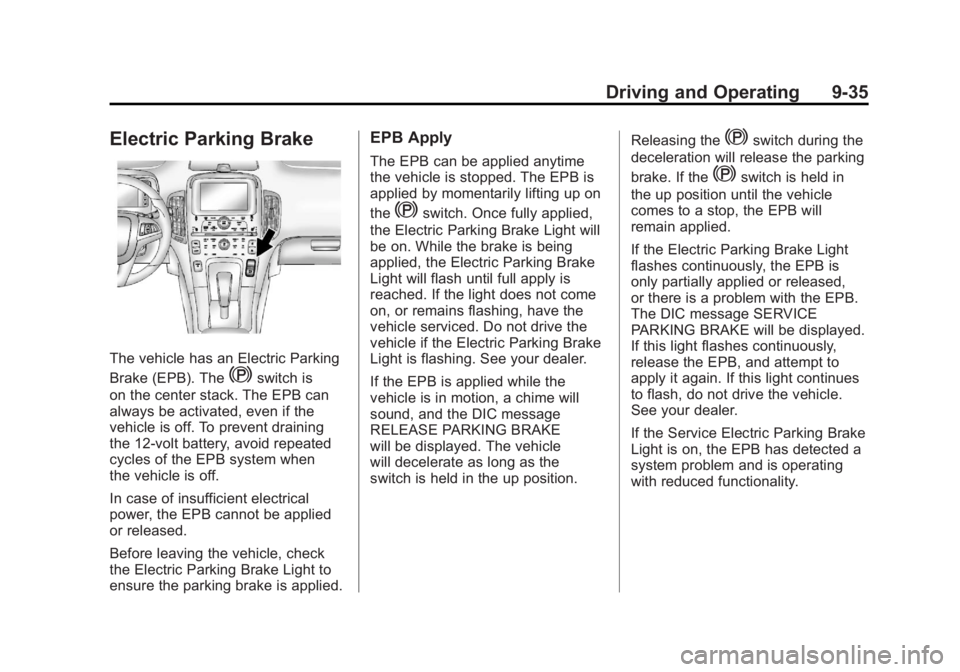
The vehicle has an Electric Parking
Brake (EPB). The
Yswitch is
on the center stack. The EPB can
always be activated, even if the
vehicle is off. To prevent draining
the 12‐volt battery, avoid repeated
cycles of the EPB system when
the vehicle is off.
In case of insufficient electrical
power, the EPB cannot be applied
or released.
Before leaving the vehicle, check
the Electric Parking Brake Light to
ensure the parking brake is applied.
EPB Apply
The EPB can be applied anytime
the vehicle is stopped. The EPB is
applied by momentarily lifting up on
the
Yswitch. Once fully applied,
the Electric Parking Brake Light will
be on. While the brake is being
applied, the Electric Parking Brake
Light will flash until full apply is
reached. If the light does not come
on, or remains flashing, have the
vehicle serviced. Do not drive the
vehicle if the Electric Parking Brake
Light is flashing. See your dealer.
If the EPB is applied while the
vehicle is in motion, a chime will
sound, and the DIC message
RELEASE PARKING BRAKE
will be displayed. The vehicle
will decelerate as long as the
switch is held in the up position. Releasing the
Yswitch during the
deceleration will release the parking
brake. If the
Yswitch is held in
the up position until the vehicle
comes to a stop, the EPB will
remain applied.
If the Electric Parking Brake Light
flashes continuously, the EPB is
only partially applied or released,
or there is a problem with the EPB.
The DIC message SERVICE
PARKING BRAKE will be displayed.
If this light flashes continuously,
release the EPB, and attempt to
apply it again. If this light continues
to flash, do not drive the vehicle.
See your dealer.
If the Service Electric Parking Brake
Light is on, the EPB has detected a
system problem and is operating
with reduced functionality.