brake light CHEVROLET VOLT 2011 Owner's Guide
[x] Cancel search | Manufacturer: CHEVROLET, Model Year: 2011, Model line: VOLT, Model: CHEVROLET VOLT 2011Pages: 516, PDF Size: 6.61 MB
Page 338 of 516
Black plate (36,1)Chevrolet Volt Owner Manual - 2011
9-36 Driving and Operating
To apply the EPB when this
light is on, lift up on the
Yswitch
and hold it in the up position.
Full application of the parking brake
by the EPB system may take a
longer period of time than normal
when this light is on. Continue to
hold the
Yswitch until the Electric
Parking Brake Light remains on.
If the Service Electric Parking
Brake Light is on, see your dealer.
If the EPB fails to apply, the rear
wheels should be blocked to
prevent vehicle movement.
For maximum EPB force when
parking on a hill, pull the EPB
switch twice.
EPB Release
To release the EPB, place the
vehicle in ON/RUN, apply and hold
the brake pedal, and push down
momentarily on the
Yswitch.
If attempting to release the EPB
without the brake pedal applied,
a chime will sound, and the DIC
message STEP ON BRAKE TO
RELEASE PARK BRAKE will be
displayed. The EPB is released
when the Electric Parking Brake
Light is off.
If the Service Electric Parking
Brake Light is on, the EPB has
detected a system problem, and is
operating with reduced functionality.
To release the EPB when this light
is on, push down on the
Yswitch
and hold it in the down position.
EPB release may take a longer
period of time than normal when
this light is on. Continue to hold
the
Yswitch until the Electric
Parking Brake Light is off. If the
light is on, see your dealer. Notice:
Driving with the parking
brake on can overheat the brake
system and cause premature
wear or damage to brake system
parts. Make sure that the parking
brake is fully released and the
Electric Parking Brake Light is
off before driving.
Automatic EPB Release
The EPB will automatically release
if the vehicle is running, placed
into gear, and an attempt is
made to drive away. Avoid rapid
acceleration when the EPB is
applied, to preserve parking
brake lining life.
See Electric Parking Brake Light on
page 5‑25, Service Electric Parking
Brake Light on page 5‑25, and
Brake System Messages on
page 5‑46.
Page 339 of 516
Black plate (37,1)Chevrolet Volt Owner Manual - 2011
Driving and Operating 9-37
Regenerative Braking
Regenerative braking takes some of
the energy from the moving vehicle
and turns it back into electrical
energy. This energy is then stored
back into the high voltage battery
system, contributing to increased
energy efficiency.
The hydraulic disc brakes work with
the regenerative braking to ensure
effective braking, such as when a
high braking demand is requested.
The braking system is
computer controlled and
blends the regenerative braking
with the conventional hydraulic disc
brakes to meet any requirements
for deceleration. The controllerinterprets the braking request
and uses regenerative braking,
conventional hydraulic braking, or a
combination of both as necessary.
Because the controller applies the
hydraulic brakes through its high
pressure accumulator, you may
occasionally hear the motor‐driven
pump when it recharges the system.
This is normal.
See
Warning Lights, Gauges,
and Indicators on page 5‑9 and
Driver Information Center (DIC) on
page 5‑43. In the event of a
controller problem, the brake pedal
may be harder to push and the
stopping distance may be longer.
Ride Control Systems
Traction Control
System (TCS)
The vehicle has a Traction Control
System (TCS) that limits wheel
spin. The system operates if it
senses that one or both of the drive
wheels are spinning or beginning to
lose traction. When this happens,
the system brakes the spinning
wheel(s) and/or reduces power
to limit wheel spin.
The system may be heard or felt
while it is working, but this is
normal.
To assist with directional control
of the vehicle, TCS comes on
automatically whenever the vehicle
is started and cannot be turned off.
Page 343 of 516
Black plate (41,1)Chevrolet Volt Owner Manual - 2011
Driving and Operating 9-41
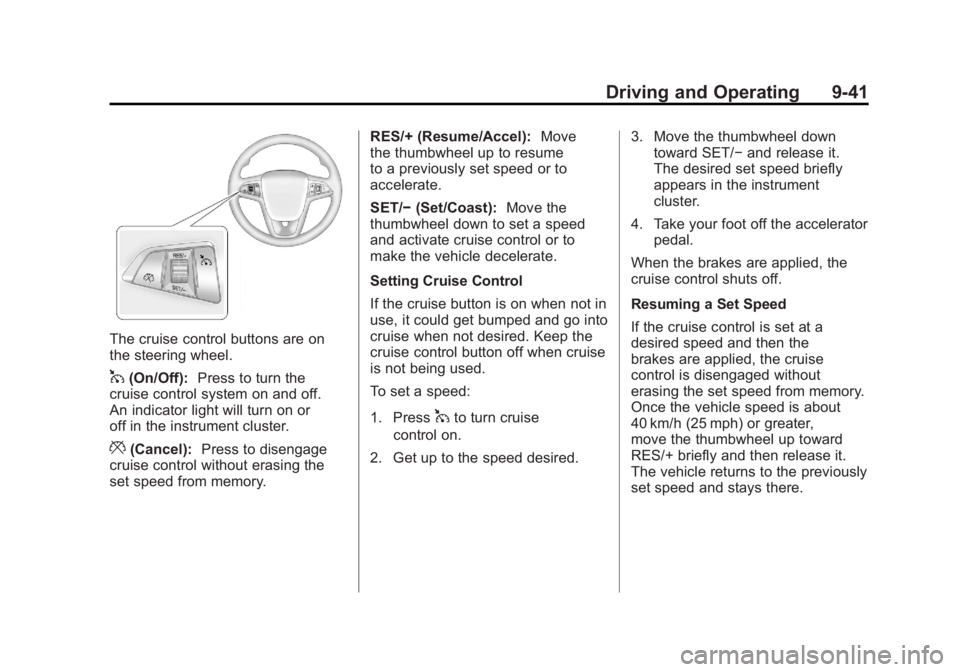
The cruise control buttons are on
the steering wheel.
1(On/Off):Press to turn the
cruise control system on and off.
An indicator light will turn on or
off in the instrument cluster.
*(Cancel): Press to disengage
cruise control without erasing the
set speed from memory. RES/+ (Resume/Accel):
Move
the thumbwheel up to resume
to a previously set speed or to
accelerate.
SET/− (Set/Coast): Move the
thumbwheel down to set a speed
and activate cruise control or to
make the vehicle decelerate.
Setting Cruise Control
If the cruise button is on when not in
use, it could get bumped and go into
cruise when not desired. Keep the
cruise control button off when cruise
is not being used.
To set a speed:
1. Press
1to turn cruise
control on.
2. Get up to the speed desired. 3. Move the thumbwheel down
toward SET/− and release it.
The desired set speed briefly
appears in the instrument
cluster.
4. Take your foot off the accelerator pedal.
When the brakes are applied, the
cruise control shuts off.
Resuming a Set Speed
If the cruise control is set at a
desired speed and then the
brakes are applied, the cruise
control is disengaged without
erasing the set speed from memory.
Once the vehicle speed is about
40 km/h (25 mph) or greater,
move the thumbwheel up toward
RES/+ briefly and then release it.
The vehicle returns to the previously
set speed and stays there.
Page 345 of 516
Black plate (43,1)Chevrolet Volt Owner Manual - 2011
Driving and Operating 9-43
Ending Cruise Control
There are three ways to end cruise
control:
.Step lightly on the brake pedal;
when cruise control disengages,
the indicator light will not be lit.
.Press*.
.Press1to turn the cruise
control system off completely.
The cruise control cannot be
resumed.
Erasing Speed Memory
The cruise control set speed
is erased from memory by
pressing
1or if the vehicle
is turned off.
Object Detection
Systems
Ultrasonic Parking Assist
For vehicles with the Ultrasonic
Front and Rear Parking Assist
(UFRPA) system, it assists the
driver with parking and avoiding
objects. UFRPA operates at
speeds less than 8 km/h (5 mph).
The sensors on the front and rear
bumper detect objects up to 1.2 m
(4 ft) in front of the vehicle, 2.5 m
(8 ft) behind the vehicle, and at
least 25.4 cm (10 in) off the ground.
{WARNING
The Ultrasonic Front and Rear
Parking Assist (UFRPA) system
does not replace driver vision.
It cannot detect:
.Objects that are below the
bumper, underneath the
vehicle, or if they are too
close or far from the vehicle.
.Children, pedestrians,
bicyclists, or pets.
If you do not use proper care
before moving forward and while
backing; vehicle damage, injury,
or death could occur. Even with
UFRPA, always check in front of
the vehicle before moving forward
and behind the vehicle before
backing up. While moving forward
and backing, be sure to look for
objects and check the vehicle
mirrors.
Page 347 of 516
Black plate (45,1)Chevrolet Volt Owner Manual - 2011
Driving and Operating 9-45
Turning the System On and Off
The UFRPA system can be turned
on and off by pressing the park
assist button in the overhead
console.
The park assist button lights up
when the system is on and turns
off when it has been disabled.
When the System Does Not
Seem to Work Properly
If UFRPA does not turn on due to a
temporary condition, the message
PARK ASSIST OFF displays on the
DIC, and the light on the park assist
button turns off. This can occur
under the following conditions:
.The ultrasonic sensors are not
clean. Keep the sensors free of
mud, dirt, snow, ice, and slush.
For cleaning instructions, see
Exterior Care on page 10‑89.
.The vehicle was washed in cold
weather. This may cause frost
or ice to form in the park assist
sensors. Keep the sensors free
of frost or ice.
.An object was hanging out of the
hatch during the last drive cycle.
Once the attached object is
removed, UFRPA will return to
normal operation.
.The bumper is damaged.
Take the vehicle to your
dealer to repair the system.
.Other conditions may affect
system performance, such as
vibrations from a jackhammer or
the compression of air brakes
on a very large truck.
Page 391 of 516
Black plate (25,1)Chevrolet Volt Owner Manual - 2011
Vehicle Care 10-25
Brakes
This vehicle has disc brakes.
Disc brake pads have built-in wear
indicators that make a high-pitched
warning sound when the brake pads
are worn and new pads are needed.
The sound can come and go or be
heard all the time the vehicle is
moving, except when applying
the brake pedal firmly.
{WARNING
The brake wear warning sound
means that soon the brakes will
not work well. That could lead to
a crash. When the brake wear
warning sound is heard, have
the vehicle serviced.
Notice: Continuing to drive with
worn-out brake pads could result
in costly brake repair. Some driving conditions or climates
can cause a brake squeal when
the brakes are first applied or
lightly applied. This does not mean
something is wrong with the brakes.
Properly torqued wheel nuts are
necessary to help prevent brake
pulsation. When tires are rotated,
inspect brake pads for wear and
evenly tighten wheel nuts in
the proper sequence to torque
specifications in
Capacities and
Specifications on page 12‑2.
Brake linings should always be
replaced as complete axle sets.
Brake Pedal Travel
See your dealer if the brake pedal
does not return to normal height,
or if there is a rapid increase
in pedal travel. This could be
a sign that brake service might
be required.
Brake Adjustment
Every time the brakes are applied,
with or without the vehicle moving,
the brakes adjust for wear.
Replacing Brake System Parts
The braking system on a vehicle is
complex. Its many parts have to be
of top quality and work well together
if the vehicle is to have really good
braking. The vehicle was designed
and tested with top-quality brake
parts. When parts of the braking
system are replaced, be sure to get
new, approved replacement parts.
If this is not done, the brakes might
not work properly. For example,
installing disc brake pads that are
wrong for the vehicle, can change
the balance between the front
and rear brakes —for the worse.
The braking performance expected
can change in many other ways if
the wrong replacement brake parts
are installed.
Page 392 of 516
Black plate (26,1)Chevrolet Volt Owner Manual - 2011
10-26 Vehicle Care
Brake Fluid
The brake master cylinder reservoir
is filled with DOT 3 brake fluid as
indicated on the reservoir cap.
SeeEngine Compartment Overview
on page 10‑10 for the location of the
reservoir. There are only two reasons why
the brake fluid level in the reservoir
might go down:
.The brake fluid level goes down
because of normal brake lining
wear. When new linings are
installed, the fluid level goes
back up.
.A fluid leak in the brake
hydraulic system can also
cause a low fluid level. Have
the brake hydraulic system fixed,
since a leak means that sooner
or later the brakes will not
work well.
Do not top off the brake fluid.
Adding fluid does not correct a
leak. If fluid is added when the
linings are worn, there will be too
much fluid when new brake linings
are installed. Add or remove brake
fluid, as necessary, only when work
is done on the brake hydraulic
system.
{WARNING
If too much brake fluid is added,
it can spill on the engine
and burn, if the engine is hot
enough. You or others could be
burned, and the vehicle could be
damaged. Add brake fluid only
when work is done on the brake
hydraulic system.
When the brake fluid falls to a low
level, the brake warning light comes
on. See Brake System Warning
Light on page 5‑24.
Page 426 of 516
Black plate (60,1)Chevrolet Volt Owner Manual - 2011
10-60 Vehicle Care
There are two minutes to match
the first tire/wheel position, and
five minutes overall to match all
four tire/wheel positions. If it takes
longer, the matching process stops
and must be restarted.
Follow the TPMS sensor matching
process:
1. Set the parking brake.
2. Put the vehicle in ON/RUN andplace the vehicle in P (Park).
3. If the DIC display is minimized, press the SELECT knob to
maximize it.
4. Use the SELECT knob to scroll to the Tire Pressure display
screen.
5. Press and hold the SELECT knob for five seconds to begin
the sensor matching process.
A message displays confirming
to begin the process. 6. Use the SELECT knob to
select YES with the highlighted
selection, and press the
SELECT knob again to
confirm the selection.
The horn sounds twice to signal
the receiver is in relearn mode
and the TIRE LEARNING
ACTIVE message displays
on the DIC screen.
7. Start with the driver side front tire.
8. Place the relearn tool against the tire sidewall, near the valve
stem. Then press the button
to activate the TPMS sensor.
A horn chirp confirms that the
sensor identification code has
been matched to this tire and
wheel position. 9. Proceed to the passenger
side front tire, and repeat the
procedure in Step 8.
10. Proceed to the passenger side rear tire, and repeat the
procedure in Step 8.
11. Proceed to the driver side rear tire, and repeat the procedure
in Step 8. The horn sounds two
times to indicate the sensor
identification code has been
matched to the driver side
rear tire, and the TPMS sensor
matching process is no longer
active. The TIRE LEARNING
ACTIVE message on the DIC
display screen goes off.
12. Turn the vehicle off.
13. Set all four tires to the recommended air pressure
level as indicated on the Tire
and Loading Information label.
Page 446 of 516
Black plate (80,1)Chevrolet Volt Owner Manual - 2011
10-80 Vehicle Care
Jump Starting the Volt
If the Volt won't start, the 12‐volt
battery may be run down. To jump
start the Volt use the underhood
remote positive (+) and negative (−)
terminals.
1. The other vehicle used to jumpstart the Volt must have a 12‐volt
battery with a negative ground
system.
Notice: Only use a vehicle
that has a 12-volt system with
a negative ground for jump
starting. If the other vehicle does
not have a 12-volt system with a
negative ground, both vehicles
can be damaged.
2. Park both vehicles close enough so that the jumper cables can
reach both vehicles' positive (+)
and negative (−) terminals.
The vehicles must not touch
each other. It could cause an
unwanted ground connection
that could damage both vehicles'
electrical systems. Put both vehicles in P (Park) for
an automatic transmission or
electric drive unit. For a manual
transmission, place the vehicle
in N (Neutral) and set the
parking brake.
Notice: If the radio or other
accessories are left on during
the jump starting procedure, they
could be damaged. The repairs
would not be covered by the
warranty. Always turn off the
radio and other accessories
when jump starting the vehicle.
3. Turn off the ignition on the other vehicle. Turn off the radio,
all lamps, and accessories that
are not needed in both vehicles.
Unplug accessories from the
cigarette lighter or the accessory
power outlets. This avoids
sparks and helps save both
batteries and accessories.
4. Locate the positive (+) and negative (−) terminals on the
other vehicle.
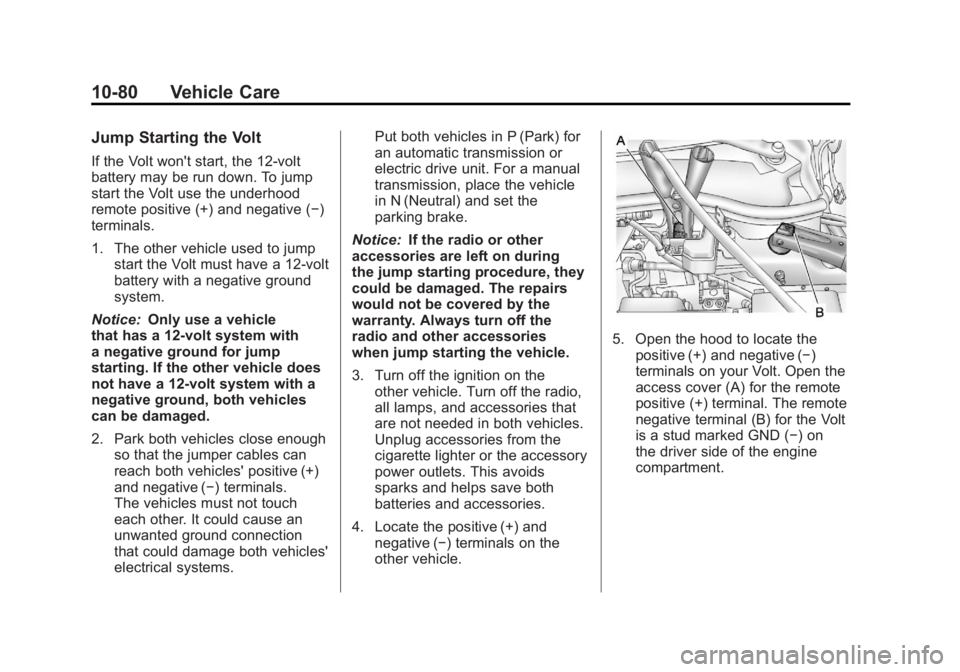
5. Open the hood to locate thepositive (+) and negative (−)
terminals on your Volt. Open the
access cover (A) for the remote
positive (+) terminal. The remote
negative terminal (B) for the Volt
is a stud marked GND (−) on
the driver side of the engine
compartment.
Page 448 of 516
Black plate (82,1)Chevrolet Volt Owner Manual - 2011
10-82 Vehicle Care
Disconnecting the Jumper Cables
1. Disconnect the blacknegative (−) jumper cable
from the Volt. Do not let the
other end of the cable touch
anything until after the next step.
2. Disconnect the black negative (−) jumper cable
from the other vehicle with
the good battery.
3. Disconnect the red positive (+) jumper cable from the other
vehicle. Do not let the other
end of the cable touch anything
until after the next step.
4. Disconnect the red positive (+) jumper cable from the Volt.
5. Return the positive (+) and negative (−) terminal covers
to their original positions.Jump Starting Another Vehicle
When using the Volt to jump
start another vehicle with a
run‐down battery, jumper cables
are connected directly to the
positive (+) and negative (−)
terminals on the 12‐volt battery in
the rear cargo area. Do not use the
remote terminals under the hood.
This could cause a fuse to overload
in the Volt.
1. Check the other vehicle. It must
have a 12‐volt battery with a
negative ground system.
Notice: Only use a vehicle
that has a 12-volt system with
a negative ground for jump
starting. If the other vehicle does
not have a 12-volt system with a
negative ground, both vehicles
can be damaged.
2. Park both vehicles close enough so that the jumper cables can
reach both vehicles' positive (+)
and negative (−) terminals.
The vehicles must not touch
each other. It could cause an unwanted ground connection
that could damage both vehicles'
electrical systems.
Put both vehicles in P (Park) for
an automatic transmission or
electric drive unit. For a manual
transmission, place the vehicle
in N (Neutral) and set the
parking brake.
Notice: If the radio or other
accessories are left on during
the jump starting procedure, they
could be damaged. The repairs
would not be covered by the
warranty. Always turn off the
radio and other accessories
when jump starting the vehicle.
3. Turn off both vehicles. Turn off the radio, all lamps,
and accessories that are not
needed in both vehicles. Unplug
accessories from the cigarette
lighter or the accessory power
outlets. This avoids sparks and
helps save both batteries and
accessories.