instrument cluster CHEVROLET VOLT 2011 User Guide
[x] Cancel search | Manufacturer: CHEVROLET, Model Year: 2011, Model line: VOLT, Model: CHEVROLET VOLT 2011Pages: 516, PDF Size: 6.61 MB
Page 136 of 516
Black plate (16,1)Chevrolet Volt Owner Manual - 2011
5-16 Instruments and Controls
Compass
The vehicle has a compass display
in the instrument cluster above
the speedometer. The compass
receives its heading and other
information from the Global
Positioning System (GPS) antenna
and vehicle speed information.
The compass system has automatic
calibration and zone adjustment
features.
Avoid covering the GPS antenna
for long periods of time with objects
that may interfere with the antenna's
ability to receive a satellite signal.
SeeMulti-Band Antenna on
page 7‑18 for the location of the
vehicle's antenna. The compass
system is designed to operate for a
certain number of miles or degrees
of turn before needing a signal from
the GPS satellites. The compass
system will automatically determine
when a GPS signal is restored and
provide a heading.
Battery Gauge
(High Voltage)
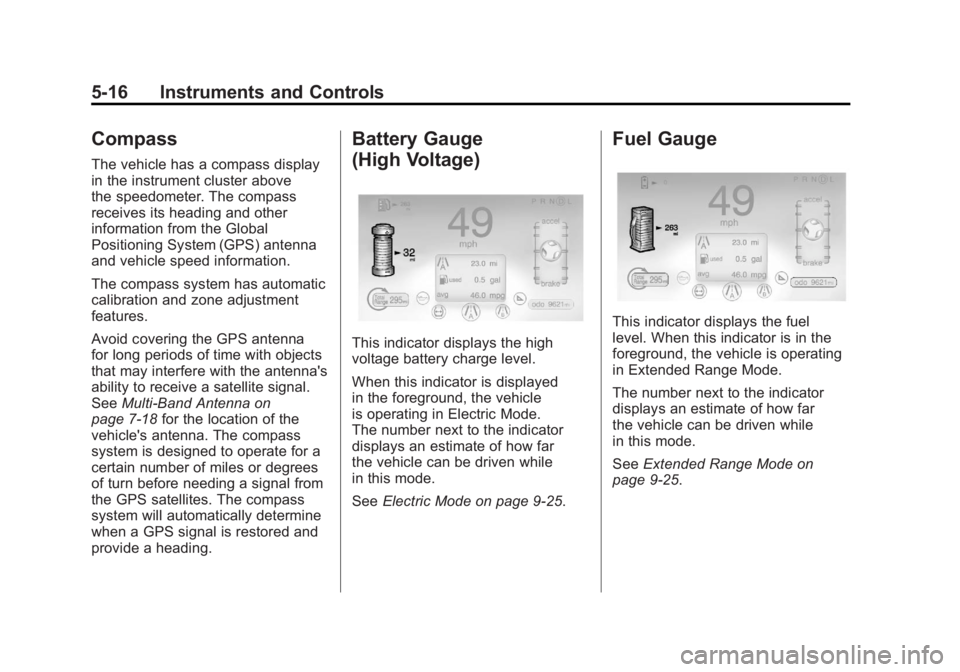
This indicator displays the high
voltage battery charge level.
When this indicator is displayed
in the foreground, the vehicle
is operating in Electric Mode.
The number next to the indicator
displays an estimate of how far
the vehicle can be driven while
in this mode.
See Electric Mode on page 9‑25.
Fuel Gauge
This indicator displays the fuel
level. When this indicator is in the
foreground, the vehicle is operating
in Extended Range Mode.
The number next to the indicator
displays an estimate of how far
the vehicle can be driven while
in this mode.
SeeExtended Range Mode on
page 9‑25.
Page 139 of 516
Black plate (19,1)Chevrolet Volt Owner Manual - 2011
Instruments and Controls 5-19
Second Row Passenger Safety
Belt Reminder Light
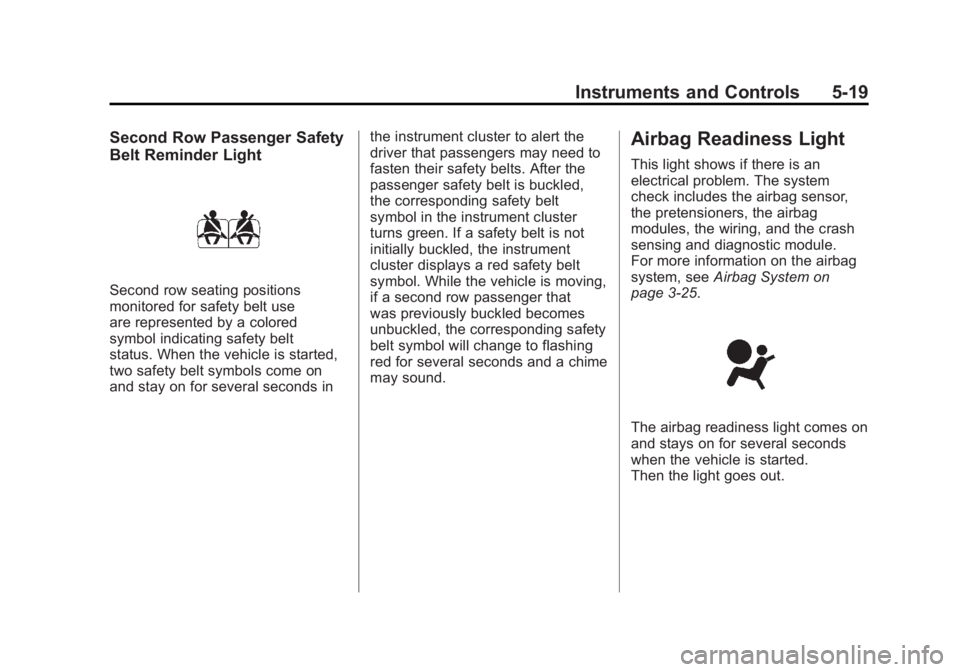
Second row seating positions
monitored for safety belt use
are represented by a colored
symbol indicating safety belt
status. When the vehicle is started,
two safety belt symbols come on
and stay on for several seconds inthe instrument cluster to alert the
driver that passengers may need to
fasten their safety belts. After the
passenger safety belt is buckled,
the corresponding safety belt
symbol in the instrument cluster
turns green. If a safety belt is not
initially buckled, the instrument
cluster displays a red safety belt
symbol. While the vehicle is moving,
if a second row passenger that
was previously buckled becomes
unbuckled, the corresponding safety
belt symbol will change to flashing
red for several seconds and a chime
may sound.
Airbag Readiness Light
This light shows if there is an
electrical problem. The system
check includes the airbag sensor,
the pretensioners, the airbag
modules, the wiring, and the crash
sensing and diagnostic module.
For more information on the airbag
system, see
Airbag System on
page 3‑25.
The airbag readiness light comes on
and stays on for several seconds
when the vehicle is started.
Then the light goes out.
Page 163 of 516
Black plate (43,1)Chevrolet Volt Owner Manual - 2011
Instruments and Controls 5-43
Driver Information
Center (DIC)
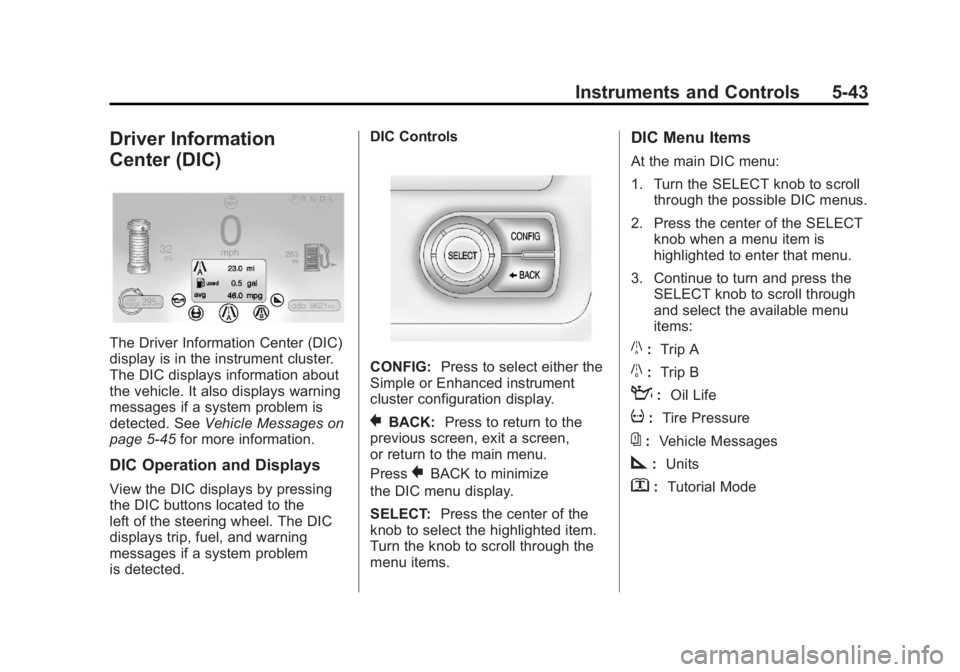
The Driver Information Center (DIC)
display is in the instrument cluster.
The DIC displays information about
the vehicle. It also displays warning
messages if a system problem is
detected. SeeVehicle Messages on
page 5‑45 for more information.
DIC Operation and Displays
View the DIC displays by pressing
the DIC buttons located to the
left of the steering wheel. The DIC
displays trip, fuel, and warning
messages if a system problem
is detected. DIC Controls
CONFIG:
Press to select either the
Simple or Enhanced instrument
cluster configuration display.
}BACK: Press to return to the
previous screen, exit a screen,
or return to the main menu.
Press
}BACK to minimize
the DIC menu display.
SELECT: Press the center of the
knob to select the highlighted item.
Turn the knob to scroll through the
menu items.
DIC Menu Items
At the main DIC menu:
1. Turn the SELECT knob to scroll through the possible DIC menus.
2. Press the center of the SELECT knob when a menu item is
highlighted to enter that menu.
3. Continue to turn and press the SELECT knob to scroll through
and select the available menu
items:
}:Trip A
x:Trip B
:: Oil Life
v:Tire Pressure
{:Vehicle Messages
z:Units
y: Tutorial Mode
Page 164 of 516
Black plate (44,1)Chevrolet Volt Owner Manual - 2011
5-44 Instruments and Controls
Trip A and Trip B
The trip displays show fuel used,
average fuel economy, and distance
traveled since the last trip reset.
Reset the trip data by pressing and
holding the SELECT button when
either Trip A or Trip B is displayed.
Oil Life
This displays the percentage
of remaining oil life. The lower
the percentage, the closer the
vehicle is to needing an oil change.
When the oil life is depleted, the
CHANGE ENGINE OIL SOON
message displays. Change the oil
as soon as possible. Additional
maintenance is also recommended
in the Maintenance Schedule.
SeeScheduled Maintenance on
page 11‑2 andEngine Oil on
page 10‑12. The oil life must be reset after
each oil change. Avoid accidental
resetting of the Engine Oil Life
System. It cannot be reset
accurately until the next oil change.
To reset the Engine Oil Life System,
see
Engine Oil Life System on
page 10‑15. The system is reset
when 100% displays.
Tire Pressure
The display will show a vehicle with
the approximate pressures of all
four tires. Tire pressure is displayed
in either kilopascals (kPa) or in
pounds per square inch (psi).
If a low or high tire pressure is
detected, a message is displayed
advising to check the tire pressure
in the specified tire. See Tire
Pressure on page 10‑54 andTire
Messages on page 5‑52 for more
information.
If the tire pressure display shows
dashes instead of a value, there
may be a problem with the vehicle.
See your dealer for service. Vehicle Messages
Turn the SELECT knob to scroll
through any active warning
messages. Press SELECT
to review the messages.
Units
Turn the SELECT knob to change
the unit display to METRIC or US
when the display is active. Press
SELECT to confirm the setting.
This will change the displays on
the cluster and DIC to either metric
or English (US) measurements.
Tutorial Mode
Select this menu item to view a
screen that explains some of the
unique features of the cluster.
Tutorial mode is only available when
the vehicle is in P (Park).
Page 186 of 516

Black plate (2,1)Chevrolet Volt Owner Manual - 2011
6-2 Lighting
Headlamp High/
Low-Beam Changer
2 3
Headlamp High/Low‐Beam
Changer: Push the turn signal/lane
change lever away from you and
release, to turn the high beams on.
To return to low beams, push the
lever again or pull it toward you
and release.
This indicator light turns on in
the instrument cluster when the
high‐beam headlamps are on.
Flash-to-Pass
The flash‐to‐pass feature works with
the low beams or Daytime Running
Lamps (DRL) on or off.
To flash the high beams, pull the
turn signal/lane change lever toward
you momentarily and then release it.
The Pedestrian Friendly Alert will
also sound if the vehicle is moving
less than 64 km/h (40 mph).
Pedestrian Friendly Alert
While driving at low speeds, such
as in parking lots, use this feature
to alert people who may not hear
your vehicle approaching.
The pedestrian alert is only
available when the vehicle is
moving at less than 64 km/h
(40 mph) or is stopped and is
not in P (Park). To use the pedestrian friendly alert:
Pull the turn signal/lane change
lever all the way toward you
momentarily. See
Exterior
Lamp Controls on page 6‑1 and
Headlamp High/Low-Beam Changer
on page 6‑2. The high‐beam
headlamps and indicator light
will turn on, and a soft‐note
alert will momentarily sound.
When the turn signal/lane change
lever is released, the high‐beam
headlamps and indicator light will
turn off.
Repeat for additional activations of
the pedestrian friendly alert.
Page 187 of 516

Black plate (3,1)Chevrolet Volt Owner Manual - 2011
Lighting 6-3
Daytime Running
Lamps (DRL)
The Daytime Running Lamps (DRL)
system comes on in daylight when
the following conditions are met:
.The vehicle is on.
.The exterior lamp control is in
the automatic position.
.The electric drive unit is not in
P (Park).
.The light sensor determines it is
daytime.A light sensor on top of the
instrument panel makes the DRL
work, so be sure it is not covered.
Fully functional DRL are required on
all vehicles first sold in Canada.When the DRL are on, the taillamps,
sidemarker lamps, instrument panel
lights, and other lamps will not be
on. The instrument cluster will be lit.
When the exterior lamp control band
is turned to the headlamp position,
the low-beam headlamps come on.
The other lamps that come on with
the headlamps will also come on.
When the vehicle is on and you are
stopped, the DRL can be turned off
by moving the shift lever to P (Park).
The DRL will stay off until the shift
lever is moved out of the P (Park)
position.
The regular headlamp system
should be turned on when needed.
Page 188 of 516
Black plate (4,1)Chevrolet Volt Owner Manual - 2011
6-4 Lighting
Hazard Warning Flashers
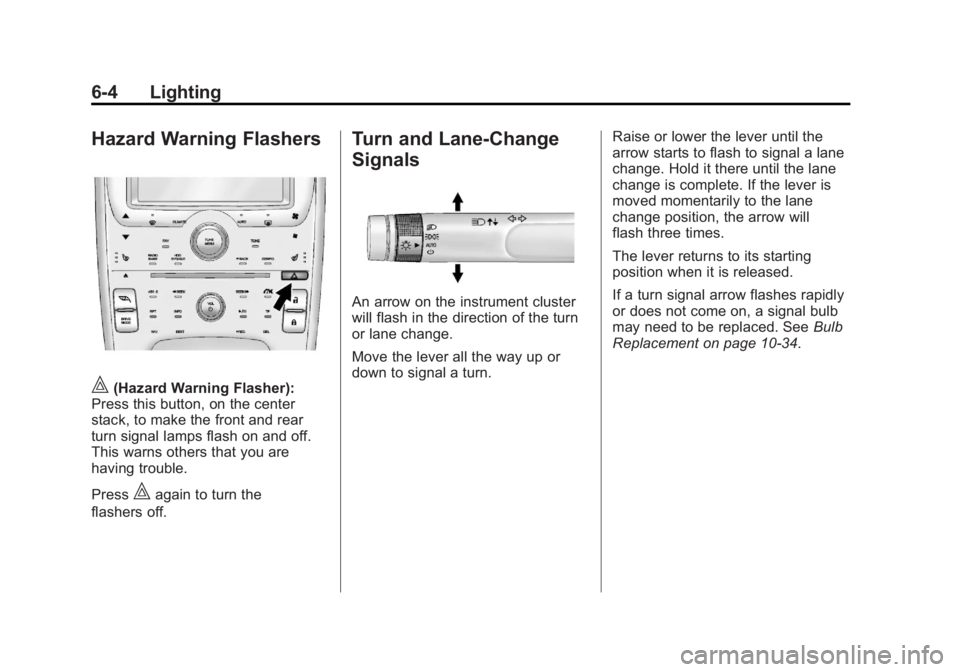
|(Hazard Warning Flasher):
Press this button, on the center
stack, to make the front and rear
turn signal lamps flash on and off.
This warns others that you are
having trouble.
Press
|again to turn the
flashers off.
Turn and Lane-Change
Signals
An arrow on the instrument cluster
will flash in the direction of the turn
or lane change.
Move the lever all the way up or
down to signal a turn. Raise or lower the lever until the
arrow starts to flash to signal a lane
change. Hold it there until the lane
change is complete. If the lever is
moved momentarily to the lane
change position, the arrow will
flash three times.
The lever returns to its starting
position when it is released.
If a turn signal arrow flashes rapidly
or does not come on, a signal bulb
may need to be replaced. See
Bulb
Replacement on page 10‑34.
Page 189 of 516

Black plate (5,1)Chevrolet Volt Owner Manual - 2011
Lighting 6-5
Interior Lighting
Instrument Panel
Illumination Control
The brightness of the instrument
panel cluster display, infotainment
display and controls, steering wheel
controls, and all other illuminated
controls, as well as feature status
indicators can be adjusted.The thumbwheel is on the
instrument panel to the left
of the steering column.
Move the thumbwheel up or down to
brighten or dim the lights.
Dome Lamps
The dome lamp controls are in the
overhead console.
To operate, press the following
buttons:
+(On):
Press to turn on the
dome lamps.
1(Door): Press to turn the lamps
on automatically when a door is
opened.
*(Off): Press to turn the lamps
off, even when a door is open.
Reading Lamps
The front reading lamps are in the
overhead console.
# $: Press to turn each lamp on
or off.
Lighting Features
Entry Lighting
The headlamps, parking lamps,
taillamps, back‐up lamps, and the
interior lights turn on briefly, when
the Remote Keyless Entry (RKE)
transmitter
Kis pressed. The lights
turn off immediately when the
POWER
Obutton is pressed or
automatically after a brief period.
Page 304 of 516
Black plate (2,1)Chevrolet Volt Owner Manual - 2011
9-2 Driving and Operating
Fuel
Fuel . . . . . . . . . . . . . . . . . . . . . . . . . 9-57
Gasoline Specifications (U.S.and Canada Only) . . . . . . . . . . 9-58
California Fuel Requirements . . . . . . . . . . . . . . 9-58
Fuels in Foreign Countries . . . 9-58
Fuel Additives . . . . . . . . . . . . . . . 9-59
Filling the Tank . . . . . . . . . . . . . . 9-60
Filling a Portable Fuel Container . . . . . . . . . . . . . . . . . . . 9-62
Towing
General TowingInformation . . . . . . . . . . . . . . . . . 9-62
Conversions and Add-Ons
Add-On ElectricalEquipment . . . . . . . . . . . . . . . . . 9-63
Driving Information
Driving for Better Energy
Efficiency
Use the following tips to help
maximize energy efficiency
and range.
Driving Style
Efficiency Gauge
(Instrument Cluster)
The ball indicator should be kept
green and in the center of the
gauge.
Inefficient acceleration is indicated
when the ball turns yellow and
travels above the center of the
gauge.
Aggressive braking is indicated
when the ball turns yellow and
travels below the center of the
gauge. Acceleration/Braking/Coasting
Avoid unnecessary rapid
accelerations and decelerations.
Electric range is maximized at
80 km/h (50 mph) and below.
Higher speeds use more energy
and can significantly reduce
electric range.
Use cruise control when
appropriate.
Plan ahead for decelerations
and coast whenever possible.
For example, do not rush to
traffic signals.
Do not shift to N (Neutral) to coast.
The vehicle recovers energy while
coasting and braking in D (Drive)
or L (Low).
Page 321 of 516
Black plate (19,1)Chevrolet Volt Owner Manual - 2011
Driving and Operating 9-19
on. The flashing light will eventually
time out. The POWER
Obutton
light is on steady when in ON/RUN
power mode. When the vehicle is
turned off, the POWER
Obutton
light will turn off.
The Remote Keyless Entry (RKE)
transmitter must be in the vehicle
for the system to operate. If the
vehicle will not start, place the RKE
transmitter in the transmitter slot.
See Remote Keyless Entry (RKE)
System Operation on page 2‑3.
ON/RUN: This position is for
driving and starting. With the vehicle
off, and the brake pedal applied,
pressing the POWER
Obutton once
will place the vehicle in ON/RUN.
The instrument cluster displays an
active fuel or battery gauge, along
with an audio startup cue, when
the vehicle is ready to be driven.
This could take up to 15 seconds
at extremely cold temperatures. The engine will only start if needed.
If the vehicle did not start, the
instrument cluster will display a
screen with inactive fuel and battery
gauges. See
Starting and Stopping
the Vehicle on page 9‑20.
Service Only Mode
This power mode is available for
service and diagnostics, and to
verify the proper operation of
the MIL as may be required for
emission inspection purposes.
With the vehicle off, and the brake
pedal not applied, pressing and
holding the POWER
Obutton for
more than 5 seconds will place
the vehicle in Service Only Mode.
The instruments and audio systems
will operate as they do in ON/RUN,
but the vehicle will not be able to be
driven. The propulsion system will
not start in Service Only Mode. STOPPING THE VEHICLE/OFF:
To turn the vehicle off, push the
POWER
Obutton with the vehicle
in P (Park). Retained Accessory
Power (RAP) will remain active
until the driver door is opened.
See Retained Accessory Power
(RAP) on page 9‑22. When turning
off the vehicle, if the vehicle is not
in P (Park), the vehicle will go to
ACC/ACCESSORY and display the
message SHIFT TO PARK in the
Driver Information Center (DIC).
See Electric Drive Unit Messages
on page 5‑47.
In an emergency, if the vehicle must
be stopped while driving:
1. Brake using a firm and steady pressure. Do not pump the
brakes repeatedly. This may
deplete power assist, requiring
increased brake pedal force.