ESP CHEVROLET VOLT 2011 Owner's Guide
[x] Cancel search | Manufacturer: CHEVROLET, Model Year: 2011, Model line: VOLT, Model: CHEVROLET VOLT 2011Pages: 516, PDF Size: 6.61 MB
Page 271 of 516
Black plate (81,1)Chevrolet Volt Owner Manual - 2011
Infotainment System 7-81
General Navigation Commands
Feedback on, feedback off:
This command instructs the
system to turn on and off the
voice recognition feedback.
When feedback is ON, the system
responds to commands with a talk
back phrase. When feedback is
OFF, the system responds to
commands with a chime.
Navigation voice (guidance) on,
navigation voice (guidance) off:
This command instructs the system
to turn on and off voice guidance
prompts during route guidance.
Cancel:This instructs the system
to cancel the command.
Point of Interest (POI)
Commands
The following is a list of POI
commands. POIs only display on
the map screen if the map scale
is 800 m (0.50 mi) or less. If POIs
display on a map with the wrong
scale, the system reminds that this
cannot be done. The available POI
commands are:
Navigation show gas station(s),
navigation show gas, navigation
hide gas station(s), navigation
hide gas: These commands
instruct the system to display and
hide gas station POIs on the map
screen.
Navigation show restaurant(s),
navigation show dining,
navigation hide restaurant(s),
navigation hide dining: These
commands instruct the system to
display and hide restaurant POIs
on the map screen. Navigation show ATM(s),
navigation hide ATM(s):
These
commands instruct the system to
display and hide ATM POIs on the
map screen.
Navigation show hotel(s),
navigation hide hotel(s): These
commands instruct the system to
display and hide hotel POIs on the
map screen.
Navigation show airport(s),
navigation hide airport(s): These
commands instruct the system to
display and hide airport POIs on the
map screen.
Navigation show shop(s),
navigation show shopping,
navigation hide shop(s),
navigation hide shopping: These
commands instruct the system to
display and hide shopping POIs on
the map screen.
Page 276 of 516
Black plate (86,1)Chevrolet Volt Owner Manual - 2011
7-86 Infotainment System
Using Voice Recognition
To use voice recognition, press thebgbutton on the steering wheel.
The system responds with a tone.
After the tone say “Hands Free”to
use the Bluetooth voice recognition
system. The system then responds
with “Ready,” followed by a tone.
After the tone, say a command.
For additional information say
“Help” while you are in a voice
recognition menu.
Pairing a Phone
1. Press
b g. Say “Hands Free”
after the tone.
2. Say “Bluetooth.”
3. Say “Pair.”The system responds
with instructions and a four‐digit
Personal Identification Number
(PIN). The PIN is used in Step 5. 4. Start the pairing process on the
cell phone that you want to pair.
For help with this process, see
your cell phone manufacturer's
user guide.
5. Locate the device named “Your
Vehicle” in the list on the cell
phone. Follow the instructions
on the cell phone to enter the
PIN that was provided in Step 3.
After the PIN is successfully
entered, the system prompts you
to provide a name for the paired
cell phone. This name will be
used to indicate which phones
are paired and connected to the
vehicle. See “Listing All Paired
and Connected Phones” later in
this section for more information.
6. Repeat Steps 1 through 5 to pair additional phones. Listing All Paired and Connected
Phones
The system can list all cell phones
paired to it. If a paired cell phone is
also connected to the vehicle, the
system responds with
“is connected”
after that phone name.
1. Press
b g. Say “Hands Free”
after the tone.
2. Say “Bluetooth.”
3. Say “List.”
Deleting a Paired Phone
If the phone name you want to
delete is unknown, see “Listing All
Paired and Connected Phones.”
1. Press
b g. Say “Hands Free”
after the tone.
2. Say “Bluetooth.”
3. Say “Delete.” The system asks
for which phone to delete.
4. Say the name of the phone you want to delete.
Page 277 of 516
Black plate (87,1)Chevrolet Volt Owner Manual - 2011
Infotainment System 7-87
Connecting to a Different Phone
To connect to a different cell phone,
the Bluetooth system looks for the
next available cell phone in the
order in which all available cell
phones were paired. Depending
on which cell phone you want to
connect to, you may have to use
this command several times.
1. Press
bg. Say “Hands Free”
after the tone.
2. Say “Bluetooth.”
3. Say “Change phone.”
.If another cell phone is
found, the response will
be“
connected.”
.If another cell phone is not
found, the original phone
remains connected.
Storing and Deleting Phone
Numbers
The system can store up to
30 phone numbers as name tags
in the Hands-Free Directory that is
shared between the Bluetooth and
OnStar systems.
The following commands are used
to delete and store phone numbers.
Store: This command will store
a phone number, or a group of
numbers as a name tag.
Digit Store: This command allows
a phone number to be stored as a
name tag by entering the digits one
at a time.
Delete: This command is used to
delete individual name tags.
Delete All Name Tags: This
command deletes all stored
name tags in the Hands-Free
Calling Directory and the OnStar
Turn-by-Turn Destinations Directory. Using the
“Store”Command
1. Pressb g. Say “Hands Free”
after the tone.
2. Say “Store.”
3. Say the phone number or group of numbers to store all at once
with no pauses, then follow the
directions given by the system to
save a name tag for this number.
Using the “Digit Store” Command
If an unwanted number is
recognized by the system, say
“Clear” at any time to clear the
last number.
To hear all of the numbers
recognized by the system,
say “Verify” at any time.
1. Press
b g. Say “Hands Free”
after the tone.
2. Say “Digit Store.”
Page 281 of 516
Black plate (91,1)Chevrolet Volt Owner Manual - 2011
Infotainment System 7-91
Voice Pass-Thru
Voice pass‐thru allows access to
the voice recognition commands on
the cell phone. See your cell phone
manufacturer's user guide to see if
the cell phone supports this feature.
To access contacts stored in the cell
phone:
1. Press
bg. Say “Hands Free”
after the tone.
2. Say “Bluetooth.” The system
responds “Bluetooth ready,”
followed by a tone.
3. Say “Voice.” The system
responds “OK, accessing
The cell phone's normal prompt
messages will go through their
cycle according to the phone's
operating instructions.
Dual Tone Multi-Frequency
(DTMF) Tones
The Bluetooth system can send
numbers and numbers stored as
name tags during a call. Use this
feature when calling a menu-driven
phone system. Account numbers
can also be stored for use.
Sending a Number or Name Tag
During a Call
1. Press
b g. The system
responds “Ready,”followed
by a tone.
2. Say “Dial.”
3. Say the number or name tag to send.
Clearing the System
Unless information is deleted out
of the in‐vehicle Bluetooth system,
it will be retained indefinitely.
This includes all saved name tags in
the phone book and phone pairing
information. For information on how
to delete this information, see the
previous sections on “Deleting a
Paired Phone” and“Storing and
Deleting Phone Numbers.”
Page 282 of 516
Black plate (92,1)Chevrolet Volt Owner Manual - 2011
7-92 Infotainment System
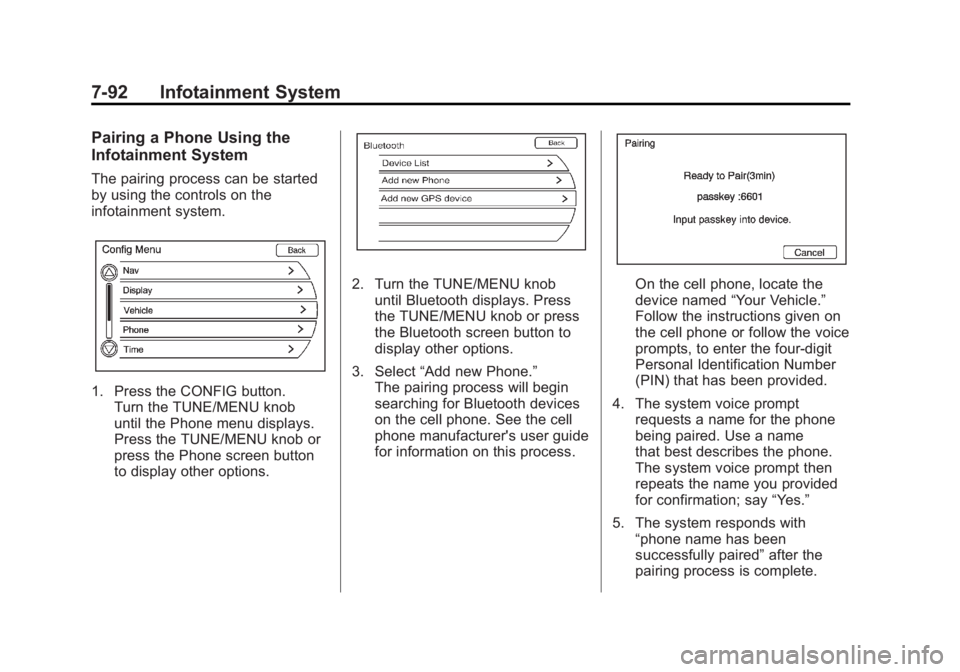
Pairing a Phone Using the
Infotainment System
The pairing process can be started
by using the controls on the
infotainment system.
1. Press the CONFIG button.Turn the TUNE/MENU knob
until the Phone menu displays.
Press the TUNE/MENU knob or
press the Phone screen button
to display other options.
2. Turn the TUNE/MENU knobuntil Bluetooth displays. Press
the TUNE/MENU knob or press
the Bluetooth screen button to
display other options.
3. Select “Add new Phone.”
The pairing process will begin
searching for Bluetooth devices
on the cell phone. See the cell
phone manufacturer's user guide
for information on this process.On the cell phone, locate the
device named “Your Vehicle.”
Follow the instructions given on
the cell phone or follow the voice
prompts, to enter the four-digit
Personal Identification Number
(PIN) that has been provided.
4. The system voice prompt requests a name for the phone
being paired. Use a name
that best describes the phone.
The system voice prompt then
repeats the name you provided
for confirmation; say “Yes.”
5. The system responds with “phone name has been
successfully paired” after the
pairing process is complete.
Page 300 of 516
Black plate (8,1)Chevrolet Volt Owner Manual - 2011
8-8 Climate Controls
Rear Window Defogger
=(Rear Window Defogger):
Press to turn the rear window
defogger on or off.
The rear window defogger
turns off automatically after about
five minutes. If turned on again,
it runs for about five minutes
before turning off. The defogger
can also be turned off by turning
the vehicle off.
For vehicles with heated outside
rearview mirrors, they turn on when
the rear window defogger button
is on and help to clear fog or frost
from the surface of the mirror.
See Heated Mirrors on page 2‑16. Notice:
Do not try to clear frost
or other material from the inside
of the front windshield and rear
window with a razor blade or
anything else that is sharp.
This may damage the rear
window defogger grid and affect
the radio's ability to pick up
stations clearly. The repairs
wouldn't be covered by the
vehicle warranty.
Remote Start: For vehicles with
this feature, the climate control
system may be started by using
the Remote Keyless Entry (RKE)
transmitter. The climate control
system will default to an appropriate
heating or cooling mode.
See Remote Start on page 2‑8.
The rear window defogger turns on
if it is cold outside.
Compressor
The vehicle has an electric powered
air conditioning compressor.
This allows for continuous air
conditioning and/or high voltage
battery cooling operation, without
running the engine.
The compressor operating speed
is not tied to the engine speed, so
some noise may be heard from the
compressor, especially when air
conditioning use is high and the
engine has turned off. This is
normal.
Page 305 of 516
Black plate (3,1)Chevrolet Volt Owner Manual - 2011
Driving and Operating 9-3
Drive Mode and PRNDL Selection
Use Normal Mode when possible.
Sport Mode provides more
responsive acceleration than
Normal Mode but can reduce
efficiency.
Use Mountain Mode prior to
climbing long, steep grades in
mountainous areas. Be sure to
engage Mountain Mode before
starting to climb. Mountain Mode
reduces electric range and power
but may be needed to maintain
speeds above 96 km/h (60 mph)
when climbing grades of 5% or
greater.
Use L (Low) in heavy stop‐and‐go
traffic or when traveling downhill.
L (Low) requires less brake
pedal application and provides
a controlled, efficient way to
slow the vehicle down.Climate Setting
Using the heat and air conditioning
systems decreases the energy
available for electric driving.
Optimal energy efficiency is
achieved with the heat, air
conditioning, and fan turned off.
Less energy is used at low fan
speeds. When using the fan:
.Fan Only is the most energy
efficient climate setting as long
as
0is not selected.
.ECO is for moderate air
conditioning and heater
operation and is the next
most energy efficient setting as
long as
0is not selected.
.Comfort provides the most
comfort but is the least energy
efficient.
Use the auto heated seat feature
instead of climate settings. Heating
the seat uses less energy than
heating the vehicle interior. Use remote start to heat or cool the
interior when the vehicle is plugged
in to maximize the electric range by
utilizing electricity from the electrical
outlet.
In hot weather, avoid parking in
direct sunlight or use sunshades
inside the vehicle.
Turn off the front and rear window
defog/defrost when they are no
longer needed.
Avoid driving with the windows open
at highway speeds.
Vehicle Charging/Maintenance
Charging
Keep the vehicle plugged in, even
when fully charged, to keep the
battery temperature ready for the
next drive. This is important when
outside temperatures are extremely
hot or cold.
Page 307 of 516
Black plate (5,1)Chevrolet Volt Owner Manual - 2011
Driving and Operating 9-5
Alcohol affects four things that
anyone needs to drive a vehicle:
judgment, muscular coordination,
vision, and attentiveness.
Police records show that
almost 40 percent of all motor
vehicle-related deaths involve
alcohol. In most cases, these
deaths are the result of someone
who was drinking and driving.
In recent years, more than
17,000 annual motor vehicle-related
deaths have been associated with
the use of alcohol, with about
250,000 people injured.
For persons under 21, it is against
the law in every U.S. state to drink
alcohol. There are good medical,
psychological, and developmental
reasons for these laws.
The obvious way to eliminate the
leading highway safety problem is
for people never to drink alcohol
and then drive.Medical research shows that
alcohol in a person's system
can make crash injuries worse,
especially injuries to the brain,
spinal cord, or heart. This means
that when anyone who has been
drinking
—driver or passenger —is
in a crash, that person's chance of
being killed or permanently disabled
is higher than if the person had not
been drinking.
Control of a Vehicle
The following three systems
help to control the vehicle while
driving —brakes, steering, and
accelerator. At times, as when
driving on snow or ice, it is easy to
ask more of those control systems
than the tires and road can provide.
Meaning, you can lose control of the
vehicle.
Adding non‐dealer accessories
can affect vehicle performance.
See Accessories and Modifications
on page 10‑4.
Braking
See Brake System Warning Light on
page 5‑24.
Braking action involves perception
time and reaction time. Deciding to
push the brake pedal is perception
time. Actually doing it is
reaction time.
Average reaction time is about
three‐fourths of a second. But that
is only an average. It might be less
with one driver and as long as two
or three seconds or more with
another. Age, physical condition,
alertness, coordination, and
eyesight all play a part. So do
alcohol, drugs, and frustration.
But even in three‐fourths of a
second, a vehicle moving at
100 km/h (60 mph) travels 20 m
(66 ft). That could be a lot of
distance in an emergency, so
keeping enough space between
the vehicle and others is important.
Page 310 of 516
Black plate (8,1)Chevrolet Volt Owner Manual - 2011
9-8 Driving and Operating
Off-Road Recovery
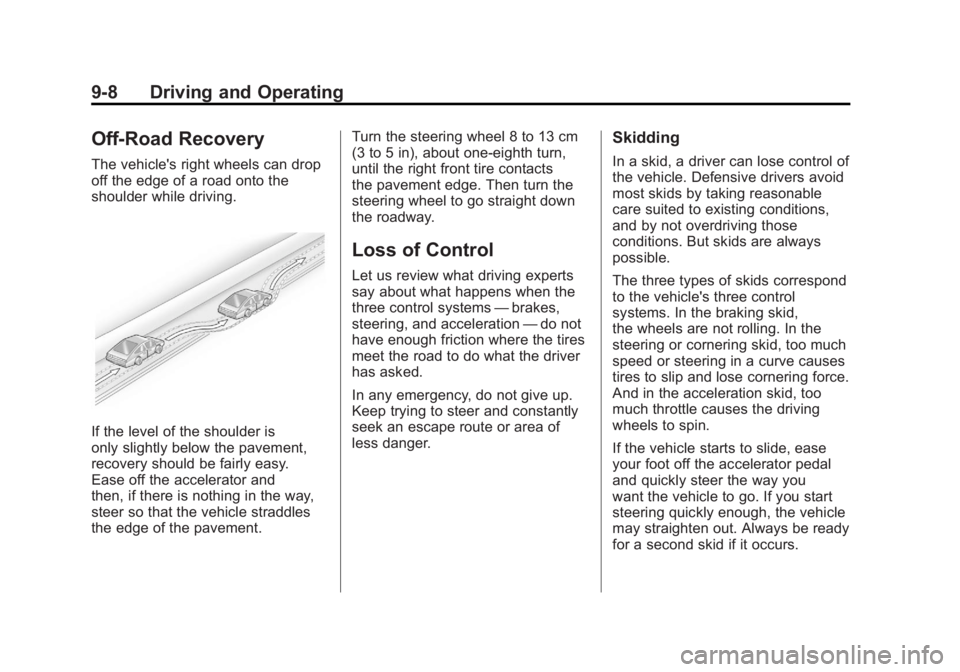
The vehicle's right wheels can drop
off the edge of a road onto the
shoulder while driving.
If the level of the shoulder is
only slightly below the pavement,
recovery should be fairly easy.
Ease off the accelerator and
then, if there is nothing in the way,
steer so that the vehicle straddles
the edge of the pavement.Turn the steering wheel 8 to 13 cm
(3 to 5 in), about one-eighth turn,
until the right front tire contacts
the pavement edge. Then turn the
steering wheel to go straight down
the roadway.
Loss of Control
Let us review what driving experts
say about what happens when the
three control systems
—brakes,
steering, and acceleration —do not
have enough friction where the tires
meet the road to do what the driver
has asked.
In any emergency, do not give up.
Keep trying to steer and constantly
seek an escape route or area of
less danger.
Skidding
In a skid, a driver can lose control of
the vehicle. Defensive drivers avoid
most skids by taking reasonable
care suited to existing conditions,
and by not overdriving those
conditions. But skids are always
possible.
The three types of skids correspond
to the vehicle's three control
systems. In the braking skid,
the wheels are not rolling. In the
steering or cornering skid, too much
speed or steering in a curve causes
tires to slip and lose cornering force.
And in the acceleration skid, too
much throttle causes the driving
wheels to spin.
If the vehicle starts to slide, ease
your foot off the accelerator pedal
and quickly steer the way you
want the vehicle to go. If you start
steering quickly enough, the vehicle
may straighten out. Always be ready
for a second skid if it occurs.
Page 314 of 516
Black plate (12,1)Chevrolet Volt Owner Manual - 2011
9-12 Driving and Operating
Blizzard Conditions
Being stuck in snow can be
a serious situation. Stay with
the vehicle unless there is help
nearby. If possible, use the
Roadside Assistance Program.
To get help and keep everyone
in the vehicle safe:
.Turn on the hazard warning
flashers.
.Tie a red cloth to an outside
mirror.
{WARNING
Snow can trap engine exhaust
under the vehicle. This may
cause exhaust gases to get
inside. Engine exhaust contains
Carbon Monoxide (CO) which
cannot be seen or smelled. It can
cause unconsciousness and even
death.(Continued)
WARNING (Continued)
If the vehicle is stuck in the snow:
.Clear away snow from
around the base of the
vehicle, especially any that
is blocking the exhaust pipe.
.Check again from time to
time to be sure snow does
not collect there.
.Open a window about 5 cm
(2 in) on the side of the
vehicle that is away from
the wind to bring in fresh air.
.Fully open the air outlets
on or under the instrument
panel.
.Adjust the climate control
system to a setting that
circulates the air inside
the vehicle and set the fan
speed to the highest setting.
See Climate Control Systems
in the Index.(Continued)
WARNING (Continued)
For more information about
carbon monoxide, see Engine
Exhaust on page 9‑30.
To conserve energy, run the
vehicle for only short periods as
needed to warm the vehicle and
then shut the vehicle off and close
the window most of the way to
save heat. Repeat this until help
arrives but only when you feel really
uncomfortable from the cold. Moving
about to keep warm also helps.
If it takes some time for help to
arrive, start the vehicle. The engine
may start to charge the 12‐volt
battery. Turn off unnecessary
accessories to conserve energy.