mirror CHEVROLET VOLT 2011 Owner's Manual
[x] Cancel search | Manufacturer: CHEVROLET, Model Year: 2011, Model line: VOLT, Model: CHEVROLET VOLT 2011Pages: 516, PDF Size: 6.61 MB
Page 1 of 516
Black plate (1,1)Chevrolet Volt Owner Manual - 2011
2011 Chevrolet Volt Owner ManualM
In Brief. . . . . . . . . . . . . . . . . . . . . . . . 1-1
Instrument Panel . . . . . . . . . . . . . . 1-2
Initial Drive Information . . . . . . . . 1-4
Vehicle Features . . . . . . . . . . . . . 1-15
Battery and Efficiency . . . . . . . . 1-18
Performance and
Maintenance . . . . . . . . . . . . . . . . 1-23
Keys, Doors and Windows . . . 2-1
Keys and Locks . . . . . . . . . . . . . . . 2-2
Doors . . . . . . . . . . . . . . . . . . . . . . . . 2-12
Vehicle Security . . . . . . . . . . . . . . 2-13
Exterior Mirrors . . . . . . . . . . . . . . . 2-15
Interior Mirrors . . . . . . . . . . . . . . . . 2-16
Windows . . . . . . . . . . . . . . . . . . . . . 2-16
Seats and Restraints . . . . . . . . . 3-1
Head Restraints . . . . . . . . . . . . . . . 3-2
Front Seats . . . . . . . . . . . . . . . . . . . . 3-4
Rear Seats . . . . . . . . . . . . . . . . . . . . 3-8
Safety Belts . . . . . . . . . . . . . . . . . . 3-10
Airbag System . . . . . . . . . . . . . . . . 3-25
Child Restraints . . . . . . . . . . . . . . 3-41 Storage
. . . . . . . . . . . . . . . . . . . . . . . 4-1
Storage Compartments . . . . . . . . 4-1
Additional Storage Features . . . 4-2
Instruments and Controls . . . . 5-1
Instrument Panel Overview . . . . 5-4
Controls . . . . . . . . . . . . . . . . . . . . . . . 5-6
Warning Lights, Gauges, and
Indicators . . . . . . . . . . . . . . . . . . . . 5-9
Information Displays . . . . . . . . . . 5-31
Vehicle Messages . . . . . . . . . . . . 5-45
Vehicle Personalization . . . . . . . 5-53
Universal Remote System . . . . 5-60
Lighting . . . . . . . . . . . . . . . . . . . . . . . 6-1
Exterior Lighting . . . . . . . . . . . . . . . 6-1
Interior Lighting . . . . . . . . . . . . . . . . 6-5
Lighting Features . . . . . . . . . . . . . . 6-5
Infotainment System . . . . . . . . . 7-1
Introduction . . . . . . . . . . . . . . . . . . . . 7-2
Radio . . . . . . . . . . . . . . . . . . . . . . . . . 7-10
Audio Players . . . . . . . . . . . . . . . . 7-18 Navigation . . . . . . . . . . . . . . . . . . . . 7-39
Voice Recognition . . . . . . . . . . . . 7-77
Phone . . . . . . . . . . . . . . . . . . . . . . . . 7-85
Climate Controls . . . . . . . . . . . . . 8-1
Climate Control Systems . . . . . . 8-1
Air Vents . . . . . . . . . . . . . . . . . . . . . . . 8-9
Driving and Operating . . . . . . . . 9-1
Driving Information . . . . . . . . . . . . . 9-2
Starting and Operating . . . . . . . 9-18
Electric Vehicle Operating Modes . . . . . . . . . . . . . . . . . . . . . . 9-24
Engine Exhaust . . . . . . . . . . . . . . 9-30
Electric Drive Unit . . . . . . . . . . . . 9-32
Brakes . . . . . . . . . . . . . . . . . . . . . . . 9-33
Ride Control Systems . . . . . . . . 9-37
Cruise Control . . . . . . . . . . . . . . . . 9-40
Object Detection Systems . . . . 9-43
Charging . . . . . . . . . . . . . . . . . . . . . 9-49
Fuel . . . . . . . . . . . . . . . . . . . . . . . . . . 9-57
Towing . . . . . . . . . . . . . . . . . . . . . . . 9-62
Conversions and Add-Ons . . . 9-63
Page 7 of 516
Black plate (1,1)Chevrolet Volt Owner Manual - 2011
In Brief 1-1
In Brief
Instrument Panel
Instrument Panel . . . . . . . . . . . . . . 1-2
Initial Drive Information
Initial Drive Information . . . . . . . . 1-4
Remote Keyless Entry (RKE)System . . . . . . . . . . . . . . . . . . . . . . 1-4
Remote Start . . . . . . . . . . . . . . . . . . 1-5
Door Locks . . . . . . . . . . . . . . . . . . . 1-5
Windows . . . . . . . . . . . . . . . . . . . . . . 1-6
Seat Adjustment . . . . . . . . . . . . . . 1-6
Heated Seats . . . . . . . . . . . . . . . . . 1-8
Head Restraint Adjustment . . . . 1-9
Safety Belts . . . . . . . . . . . . . . . . . . . 1-9
Sensing System for Passenger Airbag . . . . . . . . . . 1-10
Mirror Adjustment . . . . . . . . . . . . 1-10
Steering Wheel Adjustment . . . . . . . . . . . . . . . . . 1-11 Interior Lighting . . . . . . . . . . . . . . 1-11
Exterior Lighting . . . . . . . . . . . . . 1-11
Windshield Wiper/Washer . . . . 1-12
Climate Controls . . . . . . . . . . . . . 1-13
Vehicle Features
Radio(s) . . . . . . . . . . . . . . . . . . . . . 1-15
Satellite Radio . . . . . . . . . . . . . . . 1-15
Portable Audio Devices . . . . . . 1-15
Bluetooth
®. . . . . . . . . . . . . . . . . . . 1-16
Steering Wheel Controls . . . . . 1-16
Cruise Control . . . . . . . . . . . . . . . 1-17
Navigation System . . . . . . . . . . . 1-17
Power Outlets . . . . . . . . . . . . . . . 1-17
Battery and Efficiency
High Voltage Safety Information . . . . . . . . . . . . . . . . . 1-18
Charging . . . . . . . . . . . . . . . . . . . . . 1-18
Fueling . . . . . . . . . . . . . . . . . . . . . . 1-21
Total Vehicle Range . . . . . . . . . 1-22
Regenerative Braking . . . . . . . . 1-22
Service . . . . . . . . . . . . . . . . . . . . . . 1-23
Performance and Maintenance
Traction Control System (TCS) . . . . . . . . . . . . . . 1-23
Electronic Stability Control (ESC) . . . . . . . . . . . . . . 1-23
Tire Pressure Monitor . . . . . . . . 1-23
Tire Sealant and
Compressor Kit . . . . . . . . . . . . . 1-24
Engine Oil Life System . . . . . . 1-24
Driving for Better Energy Efficiency . . . . . . . . . . . . . . . . . . . 1-25
Roadside Assistance Program . . . . . . . . . . . . . . . . . . . . 1-27
OnStar
®. . . . . . . . . . . . . . . . . . . . . 1-27
Page 16 of 516
Black plate (10,1)Chevrolet Volt Owner Manual - 2011
1-10 In Brief
Sensing System for
Passenger Airbag
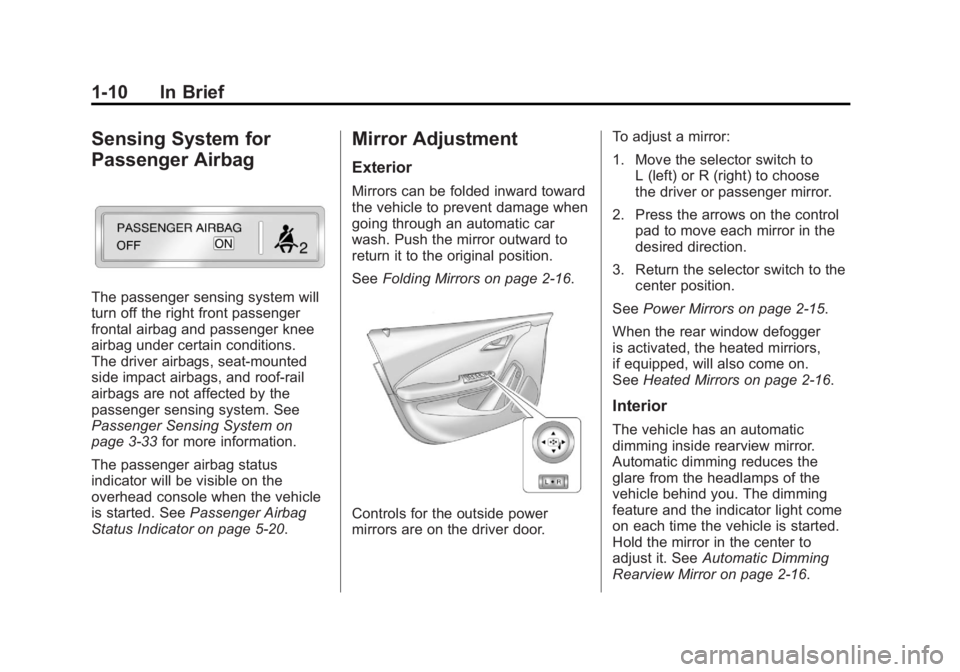
The passenger sensing system will
turn off the right front passenger
frontal airbag and passenger knee
airbag under certain conditions.
The driver airbags, seat‐mounted
side impact airbags, and roof‐rail
airbags are not affected by the
passenger sensing system. See
Passenger Sensing System on
page 3‑33for more information.
The passenger airbag status
indicator will be visible on the
overhead console when the vehicle
is started. See Passenger Airbag
Status Indicator on page 5‑20.
Mirror Adjustment
Exterior
Mirrors can be folded inward toward
the vehicle to prevent damage when
going through an automatic car
wash. Push the mirror outward to
return it to the original position.
See Folding Mirrors on page 2‑16.
Controls for the outside power
mirrors are on the driver door. To adjust a mirror:
1. Move the selector switch to
L (left) or R (right) to choose
the driver or passenger mirror.
2. Press the arrows on the control pad to move each mirror in the
desired direction.
3. Return the selector switch to the center position.
See Power Mirrors on page 2‑15.
When the rear window defogger
is activated, the heated mirriors,
if equipped, will also come on.
See Heated Mirrors on page 2‑16.
Interior
The vehicle has an automatic
dimming inside rearview mirror.
Automatic dimming reduces the
glare from the headlamps of the
vehicle behind you. The dimming
feature and the indicator light come
on each time the vehicle is started.
Hold the mirror in the center to
adjust it. See Automatic Dimming
Rearview Mirror on page 2‑16.
Page 37 of 516
Black plate (1,1)Chevrolet Volt Owner Manual - 2011
Keys, Doors and Windows 2-1
Keys, Doors and
Windows
Keys and Locks
Keys . . . . . . . . . . . . . . . . . . . . . . . . . . 2-2
Remote Keyless Entry (RKE)System . . . . . . . . . . . . . . . . . . . . . . 2-3
Remote Keyless Entry (RKE) System Operation . . . . . . . . . . . 2-3
Remote Start . . . . . . . . . . . . . . . . . . 2-8
Door Locks . . . . . . . . . . . . . . . . . . 2-10
Power Door Locks . . . . . . . . . . . 2-11
Delayed Locking . . . . . . . . . . . . . 2-11
Automatic Door Locks . . . . . . . 2-11
Lockout Protection . . . . . . . . . . . 2-11
Safety Locks . . . . . . . . . . . . . . . . . 2-12
Doors
Hatch . . . . . . . . . . . . . . . . . . . . . . . . 2-12
Vehicle Security
Vehicle Security . . . . . . . . . . . . . . 2-13
Anti-theft Alarm System . . . . . . 2-13
Immobilizer . . . . . . . . . . . . . . . . . . 2-14
Immobilizer Operation . . . . . . . 2-14
Exterior Mirrors
Convex Mirrors . . . . . . . . . . . . . . 2-15
Power Mirrors . . . . . . . . . . . . . . . . 2-15
Folding Mirrors . . . . . . . . . . . . . . . 2-16
Heated Mirrors . . . . . . . . . . . . . . . 2-16
Interior Mirrors
Automatic Dimming Rearview Mirror . . . . . . . . . . . . . . . . . . . . . . . 2-16
Windows
Windows . . . . . . . . . . . . . . . . . . . . . 2-16
Power Windows . . . . . . . . . . . . . 2-17
Sun Visors . . . . . . . . . . . . . . . . . . . 2-19
Page 51 of 516
Black plate (15,1)Chevrolet Volt Owner Manual - 2011
Keys, Doors and Windows 2-15
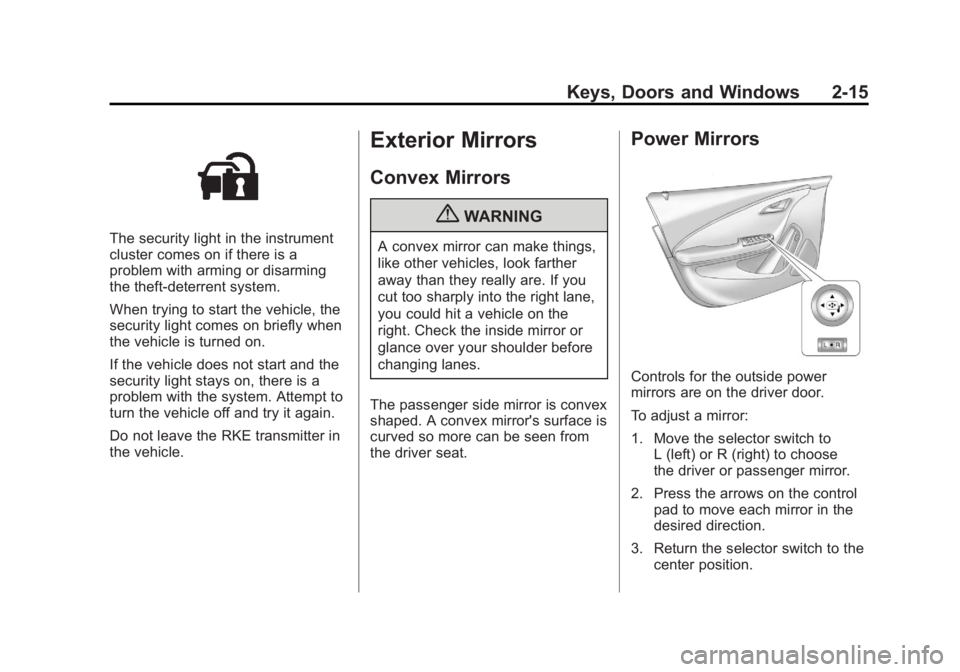
The security light in the instrument
cluster comes on if there is a
problem with arming or disarming
the theft-deterrent system.
When trying to start the vehicle, the
security light comes on briefly when
the vehicle is turned on.
If the vehicle does not start and the
security light stays on, there is a
problem with the system. Attempt to
turn the vehicle off and try it again.
Do not leave the RKE transmitter in
the vehicle.
Exterior Mirrors
Convex Mirrors
{WARNING
A convex mirror can make things,
like other vehicles, look farther
away than they really are. If you
cut too sharply into the right lane,
you could hit a vehicle on the
right. Check the inside mirror or
glance over your shoulder before
changing lanes.
The passenger side mirror is convex
shaped. A convex mirror's surface is
curved so more can be seen from
the driver seat.
Power Mirrors
Controls for the outside power
mirrors are on the driver door.
To adjust a mirror:
1. Move the selector switch to L (left) or R (right) to choose
the driver or passenger mirror.
2. Press the arrows on the control pad to move each mirror in the
desired direction.
3. Return the selector switch to the center position.
Page 52 of 516

Black plate (16,1)Chevrolet Volt Owner Manual - 2011
2-16 Keys, Doors and Windows
Folding Mirrors
Manual Foldaway Mirrors
The mirrors can be folded inward
toward the vehicle to prevent
damage when going through an
automatic car wash. Push the
mirror outward to return it to the
original position.
Heated Mirrors
The vehicle may have heated
mirrors.
=(Rear Window Defogger):
Press to heat the outside rearview
mirrors. See “Rear Window
Defogger” underAutomatic Climate
Control System on page 8‑1 for
more information.
Interior Mirrors
Automatic Dimming
Rearview Mirror
The vehicle has an automatic
dimming inside rearview mirror.
Automatic dimming reduces the
glare from the headlamps of the
vehicle behind you. The dimming
feature and the indicator light come
on each time the vehicle is started.
Hold the mirror in the center to
adjust it.
Cleaning the Mirror
Do not spray glass cleaner directly
on the mirror. Use a soft towel
dampened with water.
Windows
{WARNING
Leaving children, helpless
adults, or pets in a vehicle
with the windows closed is
dangerous. They can be
overcome by the extreme heat
and suffer permanent injuries
or even death from heat stroke.
Never leave a child, a helpless
adult, or a pet alone in a vehicle,
especially with the windows
closed in warm or hot weather.
Page 300 of 516
Black plate (8,1)Chevrolet Volt Owner Manual - 2011
8-8 Climate Controls
Rear Window Defogger
=(Rear Window Defogger):
Press to turn the rear window
defogger on or off.
The rear window defogger
turns off automatically after about
five minutes. If turned on again,
it runs for about five minutes
before turning off. The defogger
can also be turned off by turning
the vehicle off.
For vehicles with heated outside
rearview mirrors, they turn on when
the rear window defogger button
is on and help to clear fog or frost
from the surface of the mirror.
See Heated Mirrors on page 2‑16. Notice:
Do not try to clear frost
or other material from the inside
of the front windshield and rear
window with a razor blade or
anything else that is sharp.
This may damage the rear
window defogger grid and affect
the radio's ability to pick up
stations clearly. The repairs
wouldn't be covered by the
vehicle warranty.
Remote Start: For vehicles with
this feature, the climate control
system may be started by using
the Remote Keyless Entry (RKE)
transmitter. The climate control
system will default to an appropriate
heating or cooling mode.
See Remote Start on page 2‑8.
The rear window defogger turns on
if it is cold outside.
Compressor
The vehicle has an electric powered
air conditioning compressor.
This allows for continuous air
conditioning and/or high voltage
battery cooling operation, without
running the engine.
The compressor operating speed
is not tied to the engine speed, so
some noise may be heard from the
compressor, especially when air
conditioning use is high and the
engine has turned off. This is
normal.
Page 301 of 516
Black plate (9,1)Chevrolet Volt Owner Manual - 2011
Climate Controls 8-9
Sensors
Solar Sensor
The solar sensor is located on top
of the instrument panel, near the
windshield, where it monitors solar
intensity.
The climate control system
uses the sensor information to
adjust the temperature, fan speed,
recirculation, and air delivery
mode for best comfort.
Do not cover the sensor; otherwise
the automatic climate control system
may not work properly.Humidity Sensor
The humidity sensor is near the
base of the inside rearview mirror.
The climate control system uses
the sensor information to adjust the
temperature and recirculation for
best comfort.
Outside Air Temperature Sensor
The outside air temperature sensor
is located behind the front grille
of the vehicle. The vehicle uses
the sensor information to display
outside air temperature. The climate
control system uses the information
to adjust the climate system
operation.
Air Vents
Use the louvers on the air vents to
change the direction of the airflow.
Use the thumbwheels near each
vent to open and close off the
airflow.
Operation Tips
.Keep all outlets open whenever
possible for best system
performance.
.Keep the path under all seats
clear of objects to help circulate
the air inside the vehicle more
effectively.
.Use of non-GM approved hood
deflectors can adversely affect
the performance of the system.
Page 311 of 516
Black plate (9,1)Chevrolet Volt Owner Manual - 2011
Driving and Operating 9-9
Of course, traction is reduced when
water, snow, ice, gravel, or other
material is on the road. For safety,
slow down and adjust your driving
to these conditions. It is important
to slow down on slippery surfaces
because stopping distance is longer
and vehicle control more limited.
While driving on a surface with
reduced traction, try to avoid
sudden steering, acceleration,
or braking, including reducing
vehicle speed by shifting to a lower
gear. Any sudden changes could
cause the tires to slide. You might
not realize the surface is slippery
until the vehicle is skidding. Learn
to recognize warning clues—such
as enough water, ice, or packed
snow on the road to make a
mirrored surface —and slow
down when you have any doubt.
Remember: Antilock brakes help
avoid only the braking skid.Driving on Wet Roads
Rain and wet roads can reduce
vehicle traction and affect your
ability to stop and accelerate.
Always drive slower in these types
of driving conditions and avoid
driving through large puddles and
deep‐standing or flowing water.
{WARNING
Wet brakes can cause crashes.
They might not work as well in
a quick stop and could cause
pulling to one side. You could
lose control of the vehicle.
After driving through a large
puddle of water or a car/vehicle
wash, lightly apply the brake
pedal until the brakes work
normally.
(Continued)
WARNING (Continued)
Flowing or rushing water creates
strong forces. Driving through
flowing water could cause the
vehicle to be carried away. If this
happens, you and other vehicle
occupants could drown. Do not
ignore police warnings and be
very cautious about trying to
drive through flowing water.
Hydroplaning
Hydroplaning is dangerous. Water
can build up under the vehicle's
tires so they actually ride on the
water. This can happen if the road
is wet enough and you are going
fast enough. When the vehicle is
hydroplaning, it has little or no
contact with the road.
There is no hard and fast rule about
hydroplaning. The best advice is to
slow down when the road is wet.
Page 312 of 516
Black plate (10,1)Chevrolet Volt Owner Manual - 2011
9-10 Driving and Operating
Other Rainy Weather Tips
Besides slowing down, other wet
weather driving tips include:
.Allow extra following distance.
.Pass with caution.
.Keep windshield wiping
equipment in good shape.
.Keep the windshield washer fluid
reservoir filled.
.Have good tires with proper
tread depth. SeeTires on
page 10‑48.
.Turn off cruise control.
Highway Hypnosis
Always be alert and pay attention
to your surroundings while driving.
If you become tired or sleepy, find
a safe place to park the vehicle
and rest.
Other driving tips include:
.Keep the vehicle well ventilated.
.Keep interior temperature cool.
.Keep your eyes moving —scan
the road ahead and to the sides.
.Check the rearview mirror and
vehicle instruments often.
Hill and Mountain Roads
Driving on steep hills or through
mountains is different than
driving on flat or rolling terrain.
See “Mountain Mode” underDriver
Selected Operating Modes on
page 9‑26. Tips for driving in
these conditions include:
.Keep the vehicle serviced and in
good shape.
.Check all fluid levels and brakes,
tires, cooling system, and
electric drive unit.
.Keep the vehicle in gear when
going down steep or long hills.
{WARNING
Coasting downhill in N (Neutral)
or with the vehicle turned off is
dangerous. The brakes will have
to do all the work of slowing down
the vehicle and could become too
hot. Hot brakes may not be able
(Continued)