battery CHEVROLET VOLT 2011 Owner's Guide
[x] Cancel search | Manufacturer: CHEVROLET, Model Year: 2011, Model line: VOLT, Model: CHEVROLET VOLT 2011Pages: 516, PDF Size: 6.61 MB
Page 144 of 516
Black plate (24,1)Chevrolet Volt Owner Manual - 2011
5-24 Instruments and Controls
.The vehicle will not pass
this inspection if the OBD II
(On-Board Diagnostic) system
determines that critical emission
control systems have not been
completely diagnosed by the
system. The vehicle would
be considered not ready for
inspection. This can happen
if the 12‐volt battery has
recently been replaced or
if the 12‐volt battery has run
down. The diagnostic system
is designed to evaluate critical
emission control systems during
normal driving. This can take
several days of routine driving.
If this has been done and the
vehicle still does not pass the
inspection for lack of OBD II
system readiness, your dealer
can prepare the vehicle for
inspection.Brake System Warning
Light
The vehicle brake system
consists of two hydraulic circuits.
If one circuit is not working, the
remaining circuit can still work to
stop the vehicle. For normal braking
performance, both circuits need to
be working.
If the warning light comes on, there
is a brake problem. Have the brake
system inspected right away.
This light comes on briefly when
the vehicle is turned on. If it does
not come on then, have it fixed so
it will be ready to warn if there is a
problem.If the light comes on and stays on,
there is a base brake problem.
{WARNING
The brake system might not be
working properly if the brake
system warning light is on.
Driving with the brake system
warning light on can lead to a
crash. If the light is still on after
the vehicle has been pulled off
the road and carefully stopped,
have the vehicle towed for
service.
Page 151 of 516
Black plate (31,1)Chevrolet Volt Owner Manual - 2011
Instruments and Controls 5-31
Information Displays
Center Stack Display
The center stack screen displays
Charging, Power Flow, and Energy
Information. See the information that
follows.
The Climate Control, Infotainment,
and Vehicle Personalization also
display information in this screen.
For more information on these
systems, see:
.Automatic Climate Control
System on page 8‑1.
.Infotainment on page 7‑2.
.Vehicle Personalization on
page 5‑53.
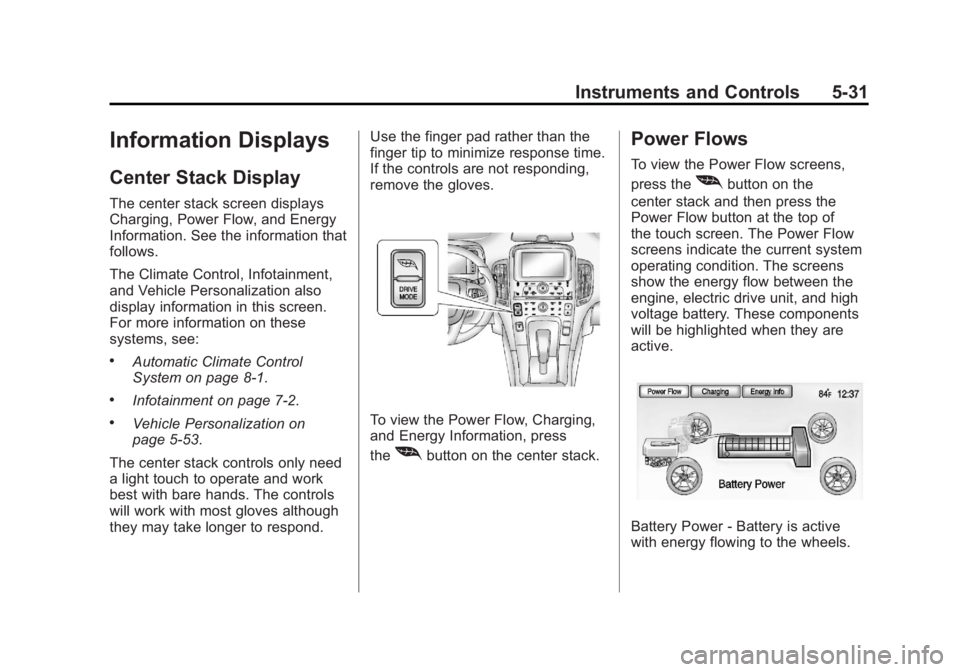
The center stack controls only need
a light touch to operate and work
best with bare hands. The controls
will work with most gloves although
they may take longer to respond. Use the finger pad rather than the
finger tip to minimize response time.
If the controls are not responding,
remove the gloves.To view the Power Flow, Charging,
and Energy Information, press
the
[button on the center stack.
Power Flows
To view the Power Flow screens,
press the
[button on the
center stack and then press the
Power Flow button at the top of
the touch screen. The Power Flow
screens indicate the current system
operating condition. The screens
show the energy flow between the
engine, electric drive unit, and high
voltage battery. These components
will be highlighted when they are
active.
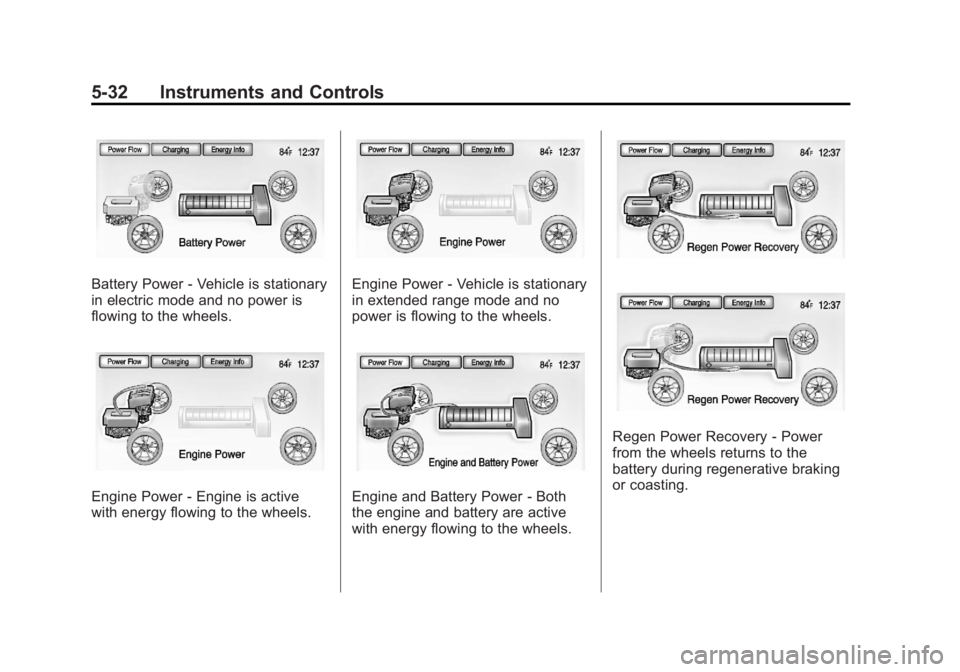
Battery Power ‐Battery is active
with energy flowing to the wheels.
Page 152 of 516
Black plate (32,1)Chevrolet Volt Owner Manual - 2011
5-32 Instruments and Controls
Battery Power‐Vehicle is stationary
in electric mode and no power is
flowing to the wheels.
Engine Power ‐Engine is active
with energy flowing to the wheels.
Engine Power ‐Vehicle is stationary
in extended range mode and no
power is flowing to the wheels.
Engine and Battery Power ‐Both
the engine and battery are active
with energy flowing to the wheels.
Regen Power Recovery ‐Power
from the wheels returns to the
battery during regenerative braking
or coasting.
Page 154 of 516
Black plate (34,1)Chevrolet Volt Owner Manual - 2011
5-34 Instruments and Controls
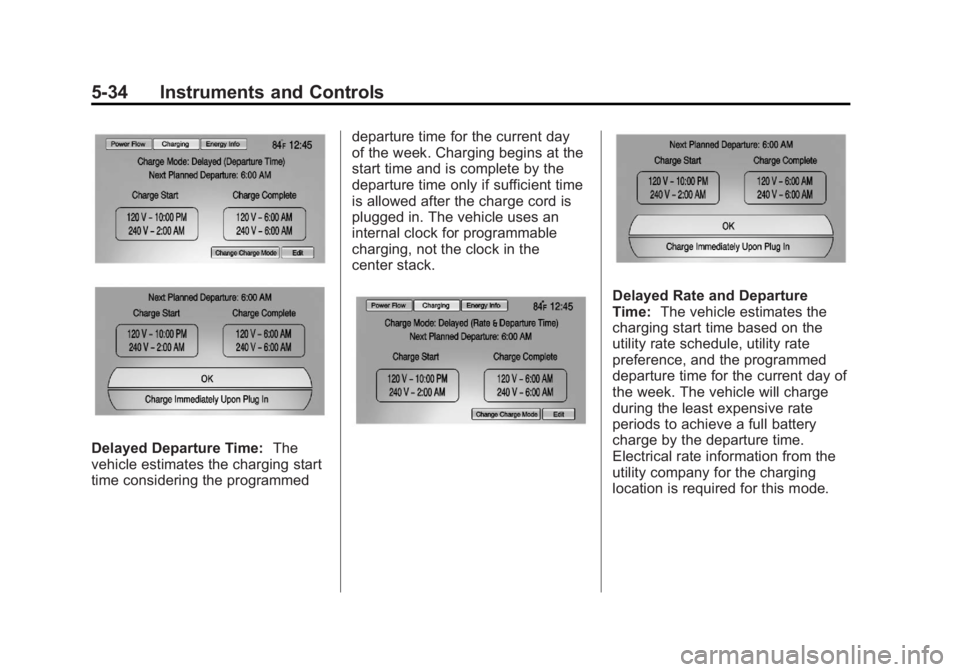
Delayed Departure Time:The
vehicle estimates the charging start
time considering the programmed departure time for the current day
of the week. Charging begins at the
start time and is complete by the
departure time only if sufficient time
is allowed after the charge cord is
plugged in. The vehicle uses an
internal clock for programmable
charging, not the clock in the
center stack.
Delayed Rate and Departure
Time:
The vehicle estimates the
charging start time based on the
utility rate schedule, utility rate
preference, and the programmed
departure time for the current day of
the week. The vehicle will charge
during the least expensive rate
periods to achieve a full battery
charge by the departure time.
Electrical rate information from the
utility company for the charging
location is required for this mode.
Page 156 of 516
Black plate (36,1)Chevrolet Volt Owner Manual - 2011
5-36 Instruments and Controls
Charge Rate Preference Selection
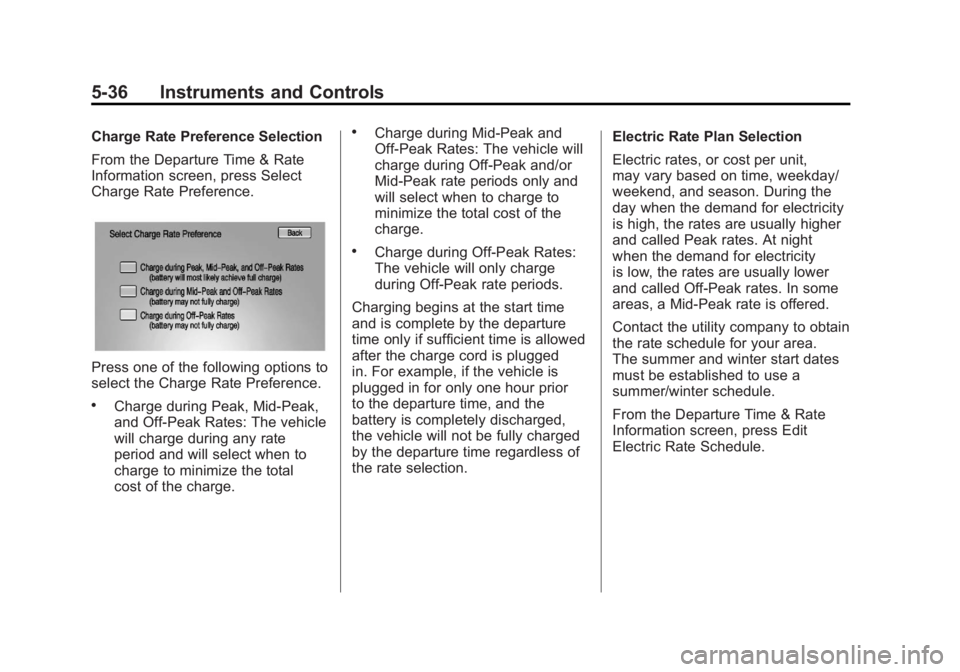
From the Departure Time & Rate
Information screen, press Select
Charge Rate Preference.
Press one of the following options to
select the Charge Rate Preference.
.Charge during Peak, Mid‐Peak,
and Off‐Peak Rates: The vehicle
will charge during any rate
period and will select when to
charge to minimize the total
cost of the charge.
.Charge during Mid‐Peak and
Off‐Peak Rates: The vehicle will
charge during Off-Peak and/or
Mid-Peak rate periods only and
will select when to charge to
minimize the total cost of the
charge.
.Charge during Off‐Peak Rates:
The vehicle will only charge
during Off-Peak rate periods.
Charging begins at the start time
and is complete by the departure
time only if sufficient time is allowed
after the charge cord is plugged
in. For example, if the vehicle is
plugged in for only one hour prior
to the departure time, and the
battery is completely discharged,
the vehicle will not be fully charged
by the departure time regardless of
the rate selection. Electric Rate Plan Selection
Electric rates, or cost per unit,
may vary based on time, weekday/
weekend, and season. During the
day when the demand for electricity
is high, the rates are usually higher
and called Peak rates. At night
when the demand for electricity
is low, the rates are usually lower
and called Off-Peak rates. In some
areas, a Mid-Peak rate is offered.
Contact the utility company to obtain
the rate schedule for your area.
The summer and winter start dates
must be established to use a
summer/winter schedule.
From the Departure Time & Rate
Information screen, press Edit
Electric Rate Schedule.
Page 161 of 516
Black plate (41,1)Chevrolet Volt Owner Manual - 2011
Instruments and Controls 5-41
The Programmable Charging
system will be disabled if the
Charge Complete Time cannot
be confidently estimated. If the
Programmable Charging system
is consistently disabled, see your
dealer for details.
Energy Information
To view the Energy Usage, Energy
Efficiency, and Efficiency Tips, press
the
[button on the center stack
and then press the Energy Info
button at the top of the touch
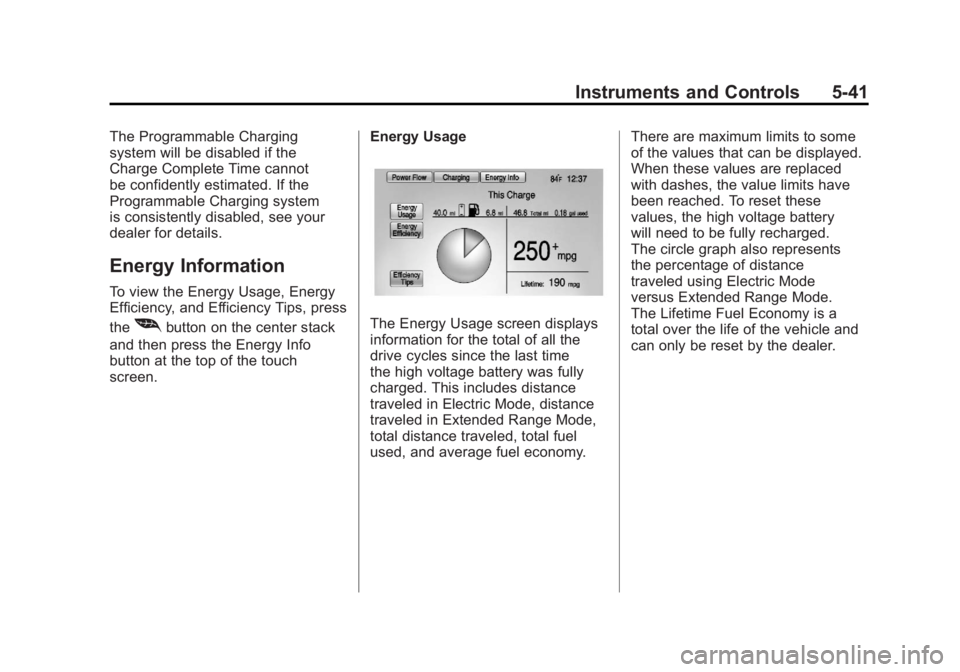
screen. Energy UsageThe Energy Usage screen displays
information for the total of all the
drive cycles since the last time
the high voltage battery was fully
charged. This includes distance
traveled in Electric Mode, distance
traveled in Extended Range Mode,
total distance traveled, total fuel
used, and average fuel economy.There are maximum limits to some
of the values that can be displayed.
When these values are replaced
with dashes, the value limits have
been reached. To reset these
values, the high voltage battery
will need to be fully recharged.
The circle graph also represents
the percentage of distance
traveled using Electric Mode
versus Extended Range Mode.
The Lifetime Fuel Economy is a
total over the life of the vehicle and
can only be reset by the dealer.
Page 165 of 516
Black plate (45,1)Chevrolet Volt Owner Manual - 2011
Instruments and Controls 5-45
Vehicle Messages
Messages displayed in the DIC
indicate the status of the vehicle
or some action that may be needed
to correct a condition. Multiple
messages may display one after
the other.
Messages that do not require
immediate action can be
acknowledged and cleared by
pressing the SELECT knob.
The messages requiring immediate
action cannot be cleared until that
action is performed. All messages
should be taken seriously. Clearing
the messages does not correct the
problem.
Battery and Charging
Messages
BATTERY SAVER ACTIVE
This message displays when the
vehicle has detected that the 12-volt
battery voltage has dropped and
vehicle features are being disabled.
The 12-volt battery saver system
starts reducing certain features
trying to save the charge of the
12-volt battery. Turn off unnecessary
features to allow the battery to
recharge.
BATTERY TOO COLD, PLUG IN
TO WARM
This message displays during
extremely cold temperatures,
when the vehicle will not start
until the high voltage battery is
warm enough.
Plug the vehicle in to allow the
charging system to warm the high
voltage battery, then the vehicle
can be started.
CHARGE CORD CONNECTED
This message displays when the
charge cord is connected to the
vehicle. The vehicle cannot be
shifted out of P (Park) with the
charge cord connected.
CHARGE DOOR OPEN
This message displays when the
charge door is open and the vehicle
is shifted out of P (Park).
LOW BATTERY
This message displays when
the 12-volt battery voltage is low.
SeeBattery on page 10‑28 for
more information.
SERVICE BATTERY
CHARGING SYSTEM
This message displays when there
is a fault in the 12-volt battery
charging system. Take the vehicle
to your dealer for service.
Page 167 of 516
Black plate (47,1)Chevrolet Volt Owner Manual - 2011
Instruments and Controls 5-47
Drive Mode Messages
MOUNTAIN MODE NOT
AVAILABLE
This message displays when
in Mountain Mode and the
mode becomes unavailable.
See“Mountain Mode” under
Driver Selected Operating
Modes on page 9‑26.
SPORT MODE NOT
AVAILABLE
This message displays when in
Sport Mode and the mode becomes
unavailable. See “Sport Mode”
under Driver Selected Operating
Modes on page 9‑26.
Electric Drive Unit
Messages
SHIFT TO PARK
This message displays when
the vehicle should be shifted to
P (Park). This may appear when
attempting to turn off the vehicle
when it is not in P (Park).
Engine Cooling System
Messages
ENGINE OVERHEATED —
REDUCE SPEED
This message displays when the
engine coolant temperature or
engine oil is too hot. Reduce speed
and allow the vehicle to cool down.
ENGINE OVERHEATED —
TURN VEHICLE OFF
This message displays and a
continuous chime sounds if the
engine cooling system reaches
unsafe temperatures for operation.
Stop and turn off the vehicle as
soon as it is safe to do so to avoid
severe damage. This message
clears when the engine has cooled
to a safe operating temperature.
ENGINE RUNNING DUE TO
TEMPERATURE
This message displays when the
high voltage battery is charged but
the engine has to come on because
of the outside temperature or high
voltage battery temperature.
Page 168 of 516
Black plate (48,1)Chevrolet Volt Owner Manual - 2011
5-48 Instruments and Controls
Engine Oil Messages
CHANGE ENGINE OIL SOON
This message displays when the
engine oil needs to be changed.
After changing the engine oil,
the Engine Oil Life System must
be reset. SeeEngine Oil Life
System on page 10‑15 and
Driver Information Center (DIC) on
page 5‑43 for information on how
to reset the system. See Engine
Oil on page 10‑12 andScheduled
Maintenance on page 11‑2 for
more information.
OIL PRESSURE LOW —TURN
VEHICLE OFF
This message displays if low oil
pressure levels occur. Stop the
vehicle as soon as safely possible
and do not operate it until the cause
of the low oil pressure has been
corrected. Check the oil as soon
as possible and have the vehicle
serviced by your dealer.
Fuel System Messages
CLOSE FUEL DOOR
This message displays when the
fuel door is open and the vehicle is
moving.
ENGINE NOT AVAILABLE
ADD FUEL
This message displays when
the engine is not available due to
running out of fuel. The vehicle can
continue to be driven in Electric
Mode until the battery is depleted,
but will have reduced acceleration.
When this message is displayed,
refuel the vehicle. See Out of Fuel/
Engine Unavailable on page 9‑28.
FUEL LEVEL LOW
This message displays when the
vehicle is low on fuel. Refuel as
soon as possible.
READY TO REFUEL
This message displays when the
fuel system is depressurized and
the vehicle can be refueled.
TIGHTEN GAS CAP
This message displays when the
fuel cap is not on tight. Tighten the
fuel cap.
WAIT TO REFUEL
This message displays when the
fuel system is pressurized and you
must to wait to refuel the vehicle.
Key and Lock Messages
When programming new Remote
Keyless Entry (RKE) transmitters,
DIC messages display. See Remote
Keyless Entry (RKE) System
Operation on page 2‑3 for more
information.
Page 169 of 516
Black plate (49,1)Chevrolet Volt Owner Manual - 2011
Instruments and Controls 5-49
NO REMOTE DETECTED
This message displays when the
RKE transmitter is not detected
while attempting to start the vehicle.
The transmitter battery may be
weak. See“Starting the Vehicle
with a Low Transmitter Battery”
under Remote Keyless Entry (RKE)
System Operation on page 2‑3 for
more information.
NO REMOTE DETECTED,
PRESS BRAKE TO RESTART
This message displays if the RKE
transmitter is no longer detected
in the vehicle. Press the brake
pedal and the POWER
Obutton
to restart the vehicle, or press the
POWER
Obutton without pressing
the brake pedal to turn the vehicle
off. If the vehicle is turned off and
a valid transmitter is not available,
the vehicle will not restart.
REMINDER: KEY LEFT IN
VEHICLE
This message displays when
leaving the vehicle with the RKE
transmitter still inside.
REPLACE BATTERY IN
REMOTE KEY
This message displays when the
battery in the RKE transmitter needs
to be replaced.
SERVICE KEYLESS START
SYSTEM
This message displays when the
keyless start system needs service.
Take the vehicle to your dealer.
Lamp Messages
AUTOMATIC LIGHT CONTROL
ON OR OFF
A message will display when the
automatic light control has been
turned on or off.
CHECK LAMP or LAMP
FAILURE
Depending on the lamp, one of
these messages may display.
See Bulb Replacement on
page 10‑34.
TURN SIGNAL ON
This message displays if the turn
signal has been left on. Turn off the
turn signal.
Object Detection System
Messages
PARK ASSIST OFF
This message displays when the
park assist system has been turned
off. See Ultrasonic Parking Assist
on page 9‑43.
SERVICE PARKING ASSIST
This message displays if there is a
problem with the park assist system.
Take the vehicle to your dealer for
service.