lights CHEVROLET VOLT 2011 Owner's Guide
[x] Cancel search | Manufacturer: CHEVROLET, Model Year: 2011, Model line: VOLT, Model: CHEVROLET VOLT 2011Pages: 516, PDF Size: 6.61 MB
Page 243 of 516
Black plate (53,1)Chevrolet Volt Owner Manual - 2011
Infotainment System 7-53
3. Select the street name field.Enter the street name. Do not
enter directional information
or street type. Use the space
screen button between street
and city names. Use the
backspace
qscreen button to
delete an incorrect character.
A list displays if four or fewer
names are available. If there
are more than four, there is a
match counter with a number
of available streets. Press the
List screen button to view the
list and select the street.
4. Select the city from the list or enter the city name.
5. Enter the house number. This field is automatically
selected.
6. Press the OK screen button. 7. Press Go located on the
confirmation screen if the
information is correct.
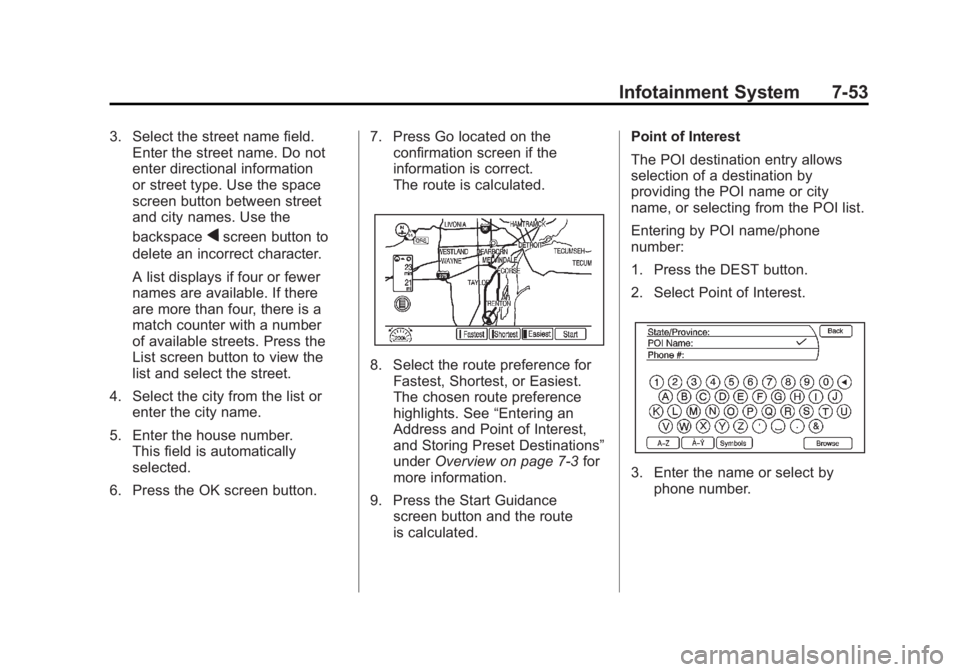
The route is calculated.
8. Select the route preference for
Fastest, Shortest, or Easiest.
The chosen route preference
highlights. See “Entering an
Address and Point of Interest,
and Storing Preset Destinations”
under Overview on page 7‑3 for
more information.
9. Press the Start Guidance screen button and the route
is calculated. Point of Interest
The POI destination entry allows
selection of a destination by
providing the POI name or city
name, or selecting from the POI list.
Entering by POI name/phone
number:
1. Press the DEST button.
2. Select Point of Interest.
3. Enter the name or select by
phone number.
Page 249 of 516
Black plate (59,1)Chevrolet Volt Owner Manual - 2011
Infotainment System 7-59
3. Enter the waypoint by any of theadd destination methods. See
Destination on page 7‑51 for
more information. The system
calculates and highlights the
route and the route can be
started.
4. To add more waypoints, press the DEST button. Press the
Add Waypoint screen button
to add the waypoint in the
order desired on the route.
The system calculates and
highlights the route and the
route can be started. To delete a waypoint:
1. Press the DEST button.
2. Press the Delete Waypoint
screen button.
3. Select the waypoint to be deleted by touching the screen.
4. A confirmation message displays. Press the Yes
screen button to delete the
waypoint; press No to cancel
this operation. The system
calculates and highlights the
route and the route can be
started.Route Preview
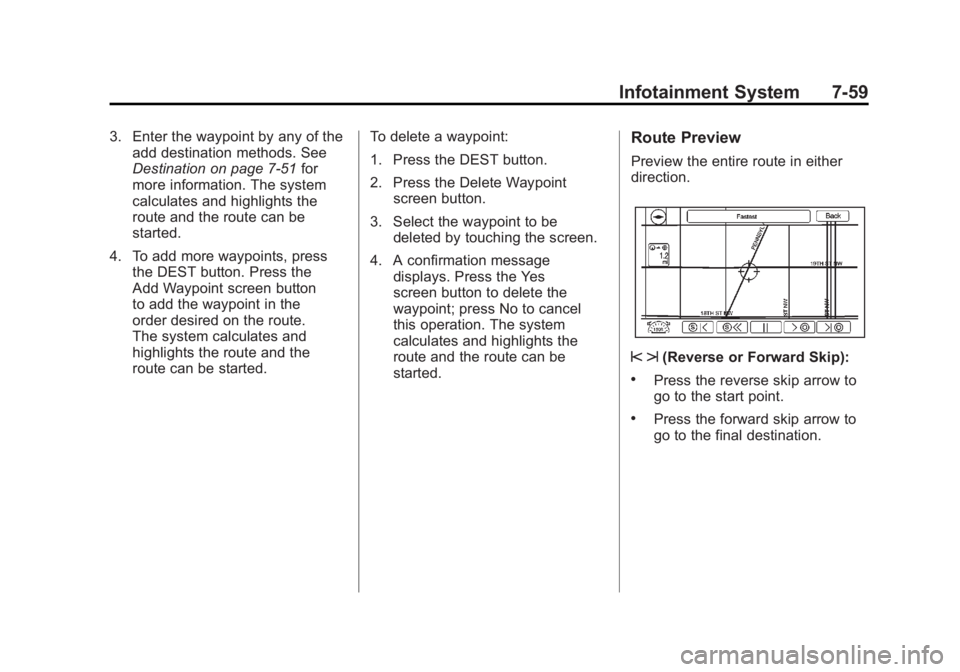
Preview the entire route in either
direction.
s t(Reverse or Forward Skip):
.Press the reverse skip arrow to
go to the start point.
.Press the forward skip arrow to
go to the final destination.
Page 257 of 516
Black plate (67,1)Chevrolet Volt Owner Manual - 2011
Infotainment System 7-67
If activated, traffic information
displays:
.Unscheduled traffic incident
data, such as accidents and
disabled vehicles.
.Scheduled traffic incident data,
such as road construction and
road closures.
.Traffic flow information (rate of
speed data). Flow data might not
be available in all markets.
Traffic information is delivered to the
vehicle by the XM Radio satellites.
XM NavTraffic provides continuously
updated traffic information.
XM NavTraffic currently broadcasts
the traffic information for many
markets nationally. The service may
be available in more cities in the
future. Visit www.xmnavtraffic.com
for more details on local coverage. To turn XM NavTraffic on or off:
1. Press the CONFIG button to
enter the menu options. Turn
the TUNE/MENU knob to scroll
through the available menu
options. Press the TUNE/MENU
knob or press the Nav screen
button to display the other
navigation settings.
2. Press the Traffic Information button.
3. Press the Traffic screen button. This button highlights and a
checkmark displays when active.
Selecting Alert for Approaching
Traffic Events displays a screen
to notify of possible traffic events
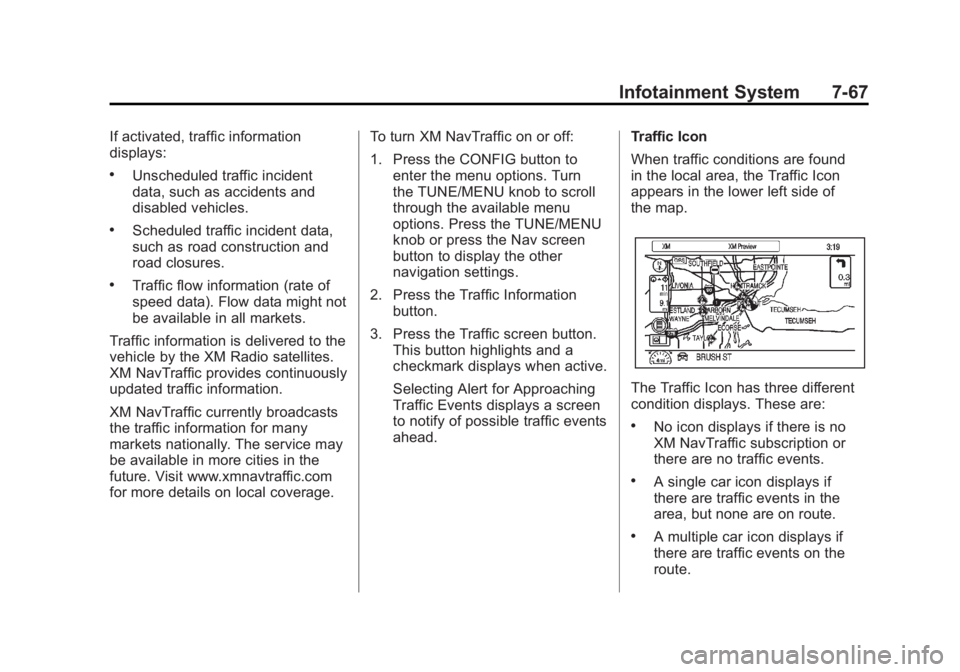
ahead. Traffic Icon
When traffic conditions are found
in the local area, the Traffic Icon
appears in the lower left side of
the map.
The Traffic Icon has three different
condition displays. These are:
.No icon displays if there is no
XM NavTraffic subscription or
there are no traffic events.
.A single car icon displays if
there are traffic events in the
area, but none are on route.
.A multiple car icon displays if
there are traffic events on the
route.
Page 299 of 516

Black plate (7,1)Chevrolet Volt Owner Manual - 2011
Climate Controls 8-7
AUTOh(Auto Recirculation):
Press to allow the system to
automatically choose the air
supply mode for best performance
in terms of comfort, efficiency,
and defogging. Air is recirculated
or outside air is pulled into the
vehicle. The touch screen button
is lit.
h(Manual Recirculation):
Press to alternate between
recirculating air inside the
vehicle or pulling in outside air.
When selected, the touch screen
button lights up to indicate that
air is being recirculated. This helps
to quickly cool the air inside the
vehicle or prevent outside air
and odors from entering. Pressing this button cancels
automatic recirculation. Press
AUTO or AUTO
hto return to
automatic operation; recirculation
runs automatically as needed.
Manual recirculation mode is not
available when in Defrost or Defog
modes.
M/L(Manual Heated Seats):
If available, the controls are on the
center stack. To operate, the vehicle
must be on.
Press
MorLto heat the driver
or passenger seat cushion and
seatback. For more information,
see Heated Front Seats on
page 3‑6.
MAUTO/LAUTO (Auto Heated
Seats): If available, the controls
are on the touch screen on the
center stack. Press the touch screen
LAUTO or
MAUTO button. The button color
will change to green when this
feature is on. When the vehicle is
on, this feature will automatically
activate the heated seats at the
level required by the vehicle's
interior temperature. The active
high, medium, low, or off heated
seat level will be indicated by the
manual heated seat button lights
on the center stack. Use the touch
screen buttons or the manual
heated seat buttons on the center
stack to turn auto heated seats off.
For more information, see Heated
Front Seats on page 3‑6.
Page 339 of 516
Black plate (37,1)Chevrolet Volt Owner Manual - 2011
Driving and Operating 9-37
Regenerative Braking
Regenerative braking takes some of
the energy from the moving vehicle
and turns it back into electrical
energy. This energy is then stored
back into the high voltage battery
system, contributing to increased
energy efficiency.
The hydraulic disc brakes work with
the regenerative braking to ensure
effective braking, such as when a
high braking demand is requested.
The braking system is
computer controlled and
blends the regenerative braking
with the conventional hydraulic disc
brakes to meet any requirements
for deceleration. The controllerinterprets the braking request
and uses regenerative braking,
conventional hydraulic braking, or a
combination of both as necessary.
Because the controller applies the
hydraulic brakes through its high
pressure accumulator, you may
occasionally hear the motor‐driven
pump when it recharges the system.
This is normal.
See
Warning Lights, Gauges,
and Indicators on page 5‑9 and
Driver Information Center (DIC) on
page 5‑43. In the event of a
controller problem, the brake pedal
may be harder to push and the
stopping distance may be longer.
Ride Control Systems
Traction Control
System (TCS)
The vehicle has a Traction Control
System (TCS) that limits wheel
spin. The system operates if it
senses that one or both of the drive
wheels are spinning or beginning to
lose traction. When this happens,
the system brakes the spinning
wheel(s) and/or reduces power
to limit wheel spin.
The system may be heard or felt
while it is working, but this is
normal.
To assist with directional control
of the vehicle, TCS comes on
automatically whenever the vehicle
is started and cannot be turned off.
Page 347 of 516
Black plate (45,1)Chevrolet Volt Owner Manual - 2011
Driving and Operating 9-45
Turning the System On and Off
The UFRPA system can be turned
on and off by pressing the park
assist button in the overhead
console.
The park assist button lights up
when the system is on and turns
off when it has been disabled.
When the System Does Not
Seem to Work Properly
If UFRPA does not turn on due to a
temporary condition, the message
PARK ASSIST OFF displays on the
DIC, and the light on the park assist
button turns off. This can occur
under the following conditions:
.The ultrasonic sensors are not
clean. Keep the sensors free of
mud, dirt, snow, ice, and slush.
For cleaning instructions, see
Exterior Care on page 10‑89.
.The vehicle was washed in cold
weather. This may cause frost
or ice to form in the park assist
sensors. Keep the sensors free
of frost or ice.
.An object was hanging out of the
hatch during the last drive cycle.
Once the attached object is
removed, UFRPA will return to
normal operation.
.The bumper is damaged.
Take the vehicle to your
dealer to repair the system.
.Other conditions may affect
system performance, such as
vibrations from a jackhammer or
the compression of air brakes
on a very large truck.
Page 409 of 516
Black plate (43,1)Chevrolet Volt Owner Manual - 2011
Vehicle Care 10-43
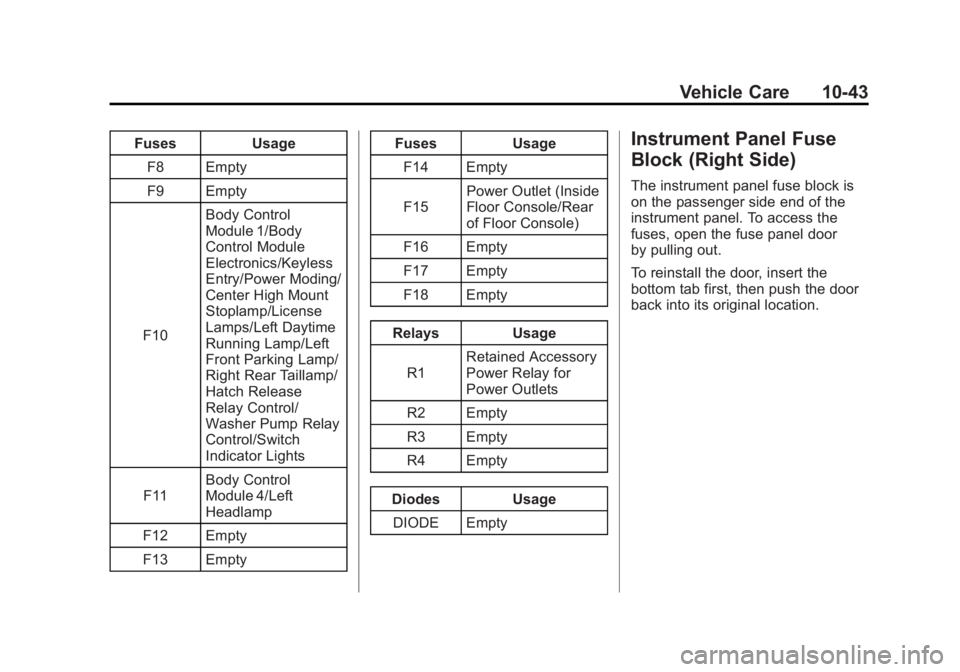
FusesUsage
F8 Empty
F9 Empty
F10 Body Control
Module 1/Body
Control Module
Electronics/Keyless
Entry/Power Moding/
Center High Mount
Stoplamp/License
Lamps/Left Daytime
Running Lamp/Left
Front Parking Lamp/
Right Rear Taillamp/
Hatch Release
Relay Control/
Washer Pump Relay
Control/Switch
Indicator Lights
F11 Body Control
Module 4/Left
Headlamp
F12 Empty
F13 Empty Fuses
Usage
F14 Empty
F15 Power Outlet (Inside
Floor Console/Rear
of Floor Console)
F16 Empty
F17 Empty
F18 Empty
Relays Usage
R1 Retained Accessory
Power Relay for
Power Outlets
R2 Empty
R3 Empty
R4 Empty
Diodes Usage DIODE EmptyInstrument Panel Fuse
Block (Right Side)
The instrument panel fuse block is
on the passenger side end of the
instrument panel. To access the
fuses, open the fuse panel door
by pulling out.
To reinstall the door, insert the
bottom tab first, then push the door
back into its original location.
Page 410 of 516

Black plate (44,1)Chevrolet Volt Owner Manual - 2011
10-44 Vehicle Care
Instrument Panel Fuse Block
A fuse puller is located in the engine
compartment fuse block.
The vehicle may not be equipped
with all of the fuses, relays, and
features shown. Fuses Usage
F1 Steering Wheel
Switch Backlighting
F2 Empty
F3 Empty
F4 Body Control
Module 3/Right
Headlamp Fuses Usage
F5 Body Control
Module 2/Body
Control Module
Electronics/Hatch
Lamp/Right Daytime
Running Lamp/
Shifter Lock/Switch
Backlighting
F6 Body Control
Module 5/Retained
Accessory Power
Relay Control/Right
Front Turn Signal
Lamp/Left Rear Stop
and Turn Signal
Lamp/Right Front
Parking Lamp/Left
Rear Taillamp
F7 Body Control
Module 6/
Map Lights/
Courtesy Lights/
Back
–up Lamp
Page 509 of 516

Black plate (5,1)Chevrolet Volt Owner Manual - 2011
INDEX i-5
Fuel (cont.)Low Fuel Warning Light . . . . . . . 5-28
Requirements, California . . . . . 9-58
System Messages . . . . . . . . . . . . 5-48
Function Check Electric Drive Unit ShiftLock Control . . . . . . . . . . . . . . 10-30
Fuses Engine Compartment
Fuse Block . . . . . . . . . . . . . . . . 10-38
Instrument Panel Fuse Block . . . . . . . . . 10-42, 10-43
Rear Compartment Fuse Block . . . . . . . . . . . . . . . . . . . . . . 10-45
G
Garage Door Opener . . . . . . . . . . 5-60
Programming . . . . . . . . . . . . . . . . . 5-60
Gasoline Specifications . . . . . . . . . . . . . . . . . 9-58
Gauges Battery . . . . . . . . . . . . . . . . . . . . . . . 5-16
Driver Efficiency . . . . . . . . . . . . . . 5-17
Fuel . . . . . . . . . . . . . . . . . . . . . . . . . . 5-16
Odometer . . . . . . . . . . . . . . . . . . . . . 5-15 Gauges (cont.)
Speedometer . . . . . . . . . . . . . . . . . 5-15
Trip Odometer . . . . . . . . . . . . . . . . 5-15
Warning Lights and
Indicators . . . . . . . . . . . . . . . . . . . . 5-9
General Information Service and Maintenance . . . . . 11-1
Towing . . . . . . . . . . . . . . . . . . . . . . . . 9-62
Vehicle Care . . . . . . . . . . . . . . . . . . 10-3
Global Positioning System (GPS) . . . . . . . . . . . . . . . . 7-74
Glove Box . . . . . . . . . . . . . . . . . . . . . . 4-1
GM Mobility Reimbursement Program . . . . . . . . . . . . . . . . . . . . . . 13-5
H
Halogen Bulbs . . . . . . . . . . . . . . . . 10-34
Hard Drive Device (HDD) . . . . . . 7-26
Hatch . . . . . . . . . . . . . . . . . . . . . . . . . . 2-12
Hazard Warning Flashers . . . . . . . 6-4
Head Restraints . . . . . . . . . . . . . . . . 3-2
Headlamps . . . . . . . . . . . . . . . . . . . 10-34
Aiming . . . . . . . . . . . . . . . . . . . . . . 10-32
Bulb Replacement . . . . . . . . . . 10-34
Daytime RunningLamps (DRL) . . . . . . . . . . . . . . . . . 6-3 Headlamps (cont.)
Flash-to-Pass . . . . . . . . . . . . . . . . . . 6-2
High-Beam On Light . . . . . . . . . . 5-29
High/Low Beam Changer . . . . . . 6-2
Lamps On Reminder . . . . . . . . . 5-29
Heated Front Seats . . . . . . . . . . . . . 3-6
Heated Mirrors . . . . . . . . . . . . . . . . . 2-16
Heating and Air Conditioning . . . 8-1
High Voltage Battery Gauge . . . 5-16
High Voltage Devices and Wiring . . . . . . . . . . . . . . . . . . . . . . . 10-37
High-Beam On Light . . . . . . . . . . . 5-29
Highway Hypnosis . . . . . . . . . . . . . 9-10
Hill and Mountain Roads . . . . . . . 9-10
Hood . . . . . . . . . . . . . . . . . . . . . . . . . . 10-9
Hood, Door, Hatch Open Light . . . . . . . . . . . . . . . . . . . . . . . . . 5-30
Horn . . . . . . . . . . . . . . . . . . . . . . . . . . . . 5-7
How to Wear Safety Belts
Properly . . . . . . . . . . . . . . . . . . . . . . 3-13
Page 510 of 516
Black plate (6,1)Chevrolet Volt Owner Manual - 2011
i-6 INDEX
I
Immobilizer . . . . . . . . . . . . . . . . . . . . 2-14
Infants and Young Children,Restraints . . . . . . . . . . . . . . . . . . . . 3-43
Information Energy . . . . . . . . . . . . . . . . . . . . . . . 5-41
Open Source . . . . . . . . . . . . . . . 13-24
Infotainment . . . . . . . . . . . . . . . . . . . . 7-2
Instrument Cluster . . . . . . . . . . . . . . 5-9
Instrument Panel Storage Area . . . . . . . . . . . . . . . . . . 4-1
Introduction . . . . . . . . . . . . . . . . . . . . . . . iii
J
Jump Starting . . . . . . . . . . . . . . . . . 10-79
K
Key and Lock Messages . . . . . . . 5-48
Keyless Entry Remote (RKE) System . . . . . . . . 2-3
Keys . . . . . . . . . . . . . . . . . . . . . . . . . . . . 2-2
L
Labeling, Tire Sidewall . . . . . . . . 10-49
Lamp Messages . . . . . . . . . . . . . . . 5-49
Lamps Daytime Running (DRL) . . . . . . . 6-3
Dome . . . . . . . . . . . . . . . . . . . . . . . . . . 6-5
Exterior Controls . . . . . . . . . . . . . . . 6-1
License Plate . . . . . . . . . . . . . . . 10-36
Malfunction Indicator . . . . . . . . . 5-21
On Reminder . . . . . . . . . . . . . . . . . 5-29
Reading . . . . . . . . . . . . . . . . . . . . . . . 6-5
Lap-Shoulder Belt . . . . . . . . . . . . . 3-19
LATCH System Replacing Parts after aCrash . . . . . . . . . . . . . . . . . . . . . . . 3-57
LATCH, Lower Anchors and
Tethers for Children . . . . . . . . . . 3-49
Lifting the Vehicle, Tires . . . . . . . 10-5
Lighting Entry . . . . . . . . . . . . . . . . . . . . . . . . . . 6-5
Exit . . . . . . . . . . . . . . . . . . . . . . . . . . . . 6-6
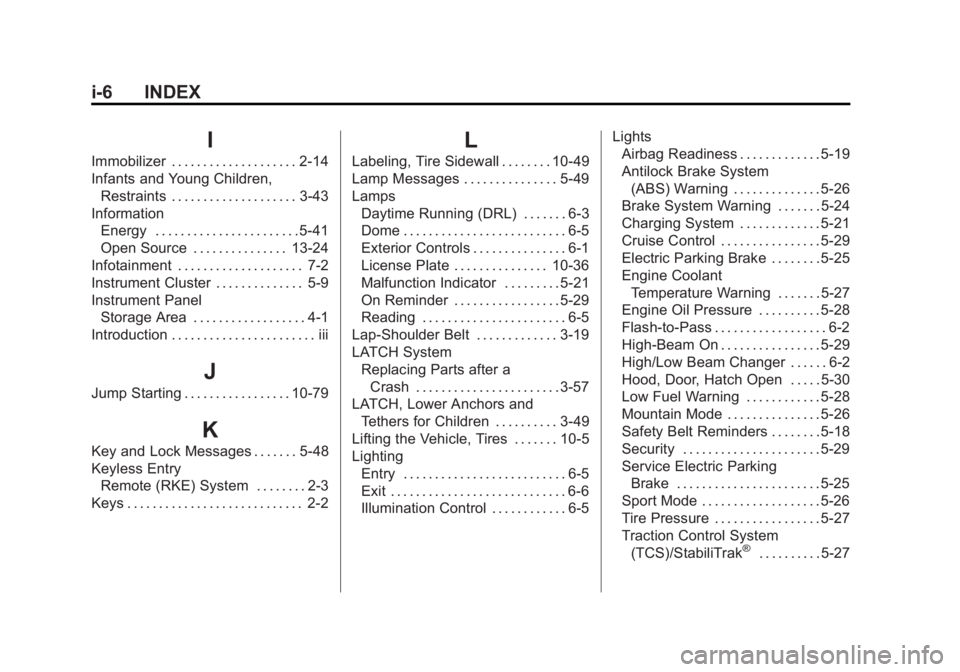
Illumination Control . . . . . . . . . . . . 6-5 Lights
Airbag Readiness . . . . . . . . . . . . . 5-19
Antilock Brake System
(ABS) Warning . . . . . . . . . . . . . . 5-26
Brake System Warning . . . . . . . 5-24
Charging System . . . . . . . . . . . . . 5-21
Cruise Control . . . . . . . . . . . . . . . . 5-29
Electric Parking Brake . . . . . . . . 5-25
Engine Coolant Temperature Warning . . . . . . . 5-27
Engine Oil Pressure . . . . . . . . . . 5-28
Flash-to-Pass . . . . . . . . . . . . . . . . . . 6-2
High-Beam On . . . . . . . . . . . . . . . . 5-29
High/Low Beam Changer . . . . . . 6-2
Hood, Door, Hatch Open . . . . . 5-30
Low Fuel Warning . . . . . . . . . . . . 5-28
Mountain Mode . . . . . . . . . . . . . . . 5-26
Safety Belt Reminders . . . . . . . . 5-18
Security . . . . . . . . . . . . . . . . . . . . . . 5-29
Service Electric Parking Brake . . . . . . . . . . . . . . . . . . . . . . . 5-25
Sport Mode . . . . . . . . . . . . . . . . . . . 5-26
Tire Pressure . . . . . . . . . . . . . . . . . 5-27
Traction Control System (TCS)/StabiliTrak
®. . . . . . . . . . 5-27