lock CHEVROLET VOLT 2011 Service Manual
[x] Cancel search | Manufacturer: CHEVROLET, Model Year: 2011, Model line: VOLT, Model: CHEVROLET VOLT 2011Pages: 516, PDF Size: 6.61 MB
Page 118 of 516
Black plate (62,1)Chevrolet Volt Owner Manual - 2011
3-62 Seats and Restraints
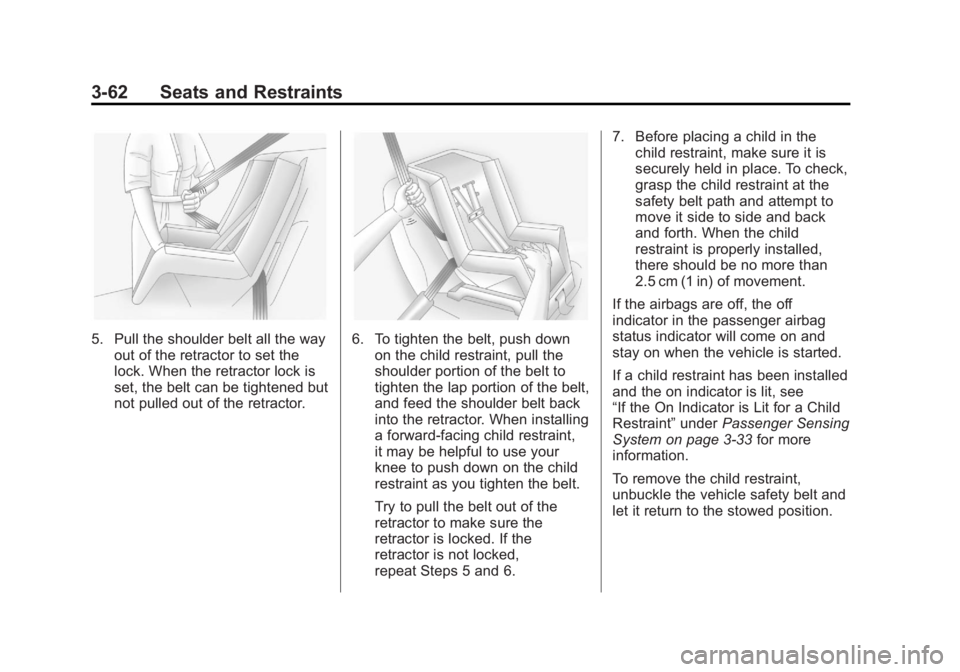
5. Pull the shoulder belt all the wayout of the retractor to set the
lock. When the retractor lock is
set, the belt can be tightened but
not pulled out of the retractor.6. To tighten the belt, push downon the child restraint, pull the
shoulder portion of the belt to
tighten the lap portion of the belt,
and feed the shoulder belt back
into the retractor. When installing
a forward-facing child restraint,
it may be helpful to use your
knee to push down on the child
restraint as you tighten the belt.
Try to pull the belt out of the
retractor to make sure the
retractor is locked. If the
retractor is not locked,
repeat Steps 5 and 6. 7. Before placing a child in the
child restraint, make sure it is
securely held in place. To check,
grasp the child restraint at the
safety belt path and attempt to
move it side to side and back
and forth. When the child
restraint is properly installed,
there should be no more than
2.5 cm (1 in) of movement.
If the airbags are off, the off
indicator in the passenger airbag
status indicator will come on and
stay on when the vehicle is started.
If a child restraint has been installed
and the on indicator is lit, see
“If the On Indicator is Lit for a Child
Restraint” underPassenger Sensing
System on page 3‑33 for more
information.
To remove the child restraint,
unbuckle the vehicle safety belt and
let it return to the stowed position.
Page 121 of 516
Black plate (1,1)Chevrolet Volt Owner Manual - 2011
Instruments and Controls 5-1
Instruments and
Controls
Instrument Panel Overview
Instrument Panel Overview . . . . 5-4
Controls
Steering Wheel Adjustment . . . 5-6
Steering Wheel Controls . . . . . . 5-6
Horn . . . . . . . . . . . . . . . . . . . . . . . . . . 5-7
Windshield Wiper/Washer . . . . . 5-7
Power Outlets . . . . . . . . . . . . . . . . . 5-8
Warning Lights, Gauges, and
Indicators
Warning Lights, Gauges, andIndicators . . . . . . . . . . . . . . . . . . . . 5-9
Instrument Cluster . . . . . . . . . . . . 5-9
Speedometer . . . . . . . . . . . . . . . . 5-15
Odometer . . . . . . . . . . . . . . . . . . . . 5-15
Trip Odometer . . . . . . . . . . . . . . . 5-15
Compass . . . . . . . . . . . . . . . . . . . . 5-16 Battery Gauge (High
Voltage) . . . . . . . . . . . . . . . . . . . . 5-16
Fuel Gauge . . . . . . . . . . . . . . . . . . 5-16
Driver Efficiency Gauge . . . . . . 5-17
Total Vehicle Range . . . . . . . . . 5-17
Safety Belt Reminders . . . . . . . 5-18
Airbag Readiness Light . . . . . . 5-19
Passenger Airbag Status Indicator . . . . . . . . . . . . . . . . . . . . 5-20
Charging System Light (12-Volt Battery) . . . . . . . . . . . . 5-21
Malfunction Indicator Lamp . . . . . . . . . . . . . 5-21
Brake System Warning Light . . . . . . . . . . . . . . . . . . . . . . . 5-24
Electric Parking Brake Light . . . . . . . . . . . . . . . . . . . . . . . 5-25
Service Electric Parking Brake Light . . . . . . . . . . . . . . . . . . . . . . . 5-25
Antilock Brake System (ABS) Warning Light . . . . . . . . . . . . . . 5-26
Sport Mode Light . . . . . . . . . . . . 5-26
Mountain Mode Light . . . . . . . . 5-26 Traction Control System
(TCS)/StabiliTrak
®Light . . . . 5-27
Engine Coolant Temperature Warning Light . . . . . . . . . . . . . . 5-27
Tire Pressure Light . . . . . . . . . . 5-27
Engine Oil Pressure Light . . . . 5-28
Low Fuel Warning Light . . . . . . 5-28
Security Light . . . . . . . . . . . . . . . . 5-29
High-Beam On Light . . . . . . . . . 5-29
Lamps On Reminder . . . . . . . . . 5-29
Cruise Control Light . . . . . . . . . 5-29
Door, Hood, or Hatch Open
Light . . . . . . . . . . . . . . . . . . . . . . . 5-30
Information Displays
Center Stack Display . . . . . . . . 5-31
Power Flows . . . . . . . . . . . . . . . . . 5-31
Charging . . . . . . . . . . . . . . . . . . . . . 5-33
Energy Information . . . . . . . . . . 5-41
Clock . . . . . . . . . . . . . . . . . . . . . . . . 5-42
Driver InformationCenter (DIC) . . . . . . . . . . . . . . . 5-43
Page 122 of 516

Black plate (2,1)Chevrolet Volt Owner Manual - 2011
5-2 Instruments and Controls
Vehicle Messages
Vehicle Messages . . . . . . . . . . . 5-45
Battery and ChargingMessages . . . . . . . . . . . . . . . . . . 5-45
Brake System Messages . . . . 5-46
Cruise Control Messages . . . . 5-46
Door Ajar Messages . . . . . . . . . 5-46
Drive Mode Messages . . . . . . . 5-47
Electric Drive Unit Messages . . . . . . . . . . . . . . . . . . 5-47
Engine Cooling System Messages . . . . . . . . . . . . . . . . . . 5-47
Engine Oil Messages . . . . . . . . 5-48
Fuel System Messages . . . . . . 5-48
Key and Lock Messages . . . . . 5-48
Lamp Messages . . . . . . . . . . . . . 5-49
Object Detection System Messages . . . . . . . . . . . . . . . . . . 5-49
Propulsion Power Messages . . . . . . . . . . . . . . . . . . 5-50 Ride Control System
Messages . . . . . . . . . . . . . . . . . . 5-50
Airbag System Messages . . . . 5-51
Anti-theft Alarm System Messages . . . . . . . . . . . . . . . . . . 5-51
Service Vehicle Messages . . . 5-51
Starting the Vehicle Messages . . . . . . . . . . . . . . . . . . 5-52
Tire Messages . . . . . . . . . . . . . . . 5-52
Vehicle Speed Messages . . . . 5-53
Washer Fluid Messages . . . . . 5-53
Vehicle Personalization
Vehicle Personalization . . . . . . 5-53
Universal Remote System
Universal Remote System . . . 5-60
Universal Remote System Programming . . . . . . . . . . . . . . . 5-60
Universal Remote System Operation . . . . . . . . . . . . . . . . . . 5-63
Page 125 of 516
Black plate (5,1)Chevrolet Volt Owner Manual - 2011
Instruments and Controls 5-5
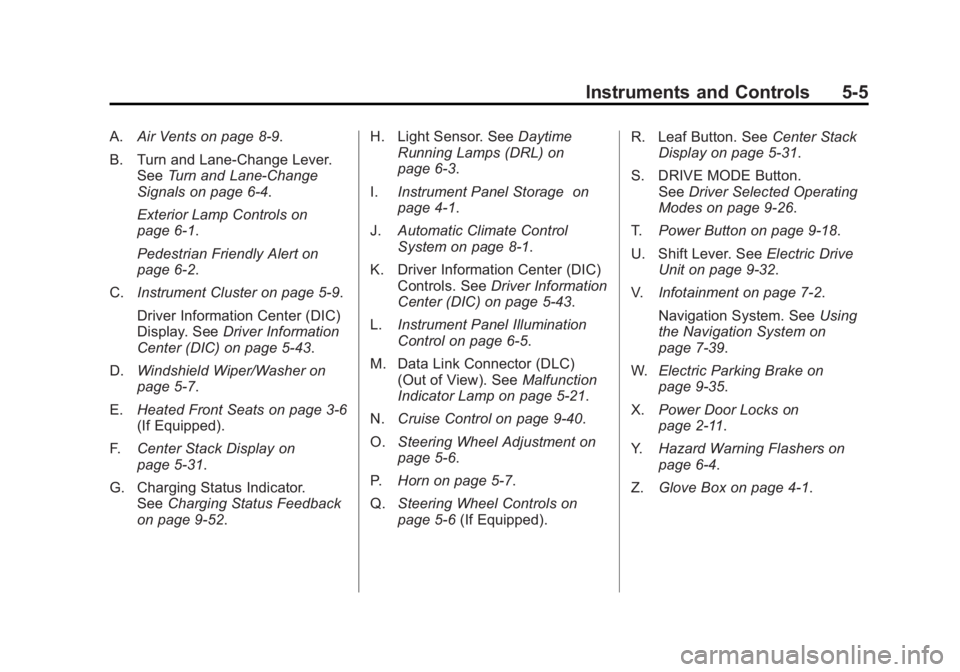
A.Air Vents on page 8‑9.
B. Turn and Lane‐Change Lever. See Turn and Lane-Change
Signals on page 6‑4.
Exterior Lamp Controls on
page 6‑1.
Pedestrian Friendly Alert on
page 6‑2.
C. Instrument Cluster on page 5‑9.
Driver Information Center (DIC)
Display. See Driver Information
Center (DIC) on page 5‑43.
D. Windshield Wiper/Washer on
page 5‑7.
E. Heated Front Seats on page 3‑6
(If Equipped).
F. Center Stack Display on
page 5‑31.
G. Charging Status Indicator. See Charging Status Feedback
on page 9‑52. H. Light Sensor. See
Daytime
Running Lamps (DRL) on
page 6‑3.
I. Instrument Panel Storage on
page 4‑1.
J. Automatic Climate Control
System on page 8‑1.
K. Driver Information Center (DIC) Controls. See Driver Information
Center (DIC) on page 5‑43.
L. Instrument Panel Illumination
Control on page 6‑5.
M. Data Link Connector (DLC) (Out of View). See Malfunction
Indicator Lamp on page 5‑21.
N. Cruise Control on page 9‑40.
O. Steering Wheel Adjustment on
page 5‑6.
P. Horn on page 5‑7.
Q. Steering Wheel Controls on
page 5‑6 (If Equipped). R. Leaf Button. See
Center Stack
Display on page 5‑31.
S. DRIVE MODE Button. See Driver Selected Operating
Modes on page 9‑26.
T. Power Button on page 9‑18.
U. Shift Lever. See Electric Drive
Unit on page 9‑32.
V. Infotainment on page 7‑2.
Navigation System. See Using
the Navigation System on
page 7‑39.
W. Electric Parking Brake on
page 9‑35.
X. Power Door Locks on
page 2‑11.
Y. Hazard Warning Flashers on
page 6‑4.
Z. Glove Box on page 4‑1.
Page 126 of 516

Black plate (6,1)Chevrolet Volt Owner Manual - 2011
5-6 Instruments and Controls
Controls
Steering Wheel
Adjustment
To adjust the steering wheel:
1. Pull the lever (A) down.
2. Move the steering wheel upor down. 3. Pull or push the steering wheel
closer or away from you.
4. Pull the lever (A) up to lock the steering wheel in place.
Do not adjust the steering wheel
while driving.
Steering Wheel Controls
For vehicles with audio steering
wheel controls, some audio controls
can be adjusted at the steering
wheel.
b/g(Push to Talk): For vehicles
with an OnStar, Bluetooth,
or navigation system, press
to interact with those systems.
See Bluetooth on page 7‑85 and
the OnStar Glove Box Kit for more
information.
$/i(End Call/Mute): Press
to silence the vehicle speakers
only. Press again to turn the sound
on. For vehicles with OnStar or
Bluetooth systems, press to reject
an incoming call, or to end a
current call.
_SRC^(Rotary Control): Press_or^to select a radio band or
audio source.
Press
_or^to select the next or
previous favorite radio station,
CD track, DVD track/chapter,
or MP3 track.
Page 128 of 516
Black plate (8,1)Chevrolet Volt Owner Manual - 2011
5-8 Instruments and Controls
Clear ice and snow from the wiper
blades before using them. If frozen
to the windshield, carefully loosen or
thaw them. Damaged wiper blades
should be replaced. SeeWiper
Blade Replacement on page 10‑31.
Heavy snow or ice can overload the
wipers. If the wiper motor overheats,
the windshield wipers will stop until
the motor cools and the wiper
control is turned off. See Electrical
System Overload on page 10‑37.
Wipe Parking
If the vehicle is turned off, while the
wipers are on 1, 2, or
G, they will
stop immediately.
If the windshield wiper lever is then
moved to off before the driver door
is opened or within 10 minutes, the
wipers will restart and move to the
base of the windshield.
If the vehicle is turned off during a
windshield wash, the wipers will
stop when they reach the base of
the windshield.
Windshield Washer
Pull the windshield wiper lever
toward you to spray windshield
washer fluid and activate the wipers.
The washer and wipers will continue
until the lever is released or the
maximum wash time is reached.
When the windshield wiper lever
is released, additional wipes may
occur depending on how long
the windshield washer had been
activated. See Washer Fluid on
page 10‑24 for information on
filling the windshield washer fluid
reservoir.
{WARNING
In freezing weather, do not use
the washer until the windshield is
warmed. Otherwise the washer
fluid can form ice on the
windshield, blocking your vision.
Power Outlets
The accessory power outlets can be
used to plug in electrical equipment,
such as a cell phone or MP3 player.
There are three accessory power
outlets:
.Inside the front of the center
floor console.
.On the rear of the center floor
console.
.Inside the instrument panel
storage area.
The power outlets supply power
while the vehicle is on, or if the
vehicle is in Retained Accessory
Power (RAP). See Retained
Accessory Power (RAP) on
page 9‑22.
Page 133 of 516
Black plate (13,1)Chevrolet Volt Owner Manual - 2011
Instruments and Controls 5-13
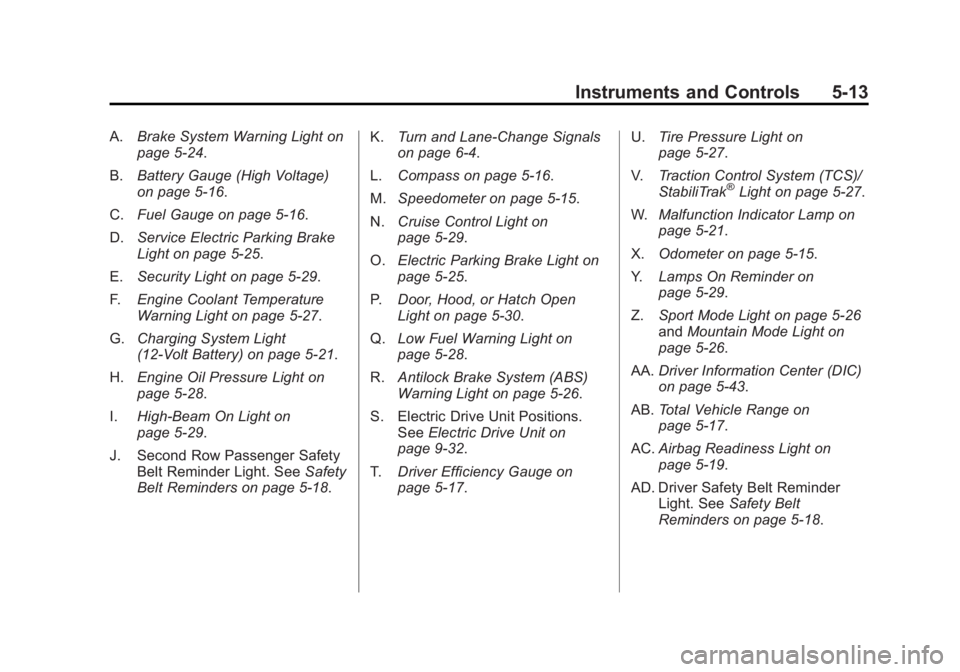
A.Brake System Warning Light on
page 5‑24.
B. Battery Gauge (High Voltage)
on page 5‑16.
C. Fuel Gauge on page 5‑16.
D. Service Electric Parking Brake
Light on page 5‑25.
E. Security Light on page 5‑29.
F. Engine Coolant Temperature
Warning Light on page 5‑27.
G. Charging System Light
(12-Volt Battery) on page 5‑21.
H. Engine Oil Pressure Light on
page 5‑28.
I. High-Beam On Light on
page 5‑29.
J. Second Row Passenger Safety Belt Reminder Light. See Safety
Belt Reminders on page 5‑18. K.
Turn and Lane-Change Signals
on page 6‑4.
L. Compass on page 5‑16.
M. Speedometer on page 5‑15.
N. Cruise Control Light on
page 5‑29.
O. Electric Parking Brake Light on
page 5‑25.
P. Door, Hood, or Hatch Open
Light on page 5‑30.
Q. Low Fuel Warning Light on
page 5‑28.
R. Antilock Brake System (ABS)
Warning Light on page 5‑26.
S. Electric Drive Unit Positions. See Electric Drive Unit on
page 9‑32.
T. Driver Efficiency Gauge on
page 5‑17. U.
Tire Pressure Light on
page 5‑27.
V. Traction Control System (TCS)/
StabiliTrak
®Light on page 5‑27.
W. Malfunction Indicator Lamp on
page 5‑21.
X. Odometer on page 5‑15.
Y. Lamps On Reminder on
page 5‑29.
Z. Sport Mode Light on page 5‑26
and Mountain Mode Light on
page 5‑26.
AA. Driver Information Center (DIC)
on page 5‑43.
AB. Total Vehicle Range on
page 5‑17.
AC. Airbag Readiness Light on
page 5‑19.
AD. Driver Safety Belt Reminder Light. See Safety Belt
Reminders on page 5‑18.
Page 146 of 516
Black plate (26,1)Chevrolet Volt Owner Manual - 2011
5-26 Instruments and Controls
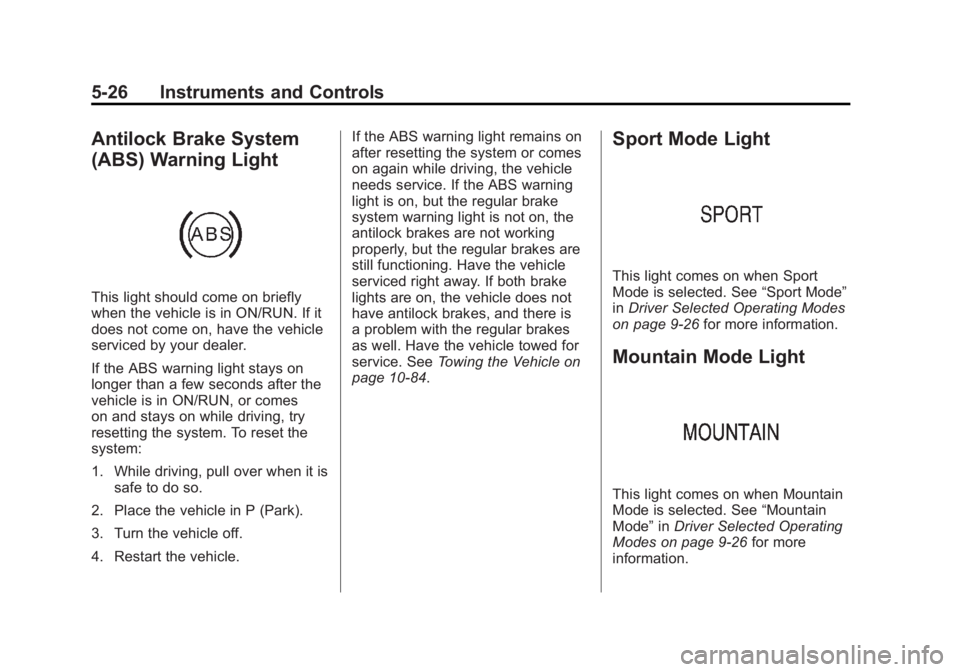
Antilock Brake System
(ABS) Warning Light
This light should come on briefly
when the vehicle is in ON/RUN. If it
does not come on, have the vehicle
serviced by your dealer.
If the ABS warning light stays on
longer than a few seconds after the
vehicle is in ON/RUN, or comes
on and stays on while driving, try
resetting the system. To reset the
system:
1. While driving, pull over when it issafe to do so.
2. Place the vehicle in P (Park).
3. Turn the vehicle off.
4. Restart the vehicle. If the ABS warning light remains on
after resetting the system or comes
on again while driving, the vehicle
needs service. If the ABS warning
light is on, but the regular brake
system warning light is not on, the
antilock brakes are not working
properly, but the regular brakes are
still functioning. Have the vehicle
serviced right away. If both brake
lights are on, the vehicle does not
have antilock brakes, and there is
a problem with the regular brakes
as well. Have the vehicle towed for
service. See
Towing the Vehicle on
page 10‑84.
Sport Mode Light
This light comes on when Sport
Mode is selected. See “Sport Mode”
in Driver Selected Operating Modes
on page 9‑26 for more information.
Mountain Mode Light
This light comes on when Mountain
Mode is selected. See “Mountain
Mode” inDriver Selected Operating
Modes on page 9‑26 for more
information.
Page 154 of 516
Black plate (34,1)Chevrolet Volt Owner Manual - 2011
5-34 Instruments and Controls
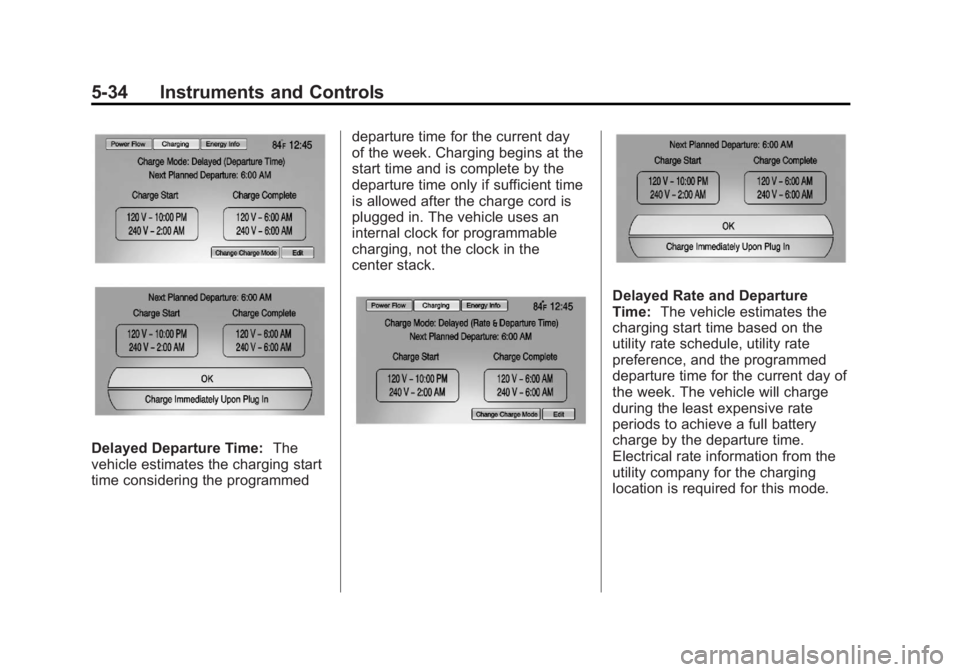
Delayed Departure Time:The
vehicle estimates the charging start
time considering the programmed departure time for the current day
of the week. Charging begins at the
start time and is complete by the
departure time only if sufficient time
is allowed after the charge cord is
plugged in. The vehicle uses an
internal clock for programmable
charging, not the clock in the
center stack.
Delayed Rate and Departure
Time:
The vehicle estimates the
charging start time based on the
utility rate schedule, utility rate
preference, and the programmed
departure time for the current day of
the week. The vehicle will charge
during the least expensive rate
periods to achieve a full battery
charge by the departure time.
Electrical rate information from the
utility company for the charging
location is required for this mode.
Page 162 of 516
Black plate (42,1)Chevrolet Volt Owner Manual - 2011
5-42 Instruments and Controls
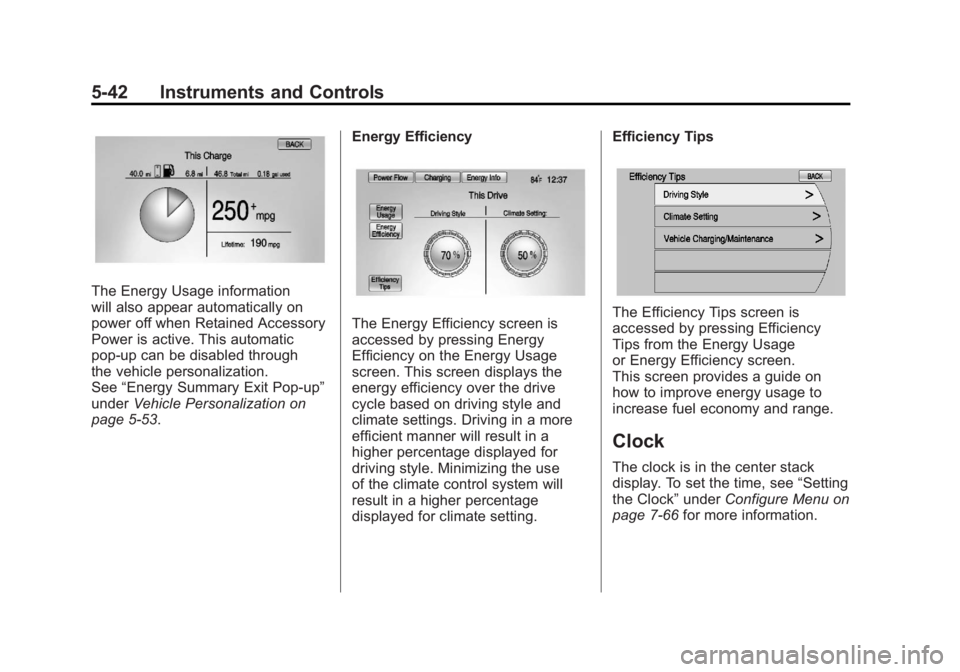
The Energy Usage information
will also appear automatically on
power off when Retained Accessory
Power is active. This automatic
pop-up can be disabled through
the vehicle personalization.
See“Energy Summary Exit Pop-up”
under Vehicle Personalization on
page 5‑53. Energy Efficiency
The Energy Efficiency screen is
accessed by pressing Energy
Efficiency on the Energy Usage
screen. This screen displays the
energy efficiency over the drive
cycle based on driving style and
climate settings. Driving in a more
efficient manner will result in a
higher percentage displayed for
driving style. Minimizing the use
of the climate control system will
result in a higher percentage
displayed for climate setting.Efficiency TipsThe Efficiency Tips screen is
accessed by pressing Efficiency
Tips from the Energy Usage
or Energy Efficiency screen.
This screen provides a guide on
how to improve energy usage to
increase fuel economy and range.
Clock
The clock is in the center stack
display. To set the time, see
“Setting
the Clock” underConfigure Menu on
page 7‑66 for more information.