lock CHEVROLET VOLT 2011 Workshop Manual
[x] Cancel search | Manufacturer: CHEVROLET, Model Year: 2011, Model line: VOLT, Model: CHEVROLET VOLT 2011Pages: 516, PDF Size: 6.61 MB
Page 168 of 516
Black plate (48,1)Chevrolet Volt Owner Manual - 2011
5-48 Instruments and Controls
Engine Oil Messages
CHANGE ENGINE OIL SOON
This message displays when the
engine oil needs to be changed.
After changing the engine oil,
the Engine Oil Life System must
be reset. SeeEngine Oil Life
System on page 10‑15 and
Driver Information Center (DIC) on
page 5‑43 for information on how
to reset the system. See Engine
Oil on page 10‑12 andScheduled
Maintenance on page 11‑2 for
more information.
OIL PRESSURE LOW —TURN
VEHICLE OFF
This message displays if low oil
pressure levels occur. Stop the
vehicle as soon as safely possible
and do not operate it until the cause
of the low oil pressure has been
corrected. Check the oil as soon
as possible and have the vehicle
serviced by your dealer.
Fuel System Messages
CLOSE FUEL DOOR
This message displays when the
fuel door is open and the vehicle is
moving.
ENGINE NOT AVAILABLE
ADD FUEL
This message displays when
the engine is not available due to
running out of fuel. The vehicle can
continue to be driven in Electric
Mode until the battery is depleted,
but will have reduced acceleration.
When this message is displayed,
refuel the vehicle. See Out of Fuel/
Engine Unavailable on page 9‑28.
FUEL LEVEL LOW
This message displays when the
vehicle is low on fuel. Refuel as
soon as possible.
READY TO REFUEL
This message displays when the
fuel system is depressurized and
the vehicle can be refueled.
TIGHTEN GAS CAP
This message displays when the
fuel cap is not on tight. Tighten the
fuel cap.
WAIT TO REFUEL
This message displays when the
fuel system is pressurized and you
must to wait to refuel the vehicle.
Key and Lock Messages
When programming new Remote
Keyless Entry (RKE) transmitters,
DIC messages display. See Remote
Keyless Entry (RKE) System
Operation on page 2‑3 for more
information.
Page 170 of 516
Black plate (50,1)Chevrolet Volt Owner Manual - 2011
5-50 Instruments and Controls
Propulsion Power
Messages
PROPULSION POWER IS
REDUCED
This message displays when the
propulsion power is reduced and
can affect the ability to accelerate.
If this message is on, but there
is no reduction in performance,
proceed to your destination.
The performance may be reduced
the next time the vehicle is driven.
The vehicle may be driven at a
reduced speed while this message
is on, but maximum acceleration
and speed may be reduced.
If this message stays on when
the malfunction indicator lamp is
on, the vehicle should be taken to
your dealer for service as soon as
possible.This message can display when
driving in mountainous terrain
without using Mountain Mode or by
not entering Mountain Mode soon
enough to build a sufficient battery
charge reserve before climbing
steep grades. This is normal
operation to protect the high
voltage battery. Only if both
the PROPULSION POWER IS
REDUCED message and the
malfunction indicator lamp are
on should the vehicle be taken
to the dealer for service.
While climbing the grade with this
message displayed, the vehicle
speed may be reduced until the
engine can recover the battery
state of charge to a normal level.
See
“Mountain Mode” underDriver
Selected Operating Modes on
page 9‑26.
Ride Control System
Messages
LOW TRACTION
This message displays when the
Antilock Brake System (ABS) is
active and is working to assist the
driver with control of the vehicle in
difficult driving conditions.
SERVICE STABILITRAK
This message displays when
there is a problem detected with
the StabiliTrak system. The vehicle
is safe to drive, but the StabiliTrak
system is not operational.
See Electronic Stability Control
(ESC) on page 9‑39 for information
on resetting the system.
Page 174 of 516
Black plate (54,1)Chevrolet Volt Owner Manual - 2011
5-54 Instruments and Controls
Turning a Function On or Off
1. Turn the TUNE/MENU knob tohighlight the function.
2. Press the TUNE/MENU knob to turn the function on or off.
A checkmark next to the function
indicates that the function is on.
Using the Touch Screen
Use the touch screen icons and
menus on the center stack display
to select personalization features.
w:Touch to scroll up.
x:Touch to scroll down.
Back: Touch Back in the upper
right corner of the display to return
to the previous menu. Submenus
An arrow on the right‐hand edge
of the menu indicates that it has a
submenu with other options.
Selecting a Menu Option
Touch any one of the available
menu options on the touch screen
to select the option. A checkmark
next to the option indicates the
selected option.
Turning a Function On or Off
Touch the screen where the
available function is listed to turn it
on or off. A checkmark next to the
function indicates that the function
is on.
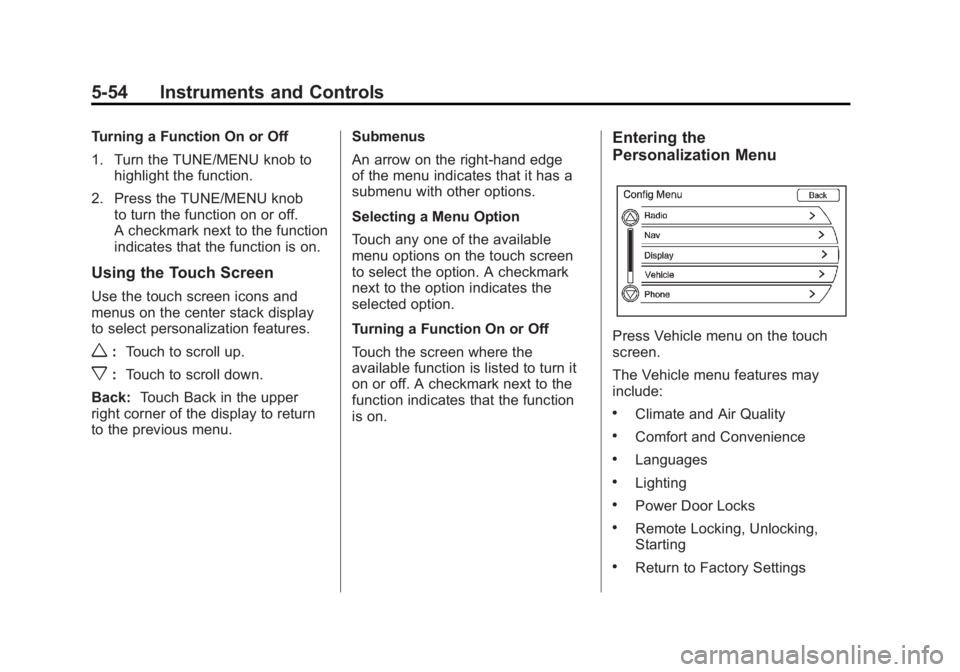
Entering the
Personalization Menu
Press Vehicle menu on the touch
screen.
The Vehicle menu features may
include:
.Climate and Air Quality
.Comfort and Convenience
.Languages
.Lighting
.Power Door Locks
.Remote Locking, Unlocking,
Starting
.Return to Factory Settings
Page 177 of 516

Black plate (57,1)Chevrolet Volt Owner Manual - 2011
Instruments and Controls 5-57
Languages
This allows the selection of a
language:
1. Press the Vehicle menu.
2. Select Languages.
3. Select English, French,or Spanish.
4. Press Back to return to the previous menu.
Lighting
Select the Lighting menu and the
following will be displayed:
.Exit Lighting
.Vehicle Locator Lights Exit Lighting
This allows the selection of how
long the exterior headlamps stay on
when leaving the vehicle and it is
dark outside.
The available options are:
.OFF
.30 seconds
.1 minute
.2 minutes
To select the length of time the
exterior lamps will remain on:
1. Press the Vehicle menu.
2. Select Lighting.
3. Select Exit Lighting.
4. Select the length of time the exterior lamps will remain on.
5. Press Back to return to the previous menu. Vehicle Locator Lights
This allows the vehicle locator lights
to be turned on or off. When on, the
headlamps, parklamps, taillamps,
license plate lamps, and back-up
lamps will illuminate when
Kis
pressed on the RKE transmitter.
To turn the vehicle locator lights on
or off:
1. Press the Vehicle menu.
2. Select Lighting.
3. Turn the vehicle locator lights on or off.
4. Press Back to return to the previous menu.
Power Door Locks
Select Power Door Locks and the
following will be displayed:
.Auto Door Unlock
.Unlocked Door Anti Lock Out
.Delayed Door Lock
Page 178 of 516
Black plate (58,1)Chevrolet Volt Owner Manual - 2011
5-58 Instruments and Controls
Auto Door Unlock
This allows selection of which doors
will automatically unlock when the
vehicle is shifted into P (Park).
The available options are:
.All Doors
.Driver Door
.OFF
To select how the doors will
automatically unlock:
1. Press the Vehicle menu.
2. Select Power Door Locks.
3. Select Auto Door Unlock.
4. Select how the doors will automatically unlock.
5. Press Back to return to the previous menu. Unlocked Door Anti Lock Out
When on, this feature will keep the
driver door from locking until the
door is closed. If this feature is
turned on, the Delayed Door Lock
menu will not be available.
To turn the unlocked door anti lock
out feature on or off:
1. Press the Vehicle menu.
2. Select Unlocked Door Anti
Lock Out.
3. Turn the unlocked door anti lock out feature on or off.
4. Press Back to return to the previous menu.
Delayed Door Lock
When on, this feature will delay the
locking of the doors. To override the
delay, press the power door lock
switch on the center stack. To turn the delayed door lock
feature on or off:
1. Press the Vehicle menu.
2. Select Power Door Locks.
3. Turn the delayed door lock
feature on or off.
4. Press Back to return to the previous menu.
Remote Locking, Unlocking,
Starting
Select Remote Locking, Unlocking,
Starting and the following will be
displayed:
.Remote Lock Feedback
.Remote Unlock Light Feedback
.Door Unlock or Remote Door
Unlock
.Remote Left in Vehicle Reminder
Page 179 of 516
Black plate (59,1)Chevrolet Volt Owner Manual - 2011
Instruments and Controls 5-59
Remote Lock Feedback
This allows selection of what
feedback is provided when
unlocking the vehicle with
the RKE transmitter.
The available options are:
.Lights and Horn
.Lights Only
.Horn Only
.OFF
To select the remote lock feedback:
1. Press the Vehicle menu.
2. Select Remote Locking, Unlocking, Starting.
3. Select Remote Lock Feedback.
4. Select the remote feedback.
5. Press Back to return to the previous menu. Remote Unlock Light Feedback
When on, the exterior lamps will
flash when unlocking the vehicle
with the RKE transmitter.
To turn the remote unlock light
feedback feature on or off:
1. Press the Vehicle menu.
2. Select Remote Locking,
Unlocking, Starting.
3. Turn the remote unlock light feedback feature on or off.
4. Press Back to return to the previous menu.
Door Unlock or Remote Door
Unlock
This allows selection of which doors
will unlock when pressing
Kon the
RKE transmitter.
The available options are:
.All Doors
.Driver Door If All Doors is selected, all doors will
be unlocked.
If Driver Door is selected, only the
driver door will be unlocked on the
first press of
K. All doors will be
unlocked on the second press
of
Kwithin five seconds of the
prior press.
To select how the doors will unlock
with the RKE transmitter:
1. Press the Vehicle menu.
2. Select Remote Locking, Unlocking, Starting.
3. Select Door Unlock or Remote Door Unlock.
4. Select how the doors will unlock.
5. Press Back to return to the previous menu.
Page 180 of 516

Black plate (60,1)Chevrolet Volt Owner Manual - 2011
5-60 Instruments and Controls
Remote Left in Vehicle Reminder
When on, the horn will chirp rapidly
three times if an RKE transmitter is
left in the vehicle.
To turn the remote left in vehicle
reminder feature on or off:
1. Press the Vehicle menu.
2. Select Remote Locking,Unlocking, Starting.
3. Turn the remote left in vehicle reminder feature on or off.
4. Press Back to return to the previous menu.
Return to Factory Settings
This returns all of the vehicle
personalization settings to the
factory settings.
1. Press the Vehicle menu.
2. Select Return to FactorySettings.
3. Select Yes or No.
4. Press Back to return to the previous menu.
Universal Remote
System
See Radio Frequency
Statement on page 13‑28 for
information regarding Part 15
of the Federal Communications
Commission (FCC) rules and
Industry Canada Standards
RSS-210/220/310.
Universal Remote System
Programming
If the vehicle has this feature, you
will see these buttons with one
LED indicator next to them in the
overhead console. This system provides a way to
replace up to three remote control
transmitters used to activate
devices such as garage door
openers, security systems, and
home automation devices.
Do not use the Universal Remote
system with any garage door opener
that does not have the stop and
reverse feature. This includes
any garage door opener model
manufactured before April 1,1982.
Read the instructions completely
before attempting to program
the Universal Remote system.
Because of the steps involved, it
may be helpful to have another
person available to assist with
programming the Universal
Remote system.
Page 206 of 516

Black plate (16,1)Chevrolet Volt Owner Manual - 2011
7-16 Infotainment System
Satellite Radio
XM™Satellite Radio Service
Vehicles with an XM satellite radio
tuner and an XM satellite radio
subscription can receive XM
programming.
XM is a satellite radio service based
in the 48 contiguous United States
and 10 Canadian provinces. XM
satellite radio has a wide variety of
programming and commercial-free
music, coast to coast, and in
digital-quality sound. A service
fee is required to receive the XM
service. For more information,
see www.xmradio.com or call
1-800-929-2100 in the U.S.
In Canada, see www.xmradio.ca
or call 1-877-438-9677.
When XM is active, the channel
name and number, category name,
song title, and artist display on the
screen.
XM Categories
XM stations are organized in
categories.
Removing or Adding Categories
1. Press the CONFIG button.
Turn the TUNE/MENU knob
until Radio displays. Press the
TUNE/MENU knob or press
Radio to display the radio
settings menu.
2. Select the Show/Hide XM Categories screen button.
3. Press the category buttons on the screen to show or hide the
category.
XM Messages
XL (Explicit Language
Channels): These channels, or any
others, can be blocked by request,
by calling 1-800-929-2100 in the
U.S., and 1-877-438-9677 in
Canada. XM Updating:
The encryption code
in the receiver is being updated.
No action is required. This process
should take no longer than
30 seconds.
Loading XM: The audio system
is acquiring and processing audio
and text data. No action is needed.
This message should disappear
shortly.
Channel Off Air: This channel is
not currently in service. Tune in to
another channel.
Channel Unauth: This channel is
blocked or cannot be received with
your XM subscription package.
Channel Unavailable: This
previously assigned channel is
no longer assigned. Tune to
another station.
No Artist Info: The system
is working properly. No artist
information is available at this
time on this channel.
Page 207 of 516
Black plate (17,1)Chevrolet Volt Owner Manual - 2011
Infotainment System 7-17
No Title Info:The system is
working properly. No song title
information is available at this
time on this channel.
No CAT Info: The system is
working properly. No category
information is available at this
time on this channel.
No Information: The system
is working properly. No text or
informational messages are
available at this time on this
channel.
No XM Signal: The system is
working properly. The vehicle may
be in a location where the XM signal
is being blocked. When the vehicle
is moved into an open area, the
signal should return. CAT Not Found:
The system is
working properly. There are no
channels available for the selected
category.
XM Radio ID: If tuned to channel 0,
this message alternates with the
XM radio eight‐digit radio ID label.
This label is needed to activate the
service.
Unknown: If this message is
received when tuned to channel 0,
there could be a receiver fault.
Consult with your dealer.
Check Antenna: If this message
does not clear within a short period
of time, the receiver could have a
fault. Consult with your dealer.
XM Not Available: If this message
does not clear within a short period
of time, the receiver could have a
fault. Consult with your dealer.Radio Reception
Frequency interference and static
can occur during normal radio
reception if items such as cell phone
chargers, vehicle convenience
accessories, and external electronic
devices are plugged into the
accessory power outlet. If there is
interference or static, unplug the
item from the accessory power
outlet.
FM
FM signals only reach about 16 to
65 km (10 to 40 mi). Although the
radio has a built-in electronic circuit
that automatically works to reduce
interference, some static can occur,
especially around tall buildings or
hills, causing the sound to fade in
and out.
Page 236 of 516
Black plate (46,1)Chevrolet Volt Owner Manual - 2011
7-46 Infotainment System
Map Adjustments
The scale of view on the map can
be adjusted.
Map Scales
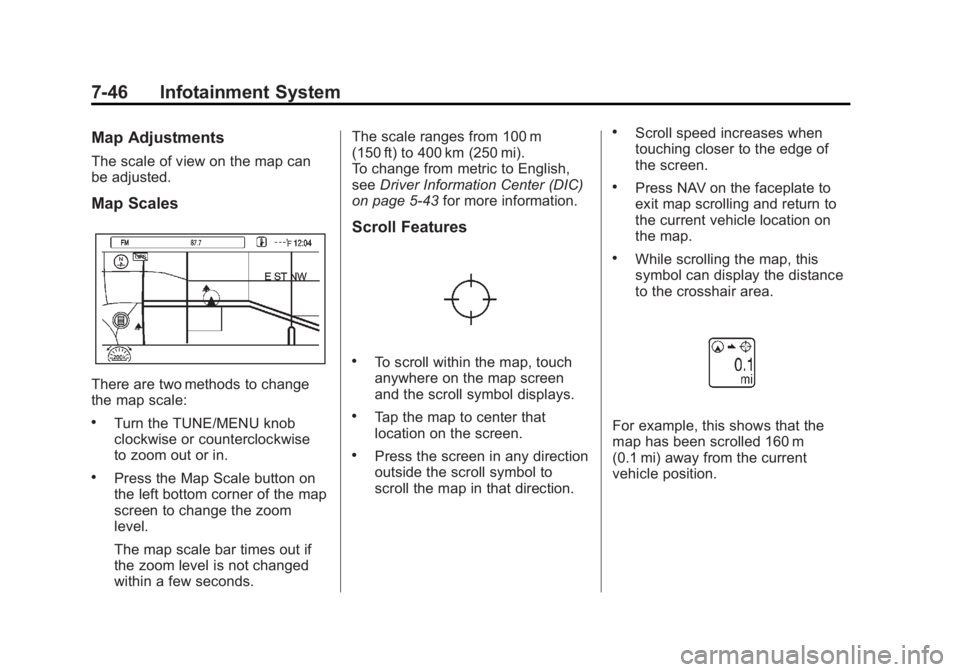
There are two methods to change
the map scale:
.Turn the TUNE/MENU knob
clockwise or counterclockwise
to zoom out or in.
.Press the Map Scale button on
the left bottom corner of the map
screen to change the zoom
level.
The map scale bar times out if
the zoom level is not changed
within a few seconds.The scale ranges from 100 m
(150 ft) to 400 km (250 mi).
To change from metric to English,
see
Driver Information Center (DIC)
on page 5‑43 for more information.
Scroll Features
.To scroll within the map, touch
anywhere on the map screen
and the scroll symbol displays.
.Tap the map to center that
location on the screen.
.Press the screen in any direction
outside the scroll symbol to
scroll the map in that direction.
.Scroll speed increases when
touching closer to the edge of
the screen.
.Press NAV on the faceplate to
exit map scrolling and return to
the current vehicle location on
the map.
.While scrolling the map, this
symbol can display the distance
to the crosshair area.
For example, this shows that the
map has been scrolled 160 m
(0.1 mi) away from the current
vehicle position.