lock CHEVROLET VOLT 2011 Manual Online
[x] Cancel search | Manufacturer: CHEVROLET, Model Year: 2011, Model line: VOLT, Model: CHEVROLET VOLT 2011Pages: 516, PDF Size: 6.61 MB
Page 370 of 516
Black plate (4,1)Chevrolet Volt Owner Manual - 2011
10-4 Vehicle Care
Accessories and
Modifications
Adding non‐dealer accessories or
making modifications to the vehicle
can affect vehicle performance and
safety, including such things as
airbags, braking, stability, ride
and handling, emissions systems,
aerodynamics, durability, and
electronic systems like antilock
brakes, traction control, and stability
control. These accessories or
modifications could even cause
malfunction or damage not
covered by the vehicle warranty.Damage to vehicle components
resulting from modifications or
the installation or use of non‐GM
certified parts, including control
module or software modifications,
is not covered under the terms of
the vehicle warranty and may affect
remaining warranty coverage for
affected parts.
GM Accessories are designed to
complement and function with other
systems on the vehicle. Your GM
dealer can accessorize the vehicle
using genuine GM Accessories.
When you go to your GM dealer
and ask for GM Accessories,
you will know that GM-trained and
supported service technicians will
perform the work using genuine
GM Accessories.
Also, see
Adding Equipment to
the Airbag-Equipped Vehicle on
page 3‑38.
Page 371 of 516

Black plate (5,1)Chevrolet Volt Owner Manual - 2011
Vehicle Care 10-5
Lifting the Vehicle
This vehicle can be lifted with a
hoist or a service jack. Do not use
any other type of jack to lift the
vehicle.
Lifting the Vehicle with a Hoist
This vehicle can be lifted with
a hoist at the four locations,
as illustrated.
Notice:Lifting the vehicle
improperly can damage the
vehicle and result in costly
repairs not covered by the
warranty.
The front lifting points can be
accessed from either side of the
vehicle, behind the front tires.
The rear lifting points can be
accessed from either side of the
vehicle, in front of the rear tires. Lifting the Vehicle with a
Service Jack
{WARNING
Lifting a vehicle can cause
an injury. The vehicle can slip
off the jack and roll over you or
other people. You and they could
be badly injured. Find a level
place to lift your vehicle. To help
prevent the vehicle from moving:
1. Set the parking brake firmly.
2. Put the shift lever in P (Park).
3. Turn off the vehicle.
To be even more certain the
vehicle will not move, put blocks
in front of and behind the wheels.
Page 375 of 516
Black plate (9,1)Chevrolet Volt Owner Manual - 2011
Vehicle Care 10-9
Keep a record with all parts receipts
and list the mileage and the date
of any service work performed.
SeeMaintenance Records on
page 11‑8.
Hood
To open the hood:
1. Turn the vehicle off before opening the hood. If the
vehicle is on, the engine will
start when the hood is opened.
See Electric Mode on page 9‑25
and Extended Range Mode on
page 9‑25.
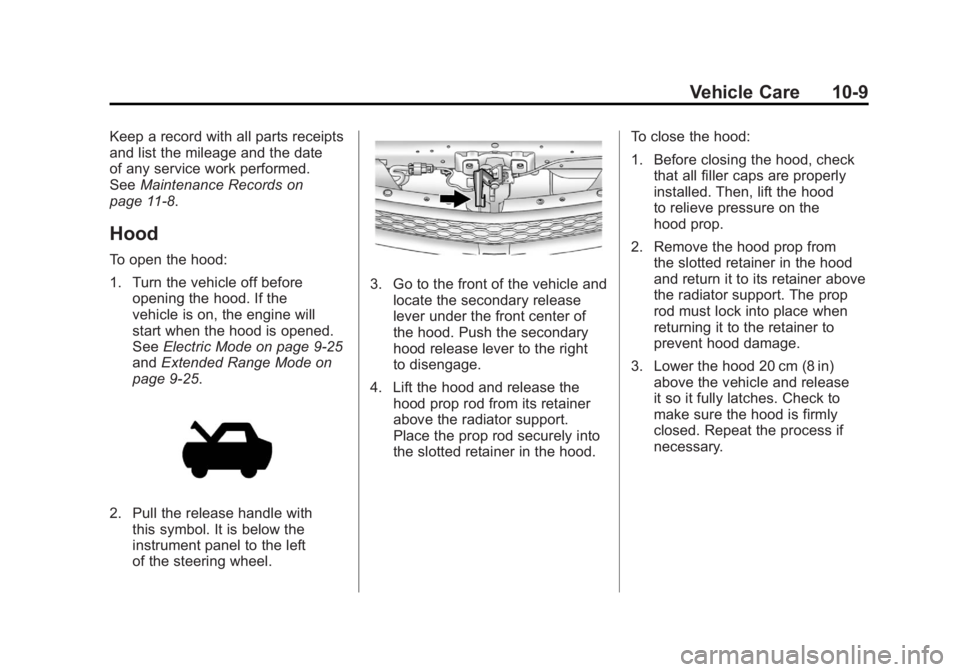
2. Pull the release handle with this symbol. It is below the
instrument panel to the left
of the steering wheel.
3. Go to the front of the vehicle andlocate the secondary release
lever under the front center of
the hood. Push the secondary
hood release lever to the right
to disengage.
4. Lift the hood and release the hood prop rod from its retainer
above the radiator support.
Place the prop rod securely into
the slotted retainer in the hood. To close the hood:
1. Before closing the hood, check
that all filler caps are properly
installed. Then, lift the hood
to relieve pressure on the
hood prop.
2. Remove the hood prop from the slotted retainer in the hood
and return it to its retainer above
the radiator support. The prop
rod must lock into place when
returning it to the retainer to
prevent hood damage.
3. Lower the hood 20 cm (8 in) above the vehicle and release
it so it fully latches. Check to
make sure the hood is firmly
closed. Repeat the process if
necessary.
Page 377 of 516
Black plate (11,1)Chevrolet Volt Owner Manual - 2011
Vehicle Care 10-11
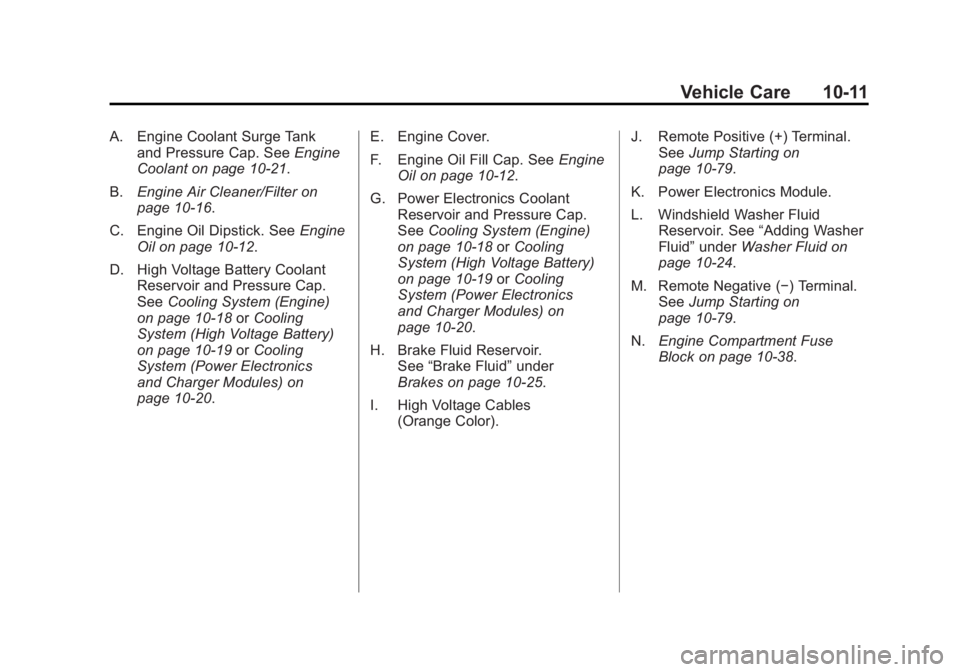
A. Engine Coolant Surge Tankand Pressure Cap. See Engine
Coolant on page 10‑21.
B. Engine Air Cleaner/Filter on
page 10‑16.
C. Engine Oil Dipstick. See Engine
Oil on page 10‑12.
D. High Voltage Battery Coolant Reservoir and Pressure Cap.
See Cooling System (Engine)
on page 10‑18 orCooling
System (High Voltage Battery)
on page 10‑19 orCooling
System (Power Electronics
and Charger Modules) on
page 10‑20. E. Engine Cover.
F. Engine Oil Fill Cap. See
Engine
Oil on page 10‑12.
G. Power Electronics Coolant Reservoir and Pressure Cap.
See Cooling System (Engine)
on page 10‑18 orCooling
System (High Voltage Battery)
on page 10‑19 orCooling
System (Power Electronics
and Charger Modules) on
page 10‑20.
H. Brake Fluid Reservoir. See “Brake Fluid” under
Brakes on page 10‑25.
I. High Voltage Cables (Orange Color). J. Remote Positive (+) Terminal.
See Jump Starting on
page 10‑79.
K. Power Electronics Module.
L. Windshield Washer Fluid Reservoir. See “Adding Washer
Fluid” under Washer Fluid on
page 10‑24.
M. Remote Negative (−) Terminal. See Jump Starting on
page 10‑79.
N. Engine Compartment Fuse
Block on page 10‑38.
Page 389 of 516
Black plate (23,1)Chevrolet Volt Owner Manual - 2011
Vehicle Care 10-23
If coolant is needed, add the proper
DEX-COOL coolant mixture at the
coolant surge tank.
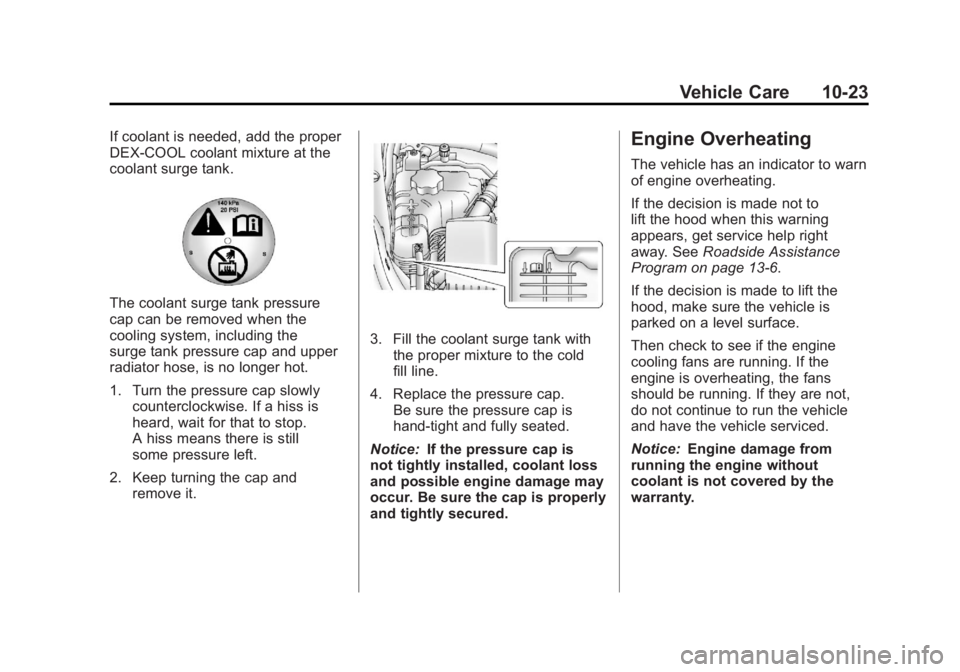
The coolant surge tank pressure
cap can be removed when the
cooling system, including the
surge tank pressure cap and upper
radiator hose, is no longer hot.
1. Turn the pressure cap slowlycounterclockwise. If a hiss is
heard, wait for that to stop.
A hiss means there is still
some pressure left.
2. Keep turning the cap and remove it.
3. Fill the coolant surge tank with
the proper mixture to the cold
fill line.
4. Replace the pressure cap. Be sure the pressure cap is
hand‐tight and fully seated.
Notice: If the pressure cap is
not tightly installed, coolant loss
and possible engine damage may
occur. Be sure the cap is properly
and tightly secured.
Engine Overheating
The vehicle has an indicator to warn
of engine overheating.
If the decision is made not to
lift the hood when this warning
appears, get service help right
away. See Roadside Assistance
Program on page 13‑6.
If the decision is made to lift the
hood, make sure the vehicle is
parked on a level surface.
Then check to see if the engine
cooling fans are running. If the
engine is overheating, the fans
should be running. If they are not,
do not continue to run the vehicle
and have the vehicle serviced.
Notice: Engine damage from
running the engine without
coolant is not covered by the
warranty.
Page 396 of 516
Black plate (30,1)Chevrolet Volt Owner Manual - 2011
10-30 Vehicle Care
Electrical Drive Unit Shift
Lock Control Function
Check
{WARNING
When you are doing this
inspection, the vehicle could
move suddenly. If the vehicle
moves, you or others could be
injured.
1. Before starting this check, be sure there is enough room
around the vehicle. It should
be parked on a level surface. 2. Firmly apply the parking brake.
See Electric Parking Brake on
page 9‑35.
Be ready to apply the regular
brake immediately if the vehicle
begins to move.
3. With the vehicle off and the brake not applied, push the
power button to ON/RUN without
starting the vehicle. See Power
Button on page 9‑18. Without
applying the regular brake, try
to move the shift lever out of
P (Park) with normal effort. If the
shift lever moves out of P (Park),
contact your dealer for service.
Park Brake and P (Park)
Mechanism Check
{WARNING
When you are doing this check,
the vehicle could begin to move.
You or others could be injured
and property could be damaged.
Make sure there is room in front
of the vehicle in case it begins to
roll. Be ready to apply the regular
brake at once should the vehicle
begin to move.
Page 399 of 516

Black plate (33,1)Chevrolet Volt Owner Manual - 2011
Vehicle Care 10-33
4. At the wall, measure fromthe ground upward (A) to
the recorded distance from
Step 3 and mark it.
5. Draw or tape a horizontal line (B) on the wall the width of the
vehicle at the height of the
mark in Step 4.
Notice: Do not cover a headlamp
to improve beam cut-off when
aiming. Covering a headlamp may
cause excessive heat build-up
which may cause damage to
the headlamp. 6. Turn on the low-beam
headlamps and place a
piece of cardboard or something
equivalent in front of the
headlamp not being adjusted.
This allows only the beam of
light from the headlamp being
adjusted to be seen on the flat
surface.
7. Locate the vertical headlamp
aiming screws, which are under
the hood near each headlamp
assembly. 8. Turn the vertical aiming screw
until the headlamp beam
is aimed to the horizontal
tape line. Turn it clockwise or
counterclockwise to raise or
lower the angle of the beam.
9. Make sure that the light from theheadlamp is positioned at the
bottom edge of the horizontal
tape line. The lamp on the
left (A) shows the correct
headlamp aim. The lamp
on the right (B) shows the
incorrect headlamp aim.
10. Repeat Steps 7 through 9 for the opposite headlamp.
Page 400 of 516

Black plate (34,1)Chevrolet Volt Owner Manual - 2011
10-34 Vehicle Care
Bulb Replacement
For the proper type of replacement
bulbs, seeReplacement Bulbs on
page 10‑37.
For any bulb‐changing procedure
not listed in this section, contact
your dealer.
Halogen Bulbs
{WARNING
Halogen bulbs have pressurized
gas inside and can burst if you
drop or scratch the bulb. You or
others could be injured. Be sure
to read and follow the instructions
on the bulb package.
Headlamps
Driver Side Headlamps
To replace the high/low‐beam
headlamp:
1. Open the hood. See Hood on
page 10‑9.
2. Remove the cover from the back
of the headlamp assembly by
turning it counterclockwise. 3. Remove the bulb socket from
the headlamp assembly by
turning it counterclockwise.
4. Remove the bulb from the socket.
5. Install the new bulb in the socket.
6. Install the bulb socket by turning it clockwise.
7. Install the cover in the back of the headlamp assembly by
turning it clockwise.
Page 401 of 516

Black plate (35,1)Chevrolet Volt Owner Manual - 2011
Vehicle Care 10-35
Passenger Side Headlamps
To replace the high/low‐beam
headlamp:
1. Open the hood. SeeHood on
page 10‑9.
2. Remove the air cleaner cover. See Engine Air Cleaner/Filter on
page 10‑16.
3. Remove the air cleaner assembly by pulling up to
release the rear two retention
posts from the securing
grommets. Then pull it forward to
remove the remaining retention
post from the securing grommet.
4. Remove the cover from the back
of the headlamp assembly by
turning it counterclockwise.
5. Remove the bulb from the headlamp assembly by turning
it counterclockwise.
6. Disconnect the bulb from the wiring harness connector.
7. Install the new bulb in the headlamp assembly by turning
it clockwise.
8. Reconnect the wiring harness connector.
9. Install the cover on the back of the headlamp assembly by
turning it clockwise.
10. Install the air cleaner assembly by lowering the three retention
posts into the grommets. 11. Install the engine air
cleaner/filter assembly cover.
SeeEngine Air Cleaner/Filter
on page 10‑16.
Back-Up Lamps
The back-up lamp is in the rear
fascia.
To replace a bulb:
1. Remove the two inboard screws from the aero panel located
under the rear fascia.
2. Push up on the aero panel to locate the bulb socket.
Page 402 of 516
Black plate (36,1)Chevrolet Volt Owner Manual - 2011
10-36 Vehicle Care
3. Turn the bulb socketcounterclockwise to remove it
from the bulb assembly.
4. Pull the bulb from the bulb socket.
5. Push a new bulb straight into the bulb socket.
6. Reinstall the bulb socket by lining up the tabs in the lamp
assembly and turn it clockwise
to lock it into place.
7. Replace the two inboard screws from the aero panel.License Plate Lamp
To replace one of these bulbs:
Passenger Side Shown,
Driver Side Similar
1. Press the spring clip on the right end of the lamp assembly to the
left to unlock the lamp assembly.
2. Pull down on the lamp assembly to remove it from the fascia.
A. Bulb Socket
B. Bulb
C. Lamp Assembly
3. Turn the bulb socket (A) counterclockwise to remove it
from the lamp assembly (C).
4. Pull the bulb (B) straight out of the bulb socket (A).
5. Push the replacement bulb straight into the bulb socket (A)
and turn the bulb socket (A)
clockwise to install into the
lamp assembly (C).