navigation system CHEVROLET VOLT 2011 Service Manual
[x] Cancel search | Manufacturer: CHEVROLET, Model Year: 2011, Model line: VOLT, Model: CHEVROLET VOLT 2011Pages: 516, PDF Size: 6.61 MB
Page 271 of 516
Black plate (81,1)Chevrolet Volt Owner Manual - 2011
Infotainment System 7-81
General Navigation Commands
Feedback on, feedback off:
This command instructs the
system to turn on and off the
voice recognition feedback.
When feedback is ON, the system
responds to commands with a talk
back phrase. When feedback is
OFF, the system responds to
commands with a chime.
Navigation voice (guidance) on,
navigation voice (guidance) off:
This command instructs the system
to turn on and off voice guidance
prompts during route guidance.
Cancel:This instructs the system
to cancel the command.
Point of Interest (POI)
Commands
The following is a list of POI
commands. POIs only display on
the map screen if the map scale
is 800 m (0.50 mi) or less. If POIs
display on a map with the wrong
scale, the system reminds that this
cannot be done. The available POI
commands are:
Navigation show gas station(s),
navigation show gas, navigation
hide gas station(s), navigation
hide gas: These commands
instruct the system to display and
hide gas station POIs on the map
screen.
Navigation show restaurant(s),
navigation show dining,
navigation hide restaurant(s),
navigation hide dining: These
commands instruct the system to
display and hide restaurant POIs
on the map screen. Navigation show ATM(s),
navigation hide ATM(s):
These
commands instruct the system to
display and hide ATM POIs on the
map screen.
Navigation show hotel(s),
navigation hide hotel(s): These
commands instruct the system to
display and hide hotel POIs on the
map screen.
Navigation show airport(s),
navigation hide airport(s): These
commands instruct the system to
display and hide airport POIs on the
map screen.
Navigation show shop(s),
navigation show shopping,
navigation hide shop(s),
navigation hide shopping: These
commands instruct the system to
display and hide shopping POIs on
the map screen.
Page 272 of 516
Black plate (82,1)Chevrolet Volt Owner Manual - 2011
7-82 Infotainment System
Destination and Guidance
Commands
Navigation (go to) preset
destination (number) (one, two,
three, four, five, or six):These
commands instruct the system to
set one of the preset destinations
one through six as the new
destination.
Navigation delete: This command
instructs the system to delete the
destination, route, or next waypoint.
The system requests a confirmation
of which item should be deleted
(destination, route, or next
waypoint).
Destination (available for English
language only): This command
instructs the system that the
user wants to enter a destination
using voice recognition. After this
command is stated, the system
displays a state abbreviation
(such as NY for New York). If the destination to be entered is in
the displayed state, then say the
desired city name. Otherwise, say
“Change State”
and say the state
name the search should take place
in. Then, say the desired city name
when prompted, and say the desired
street name and house number
when prompted.
To set a destination using voice
recognition:
1. Press and release the
b g
steering wheel control.
The audio system mutes,
and a beep is heard.
2. Say the command “Destination.”
The system replies with “Please
say city name or change state,”
and the system shows a pop-up
banner of an abbreviated state
name, such as NY for New York.
If the state is correct, then go to
Step 4. Otherwise, say “Change
State.”
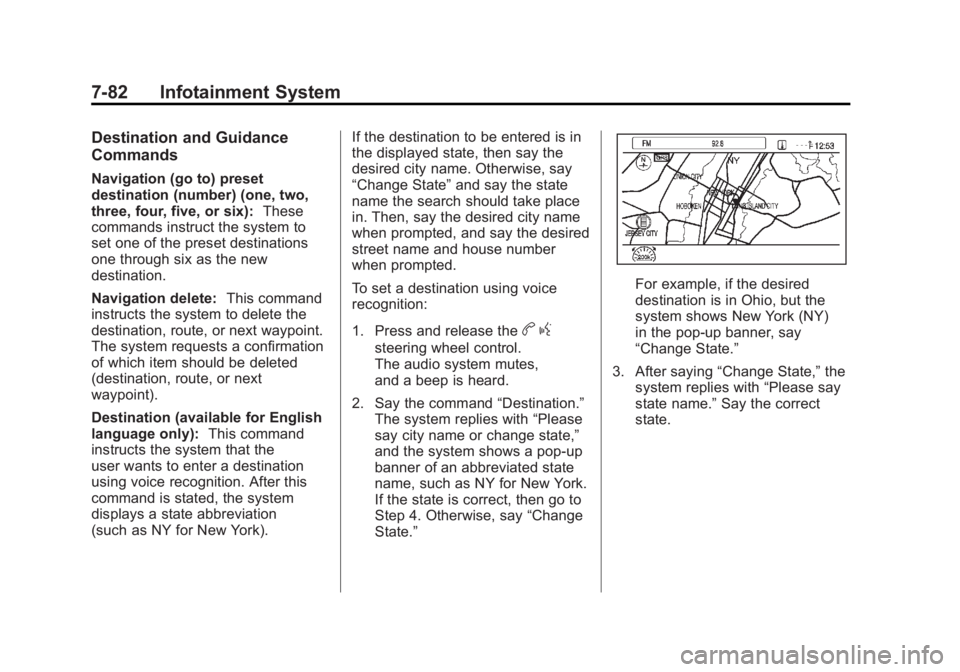
For example, if the desired
destination is in Ohio, but the
system shows New York (NY)
in the pop-up banner, say
“Change State.”
3. After saying “Change State,” the
system replies with “Please say
state name.” Say the correct
state.
Page 273 of 516
Black plate (83,1)Chevrolet Volt Owner Manual - 2011
Infotainment System 7-83
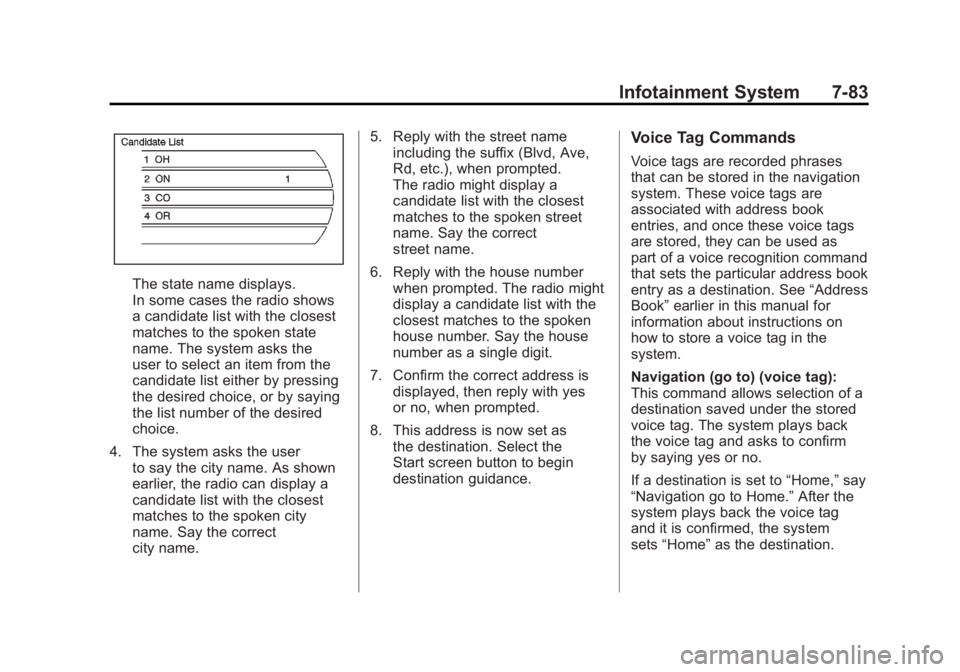
The state name displays.
In some cases the radio shows
a candidate list with the closest
matches to the spoken state
name. The system asks the
user to select an item from the
candidate list either by pressing
the desired choice, or by saying
the list number of the desired
choice.
4. The system asks the user to say the city name. As shown
earlier, the radio can display a
candidate list with the closest
matches to the spoken city
name. Say the correct
city name. 5. Reply with the street name
including the suffix (Blvd, Ave,
Rd, etc.), when prompted.
The radio might display a
candidate list with the closest
matches to the spoken street
name. Say the correct
street name.
6. Reply with the house number when prompted. The radio might
display a candidate list with the
closest matches to the spoken
house number. Say the house
number as a single digit.
7. Confirm the correct address is displayed, then reply with yes
or no, when prompted.
8. This address is now set as the destination. Select the
Start screen button to begin
destination guidance.
Voice Tag Commands
Voice tags are recorded phrases
that can be stored in the navigation
system. These voice tags are
associated with address book
entries, and once these voice tags
are stored, they can be used as
part of a voice recognition command
that sets the particular address book
entry as a destination. See “Address
Book” earlier in this manual for
information about instructions on
how to store a voice tag in the
system.
Navigation (go to) (voice tag):
This command allows selection of a
destination saved under the stored
voice tag. The system plays back
the voice tag and asks to confirm
by saying yes or no.
If a destination is set to “Home,”say
“Navigation go to Home.” After the
system plays back the voice tag
and it is confirmed, the system
sets “Home” as the destination.
Page 274 of 516
Black plate (84,1)Chevrolet Volt Owner Manual - 2011
7-84 Infotainment System
OnStar (if equipped) Command
Hands Free:This command
instructs the system to enter the
OnStar voice recognition system.
See “Hands-Free Calling” in the
OnStar Owner's Guide for more
information.
Help Commands Help
Radio (help)
CD (help), DVD (help),
Disc (help)
Display (help)
Navigation (help)
Display Commands Display (set/select) day (mode)
Display (set/select) night (mode)
Display (set/select) auto (mode)
Radio Commands (radio/radio band) AM
(radio/radio band) FM
(radio/radio band) XM
Radio select
Radio select
Radio select
Radio (CD/DVD/Disc)
Radio (CD/DVD/Disc) select
Page 275 of 516
Black plate (85,1)Chevrolet Volt Owner Manual - 2011
Infotainment System 7-85
Route (used in conjunction with
another command)
Next waypoint
(used in conjunction with
another command)
Add to waypoint
(used in conjunction with
another command)
Replace destination
(used in conjunction with
another command)
Yes (used in conjunction with
another command)
No (used in conjunction with
another command)
Destination (used for
Destination VR entry, available
in English language only)
Voice Tag Commands Navigation (go to)
OnStar Command Hands FreePhone
Bluetooth
For vehicles equipped with
Bluetooth capability, the system
can interact with many cell phones,
allowing:
.Placement and receipt of calls in
a hands-free mode.
.Sharing of the cell phone’s
address book or contact list
with the vehicle.
To minimize driver distraction,
before driving, and with the vehicle
parked:
.Become familiar with the
features of the cell phone.
Organize the phone book and
contact lists clearly and delete
duplicate or rarely used entries.
If possible, program speed dial
or other shortcuts.
.Review the controls and
operation of the infotainment
and navigation system.
.Pair cell phone(s) to the vehicle.
The system may not work with
all cell phones. See “Pairing a
Phone” in this section for more
information.
.If the cell phone has voice
dialing capability, learn to use
that feature to access the
address book or contact list.
See “Voice Pass-Thru” in this
section for more information.
.See “Storing and Deleting Phone
Numbers” in this section for
more information.
{WARNING
When using a cell phone, it can
be distracting to look too long
or too often at the screen of
the phone or the infotainment
(navigation) system. Taking
your eyes off the road too long
or too often could cause a crash
resulting in injury or death.
Focus your attention on driving.
Page 349 of 516
Black plate (47,1)Chevrolet Volt Owner Manual - 2011
Driving and Operating 9-47
Turning the Rear Vision Camera
System On or Off
To turn the RVC system on or off:
1. Shift into P (Park).
2. Press the CONFIG button on thecenter stack.
3. Select Display.
4. Select Camera. When a checkmark appears next to
Camera, then the RVC system
is on.
Symbols
The navigation system may have
a feature that lets the driver view
symbols on the navigation screen
while using the RVC. The Ultrasonic
Front and Rear Parking Assist
(UFRPA) system must not be
disabled to use the caution symbols. The error message REAR PARKING
ASSIST SYMBOLS UNAVAILABLE
may display if UFRPA has been
disabled and the symbols have
been turned on. See
Ultrasonic
Parking Assist on page 9‑43.
The symbols appear and may
cover an object when viewing the
navigation screen when an object
is detected by the UFRPA system.
To turn the symbols on or off:
1. Shift into P (Park).
2. Press the CONFIG button on the
center stack.
3. Select Display.
4. Select Symbols. When a checkmark appears next to
Symbols, symbols will appear. Guidelines
The RVC system has a guideline
overlay that can help the driver align
the vehicle when backing into a
parking spot.
To turn the guidelines on or off:
1. Shift into P (Park).
2. Press the CONFIG button on the
center stack.
3. Select Display.
4. Select Guidelines. When a checkmark appears next to
Guidelines, guidelines will
appear.
Page 477 of 516
Black plate (1,1)Chevrolet Volt Owner Manual - 2011
Customer Information 13-1
Customer
Information
Customer Information
Customer SatisfactionProcedure . . . . . . . . . . . . . . . . . . 13-1
Customer Assistance Offices . . . . . . . . . . . . . . . . . . . . . 13-3
Customer Assistance for Text Telephone (TTY) Users . . . . . 13-4
Online Owner Center . . . . . . . . 13-4
GM Mobility Reimbursement Program . . . . . . . . . . . . . . . . . . . . 13-5
Roadside Assistance Program . . . . . . . . . . . . . . . . . . . . 13-6
Scheduling Service Appointments . . . . . . . . . . . . . . 13-8
Courtesy Transportation Program . . . . . . . . . . . . . . . . . . . . 13-8
Collision Damage Repair . . . 13-10
Service Publications Ordering Information . . . . . . 13-12
Trademarks and License Agreements . . . . . . . . . . . . . . . 13-13
Open Source Information . . . 13-24
Reporting Safety Defects
Reporting Safety Defects to the United States
Government . . . . . . . . . . . . . . . 13-24
Reporting Safety Defects to the Canadian
Government . . . . . . . . . . . . . . . 13-25
Reporting Safety Defects to General Motors . . . . . . . . . . . 13-25
Vehicle Data Recording and
Privacy
Vehicle Data Recording andPrivacy . . . . . . . . . . . . . . . . . . . . 13-26
Event Data Recorders . . . . . . 13-26
OnStar
®. . . . . . . . . . . . . . . . . . . . 13-27
Navigation System . . . . . . . . . 13-27
Radio Frequency Identification (RFID) . . . . . . . 13-27
Radio Frequency Statement . . . . . . . . . . . . . . . . . 13-28
Customer Information
Customer Satisfaction
Procedure
Your satisfaction and goodwill are
important to your dealer and to
Chevrolet. Normally, any concerns
with the sales transaction or the
operation of the vehicle will be
resolved by your dealer's sales or
service departments. Sometimes,
however, despite the best intentions
of all concerned, misunderstandings
can occur. If your concern has not
been resolved to your satisfaction,
the following steps should be taken:
STEP ONE: Discuss your concern
with a member of dealership
management. Normally, concerns
can be quickly resolved at that level.
If the matter has already been
reviewed with the sales, service,
or parts manager, contact the owner
of your dealership or the general
manager.
Page 494 of 516
Black plate (18,1)Chevrolet Volt Owner Manual - 2011
13-18 Customer Information
No warranty is made that the
Gracenote Software or Gracenote
Servers are error-free or that
functioning of Gracenote Software
or Gracenote Servers will be
uninterrupted.
Gracenote is not obligated to
provide you with new enhanced or
additional data types or categories
that Gracenote may provide in the
future and is free to discontinue its
services at any time.
Gracenote disclaims all warranties
express or implied, including, but
not limited to, implied warranties
of merchantability, fitness for
a particular purpose, title, and
non-infringement. Gracenote
does not warrant the results that
will be obtained by your use of
the gracenote software or any
gracenote server. In no case
will gracenote be liable for any
consequential or incidental
damages or for any lost profits
or lost revenues.
© Gracenote, Inc. 2010Map End User License
Agreement
© 2010 Tele Atlas North America,
Inc. All rights reserved.
This material is proprietary and the
subject of copyright protection and
other intellectual property rights
owned by or licensed to Tele Atlas
North America, Inc.
The use of this material is subject to
the terms of a license agreement.
You will be held liable for any
unauthorized copying or disclosure
of this material.
Data by infoUSA Copyright © 2010,
All Rights Reserved.
© 2010 VISA Corporation
© CoStar Realty Information, Inc.
The Bullseye Design is a registered
trademark of Target Brands, Inc.END USER LICENSE AGREEMENT
PLEASE READ THIS AGREEMENT
CAREFULLY BEFORE USING THE
NAVIGATION SYSTEM. THIS IS
A LICENSE AGREEMENT FOR
YOUR COPY OF THE SPATIAL
MAP DATABASE, INCLUDING
LOCATION CODES AND RELATED
PRODUCTS (COLLECTIVELY,
THE "DATABASE"), USED IN THE
NAVIGATION SYSTEM. BY USING
THE NAVIGATION SYSTEM AND
THE DATABASE, YOU ACCEPT
AND AGREE TO BE BOUND BY
ALL TERMS AND CONDITIONS
SET FORTH BELOW.
Page 498 of 516
Black plate (22,1)Chevrolet Volt Owner Manual - 2011
13-22 Customer Information
END USER NOTICE
PLEASE READ THIS NOTICE
CAREFULLY BEFORE USING
THIS NAVIGATION SYSTEM.
The Point Of Interest Data
(“POI”Data) in the navigation
system is in part provided by
infoUSA Inc. (“infoUSA”). By using
the POI Data, you accept and agree
to all terms and conditions set forth
below.
1. Ownership
All rights, title and interest to
the infoUSA POI Data shall be
retained by infoUSA. 2. Limitations on Use
Except to the extent explicitly
permitted by mandatory laws,
you may not extract or re-utilize
any portion of the contents of
the POI Data, nor reproduce,
copy, modify, adapt, translate,
disassemble, decompile,
or reverse engineer any
portion of the POI Data.
3. Transfer You may not transfer the POI
Data to third parties, except
together with the system for
which it was created, provided
that you do not retain any copy
of the POI Data. 4. Disclaimer of Warranty
EXCEPT AS STATED
HEREIN, INFOUSA MAKES
NO EXPRESS OR IMPLIED
WARRANTIES, INCLUDING,
WITHOUT LIMITATION,
ANY EXPRESS OR IMPLIED
WARRANTY OF FITNESS
FOR A PARTICULAR
PURPOSE OR WARRANTY
OF MERCHANTABILITY.
5. Limitation of Liability EITHER INFOUSA OR
SUPPLIER OF POI DATA
SHALL NOT BE LIABLE
FOR ANY INDIRECT,
CONSEQUENTIAL OR
INCIDENTAL DAMAGES
MADE OR ALLEGED IN
CONNECTION WITH YOUR
USE OF THE POI DATA.
Page 499 of 516
Black plate (23,1)Chevrolet Volt Owner Manual - 2011
Customer Information 13-23
END USER LICENSE AGREEMENT
Personal Use Only—You agree
to use this information for solely
personal, non commercial purposes,
and not for service bureau, time
sharing or other similar purposes.
You may not modify the information
or remove any copyright notices
that appear on the information in
any way. You may not decompile,
disassemble or reverse engineer
any portion of this information, and
may not transfer or distribute it in
any form, for any purpose. Without
limiting the foregoing, you may
not use this information with any
products, systems, or applications
installed or otherwise connected to
or in communication with vehicles,
capable of vehicle navigation,
positioning, dispatch, real time
route guidance, fleet management
or similar applications. No Warranty
—This information
is provided to you “as is,”and you
agree to use it at your own risk.
DENSO and its licensors (and their
licensors and suppliers, collectively
“DENSO”) make no guarantees,
representations or warranties of
any kind, express or implied,
arising by law or otherwise,
including but not limited to, and
DENSO expressly disclaims
any warranties regarding content,
quality, accuracy, completeness,
effectiveness, reliability, fitness
for a particular purpose, non
infringement, usefulness, use or
results to be obtained from this
information, or that the information
or server will be uninterrupted or
error free. Some states, territories
and countries do not allow certain
warranty exclusions, so to that
extent, the above exclusion may
not apply to you. Disclaimer of Liability: DENSO
SHALL NOT BE LIABLE TO YOU
FOR ANY CLAIM, DEMAND OR
ACTION, IRRESPECTIVE OF
ITS NATURE, ALLEGING ANY
LOSS, INJURY OR DAMAGES,
WHETHER DIRECT, INDIRECT,
INCIDENTAL, SPECIAL OR
CONSEQUENTIAL DAMAGES,
INCLUDING ANY LOSS OF
PROFIT, REVENUE OR
CONTRACTS ARISING OUT
OF YOUR POSSESSION, USE
OF OR INABILITY TO USE THIS
INFORMATION, ANY DEFECT
IN THE INFORMATION, OR THE
BREACH OF THESE TERMS OR
CONDITIONS, WHETHER IN AN
ACTION IN CONTRACT OR TORT
OR BASED ON A WARRANTY,
EVEN IF DENSO OR ITS
LICENSORS HAVE BEEN
ADVISED OF THE POSSIBILITY
OF SUCH DAMAGES. Some states,
territories and countries do not
allow certain liability exclusions
or damages limitations, so to that
extent the above may not apply
to you.