garage door opener CHEVROLET VOLT 2011 Owner's Manual
[x] Cancel search | Manufacturer: CHEVROLET, Model Year: 2011, Model line: VOLT, Model: CHEVROLET VOLT 2011Pages: 516, PDF Size: 6.61 MB
Page 180 of 516

Black plate (60,1)Chevrolet Volt Owner Manual - 2011
5-60 Instruments and Controls
Remote Left in Vehicle Reminder
When on, the horn will chirp rapidly
three times if an RKE transmitter is
left in the vehicle.
To turn the remote left in vehicle
reminder feature on or off:
1. Press the Vehicle menu.
2. Select Remote Locking,Unlocking, Starting.
3. Turn the remote left in vehicle reminder feature on or off.
4. Press Back to return to the previous menu.
Return to Factory Settings
This returns all of the vehicle
personalization settings to the
factory settings.
1. Press the Vehicle menu.
2. Select Return to FactorySettings.
3. Select Yes or No.
4. Press Back to return to the previous menu.
Universal Remote
System
See Radio Frequency
Statement on page 13‑28 for
information regarding Part 15
of the Federal Communications
Commission (FCC) rules and
Industry Canada Standards
RSS-210/220/310.
Universal Remote System
Programming
If the vehicle has this feature, you
will see these buttons with one
LED indicator next to them in the
overhead console. This system provides a way to
replace up to three remote control
transmitters used to activate
devices such as garage door
openers, security systems, and
home automation devices.
Do not use the Universal Remote
system with any garage door opener
that does not have the stop and
reverse feature. This includes
any garage door opener model
manufactured before April 1,1982.
Read the instructions completely
before attempting to program
the Universal Remote system.
Because of the steps involved, it
may be helpful to have another
person available to assist with
programming the Universal
Remote system.
Page 181 of 516
Black plate (61,1)Chevrolet Volt Owner Manual - 2011
Instruments and Controls 5-61
Keep the original hand-held
transmitter for use in other vehicles
as well as for future Universal
Remote system programming.
It is also recommended that
upon the sale of the vehicle, the
programmed Universal Remote
system buttons be erased for
security purposes. See“Erasing
Universal Remote System Buttons”
later in this section.
When programming a garage door,
park outside of the garage. Park
directly in line with and facing the
garage door opener motor-head
or gate motor-head. Be sure that
people and objects are clear of
the garage door or gate being
programmed.
It is recommended that a new
battery be installed in the hand-held
transmitter for quicker and more
accurate transmission of the
radio-frequency signal.Programming the Universal
Remote System
For questions or help programming
the Universal Remote system,
call 1‐800‐355‐3515 or go to
www.homelink.com.
Programming a garage door opener
involves time-sensitive actions, so
read the entire procedure before
starting. Otherwise, the device will
time out and the procedure will have
to be repeated.
To program up to three devices:
1. Hold the end of the hand-held transmitter about 3 to 8 cm
(1 to 3 in) away from the
Universal Remote system
buttons while keeping
the indicator light in view.
The hand-held transmitter was
supplied by the manufacturer
of the garage door opener
receiver (motor-head unit). 2. At the same time, press
and hold both the hand-held
transmitter button and one
of the three Universal Remote
system buttons to be used to
operate the garage door. Do not
release the Universal Remote
system button or the hand-held
transmitter button until the
indicator light changes from a
slowly to a rapidly flashing light.
You now may release both
buttons.
Some entry gates and garage
door openers may require
substitution of Step 2 with
the procedure noted in “Gate
Operator and Canadian
Programming” later in this
section.
Page 182 of 516
Black plate (62,1)Chevrolet Volt Owner Manual - 2011
5-62 Instruments and Controls
3. Press and hold for five secondsthe newly trained Universal
Remote system button (the
button selected in Step 2) while
observing the indicator light and
garage door activation.
.If the indicator light stays on
continuously or the garage
door starts to move when
the Universal Remote
system button is pressed
and released, then the
programming is complete.
There is no need to
continue programming
Steps 4 through 6.
.If the Universal Remote
system indicator light blinks
rapidly for two seconds,
then turns to a constant
light and the garage door
does not move, continue
with programming Steps 4
through 6. It may be helpful to have
another person assist with
the remaining Steps 4
through 6.
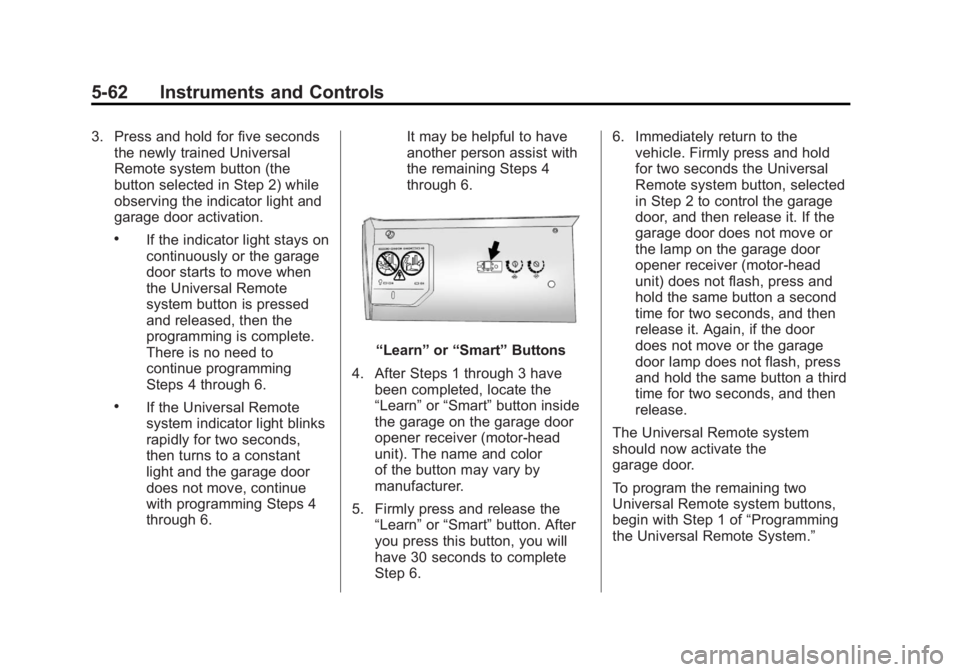
“Learn”
or“Smart” Buttons
4. After Steps 1 through 3 have been completed, locate the
“Learn” or“Smart” button inside
the garage on the garage door
opener receiver (motor-head
unit). The name and color
of the button may vary by
manufacturer.
5. Firmly press and release the “Learn” or“Smart” button. After
you press this button, you will
have 30 seconds to complete
Step 6. 6. Immediately return to the
vehicle. Firmly press and hold
for two seconds the Universal
Remote system button, selected
in Step 2 to control the garage
door, and then release it. If the
garage door does not move or
the lamp on the garage door
opener receiver (motor-head
unit) does not flash, press and
hold the same button a second
time for two seconds, and then
release it. Again, if the door
does not move or the garage
door lamp does not flash, press
and hold the same button a third
time for two seconds, and then
release.
The Universal Remote system
should now activate the
garage door.
To program the remaining two
Universal Remote system buttons,
begin with Step 1 of “Programming
the Universal Remote System.”
Page 183 of 516

Black plate (63,1)Chevrolet Volt Owner Manual - 2011
Instruments and Controls 5-63
Gate Operator and Canadian
Programming
If you have questions or need help
programming the Universal Remote
system, call 1‐800‐355‐3515 or go
to www.homelink.com.
Canadian radio-frequency laws
require transmitter signals to time
out or quit after several seconds of
transmission. This may not be long
enough for the Universal Remote
system to pick up the signal during
programming. Similarly, some U.S.
gate operators are manufactured to
time out in the same manner.If you live in Canada, or you are
having difficulty programming a
gate operator or garage door
opener by using the
“Programming
the Universal Remote System”
procedures, regardless of where
you live, replace Step 2 under
“Programming the Universal Remote
System” with the following:
Continue to press and hold
the Universal Remote system
button while you press and
release every two seconds (cycle)
the hand-held transmitter button
until the frequency signal has
been successfully accepted by
the Universal Remote system.
The Universal Remote system
indicator light will flash slowly at
first and then rapidly. Proceed with
Step 3 under “Programming the
Universal Remote System” to
complete.
Universal Remote System
Operation
Using the Universal Remote
System
Press and hold the appropriate
Universal Remote system
button for at least half of a second.
The indicator light will come on
while the signal is being transmitted.
Erasing Universal Remote
System Buttons
All programmed buttons should be
erased when the vehicle is sold or
the lease ends.
To erase all programmed buttons
on the Universal Remote system
device:
1. Press and hold down the two outside buttons until the
indicator light begins to flash.
This should take about
10 seconds.
2. Release both buttons.
Page 411 of 516

Black plate (45,1)Chevrolet Volt Owner Manual - 2011
Vehicle Care 10-45
FusesUsage
F8 Body Control
Module 7/Left Front
Turn Signal/Right
Rear Stop and Turn
Signal Lamp/Child
Security Lock Relay
Control
F9 Body Control
Module 8/Locks
F10 OnStar
®
F11 Universal Garage
Door Opener
(If Equipped)
F12 Blower Motor Fuses Usage
F13 Empty
F14 Empty
F15 Empty
F16 Empty
F17 Empty
F18 Empty
Relays Usage R1 Empty
R2 Empty Relays Usage
R3 Empty
R4 Empty
Diodes Usage DIODE Empty
Rear Compartment Fuse
Block
The rear compartment fuse
block is on the left side of the rear
compartment behind a removable
cover. Open the latch to remove the
cover and access the fuse block.
Page 503 of 516
Black plate (27,1)Chevrolet Volt Owner Manual - 2011
Customer Information 13-27
GM will not access this data or
share it with others except: with the
consent of the vehicle owner or,
if the vehicle is leased, with the
consent of the lessee; in response
to an official request by police or
similar government office; as part of
GM's defense of litigation through
the discovery process; or, as
required by law. Data that GM
collects or receives may also be
used for GM research needs or
may be made available to others for
research purposes, where a need is
shown and the data is not tied to a
specific vehicle or vehicle owner.OnStar®
If the vehicle is equipped with an
active OnStar system, that system
may also record data in crash
or near crash‐like situations.
The OnStar Terms and Conditions
provides information on data
collection and use and is available
in the OnStar glove box kit,
at www.onstar.com (U.S.) or
www.onstar.ca (Canada), or
by pressing the
Qbutton and
speaking to an advisor.
Navigation System
If the vehicle has a navigation
system, use of the system may
result in the storage of destinations,
addresses, telephone numbers, and
other trip information. See Using the
Navigation System on page 7‑39 for
information on stored data and for
deletion instructions.
Radio Frequency
Identification (RFID)
RFID technology is used in some
vehicles for functions such as tire
pressure monitoring and ignition
system security, as well as in
connection with conveniences
such as key fobs for remote door
locking/unlocking and starting, and
in-vehicle transmitters for garage
door openers. RFID technology in
GM vehicles does not use or record
personal information or link with
any other GM system containing
personal information.
Page 509 of 516

Black plate (5,1)Chevrolet Volt Owner Manual - 2011
INDEX i-5
Fuel (cont.)Low Fuel Warning Light . . . . . . . 5-28
Requirements, California . . . . . 9-58
System Messages . . . . . . . . . . . . 5-48
Function Check Electric Drive Unit ShiftLock Control . . . . . . . . . . . . . . 10-30
Fuses Engine Compartment
Fuse Block . . . . . . . . . . . . . . . . 10-38
Instrument Panel Fuse Block . . . . . . . . . 10-42, 10-43
Rear Compartment Fuse Block . . . . . . . . . . . . . . . . . . . . . . 10-45
G
Garage Door Opener . . . . . . . . . . 5-60
Programming . . . . . . . . . . . . . . . . . 5-60
Gasoline Specifications . . . . . . . . . . . . . . . . . 9-58
Gauges Battery . . . . . . . . . . . . . . . . . . . . . . . 5-16
Driver Efficiency . . . . . . . . . . . . . . 5-17
Fuel . . . . . . . . . . . . . . . . . . . . . . . . . . 5-16
Odometer . . . . . . . . . . . . . . . . . . . . . 5-15 Gauges (cont.)
Speedometer . . . . . . . . . . . . . . . . . 5-15
Trip Odometer . . . . . . . . . . . . . . . . 5-15
Warning Lights and
Indicators . . . . . . . . . . . . . . . . . . . . 5-9
General Information Service and Maintenance . . . . . 11-1
Towing . . . . . . . . . . . . . . . . . . . . . . . . 9-62
Vehicle Care . . . . . . . . . . . . . . . . . . 10-3
Global Positioning System (GPS) . . . . . . . . . . . . . . . . 7-74
Glove Box . . . . . . . . . . . . . . . . . . . . . . 4-1
GM Mobility Reimbursement Program . . . . . . . . . . . . . . . . . . . . . . 13-5
H
Halogen Bulbs . . . . . . . . . . . . . . . . 10-34
Hard Drive Device (HDD) . . . . . . 7-26
Hatch . . . . . . . . . . . . . . . . . . . . . . . . . . 2-12
Hazard Warning Flashers . . . . . . . 6-4
Head Restraints . . . . . . . . . . . . . . . . 3-2
Headlamps . . . . . . . . . . . . . . . . . . . 10-34
Aiming . . . . . . . . . . . . . . . . . . . . . . 10-32
Bulb Replacement . . . . . . . . . . 10-34
Daytime RunningLamps (DRL) . . . . . . . . . . . . . . . . . 6-3 Headlamps (cont.)
Flash-to-Pass . . . . . . . . . . . . . . . . . . 6-2
High-Beam On Light . . . . . . . . . . 5-29
High/Low Beam Changer . . . . . . 6-2
Lamps On Reminder . . . . . . . . . 5-29
Heated Front Seats . . . . . . . . . . . . . 3-6
Heated Mirrors . . . . . . . . . . . . . . . . . 2-16
Heating and Air Conditioning . . . 8-1
High Voltage Battery Gauge . . . 5-16
High Voltage Devices and Wiring . . . . . . . . . . . . . . . . . . . . . . . 10-37
High-Beam On Light . . . . . . . . . . . 5-29
Highway Hypnosis . . . . . . . . . . . . . 9-10
Hill and Mountain Roads . . . . . . . 9-10
Hood . . . . . . . . . . . . . . . . . . . . . . . . . . 10-9
Hood, Door, Hatch Open Light . . . . . . . . . . . . . . . . . . . . . . . . . 5-30
Horn . . . . . . . . . . . . . . . . . . . . . . . . . . . . 5-7
How to Wear Safety Belts
Properly . . . . . . . . . . . . . . . . . . . . . . 3-13