ECO mode CHEVROLET VOLT 2012 1.G User Guide
[x] Cancel search | Manufacturer: CHEVROLET, Model Year: 2012, Model line: VOLT, Model: CHEVROLET VOLT 2012 1.GPages: 454, PDF Size: 7.89 MB
Page 82 of 454
Black plate (24,1)Chevrolet Volt Owner Manual - 2012
3-24 Seats and Restraints
How Does an Airbag
Restrain?
In moderate to severe frontal or
near frontal collisions, even belted
occupants can contact the steering
wheel or the instrument panel. In
moderate to severe side collisions,
even belted occupants can contact
the inside of the vehicle.
Airbags supplement the protection
provided by safety belts by
distributing the force of the impact
more evenly over the
occupant's body.
Rollover capable roof‐rail airbags
are designed to help contain the
head and chest of occupants in the
outboard seating positions in the
first and second rows. The rollover
capable roof‐rail airbags are
designed to help reduce the risk of
full or partial ejection in rollover
events, although no system can
prevent all such ejections.But airbags would not help in many
types of collisions, primarily
because the occupant's motion is
not toward those airbags. See
When
Should an Airbag Inflate? on
page 3‑22 for more information.
Airbags should never be regarded
as anything more than a supplement
to safety belts.
What Will You See after
an Airbag Inflates?
After the frontal airbags and
seat-mounted side impact airbags
inflate, they quickly deflate, so
quickly that some people may not
even realize an airbag inflated.
Roof-rail airbags may still be at least
partially inflated for some time after
they inflate. Some components of
the airbag module may be hot for
several minutes. For location of the
airbags, see Where Are the
Airbags? on page 3‑21.
The parts of the airbag that come
into contact with you may be warm,
but not too hot to touch. There may be some smoke and dust coming
from the vents in the deflated
airbags. Airbag inflation does not
prevent the driver from seeing out of
the windshield or being able to steer
the vehicle, nor does it prevent
people from leaving the vehicle.
{WARNING
When an airbag inflates, there
may be dust in the air. This dust
could cause breathing problems
for people with a history of
asthma or other breathing trouble.
To avoid this, everyone in the
vehicle should get out as soon as
it is safe to do so. If you have
breathing problems but cannot
get out of the vehicle after an
airbag inflates, then get fresh air
by opening a window or a door.
If you experience breathing
problems following an airbag
deployment, you should seek
medical attention.
Page 83 of 454
Black plate (25,1)Chevrolet Volt Owner Manual - 2012
Seats and Restraints 3-25
The vehicle has a feature that may
automatically unlock the doors, turn
on the interior lamps and hazard
warning flashers, and shut off the
fuel system after the airbags inflate.
You can lock the doors, and turn off
the interior lamps and hazard
warning flashers by using the
controls for those features.
{WARNING
A crash severe enough to inflate
the airbags may have also
damaged important functions in
the vehicle, such as the fuel
system, brake and steering
systems, etc. Even if the vehicle
appears to be drivable after a
moderate crash, there may be
concealed damage that could
make it difficult to safely operate
the vehicle.
Use caution if attempting to
restart the vehicle after a crash
has occurred.In many crashes severe enough to
inflate the airbag, windshields are
broken by vehicle deformation.
Additional windshield breakage may
also occur from the front outboard
passenger airbag.
.Airbags are designed to inflate
only once. After an airbag
inflates, you will need some new
parts for the airbag system.
If you do not get them, the
airbag system will not be there
to help protect you in another
crash. A new system will include
airbag modules and possibly
other parts. The service manual
for the vehicle covers the need
to replace other parts.
.The vehicle has a crash sensing
and diagnostic module which
records information after a
crash. See
Vehicle Data
Recording and Privacy on
page 13‑15 andEvent Data
Recorders on page 13‑16.
.Let only qualified technicians
work on the airbag systems.
Improper service can mean that
an airbag system will not work
properly. See your dealer for
service.
Page 128 of 454

Black plate (12,1)Chevrolet Volt Owner Manual - 2012
5-12 Instruments and Controls
A.Battery Gauge (High Voltage)
on page 5‑14.
B. Fuel Gauge on page 5‑15.
C. Service Electric Parking Brake
Light on page 5‑23.
D. Security Light on page 5‑27.
E. Engine Coolant Temperature
Warning Light on page 5‑25.
F. Charging System Light (12-Volt
Battery) on page 5‑19.
G. Engine Oil Pressure Light on
page 5‑26.
H. High-Beam On Light on
page 5‑27.
I. Second Row Passenger Safety Belt Reminder Light. See Safety
Belt Reminders on page 5‑16.
J. Turn and Lane-Change Signals
on page 6‑4.
K. Compass on page 5‑14.
L. Speedometer on page 5‑14. M.
Cruise Control Light on
page 5‑28.
N. Electric Parking Brake Light on
page 5‑22.
O. Door, Hood, or Hatch Open
Light on page 5‑28.
P. Low Fuel Warning Light on
page 5‑27.
Q. Antilock Brake System (ABS)
Warning Light on page 5‑23.
R. Electric Drive Unit Positions. See Electric Drive Unit on
page 9‑31.
S. Driver Efficiency Gauge on
page 5‑15.
T. Brake System Warning Light on
page 5‑22.
U. Driver Safety Belt Reminder Light. See Safety Belt
Reminders on page 5‑16.
V. Airbag Readiness Light on
page 5‑17. W.
Total Vehicle Range on
page 5‑15.
X. Vehicle Ready Light on
page 5‑27.
Y. StabiliTrak
®OFF Light on
page 5‑24.
Z. Driver Information Center (DIC)
on page 5‑45.
AA. Traction Off Light on page 5‑24.
AB. Sport Mode Light on page 5‑24
and Mountain Mode Light on
page 5‑24.
AC. Lamps On Reminder on
page 5‑28.
AD. Odometer on page 5‑14.
AE. Malfunction Indicator Lamp on
page 5‑19.
AF. Traction Control System (TCS)/
StabiliTrak
®Light on page 5‑25.
AG. Tire Pressure Light on
page 5‑25.
Page 135 of 454
Black plate (19,1)Chevrolet Volt Owner Manual - 2012
Instruments and Controls 5-19
Charging System Light
(12-Volt Battery)
The charging system light comes on
briefly when the vehicle is in ON/
RUN, as a check to show the light is
working.
If the light stays on, or comes on
while driving, there could be a
problem with the electrical charging
system. Have it checked by your
dealer. Driving while this light is on
could drain the 12‐volt battery.
If a short distance must be driven
with the light on, be sure to turn off
all accessories, such as the radio.
Malfunction
Indicator Lamp
A computer system called OBD II
(On-Board Diagnostics-Second
Generation) monitors operation of
the fuel, ignition, and emission
control systems. It ensures that
emissions are at acceptable levels
for the life of the vehicle, helping to
produce a cleaner environment.
This light comes on when the
vehicle is placed in Service Only
Mode, as a check to show it is
working. If it does not, have the
vehicle serviced by your dealer. See
Power Button on page 9‑18for more
information.
If the malfunction indicator lamp
comes on and stays on, while the
engine is in ON/RUN, this indicates
that there is an OBD II problem and
service is required.
Malfunctions often are indicated by
the system before any problem is
apparent. Being aware of the light
can prevent more serious damage
to the vehicle. This system assists
the dealer technician in correctly
diagnosing any malfunction.
Notice: If the vehicle is
continually driven with this light
on, the emission controls might
not work as well, the vehicle fuel
economy might not be as good,
and the engine might not run as
smoothly. This could lead to
costly repairs that might not be
covered by the vehicle warranty.
Page 147 of 454
Black plate (31,1)Chevrolet Volt Owner Manual - 2012
Instruments and Controls 5-31
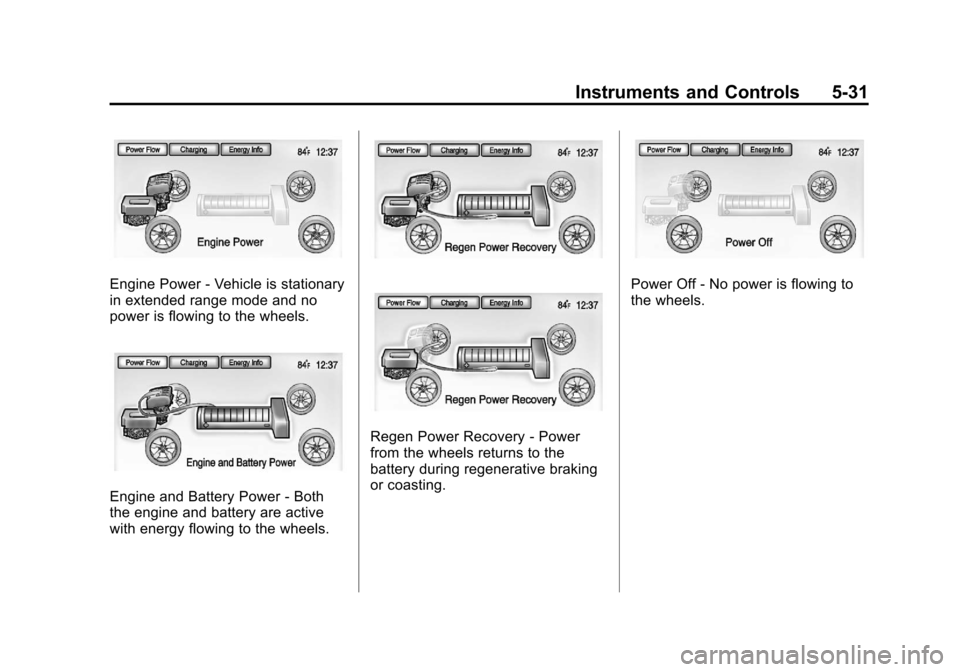
Engine Power‐Vehicle is stationary
in extended range mode and no
power is flowing to the wheels.
Engine and Battery Power ‐Both
the engine and battery are active
with energy flowing to the wheels.
Regen Power Recovery ‐Power
from the wheels returns to the
battery during regenerative braking
or coasting.
Power Off ‐No power is flowing to
the wheels.
Page 159 of 454
Black plate (43,1)Chevrolet Volt Owner Manual - 2012
Instruments and Controls 5-43
Energy Information
To view the Energy Usage, Energy
Efficiency, and Efficiency Tips, press
the
[button on the center stack
and then press the Energy Info
button at the top of the touch
screen.
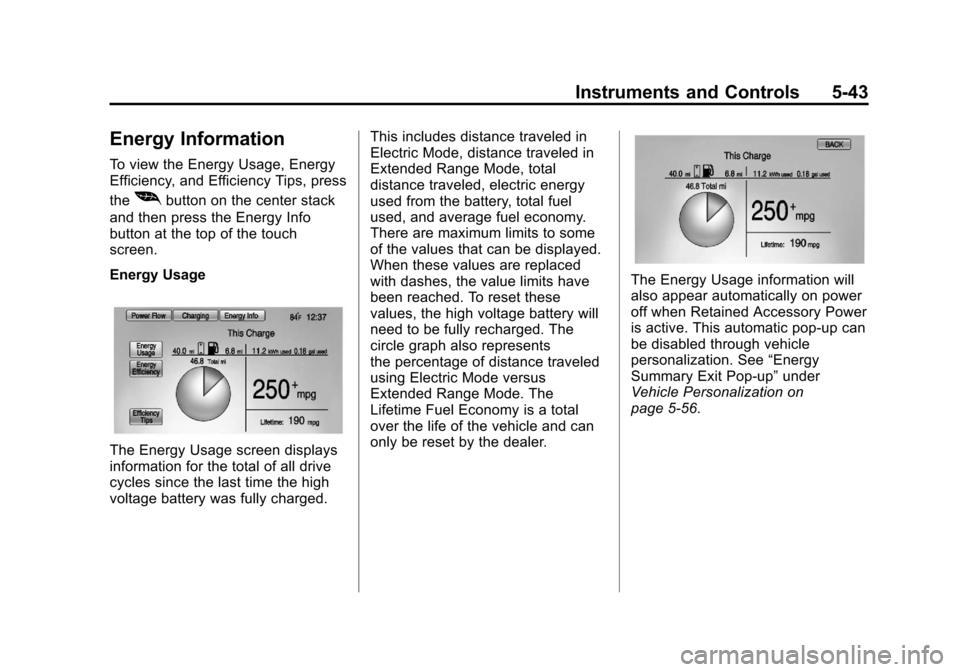
Energy Usage
The Energy Usage screen displays
information for the total of all drive
cycles since the last time the high
voltage battery was fully charged. This includes distance traveled in
Electric Mode, distance traveled in
Extended Range Mode, total
distance traveled, electric energy
used from the battery, total fuel
used, and average fuel economy.
There are maximum limits to some
of the values that can be displayed.
When these values are replaced
with dashes, the value limits have
been reached. To reset these
values, the high voltage battery will
need to be fully recharged. The
circle graph also represents
the percentage of distance traveled
using Electric Mode versus
Extended Range Mode. The
Lifetime Fuel Economy is a total
over the life of the vehicle and can
only be reset by the dealer.
The Energy Usage information will
also appear automatically on power
off when Retained Accessory Power
is active. This automatic pop-up can
be disabled through vehicle
personalization. See
“Energy
Summary Exit Pop-up” under
Vehicle Personalization on
page 5‑56.
Page 165 of 454
Black plate (49,1)Chevrolet Volt Owner Manual - 2012
Instruments and Controls 5-49
Cruise Control Messages
CRUISE SET TO XXX
This message displays when the
cruise control is set and shows the
speed it was set to. SeeCruise
Control on page 9‑40 for more
information.
Door Ajar Messages
DOOR(S) OPEN, HOOD OPEN,
HATCH OPEN
A symbol will appear on the display
showing the area that is open. See
Door, Hood, or Hatch Open Light on
page 5‑28.
Drive Mode Messages
MOUNTAIN MODE NOT
AVAILABLE
This message displays when in
Mountain Mode and the mode
becomes unavailable. See “Mountain Mode”
underDriver
Selected Operating Modes on
page 9‑25.
SPORT MODE NOT
AVAILABLE
This message displays when in
Sport Mode and the mode becomes
unavailable. See “Sport Mode”
under Driver Selected Operating
Modes on page 9‑25.
Electric Drive Unit
Messages
SHIFT TO PARK
This message displays when the
vehicle should be shifted to
P (Park). This may appear when
attempting to turn off the vehicle
when it is not in P (Park).
Engine Cooling System
Messages
ENGINE
OVERHEATED —REDUCE
SPEED
This message displays when the
engine coolant temperature or
engine oil is too hot. Reduce speed
and allow the vehicle to cool down.
ENGINE
OVERHEATED —TURN
VEHICLE OFF
This message displays and a
continuous chime sounds if the
engine cooling system reaches
unsafe temperatures for operation.
Stop and turn off the vehicle as
soon as it is safe to do so to avoid
severe damage. This message
clears when the engine has cooled
to a safe operating temperature.
Page 168 of 454
Black plate (52,1)Chevrolet Volt Owner Manual - 2012
5-52 Instruments and Controls
Object Detection System
Messages
PARK ASSIST OFF
This message displays when the
park assist system has been turned
off or when there is a temporary
condition causing the system to be
disabled. SeeUltrasonic Parking
Assist on page 9‑42.
SERVICE PARKING ASSIST
This message displays if there is a
problem with the Ultrasonic Front
and Rear Parking Assist (UFRPA)
system. Do not use this system to
help you park. See Ultrasonic
Parking Assist on page 9‑42 for
more information. See your dealer
for service.
Propulsion Power
Messages
PROPULSION POWER IS
REDUCED
This message displays when the
propulsion power is reduced and
can affect the ability to accelerate.
If this message is on, but there is no
reduction in performance, proceed
to your destination. The
performance may be reduced the
next time the vehicle is driven. The
vehicle may be driven at a reduced
speed while this message is on, but
maximum acceleration and speed
may be reduced. If this message
stays on when the malfunction
indicator lamp is on, the vehicle
should be taken to your dealer for
service as soon as possible. This message can display when
driving in mountainous terrain
without using Mountain Mode or by
not entering Mountain Mode soon
enough to build a sufficient battery
charge reserve before climbing
steep grades. This is normal
operation to protect the high voltage
battery. Only if both the
PROPULSION POWER IS
REDUCED message and the
malfunction indicator lamp are on
should the vehicle be taken to the
dealer for service.
While climbing the grade with this
message displayed, the vehicle
speed may be reduced until the
engine can recover the battery state
of charge to a normal level. See
“Mountain Mode”
underDriver
Selected Operating Modes on
page 9‑25.
Page 203 of 454
Black plate (11,1)Chevrolet Volt Owner Manual - 2012
Infotainment System 7-11
Satellite Radio
XM™Satellite Radio Service
For vehicles equipped with the
MyLink or IntelliLink infotainment
system, see the separate MyLink/
IntelliLink Features and Functions
Guide for more information.
Vehicles with an XM satellite radio
tuner and a valid XM satellite radio
subscription can receive XM
programming.
XM is a satellite radio service based
in the 48 contiguous United States
and 10 Canadian provinces. XM
satellite radio has a wide variety of
programming and commercial-free
music, coast to coast, and in
digital-quality sound. A service fee
is required to receive the XM
service. For more information, see
www.xmradio.com or
1-800-929-2100 in the U.S. In
Canada, see www.xmradio.ca or
1-877-438-9677. When XM is active, the channel
name and number, category name,
song title, and artist display on the
screen.
XM Categories
XM stations are organized in
categories.
To customize which XM categories
are used and displayed in the
system, see
“Adding or Removing
XM Categories” following.
Adding or Removing
Categories
1. From the Home Page press the
Config screen button or the
CONFIG button on the faceplate.
2. Select Radio Settings from the Config Menu list.
3. Select Add/Remove XM Categories. 4. From the Add/Remove XM
Categories screen, select or
deselect any category to be
used in XM mode. A checkmark
will indicate that the category is
selected.
Turning XM Album Art On
or Off
1. From the Home Page press theConfig screen button or the
CONFIG button on the faceplate.
2. Select Radio Settings from the Config Menu list.
3. Select XM Album Art to turn on or off.
XM Messages
XL (Explicit Language
Channels): These channels, or any
others, can be blocked by request,
by calling 1-800-929-2100 in the
U.S., and 1-877-438-9677 in
Canada.
Page 214 of 454
Black plate (22,1)Chevrolet Volt Owner Manual - 2012
7-22 Infotainment System
Composers:
1. Press to view the composersstored on the iPod.
2. Select a composer name to view a list of all songs by that
composer.
3. Select the desired song from the list to begin playback.
Audio Books:
1. Press to view the audio books stored on the iPod.
2. Select an audio book name to view a list of all audio books.
3. Select the desired audio book from the list to begin playback.
Playing from an iPhone®
This feature supports the following
iPhone model:
.iPhone (3g –3gs)
To use the iPhone, follow the same
instructions as stated earlier for
using an iPod.
Phone
Bluetooth (Overview)
For vehicles equipped with the
MyLink or IntelliLink infotainment
system, see the separate MyLink/
IntelliLink Features and Functions
Guide for more information.
For vehicles equipped with
Bluetooth capability, the system can
interact with many cell phones,
allowing:
.Placement and receipt of calls in
a hands-free mode.
.Sharing of the cell phone’s
address book or contact list with
the vehicle. To minimize driver distraction,
before driving, and with the vehicle
parked:
.Become familiar with the
features of the cell phone.
Organize the phone book and
contact lists clearly and delete
duplicate or rarely used entries.
If possible, program speed dial
or other shortcuts.
.Review the controls and
operation of the infotainment
system.
.Pair cell phone(s) to the vehicle.
The system may not work with
all cell phones. See
“Pairing”in
this section for more information.
.If the cell phone has voice
dialing capability, learn to use
that feature to access the
address book or contact list. See
“Voice Pass-Thru” in this section
for more information.
.See “Storing and Deleting Phone
Numbers” in this section for
more information.