change wheel CHEVROLET VOLT 2012 1.G User Guide
[x] Cancel search | Manufacturer: CHEVROLET, Model Year: 2012, Model line: VOLT, Model: CHEVROLET VOLT 2012 1.GPages: 454, PDF Size: 7.89 MB
Page 238 of 454
Black plate (8,1)Chevrolet Volt Owner Manual - 2012
8-8 Climate Controls
Sensors
Solar Sensor
The solar sensor is located on top of
the instrument panel, near the
windshield, where it monitors solar
intensity.
The climate control system uses the
sensor information to adjust the
temperature, fan speed,
recirculation, and air delivery
mode for best comfort.
Do not cover the sensor; otherwise
the automatic climate control system
may not work properly.Humidity Sensor
The humidity sensor is near the
base of the inside rearview mirror.
The climate control system uses the
sensor information to adjust the
temperature and recirculation for
best comfort.
Outside Air Temperature Sensor
The outside air temperature sensor
is located behind the front grille of
the vehicle. The vehicle uses the
sensor information to display
outside air temperature. The climate
control system uses the information
to adjust the climate system
operation.
Air Vents
Use the louvers on the air vents to
change the direction of the airflow.
Use the thumbwheels near each
vent to open and close off the
airflow.
Operation Tips
.Keep all outlets open whenever
possible for best system
performance.
.Keep the path under all seats
clear of objects to help circulate
the air inside the vehicle more
effectively.
.Use of non-GM approved hood
deflectors can adversely affect
the performance of the system.
Page 271 of 454
Black plate (33,1)Chevrolet Volt Owner Manual - 2012
Driving and Operating 9-33
Brakes
Antilock Brake
System (ABS)
This vehicle has the Antilock Brake
System (ABS), an advanced
electronic braking system that helps
prevent a braking skid.
When propulsion is active and the
vehicle begins to drive away, ABS
checks itself. A momentary motor or
clicking noise might be heard while
this test is going on, and it might
even be noticed that the brake
pedal moves a little. This is normal.
If there is a problem with ABS, this
warning light stays on. SeeAntilock
Brake System (ABS) Warning Light
on page 5‑23. If driving safely on a wet road and it
becomes necessary to slam on the
brakes and continue braking to
avoid a sudden obstacle, a
computer senses that the wheels
are slowing down. If one of the
wheels is about to stop rolling, the
computer will separately work the
brakes at each wheel.
ABS can change the brake pressure
to each wheel, as required, faster
than any driver could. This can help
the driver steer around the obstacle
while braking hard.
As the brakes are applied, the
computer keeps receiving updates
on wheel speed and controls
braking pressure accordingly.
Remember: ABS does not change
the time needed to get a foot up to
the brake pedal or always decrease
stopping distance. If you get too
close to the vehicle in front of you,
there will not be enough time to
apply the brakes if that vehicle
suddenly slows or stops. Always
leave enough room up ahead to
stop, even with ABS.
Using ABS
Do not pump the brakes. Just hold
the brake pedal down firmly and let
ABS work. You might hear the ABS
pump or motor operating and feel
the brake pedal pulsate, but this is
normal.
Braking in Emergencies
ABS allows the driver to steer and
brake at the same time. In many
emergencies, steering can help
more than even the very best
braking.
Page 275 of 454
Black plate (37,1)Chevrolet Volt Owner Manual - 2012
Driving and Operating 9-37
When the vehicle is started and
begins to move, the system
performs several diagnostic checks
to ensure there are no problems.
The system may be heard or felt
while it is working. This is normal
and does not mean there is a
problem with the vehicle. The
system should initialize before the
vehicle reaches 32 km/h (20 mph).
In some cases, it may take
approximately 3.2 km (2 mi) of
driving before the system initializes.
The TCS may activate on dry or
rough roads or under conditions
such as heavy acceleration while
turning or abrupt changes in output
from the electric drive unit. When
this happens, a reduction in
acceleration may be noticed, or a
noise or vibration may be heard.
This is normal.dflashes to indicate that TCS is
active. See Traction Control System
(TCS)/StabiliTrak
®Light on
page 5‑25 for more information.
If there is a problem detected with
TCS, SERVICE TRACTION
CONTROL is displayed on the
Driver Information Center (DIC).
See Ride Control System Messages
on page 5‑53. When this message
is displayed and
dcomes on and
stays on, the vehicle is safe to drive
but the system is not operational.
Driving should be adjusted
accordingly.
If
dcomes on and stays on, reset
the system:
1. Stop the vehicle.
2. Turn the engine off and wait 15 seconds.
3. Start the engine.
If
dstill comes on and stays on, the
vehicle needs service. Notice:
Do not repeatedly brake
or accelerate heavily when TCS is
off. The vehicle's driveline could
be damaged.
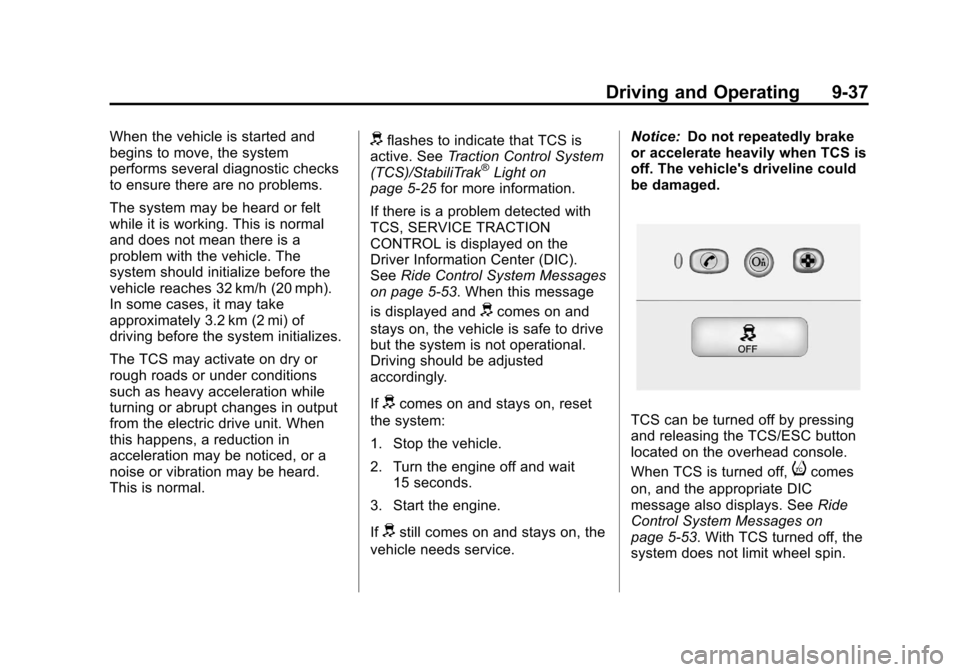
TCS can be turned off by pressing
and releasing the TCS/ESC button
located on the overhead console.
When TCS is turned off,
icomes
on, and the appropriate DIC
message also displays. See Ride
Control System Messages on
page 5‑53. With TCS turned off, the
system does not limit wheel spin.
Page 278 of 454
Black plate (40,1)Chevrolet Volt Owner Manual - 2012
9-40 Driving and Operating
Cruise Control
The cruise control lets the vehicle
maintain a speed of about 40 km/h
(25 mph) or more without keeping
your foot on the accelerator. Cruise
control does not work at speeds
below 40 km/h (25 mph).
With the Traction Control System
(TCS) or Electronic Stability Control
(ESC), the system may begin to
limit wheel spin while you are using
cruise control. If this happens, the
cruise control will automatically
disengage. SeeTraction Control
System (TCS) on page 9‑36 or
Electronic Stability Control (ESC) on
page 9‑38.
{WARNING
Cruise control can be dangerous
where you cannot drive safely at
a steady speed. So, do not use
the cruise control on winding
roads or in heavy traffic.
Cruise control can be dangerous
on slippery roads. On such roads,
fast changes in tire traction can
cause excessive wheel slip, and
you could lose control. Do not use
cruise control on slippery roads.
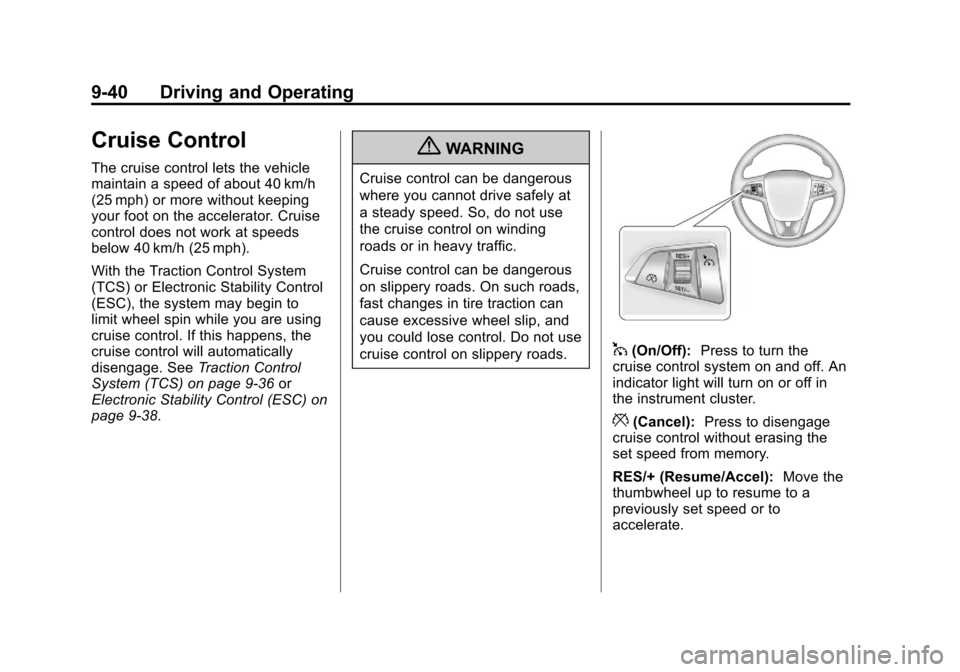
1(On/Off): Press to turn the
cruise control system on and off. An
indicator light will turn on or off in
the instrument cluster.
*(Cancel): Press to disengage
cruise control without erasing the
set speed from memory.
RES/+ (Resume/Accel): Move the
thumbwheel up to resume to a
previously set speed or to
accelerate.
Page 349 of 454
Black plate (45,1)Chevrolet Volt Owner Manual - 2012
Vehicle Care 10-45
Winter Tires
Consider installing winter tires on
the vehicle if frequent driving on
snow or ice covered roads is
expected. All season tires provide
good overall performance on most
surfaces, but they may not offer the
traction or the same level of
performance as winter tires on snow
or ice covered roads.
Winter tires, in general, are
designed for increased traction on
snow and ice covered roads. With
winter tires, there may be decreased
dry road traction, increased road
noise, and shorter tread life. After
changing to winter tires, be alert for
changes in vehicle handling and
braking.
See your dealer for details
regarding winter tire availability and
proper tire selection. Also, see
Buying New Tires on page 10‑59.If using snow tires:.Use tires of the same brand and
tread type on all four wheel
positions.
.Use only radial ply tires of the
same size, load range, and
speed rating as the original
equipment tires.
Winter tires with the same speed
rating as the original equipment tires
may not be available for H, V, W, Y,
and ZR speed rated tires. If winter
tires with a lower speed rating are
chosen, never exceed the tire's
maximum speed capability.
Tire Sidewall Labeling
Useful information about a tire is
molded into its sidewall. The
examples show a typical
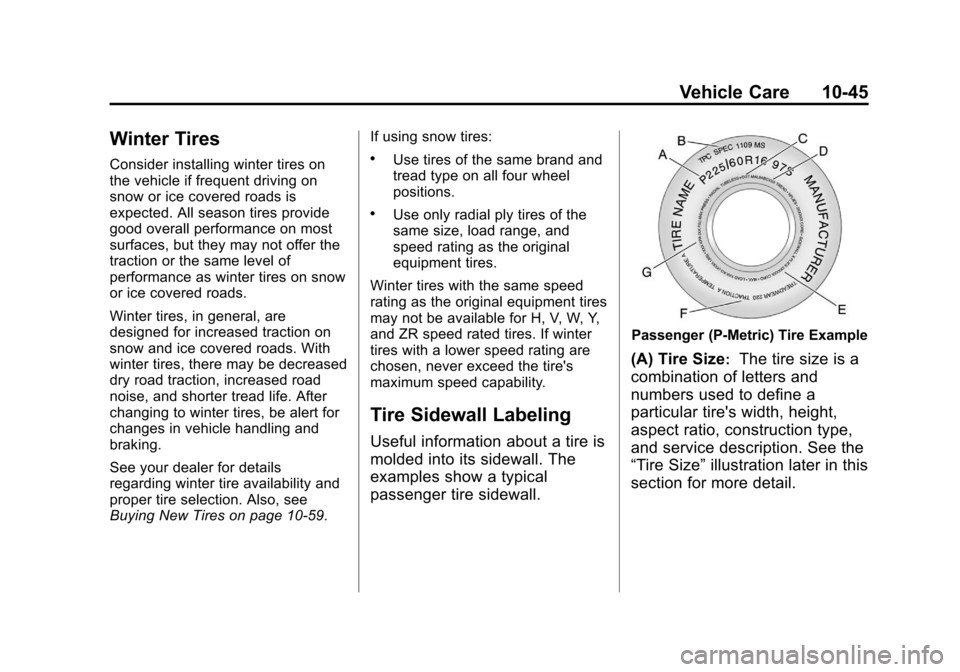
passenger tire sidewall.
Passenger (P‐Metric) Tire Example
(A) Tire Size:The tire size is a
combination of letters and
numbers used to define a
particular tire's width, height,
aspect ratio, construction type,
and service description. See the
“Tire Size” illustration later in this
section for more detail.
Page 362 of 454
Black plate (58,1)Chevrolet Volt Owner Manual - 2012
10-58 Vehicle Care
Check that all wheel nuts are
properly tightened. See“Wheel
Nut Torque” underCapacities
and Specifications on
page 12‑2.
{WARNING
Rust or dirt on a wheel, or on
the parts to which it is
fastened, can make wheel
nuts become loose after a
time. The wheel could come
off and cause a crash. When
changing a wheel, remove any
rust or dirt from places where
the wheel attaches to the
vehicle. In an emergency, a
cloth or a paper towel can be
used, however, use a scraper
or wire brush to remove all
rust or dirt. Lightly coat the center of the
wheel hub with wheel bearing
grease after a wheel change or
tire rotation to prevent corrosion
or rust build-up. Do not get
grease on the flat wheel
mounting surface or on the
wheel nuts or bolts.
When It Is Time for New
Tires
Factors such as maintenance,
temperatures, driving speeds,
vehicle loading, and road conditions
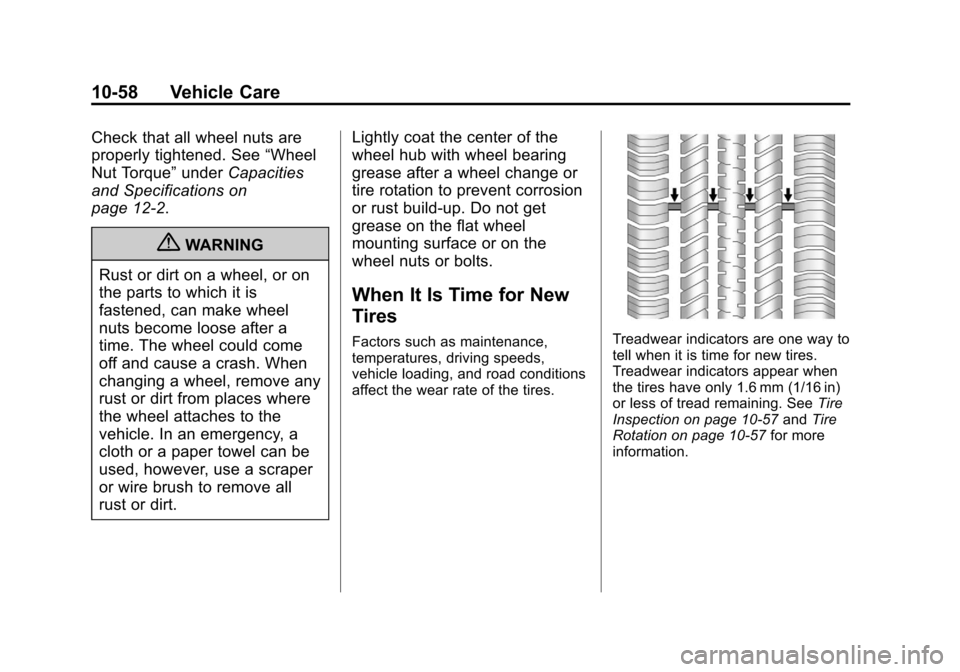
affect the wear rate of the tires.Treadwear indicators are one way to
tell when it is time for new tires.
Treadwear indicators appear when
the tires have only 1.6 mm (1/16 in)
or less of tread remaining. See
Tire
Inspection on page 10‑57 andTire
Rotation on page 10‑57 for more
information.
Page 422 of 454
Black plate (6,1)Chevrolet Volt Owner Manual - 2012
13-6 Customer Information
GM Mobility
Reimbursement Program
This program is available to
qualified applicants for cost
reimbursement of eligible
aftermarket adaptive equipment
required for the vehicle, such as
hand controls or a wheelchair/
scooter lift for the vehicle.
For more information on the limited
offer, visit www.gmmobility.com or
call the GM Mobility Assistance
Center at 1-800-323-9935. Text
Telephone (TTY) users, call
1-800-833-9935.General Motors of Canada also has
a Mobility Program. Call
1-800-GM-DRIVE (463-7483) for
details. TTY users call
1-800-263-3830.
Roadside Assistance
Program
From the U.S., call
1‐888‐811‐1926;
(Text Telephone (TTY):
1‐888‐889‐2438).
From Canada, call 1-800-268-6800.
Service is available 24 hours a day,
365 days a year.
Calling for Assistance
When calling Roadside Assistance,
have the following information
ready:
.Your name, home address, and
home telephone number.
.Telephone number of your
location.
.Location of the vehicle.
.Model, year, color, and license
plate number of the vehicle.
.Odometer reading, Vehicle
Identification Number (VIN), and
delivery date of the vehicle.
.Description of the problem.
Coverage
Services are provided up to 5 years/
160 000 km (100,000 mi), whichever
comes first.
In the U.S., anyone driving the
vehicle is covered. In Canada, a
person driving the vehicle without
permission from the owner is not
covered.
Roadside Assistance is not a part of
the New Vehicle Limited Warranty.
Chevrolet and General Motors of
Canada Limited reserve the right to
make any changes or discontinue
the Roadside Assistance program at
any time without notification.
Page 423 of 454
Black plate (7,1)Chevrolet Volt Owner Manual - 2012
Customer Information 13-7
Chevrolet and General Motors of
Canada Limited reserve the right to
limit services or payment to an
owner or driver if they decide the
claims are made too often, or the
same type of claim is made many
times.
Services Provided
.Emergency Fuel Delivery:
Delivery of enough fuel for the
vehicle to get to the nearest
service station.
.Lock‐Out Service:Service to
unlock the vehicle if you are
locked out. A remote unlock may
be available if you have OnStar.
For security reasons, the driver
must present identification
before this service is given.
.Emergency Tow from a Public
Road or Highway: Tow to the
nearest Chevrolet dealer for
warranty service, or if the vehicle
was in a crash and cannot be
driven. Assistance is also given
when the vehicle is stuck in the
sand, mud, or snow.
.Flat Tire Change: Service to
change a flat tire with the tire
sealant and compressor kit.
If the tire has been separated
from the wheel, has damaged
sidewalls, or has a large
puncture, the tire is too severely
damaged for the tire sealant and
compressor kit to be effective.
It is the owner's responsibility for
the repair or replacement of the
tire if it is not covered by the
warranty.
.Battery Jump Start: Service to
jump start a dead battery.
Services Not Included in
Roadside Assistance
.Impound towing caused by
violation of any laws.
.Legal fines.
.Mounting, dismounting,
or changing of snow tires,
chains, or other traction devices.
.Towing or services for vehicles
driven on a non-public road or
highway.
Services Specific to Canadian
Vehicles
.Fuel Delivery: Reimbursement
is approximately $5 Canadian.
Diesel fuel delivery may be
restricted. Propane and other
fuels are not provided through
this service.
.Lock-Out Service: Vehicle
registration is required.
Page 452 of 454

Black plate (10,1)Chevrolet Volt Owner Manual - 2012
i-10 INDEX
Safety Defects ReportingCanadian Government . . . . . . 13-15
General Motors . . . . . . . . . . . . . 13-15
U.S. Government . . . . . . . . . . . 13-14
Safety Locks . . . . . . . . . . . . . . . . . . . 2-13
Safety System Check . . . . . . . . . . 3-17
Satellite Radio . . . . . . . . . . . . . . . . . 7-11
Scheduling Appointments . . . . . . 13-8
Sealant Kit, Tire . . . . . . . . . . . . . . 10-67
Seats Adjustment, Front . . . . . . . . . . . . . . 3-4
Head Restraints . . . . . . . . . . . . . . . 3-2
Heated Front . . . . . . . . . . . . . . . . . . 3-6
Rear . . . . . . . . . . . . . . . . . . . . . . . . . . . 3-8
Reclining Seatbacks . . . . . . . . . . . 3-5
Securing Child
Restraints . . . . . . . . . . . . . . 3-50, 3-53
Security Light . . . . . . . . . . . . . . . . . . . . . . . . . . 5-27
OnStar
®. . . . . . . . . . . . . . . . . . . . . . 14-2
Vehicle . . . . . . . . . . . . . . . . . . . . . . . 2-15
Service Accessories andModifications . . . . . . . . . . . . . . . . 10-3
Doing Your Own Work . . . . . . . . 10-6
Engine Soon Light . . . . . . . . . . . . 5-19 Service (cont'd)
Maintenance Records . . . . . . .11-14
Maintenance, General
Information . . . . . . . . . . . . . . . . . . 11-1
Parts Identification Label . . . . . 12-1
Publications Ordering Information . . . . . . . . . . . . . . . . 13-13
Scheduling Appointments . . . . . 13-8
Vehicle Messages . . . . . . . . . . . . 5-54
Service Electric Parking Brake Light . . . . . . . . . . . . . . . . . . . 5-23
Servicing the Airbag . . . . . . . . . . . 3-31
Shifting Into Park . . . . . . . . . . . . . . . . . . . . . . 9-22
Out of Park . . . . . . . . . . . . . . . . . . . 9-23
Signals, Turn and Lane-Change . . . . . . . . . . . . . . . . . 6-4
Specifications and
Capacities . . . . . . . . . . . . . . . . . . . . 12-2
Speedometer . . . . . . . . . . . . . . . . . . 5-14
Sport Mode Light . . . . . . . . . . . . . . 5-24
StabiliTrak OFF Light . . . . . . . . . . . . . . . . . . . . . 5-24
Start Remote . . . . . . . . . . . . . . . . . . . . . . . . 2-8 Starting and Stopping the
Vehicle . . . . . . . . . . . . . . . . . . . . . . . 9-20
Starting the Vehicle Messsages . . . . . . . . . . . . . . . . . . . 5-54
Status Screens Charging . . . . . . . . . . . . . . . . . . . . . 9-52
Steering . . . . . . . . . . . . . . . . . . . . . . . . 9-6
Wheel Adjustment . . . . . . . . . . . . . 5-5
Wheel Controls . . . . . . . . . . . . . . . . 5-5
Storage Areas Cargo Cover . . . . . . . . . . . . . . . . . . . 4-2
Floor Console . . . . . . . . . . . . . . . . . 4-1
Glove Box . . . . . . . . . . . . . . . . . . . . . 4-1
Instrument Panel . . . . . . . . . . . . . . 4-1
Umbrella . . . . . . . . . . . . . . . . . . . . . . . 4-2
Storing the Tire Sealant
and Compressor Kit . . . . . . . . . 10-74
Stuck Vehicle . . . . . . . . . . . . . . . . . . 9-12
Sun Visors . . . . . . . . . . . . . . . . . . . . . 2-21
Symbols . . . . . . . . . . . . . . . . . . . . . . . . . . iv
System Infotainment . . . . . . . . . . . . . . . . . . . 7-1
System Operation . . . . . . . . . . . . . 9-24
Page 453 of 454

Black plate (11,1)Chevrolet Volt Owner Manual - 2012
INDEX i-11
T
Text Telephone (TTY) Users . . . 13-4
Theft-Deterrent Systems . . . . . . . 2-16Immobilizer . . . . . . . . . . . . . . . . . . . 2-16
Tires Buying New Tires . . . . . . . . . . . 10-59
Chains . . . . . . . . . . . . . . . . . . . . . . 10-65
Designations . . . . . . . . . . . . . . . 10-46
Different Size . . . . . . . . . . . . . . . 10-61
If a Tire Goes Flat . . . . . . . . . . 10-65
Inflation Monitor System . . . . 10-53
Inspection . . . . . . . . . . . . . . . . . . 10-57
Lifting the Vehicle . . . . . . . . . . . . . 10-3
Messages . . . . . . . . . . . . . . . . . . . . 5-55
Pressure Light . . . . . . . . . . . . . . . . 5-25
Pressure Monitor System . . . 10-51
Rotation . . . . . . . . . . . . . . . . . . . . 10-57
Sealant andCompressor Kit . . . . . . . . . . . 10-67
Sealant and Compressor
Kit, Storing . . . . . . . . . . . . . . . . 10-74
Sidewall Labeling . . . . . . . . . . . 10-45
Terminology and Definitions . . . . . . . . . . . . . . . . . 10-47
Uniform Tire Quality
Grading . . . . . . . . . . . . . . . . . . . 10-61 Tires (cont'd)
Wheel Alignment and Tire
Balance . . . . . . . . . . . . . . . . . . . 10-63
Wheel Replacement . . . . . . . . 10-63
When It Is Time for New
Tires . . . . . . . . . . . . . . . . . . . . . . 10-58
Winter . . . . . . . . . . . . . . . . . . . . . . 10-45
Total Vehicle Range . . . . . . . . . . . 5-15
Towing General Information . . . . . . . . . . 9-64
Recreational Vehicle . . . . . . . . 10-83
Vehicle . . . . . . . . . . . . . . . . . . . . . 10-81
Traction Control System (TCS) . . . . . . . . 9-36
Control System (TCS)/
StabiliTrak
®Light . . . . . . . . . . . . 5-25
Off Light . . . . . . . . . . . . . . . . . . . . . . 5-24
Transportation Program,
Courtesy . . . . . . . . . . . . . . . . . . . . . 13-9
Trip Odometer . . . . . . . . . . . . . . . . . 5-14
Turn and Lane-Change Signals . . . . . . . . . . . . . . . . . . . . . . . . 6-4
U
Ultrasonic Parking Assist . . . . . . 9-42
Umbrella Storage . . . . . . . . . . . . . . . 4-2
Uniform Tire QualityGrading . . . . . . . . . . . . . . . . . . . . . 10-61
Universal Remote System . . . . . 5-65 Operation . . . . . . . . . . . . . . . . . . . . . 5-68
Programming . . . . . . . . . . . . . . . . . 5-65
Using This Manual . . . . . . . . . . . . . . . . iv
Utility Interruption of Charging . . . . . . . . . . . . . . . . . . . . . 9-58
V
Vehicle
Canadian Owners . . . . . . . . . . . . . . . iii
Control . . . . . . . . . . . . . . . . . . . . . . . . 9-5
IdentificationNumber (VIN) . . . . . . . . . . . . . . . 12-1
Load Limits . . . . . . . . . . . . . . . . . . . 9-12
Messages . . . . . . . . . . . . . . . . . . . . 5-47
Personalization . . . . . . . . . . . . . . . 5-56
Reminder Messages . . . . . . . . . . 5-55
Security . . . . . . . . . . . . . . . . . . . . . . 2-15
Speed Messages . . . . . . . . . . . . . 5-55