remote control CHEVROLET VOLT 2012 1.G User Guide
[x] Cancel search | Manufacturer: CHEVROLET, Model Year: 2012, Model line: VOLT, Model: CHEVROLET VOLT 2012 1.GPages: 454, PDF Size: 7.89 MB
Page 50 of 454
Black plate (14,1)Chevrolet Volt Owner Manual - 2012
2-14 Keys, Doors, and Windows
Doors
Hatch
{WARNING
Exhaust gases can enter the
vehicle if it is driven in Extended
Range Mode with the hatch open,
or with any objects that pass
through the seal between the
body and the hatch. Engine
exhaust contains carbon
monoxide (CO) which cannot be
seen or smelled. It can cause
unconsciousness and even death.
If the vehicle must be driven in
Extended Range Mode with the
hatch open:
.Do not operate in Mountain
Mode if driving with the
hatch open.
.Close all of the windows.(Continued)
WARNING (Continued)
.Fully open the air outlets on
the instrument panel.
.Adjust the climate control
system to a setting that
brings in only outside air and
set the fan speed to the
highest setting. See
Automatic Climate Control
System on page 8‑1.
For more information about
carbon monoxide, see Engine
Exhaust on page 9‑30.
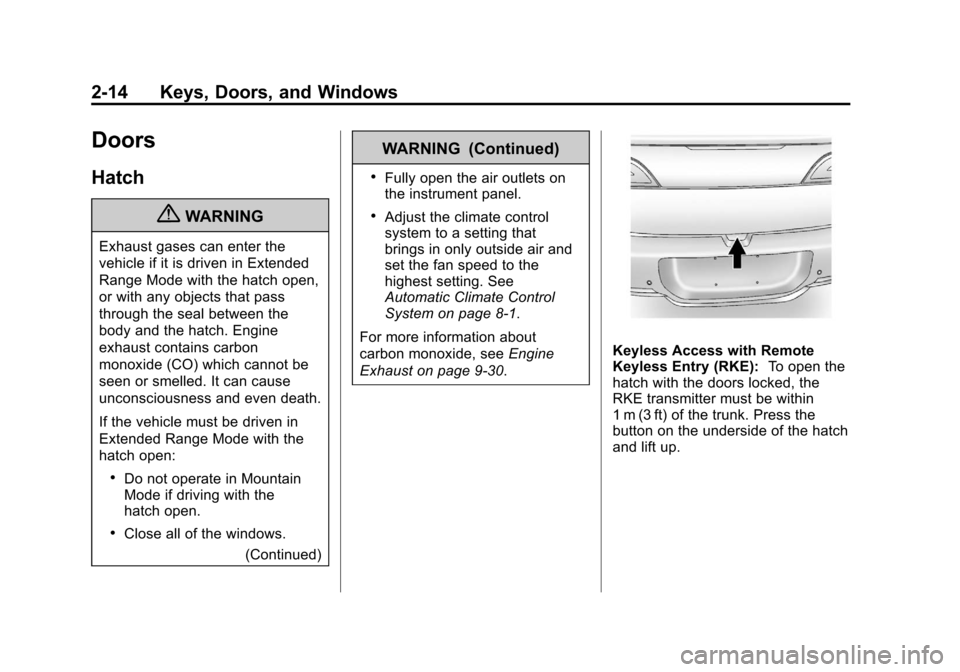
Keyless Access with Remote
Keyless Entry (RKE): To open the
hatch with the doors locked, the
RKE transmitter must be within
1 m (3 ft) of the trunk. Press the
button on the underside of the hatch
and lift up.
Page 118 of 454
Black plate (2,1)Chevrolet Volt Owner Manual - 2012
5-2 Instruments and Controls
Fuel System Messages . . . . . . 5-50
Key and Lock Messages . . . . . 5-51
Lamp Messages . . . . . . . . . . . . . 5-51
Object Detection SystemMessages . . . . . . . . . . . . . . . . . . 5-52
Propulsion Power Messages . . . . . . . . . . . . . . . . . . 5-52
Ride Control System Messages . . . . . . . . . . . . . . . . . . 5-53
Airbag System Messages . . . . 5-53
Anti-theft Alarm System Messages . . . . . . . . . . . . . . . . . . 5-53
Service Vehicle Messages . . . 5-54
Starting the Vehicle Messages . . . . . . . . . . . . . . . . . . 5-54
Tire Messages . . . . . . . . . . . . . . . 5-55
Vehicle Reminder Messages . . . . . . . . . . . . . . . . . . 5-55
Vehicle Speed Messages . . . . 5-55
Washer Fluid Messages . . . . . 5-55
Vehicle Personalization
Vehicle Personalization . . . . . . 5-56
Universal Remote System
Universal Remote System . . . 5-65
Universal Remote System Programming . . . . . . . . . . . . . . . 5-65
Universal Remote System Operation . . . . . . . . . . . . . . . . . . 5-68
Page 167 of 454
Black plate (51,1)Chevrolet Volt Owner Manual - 2012
Instruments and Controls 5-51
Key and Lock Messages
When programming new Remote
Keyless Entry (RKE) transmitters,
DIC messages display. SeeRemote
Keyless Entry (RKE) System
Operation on page 2‑3 for more
information.
NO REMOTE DETECTED
This message displays when the
RKE transmitter is not detected
while attempting to start the vehicle.
The transmitter battery may be
weak. See “Starting the Vehicle with
a Low Transmitter Battery” under
Remote Keyless Entry (RKE)
System Operation on page 2‑3 for
more information.
NO REMOTE DETECTED,
PRESS BRAKE TO RESTART
This message displays if the RKE
transmitter is no longer detected in
the vehicle. Press the brake pedal
and the POWER
Obutton to restart the vehicle, or press the POWER
O
button without pressing the brake
pedal to turn the vehicle off. If the
vehicle is turned off and a valid
transmitter is not available, the
vehicle will not restart.
REMINDER: KEY LEFT IN
VEHICLE
This message displays when
leaving the vehicle with the RKE
transmitter still inside.
REPLACE BATTERY IN
REMOTE KEY
This message displays when the
battery in the RKE transmitter needs
to be replaced.
SERVICE KEYLESS START
SYSTEM
This message displays when the
keyless start system needs service.
Take the vehicle to your dealer.
Lamp Messages
AUTOMATIC LIGHT CONTROL
ON OR OFF
A message will display when the
automatic light control has been
turned on or off.
CHECK LAMP or LAMP
FAILURE
Depending on the lamp, one of
these messages may display. See
Bulb Replacement on page 10‑29.
TURN SIGNAL ON
This message displays if the turn
signal has been left on. Turn off the
turn signal.
Page 173 of 454
Black plate (57,1)Chevrolet Volt Owner Manual - 2012
Instruments and Controls 5-57
Selecting a Menu Option
Touch any one of the available
menu options on the touch screen
to select the option. A checkmark
next to the option indicates the
selected option.
Turning a Function On or Off
Touch the screen where the
available function is listed to turn it
on or off. A checkmark next to the
function indicates that the function
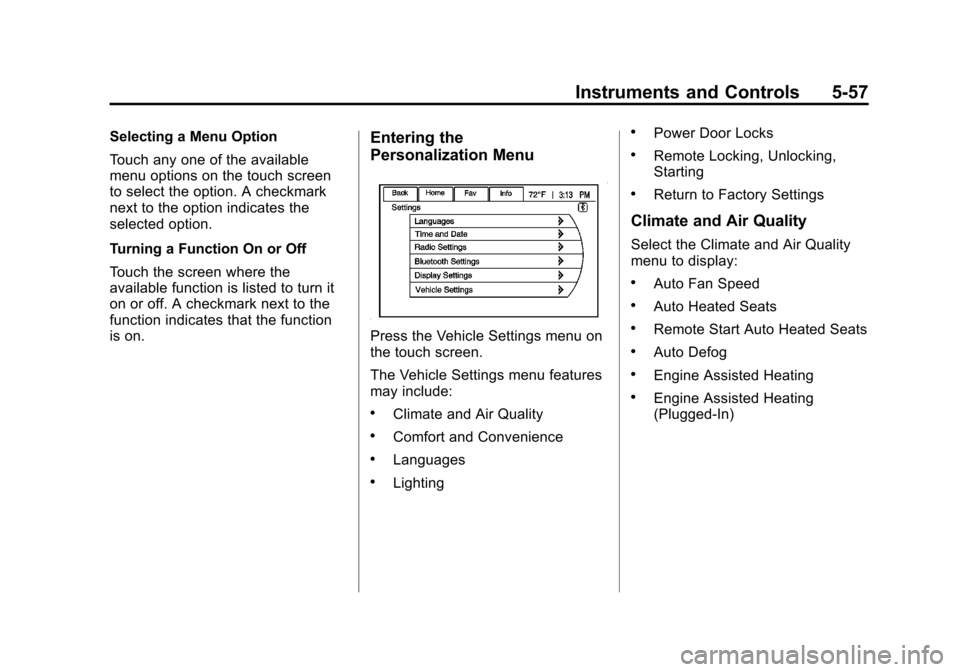
is on.Entering the
Personalization Menu
Press the Vehicle Settings menu on
the touch screen.
The Vehicle Settings menu features
may include:
.Climate and Air Quality
.Comfort and Convenience
.Languages
.Lighting
.Power Door Locks
.Remote Locking, Unlocking,
Starting
.Return to Factory Settings
Climate and Air Quality
Select the Climate and Air Quality
menu to display:
.Auto Fan Speed
.Auto Heated Seats
.Remote Start Auto Heated Seats
.Auto Defog
.Engine Assisted Heating
.Engine Assisted Heating
(Plugged‐In)
Page 174 of 454

Black plate (58,1)Chevrolet Volt Owner Manual - 2012
5-58 Instruments and Controls
Auto Fan Speed
This feature sets the automatic fan
speed to maintain the desired
interior temperature. This selection
is available on vehicles with the
automatic climate control system.
Choose a blower setting:
High:Increased speed.
Medium: Moderate speed.
Low: Reduced speed.
To select the auto fan speed:
1. Press the Vehicle Settings menu.
2. Select Climate and Air Quality.
3. Select Auto Fan Speed.
4. Select the fan speed.
5. Press Back to return to the previous menu. Auto Heated Seats
When enabled, the auto heated seat
buttons on the touch screen will be
highlighted. This feature will
automatically activate heated seats
at the level required by the interior
temperature. The auto heated seats
can be turned off by using the
heated seat buttons on the center
stack.
To turn the auto heated seats on
or off:
1. Press the Vehicle
Settings menu.
2. Select Climate and Air Quality.
3. Turn the auto heated seats feature on or off.
4. Press Back to return to the previous menu. Remote Start Auto Heated Seats
When on, this feature will turn the
heated seats on when using remote
start.
To turn the remote start auto heated
seats on or off:
1. Press the Vehicle
Settings menu.
2. Select Climate and Air Quality.
3. Turn the remote start auto heated seats feature on or off.
4. Press Back to return to the previous menu.
Auto Defog
When on and high humidity is
detected, the climate control system
will adjust the outside air, air
conditioner, or heat to decrease
fogging. The fan speed may
increase. When high humidity is no
longer detected, the system will
return to previous operation.
Page 178 of 454
Black plate (62,1)Chevrolet Volt Owner Manual - 2012
5-62 Instruments and Controls
Auto Door Unlock
This allows selection of which doors
will automatically unlock when the
vehicle is shifted into P (Park).
The available options are:
.All Doors
.Driver Door
.OFF
To select how the doors will
automatically unlock:
1. Press the Vehicle Settings menu.
2. Select Power Door Locks.
3. Select Auto Door Unlock.
4. Select how the doors will automatically unlock.
5. Press Back to return to the previous menu. Unlocked Door Anti Lock Out
When on, this feature will keep the
driver door from locking until the
door is closed. If this feature is
turned on, the Delayed Door Lock
menu will not be available.
To turn the unlocked door anti lock
out feature on or off:
1. Press the Vehicle
Settings menu.
2. Select Power Door Locks.
3. Select Unlocked Door Anti Lock Out.
4. Turn the unlocked door anti lock out feature on or off.
5. Press Back to return to the previous menu.
Delayed Door Lock
When on, this feature will delay the
locking of the doors. To override the
delay, press the power door lock
switch on the center stack. To turn the delayed door lock
feature on or off:
1. Press the Vehicle
Settings menu.
2. Select Power Door Locks.
3. Select Delayed Door Lock.
4. Turn the delayed door lock feature on or off.
5. Press Back to return to the previous menu.
Remote Locking, Unlocking,
Starting
Select Remote Locking, Unlocking,
Starting and the following will be
displayed:
.Remote Lock Feedback
.Remote Unlock Light Feedback
.Door Unlock or Remote Door
Unlock
.Remote Left in Vehicle Reminder
.Passive Door Unlock
.Passive Door Lock
Page 179 of 454
Black plate (63,1)Chevrolet Volt Owner Manual - 2012
Instruments and Controls 5-63
Remote Lock Feedback
This allows selection of what
feedback is provided when
unlocking the vehicle with the RKE
transmitter.
The available options are:
.Lights and Horn
.Lights Only
.Horn Only
.OFF
To select the remote lock feedback:
1. Press the Vehicle Settings menu.
2. Select Remote Locking, Unlocking, Starting.
3. Select Remote Lock Feedback.
4. Select the remote feedback.
5. Press Back to return to the previous menu. Remote Unlock Light Feedback
When on, the exterior lamps will
flash when unlocking the vehicle
with the RKE transmitter.
To turn the remote unlock light
feedback feature on or off:
1. Press the Vehicle
Settings menu.
2. Select Remote Locking, Unlocking, Starting.
3. Select Remote Unlock Light Feedback.
4. Turn the remote unlock light feedback feature on or off.
5. Press Back to return to the previous menu. Door Unlock or Remote Door
Unlock
This allows selection of which doors
will unlock when pressing
Kon the
RKE transmitter.
The available options are:
.All Doors
.Driver Door
If All Doors is selected, all doors will
be unlocked.
If Driver Door is selected, only the
driver door will be unlocked on the
first press of
K. All doors will be
unlocked on the second press of
K
within five seconds of the prior
press.
To select how the doors will unlock
with the RKE transmitter:
1. Press the Vehicle Settings menu.
2. Select Remote Locking, Unlocking, Starting.
Page 180 of 454

Black plate (64,1)Chevrolet Volt Owner Manual - 2012
5-64 Instruments and Controls
3. Select Door Unlock or RemoteDoor Unlock.
4. Select how the doors will unlock.
5. Press Back to return to the previous menu.
Remote Left in Vehicle Reminder
When on, the horn will chirp rapidly
three times if an RKE transmitter is
left in the vehicle.
To turn the remote left in vehicle
reminder feature on or off:
1. Press the Vehicle Settings menu.
2. Select Remote Locking, Unlocking, Starting.
3. Select Remote Left in Vehicle Reminder.
4. Turn the remote left in vehicle reminder feature on or off.
5. Press Back to return to the previous menu. Passive Door Unlock
This allows selection of which doors
are unlocked by pressing the button
on the outside door handle.
The available options are:
.All Doors
.Driver Door
To select how the doors will unlock:
1. Press the Vehicle Settings menu.
2. Select Remote Locking, Unlocking, Starting.
3. Select Passive Door Unlock.
4. Select which doors to unlock.
5. Press Back to return to the previous menu. Passive Door Lock
This allows passive locking to be
turned on or off and select what
type of feedback.
The available options are:
.Off
.On
.On with Active Horn Chirp
To select doors locking feedback:
1. Press the Vehicle Settings menu.
2. Select Remote Locking, Unlocking, Starting.
3. Select Passive Door Lock.
4. Select On, Off, or On with Active Horn Chirp.
5. Press Back to return to the previous menu.
Page 181 of 454
Black plate (65,1)Chevrolet Volt Owner Manual - 2012
Instruments and Controls 5-65
Return to Factory Settings
This returns all of the vehicle
personalization settings to the
factory settings.
1. Press the VehicleSettings menu.
2. Select Return to Factory Settings.
3. Select Yes or No.
4. Press Back to return to the previous menu.
Universal Remote
System
See Radio Frequency Statement on
page 13‑17 for information
regarding Part 15 of the Federal
Communications Commission (FCC)
rules and Industry Canada
Standards RSS-GEN/210/220/310.
Universal Remote System
Programming
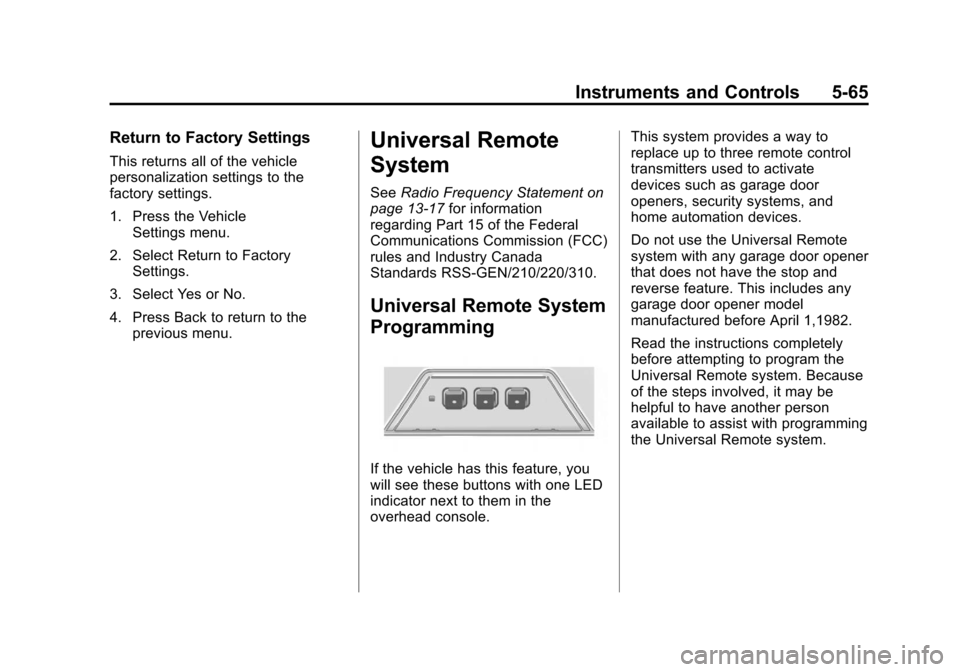
If the vehicle has this feature, you
will see these buttons with one LED
indicator next to them in the
overhead console. This system provides a way to
replace up to three remote control
transmitters used to activate
devices such as garage door
openers, security systems, and
home automation devices.
Do not use the Universal Remote
system with any garage door opener
that does not have the stop and
reverse feature. This includes any
garage door opener model
manufactured before April 1,1982.
Read the instructions completely
before attempting to program the
Universal Remote system. Because
of the steps involved, it may be
helpful to have another person
available to assist with programming
the Universal Remote system.
Page 182 of 454
Black plate (66,1)Chevrolet Volt Owner Manual - 2012
5-66 Instruments and Controls
Keep the original hand-held
transmitter for use in other vehicles
as well as for future Universal
Remote system programming. It is
also recommended that upon the
sale of the vehicle, the programmed
Universal Remote system buttons
be erased for security purposes.
See“Erasing Universal Remote
System Buttons” later in this
section.
When programming a garage door,
park outside of the garage. Park
directly in line with and facing the
garage door opener motor-head or
gate motor-head. Be sure that
people and objects are clear of the
garage door or gate being
programmed.
It is recommended that a new
battery be installed in the hand-held
transmitter for quicker and more
accurate transmission of the
radio-frequency signal.Programming the Universal
Remote System
For questions or help programming
the Universal Remote system, call
1‐800‐355‐3515 or go to
www.homelink.com.
Programming a garage door opener
involves time-sensitive actions, so
read the entire procedure before
starting. Otherwise, the device will
time out and the procedure will have
to be repeated.
To program up to three devices:
1. Hold the end of the hand-held transmitter about 3 to 8 cm
(1 to 3 in) away from the
Universal Remote system
buttons while keeping the
indicator light in view. The
hand-held transmitter was
supplied by the manufacturer of
the garage door opener receiver
(motor-head unit). 2. At the same time, press and
hold both the hand-held
transmitter button and one of the
three Universal Remote system
buttons to be used to operate
the garage door. Do not release
the Universal Remote system
button or the hand-held
transmitter button until the
indicator light changes from a
slowly to a rapidly flashing light.
You now may release both
buttons.
Some entry gates and garage
door openers may require
substitution of Step 2 with the
procedure noted in “Gate
Operator and Canadian
Programming” later in this
section.