instrument cluster CHEVROLET VOLT 2012 1.G Owner's Manual
[x] Cancel search | Manufacturer: CHEVROLET, Model Year: 2012, Model line: VOLT, Model: CHEVROLET VOLT 2012 1.GPages: 454, PDF Size: 7.89 MB
Page 240 of 454
Black plate (2,1)Chevrolet Volt Owner Manual - 2012
9-2 Driving and Operating
Charge Cord . . . . . . . . . . . . . . . . . 9-55
Utility Interruption ofCharging . . . . . . . . . . . . . . . . . . . 9-58
Electrical Requirements for Battery Charging . . . . . . . . . . . 9-58
Fuel
Fuel . . . . . . . . . . . . . . . . . . . . . . . . . 9-59
Gasoline Specifications (U.S.
and Canada Only) . . . . . . . . . . 9-60
California Fuel Requirements . . . . . . . . . . . . . . 9-60
Fuels in Foreign Countries . . . 9-60
Fuel Additives . . . . . . . . . . . . . . . 9-60
Filling the Tank . . . . . . . . . . . . . . 9-62
Filling a Portable Fuel Container . . . . . . . . . . . . . . . . . . . 9-64
Towing
General Towing
Information . . . . . . . . . . . . . . . . . 9-64
Conversions and Add-Ons
Add-On ElectricalEquipment . . . . . . . . . . . . . . . . . 9-65
Driving Information
Driving for Better Energy
Efficiency
Use the following tips to help
maximize energy efficiency and
range.
Driving Style
Efficiency Gauge (Instrument
Cluster)
The ball indicator should be kept
green and in the center of the
gauge.
Inefficient acceleration is indicated
when the ball turns yellow and
travels above the center of the
gauge.
Aggressive braking is indicated
when the ball turns yellow and
travels below the center of the
gauge. Acceleration/Braking/Coasting
Avoid unnecessary rapid
accelerations and decelerations.
Electric range is maximized at
80 km/h (50 mph) and below. Higher
speeds use more energy and can
significantly reduce electric range.
Use cruise control when
appropriate.
Plan ahead for decelerations and
coast whenever possible. For
example, do not rush to traffic
signals.
Do not shift to N (Neutral) to coast.
The vehicle recovers energy while
coasting and braking in D (Drive)
or L (Low).
Drive Mode and PRNDL Selection
Use Normal Mode when possible.
Sport Mode provides more
responsive acceleration than
Normal Mode but can reduce
efficiency.
Page 256 of 454
Black plate (18,1)Chevrolet Volt Owner Manual - 2012
9-18 Driving and Operating
Power Button
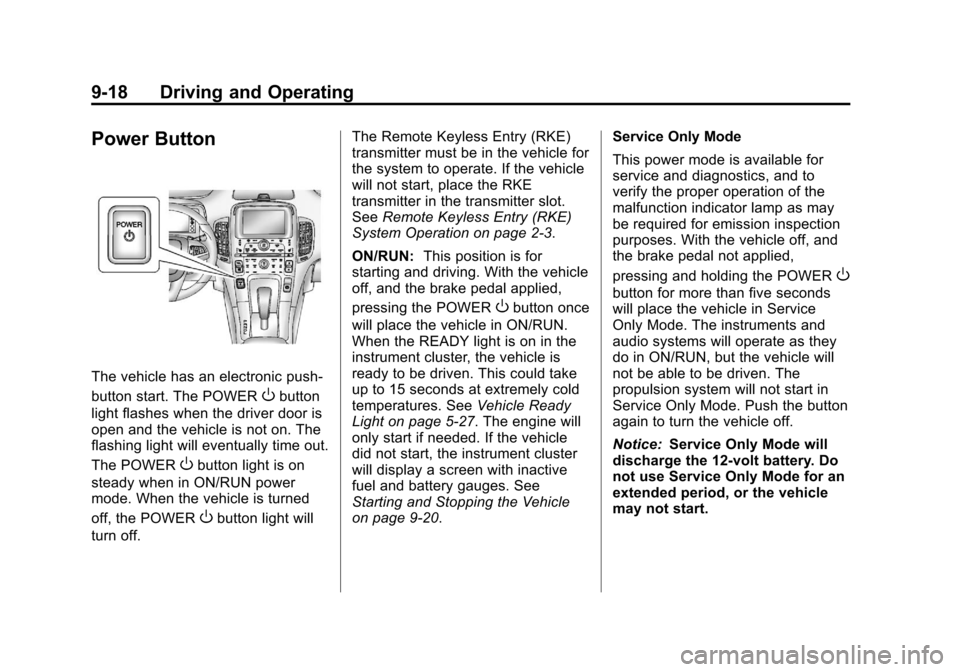
The vehicle has an electronic push‐
button start. The POWER
Obutton
light flashes when the driver door is
open and the vehicle is not on. The
flashing light will eventually time out.
The POWER
Obutton light is on
steady when in ON/RUN power
mode. When the vehicle is turned
off, the POWER
Obutton light will
turn off. The Remote Keyless Entry (RKE)
transmitter must be in the vehicle for
the system to operate. If the vehicle
will not start, place the RKE
transmitter in the transmitter slot.
See
Remote Keyless Entry (RKE)
System Operation on page 2‑3.
ON/RUN: This position is for
starting and driving. With the vehicle
off, and the brake pedal applied,
pressing the POWER
Obutton once
will place the vehicle in ON/RUN.
When the READY light is on in the
instrument cluster, the vehicle is
ready to be driven. This could take
up to 15 seconds at extremely cold
temperatures. See Vehicle Ready
Light on page 5‑27. The engine will
only start if needed. If the vehicle
did not start, the instrument cluster
will display a screen with inactive
fuel and battery gauges. See
Starting and Stopping the Vehicle
on page 9‑20. Service Only Mode
This power mode is available for
service and diagnostics, and to
verify the proper operation of the
malfunction indicator lamp as may
be required for emission inspection
purposes. With the vehicle off, and
the brake pedal not applied,
pressing and holding the POWER
O
button for more than five seconds
will place the vehicle in Service
Only Mode. The instruments and
audio systems will operate as they
do in ON/RUN, but the vehicle will
not be able to be driven. The
propulsion system will not start in
Service Only Mode. Push the button
again to turn the vehicle off.
Notice:
Service Only Mode will
discharge the 12‐volt battery. Do
not use Service Only Mode for an
extended period, or the vehicle
may not start.
Page 258 of 454
Black plate (20,1)Chevrolet Volt Owner Manual - 2012
9-20 Driving and Operating
Starting and Stopping the
Vehicle
Starting Procedure
Move the shift lever to P (Park) or
N (Neutral). The propulsion system
will not start in any other position.
Notice:Do not try to shift to
P (Park) if the vehicle is moving
or the electric drive unit could be
damaged. Shift to P (Park) only
when the vehicle is stopped.
Notice: The vehicle is designed
to work with the electronics in the
vehicle. If you add electrical parts
or accessories, you could change
the way the vehicle operates.
Before adding electrical
equipment, check with your
dealer. If you do not, the vehicle
might not perform properly. Any
resulting damage would not be
covered by the vehicle warranty. The Remote Keyless Entry (RKE)
transmitter must be in the vehicle.
Press the brake pedal and push and
release the POWER
Obutton.
If the RKE transmitter is not in the
vehicle or something is interfering
with the transmitter, a message
displays in the Driver Information
Center (DIC). See Key and Lock
Messages on page 5‑51.
If the vehicle will not start due to a
low RKE transmitter battery, the
vehicle can still be driven. See
“Starting the Vehicle with a Low
Transmitter Battery” inRemote
Keyless Entry (RKE) System
Operation on page 2‑3.
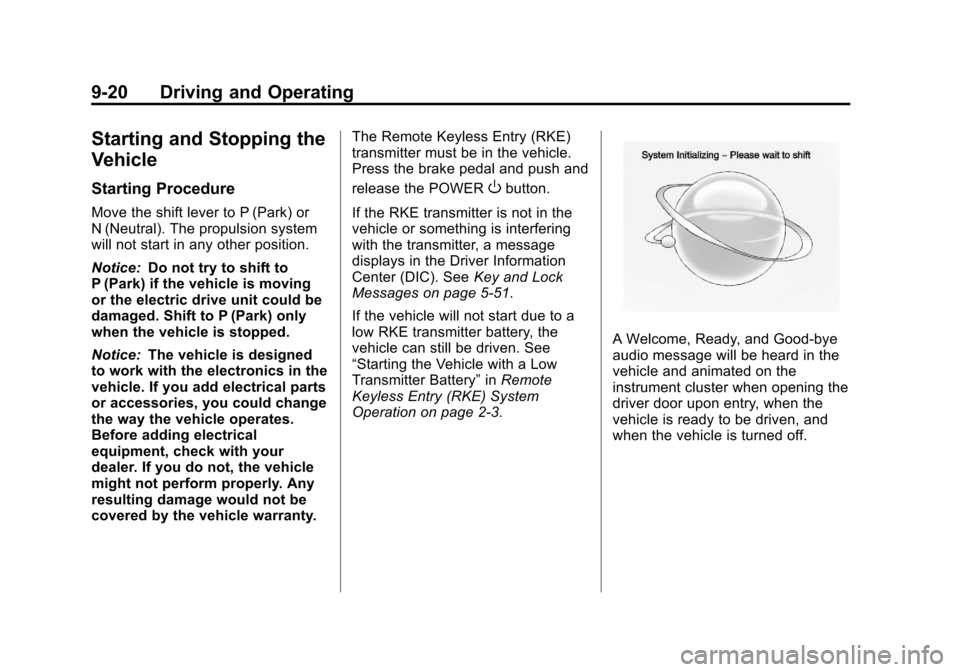
A Welcome, Ready, and Good‐bye
audio message will be heard in the
vehicle and animated on the
instrument cluster when opening the
driver door upon entry, when the
vehicle is ready to be driven, and
when the vehicle is turned off.
Page 259 of 454
Black plate (21,1)Chevrolet Volt Owner Manual - 2012
Driving and Operating 9-21
The instrument cluster displays an
active fuel or battery gauge, along
with an audio startup cue, when the
vehicle is ready to be driven. This
could take up to 15 seconds at
extremely cold temperatures. The
engine will only start if needed.
If the vehicle did not start, the
instrument cluster will display a
screen with inactive fuel and battery
gauges. SeeStarting and Stopping
the Vehicle on page 9‑20.
Restarting Procedure
If the vehicle must be restarted
while it is still moving, move the shift
lever to N (Neutral) and press the
POWER
Obutton twice without
pressing the brake pedal. The
propulsion system will not restart in
any other position. Computers determine when the
engine needs to run. The engine
may start, if required, when the
propulsion system is on. Some
vehicle conditions that force the
engine to run are:
.Cold ambient temperatures.
.The hood is open or not
completely latched.
.The high voltage battery has a
low charge.
.The engine is needed to
maintain the high voltage battery
temperature.
.The engine needs to run for
maintenance.
See Maintenance Modes on
page 9‑28.
A chime will sound if the driver door
is opened while the vehicle is in ON/
RUN. Always press the POWER
O
button to turn the vehicle off before
exiting.
Stopping Procedure
For information on how to turn the
vehicle off, see Power Button on
page 9‑18.
Retained Accessory
Power (RAP)
The following features will operate
for up to 10 minutes or until the
driver door is opened:
.Audio System
.Power Windows
.Accessory Power Outlets
Page 276 of 454
Black plate (38,1)Chevrolet Volt Owner Manual - 2012
9-38 Driving and Operating
Driving should be adjusted
accordingly. SeeTraction Off Light
on page 5‑24 for more information.
Press and release the TCS/ESC
button again to turn the system
back on.
It may be necessary to turn the
system off if the vehicle gets stuck
in sand, mud, or snow and rocking
the vehicle is required. See If the
Vehicle Is Stuck on page 9‑12 for
more information. See also Winter
Driving on page 9‑10 for information
on using TCS when driving in snowy
or icy conditions.
Adding non‐GM accessories can
affect vehicle performance. See
Accessories and Modifications on
page 10‑3 for more information.Electronic Stability
Control (ESC)
The vehicle has an Electronic
Stability Control system called
StabiliTrak. It is an advanced
computer-controlled system that
assists with directional control of the
vehicle in difficult driving conditions.
StabiliTrak comes on automatically
whenever the vehicle is turned on.
To assist with directional control of
the vehicle, the system should
always be left on.
The system may be heard or felt
while it is working, but this is
normal.
StabiliTrak activates when the
computer senses a difference
between the intended path and the
direction the vehicle is actually
traveling. StabiliTrak selectively
applies braking pressure to the
vehicle brakes to help steer the
vehicle in the intended direction. When the vehicle is started and
begins to move, the system
performs several diagnostic checks
to ensure there are no problems.
The system may be heard or felt
while it is working. This is normal
and does not mean there is a
problem with the vehicle. The
system should initialize before the
vehicle reaches 32 km/h (20 mph).
In some cases, it may take
approximately 3.2 km (2 mi) of
driving before the system initializes.
When StabiliTrak activates,
d
flashes on the instrument cluster.
This also occurs when traction
control is activated. This is normal.
Continue to steer the vehicle in the
intended direction. A noise may be
heard or vibration may be felt in the
brake pedal. This is normal.
Continue to steer the vehicle in the
intended direction. See
Traction
Control System (TCS)/StabiliTrak
®
Light on page 5‑25 for more
information.
Page 278 of 454
Black plate (40,1)Chevrolet Volt Owner Manual - 2012
9-40 Driving and Operating
Cruise Control
The cruise control lets the vehicle
maintain a speed of about 40 km/h
(25 mph) or more without keeping
your foot on the accelerator. Cruise
control does not work at speeds
below 40 km/h (25 mph).
With the Traction Control System
(TCS) or Electronic Stability Control
(ESC), the system may begin to
limit wheel spin while you are using
cruise control. If this happens, the
cruise control will automatically
disengage. SeeTraction Control
System (TCS) on page 9‑36 or
Electronic Stability Control (ESC) on
page 9‑38.
{WARNING
Cruise control can be dangerous
where you cannot drive safely at
a steady speed. So, do not use
the cruise control on winding
roads or in heavy traffic.
Cruise control can be dangerous
on slippery roads. On such roads,
fast changes in tire traction can
cause excessive wheel slip, and
you could lose control. Do not use
cruise control on slippery roads.
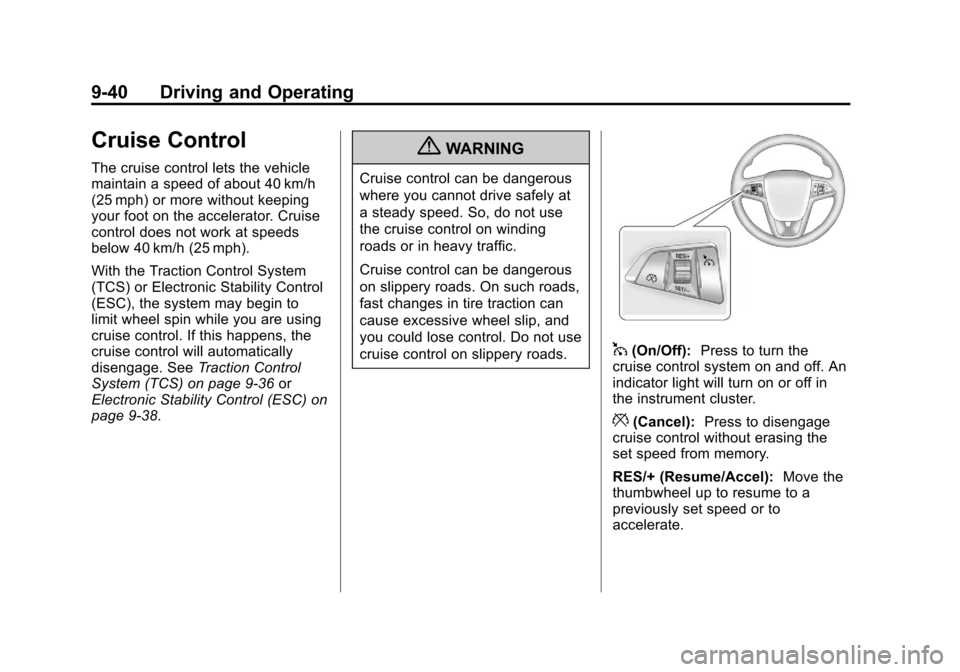
1(On/Off): Press to turn the
cruise control system on and off. An
indicator light will turn on or off in
the instrument cluster.
*(Cancel): Press to disengage
cruise control without erasing the
set speed from memory.
RES/+ (Resume/Accel): Move the
thumbwheel up to resume to a
previously set speed or to
accelerate.
Page 279 of 454

Black plate (41,1)Chevrolet Volt Owner Manual - 2012
Driving and Operating 9-41
SET/−(Set/Coast): Move the
thumbwheel down to set a speed
and activate cruise control or to
make the vehicle decelerate.
Setting Cruise Control
If the cruise button is on when not in
use, it could get bumped and go into
cruise when not desired. Keep the
cruise control button off when cruise
is not being used.
To set a speed:
1. Press
1to turn cruise
control on.
2. Get up to the speed desired.
3. Move the thumbwheel down toward SET/− and release it.
The desired set speed briefly
appears in the instrument
cluster.
4. Take your foot off the accelerator pedal.
When the brakes are applied, the
cruise control shuts off. Resuming a Set Speed
If the cruise control is set at a
desired speed and then the brakes
are applied, the cruise control is
disengaged without erasing the set
speed from memory. Once the
vehicle speed is about 40 km/h
(25 mph) or greater, move the
thumbwheel up toward RES/+
briefly and then release it. The
vehicle returns to the previously set
speed and stays there.
Increasing Speed While Using
Cruise Control
If the cruise control system is
already activated:
.Move the thumbwheel up toward
RES/+ and hold it until the
vehicle accelerates to the
desired speed, then release it.
.To increase the speed in small
amounts, move the thumbwheel
up toward RES/+ briefly and
then release it. Each time this is
done, the vehicle goes about
1.6 km/h (1 mph) faster.Reducing Speed While Using
Cruise Control
If the cruise control system is
already activated:
.Move the thumbwheel toward
SET/−
and hold until the desired
lower speed is reached, then
release it.
.To slow down in very small
amounts, move the thumbwheel
toward SET/− briefly. Each time
this is done, the vehicle goes
about 1.6 km/h (1 mph) slower.
Passing Another Vehicle While
Using Cruise Control
Use the accelerator pedal to
increase vehicle speed. When you
take your foot off the pedal, the
vehicle will slow down to the
previously set cruise control speed.
Page 296 of 454
Black plate (58,1)Chevrolet Volt Owner Manual - 2012
9-58 Driving and Operating
Utility Interruption of
Charging
For participating customers, this
vehicle will respond to remote
requests via OnStar to limit or
completely block electrical power
grid usage for brief time periods.
A utility interruption of charging may
increase vehicle charge time.
When electrical grid power is
completely blocked, the vehicle will
delay charging until the utility
interruption has expired. The vehicle
should be left plugged in so that,
when the utility interruption expires,
the vehicle can automatically begin
charging.
Changing the charge mode to
Immediate or performing a delayed
charging override will not disable a
utility interruption.A pop‐up will be displayed in the
center stack display during the key
cycle following any utility
interruption. See
“Charge Override/
Interruption Pop‐up” underCharging
on page 5‑32.
Text will be displayed on the
instrument cluster notifying the
customer that a utility interruption
has occurred. See Instrument
Cluster on page 5‑9.
Electrical Requirements
for Battery Charging
The AC outlet must have a
grounded, dedicated, 15 amp or
greater, three‐prong wall plug. That
means there should be no other
major appliances connected to the
same circuit. If it is not a dedicated
circuit, the current rating of the
outlet circuit breaker could be
exceeded and cause it to trip or
open. The vehicle can be charged in
the reduced level mode. See
“Charge Level Button” in thissection. Reduced level mode allows
a non‐dedicated circuit to be used
but increases the charging time.
This vehicle is capable of being
charged with standard vehicle
charging equipment complying to:
.SAE J1772™
.IEC 61851‐1
.IEC 61851‐22
.IEC 62196‐1
.IEC 62196‐2
The following are the minimum
requirements for circuits used to
charge this vehicle:
.120V/15Amp
.240V/20Amp
Page 339 of 454
Black plate (35,1)Chevrolet Volt Owner Manual - 2012
Vehicle Care 10-35
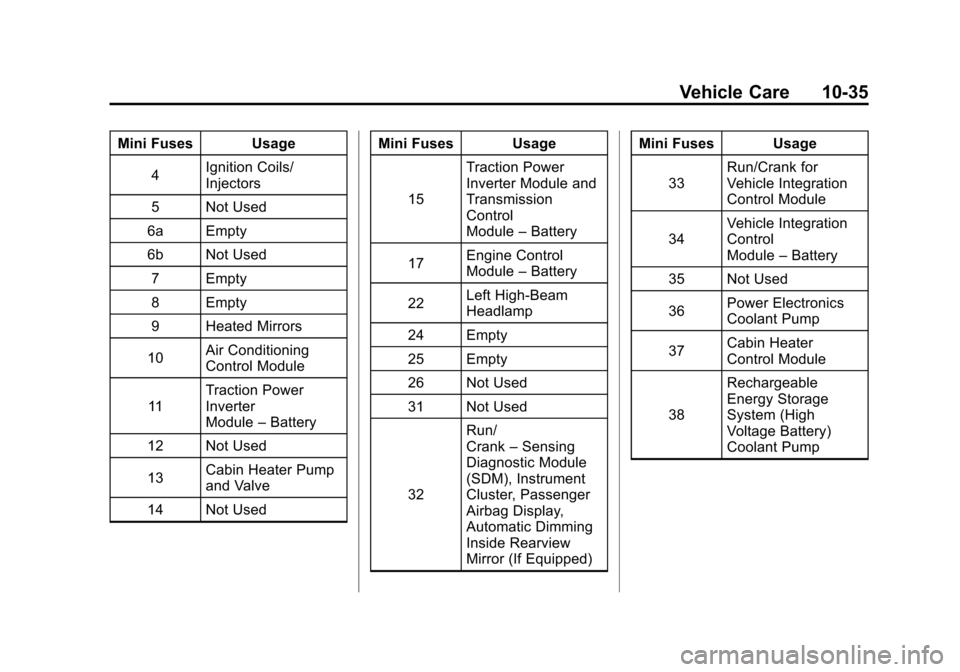
Mini Fuses Usage4 Ignition Coils/
Injectors
5 Not Used
6a Empty
6b Not Used 7 Empty
8 Empty
9 Heated Mirrors
10 Air Conditioning
Control Module
11 Traction Power
Inverter
Module
–Battery
12 Not Used
13 Cabin Heater Pump
and Valve
14 Not Used Mini Fuses Usage
15 Traction Power
Inverter Module and
Transmission
Control
Module
–Battery
17 Engine Control
Module
–Battery
22 Left High‐Beam
Headlamp
24 Empty
25 Empty
26 Not Used
31 Not Used
32 Run/
Crank
–Sensing
Diagnostic Module
(SDM), Instrument
Cluster, Passenger
Airbag Display,
Automatic Dimming
Inside Rearview
Mirror (If Equipped) Mini Fuses Usage
33 Run/Crank for
Vehicle Integration
Control Module
34 Vehicle Integration
Control
Module
–Battery
35 Not Used
36 Power Electronics
Coolant Pump
37 Cabin Heater
Control Module
38 Rechargeable
Energy Storage
System (High
Voltage Battery)
Coolant Pump
Page 342 of 454
Black plate (38,1)Chevrolet Volt Owner Manual - 2012
10-38 Vehicle Care
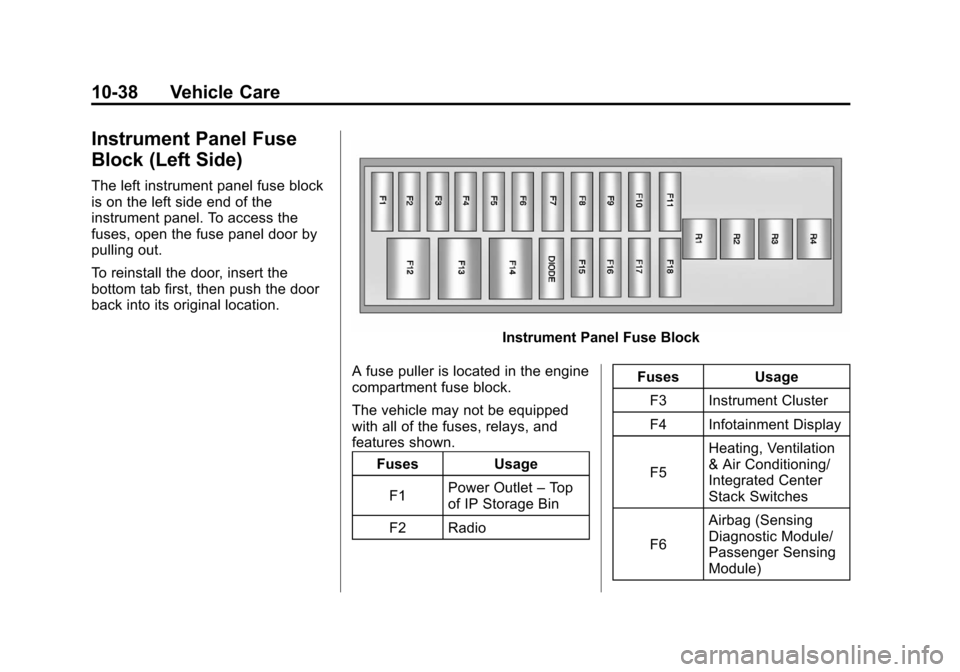
Instrument Panel Fuse
Block (Left Side)
The left instrument panel fuse block
is on the left side end of the
instrument panel. To access the
fuses, open the fuse panel door by
pulling out.
To reinstall the door, insert the
bottom tab first, then push the door
back into its original location.
Instrument Panel Fuse Block
A fuse puller is located in the engine
compartment fuse block.
The vehicle may not be equipped
with all of the fuses, relays, and
features shown. Fuses Usage
F1 Power Outlet
–Top
of IP Storage Bin
F2 Radio Fuses Usage
F3 Instrument Cluster
F4 Infotainment Display
F5 Heating, Ventilation
& Air Conditioning/
Integrated Center
Stack Switches
F6 Airbag (Sensing
Diagnostic Module/
Passenger Sensing
Module)