instrument panel CHEVROLET VOLT 2014 1.G Owner's Guide
[x] Cancel search | Manufacturer: CHEVROLET, Model Year: 2014, Model line: VOLT, Model: CHEVROLET VOLT 2014 1.GPages: 394, PDF Size: 5.86 MB
Page 234 of 394
(46,1)Chevrolet VOLT Owner Manual (GMNA-Localizing-U.S./Canada-6014139) -
2014 - CRC - 9/16/13
9-46 Driving and Operating
How the System Works
The LDW camera sensor is on the
windshield ahead of the rearview
mirror.
To turn LDW on and off, press
the
@LANE DEPART button on the
steering wheel. The control indicator
will light when LDW is on.
When the vehicle is started, the
LDW indicator on the instrument
panel will come on briefly. If LDW is on, the LDW indicator will
appear green if the system detects
a left or right lane marking while the
vehicle is traveling 56 km/h (35 mph)
or greater. If the vehicle crosses a
detected lane marking without using
the turn signal, this indicator will
change to amber and flash. In
addition, three beeps will be
sounded from the left or right side,
depending on the lane departure
direction.
When the System Does Not
Seem To Work Properly
If the LDW symbol does not appear
when the system is on and the
vehicle is traveling at least 56 km/h
(35 mph):
.The lane markings on the road
may not be seen.
.The camera sensor may be
blocked by dirt, snow, or ice.
.The windshield may be
damaged.
.The weather may be limiting
visibility.
This is normal operation; the vehicle
does not need service. Clean the
windshield.
Lane markings may not be detected
on curves, highway exit ramps,
or hills; or due to poor visibility.
If the LDW camera system does not
seem to operate properly, cleaning
the outside of the windshield in front
of the camera sensor may correct
the issue.
{Warning
LDW does not provide a warning
to help avoid a crash, unless it
detects the lane markings. LDW
may not detect the lane markings
if the camera sensor is blocked
by dirt, snow, or ice, or if the
windshield is damaged. It may (Continued)
Page 236 of 394
(48,1)Chevrolet VOLT Owner Manual (GMNA-Localizing-U.S./Canada-6014139) -
2014 - CRC - 9/16/13
9-48 Driving and Operating
In cold weather conditions, ice
may form around the charge port
door. Remove ice from the area
before attempting to open or
close the charge port door.
3. Open the rear hatch, lift the loadsupport floor covering, and
remove the charge cord. It is
near the tire sealant and
compressor kit. Pull up on the
charge cord handle. The vehicle
plug is stored as shown. 4. Plug the charge cord into the
electrical outlet. See Electrical
Requirements for Battery
Charging on page 9-54. Verify
the charge cord status. See the
charge cord user guide. See
Charge Cord on page 9-53.
Select the appropriate charge
level using the Select Charge
Level Preference screen on the
center stack. See “Charge Level
Selection” underProgrammable
Charging on page 5-31.
5. Plug in the vehicle plug of the charge cord into the charge port
on the vehicle. Verify that the
charging status indicator
illuminates on top of the
instrument panel and a horn
chirp occurs. See Charging
Status Feedback on page 9-49.
6. To arm the charge cord theft alert, lock the vehicle with the
RKE transmitter. To disable this
feature, see “Charge Cord Theft
Alert” inVehicle Personalization
on page 5-54.
End Charge
1. Unlock the vehicle with the RKE transmitter to disarm the charge
cord theft alert.
Page 237 of 394
(49,1)Chevrolet VOLT Owner Manual (GMNA-Localizing-U.S./Canada-6014139) -
2014 - CRC - 9/16/13
Driving and Operating 9-49
2. Unplug the vehicle plug of thecharge cord from the vehicle.
3. Close the charge port door by pressing firmly on the rearward
edge of the door surface.
4. Unplug the charge cord from the electrical outlet.
5. Place the charge cord into the storage compartment.
Delayed Charging
Override
To temporarily override a delayed
charge event, unplug the charge
cord from the charge port and then
plug it back in within five seconds.
A single horn chirp will sound and
charging will begin immediately.
To cancel a temporary override,
unplug the charge cord, wait for
10 seconds, and then plug the
charge cord back in. A double horn
chirp will sound and charging will be
delayed.
See Programmable Charging on
page 5-31 for advanced charge
scheduling options.
Charging Status
Feedback
The vehicle has a Charging Status
Indicator (CSI) at the center of the
instrument panel near the
windshield. When the vehicle is
plugged in and the vehicle power is
off, the CSI indicates the following:
.Solid Green –Vehicle is plugged
in. Battery is not fully charged.
Battery is charging.
Page 249 of 394
(1,1)Chevrolet VOLT Owner Manual (GMNA-Localizing-U.S./Canada-6014139) -
2014 - CRC - 9/16/13
Vehicle Care 10-1
Vehicle Care
General Information
General Information . . . . . . . . . . 10-2
California Proposition65 Warning . . . . . . . . . . . . . . . . . 10-2
California Perchlorate Materials Requirements . . . . 10-2
Accessories and Modifications . . . . . . . . . . . . . . . 10-2
Lifting the Vehicle . . . . . . . . . . . . 10-3
Vehicle Checks
Doing Your Own Service Work . . . . . . . . . . . . . . . 10-5
Hood . . . . . . . . . . . . . . . . . . . . . . . . 10-7
Engine Compartment Overview . . . . . . . . . . . . . . . . . . . 10-8
Engine Oil . . . . . . . . . . . . . . . . . . . 10-9
Engine Oil Life System . . . . . 10-12
Engine Air Cleaner/Filter . . . . 10-13
Cooling System (Engine) . . . 10-14
Cooling System (High Voltage Battery) . . . . . . . . . . . 10-15
Cooling System (Power Electronics and Charger
Modules) . . . . . . . . . . . . . . . . . . 10-16
Engine Coolant . . . . . . . . . . . . . 10-17 Engine Overheating . . . . . . . . 10-19
Washer Fluid . . . . . . . . . . . . . . . 10-20
Brakes . . . . . . . . . . . . . . . . . . . . . 10-20
Brake Fluid . . . . . . . . . . . . . . . . . 10-21
Battery . . . . . . . . . . . . . . . . . . . . . 10-23
Electric Drive Unit Shift Lock
Control Function Check . . . 10-25
Park Brake and P (Park) Mechanism Check . . . . . . . . 10-25
Wiper Blade Replacement . . . . . . . . . . . . . . 10-26
Headlamp Aiming
Headlamp Aiming . . . . . . . . . . 10-27
Bulb Replacement
Bulb Replacement . . . . . . . . . . 10-27
Halogen Bulbs . . . . . . . . . . . . . . 10-27
LED Lighting . . . . . . . . . . . . . . . 10-27
Headlamps . . . . . . . . . . . . . . . . . 10-27
Back-Up Lamps . . . . . . . . . . . . 10-28
License Plate Lamp . . . . . . . . 10-29
Replacement Bulbs . . . . . . . . . 10-30
Electrical System
High Voltage Devices andWiring . . . . . . . . . . . . . . . . . . . . . 10-30
Electrical System Overload . . . . . . . . . . . . . . . . . . 10-30 Engine Compartment Fuse
Block . . . . . . . . . . . . . . . . . . . . . 10-31
Instrument Panel Fuse Block (Left Side) . . . . . . . . . . . . . . . . 10-35
Instrument Panel Fuse Block
(Right Side) . . . . . . . . . . . . . . . 10-36
Rear Compartment Fuse Block . . . . . . . . . . . . . . . . . . . . . 10-38
Wheels and Tires
Tires . . . . . . . . . . . . . . . . . . . . . . . . 10-40
All-Season Tires . . . . . . . . . . . . 10-41
Winter Tires . . . . . . . . . . . . . . . . 10-41
Summer Tires . . . . . . . . . . . . . . 10-42
Tire Sidewall Labeling . . . . . . 10-42
Tire Designations . . . . . . . . . . . 10-43
Tire Terminology andDefinitions . . . . . . . . . . . . . . . . 10-44
Tire Pressure . . . . . . . . . . . . . . . 10-47
Tire Pressure Monitor System . . . . . . . . . . . . . . . . . . . 10-48
Tire Pressure Monitor Operation . . . . . . . . . . . . . . . . . 10-49
Tire Inspection . . . . . . . . . . . . . . 10-52
Tire Rotation . . . . . . . . . . . . . . . 10-53
When It Is Time for New Tires . . . . . . . . . . . . . . . . . . . . . . 10-54
Buying New Tires . . . . . . . . . . . 10-55
Page 255 of 394
(7,1)Chevrolet VOLT Owner Manual (GMNA-Localizing-U.S./Canada-6014139) -
2014 - CRC - 9/16/13
Vehicle Care 10-7
Hood
To open the hood:
1. Turn the vehicle off beforeopening the hood. If the vehicle
is on, the engine will start when
the hood is opened. See Electric
Mode on page 9-22 and
Extended Range Mode on
page 9-22.
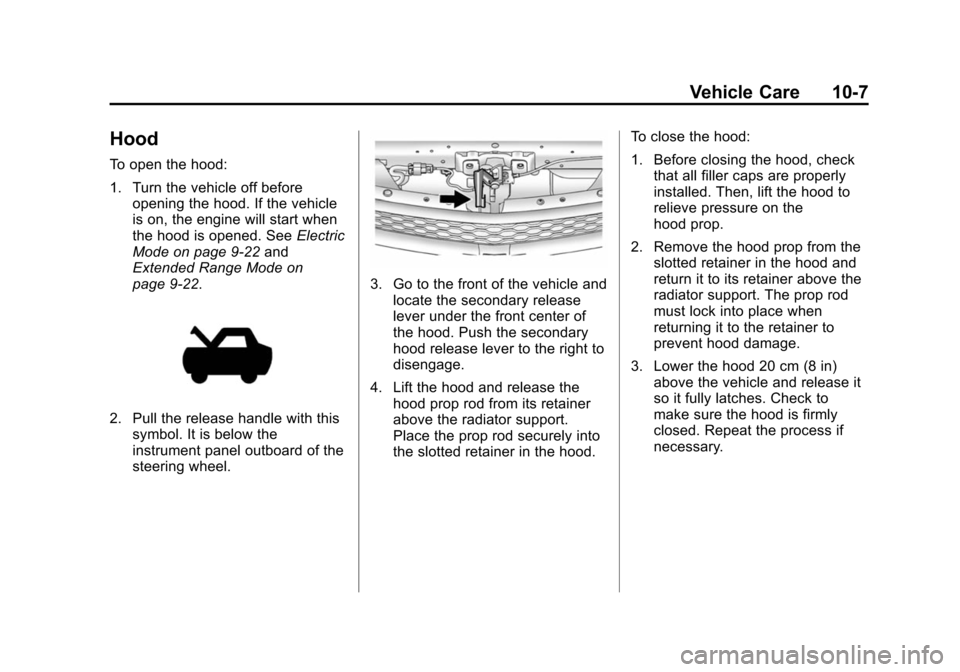
2. Pull the release handle with this
symbol. It is below the
instrument panel outboard of the
steering wheel.
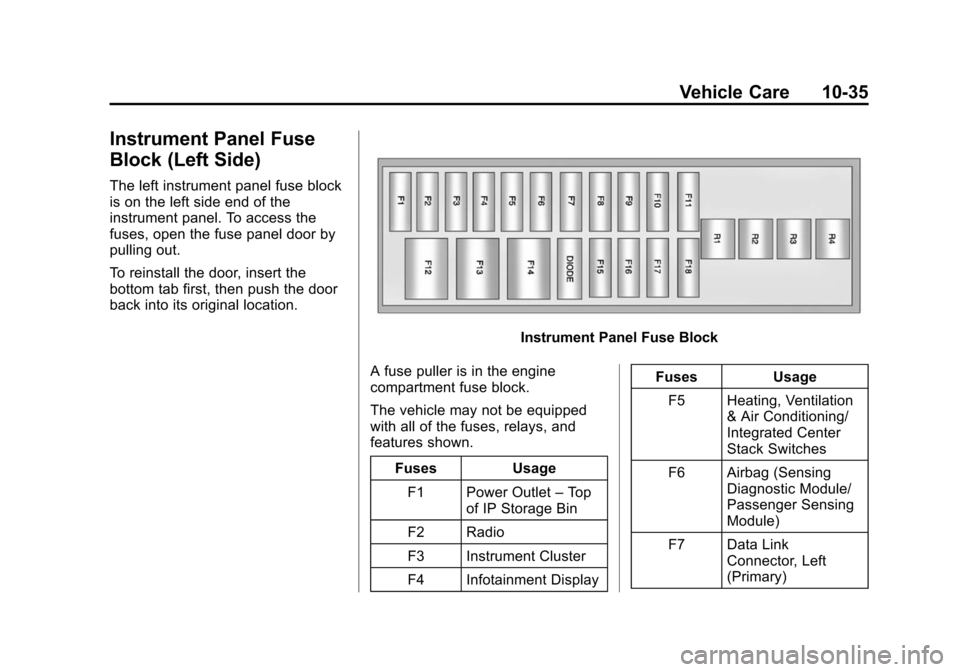
3. Go to the front of the vehicle andlocate the secondary release
lever under the front center of
the hood. Push the secondary
hood release lever to the right to
disengage.
4. Lift the hood and release the hood prop rod from its retainer
above the radiator support.
Place the prop rod securely into
the slotted retainer in the hood. To close the hood:
1. Before closing the hood, check
that all filler caps are properly
installed. Then, lift the hood to
relieve pressure on the
hood prop.
2. Remove the hood prop from the slotted retainer in the hood and
return it to its retainer above the
radiator support. The prop rod
must lock into place when
returning it to the retainer to
prevent hood damage.
3. Lower the hood 20 cm (8 in) above the vehicle and release it
so it fully latches. Check to
make sure the hood is firmly
closed. Repeat the process if
necessary.
Page 283 of 394
(35,1)Chevrolet VOLT Owner Manual (GMNA-Localizing-U.S./Canada-6014139) -
2014 - CRC - 9/16/13
Vehicle Care 10-35
Instrument Panel Fuse
Block (Left Side)
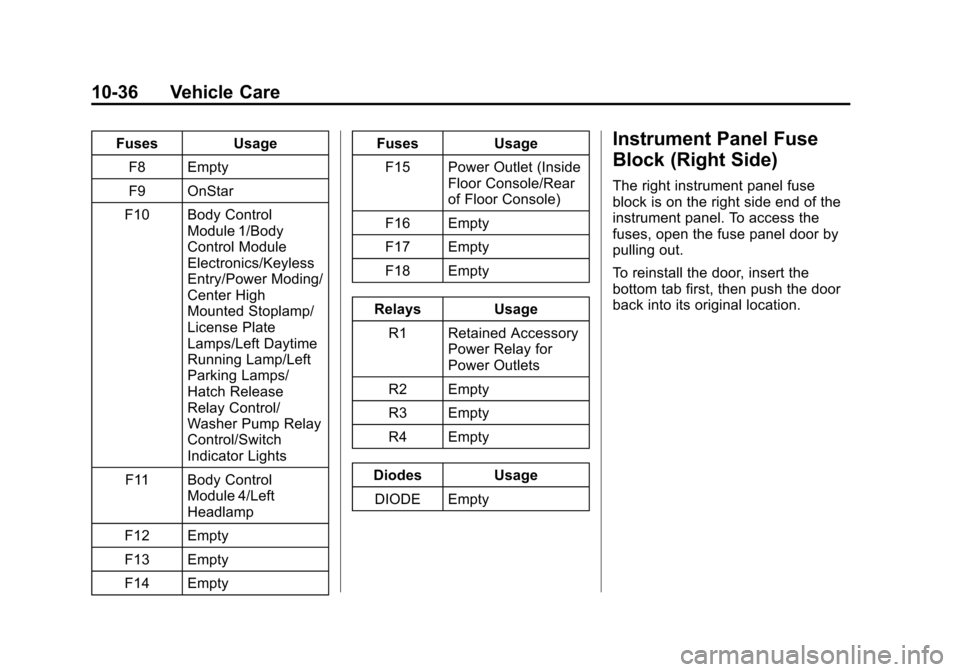
The left instrument panel fuse block
is on the left side end of the
instrument panel. To access the
fuses, open the fuse panel door by
pulling out.
To reinstall the door, insert the
bottom tab first, then push the door
back into its original location.
Instrument Panel Fuse Block
A fuse puller is in the engine
compartment fuse block.
The vehicle may not be equipped
with all of the fuses, relays, and
features shown. Fuses UsageF1 Power Outlet –Top
of IP Storage Bin
F2 Radio
F3 Instrument Cluster
F4 Infotainment Display Fuses Usage
F5 Heating, Ventilation & Air Conditioning/
Integrated Center
Stack Switches
F6 Airbag (Sensing Diagnostic Module/
Passenger Sensing
Module)
F7 Data Link Connector, Left
(Primary)
Page 284 of 394
(36,1)Chevrolet VOLT Owner Manual (GMNA-Localizing-U.S./Canada-6014139) -
2014 - CRC - 9/16/13
10-36 Vehicle Care
FusesUsage
F8 Empty
F9 OnStar
F10 Body Control Module 1/Body
Control Module
Electronics/Keyless
Entry/Power Moding/
Center High
Mounted Stoplamp/
License Plate
Lamps/Left Daytime
Running Lamp/Left
Parking Lamps/
Hatch Release
Relay Control/
Washer Pump Relay
Control/Switch
Indicator Lights
F11 Body Control Module 4/Left
Headlamp
F12 Empty
F13 Empty
F14 Empty Fuses
Usage
F15 Power Outlet (Inside Floor Console/Rear
of Floor Console)
F16 Empty
F17 Empty
F18 Empty
Relays Usage
R1 Retained Accessory Power Relay for
Power Outlets
R2 Empty
R3 Empty
R4 Empty
Diodes Usage DIODE EmptyInstrument Panel Fuse
Block (Right Side)
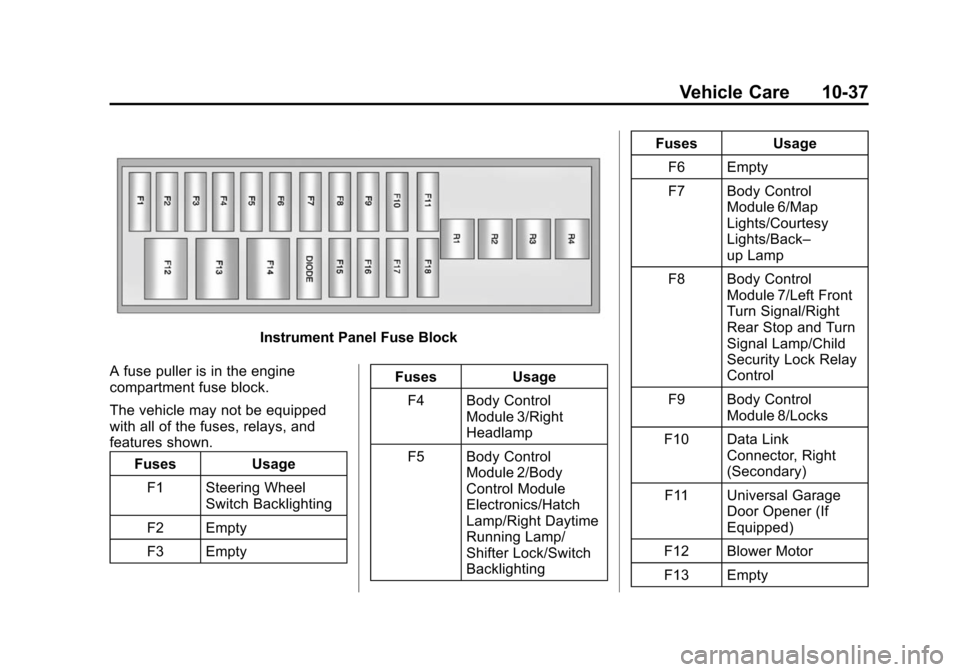
The right instrument panel fuse
block is on the right side end of the
instrument panel. To access the
fuses, open the fuse panel door by
pulling out.
To reinstall the door, insert the
bottom tab first, then push the door
back into its original location.
Page 285 of 394
(37,1)Chevrolet VOLT Owner Manual (GMNA-Localizing-U.S./Canada-6014139) -
2014 - CRC - 9/16/13
Vehicle Care 10-37
Instrument Panel Fuse Block
A fuse puller is in the engine
compartment fuse block.
The vehicle may not be equipped
with all of the fuses, relays, and
features shown. Fuses Usage
F1 Steering Wheel Switch Backlighting
F2 Empty
F3 Empty Fuses Usage
F4 Body Control Module 3/Right
Headlamp
F5 Body Control Module 2/Body
Control Module
Electronics/Hatch
Lamp/Right Daytime
Running Lamp/
Shifter Lock/Switch
Backlighting Fuses Usage
F6 Empty
F7 Body Control Module 6/Map
Lights/Courtesy
Lights/Back–
up Lamp
F8 Body Control Module 7/Left Front
Turn Signal/Right
Rear Stop and Turn
Signal Lamp/Child
Security Lock Relay
Control
F9 Body Control Module 8/Locks
F10 Data Link Connector, Right
(Secondary)
F11 Universal Garage Door Opener (If
Equipped)
F12 Blower Motor
F13 Empty
Page 335 of 394
(87,1)Chevrolet VOLT Owner Manual (GMNA-Localizing-U.S./Canada-6014139) -
2014 - CRC - 9/16/13
Vehicle Care 10-87
Cleaning High Gloss Surfaces
and Vehicle Information and
Radio Displays
For vehicles with high gloss
surfaces or vehicle displays, use a
microfiber cloth to wipe surfaces.
Before wiping the surface with the
microfiber cloth, use a soft bristle
brush to remove dirt that could
scratch the surface. Then use the
microfiber cloth by gently rubbing to
clean. Never use window cleaners
or solvents. Periodically hand wash
the microfiber cloth separately,
using mild soap. Do not use bleach
or fabric softener. Rinse thoroughly
and air dry before next use.
{Caution
Do not attach a device with a
suction cup to the display. This
may cause damage and would
not be covered by the warranty.
Instrument Panel, Leather,
Vinyl, Other Plastic Surfaces,
Low Gloss Paint Surfaces and
Natural Open Pore Wood
Surfaces
Use a soft microfiber cloth
dampened with water to remove
dust and loose dirt. For a more
thorough cleaning, use a soft
microfiber cloth dampened with a
mild soap solution.
{Caution
Soaking or saturating leather,
especially perforated leather, as
well as other interior surfaces,
may cause permanent damage.
Wipe excess moisture from these
surfaces after cleaning and allow
them to dry naturally. Never use
heat, steam, spot lifters, or spot
removers. Do not use cleaners
that contain silicone or wax-based
products. Cleaners containing(Continued)
Caution (Continued)
these solvents can permanently
change the appearance and feel
of leather or soft trim and are not
recommended.
Do not use cleaners that increase
gloss, especially on the instrument
panel. Reflected glare can decrease
visibility through the windshield
under certain conditions.
{Caution
Use of air fresheners may cause
permanent damage to plastics
and painted surfaces. If an air
freshener comes in contact with
any plastic or painted surface in
the vehicle, blot immediately and
clean with a soft cloth dampened
with a mild soap solution.
Damage caused by air fresheners
would not be covered by the
vehicle warranty.
Page 353 of 394
(1,1)Chevrolet VOLT Owner Manual (GMNA-Localizing-U.S./Canada-6014139) -
2014 - CRC - 9/16/13
Technical Data 12-1
Technical Data
Vehicle Identification
Vehicle IdentificationNumber (VIN) . . . . . . . . . . . . . . 12-1
Service Parts Identification Label . . . . . . . . . . . . . . . . . . . . . . . 12-1
Vehicle Data
Capacities andSpecifications . . . . . . . . . . . . . . 12-2
Engine Drive Belt Routing . . . 12-4
Vehicle Identification
Vehicle Identification
Number (VIN)
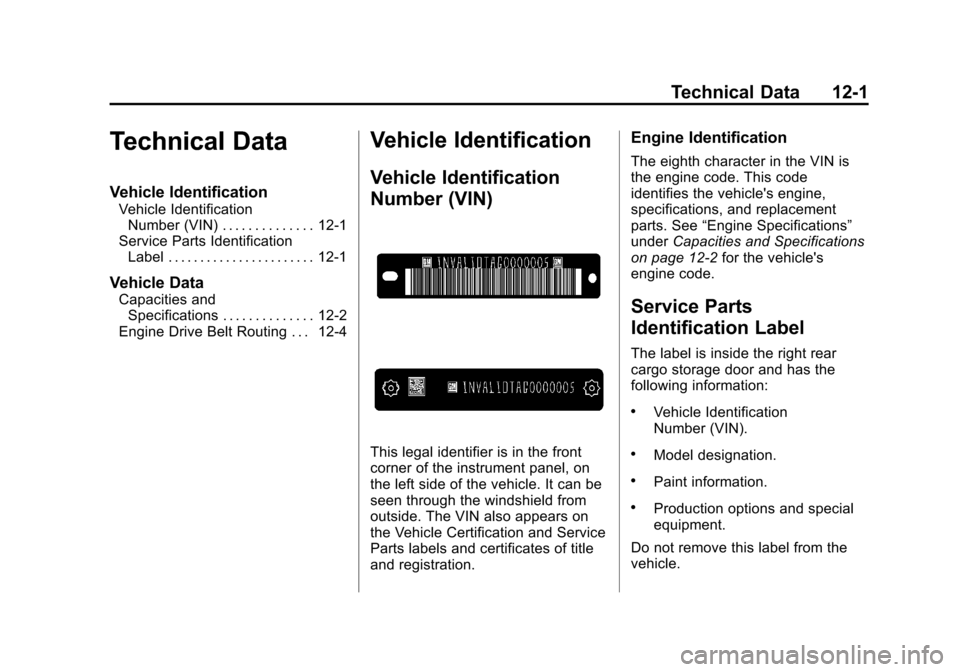
This legal identifier is in the front
corner of the instrument panel, on
the left side of the vehicle. It can be
seen through the windshield from
outside. The VIN also appears on
the Vehicle Certification and Service
Parts labels and certificates of title
and registration.
Engine Identification
The eighth character in the VIN is
the engine code. This code
identifies the vehicle's engine,
specifications, and replacement
parts. See “Engine Specifications”
under Capacities and Specifications
on page 12-2 for the vehicle's
engine code.
Service Parts
Identification Label
The label is inside the right rear
cargo storage door and has the
following information:
.Vehicle Identification
Number (VIN).
.Model designation.
.Paint information.
.Production options and special
equipment.
Do not remove this label from the
vehicle.