Operation CHEVROLET VOLT 2017 2.G Owners Manual
[x] Cancel search | Manufacturer: CHEVROLET, Model Year: 2017, Model line: VOLT, Model: CHEVROLET VOLT 2017 2.GPages: 376, PDF Size: 6.75 MB
Page 4 of 376
Chevrolet VOLT Owner Manual (GMNA-Localizing-U.S./Canada/Mexico-
9807421) - 2017 - CRC - 11/18/15
Introduction 3
Danger, Warning, and
Caution
Warning messages found on vehicle
labels and in this manual describe
hazards and what to do to avoid or
reduce them.
{Danger
Danger indicates a hazard with a
high level of risk which will result
in serious injury or death.
{Warning
Warning indicates a hazard that
could result in injury or death.
Caution
Caution indicates a hazard that
could result in property or vehicle
damage.
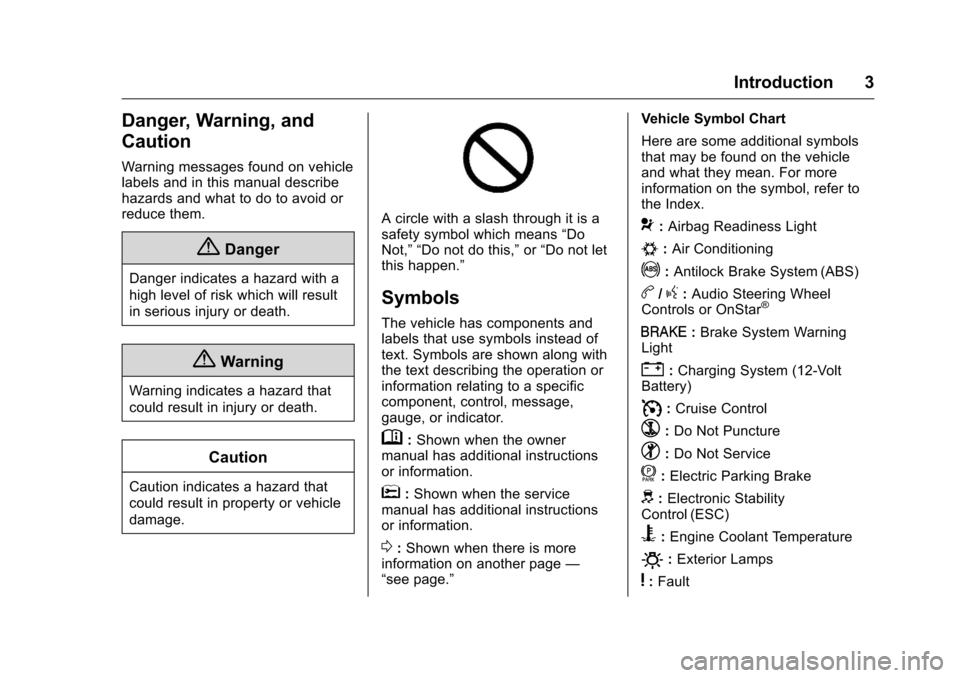
A circle with a slash through it is a
safety symbol which means“Do
Not,” “Do not do this,” or“Do not let
this happen.”
Symbols
The vehicle has components and
labels that use symbols instead of
text. Symbols are shown along with
the text describing the operation or
information relating to a specific
component, control, message,
gauge, or indicator.
M: Shown when the owner
manual has additional instructions
or information.
*: Shown when the service
manual has additional instructions
or information.
0: Shown when there is more
information on another page —
“see page.” Vehicle Symbol Chart
Here are some additional symbols
that may be found on the vehicle
and what they mean. For more
information on the symbol, refer to
the Index.
9:
Airbag Readiness Light
#:Air Conditioning
!:Antilock Brake System (ABS)
b/g: Audio Steering Wheel
Controls or OnStar®
I: Brake System Warning
Light
": Charging System (12-Volt
Battery)
I: Cruise Control
`:Do Not Puncture
^:Do Not Service
f:Electric Parking Brake
d: Electronic Stability
Control (ESC)
B: Engine Coolant Temperature
O:Exterior Lamps
y:Fault
Page 9 of 376
Chevrolet VOLT Owner Manual (GMNA-Localizing-U.S./Canada/Mexico-
9807421) - 2017 - CRC - 11/18/15
8 In Brief
Initial Drive
Information
This section provides a brief
overview about some of the
important features that may or may
not be on your specific vehicle.
For more detailed information, refer
to each of the features which can be
found later in this owner manual.
Remote Keyless Entry
(RKE) System
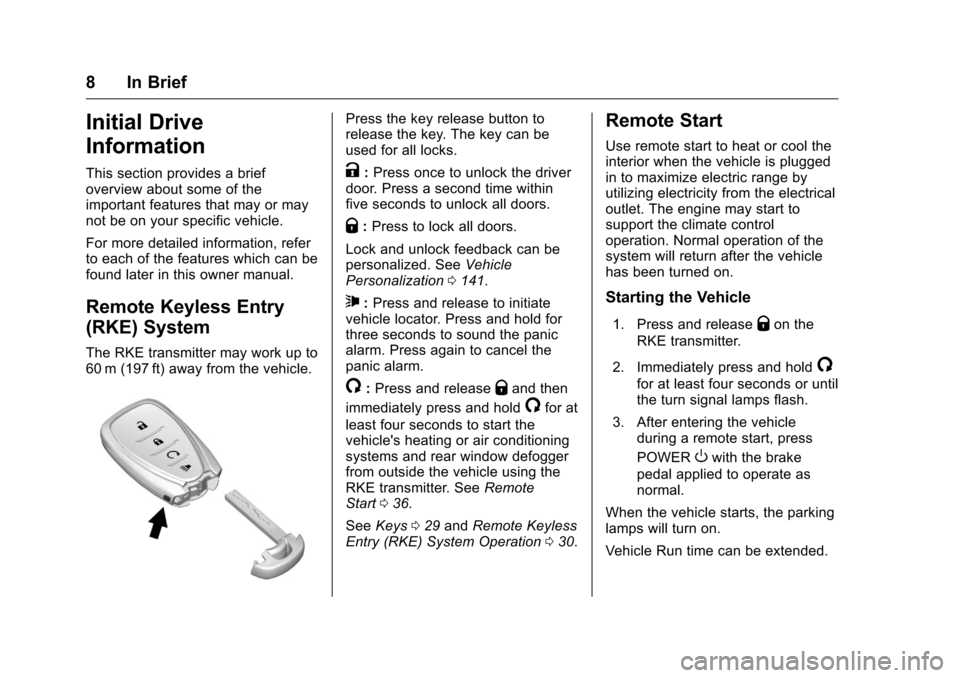
The RKE transmitter may work up to
60 m (197 ft) away from the vehicle.
Press the key release button to
release the key. The key can be
used for all locks.
K:Press once to unlock the driver
door. Press a second time within
five seconds to unlock all doors.
Q: Press to lock all doors.
Lock and unlock feedback can be
personalized. See Vehicle
Personalization 0141.
7:Press and release to initiate
vehicle locator. Press and hold for
three seconds to sound the panic
alarm. Press again to cancel the
panic alarm.
/: Press and releaseQand then
immediately press and hold
/for at
least four seconds to start the
vehicle's heating or air conditioning
systems and rear window defogger
from outside the vehicle using the
RKE transmitter. See Remote
Start 036.
See Keys 029 and Remote Keyless
Entry (RKE) System Operation 030.
Remote Start
Use remote start to heat or cool the
interior when the vehicle is plugged
in to maximize electric range by
utilizing electricity from the electrical
outlet. The engine may start to
support the climate control
operation. Normal operation of the
system will return after the vehicle
has been turned on.
Starting the Vehicle
1. Press and releaseQon the
RKE transmitter.
2. Immediately press and hold
/
for at least four seconds or until
the turn signal lamps flash.
3. After entering the vehicle during a remote start, press
POWER
Owith the brake
pedal applied to operate as
normal.
When the vehicle starts, the parking
lamps will turn on.
Vehicle Run time can be extended.
Page 10 of 376
Chevrolet VOLT Owner Manual (GMNA-Localizing-U.S./Canada/Mexico-
9807421) - 2017 - CRC - 11/18/15
In Brief 9
Canceling Remote Start
To cancel a remote start, do any of
the following:
.Press and hold
/until the
parking lamps turn off.
. Turn on the hazard warning
flashers.
. Press POWER
Owith the brake
pedal applied, then press
POWER
Oagain to turn the
vehicle off.
See Remote Start 036.
Door Locks
To lock or unlock the doors from
outside the vehicle:
.
Use the key. The driver door key
cylinder is covered with a cap.
See Door Locks 039.
. Press
QorKon the RKE
transmitter. See Remote Keyless
Entry (RKE) System
Operation 030. To lock or unlock the doors from
inside the vehicle:
.
Press
QorKon the power door
lock switch.
. Push down the manual lock
knob on the driver door to lock
all doors. Push down the manual
lock knob on a passenger door
to lock only that door.
. Pull once on the door handle to
unlock the door and again to
open the door. Press the power
door lock switch to lock or
unlock all doors.
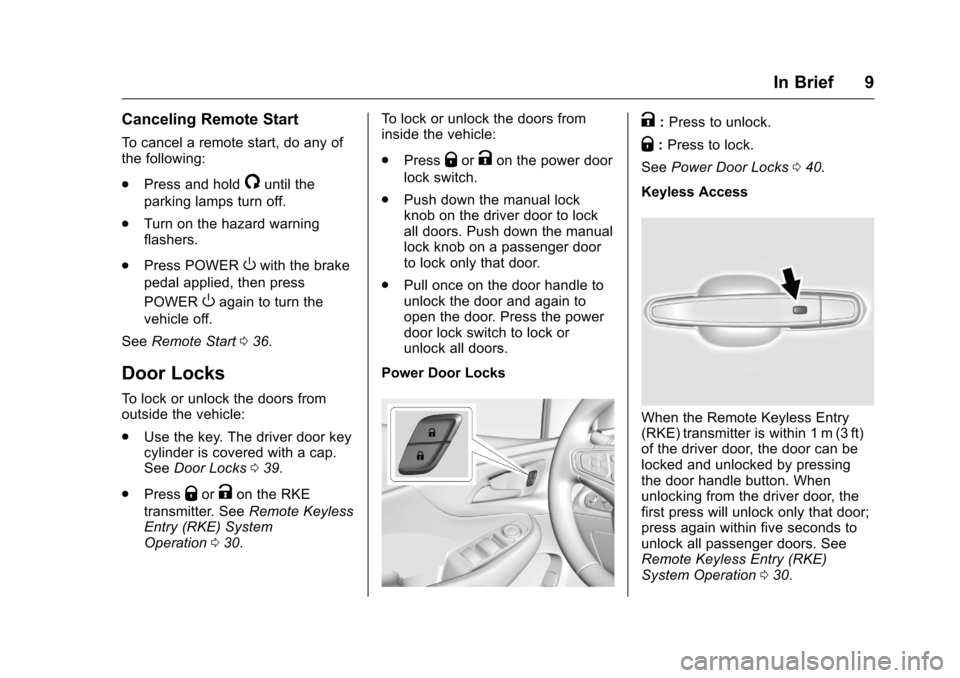
Power Door Locks
K: Press to unlock.
Q: Press to lock.
See Power Door Locks 040.
Keyless Access
When the Remote Keyless Entry
(RKE) transmitter is within 1 m (3 ft)
of the driver door, the door can be
locked and unlocked by pressing
the door handle button. When
unlocking from the driver door, the
first press will unlock only that door;
press again within five seconds to
unlock all passenger doors. See
Remote Keyless Entry (RKE)
System Operation 030.
Page 11 of 376
Chevrolet VOLT Owner Manual (GMNA-Localizing-U.S./Canada/Mexico-
9807421) - 2017 - CRC - 11/18/15
10 In Brief
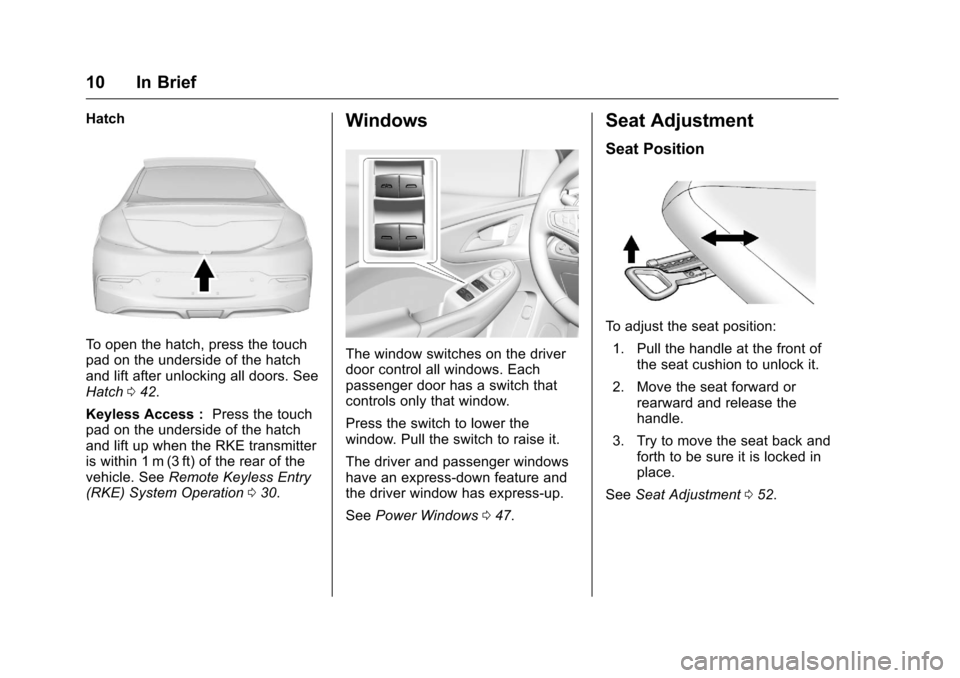
Hatch
To open the hatch, press the touch
pad on the underside of the hatch
and lift after unlocking all doors. See
Hatch042.
Keyless Access : Press the touch
pad on the underside of the hatch
and lift up when the RKE transmitter
is within 1 m (3 ft) of the rear of the
vehicle. See Remote Keyless Entry
(RKE) System Operation 030.
Windows
The window switches on the driver
door control all windows. Each
passenger door has a switch that
controls only that window.
Press the switch to lower the
window. Pull the switch to raise it.
The driver and passenger windows
have an express-down feature and
the driver window has express-up.
See Power Windows 047.
Seat Adjustment
Seat Position
To adjust the seat position:
1. Pull the handle at the front of the seat cushion to unlock it.
2. Move the seat forward or rearward and release the
handle.
3. Try to move the seat back and forth to be sure it is locked in
place.
See Seat Adjustment 052.
Page 17 of 376
Chevrolet VOLT Owner Manual (GMNA-Localizing-U.S./Canada/Mexico-
9807421) - 2017 - CRC - 11/18/15
16 In Brief
Climate Controls
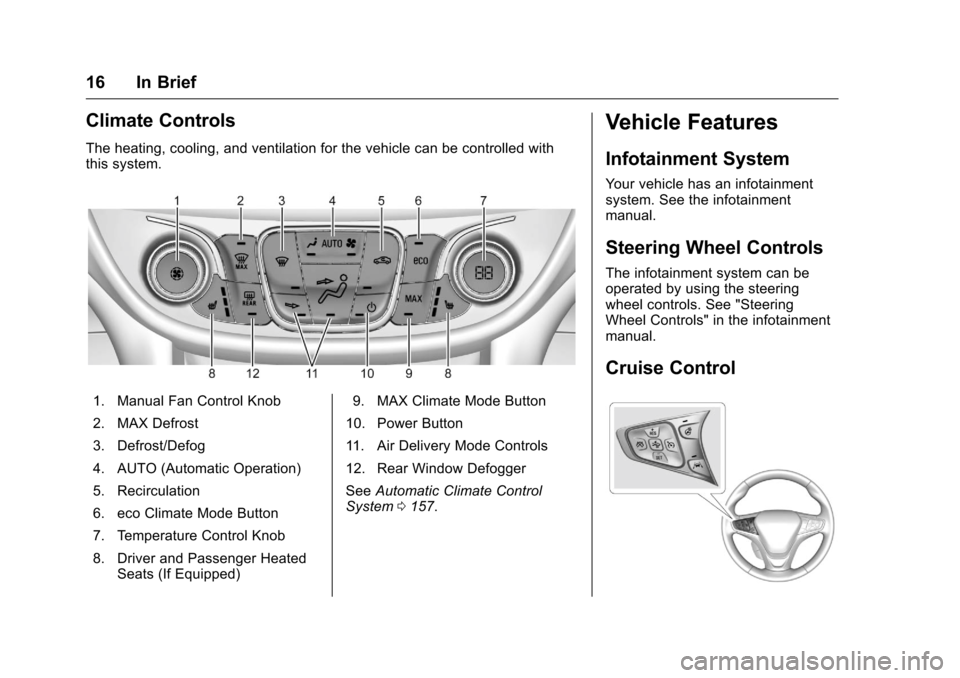
The heating, cooling, and ventilation for the vehicle can be controlled with
this system.
1. Manual Fan Control Knob
2. MAX Defrost
3. Defrost/Defog
4. AUTO (Automatic Operation)
5. Recirculation
6. eco Climate Mode Button
7. Temperature Control Knob
8. Driver and Passenger HeatedSeats (If Equipped) 9. MAX Climate Mode Button
10. Power Button
11. Air Delivery Mode Controls
12. Rear Window Defogger
See Automatic Climate Control
System 0157.
Vehicle Features
Infotainment System
Your vehicle has an infotainment
system. See the infotainment
manual.
Steering Wheel Controls
The infotainment system can be
operated by using the steering
wheel controls. See "Steering
Wheel Controls" in the infotainment
manual.
Cruise Control
Page 27 of 376
Chevrolet VOLT Owner Manual (GMNA-Localizing-U.S./Canada/Mexico-
9807421) - 2017 - CRC - 11/18/15
26 In Brief
Driving for Better Energy
Efficiency
Use the following tips to help
maximize energy efficiency and
range.
In colder temperatures, while these
efficiency tips will help, the electric
vehicle driving range may be lower
due to higher energy usage.
Driving Style
Efficiency Gauge (Instrument
Cluster)
The ball indicator should be kept
green and toward the center of the
gauge for efficient operation.
Inefficient acceleration is indicated
when the ball turns yellow and
travels above the center of the
gauge.
Aggressive braking is indicated
when the ball turns yellow and
travels below the center of the
gauge.Acceleration/Braking/Coasting
Avoid unnecessary rapid
accelerations and decelerations.
Electric range is maximized at
80 km/h (50 mph) and below. Higher
speeds use more energy and can
significantly reduce electric range.
Use cruise control when
appropriate.
Plan ahead for decelerations and
coast whenever possible. For
example, do not rush to traffic
signals.
Do not shift to N (Neutral) to coast.
The vehicle recovers energy while
coasting and braking in D (Drive)
or L (Low).
Drive Mode and PRNDL Selection
Use Normal Mode when possible.
Sport Mode provides more
responsive acceleration than
Normal Mode but can reduce
efficiency.
Use Mountain Mode prior to
climbing long, steep grades in
mountainous areas. Be sure to
engage Mountain Mode before
starting to climb. Mountain Mode
reduces electric range and power
but may be needed to maintain
speeds or steep grades.
Use Hold Mode on a trip where it is
expected that all of the electric
charge will be depleted. Use Hold
Mode mainly during highway or high
speed driving to maximize both EV
miles and fuel efficiency.
Use L (Low) in heavy stop-and-go
traffic or when traveling downhill.
L (Low) requires less brake pedal
application and provides a
controlled, efficient way to slow the
vehicle down.
Climate Setting
Using the heat and air conditioning
systems decreases the energy
available for electric driving.
Optimal energy efficiency is
achieved with the heat, air
conditioning, and fan turned off.
Page 28 of 376
Chevrolet VOLT Owner Manual (GMNA-Localizing-U.S./Canada/Mexico-
9807421) - 2017 - CRC - 11/18/15
In Brief 27
Less energy is used at low fan
speeds. When using the fan:
.Fan Only is the most energy
efficient climate setting as long
as
0is not selected.
. Use eco for moderate air
conditioning and heater
operation. This is the next most
energy efficient setting as long
as
0is not selected.
. MAX provides the most comfort
but is the least energy efficient.
Use the auto heated seat feature
and the heated steering wheel
instead of climate settings. Heating
the seat and steering wheel uses
less energy than heating the vehicle
interior.
Use remote start to heat or cool the
interior when the vehicle is plugged
in to maximize the electric range by
utilizing electricity from the electrical
outlet. Engine Assisted Heating,
if equipped, can be personalized
while plugged in. See
“Engine
Assist Heat Plugged In” under
Vehicle Personalization 0141.
In hot weather, avoid parking in
direct sunlight or use sunshades
inside the vehicle.
Turn off the front and rear window
defog/defrost when they are no
longer needed.
Avoid driving with the windows open
at highway speeds.
Vehicle Charging/Maintenance
Charging
Keep the vehicle plugged in, even
when fully charged, to keep the
battery temperature ready for the
next drive. This is important when
outside temperatures are extremely
hot or cold. Maintenance
Always keep the tires properly
inflated and the vehicle properly
aligned.
The weight of excess cargo in the
vehicle affects efficiency and range.
Avoid carrying more than is needed.
If fuel is not regularly used, consider
keeping the fuel tank only one-third
full. Excess fuel weight impacts
efficiency and range.
For fuel recommendations, see
Fuel
0230.
Avoid unnecessary use of electrical
accessories. Power used for
functions other than propelling the
vehicle will reduce EV range.
Using a rooftop carrier will reduce
efficiency due to additional weight
and drag.
Page 30 of 376
Chevrolet VOLT Owner Manual (GMNA-Localizing-U.S./Canada/Mexico-
9807421) - 2017 - CRC - 11/18/15
Keys, Doors, and Windows 29
Keys, Doors, and
Windows
Keys and Locks
Keys . . . . . . . . . . . . . . . . . . . . . . . . . . . 29
Remote Keyless Entry (RKE)System . . . . . . . . . . . . . . . . . . . . . . . 30
Remote Keyless Entry (RKE) System Operation . . . . . . . . . . . . 30
Remote Start . . . . . . . . . . . . . . . . . . 36
Door Locks . . . . . . . . . . . . . . . . . . . . 39
Power Door Locks . . . . . . . . . . . . . 40
Delayed Locking . . . . . . . . . . . . . . . 40
Automatic Door Locks . . . . . . . . . 40
Lockout Protection . . . . . . . . . . . . . 41
Safety Locks . . . . . . . . . . . . . . . . . . . 41
Doors
Hatch . . . . . . . . . . . . . . . . . . . . . . . . . . 42
Vehicle Security
Vehicle Security . . . . . . . . . . . . . . . . 43
Vehicle Alarm System . . . . . . . . . 43
Immobilizer . . . . . . . . . . . . . . . . . . . . 44
Immobilizer Operation . . . . . . . . . 44
Exterior Mirrors
Convex Mirrors . . . . . . . . . . . . . . . . 45
Power Mirrors . . . . . . . . . . . . . . . . . . 46
Folding Mirrors . . . . . . . . . . . . . . . . . 46
Heated Mirrors . . . . . . . . . . . . . . . . . 46
Interior Mirrors
Interior Rearview Mirrors . . . . . . . 46
Manual Rearview Mirror . . . . . . . . 46
Automatic Dimming Rearview Mirror . . . . . . . . . . . . . . . . . . . . . . . . . 46
Windows
Windows . . . . . . . . . . . . . . . . . . . . . . . 47
Power Windows . . . . . . . . . . . . . . . 47
Sun Visors . . . . . . . . . . . . . . . . . . . . . 49
Keys and Locks
Keys
{Warning
Leaving children in a vehicle with
a Remote Keyless Entry (RKE)
transmitter is dangerous and
children or others could be
seriously injured or killed. They
could operate the power windows
or other controls or make the
vehicle move. The windows will
function with the RKE transmitter
in the vehicle, and children or
others could be caught in the path
of a closing window. Do not leave
children in a vehicle with an RKE
transmitter.
Page 31 of 376
Chevrolet VOLT Owner Manual (GMNA-Localizing-U.S./Canada/Mexico-
9807421) - 2017 - CRC - 11/18/15
30 Keys, Doors, and Windows
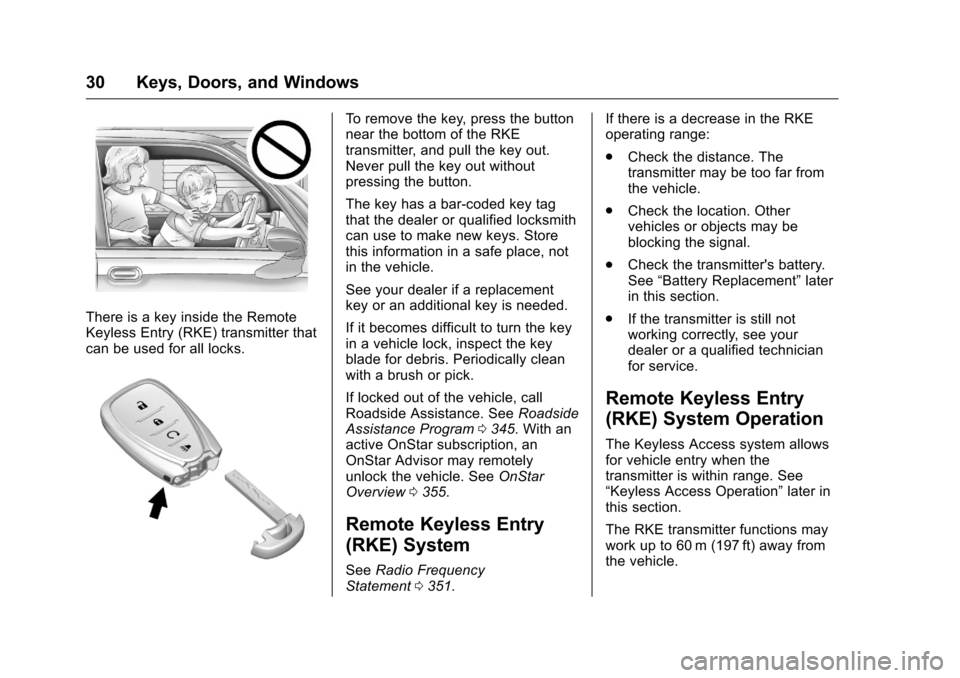
There is a key inside the Remote
Keyless Entry (RKE) transmitter that
can be used for all locks.
To remove the key, press the button
near the bottom of the RKE
transmitter, and pull the key out.
Never pull the key out without
pressing the button.
The key has a bar-coded key tag
that the dealer or qualified locksmith
can use to make new keys. Store
this information in a safe place, not
in the vehicle.
See your dealer if a replacement
key or an additional key is needed.
If it becomes difficult to turn the key
in a vehicle lock, inspect the key
blade for debris. Periodically clean
with a brush or pick.
If locked out of the vehicle, call
Roadside Assistance. SeeRoadside
Assistance Program 0345. With an
active OnStar subscription, an
OnStar Advisor may remotely
unlock the vehicle. See OnStar
Overview 0355.
Remote Keyless Entry
(RKE) System
See Radio Frequency
Statement 0351. If there is a decrease in the RKE
operating range:
.
Check the distance. The
transmitter may be too far from
the vehicle.
. Check the location. Other
vehicles or objects may be
blocking the signal.
. Check the transmitter's battery.
See “Battery Replacement” later
in this section.
. If the transmitter is still not
working correctly, see your
dealer or a qualified technician
for service.
Remote Keyless Entry
(RKE) System Operation
The Keyless Access system allows
for vehicle entry when the
transmitter is within range. See
“Keyless Access Operation” later in
this section.
The RKE transmitter functions may
work up to 60 m (197 ft) away from
the vehicle.
Page 32 of 376
Chevrolet VOLT Owner Manual (GMNA-Localizing-U.S./Canada/Mexico-
9807421) - 2017 - CRC - 11/18/15
Keys, Doors, and Windows 31
Other conditions, such as those
previously stated, can impact the
performance of the transmitter.
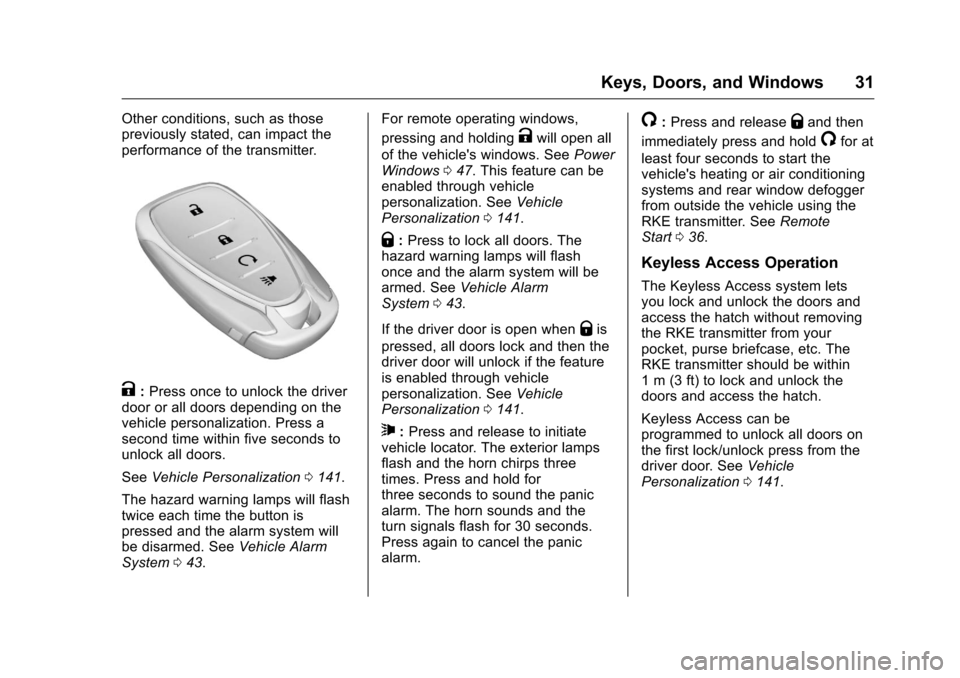
K:Press once to unlock the driver
door or all doors depending on the
vehicle personalization. Press a
second time within five seconds to
unlock all doors.
See Vehicle Personalization 0141.
The hazard warning lamps will flash
twice each time the button is
pressed and the alarm system will
be disarmed. See Vehicle Alarm
System 043. For remote operating windows,
pressing and holding
Kwill open all
of the vehicle's windows. See Power
Windows 047. This feature can be
enabled through vehicle
personalization. See Vehicle
Personalization 0141.
Q:Press to lock all doors. The
hazard warning lamps will flash
once and the alarm system will be
armed. See Vehicle Alarm
System 043.
If the driver door is open when
Qis
pressed, all doors lock and then the
driver door will unlock if the feature
is enabled through vehicle
personalization. See Vehicle
Personalization 0141.
7:Press and release to initiate
vehicle locator. The exterior lamps
flash and the horn chirps three
times. Press and hold for
three seconds to sound the panic
alarm. The horn sounds and the
turn signals flash for 30 seconds.
Press again to cancel the panic
alarm.
/: Press and releaseQand then
immediately press and hold
/for at
least four seconds to start the
vehicle's heating or air conditioning
systems and rear window defogger
from outside the vehicle using the
RKE transmitter. See Remote
Start 036.
Keyless Access Operation
The Keyless Access system lets
you lock and unlock the doors and
access the hatch without removing
the RKE transmitter from your
pocket, purse briefcase, etc. The
RKE transmitter should be within
1 m (3 ft) to lock and unlock the
doors and access the hatch.
Keyless Access can be
programmed to unlock all doors on
the first lock/unlock press from the
driver door. See Vehicle
Personalization 0141.