Operation CHEVROLET VOLT 2017 2.G Service Manual
[x] Cancel search | Manufacturer: CHEVROLET, Model Year: 2017, Model line: VOLT, Model: CHEVROLET VOLT 2017 2.GPages: 376, PDF Size: 6.75 MB
Page 176 of 376
Chevrolet VOLT Owner Manual (GMNA-Localizing-U.S./Canada/Mexico-
9807421) - 2017 - CRC - 11/18/15
Driving and Operating 175
Starting and
Operating
New Vehicle Break-In
The vehicle does not require a
break-in period. Vehicle break-in is
performed during manufacturing.
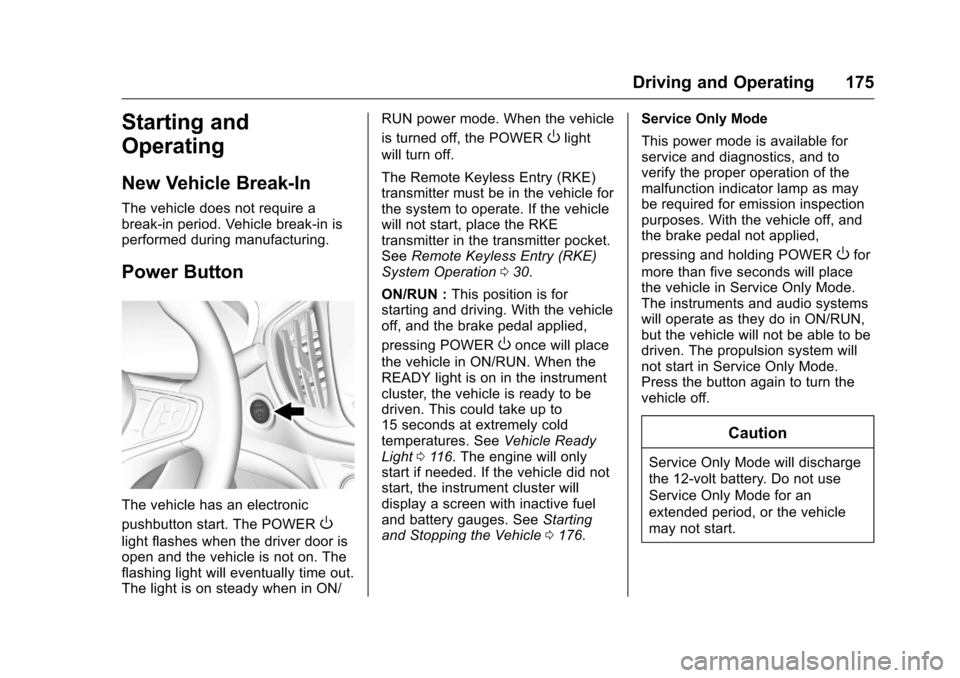
Power Button
The vehicle has an electronic
pushbutton start. The POWER
O
light flashes when the driver door is
open and the vehicle is not on. The
flashing light will eventually time out.
The light is on steady when in ON/RUN power mode. When the vehicle
is turned off, the POWER
Olight
will turn off.
The Remote Keyless Entry (RKE)
transmitter must be in the vehicle for
the system to operate. If the vehicle
will not start, place the RKE
transmitter in the transmitter pocket.
See Remote Keyless Entry (RKE)
System Operation 030.
ON/RUN : This position is for
starting and driving. With the vehicle
off, and the brake pedal applied,
pressing POWER
Oonce will place
the vehicle in ON/RUN. When the
READY light is on in the instrument
cluster, the vehicle is ready to be
driven. This could take up to
15 seconds at extremely cold
temperatures. See Vehicle Ready
Light 0116. The engine will only
start if needed. If the vehicle did not
start, the instrument cluster will
display a screen with inactive fuel
and battery gauges. See Starting
and Stopping the Vehicle 0176. Service Only Mode
This power mode is available for
service and diagnostics, and to
verify the proper operation of the
malfunction indicator lamp as may
be required for emission inspection
purposes. With the vehicle off, and
the brake pedal not applied,
pressing and holding POWER
Ofor
more than five seconds will place
the vehicle in Service Only Mode.
The instruments and audio systems
will operate as they do in ON/RUN,
but the vehicle will not be able to be
driven. The propulsion system will
not start in Service Only Mode.
Press the button again to turn the
vehicle off.
Caution
Service Only Mode will discharge
the 12-volt battery. Do not use
Service Only Mode for an
extended period, or the vehicle
may not start.
Page 178 of 376
Chevrolet VOLT Owner Manual (GMNA-Localizing-U.S./Canada/Mexico-
9807421) - 2017 - CRC - 11/18/15
Driving and Operating 177
displays in the Driver Information
Center (DIC). SeeKey and Lock
Messages 0135.
If the vehicle will not start due to a
low RKE transmitter battery, the
vehicle can still be driven. See
“Starting the Vehicle with a Low
Transmitter Battery” inRemote
Keyless Entry (RKE) System
Operation 030.
A Welcome, Ready, and Good-bye
audio message will be heard in the
vehicle and animated on the
instrument cluster when opening the
driver door upon entry, when the
vehicle is ready to be driven, and
when the vehicle is turned off.
The instrument cluster displays an
active fuel and/or battery gauge,
along with an audio startup cue,
when the vehicle is ready to be
driven. This could take up to
15 seconds at extremely cold
temperatures. The engine will only
start if needed. If the vehicle did not
start, the instrument cluster will
display a screen with inactive fuel
and battery gauges. See Starting
and Stopping the Vehicle 0176. Restarting Procedure
If the vehicle must be restarted
while it is still moving, move the shift
lever to N (Neutral) and press
POWER
Otwice without pressing
the brake pedal. The propulsion
system will not restart in any other
position.
Forced Engine On
Some vehicle conditions that force
the engine to run:
. There are cold ambient
temperatures.
. The hood is open or not
completely latched while the
vehicle is not in N (Neutral).
. The high voltage battery has a
low charge.
. The engine needs to run for
maintenance.
See Maintenance Modes 0183.
A chime will sound if the driver door
is opened while the vehicle is in ON/
RUN. Always press POWER
Oto
turn the vehicle off before exiting.
Stopping Procedure
For information on how to turn the
vehicle off, see Power Button0175.
Retained Accessory
Power (RAP)
The following features will operate
for up to 10 minutes or until the
driver door is opened:
.
Audio System
. Accessory Power Outlets
Power windows will operate for up
to 10 minutes or until any door is
opened.
Shifting Into Park
1. Hold the brake pedal down and set the parking brake. See
Electric Parking Brake 0188.
2. Move the shift lever into P (Park) by pushing the lever
all the way toward the front of
the vehicle.
3. Turn the vehicle off.
Page 180 of 376
Chevrolet VOLT Owner Manual (GMNA-Localizing-U.S./Canada/Mexico-
9807421) - 2017 - CRC - 11/18/15
Driving and Operating 179
If the vehicle has an uncharged
12-volt battery or a 12-volt battery
with low voltage, try charging or
jump starting the 12-volt battery.
SeeBattery - North America 0256
or Jump Starting - North
America 0305.
If the shift lever cannot be moved
out of P (Park): 1. Apply and maintain the regular brakes.
2. Turn the vehicle on using POWER
O. See Power
Button 0175.
3. Let up on the shift lever and make sure the shift lever is
pushed all the way into
P (Park). 4. Press the shift lever button.
5. Move the shift lever into the
desired gear.
If you still cannot move the shift
lever from P (Park), see your dealer
or a professional towing service.
Parking over Things
That Burn
{Warning
Things that can burn could touch
hot exhaust parts under the
vehicle and ignite. Do not park
over papers, leaves, dry grass,
or other things that can burn.
Electric Vehicle
Operating Modes
System Operation
This vehicle is an Extended Range
Electric Vehicle (EREV). It uses an
electric propulsion system to drive
the vehicle at all times. Electricity is
the vehicle's primary source of
energy, while gasoline is the
secondary source.
The vehicle has two modes of
operation: Electric and Extended
Range. In Electric Mode, the vehicle
is propelled by its electric drive unit
only. It converts electrical energy
into mechanical energy to drive the
wheels. In Extended Range Mode,
both the battery and the engine
power the vehicle. The vehicle's
performance remains nearly the
same in either mode. See Driving
for Better Energy Efficiency 026.
Page 181 of 376
Chevrolet VOLT Owner Manual (GMNA-Localizing-U.S./Canada/Mexico-
9807421) - 2017 - CRC - 11/18/15
180 Driving and Operating
Electric Mode
In Electric Mode, the vehicle does
not use fuel or produce tailpipe
emissions. During this primary
mode, the vehicle is powered by
electrical energy stored in the high
voltage battery. The vehicle can
operate in this mode until the
battery has reached a low charge.
There are some conditions when the
battery charge is high enough to
provide Electric Mode operation, but
the engine still runs. They are:
.Cold ambient temperatures.
. Hot or cold high voltage battery
temperatures.
. The hood being open or not
completely closed and latched.
. Certain high voltage battery fault
conditions.
. Engine Maintenance Mode or
Fuel Maintenance Mode
being run.
Extended Range Mode
When the vehicle reaches the end
of its electric range, it switches to
Extended Range Mode (ERM). In
this secondary mode, electricity is
produced by the fuel-powered
engine. This secondary source of
electric power extends the vehicle
range. Operation will continue in
ERM until the vehicle can be
plugged in to recharge the high
voltage battery and restore
Electric Mode.
The high voltage battery will
continue to provide some power and
work together with the engine to
provide peak performance when it is
required, such as driving up a steep
incline or for high acceleration
maneuvers. The battery will not be
charged nor will electric vehicle
range be restored by the engine. In either Electric Mode or Extended
Range Mode, when the hood is
open and the vehicle is moving at
low speed or stopped, the engine
will run without turning off if the
vehicle is on, except when the
electric drive unit is in N (Neutral).
The engine will turn off or remain off
at low vehicle speed in N (Neutral).
The high voltage battery is not
charged when this occurs. Under
these conditions, the high voltage
battery can still be discharged
based on the vehicle loads such as
A/C, or 12-volt loads.
In either Electric Mode or Extended
Range Mode, if there is a high
voltage battery fault, the engine may
run without turning off to generate
needed electricity. The malfunction
indicator lamp will turn on. See
Malfunction Indicator Lamp (Check
Engine Light)
0109.
Page 184 of 376
Chevrolet VOLT Owner Manual (GMNA-Localizing-U.S./Canada/Mexico-
9807421) - 2017 - CRC - 11/18/15
Driving and Operating 183
Hold Mode is only available when
the vehicle is in Electric Mode. This
mode places the remaining battery
charge into a reserve for the driver
to use as desired. Selecting this
mode transitions the vehicle to
Extended Range Mode to maintain
the battery charge reserve.
Upon exiting Hold Mode, the
reserved battery charge becomes
available again and the vehicle
returns to Electric Mode. If the
transition is from Hold Mode directly
to Mountain Mode, the electric
range displayed adjusts for the
Mountain Mode charge reserve.
Hold Mode will not change normal
vehicle acceleration or braking
performance.
Press MODE to select Hold Mode.
Press MODE again to return to
Normal Mode and it becomes active
after three seconds.
Each time the vehicle is started, it
will return to Normal Mode.Out of Fuel/Engine
Unavailable
If the vehicle runs out of fuel, or the
engine will not start due to a
malfunction, the vehicle can
continue to be driven in Electric
Mode until the current charge is
depleted. The vehicle will have less
responsive acceleration. DIC
messages indicate reduced
propulsion power, that the engine is
not available, and the need for fuel
or service.
Once the vehicle is refueled, or the
malfunction is corrected, the engine
will start the next time the vehicle is
turned on to perform a self test, and
DIC messages will not be displayed.
Once the engine starts successfully,
normal operation will continue in
either Electric or Extended Range
Mode. The engine may stop running
after the self test is completed,
based on the current mode of
operation. SeeFuel System
Messages 0135 andService
Vehicle Messages 0139.
Maintenance Modes
Engine Maintenance Mode (EMM)
EMM runs the engine to keep it in
good working condition after
approximately six weeks of no or
very limited engine operation. EMM
will force the engine to run, even if
there is a charge to power the
vehicle.
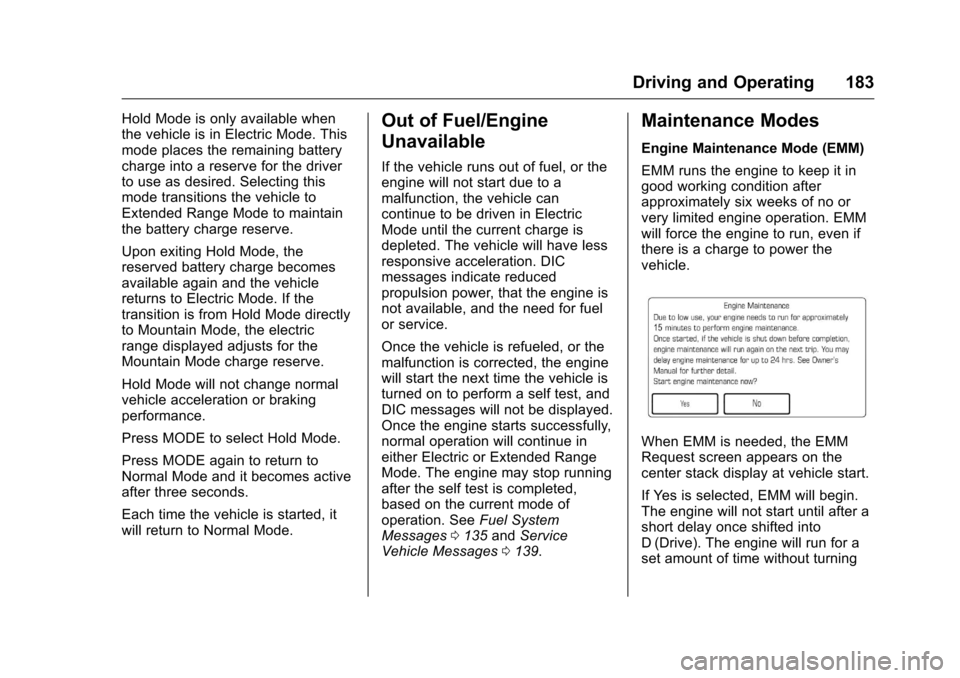
When EMM is needed, the EMM
Request screen appears on the
center stack display at vehicle start.
If Yes is selected, EMM will begin.
The engine will not start until after a
short delay once shifted into
D (Drive). The engine will run for a
set amount of time without turning
Page 185 of 376
Chevrolet VOLT Owner Manual (GMNA-Localizing-U.S./Canada/Mexico-
9807421) - 2017 - CRC - 11/18/15
184 Driving and Operating
off. During EMM, a DIC message
displays to show the
EMM percentage complete.
If No is selected, the EMM Request
screen will appear when the vehicle
is next started. The EMM request
can be delayed for up to one day.
If the EMM request was delayed for
one day, EMM will automatically
start the engine at the next vehicle
start. The engine will not start until
after a short delay once shifted into
D (Drive).
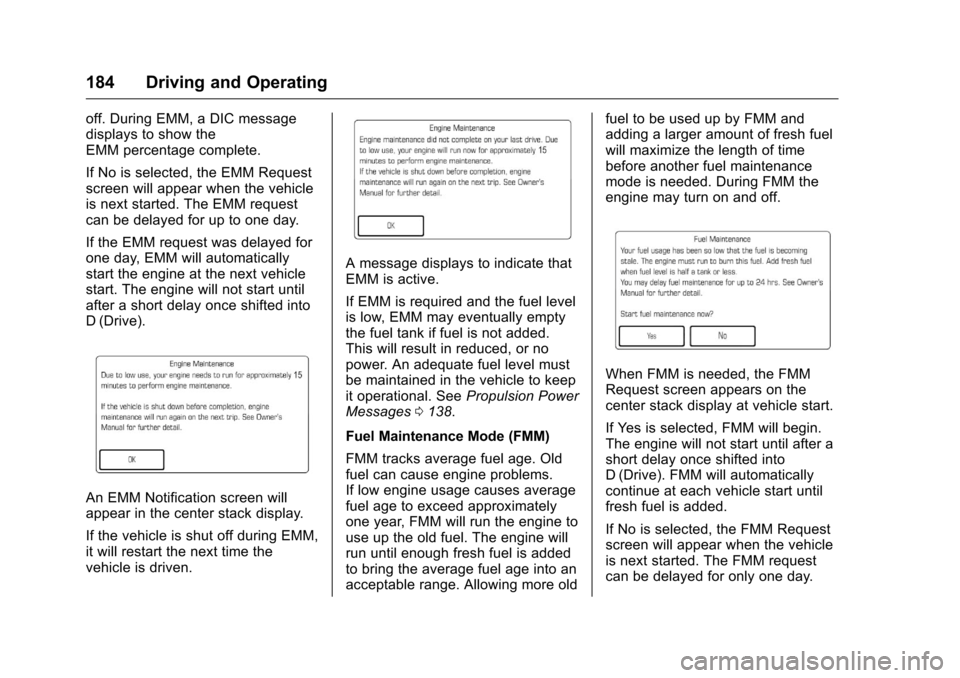
An EMM Notification screen will
appear in the center stack display.
If the vehicle is shut off during EMM,
it will restart the next time the
vehicle is driven.
A message displays to indicate that
EMM is active.
If EMM is required and the fuel level
is low, EMM may eventually empty
the fuel tank if fuel is not added.
This will result in reduced, or no
power. An adequate fuel level must
be maintained in the vehicle to keep
it operational. SeePropulsion Power
Messages 0138.
Fuel Maintenance Mode (FMM)
FMM tracks average fuel age. Old
fuel can cause engine problems.
If low engine usage causes average
fuel age to exceed approximately
one year, FMM will run the engine to
use up the old fuel. The engine will
run until enough fresh fuel is added
to bring the average fuel age into an
acceptable range. Allowing more old fuel to be used up by FMM and
adding a larger amount of fresh fuel
will maximize the length of time
before another fuel maintenance
mode is needed. During FMM the
engine may turn on and off.
When FMM is needed, the FMM
Request screen appears on the
center stack display at vehicle start.
If Yes is selected, FMM will begin.
The engine will not start until after a
short delay once shifted into
D (Drive). FMM will automatically
continue at each vehicle start until
fresh fuel is added.
If No is selected, the FMM Request
screen will appear when the vehicle
is next started. The FMM request
can be delayed for only one day.
Page 186 of 376
Chevrolet VOLT Owner Manual (GMNA-Localizing-U.S./Canada/Mexico-
9807421) - 2017 - CRC - 11/18/15
Driving and Operating 185
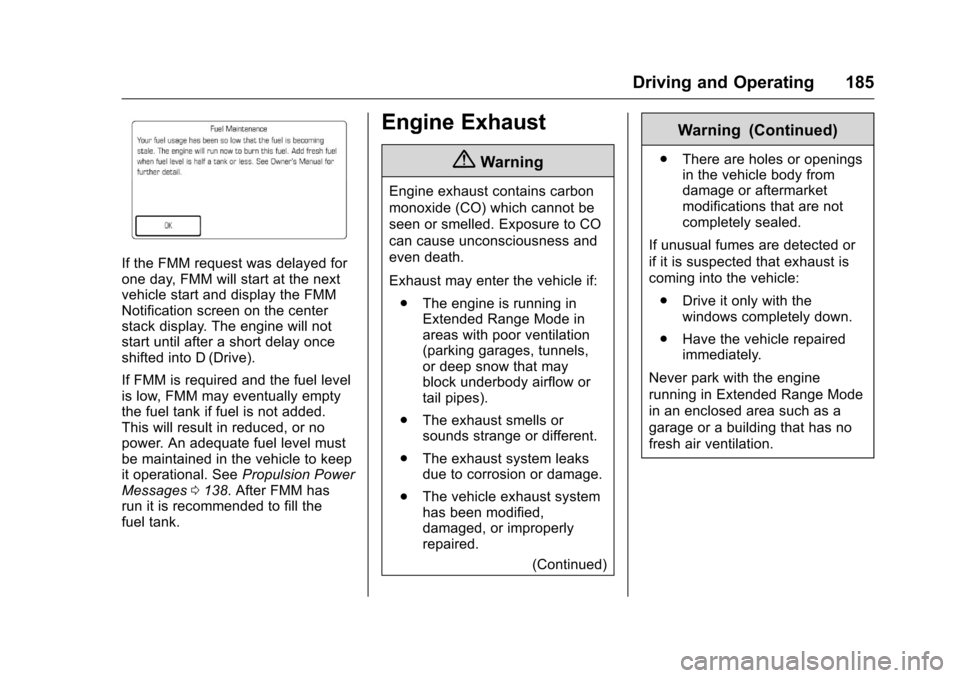
If the FMM request was delayed for
one day, FMM will start at the next
vehicle start and display the FMM
Notification screen on the center
stack display. The engine will not
start until after a short delay once
shifted into D (Drive).
If FMM is required and the fuel level
is low, FMM may eventually empty
the fuel tank if fuel is not added.
This will result in reduced, or no
power. An adequate fuel level must
be maintained in the vehicle to keep
it operational. SeePropulsion Power
Messages 0138. After FMM has
run it is recommended to fill the
fuel tank.
Engine Exhaust
{Warning
Engine exhaust contains carbon
monoxide (CO) which cannot be
seen or smelled. Exposure to CO
can cause unconsciousness and
even death.
Exhaust may enter the vehicle if:
. The engine is running in
Extended Range Mode in
areas with poor ventilation
(parking garages, tunnels,
or deep snow that may
block underbody airflow or
tail pipes).
. The exhaust smells or
sounds strange or different.
. The exhaust system leaks
due to corrosion or damage.
. The vehicle exhaust system
has been modified,
damaged, or improperly
repaired.
(Continued)
Warning (Continued)
.There are holes or openings
in the vehicle body from
damage or aftermarket
modifications that are not
completely sealed.
If unusual fumes are detected or
if it is suspected that exhaust is
coming into the vehicle: . Drive it only with the
windows completely down.
. Have the vehicle repaired
immediately.
Never park with the engine
running in Extended Range Mode
in an enclosed area such as a
garage or a building that has no
fresh air ventilation.
Page 190 of 376
Chevrolet VOLT Owner Manual (GMNA-Localizing-U.S./Canada/Mexico-
9807421) - 2017 - CRC - 11/18/15
Driving and Operating 189
The vehicle has an Electric Parking
Brake (EPB). The EPB can always
be activated, even if the vehicle
is off.
The system has a red parking brake
status light and an amber parking
brake warning light. SeeElectric
Parking Brake Light 0111 and
Service Electric Parking Brake Light
0 112. There are also parking
brake-related Driver Information
Center (DIC) messages. See Brake
System Messages 0133. In case of
insufficient electrical power, the EPB
cannot be applied or released.
Before leaving the vehicle, check
the red parking brake status light to
ensure that the parking brake is
applied.
EPB Apply
To apply the EPB:
1. Be sure the vehicle is at a complete stop.
2. Pull the EPB switch momentarily. The red parking brake status light
will flash and then stay on once the
EPB is fully applied. If the red
parking brake status light flashes
continuously, then the EPB is only
partially applied or there is a
problem with the EPB. A DIC
message will display. Release the
EPB and try to apply it again. If the
light does not come on, or keeps
flashing, have the vehicle serviced.
Do not drive the vehicle if the red
parking brake status light is flashing.
See your dealer. See
Electric
Parking Brake Light 0111.
If the amber parking brake warning
light is on, lift up on the EPB switch
and hold it up. Continue to hold the
switch until the red parking brake
status light remains on. If the amber
parking brake warning light is on,
see your dealer.
If the EPB is applied while the
vehicle is moving, the vehicle will
decelerate as long as the switch is
held up. If the switch is held up until
the vehicle comes to a stop, the
EPB will remain applied. The vehicle may automatically apply
the EPB in some situations when
the vehicle is not moving. This is
normal, and is done to periodically
check the correct operation of the
EPB system.
If the EPB fails to apply, the rear
wheels should be blocked to
prevent vehicle movement.
EPB Release
To release the EPB:
1. Place the vehicle in ON/RUN.
2. Apply and hold the brake pedal.
3. Push momentarily on the EPB switch.
The EPB is released when the red
parking brake status light is off.
If the amber parking brake warning
light is on, release the EPB by
pushing down on the EPB switch
and holding it down. Continue to
hold the switch until the red parking
brake status light is off. If either light
stays on after release is attempted,
see your dealer.
Page 192 of 376
Chevrolet VOLT Owner Manual (GMNA-Localizing-U.S./Canada/Mexico-
9807421) - 2017 - CRC - 11/18/15
Driving and Operating 191
The controller interprets the braking
request and uses regenerative
braking, conventional hydraulic
braking, or a combination of both as
necessary.
The brake controller applies the
hydraulic brakes using a pump. The
pump may be heard during some
braking, such as rapid applies. This
is normal.
SeeWarning Lights, Gauges, and
Indicators 0101 andDriver
Information Center (DIC) 0130.
If there is a controller problem, the
brake pedal may be harder to push
and the stopping distance may be
longer.Regen on Demand®
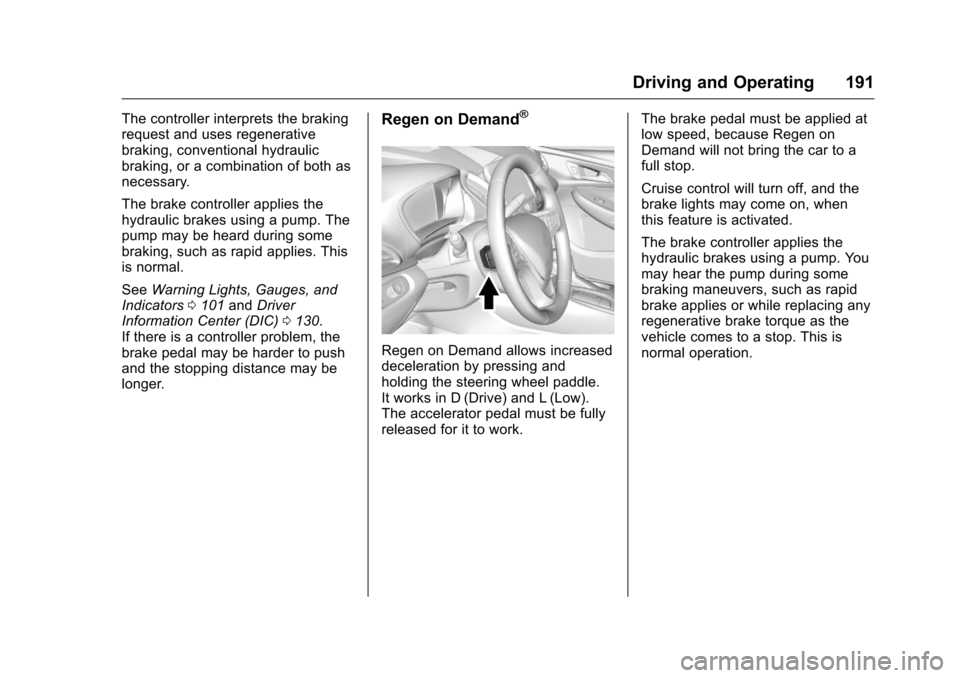
Regen on Demand allows increased
deceleration by pressing and
holding the steering wheel paddle.
It works in D (Drive) and L (Low).
The accelerator pedal must be fully
released for it to work. The brake pedal must be applied at
low speed, because Regen on
Demand will not bring the car to a
full stop.
Cruise control will turn off, and the
brake lights may come on, when
this feature is activated.
The brake controller applies the
hydraulic brakes using a pump. You
may hear the pump during some
braking maneuvers, such as rapid
brake applies or while replacing any
regenerative brake torque as the
vehicle comes to a stop. This is
normal operation.
Page 194 of 376
Chevrolet VOLT Owner Manual (GMNA-Localizing-U.S./Canada/Mexico-
9807421) - 2017 - CRC - 11/18/15
Driving and Operating 193
Drive the vehicle. Ifdcomes on
and stays on, the vehicle may need
more time to diagnose the problem.
If the condition persists, see your
dealer.
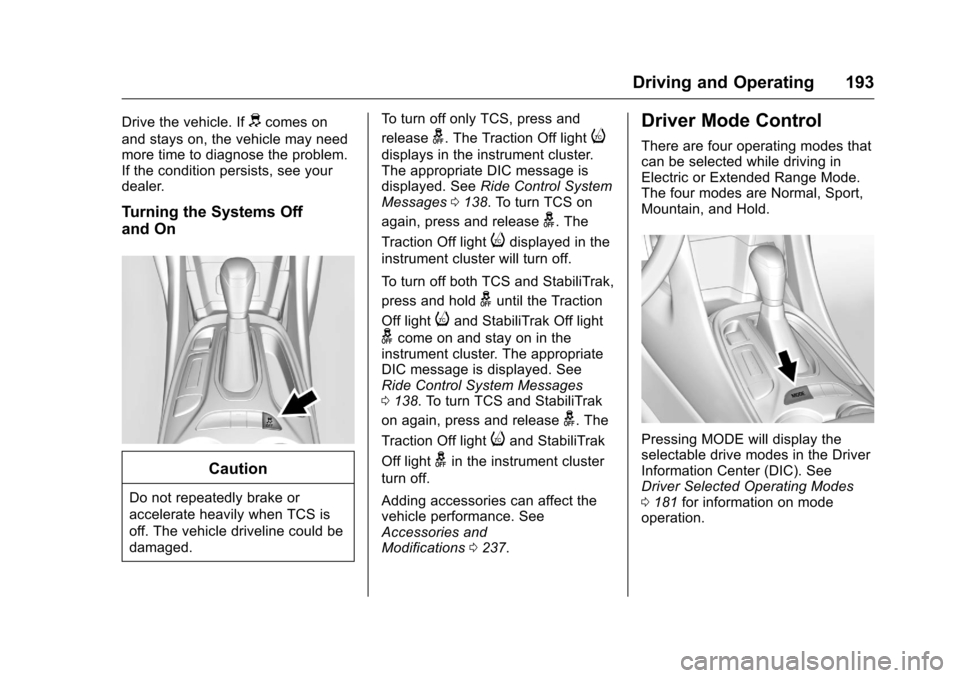
Turning the Systems Off
and On
Caution
Do not repeatedly brake or
accelerate heavily when TCS is
off. The vehicle driveline could be
damaged. To turn off only TCS, press and
release
g. The Traction Off lighti
displays in the instrument cluster.
The appropriate DIC message is
displayed. See
Ride Control System
Messages 0138. To turn TCS on
again, press and release
g. The
Traction Off light
idisplayed in the
instrument cluster will turn off.
To turn off both TCS and StabiliTrak,
press and hold
guntil the Traction
Off light
iand StabiliTrak Off light
gcome on and stay on in the
instrument cluster. The appropriate
DIC message is displayed. See
Ride Control System Messages
0 138. To turn TCS and StabiliTrak
on again, press and release
g. The
Traction Off light
iand StabiliTrak
Off light
gin the instrument cluster
turn off.
Adding accessories can affect the
vehicle performance. See
Accessories and
Modifications 0237.
Driver Mode Control
There are four operating modes that
can be selected while driving in
Electric or Extended Range Mode.
The four modes are Normal, Sport,
Mountain, and Hold.
Pressing MODE will display the
selectable drive modes in the Driver
Information Center (DIC). See
Driver Selected Operating Modes
0181 for information on mode
operation.