battery CHEVROLET VOLT 2017 2.G Workshop Manual
[x] Cancel search | Manufacturer: CHEVROLET, Model Year: 2017, Model line: VOLT, Model: CHEVROLET VOLT 2017 2.GPages: 376, PDF Size: 6.75 MB
Page 184 of 376
Chevrolet VOLT Owner Manual (GMNA-Localizing-U.S./Canada/Mexico-
9807421) - 2017 - CRC - 11/18/15
Driving and Operating 183
Hold Mode is only available when
the vehicle is in Electric Mode. This
mode places the remaining battery
charge into a reserve for the driver
to use as desired. Selecting this
mode transitions the vehicle to
Extended Range Mode to maintain
the battery charge reserve.
Upon exiting Hold Mode, the
reserved battery charge becomes
available again and the vehicle
returns to Electric Mode. If the
transition is from Hold Mode directly
to Mountain Mode, the electric
range displayed adjusts for the
Mountain Mode charge reserve.
Hold Mode will not change normal
vehicle acceleration or braking
performance.
Press MODE to select Hold Mode.
Press MODE again to return to
Normal Mode and it becomes active
after three seconds.
Each time the vehicle is started, it
will return to Normal Mode.Out of Fuel/Engine
Unavailable
If the vehicle runs out of fuel, or the
engine will not start due to a
malfunction, the vehicle can
continue to be driven in Electric
Mode until the current charge is
depleted. The vehicle will have less
responsive acceleration. DIC
messages indicate reduced
propulsion power, that the engine is
not available, and the need for fuel
or service.
Once the vehicle is refueled, or the
malfunction is corrected, the engine
will start the next time the vehicle is
turned on to perform a self test, and
DIC messages will not be displayed.
Once the engine starts successfully,
normal operation will continue in
either Electric or Extended Range
Mode. The engine may stop running
after the self test is completed,
based on the current mode of
operation. SeeFuel System
Messages 0135 andService
Vehicle Messages 0139.
Maintenance Modes
Engine Maintenance Mode (EMM)
EMM runs the engine to keep it in
good working condition after
approximately six weeks of no or
very limited engine operation. EMM
will force the engine to run, even if
there is a charge to power the
vehicle.
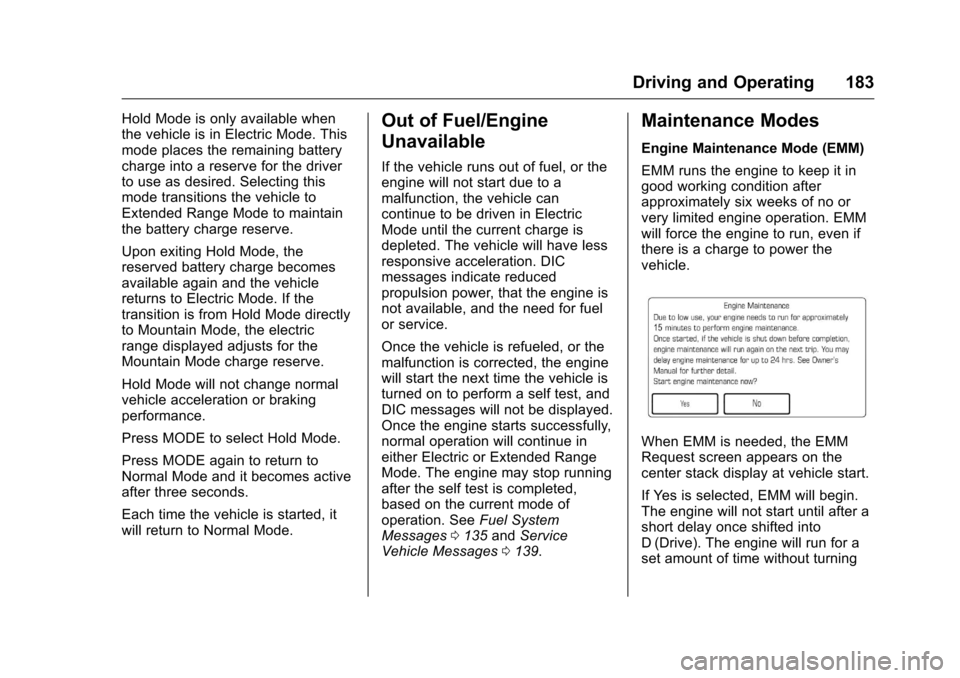
When EMM is needed, the EMM
Request screen appears on the
center stack display at vehicle start.
If Yes is selected, EMM will begin.
The engine will not start until after a
short delay once shifted into
D (Drive). The engine will run for a
set amount of time without turning
Page 188 of 376
Chevrolet VOLT Owner Manual (GMNA-Localizing-U.S./Canada/Mexico-
9807421) - 2017 - CRC - 11/18/15
Driving and Operating 187
on the shift lever, then push the shift
lever all the way into P (Park) as
you maintain brake application.
Then press the shift lever button
and move the shift lever into
another gear. SeeShifting out of
Park 0178.
R : Use this gear to back up.
Caution
Shifting to R (Reverse) while the
vehicle is moving forward could
damage the electric drive unit.
The repairs would not be covered
by the vehicle warranty. Shift to
R (Reverse) only after the vehicle
is stopped.
To rock the vehicle back and forth to
get out of snow, ice, or sand without
damaging the electric drive unit, see
If the Vehicle Is Stuck 0171. N :
In this position, the propulsion
system does not provide power to
the wheels. The high voltage battery
is neither charged or discharged
when in N (Neutral) at low vehicle
speeds.
D : This position is for normal
driving. It provides the best fuel
economy. If more power is needed
for passing, press the accelerator
pedal to gain the desired
acceleration
Caution
If the vehicle seems to accelerate
slowly or not respond when you
go faster, and you continue to
drive the vehicle that way, you
could damage the electric drive
unit. Have the vehicle serviced
right away. L :
This position reduces vehicle
speed without using the brakes. Use
L (Low) on very steep hills, in deep
snow, in mud, or in stop-and-go
traffic.
Caution
Spinning the tires or holding the
vehicle in one place on a hill
using only the accelerator pedal
may damage the electric drive
unit. The repair will not be
covered by the vehicle warranty.
If you are stuck, do not spin the
tires. When stopping on a hill, use
the brakes to hold the vehicle in
place.
Page 191 of 376
Chevrolet VOLT Owner Manual (GMNA-Localizing-U.S./Canada/Mexico-
9807421) - 2017 - CRC - 11/18/15
190 Driving and Operating
Caution
Driving with the parking brake on
can overheat the brake system
and cause premature wear or
damage to brake system parts.
Make sure that the parking brake
is fully released and the brake
warning light is off before driving.
Automatic EPB Release
The EPB will automatically release if
the vehicle is running, placed into
gear, and an attempt is made to
drive away. Avoid rapid acceleration
when the EPB is applied, to
preserve parking brake lining life.
Hill Start Assist (HSA)
The HSA feature will activate when
the vehicle is stopped on a
moderate to steep grade to help
prevent it from rolling in an
unintended direction. After the brake
pedal has been released and before
the accelerator pedal has been
pressed, HSA uses braking
pressure to hold the vehiclestationary. If HSA is holding the
vehicle, a DIC message displays.
HSA will not activate in a forward
drive gear when facing downhill,
or in R (Reverse) when facing uphill.
Extended Hill Start
Assist (EHSA)
Select the duration of the HSA
feature on the center stack
touchscreen by choosing the
submenu for Hill Start Assist or
Extended Hill Start Assist (EHSA).
See
“Extended Hill Start Assist"
under “Comfort and Convenience” in
Vehicle Personalization 0141.
When Standard Hold is selected,
the vehicle is held stationary for up
to two seconds after the brake pedal
is released. When Extended Hold is
selected, the vehicle is held
stationary for up to five minutes
after the brake pedal is released. In
either case, override the hold
feature by pressing the accelerator
pedal and attempting to drive away.
If Hill Start Assist is selected in the
Settings menu, it will hold the
vehicle for two seconds unless the
driver door is opened or the driver safety belt is unbuckled after
releasing the brake pedal.
If Extended Hill Start Assist is
selected, it will hold the vehicle for
five minutes unless the driver door
is opened and the driver safety belt
is unbuckled prior to releasing the
brake pedal. When EHSA is
deactivated after five minutes, or if it
is deactivated when the driver
safety belt is unlatched or the driver
door is opened, the Electric Parking
Brake will engage to prevent vehicle
movement.
Regenerative Braking
Some braking energy from the
moving vehicle is turned back into
electrical energy. This energy is
then stored back into the high
voltage battery system, increasing
energy efficiency.
The hydraulic disc brakes work with
the regenerative braking to ensure
effective braking, such as when a
high braking demand is requested.
Page 216 of 376
Chevrolet VOLT Owner Manual (GMNA-Localizing-U.S./Canada/Mexico-
9807421) - 2017 - CRC - 11/18/15
Driving and Operating 215
When the System Does Not
Seem to Work Properly
The system performance may be
affected by:
.Close vehicles ahead.
. Sudden lighting changes, such
as when driving through tunnels.
. Banked roads.
. Roads with poor lane markings,
such as two-lane roads.
If the LKA system is not functioning
properly when lane markings are
clearly visible, cleaning the
windshield may help.
LKA assistance and/or LDW alerts
may occur due to tar marks,
shadows, cracks in the road,
temporary or construction lane
markings, or other road
imperfections. This is normal system
operation; the vehicle does not need
service. Turn LKA off if these
conditions continue.
Charging
Plug-In Charging
This section explains the charging
of the vehicle's high voltage battery.
Do not allow the vehicle to remain in
extreme temperatures for long
periods without being driven or
plugged in. Plug the vehicle in when
temperatures are below 0 °C (32 °F)
and above 32 °C (90 °F) to
maximize the life of the high voltage
battery.
When using a 120-volt AC electrical
outlet, it will take approximately
13 hours to charge the vehicle with
the 12 amp AC current setting or
19 hours using the default 8 amp
AC current setting. When using a
240-volt charging station, it will take
approximately 4.5 hours to charge
the vehicle. Charge times will vary
with outside temperature. There are
three ways to program how the
vehicle is charged. See
Programmable Charging 0119.
The charging system may run fans
and pumps that result in sounds
from the vehicle while it is turned off. Additional unexpected clicking
sounds may be caused by the
electrical devices used while
charging.
While the charge cord is plugged
into the vehicle, the vehicle cannot
be driven.
Charging
Start Charge
1. Make sure the vehicle is parked. Select the appropriate
charge level using the Charge
Limit Preference screen on the
center stack. See “Charge
Limit Selection” under
Programmable Charging 0119.
Turn the vehicle off.
2. Push the rearward edge of the charge port door in and release
to open the door.
In cold weather conditions, ice
may form around the charge
port door. Remove ice from the
area before attempting to open
or close the charge port door.
Page 217 of 376
Chevrolet VOLT Owner Manual (GMNA-Localizing-U.S./Canada/Mexico-
9807421) - 2017 - CRC - 11/18/15
216 Driving and Operating
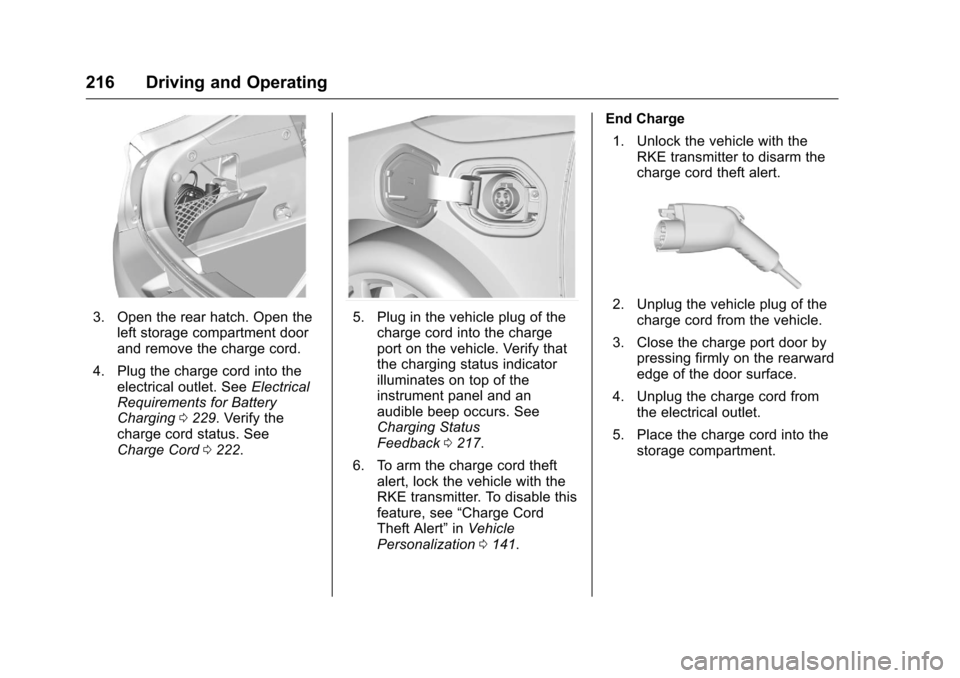
3. Open the rear hatch. Open theleft storage compartment door
and remove the charge cord.
4. Plug the charge cord into the electrical outlet. See Electrical
Requirements for Battery
Charging 0229. Verify the
charge cord status. See
Charge Cord 0222.5. Plug in the vehicle plug of the
charge cord into the charge
port on the vehicle. Verify that
the charging status indicator
illuminates on top of the
instrument panel and an
audible beep occurs. See
Charging Status
Feedback 0217.
6. To arm the charge cord theft alert, lock the vehicle with the
RKE transmitter. To disable this
feature, see “Charge Cord
Theft Alert” inVehicle
Personalization 0141. End Charge
1. Unlock the vehicle with the RKE transmitter to disarm the
charge cord theft alert.2. Unplug the vehicle plug of thecharge cord from the vehicle.
3. Close the charge port door by pressing firmly on the rearward
edge of the door surface.
4. Unplug the charge cord from the electrical outlet.
5. Place the charge cord into the storage compartment.
Page 218 of 376
Chevrolet VOLT Owner Manual (GMNA-Localizing-U.S./Canada/Mexico-
9807421) - 2017 - CRC - 11/18/15
Driving and Operating 217
Delayed Charging
Override
To temporarily override a delayed
charge event, unplug the charge
cord from the charge port and then
plug it back in within five seconds.
A single audible beep will sound
and charging will begin immediately.
To cancel a temporary override,
unplug the charge cord, wait for
10 seconds, and then plug the
charge cord back in. A double
audible beep will sound and
charging will be delayed.
SeeProgrammable Charging 0119
for advanced charge scheduling
options.
Charging Status
Feedback
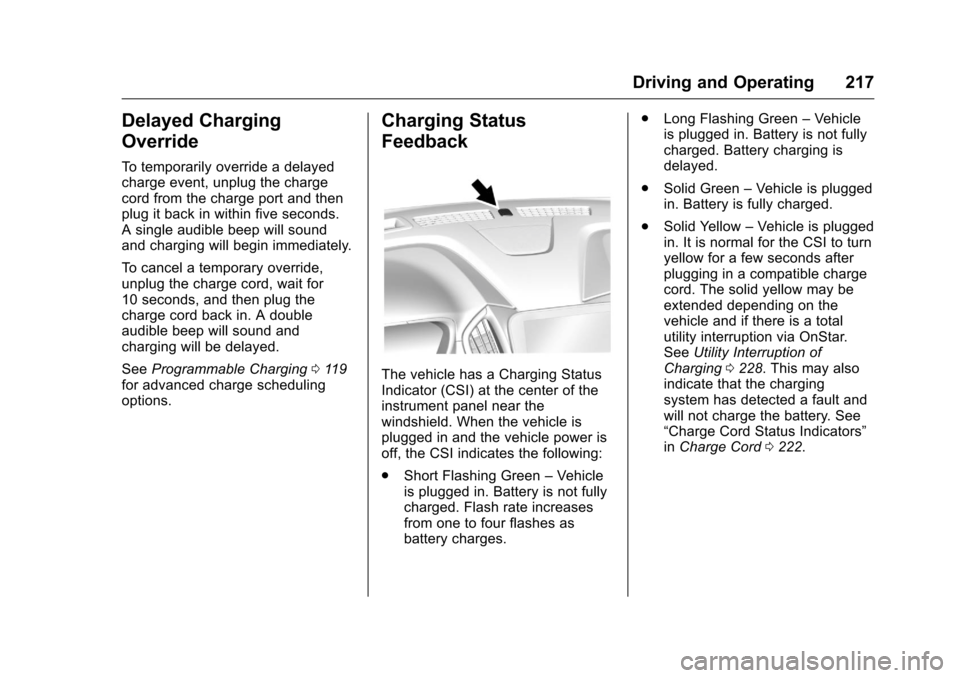
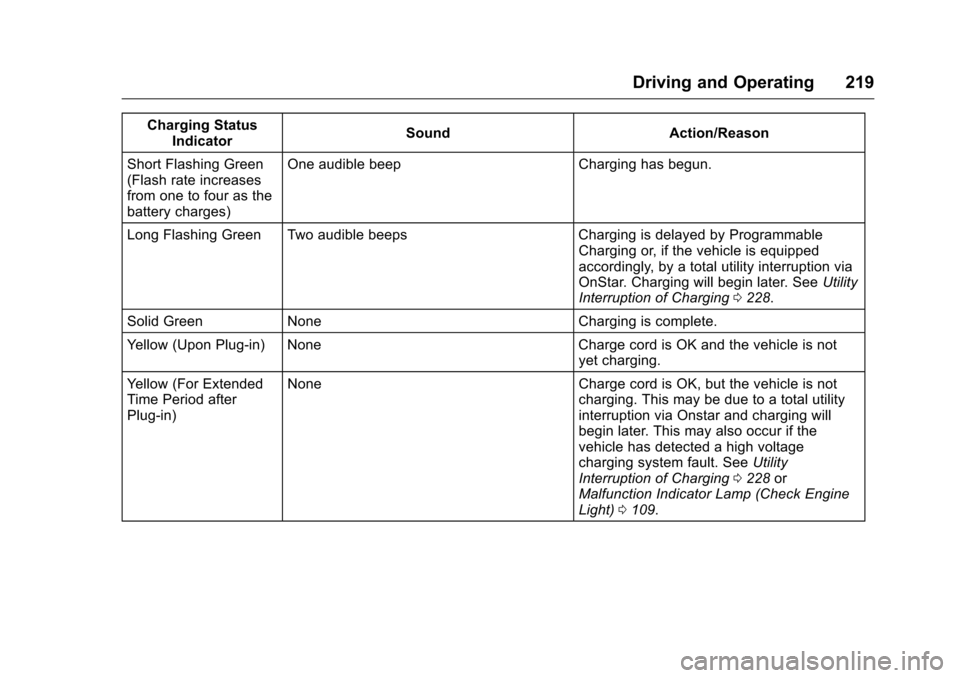
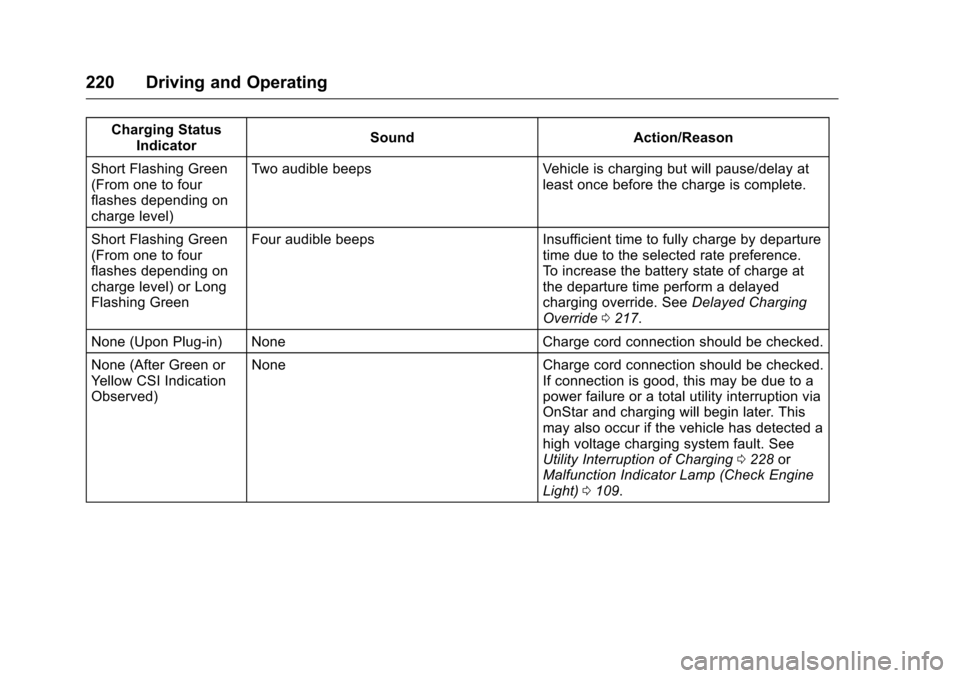
The vehicle has a Charging Status
Indicator (CSI) at the center of the
instrument panel near the
windshield. When the vehicle is
plugged in and the vehicle power is
off, the CSI indicates the following:
. Short Flashing Green –Vehicle
is plugged in. Battery is not fully
charged. Flash rate increases
from one to four flashes as
battery charges. .
Long Flashing Green –Vehicle
is plugged in. Battery is not fully
charged. Battery charging is
delayed.
. Solid Green –Vehicle is plugged
in. Battery is fully charged.
. Solid Yellow –Vehicle is plugged
in. It is normal for the CSI to turn
yellow for a few seconds after
plugging in a compatible charge
cord. The solid yellow may be
extended depending on the
vehicle and if there is a total
utility interruption via OnStar.
See Utility Interruption of
Charging 0228. This may also
indicate that the charging
system has detected a fault and
will not charge the battery. See
“Charge Cord Status Indicators”
in Charge Cord 0222.
Page 220 of 376
Chevrolet VOLT Owner Manual (GMNA-Localizing-U.S./Canada/Mexico-
9807421) - 2017 - CRC - 11/18/15
Driving and Operating 219
Charging StatusIndicator Sound Action/Reason
Short Flashing Green
(Flash rate increases
from one to four as the
battery charges) One audible beep Charging has begun.
Long Flashing Green Two audible beeps Charging is delayed by Programmable Charging or, if the vehicle is equipped
accordingly, by a total utility interruption via
OnStar. Charging will begin later. SeeUtility
Interruption of Charging 0228.
Solid Green None Charging is complete.
Yellow (Upon Plug-in) None Charge cord is OK and the vehicle is not yet charging.
Yellow (For Extended
Time Period after
Plug-in) None Charge cord is OK, but the vehicle is not
charging. This may be due to a total utility
interruption via Onstar and charging will
begin later. This may also occur if the
vehicle has detected a high voltage
charging system fault. SeeUtility
Interruption of Charging 0228 or
Malfunction Indicator Lamp (Check Engine
Light) 0109.
Page 221 of 376
Chevrolet VOLT Owner Manual (GMNA-Localizing-U.S./Canada/Mexico-
9807421) - 2017 - CRC - 11/18/15
220 Driving and Operating
Charging StatusIndicator Sound Action/Reason
Short Flashing Green
(From one to four
flashes depending on
charge level) Two audible beeps Vehicle is charging but will pause/delay at
least once before the charge is complete.
Short Flashing Green
(From one to four
flashes depending on
charge level) or Long
Flashing Green Four audible beeps Insufficient time to fully charge by departure
time due to the selected rate preference.
To increase the battery state of charge at
the departure time perform a delayed
charging override. SeeDelayed Charging
Override 0217.
None (Upon Plug-in) None Charge cord connection should be checked.
None (After Green or
Yellow CSI Indication
Observed) None Charge cord connection should be checked.
If connection is good, this may be due to a
power failure or a total utility interruption via
OnStar and charging will begin later. This
may also occur if the vehicle has detected a
high voltage charging system fault. See
Utility Interruption of Charging0228 or
Malfunction Indicator Lamp (Check Engine
Light) 0109.
Page 223 of 376
Chevrolet VOLT Owner Manual (GMNA-Localizing-U.S./Canada/Mexico-
9807421) - 2017 - CRC - 11/18/15
222 Driving and Operating
Charge Cord
IMPORTANT SAFETY
INSTRUCTIONS
This symbol means Warning: Risk
of electrical shock.
SeeRadio Frequency
Statement 0351.
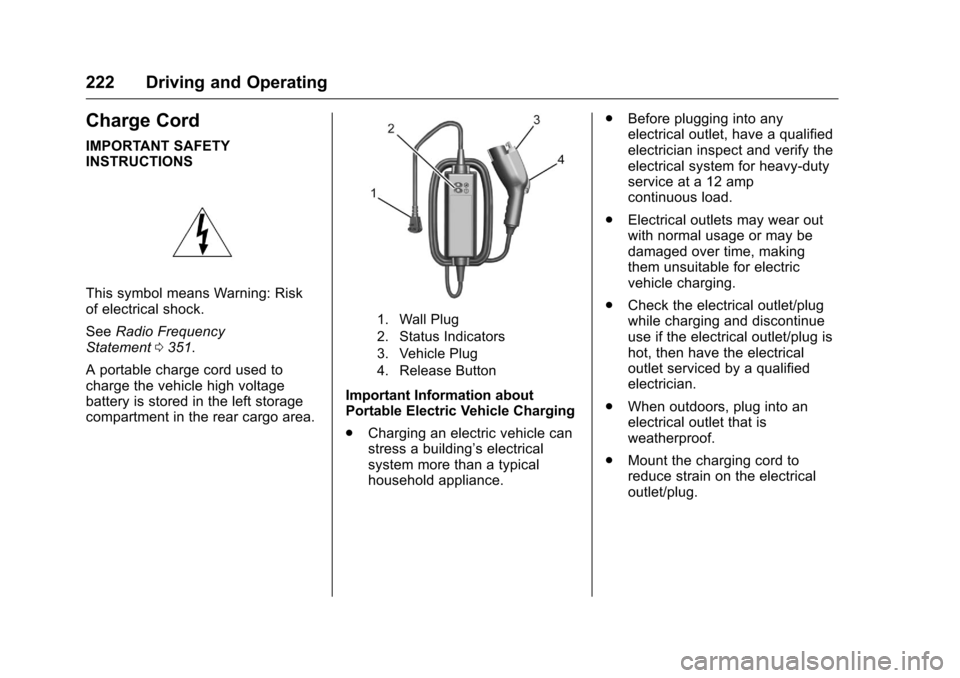
A portable charge cord used to
charge the vehicle high voltage
battery is stored in the left storage
compartment in the rear cargo area.
1. Wall Plug
2. Status Indicators
3. Vehicle Plug
4. Release Button
Important Information about
Portable Electric Vehicle Charging
. Charging an electric vehicle can
stress a building’ s electrical
system more than a typical
household appliance. .
Before plugging into any
electrical outlet, have a qualified
electrician inspect and verify the
electrical system for heavy-duty
service at a 12 amp
continuous load.
. Electrical outlets may wear out
with normal usage or may be
damaged over time, making
them unsuitable for electric
vehicle charging.
. Check the electrical outlet/plug
while charging and discontinue
use if the electrical outlet/plug is
hot, then have the electrical
outlet serviced by a qualified
electrician.
. When outdoors, plug into an
electrical outlet that is
weatherproof.
. Mount the charging cord to
reduce strain on the electrical
outlet/plug.
Page 230 of 376
Chevrolet VOLT Owner Manual (GMNA-Localizing-U.S./Canada/Mexico-
9807421) - 2017 - CRC - 11/18/15
Driving and Operating 229
3. Plug the portable charge cordinto the wall outlet, verify that
the indicator light on the charge
cord is solid green, and
connect it to the vehicle. See
“Charge Cord Status
Indicators” inCharge
Cord 0222.
4. If the vehicle charges with the portable charge cord, there
may be a problem with the
charging station. Try to charge
the vehicle with a different
240-volt charging station, such
as a public station. If both
attempts charge the vehicle,
contact the charging station
manufacturer.Electrical Requirements
for Battery Charging
This vehicle is capable of being
charged with most standard vehicle
charging equipment complying with
one or more of the following:
.SAE J1772
. SAE J2847-2
. IEC 61851-1
. IEC 61851-22
. IEC 61851-23
. IEC 61851-24
. IEC 62196-1
. IEC 62196-2
. IEC 62196-3
. ISO 15118
. GB/T 18487.1
. GB/T 20234.1
. GB/T 20234.2 The following are the minimum
requirements for circuits used to
charge this vehicle:
.
120 volts/15 amps
. 240 volts/20 amps
Charging equipment with a rating of
at least 240 volts/20 amps will
provide the fastest charging time
and best charging efficiency to
recharge the high voltage battery.
240 volt/40 amp circuits provide
flexibility for future vehicle charging
needs. Always follow the charging
equipment installation instructions.
Contact your dealer for more
information.
Caution
Do not use portable or stationary
backup generating equipment to
charge the vehicle. This may
cause damage to the vehicle's
charging system. Only charge the
vehicle from utility supplied
power.