headlamp CHEVROLET VOLT 2019 Owner's Manual
[x] Cancel search | Manufacturer: CHEVROLET, Model Year: 2019, Model line: VOLT, Model: CHEVROLET VOLT 2019Pages: 373, PDF Size: 5.66 MB
Page 8 of 373

Chevrolet VOLT Owner Manual (GMNA-Localizing-U.S./Canada/Mexico-
12163007) - 2019 - CRC - 11/5/18
In Brief 7
1.Air Vents 0155.
2. Turn Signal Lever. See Turn
and Lane-Change Signals
0 146.
IntelliBeam
®System Button (If
Equipped). See Exterior Lamp
Controls 0142.
3. Instrument Cluster 0107.
Driver Information Center (DIC)
Display. See Driver Information
Center (DIC) 0133.
4. Windshield Wiper/Washer
0103.
5. Charging Status Indicator. See Charging Status Feedback
0216.
Light Sensor. See Automatic
Headlamp System 0145.
6. Infotainment. See the infotainment manual.
Navigation System (If
Equipped). See the
infotainment manual. 7.
Automatic Climate Control
System 0150.
Heated Front Seats 057 (If
Equipped).
8. Power Outlets 0104.
USB Port. See the infotainment
manual.
Auxiliary Jack. See the
infotainment manual.
SD Card Slot. See the
infotainment manual.
9. Shift Lever. See Electric Drive
Unit 0181.
10. Drive MODE Button. See Driver Selected Operating
Modes 0174.
Assistance Systems for
Parking or Backing 0202 (If
Equipped).
Traction Control/Electronic
Stability Control 0186.
11. Hazard Warning Flashers
0145. 12.
Electric Parking Brake 0183.
13. Power Button 0168.
14. Steering Wheel Controls. See the infotainment manual.
15. Volume Switches (Out of View) (If Equipped). See “Steering
Wheel Controls” in the
infotainment manual.
16. Horn 0102.
17. Steering Wheel Adjustment
0102 (Out of View).
18. Regen on Demand Paddle (Out of View). See Regenerative
Braking 0185.
19. Cruise Control 0188.
Adaptive Cruise Control 0191
(If Equipped).
Heated Steering Wheel 0102
(If Equipped).
Forward Collision Alert (FCA)
System 0206 (If Equipped).
Lane Keep Assist (LKA) 0212
(If Equipped).
Page 15 of 373
Chevrolet VOLT Owner Manual (GMNA-Localizing-U.S./Canada/Mexico-
12163007) - 2019 - CRC - 11/5/18
14 In Brief
Passenger Sensing
System
The passenger sensing system will
turn off the front outboard
passenger frontal airbag and knee
airbag under certain conditions. No
other airbag is affected by the
passenger sensing system. See
Passenger Sensing System074.
The passenger airbag status
indicator lights on the overhead
console are visible when the vehicle
is started. See Passenger Airbag
Status Indicator 0113.
Mirror Adjustment
Power Mirrors
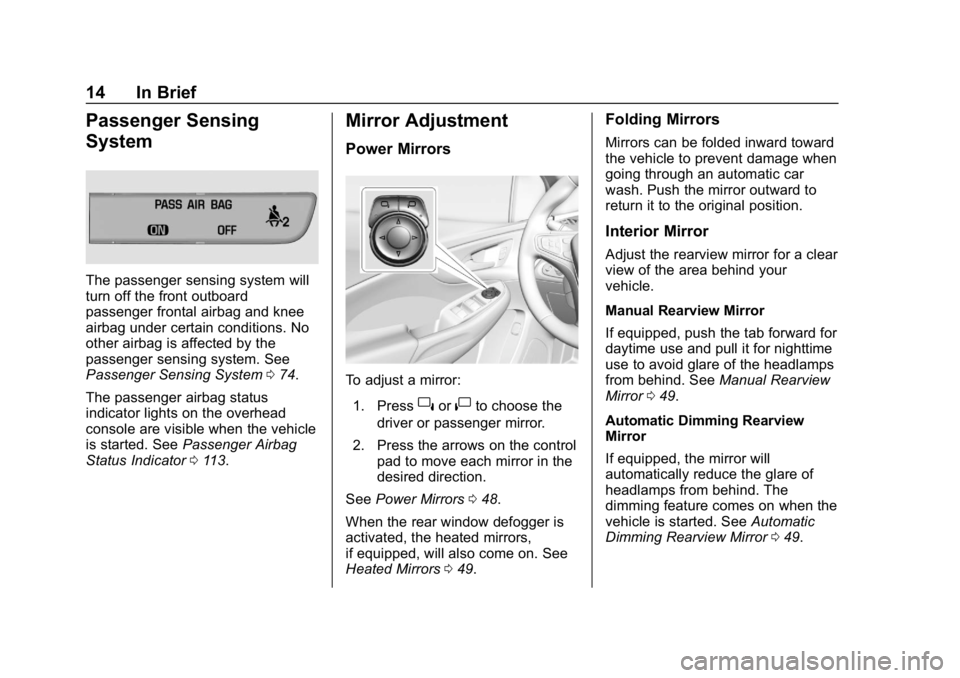
To adjust a mirror:
1. Press
}or|to choose the
driver or passenger mirror.
2. Press the arrows on the control pad to move each mirror in the
desired direction.
See Power Mirrors 048.
When the rear window defogger is
activated, the heated mirrors,
if equipped, will also come on. See
Heated Mirrors 049.
Folding Mirrors
Mirrors can be folded inward toward
the vehicle to prevent damage when
going through an automatic car
wash. Push the mirror outward to
return it to the original position.
Interior Mirror
Adjust the rearview mirror for a clear
view of the area behind your
vehicle.
Manual Rearview Mirror
If equipped, push the tab forward for
daytime use and pull it for nighttime
use to avoid glare of the headlamps
from behind. See Manual Rearview
Mirror 049.
Automatic Dimming Rearview
Mirror
If equipped, the mirror will
automatically reduce the glare of
headlamps from behind. The
dimming feature comes on when the
vehicle is started. See Automatic
Dimming Rearview Mirror 049.
Page 17 of 373
Chevrolet VOLT Owner Manual (GMNA-Localizing-U.S./Canada/Mexico-
12163007) - 2019 - CRC - 11/5/18
16 In Brief
The rear reading lamps are in the
headliner.
Press the button near each lamp to
turn the rear reading lamps on
or off.
For more information on interior
lighting, seeInstrument Panel
Illumination Control 0146.
Exterior Lighting
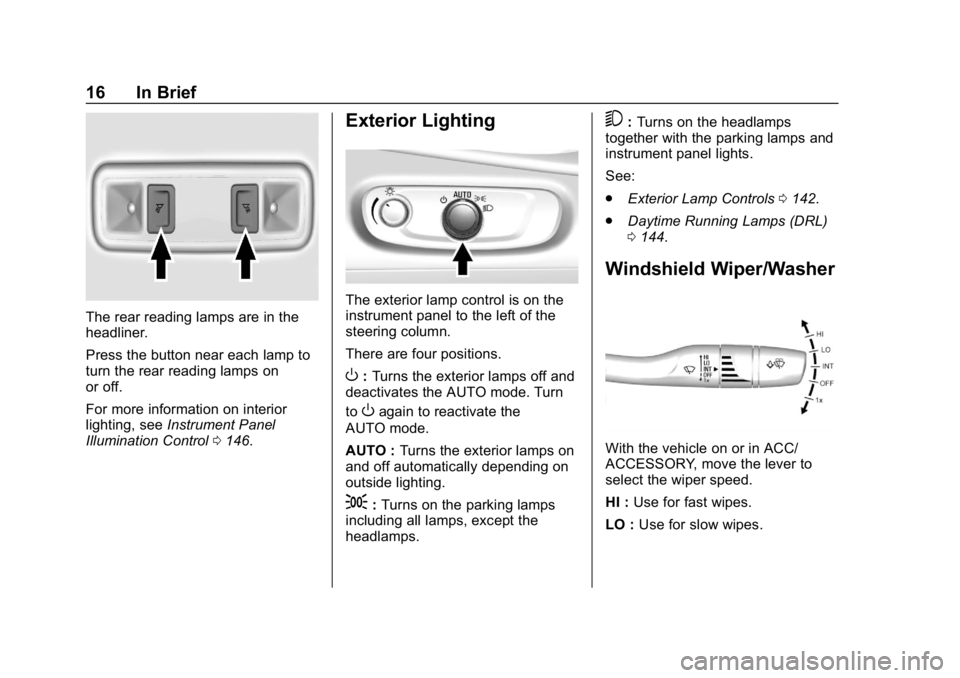
The exterior lamp control is on the
instrument panel to the left of the
steering column.
There are four positions.
O:Turns the exterior lamps off and
deactivates the AUTO mode. Turn
to
Oagain to reactivate the
AUTO mode.
AUTO : Turns the exterior lamps on
and off automatically depending on
outside lighting.
;: Turns on the parking lamps
including all lamps, except the
headlamps.
5: Turns on the headlamps
together with the parking lamps and
instrument panel lights.
See:
. Exterior Lamp Controls 0142.
. Daytime Running Lamps (DRL)
0144.
Windshield Wiper/Washer
With the vehicle on or in ACC/
ACCESSORY, move the lever to
select the wiper speed.
HI : Use for fast wipes.
LO : Use for slow wipes.
Page 50 of 373
Chevrolet VOLT Owner Manual (GMNA-Localizing-U.S./Canada/Mexico-
12163007) - 2019 - CRC - 11/5/18
Keys, Doors, and Windows 49
Folding Mirrors
Manual Folding Mirrors
The mirrors can be folded inward
toward the vehicle to prevent
damage when going through an
automatic car wash. Push the mirror
outward to return it to the original
position.
Heated Mirrors
The rear window defogger also
heats the outside mirrors,
if equipped.
K:Press to heat the outside
rearview mirrors. See “Rear Window
Defogger” underAutomatic Climate
Control System 0150.
Interior Mirrors
Interior Rearview Mirrors
Adjust the rearview mirror for a clear
view of the area behind the vehicle.
Do not spray glass cleaner directly
on the mirror. Use a soft towel
dampened with water.
Manual Rearview Mirror
If equipped with a manual rearview
mirror, push the tab forward for
daytime use and pull it for nighttime
use to avoid glare from the
headlamps from behind.
Automatic Dimming
Rearview Mirror
If equipped, automatic dimming
reduces the glare of headlamps
from behind. The dimming feature
comes on when the vehicle is
started.
Windows
{Warning
Never leave a child, a helpless
adult, or a pet alone in a vehicle,
especially with the windows
closed in warm or hot weather.
They can be overcome by the
extreme heat and suffer
permanent injuries or even death
from heat stroke.
Page 123 of 373
Chevrolet VOLT Owner Manual (GMNA-Localizing-U.S./Canada/Mexico-
12163007) - 2019 - CRC - 11/5/18
122 Instruments and Controls
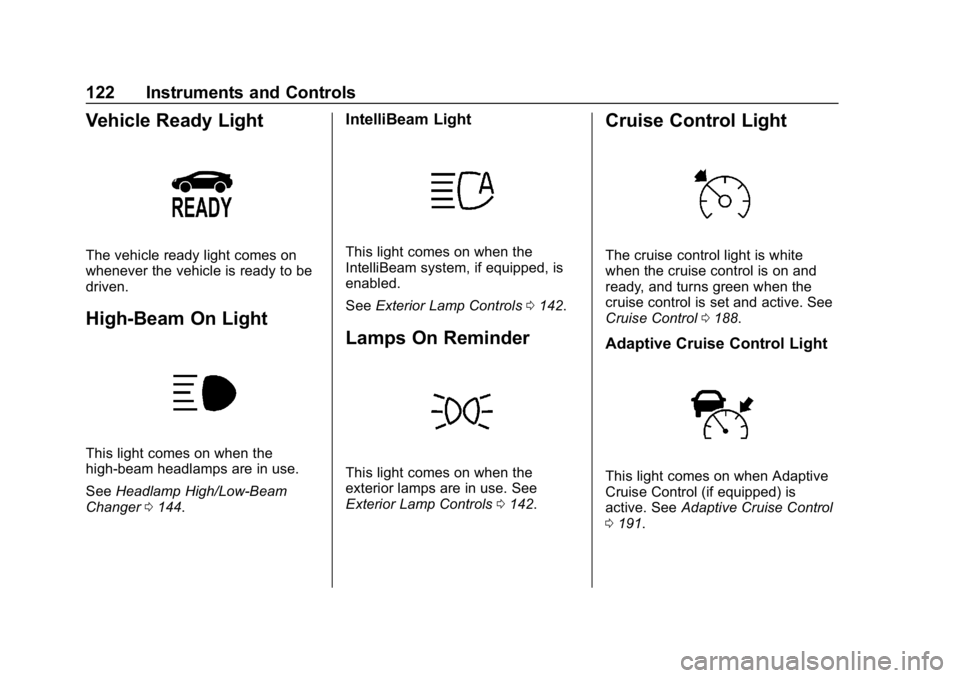
Vehicle Ready Light
The vehicle ready light comes on
whenever the vehicle is ready to be
driven.
High-Beam On Light
This light comes on when the
high-beam headlamps are in use.
SeeHeadlamp High/Low-Beam
Changer 0144.
IntelliBeam Light
This light comes on when the
IntelliBeam system, if equipped, is
enabled.
See Exterior Lamp Controls 0142.
Lamps On Reminder
This light comes on when the
exterior lamps are in use. See
Exterior Lamp Controls 0142.
Cruise Control Light
The cruise control light is white
when the cruise control is on and
ready, and turns green when the
cruise control is set and active. See
Cruise Control 0188.
Adaptive Cruise Control Light
This light comes on when Adaptive
Cruise Control (if equipped) is
active. See Adaptive Cruise Control
0 191.
Page 140 of 373
Chevrolet VOLT Owner Manual (GMNA-Localizing-U.S./Canada/Mexico-
12163007) - 2019 - CRC - 11/5/18
Instruments and Controls 139
When Lane Change Alert is
disabled, Side Blind Zone Alert is
also disabled.
Touch Off or On.
Comfort and Convenience
Touch and the following may
display:
.Chime Volume
. Extended Hill Start Assist
Chime Volume
This setting determines the chime
volume level.
Touch the controls on the
infotainment display to adjust the
volume.
Extended Hill Start Assist
This allows the duration of the Hill
Start Assist to be changed. See
“Extended Hill Start Assist (EHSA)”
in Hill Start Assist (HSA) 0184.
Touch Extended Hold or
Standard Hold.
Energy
Touch and the following may
display:
. Location Based Charging
. Energy Summary Pop-up
. Charge Status Feedback
. Charge Cord Theft Alert
. Charge Power Loss Alert
Location Based Charging
This allows the feature to be turned
on or off.
Touch Set Home Location, On,
or Off.
Energy Summary Pop-up
This allows the feature to be turned
on or off.
Touch Off or On.
Charge Status Feedback
If the feature is on, horn chirps
are on.
Touch Off or On. Charge Cord Theft Alert
When this function is turned on and
the vehicle is off and locked, the
horn will sound if the charge cord is
removed.
Touch Off or On.
Charge Power Loss Alert
When this function is turned on and
the vehicle is charging, the horn will
sound if power is lost.
Touch Off or On.
Lighting
Touch and the following may
display:
.
Vehicle Locator Lights
. Exit Lighting
Vehicle Locator Lights
This setting flashes the vehicle’ s
headlamps when
Kis pressed on
the Remote Keyless Entry (RKE)
transmitter.
Touch Off or On.
Page 141 of 373
Chevrolet VOLT Owner Manual (GMNA-Localizing-U.S./Canada/Mexico-
12163007) - 2019 - CRC - 11/5/18
140 Instruments and Controls
Exit Lighting
This setting specifies how long the
headlamps stay on after the vehicle
is turned off and exited.
Touch Off, 30 Seconds, 60 Seconds,
or 120 Seconds.
Power Door Locks
Touch and the following may
display:
.Open Door Anti Lock Out
. Auto Door Unlock
. Delayed Door Lock
Open Door Anti Lock Out
This setting prevents the driver door
from locking when the door is open.
If this setting is on, the Delayed
Door Lock menu will not be
available. If this setting is turned off,
the Delayed Door Lock menu may
not be available until the next
ignition cycle.
Touch Off or On. Auto Door Unlock
This allows selection of which of the
doors will automatically unlock when
the vehicle is shifted into P (Park).
Touch Off, All Doors, or Driver Door.
Delayed Door Lock
When on, this feature will delay the
locking of the doors. To override the
delay, press the power door lock
switch on the door.
Touch Off or On.
Remote Lock, Unlock, Start
Touch and the following may
display:
.
Remote Unlock Light Feedback
. Remote Lock Feedback
. Remote Door Unlock
. Remote Start Auto Heat Seats
. Remote Window Operation
. Passive Door Unlock
. Passive Door Lock
. Remote Left in Vehicle Alert Remote Unlock Light Feedback
This setting flashes the exterior
lamps when the vehicle is unlocked
with the RKE transmitter.
Touch Off or Flash Lights.
Remote Lock Feedback
This setting specifies how the
vehicle responds when the vehicle
is locked with the RKE transmitter.
Touch Off, Lights and Horn, Lights
Only, or Horn Only.
Remote Door Unlock
This setting specifies whether all
doors, or just the driver door, unlock
when pressing
Kon the RKE
transmitter.
Touch All Doors or Driver Door.
Remote Start Auto Heat Seats
This setting automatically turns on
the heated seats when using the
remote start function on cold days.
See Heated Front Seats 057 and
Remote Start 038.
Page 143 of 373
Chevrolet VOLT Owner Manual (GMNA-Localizing-U.S./Canada/Mexico-
12163007) - 2019 - CRC - 11/5/18
142 Lighting
Lighting
Exterior Lighting
Exterior Lamp Controls . . . . . . . 142
Headlamp High/Low-BeamChanger . . . . . . . . . . . . . . . . . . . . 144
Flash-to-Pass . . . . . . . . . . . . . . . . 144
Daytime Running Lamps (DRL) . . . . . . . . . . . . . . . 144
Automatic Headlamp System . . . . . . . . . . . . . . . . . . . . . . 145
Hazard Warning Flashers . . . . . 145
Turn and Lane-Change Signals . . . . . . . . . . . . . . . . . . . . . . 146
Interior Lighting
Instrument Panel IlluminationControl . . . . . . . . . . . . . . . . . . . . . . 146
Dome Lamps . . . . . . . . . . . . . . . . . 147
Reading Lamps . . . . . . . . . . . . . . 147
Lighting Features
Entry Lighting . . . . . . . . . . . . . . . . 148
Exit Lighting . . . . . . . . . . . . . . . . . . 148
Battery Power Protection . . . . . 148
Exterior Lighting Battery Saver . . . . . . . . . . . . . . . . . . . . . . . 148
Exterior Lighting
Exterior Lamp Controls
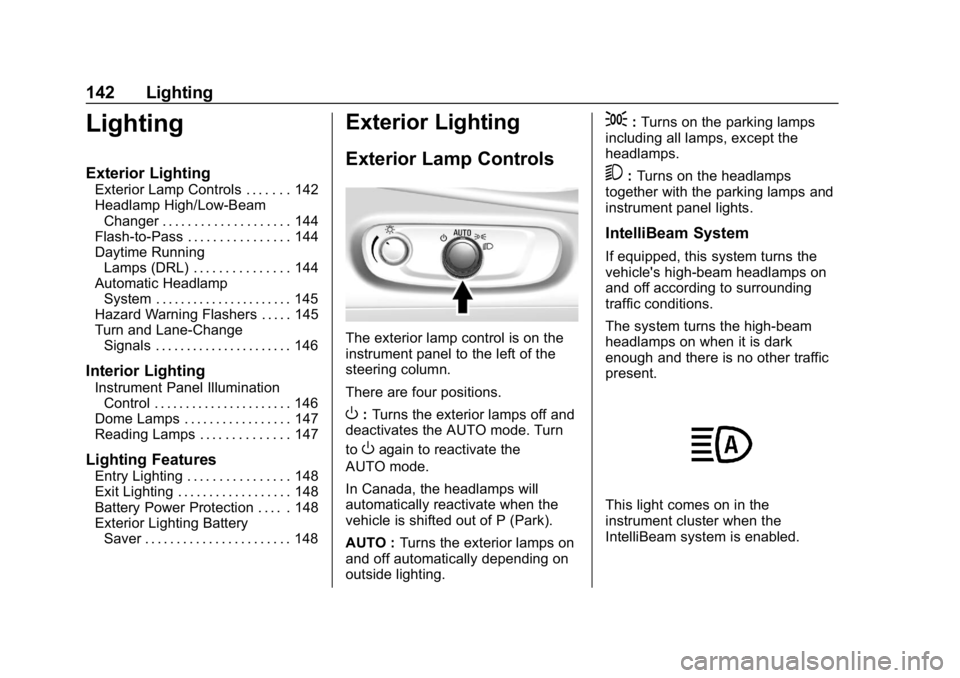
The exterior lamp control is on the
instrument panel to the left of the
steering column.
There are four positions.
O: Turns the exterior lamps off and
deactivates the AUTO mode. Turn
to
Oagain to reactivate the
AUTO mode.
In Canada, the headlamps will
automatically reactivate when the
vehicle is shifted out of P (Park).
AUTO : Turns the exterior lamps on
and off automatically depending on
outside lighting.
;: Turns on the parking lamps
including all lamps, except the
headlamps.
5: Turns on the headlamps
together with the parking lamps and
instrument panel lights.
IntelliBeam System
If equipped, this system turns the
vehicle's high-beam headlamps on
and off according to surrounding
traffic conditions.
The system turns the high-beam
headlamps on when it is dark
enough and there is no other traffic
present.
This light comes on in the
instrument cluster when the
IntelliBeam system is enabled.
Page 144 of 373
Chevrolet VOLT Owner Manual (GMNA-Localizing-U.S./Canada/Mexico-
12163007) - 2019 - CRC - 11/5/18
Lighting 143
Turning On and Enabling
IntelliBeam
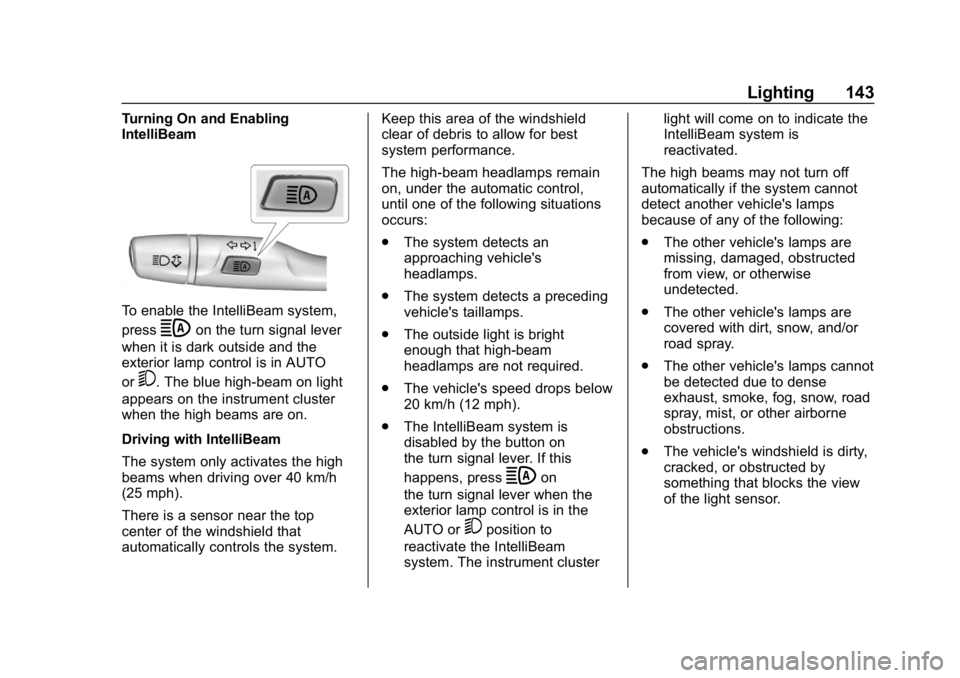
To enable the IntelliBeam system,
press
bon the turn signal lever
when it is dark outside and the
exterior lamp control is in AUTO
or
5. The blue high-beam on light
appears on the instrument cluster
when the high beams are on.
Driving with IntelliBeam
The system only activates the high
beams when driving over 40 km/h
(25 mph).
There is a sensor near the top
center of the windshield that
automatically controls the system. Keep this area of the windshield
clear of debris to allow for best
system performance.
The high-beam headlamps remain
on, under the automatic control,
until one of the following situations
occurs:
.
The system detects an
approaching vehicle's
headlamps.
. The system detects a preceding
vehicle's taillamps.
. The outside light is bright
enough that high-beam
headlamps are not required.
. The vehicle's speed drops below
20 km/h (12 mph).
. The IntelliBeam system is
disabled by the button on
the turn signal lever. If this
happens, press
bon
the turn signal lever when the
exterior lamp control is in the
AUTO or
5position to
reactivate the IntelliBeam
system. The instrument cluster light will come on to indicate the
IntelliBeam system is
reactivated.
The high beams may not turn off
automatically if the system cannot
detect another vehicle's lamps
because of any of the following:
. The other vehicle's lamps are
missing, damaged, obstructed
from view, or otherwise
undetected.
. The other vehicle's lamps are
covered with dirt, snow, and/or
road spray.
. The other vehicle's lamps cannot
be detected due to dense
exhaust, smoke, fog, snow, road
spray, mist, or other airborne
obstructions.
. The vehicle's windshield is dirty,
cracked, or obstructed by
something that blocks the view
of the light sensor.
Page 145 of 373

Chevrolet VOLT Owner Manual (GMNA-Localizing-U.S./Canada/Mexico-
12163007) - 2019 - CRC - 11/5/18
144 Lighting
.The vehicle is loaded such that
the front end points upward,
causing the light sensor to aim
high and not detect headlamps
and taillamps.
. The vehicle is being driven on
winding or hilly roads.
The IntelliBeam system may need to
be disabled if any of the above
conditions exist.
Headlamp High/
Low-Beam Changer
Push the turn signal lever away
from you and release, to turn the
high beams on. To return to low
beams, push the lever again or pull
it toward you and release.
This indicator light turns on in the
instrument cluster when the
high-beam headlamps are on.
Flash-to-Pass
The flash-to-pass feature works with
the low beams or Daytime Running
Lamps (DRL) on or off.
To flash the high beams, pull the
turn signal lever toward you
momentarily and then release it.
Daytime Running
Lamps (DRL)
The DRL system comes on in
daylight when the following
conditions are met:
. The vehicle is on.
. The exterior lamp control is
in AUTO.
. The electric drive unit is not in
P (Park).
. The light sensor determines it is
daytime.
Fully functional DRL are required on
all vehicles first sold in Canada. When the DRL are on, the taillamps,
sidemarker lamps, instrument panel
lights, and other lamps will not be
on. The instrument cluster will be lit.
When the exterior lamp control is
turned to the headlamp position, the
low-beam headlamps come on. The
other lamps that come on with the
headlamps will also come on.
The DRL turn off when the
headlamps are turned to
Oor the
vehicle is off.
For vehicles first sold in Canada,
the DRL can only be turned off
when the vehicle is parked.
The regular headlamp system
should be turned on when needed.