key CHRYSLER 200 2015 2.G Service Manual
[x] Cancel search | Manufacturer: CHRYSLER, Model Year: 2015, Model line: 200, Model: CHRYSLER 200 2015 2.GPages: 698, PDF Size: 5.12 MB
Page 307 of 698
STORAGE
Glove Compartment
The glove compartment is located on the passenger side
of the instrument panel. Pull on the release handle to
open the glove compartment.
NOTE:The glove compartment handle is equipped with
a lock. To lock the glove compartment, remove the
emergency key from the key fob, insert emergency key
into glove compartment handle lock cylinder and turn
the key to the lock position and remove the key. Use the
reverse sequence to unlock the glove compartment.
Glove Compartment Release Handle
3
UNDERSTANDING THE FEATURES OF YOUR VEHICLE 305
Page 331 of 698
14. Fuel Filler Door LocationThe fuel pump symbol points to the side of the
vehicle where the fuel door is located.
15. Fuel Gauge
The pointer shows the level of fuel in the fuel tank when
the ignition switch is in the ON/RUN position.
16. Gear Selector Status (PRNDL/S) •P = Park
• R = Reverse
• N = Neutral
• D = Drive
• L = Low – If Equipped
• S = Sport – If Equipped
The shift status “P,R,N,D,L/,S” are displayed indicating
the shifter position. Refer to “Starting And Operating”. 17. Engine Temperature
When the engine temperature gets too high, the
temperature icon will change color from light blue
to red.
18. High Beam Indicator
Indicates that headlights are on high beam.
19. Malfunction Indicator Light (MIL) The Malfunction Indicator Light (MIL) is part of
an onboard diagnostic system called OBD II that
monitors engine and automatic transmission con-
trol systems. The light will illuminate when the key is in
the ON/RUN position before engine start. If the bulb
does not come on when turning the key from OFF to
ON/RUN, have the condition checked promptly.
Certain conditions, such as a loose or missing gas cap,
poor fuel quality, etc., may illuminate the light after
4
UNDERSTANDING YOUR INSTRUMENT PANEL 329
Page 345 of 698
briefly as a bulb check. If the light does not come on
during starting, have the system checked by an
authorized dealer.
If a problem is detected, the light will come on while
the engine is running. Cycle the ignition key when
the vehicle has completely stopped and the shift lever
is placed in the PARK position. The light should turn
off.
If the light remains lit with the engine running, your
vehicle will usually be drivable. However, see an
authorized dealer for service as soon as possible. If
the light is flashing when the engine is running,
immediate service is required. You may experience
reduced performance, an elevated/rough idle or en-
gine stall and your vehicle may require towing.•
Air Bag Warning Light
This light will turn on for four to eight
seconds as a bulb check when the ignition
switch is first turned to the ON/RUN po-
sition. If the light is either not on during
starting, stays on, or turns on while driving, have the
system inspected at an authorized dealer as soon as
possible. Refer to “Occupant Restraints” in “Things
To Know Before Starting Your Vehicle” for further
information.
• Door Ajar
This light will turn on to indicate that one
or more doors may be ajar.
• Decklid Ajar
This light will turn on to indicate the deck-
lid may be ajar.
4
UNDERSTANDING YOUR INSTRUMENT PANEL 343
Page 349 of 698
•Service Power Steering
• Cruise Off
• Cruise Ready
• Cruise Set To XXX MPH
• Cruise Set To XXX KM/H
• Tire Pressure Screen With Low Tire(s) “Inflate Tire to
XX”
• Service Tire Pressure System
• Parking Brake Engaged
• Brake Fluid Low
• Service Electronic Braking System
• Engine Temperature Hot
• Battery Voltage Low •
Service Electronic Throttle Control
• Lights On
• Right Turn Signal Light Out
• Left Turn Signal Light Out
• Turn Signal On
• Vehicle Not in Park
• Key in Ignition
• Key in Ignition Lights On
• Remote Start Active Key to Run
• Remote Start Active Push Start Button
• Remote Start Aborted Fuel Low
• Remote Start Aborted Too Cold
• Remote Start Aborted Door Open
4
UNDERSTANDING YOUR INSTRUMENT PANEL 347
Page 354 of 698
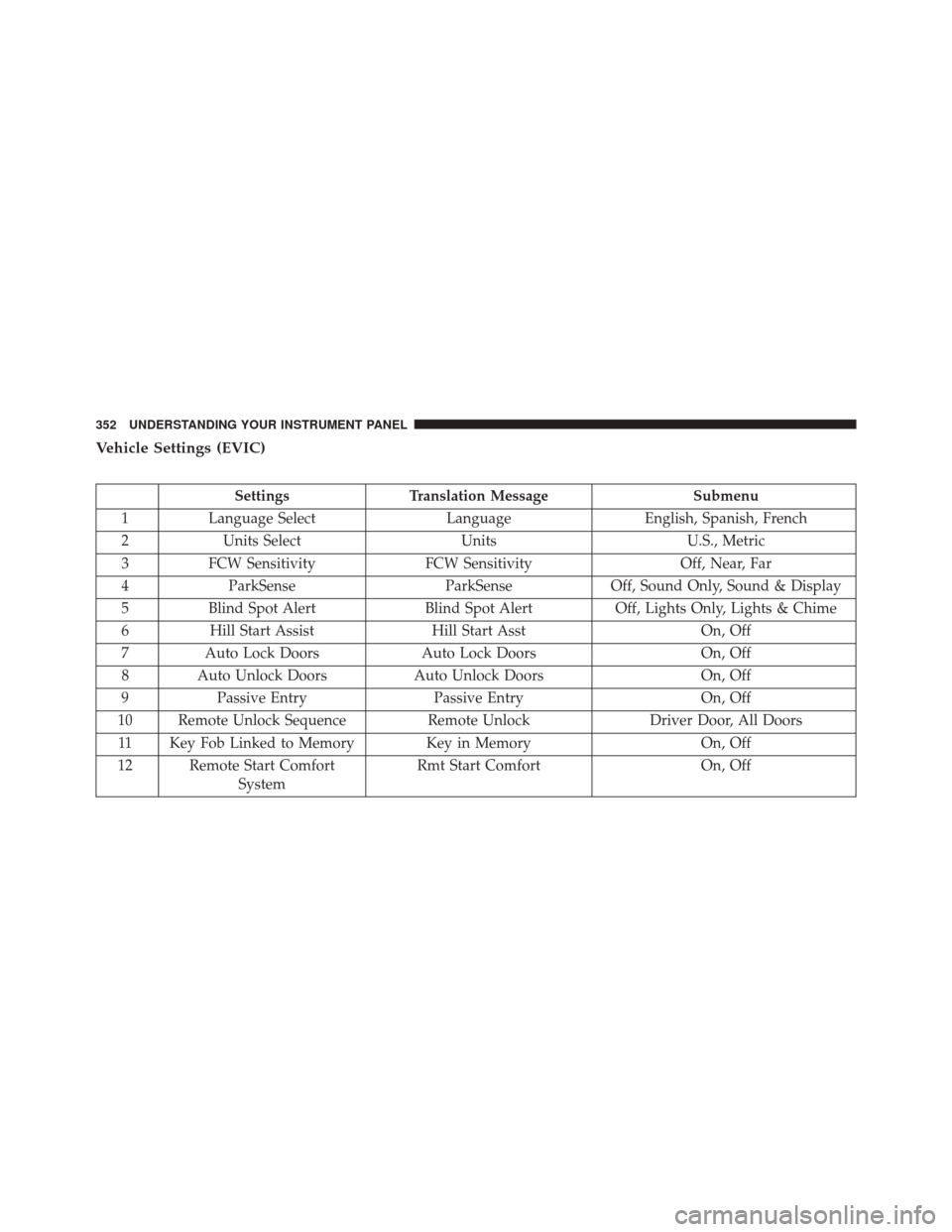
Vehicle Settings (EVIC)
SettingsTranslation Message Submenu
1 Language Select LanguageEnglish, Spanish, French
2 Units Select UnitsU.S., Metric
3 FCW Sensitivity FCW Sensitivity Off, Near, Far
4 ParkSense ParkSenseOff, Sound Only, Sound & Display
5 Blind Spot Alert Blind Spot AlertOff, Lights Only, Lights & Chime
6 Hill Start Assist Hill Start Asst On, Off
7 Auto Lock Doors Auto Lock Doors On, Off
8 Auto Unlock Doors Auto Unlock DoorsOn, Off
9 Passive Entry Passive Entry On, Off
10 Remote Unlock Sequence Remote UnlockDriver Door, All Doors
11 Key Fob Linked to Memory Key in Memory On, Off
12 Remote Start Comfort System Rmt Start Comfort
On, Off
352 UNDERSTANDING YOUR INSTRUMENT PANEL
Page 355 of 698
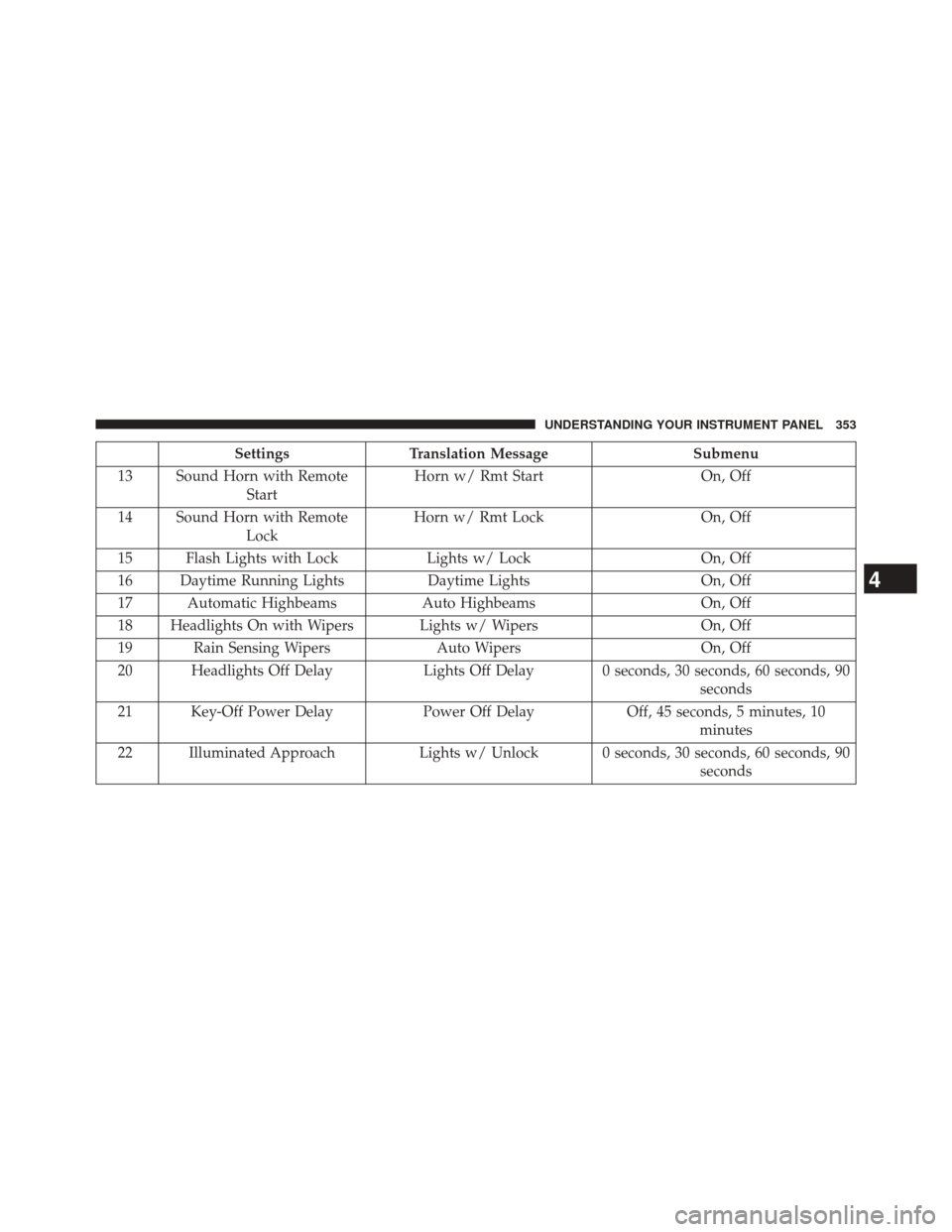
SettingsTranslation Message Submenu
13 Sound Horn with Remote Start Horn w/ Rmt Start
On, Off
14 Sound Horn with Remote Lock Horn w/ Rmt Lock
On, Off
15 Flash Lights with Lock Lights w/ LockOn, Off
16 Daytime Running Lights Daytime LightsOn, Off
17 Automatic Highbeams Auto HighbeamsOn, Off
18 Headlights On with Wipers Lights w/ Wipers On, Off
19 Rain Sensing Wipers Auto WipersOn, Off
20 Headlights Off Delay Lights Off Delay 0 seconds, 30 seconds, 60 seconds, 90
seconds
21 Key-Off Power Delay Power Off DelayOff, 45 seconds, 5 minutes, 10
minutes
22 Illuminated Approach Lights w/ Unlock 0 seconds, 30 seconds, 60 seconds, 90
seconds
4
UNDERSTANDING YOUR INSTRUMENT PANEL 353
Page 362 of 698
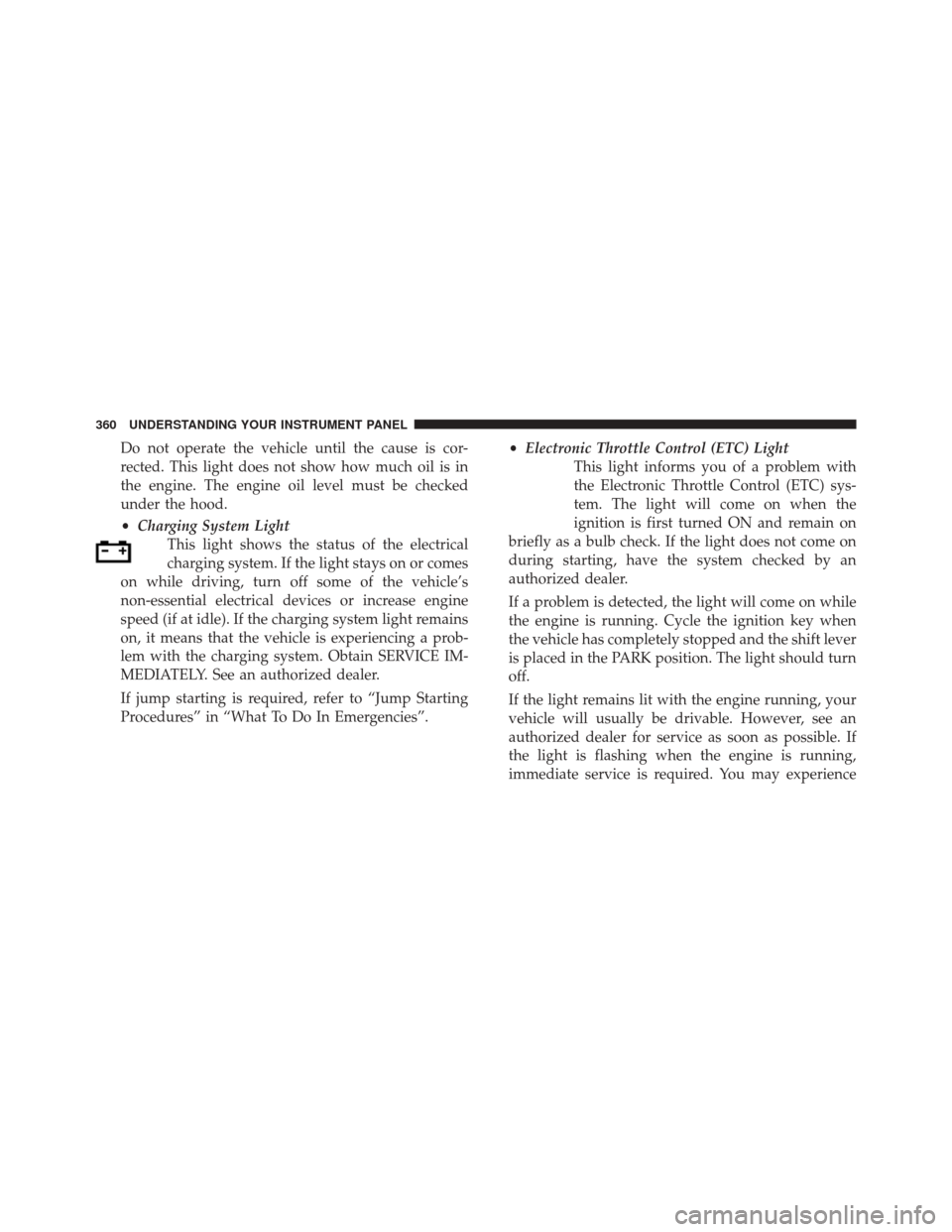
Do not operate the vehicle until the cause is cor-
rected. This light does not show how much oil is in
the engine. The engine oil level must be checked
under the hood.
•Charging System Light
This light shows the status of the electrical
charging system. If the light stays on or comes
on while driving, turn off some of the vehicle’s
non-essential electrical devices or increase engine
speed (if at idle). If the charging system light remains
on, it means that the vehicle is experiencing a prob-
lem with the charging system. Obtain SERVICE IM-
MEDIATELY. See an authorized dealer.
If jump starting is required, refer to “Jump Starting
Procedures” in “What To Do In Emergencies”. •
Electronic Throttle Control (ETC) Light
This light informs you of a problem with
the Electronic Throttle Control (ETC) sys-
tem. The light will come on when the
ignition is first turned ON and remain on
briefly as a bulb check. If the light does not come on
during starting, have the system checked by an
authorized dealer.
If a problem is detected, the light will come on while
the engine is running. Cycle the ignition key when
the vehicle has completely stopped and the shift lever
is placed in the PARK position. The light should turn
off.
If the light remains lit with the engine running, your
vehicle will usually be drivable. However, see an
authorized dealer for service as soon as possible. If
the light is flashing when the engine is running,
immediate service is required. You may experience
360 UNDERSTANDING YOUR INSTRUMENT PANEL
Page 374 of 698
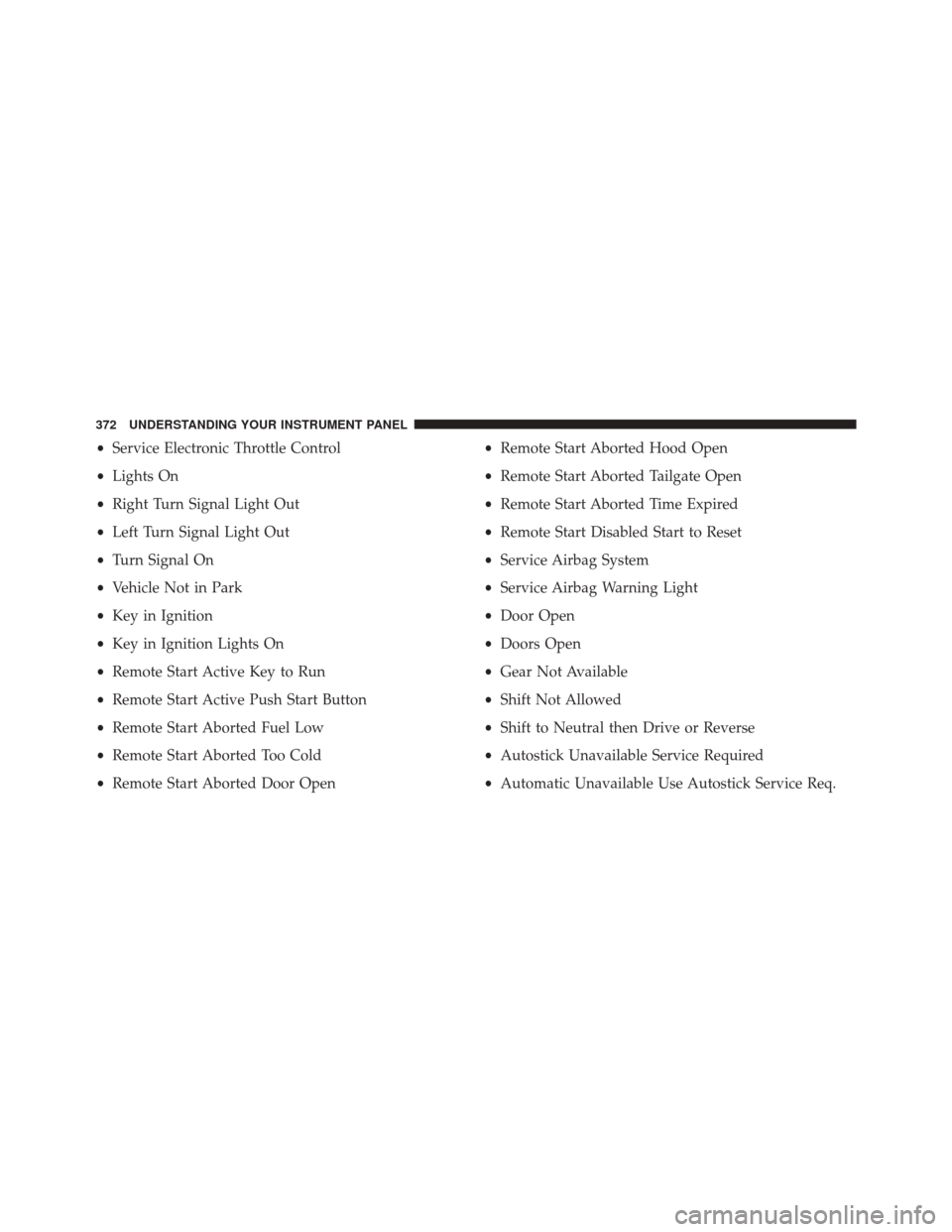
•Service Electronic Throttle Control
• Lights On
• Right Turn Signal Light Out
• Left Turn Signal Light Out
• Turn Signal On
• Vehicle Not in Park
• Key in Ignition
• Key in Ignition Lights On
• Remote Start Active Key to Run
• Remote Start Active Push Start Button
• Remote Start Aborted Fuel Low
• Remote Start Aborted Too Cold
• Remote Start Aborted Door Open •
Remote Start Aborted Hood Open
• Remote Start Aborted Tailgate Open
• Remote Start Aborted Time Expired
• Remote Start Disabled Start to Reset
• Service Airbag System
• Service Airbag Warning Light
• Door Open
• Doors Open
• Gear Not Available
• Shift Not Allowed
• Shift to Neutral then Drive or Reverse
• Autostick Unavailable Service Required
• Automatic Unavailable Use Autostick Service Req.
372 UNDERSTANDING YOUR INSTRUMENT PANEL
Page 390 of 698
For further information, refer to “Electric Parking Brake
(EPD)” in “Starting and Operating.”
•Auto Park Brake
Auto Park Brake will set the park brake once the vehicle
is set in park (or at key off for a manual transmission)
• Hill Start Assist
This setting will hold the brake if the driver is on a hill
and takes their foot off the brake to accelerate.
Lights
After pressing the “Lights” button on the touchscreen the
following settings will be available.
• Headlights Off Delay
When this feature is selected, it allows the adjustment of
the amount of time the headlights remain on after the
engine is shut off. To change the Headlights Off Delay
setting, press the “Headlights Off Delay” button on the touchscreen, and choose either 0 sec, 30 sec, 60 sec or 90
seconds. A check-mark appears next to setting indicating
that the setting has been selected. Press the back arrow
button on the touchscreen to return to the previous
menu, or push the back button on the faceplate.
•
Headlight Illumination On Approach
When this feature is selected, the headlights will activate
and remain on for 0, 30, 60, or 90 seconds when the doors
are unlocked with the Remote Keyless Entry (RKE)
transmitter. To change the Illuminated Approach status,
press the + or - button on the touchscreen to select your
desired time interval. Press the back arrow button on the
touchscreen to return to the previous menu, or push the
back button on the faceplate.
• Headlights With Wipers — If Equipped
When this feature is selected, and the headlight switch is
in the AUTO position, the headlights will turn on ap-
proximately 10 seconds after the wipers are turned on.
388 UNDERSTANDING YOUR INSTRUMENT PANEL
Page 391 of 698
The headlights will also turn off when the wipers are
turned off if they were turned on by this feature. To make
your selection, press the “Headlights With Wipers” button
on the touchscreen, until a check-mark appears next to
setting, indicating that the setting has been selected. Press
the back arrow button on the touchscreen to return to the
previous menu, or push the back button on the faceplate.
•Auto Dim High Beams — If Equipped
When this feature is selected, the high beam headlights
will activate/deactivate automatically under certain con-
ditions. To make your selection, press the “Auto High
Beams” button on the touchscreen, until a check-mark
appears next to setting, indicating that the setting has
been selected. Press the back arrow button on the touch-
screen to return to the previous menu, or push the back
button on the faceplate. Refer to “Lights — If Equipped”
in “Understanding The Features Of Your Vehicle” for
further information. •
Daytime Running Lights — If Equipped
When this feature is selected, the headlights will turn on
whenever the engine is running. To make your selection,
press the Daytime Running Lights button on the touch-
screen, until a check-mark appears next to setting, indi-
cating that the setting has been selected. Press the back
arrow button on the touchscreen to return to the previous
menu, or push the back button on the faceplate.
• Flash Lights With Lock
When this feature is selected, the hazard lights will flash
when the doors are locked or unlocked with the Remote
Keyless Entry (RKE) transmitter, or when using the passive
entry feature. This feature may be selected with or without
the sound horn on lock feature selected. To make your
selection, press the “Flash Lights with Lock” button on the
touchscreen, until a check-mark appears next to setting,
indicating that the setting has been selected. Press the back
4
UNDERSTANDING YOUR INSTRUMENT PANEL 389