instrument panel CHRYSLER 200 2016 2.G Owner's Guide
[x] Cancel search | Manufacturer: CHRYSLER, Model Year: 2016, Model line: 200, Model: CHRYSLER 200 2016 2.GPages: 702, PDF Size: 5.13 MB
Page 169 of 702
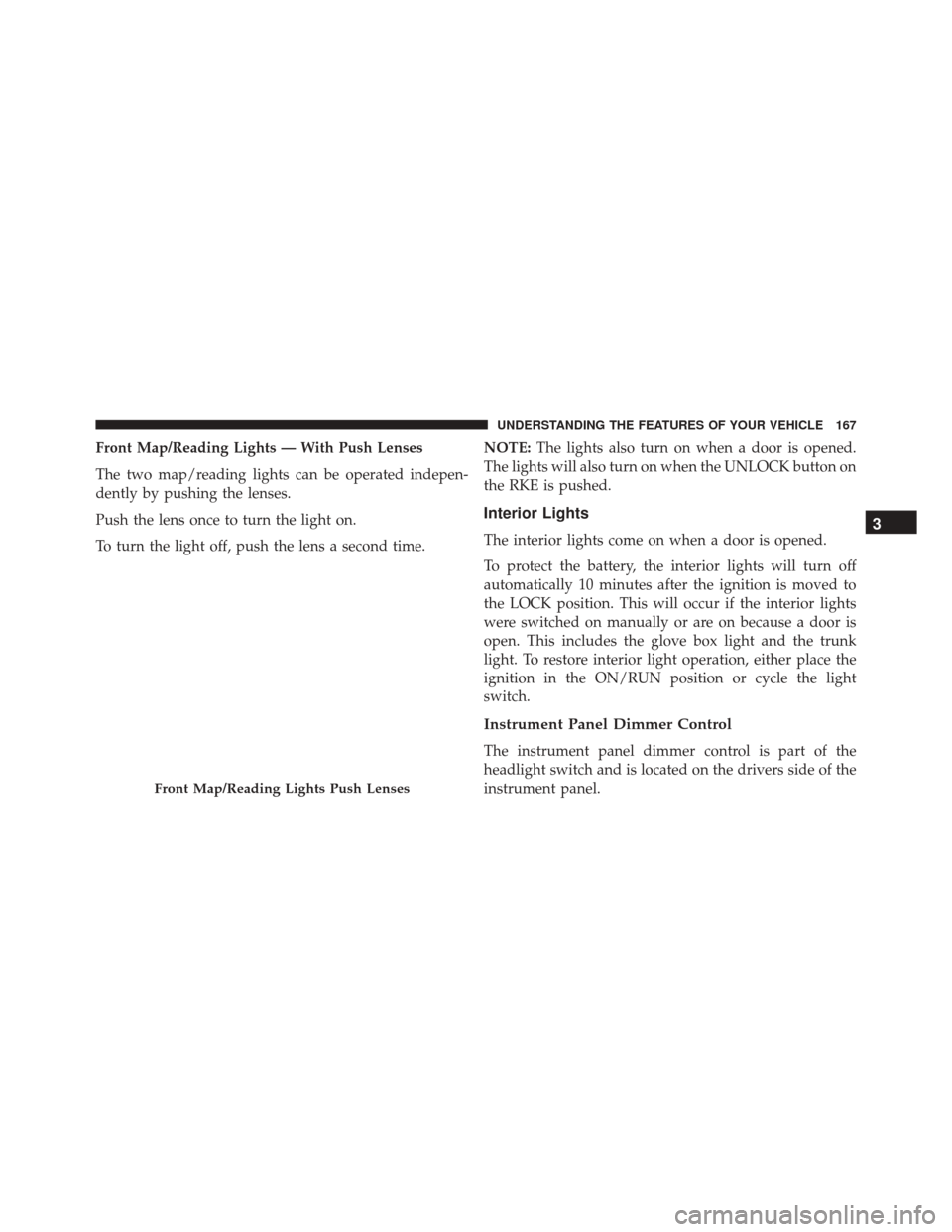
Front Map/Reading Lights — With Push Lenses
The two map/reading lights can be operated indepen-
dently by pushing the lenses.
Push the lens once to turn the light on.
To turn the light off, push the lens a second time.NOTE:
The lights also turn on when a door is opened.
The lights will also turn on when the UNLOCK button on
the RKE is pushed.
Interior Lights
The interior lights come on when a door is opened.
To protect the battery, the interior lights will turn off
automatically 10 minutes after the ignition is moved to
the LOCK position. This will occur if the interior lights
were switched on manually or are on because a door is
open. This includes the glove box light and the trunk
light. To restore interior light operation, either place the
ignition in the ON/RUN position or cycle the light
switch.
Instrument Panel Dimmer Control
The instrument panel dimmer control is part of the
headlight switch and is located on the drivers side of the
instrument panel.
Front Map/Reading Lights Push Lenses
3
UNDERSTANDING THE FEATURES OF YOUR VEHICLE 167
Page 170 of 702
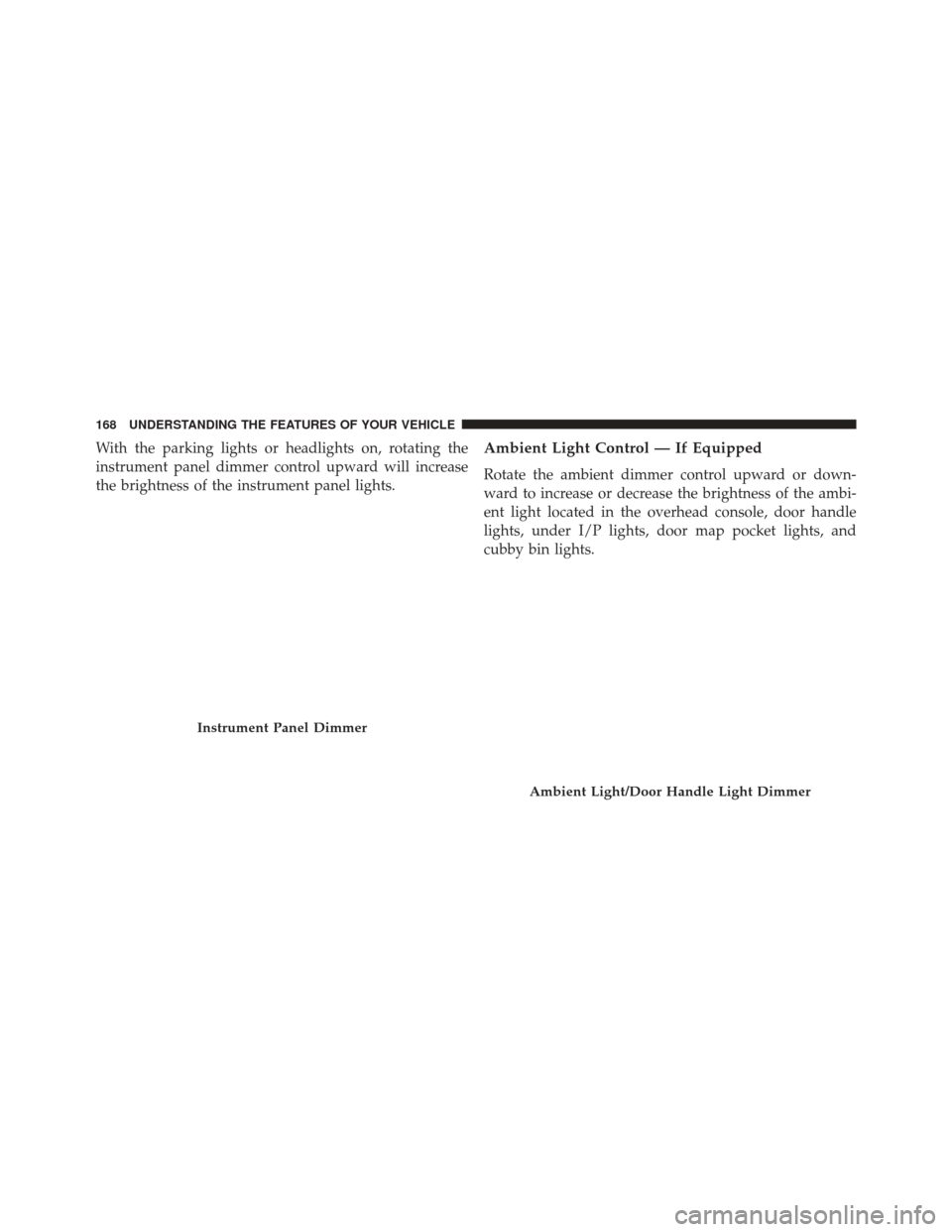
With the parking lights or headlights on, rotating the
instrument panel dimmer control upward will increase
the brightness of the instrument panel lights.Ambient Light Control — If Equipped
Rotate the ambient dimmer control upward or down-
ward to increase or decrease the brightness of the ambi-
ent light located in the overhead console, door handle
lights, under I/P lights, door map pocket lights, and
cubby bin lights.
Instrument Panel Dimmer
Ambient Light/Door Handle Light Dimmer
168 UNDERSTANDING THE FEATURES OF YOUR VEHICLE
Page 171 of 702
Dome Light Position
Rotate the instrument panel dimmer control completely
upward to the second detent to turn on the interior lights.
The interior lights will remain on when the instrument
panel dimmer control is in this position.
Interior Light Defeat (OFF)
Rotate the instrument panel dimmer control to the ex-
treme bottom OFF position. The interior lights will
remain off when the doors are open.
Parade Mode (Daytime Brightness Feature)
Rotate the instrument panel dimmer control upward to
the first detent. This feature brightens all text displays
such as the odometer, EVIC/DID, and radio when the
position lights or headlights are on.
Battery Saver Feature
To protect the battery, the interior lights will turn off
automatically 10 minutes after the ignition switch is
moved to the LOCK position. This will occur if the
interior lights were switched on manually or are on
because a door is open.
3
UNDERSTANDING THE FEATURES OF YOUR VEHICLE 169
Page 176 of 702
Rain Sensing Wipers — If Equipped
This feature senses moisture on the windshield and
automatically activates the wipers for the driver. The
feature is especially useful for road splash or overspray
from the windshield washers of the vehicle ahead. Rotate
the end of the multifunction lever to one of four settings
to activate this feature.
The sensitivity of the system can be adjusted with the
multifunction lever. Wiper delay position one is the least
sensitive, and wiper delay position four is the most
sensitive. Setting three should be used for normal rain
conditions. Settings one and two can be used if the driver
desires less wiper sensitivity. Setting four can be used if
the driver desires more sensitivity. Place the wiper switch
in the OFF position when not using the system.
NOTE:
•The Rain Sensing feature will not operate when the
wiper switch is in the low or high-speed position. •
The Rain Sensing feature may not function properly
when ice, or dried salt water is present on the wind-
shield.
• Use of Rain-X or products containing wax or silicone
may reduce Rain Sensing performance.
• The Rain Sensing feature can be turned on and off
using the Uconnect System, refer to “Uconnect Set-
tings” in “Understanding Your Instrument Panel” for
further information.
The Rain Sensing system has protection features for the
wiper blades and arms, and will not operate under the
following conditions:
• Low Ambient Temperature — When the ignition is
first turned ON, the Rain Sensing system will not
operate until the wiper switch is moved, vehicle speed
is greater than 0 mph (0 km/h), or the outside tem-
perature is greater than 32°F (0°C).
174 UNDERSTANDING THE FEATURES OF YOUR VEHICLE
Page 182 of 702
The drivers preferred units can be selected through the
instrument panel settings if equipped. Refer to “Under-
standing Your Instrument Panel” for more information.
The speed increment shown is dependant on the chosen
speed unit of U.S. (mph) or Metric (km/h):
U.S. Speed (mph)
•Pushing the SET +button once will result ina1mph
increase in set speed. Each subsequent tap of the
button results in an increase of 1 mph.
• If the button is continually pushed, the set speed will
continue to increase until the button is released, then
the new set speed will be established.
Metric Speed (km/h)
• Pushing the SET +button once will result in a 1 km/h
increase in set speed. Each subsequent tap of the
button results in an increase of 1 km/h. •
If the button is continually pushed, the set speed will
continue to increase until the button is released, then
the new set speed will be established.
To Decrease Speed
When the Electronic Speed Control is set, you can de-
crease speed by pushing the SET -button.
The drivers preferred units can be selected through the
instrument panel settings if equipped. Refer to “Under-
standing Your Instrument Panel” for more information.
The speed decrement shown is dependant on the chosen
speed unit of U.S. (mph) or Metric (km/h):
U.S. Speed (mph)
• Pushing the SET -button once will result ina1mph
decrease in set speed. Each subsequent tap of the
button results in a decrease of 1 mph.
180 UNDERSTANDING THE FEATURES OF YOUR VEHICLE
Page 191 of 702
WARNING!(Continued)
that is too high or too low for prevailing traffic and
road conditions could cause the vehicle to accelerate
or decelerate too sharply for safe operation. Failure to
follow these warnings can result in a collision and
death or serious personal injury.
To Vary The Speed Setting
To Increase Speed
While ACC is set, you can increase the set speed by
pushing the SET +button.
The drivers preferred units can be selected through the
instrument panel settings if equipped. Refer to “Under-
standing Your Instrument Panel” for more information. The speed increment shown is dependant on the chosen
speed unit of U.S. (mph) or Metric (km/h):
U.S. Speed (mph)
•
Pushing the SET +button once will result ina1mph
increase in set speed. Each subsequent tap of the
button results in an increase of 1 mph.
• If the button is continually pushed, the set speed will
continue to increase in 5 mph increments until the
button is released. The increase in set speed is reflected
in the EVIC/DID.
Metric Speed (km/h)
• Pushing the SET +button once will result in a 1 km/h
increase in set speed. Each subsequent tap of the
button results in an increase of 1 km/h.
3
UNDERSTANDING THE FEATURES OF YOUR VEHICLE 189
Page 192 of 702
•If the button is continually pushed, the set speed will
continue to increase in 10 km/h increments until the
button is released. The increase in set speed is reflected
in the EVIC/DID.
To Decrease Speed
While ACC is set, the set speed can be decreased by
pushing the SET -button.
The drivers preferred units can be selected through the
instrument panel settings if equipped. Refer to “Under-
standing Your Instrument Panel” for more information.
The speed decrement shown is dependant on the chosen
speed unit of U.S. (mph) or Metric (km/h):
U.S. Speed (mph)
• Pushing the SET -button once will result ina1mph
decrease in set speed. Each subsequent tap of the
button results in a decrease of 1 mph. •
If the button is continually pushed, the set speed will
continue to decrease in 5 mph decrements until the
button is released. The decrease in set speed is re-
flected in the EVIC/DID.
Metric Speed (km/h)
• Pushing the SET -button once will result in a 1 km/h
decrease in set speed. Each subsequent tap of the
button results in a decrease of 1 km/h.
• If the button is continually pushed, the set speed will
continue to decrease in 10 km/h decrements until the
button is released. The decrease in set speed is re-
flected in the EVIC/DID.
NOTE:
•
When you override and push the SET +button or SET -
buttons, the new Set Speed will be the current speed of
the vehicle.
190 UNDERSTANDING THE FEATURES OF YOUR VEHICLE
Page 208 of 702
Once a speed has been set a message (CRUISE CON-
TROL SET TO MPH/KM) will appear indicating what
speed was set. This light will turn on when the electronic
speed control is SET.
To Vary The Speed Setting
To Increase Speed
When the Normal (Fixed Speed) Electronic Speed Con-
trol is set, you can increase speed by pushing the SET+
button.
The drivers preferred units can be selected through the
instrument panel settings if equipped. Refer to “Under-
standing Your Instrument Panel” for more information. The speed increment shown is dependant on the speed of
U.S. (mph) or Metric (km/h) units:
U.S. Speed (mph)
•
Pushing the SET +button once will result ina1mph
increase in set speed. Each subsequent tap of the
button results in an increase of 1 mph.
• If the button is continually pushed, the set speed will
continue to increase in 5 mph increments until the
button is released. The increase in set speed is reflected
in the EVIC/DID display.
Metric Speed (km/h)
• Pushing the SET +button once will result in a 1 km/h
increase in set speed. Each subsequent tap of the
button results in an increase of 1 km/h.
206 UNDERSTANDING THE FEATURES OF YOUR VEHICLE
Page 209 of 702
•If the button is continually pushed, the set speed will
continue to increase in 10 km/h increments until the
button is released. The increase in set speed is reflected
in the EVIC/DID display.
To Decrease Speed
When the Normal (Fixed Speed) Cruise Control is set,
you can decrease speed by pushing the SET -button.
The drivers preferred units can be selected through the
instrument panel settings if equipped. Refer to “Under-
standing Your Instrument Panel” for more information.
The speed decrement shown is dependant on the speed
of U.S. (mph) or Metric (km/h) units:
U.S. Speed (mph)
• Pushing the SET -button once will result ina1mph
decrease in set speed. Each subsequent tap of the
button results in a decrease of 1 mph. •
If the button is continually pushed, the set speed will
continue to decrease in 5 mph decrements until the
button is released. The decrease in set speed is re-
flected in the EVIC/DID display.
Metric Speed (km/h)
• Pushing the SET -button once will result in a 1 km/h
decrease in set speed. Each subsequent tap of the
button results in a decrease of 1 km/h.
• If the button is continually pushed, the set speed will
continue to decrease in 10 km/h decrements until the
button is released. The decrease in set speed is re-
flected in the EVIC/DID display.
3
UNDERSTANDING THE FEATURES OF YOUR VEHICLE 207
Page 214 of 702
To turn the FCW system back ON, push the forward
collision button again to turn the system ON (LED turns
off).
•Changing the FCW status to “Off” prevents the system
from warning you of a possible collision with the
vehicle in front of you.
• Changing the FCW sensitivity - Near vs. Far. Far warns
the driver of a possible collision earlier and Near
warns the driver later.
• Changing the Active Braking status to “Off” prevents
the system from providing limited active braking, or
additional brake support if the driver is not braking
adequately in the event of a potential frontal collision,
but maintains the audible and visual warnings.
NOTE: The FCW system state is kept in memory from
one key cycle to the next. If the system is turned OFF, it
will remain off when the vehicle is restarted.Changing FCW And Active Braking Status
The FCW Sensitivity And Active Braking Settings are
programmable through the Uconnect System. Refer to
“Uconnect Settings” in “Understanding Your Instrument
Panel” for further information.
The default status of FCW is the “Far” setting and the
Active Braking is the “On” setting, this allows the system
to warn you of a possible collision with the vehicle in
front of you when you are farther away and it applies
limited braking. This gives you the most reaction time to
avoid a possible collision.
Changing the FCW status to the “Near” setting, allows
the system to warn you of a possible collision with the
vehicle in front of you when you are much closer. This
setting provides less reaction time than the “Far” setting,
which allows for a more dynamic driving experience.
212 UNDERSTANDING THE FEATURES OF YOUR VEHICLE