buttons CHRYSLER 300 LX 2005 User Guide
[x] Cancel search | Manufacturer: CHRYSLER, Model Year: 2005, Model line: 300 LX, Model: CHRYSLER 300 LX 2005Pages: 374, PDF Size: 7.09 MB
Page 120 of 374
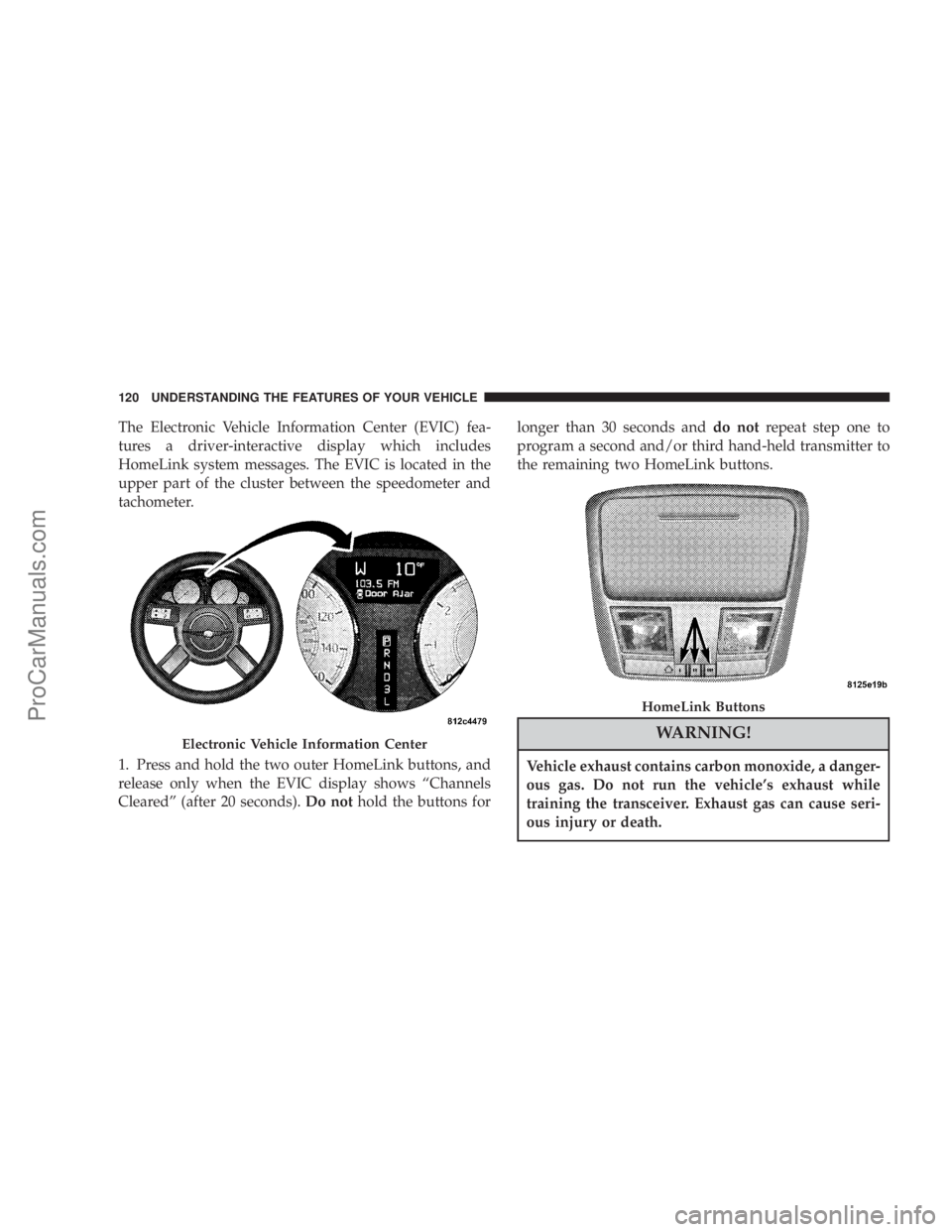
The Electronic Vehicle Information Center (EVIC) fea-
tures a driver-interactive display which includes
HomeLink system messages. The EVIC is located in the
upper part of the cluster between the speedometer and
tachometer.
1. Press and hold the two outer HomeLink buttons, and
release only when the EVIC display shows ªChannels
Clearedº (after 20 seconds).Do nothold the buttons forlonger than 30 seconds anddo notrepeat step one to
program a second and/or third hand-held transmitter to
the remaining two HomeLink buttons.
WARNING!
Vehicle exhaust contains carbon monoxide, a danger-
ous gas. Do not run the vehicle's exhaust while
training the transceiver. Exhaust gas can cause seri-
ous injury or death.
Electronic Vehicle Information Center
HomeLink Buttons
120 UNDERSTANDING THE FEATURES OF YOUR VEHICLE
ProCarManuals.com
Page 121 of 374
WARNING!
Your motorized door or gate will open and close
while you are training the Universal Transceiver. Do
not train the transceiver if people or pets are in the
path of the door or gate. A moving door or gate can
cause serious injury or death to people and pets or
damage to objects.
2. Position the end of your hand-held transmitter 1-3
inches (3-8 cm) away from the HomeLink buttons.
3. Simultaneously press and hold both the HomeLink
button that you want to train and the hand-held trans-
mitter buttons.Do not release the buttons until step 4
has been completed.
NOTE:Some gate operators and garage door openers
may require you to replace this Programming Step 3 with
procedures noted in the9Gate Operator/Canadian Pro-
gramming9section.4. The EVIC display will show ªChannel X Trainingº
(where X is Channel 1, 2, or 3). Release both buttons after
the EVIC display shows ªChannel X Trainedº.
NOTE:If the EVIC display shows ªDid Not Trainº
repeat steps 2±4.
5. Press and hold the just trained HomeLink button and
observe the EVIC display. If the EVIC display shows
ªChannel X Transmitº (where X is Channel 1, 2, or 3),
programming is complete and your device should acti-
vate when the HomeLink button is pressed and released.
NOTE:To program the remaining two HomeLink but-
tons, begin with9Programming9step two. Do not repeat
step one.
NOTE:If your hand-held transmitter appears to pro-
gram the universal transceiver, but your garage door
does not operate using the transmitter and your garage
door opener was manufactured after 1995, your garage
door opener may have a multiple security code system
(rolling code system). Please proceed to steps 6±8 to
UNDERSTANDING THE FEATURES OF YOUR VEHICLE 121
3
ProCarManuals.com
Page 123 of 374
3. Continue to press and hold the HomeLink button
while youpress and release every two seconds(9cycle9)
your hand-held transmitter until the frequency signal has
successfully been accepted by HomeLink. The EVIC
display will show ªChannel X Trainedº (where X is
Channel 1, 2, or 3). Proceed with9Programming9step
four to complete.
Using HomeLink
To operate, simply press and release the programmed
HomeLink button. Activation will now occur for the
trained device (i.e. garage door opener, gate operator,
security system, entry door lock, home/office lighting,
etc.). For convenience, the hand-held transmitter of the
device may also be used at any time. In the event that
there are still programming difficulties or questions,
contact HomeLink at:www.homelink.com or 1-800-355-
3515.
Erasing HomeLink Buttons
To erase programming from the three buttons (individual
buttons cannot be erased but can be9reprogrammed9-
note below), follow the step noted:
²Press and hold the two outer HomeLink buttons and
release only when the EVIC display shows ªChannels
Clearedº (after 20 seconds). Release both buttons. Do
not hold for longer that 30 seconds. HomeLink is now
in the train (or learning) mode and can be pro-
grammed at any time beginning with9Programming9
- step 2.
Reprogramming a Single HomeLink Button
To program a device to HomeLink using a HomeLink
button previously trained, follow these steps:
1. Press and hold the desired HomeLink button.Do
NOTrelease the button.
2. The EVIC display will show ªChannel X Transmitº
(where X is Channel 1, 2, or 3) for 20 seconds and then
change to ªChannel X Trainingº. Without releasing the
HomeLink button, proceed with9Programming9step 2.
For questions or comments, contact HomeLink at:
www.homelink.com or 1-800-355-3515.
UNDERSTANDING THE FEATURES OF YOUR VEHICLE 123
3
ProCarManuals.com
Page 124 of 374
Security
If you sell your vehicle, be sure to erase the frequencies.
To erase all of the previously trained frequencies, hold
down both outside buttons until the green light begins to
flash.
This device complies with part 15 of FCC rules and with
RSS-210 of Industry Canada. Operation is subject to the
following conditions:
²This device may not cause harmful interference.
²This device must accept any interference that may be
received including interference that may cause undes-
ired operation.
NOTE:Changes or modifications not expressly ap-
proved by the party responsible for compliance could
void the user's authority to operate the equipment.
HomeLinktis a trademark owned by Johnson Controls,
Inc.
POWER SUNROOF Ð IF EQUIPPED
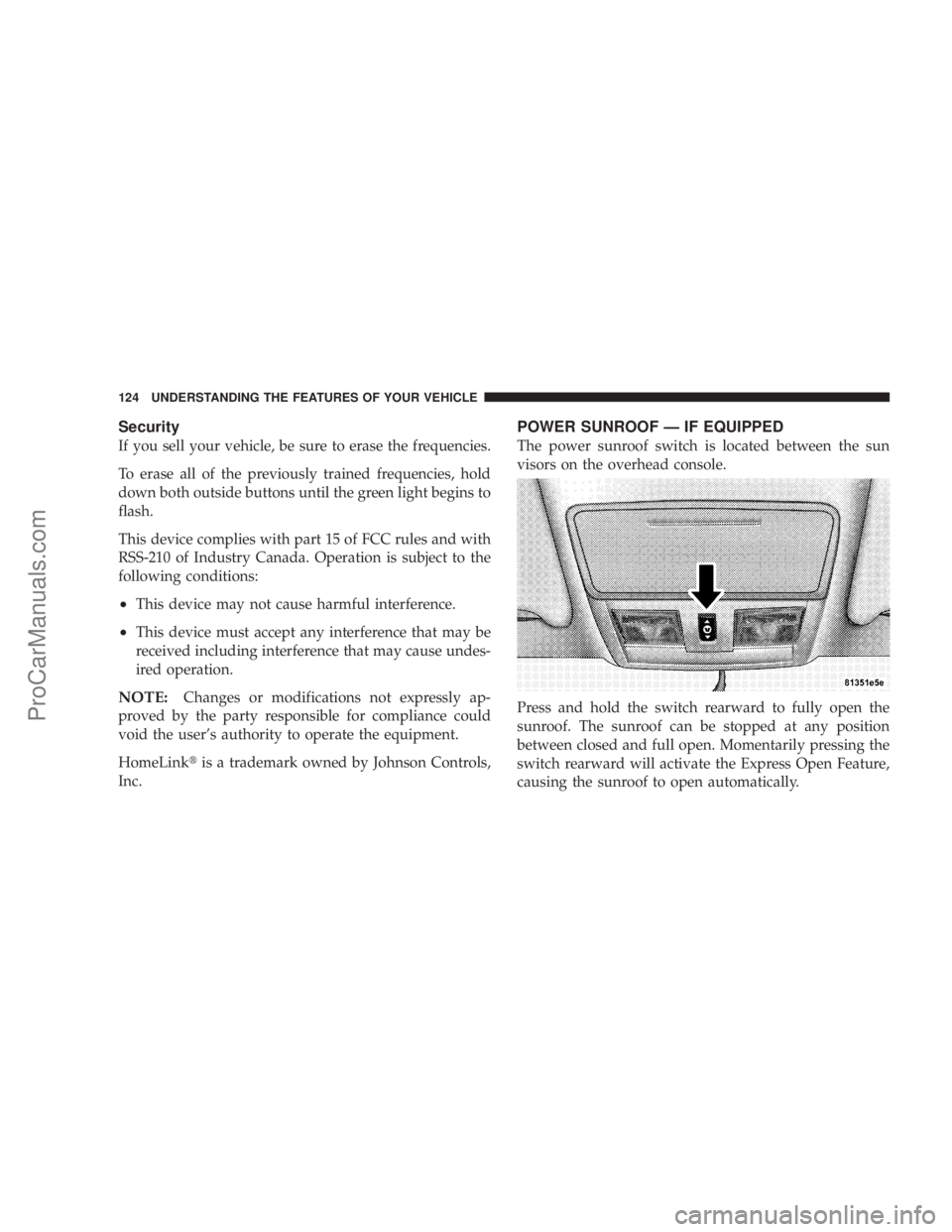
The power sunroof switch is located between the sun
visors on the overhead console.
Press and hold the switch rearward to fully open the
sunroof. The sunroof can be stopped at any position
between closed and full open. Momentarily pressing the
switch rearward will activate the Express Open Feature,
causing the sunroof to open automatically.
124 UNDERSTANDING THE FEATURES OF YOUR VEHICLE
ProCarManuals.com
Page 148 of 374

Pressing the FUNCTION SELECT button ac-
cepts a selected choice. The Function Select
button also advances the radio preset when the
EVIC is in the Compass/Temp/Audio screen.
Use the SCROLL buttons to scroll through Trip
Functions, Navigation (If Equipped), System
Status Messages, and Personal Settings (Cus-
tomer Programmable Features). The SCROLL
buttons also seek up and down (radio station or CD track
number).
The AUDIO MODE SELECT button is used to
select the Compass/Temp/Audio screen. If
Compass/Temp/Audio is already being dis-
played when the AUDIO MODE SELECT but-
ton is pressed, the radio mode will change from AM to
FM to Tape to CD, or to Satellite (SAT) depending on
which radio is in the vehicle. This button can also be used
to return to a previous navigation menu selection.
When the appropriate conditions exist, the Electronic
Vehicle Information Center (EVIC) displays the following
messages.²Turn Signal On (with a continuous warning chime)
²Left Front Turn Signal Lamp Out (with a single chime)
²Left Rear Turn Signal Lamp Out (with a single chime)
²Right Front Turn Signal Lamp Out (with a single
chime)
²Right Rear Turn Signal Lamp Out (with a single
chime)
²RKE Battery Low (with a single chime)
²Memory #1/#2 Profile Set
²Memory #1/#2 Profile Recall
²Memory System Disabled ± Vehicle Not In Park (with
a single chime)
²Memory System Disabled ± Seat Belt Buckled (with a
single chime)
²Personal Settings Not Available ± Vehicle Not in Park
²Left/Right Front Door Ajar (one or more, with a single
chime if speed is above 1 mph)
148 UNDERSTANDING YOUR INSTRUMENT PANEL
ProCarManuals.com
Page 149 of 374
²Left/Right Rear Door Ajar (one or more, with a single
chime if speed is above 1 mph)
²Door (S) Ajar (with a single chime if vehicle is in
motion)
²Trunk Ajar (with a single chime)
²Low Washer Fluid (with a single chime)
²Adjustable Pedals Disabled ± Cruise Engaged (with a
single chime) Ð only available on vehicles equipped
with memory seats.
²Adjustable Pedals Disabled ± Vehicle In Reverse (with
a single chime) Ð only available on vehicles equipped
with memory seats.
²Channel 1, 2, OR 3 Transmit
²Channel 1, 2, OR 3 Training
²Channel 1, 2, OR 3 Trained
²Clearing Channels
²Channels Cleared
²Channels Defaulted
²Did Not Train
²Left Front Low Pressure (with a single chime). Refer to
ªStarting And Operating, Tire Sectionº
²Left Rear Low Pressure (with a single chime). Refer to
ªStarting And Operating, Tire Sectionº
²Right Front Low Pressure (with a single chime). Refer
to ªStarting And Operating, Tire Sectionº
²Right Rear Low Pressure (with a single chime). Refer
to ªStarting And Operating, Tire Sectionº
²Check TPM System (with a single chime). Refer to
ªStarting And Operating, Tire Sectionº
²Service Park Assist System (with a single chime)
Trip Functions
Press and release the MENU button until one of the Trip
Functions is displayed in the EVIC.
Use the SCROLL buttons to cycle through all the Trip
Computer functions.
UNDERSTANDING YOUR INSTRUMENT PANEL 149
4
ProCarManuals.com
Page 151 of 374
Automatic Compass Calibration
This compass is self calibrating which eliminates the
need to manually set the compass. When the vehicle is
new, the compass may appear erratic and the EVIC will
display ªCALº until the compass is calibrated. You may
also calibrate the compass by completing one or more
360É turns in an area free from large metal or metallic
objects until the ªCALº message displayed in the EVIC
turns off. The compass will now function normally.
Manual Compass Calibration
If the compass appears erratic and the ªCALº message
does not appear in the EVIC display, you must put the
compass into the Calibration Mode manually.
To put into a Calibration Mode:Turn on the ignition
switch. Press and hold the compass button for approxi-
mately 2 seconds. Use the SCROLL buttons until ªCali-
brate Compassº is highlighted. Press and release theFUNCTION SELECT button to start the calibration. The
message ªCALº will appear in the EVIC. Complete one
or more 360É turns in an area free from large metal objects
until the ªCALº message turns off. The compass will now
function normally.
Compass Variance
Compass Variance is the difference between magnetic
North and Geographic North. In some areas of the
country, the difference between magnetic and geographic
North is great enough to cause the compass to give false
readings. If this occurs, the compass variance must be set.
NOTE:Magnetic materials should be kept away from
the overhead console. This is where the compass sensor is
located.
UNDERSTANDING YOUR INSTRUMENT PANEL 151
4
ProCarManuals.com
Page 152 of 374
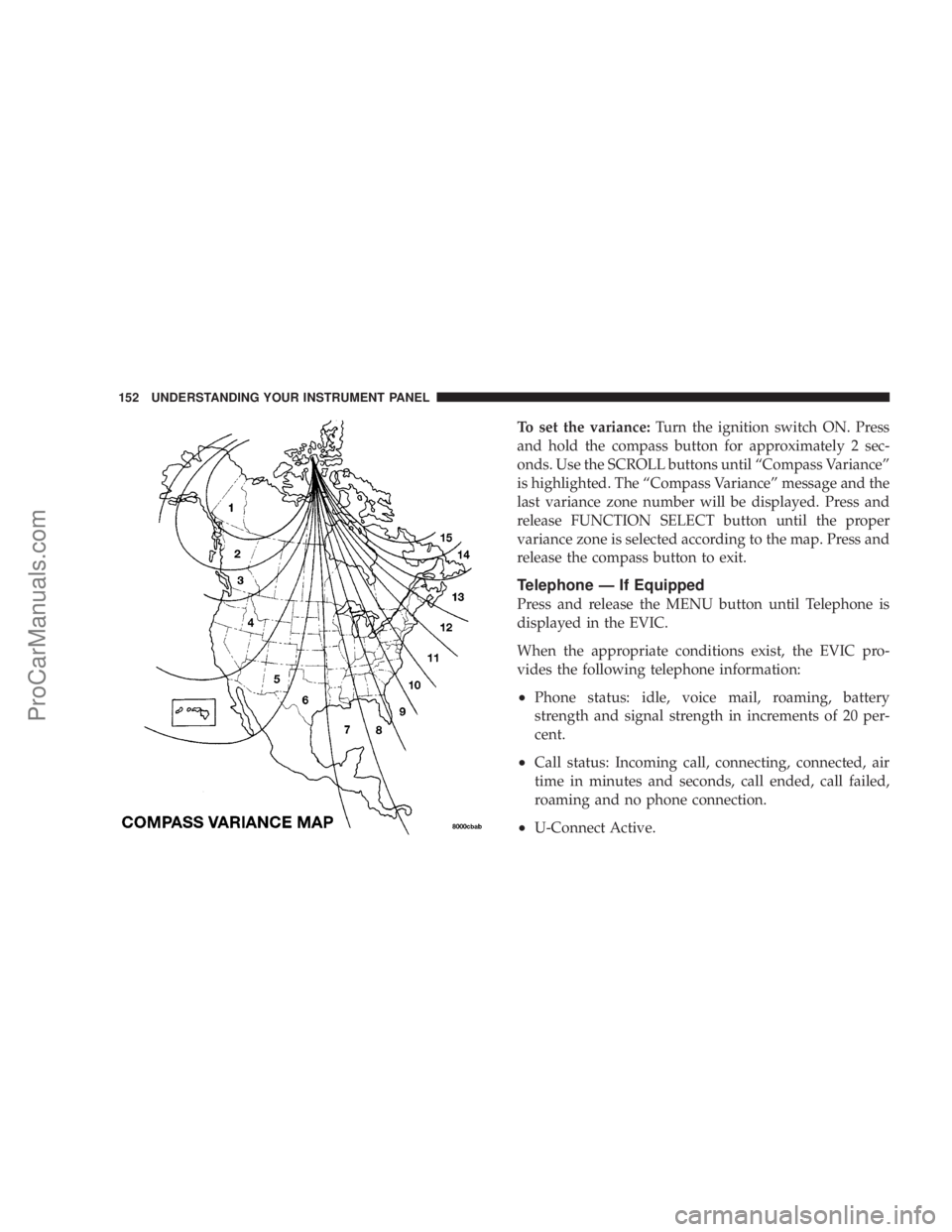
To set the variance:Turn the ignition switch ON. Press
and hold the compass button for approximately 2 sec-
onds. Use the SCROLL buttons until ªCompass Varianceº
is highlighted. The ªCompass Varianceº message and the
last variance zone number will be displayed. Press and
release FUNCTION SELECT button until the proper
variance zone is selected according to the map. Press and
release the compass button to exit.
Telephone Ð If Equipped
Press and release the MENU button until Telephone is
displayed in the EVIC.
When the appropriate conditions exist, the EVIC pro-
vides the following telephone information:
²Phone status: idle, voice mail, roaming, battery
strength and signal strength in increments of 20 per-
cent.
²Call status: Incoming call, connecting, connected, air
time in minutes and seconds, call ended, call failed,
roaming and no phone connection.
²U-Connect Active.
152 UNDERSTANDING YOUR INSTRUMENT PANEL
ProCarManuals.com
Page 154 of 374
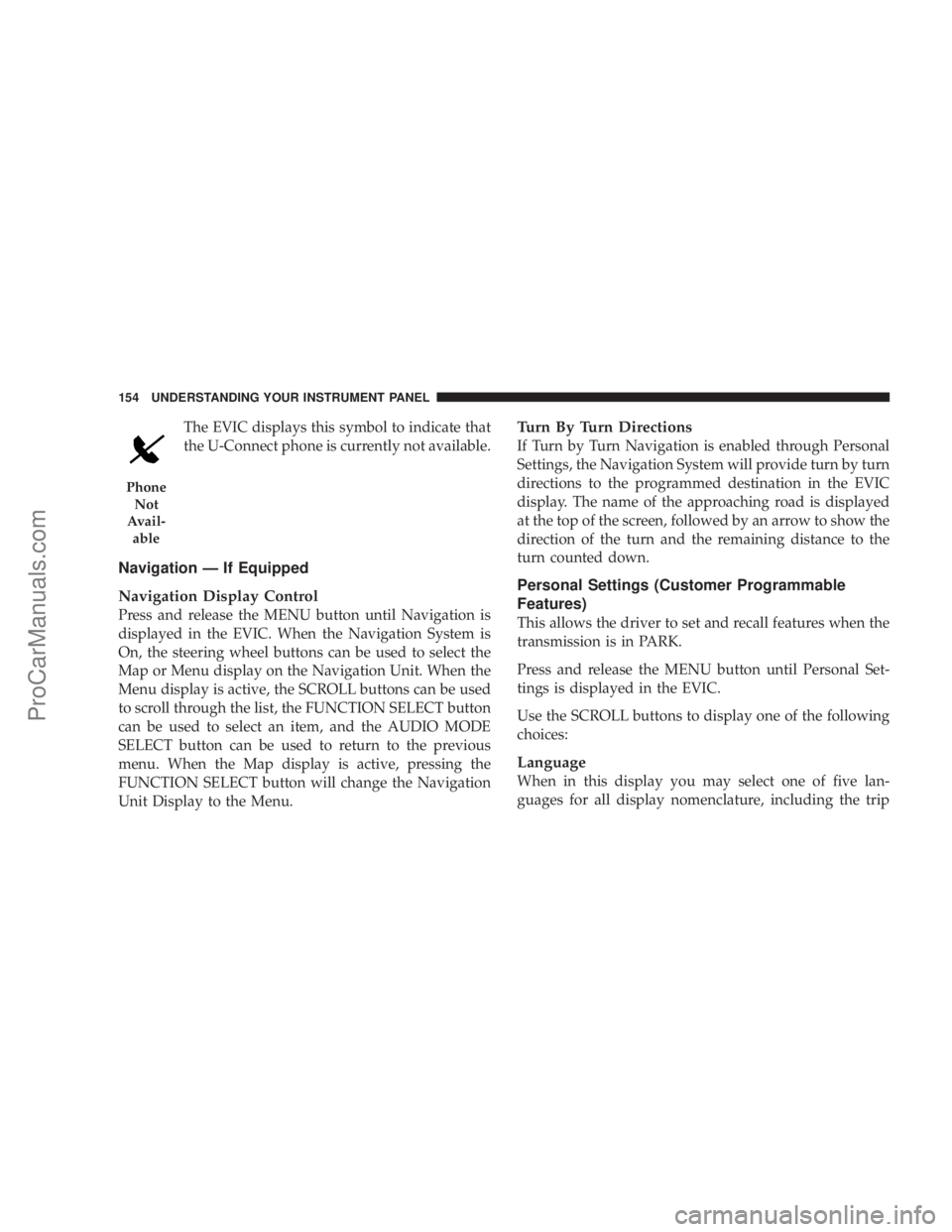
The EVIC displays this symbol to indicate that
the U-Connect phone is currently not available.
Navigation Ð If Equipped
Navigation Display Control
Press and release the MENU button until Navigation is
displayed in the EVIC. When the Navigation System is
On, the steering wheel buttons can be used to select the
Map or Menu display on the Navigation Unit. When the
Menu display is active, the SCROLL buttons can be used
to scroll through the list, the FUNCTION SELECT button
can be used to select an item, and the AUDIO MODE
SELECT button can be used to return to the previous
menu. When the Map display is active, pressing the
FUNCTION SELECT button will change the Navigation
Unit Display to the Menu.
Turn By Turn Directions
If Turn by Turn Navigation is enabled through Personal
Settings, the Navigation System will provide turn by turn
directions to the programmed destination in the EVIC
display. The name of the approaching road is displayed
at the top of the screen, followed by an arrow to show the
direction of the turn and the remaining distance to the
turn counted down.
Personal Settings (Customer Programmable
Features)
This allows the driver to set and recall features when the
transmission is in PARK.
Press and release the MENU button until Personal Set-
tings is displayed in the EVIC.
Use the SCROLL buttons to display one of the following
choices:
Language
When in this display you may select one of five lan-
guages for all display nomenclature, including the trip
Phone
Not
Avail-
able
154 UNDERSTANDING YOUR INSTRUMENT PANEL
ProCarManuals.com
Page 162 of 374
12 Satellite (if equipped) stations to be stored into push-
button memory. The stations stored in SET 2 memory can
be selected by pressing the push-button twice.
Every time a preset button is used a corresponding
button number will be displayed.
Preset Buttons1-6(Radio Mode)
These buttons tune the Radio to the stations that you
commit to push-button memory {12 AM, 12 FM, and 12
Satellite (if equipped) stations}.
Operation Instructions - CD Mode
NOTE:
The ignition switch must be in the ON or ACC
position to operate the radio.
Inserting The Compact Disc (Single CD Player)
Gently insert one CD into the CD player with the CD
label facing up. The CD will automatically be pulled into
the CD Player and the CD icon will illuminate on the
radio display.If the volume control is ON, the unit will switch to CD
mode and begin to play. The display will show the track
number and play time in minutes and seconds. Play will
begin at the start of track one.
NOTE:
²
You may insert or eject a disc with the radio or ignition
switch OFF.
²If you insert a disc with the ignition ON and the radio
OFF, the CD will automatically be pulled into the CD
Player.
²This radio does not play discs with MP3 tracks.
SEEK Button (CD Mode)
Press the right side of the SEEK button for the next track
on the CD. Press the left side of the button to return to the
beginning of the current track, or return to the beginning
of the previous track if the CD is within the first 10
seconds of the current selection.
162 UNDERSTANDING YOUR INSTRUMENT PANEL
ProCarManuals.com