service CHRYSLER 300 LX 2005 User Guide
[x] Cancel search | Manufacturer: CHRYSLER, Model Year: 2005, Model line: 300 LX, Model: CHRYSLER 300 LX 2005Pages: 374, PDF Size: 7.09 MB
Page 79 of 374
Voice Mail Calling
To learn how to access your voice mail, refer to section
9Working with Automated Systems.9
Working with Automated Systems
This method is designed to be used in instances where
one generally has to press numbers on the cellular phone
keypad while navigating through an automated tele-
phony system.
You can use your UConnectŸ system to access a voice-
mail system or an automated service, such as, paging
service or automated customer service. Some services
require immediate response selection, in some instances,
that may be too quick for use of UConnectŸ system.
When calling a number with your UConnectŸ system
that normally requires you to enter in a touch-tone
sequence on your cellular phone keypad, you can push
the 'Voice Recognition' button and say the sequence you
wish to enter followed by the word9Send.9For example,
if required to enter your pin number followed with a
pound3746#,youcanpressthe'Voice Recognition'
button and say93746#Send.9Saying a number, or
sequence of numbers, followed by9Send9is also to beused to navigate through an automated customer service
center menu structure and to leave a number on a pager.
Barge In - Overriding Prompts
The 'Voice Recognition' button can be used when you
wish to skip part of a prompt and issue your voice
recognition command immediately. For example, if a
prompt is playing9Would you like to pair a phone, clear
a{,9you could press the 'Voice Recognition' button and
say9Pair a Phone9to select that option without having to
listen to the rest of the voice prompt.
Turning Confirmation Prompts On/Off
Turning confirmation prompts off will stop the system
from confirming your choices (e.g. the UConnectŸ sys-
tem will not repeat a phone number before you dial it).
²Press the 'Phone' button to begin.
²After the9Ready9prompt and the following beep, say
9Setup Confirmations.9The UConnectŸ system will
play the current confirmation prompt status and you
will be given the choice to change it.
Voice Confirmation Prompts are also customer program-
mable through the Electronic Vehicle Information Center
UNDERSTANDING THE FEATURES OF YOUR VEHICLE 79
3
ProCarManuals.com
Page 80 of 374

Ð If Equipped. Refer to ªPersonal Settingsº in the
Electronic Vehicle Information Center section of this
manual for details.
Phone and Network Status Indicators
The UConnectŸ system will provide notification to
inform you if your cellular phone is in roaming status,
has low signal strength, or has a low battery when you
are trying to place a phone call.
Dialing Using the Cellular Phone Keypad
You can dial a phone number with your cellular phone
keypad and still use the UConnectŸ system (while
dialing via the cell phone keypad, the user must exercise
caution and take precautionary safety measures). By
dialing a number with your paired BluetoothŸ cellular
phone, the audio will be played through your vehicle's
audio system. The UConnectŸ system will work the
same as if you dial the number using voice recognition.
NOTE:Certain brands of mobile phones do not send
the dial ring to the UConnectŸ system to play it on the
vehicle audio system, so you will not hear it. Under this
situation, after successfully dialing a number, the usermay feel that the call did not go through even though the
call is in progress. Once your call is answered, you will
hear the audio.
Mute/Un-mute (Mute off)
When you mute the UConnectŸ system, you will still be
able to hear the conversation coming from the other
party, but the other party will not be able to hear you. In
order to mute the UConnectŸ system:
²Press the 'Voice Recognition' button.
²After the9Ready9prompt and the following beep, say
9Mute.9
In order to un-mute the UConnectŸ system:
²Press the 'Voice Recognition' button.
²After the9Ready9prompt and the following beep, say
9Mute-off.9
Information Service
When using AT&T Wireless Service, dialing to phone
number9#121,9you can access voice activated automated
system to receive news, weather, stocks, traffic, etc.
related information.
80 UNDERSTANDING THE FEATURES OF YOUR VEHICLE
ProCarManuals.com
Page 89 of 374
NOTE:The Rear Park Assist System displays the outer
most yellow LED's at a slightly dimmer level to indicate
that the system is ON.
NOTE:When an audio tone is indicated by the Rear
Park Assist display the system will MUTE the radio if it
is turned on.
The system can be turned on or off through the Electronic
Vehicle Information Center (EVIC) when the vehicle is in
PARK. Refer to ªPersonal Settingsº in the Electronic
Vehicle Information Center section of this manual for
details.
NOTE:
²
Ensure that the rear bumper is free of dirt and debris
to keep the system operating properly.
²Jackhammers, large trucks, and other vibrations could
affect the performance of the system.
If ªService Park Assist Systemº appears in the EVIC after
making sure the rear bumper is clean please see your
authorized dealer.
SEATS
Power Seats
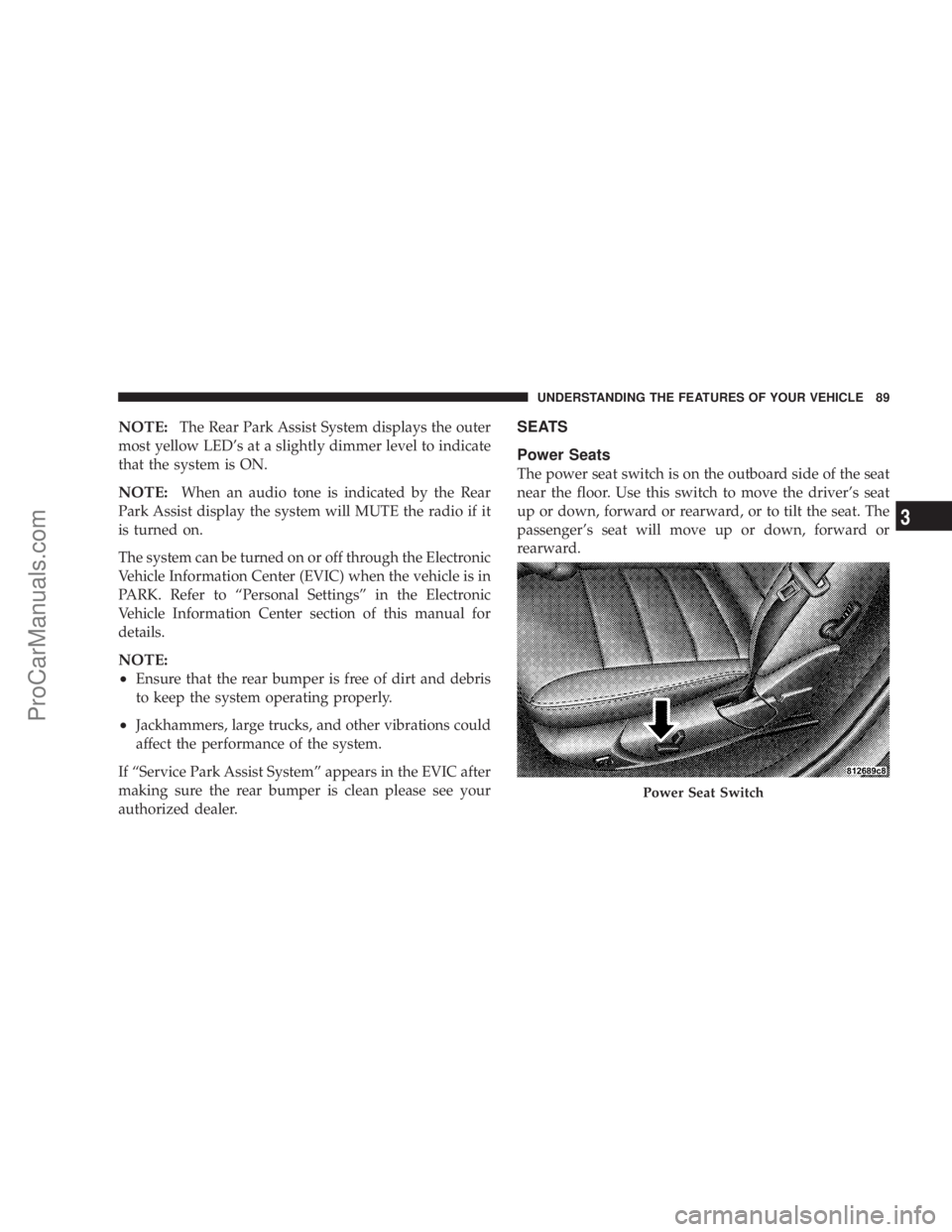
The power seat switch is on the outboard side of the seat
near the floor. Use this switch to move the driver's seat
up or down, forward or rearward, or to tilt the seat. The
passenger's seat will move up or down, forward or
rearward.
Power Seat Switch
UNDERSTANDING THE FEATURES OF YOUR VEHICLE 89
3
ProCarManuals.com
Page 141 of 374

7. Tachometer
The red segments indicate the maximum permissible
engine revolutions-per-minute (r.p.m. x 1000) for each
gear range. Before reaching the red area, ease up on the
accelerator.
8. Engine Temperature Warning Light
This light illuminates, and will be accompanied
by a single chime to warn of an overheated
engine condition. The engine temperature is
critically hot, and the vehicle should be turned off
immediately. The vehicle should be serviced as soon
as possible.
9. Anti-Lock Brake Light
This light monitors the Anti-Lock Brake System.
The light will turn on when the ignition switch
is turned to the ON position and may stay on for as
long as four seconds.
If the ABS light remains on or turns on while driving, it
indicates that the Anti-Lock portion of the brake system
is not functioning and that service is required. However,
the conventional brake system will continue to operate
normally if the BRAKE warning light is not on.If the ABS light is on, the brake system should be serviced
as soon as possible to restore the benefits of Anti-Lock
brakes. If the ABS light does not turn on when the
Ignition switch is turned to the ON position, have the
light inspected by an authorized dealer.
10. Brake Assist System (BAS) Warning
Light/Electronic Stability Program (ESP) Warning
Light Ð If Equipped
The yellow Brake Assist System (BAS) mal-
function indicator light in the instrument
cluster comes on with the key in the ignition
switch turned to the ªONº position. The
light should go out with the engine running. If the
BAS malfunction indicator light comes on continu-
ously with the engine running, a malfunction has been
detected in either the BAS, or the Electronic Stability
Program (ESP) system. If this light stays illuminated,
have the BAS and ESP checked at your authorized
dealer as soon as possible.
The yellow malfunction indicator lamp for
the ESP is combined with the BAS on some
models. The yellow BAS malfunction indica-
tor light and the yellow ESP warning light in
UNDERSTANDING YOUR INSTRUMENT PANEL 141
4
ProCarManuals.com
Page 142 of 374

the instrument cluster both come on with the key in
the ignition switch turned to the ªONº position. They
should go out with the engine running. If the BAS/
ESP malfunction indicator light comes on continu-
ously with the engine running, a malfunction has been
detected in either the BAS or the ESP system. If this
light stays illuminated, have the BAS and ESP checked
at your authorized dealer as soon as possible.
11. Airbag Light
This light turns on and remains on for 6 to 8
seconds as a bulb check when the ignition
switch is first turned ON. If the light is not
on during starting, stays on, or turns on
while driving, have the system inspected by an autho-
rized dealer as soon as possible.
12. Brake System Warning Light
This light monitors various brake functions,
including brake fluid level and parking
brake application. If the brake light turns on,
it may indicate that the parking brake is
applied, there is a low brake fluid level or there is a
problem with the anti-lock brake system.The dual brake system provides a reserve braking capac-
ity in the event of a failure to a portion of the hydraulic
system. Failure of either half of the dual brake system is
indicated by the Brake Warning Light which will turn on
when the brake fluid level in the master cylinder has
dropped below a specified level.
The light will remain on until the cause is corrected.
NOTE:The light may flash momentarily during sharp
cornering maneuvers which change fluid level condi-
tions. The vehicle should have service performed, and
the brake fluid level checked.
If brake failure is indicated, immediate repair is neces-
sary.
WARNING!
Driving a vehicle with the brake light on is danger-
ous. Part of the brake system may have failed. It will
take longer to stop the vehicle. You could have an
accident. Have the vehicle checked immediately.
142 UNDERSTANDING YOUR INSTRUMENT PANEL
ProCarManuals.com
Page 144 of 374
CAUTION!
Driving with a hot engine cooling system could
damage your vehicle. If temperature gauge reads (H),
pull over and stop the vehicle. Idle the vehicle with
the air conditioner turned off until the pointer drops
back into the normal range. If the pointer remains on
the ªHº, and you hear continuous chimes, turn the
engine off immediately, and call for service.
WARNING!
A hot engine cooling system is dangerous. You or
others could be badly burned by steam or boiling
coolant. You may want to call a service center if your
vehicle overheats. If you decide to look under the
hood yourself, see Section 7 of this manual. Follow
the warnings under the Cooling System Pressure
Cap paragraph.
15. Trip Odometer Button
Trip Odometer Button Ð Standard Cluster
The word9TRIP9will appear when this button is pressed.
Push in and hold the button for two seconds when the
trip odometer is displayed to reset it to 0 miles or
kilometers. A second press of the button will display the
outside temperature in the odometer.
Trip Odometer Button Ð Premium Cluster
Press this button to change the display from odometer to
either of the two trip odometer settings. The letter ªAº or
ªBº will appear when in the trip odometer mode. Push in
and hold the button for two seconds to reset the trip
odometer to 0 miles or kilometers. The odometer must be
in trip mode to reset.
16. High Beam Light
This light shows that the headlights are on high
beam. Push the Multi-Function lever away from
the steering wheel to switch the headlights to high
beam.
144 UNDERSTANDING YOUR INSTRUMENT PANEL
ProCarManuals.com
Page 145 of 374

17. Transmission Range Indicator
This display indicator shows the automatic transmission
gear selection.
18. Seat Belt Reminder Light
When the ignition switch is first turned ON, this
light will turn on for 5 to 8 seconds as a bulb
check. During the bulb check, if the driver's seat
belt is unbuckled, a chime will sound. After the bulb
check or when driving, if the driver seat belt remains
unbuckled, the Seat Belt Warning Light will flash or
remain on continuously. Refer to9Enhanced Driver
Seat Belt Reminder System (BeltAlertŸ)9in the Occu-
pant Restraints section for more information.
19. Fuel Gauge
The pointer shows the level of fuel in the fuel tank when
the ignition switch is in the ON position.
20. Electronic Throttle Control (ETC) Light
This light informs you of a problem with the
Electronic Throttle Control system. If a prob-
lem is detected the light will come on while
the engine is running. Cycle the ignition key
when the vehicle has completely stopped and the gearselector is placed in the PARK position. The light
should turn off. If the light remains lit with the engine
running your vehicle will usually be drivable, how-
ever, see your dealer for service as soon as possible. If
the light is flashing when the engine is running,
immediate service is required and you may experience
reduced performance, an elevated/rough idle or en-
gine stall and your vehicle may require towing. The
light will come on when the ignition is first turned on
and remain on briefly as a bulb check. If the light does
not come on during starting, have the system checked
by an authorized dealer.
21. Tire Pressure Monitor Warning Light Ð If
Equipped
This light will turn on continuously when
there is a Low tire pressure condition. The
light will also turn on if a problem exist with
any tire sensor. When a system fault is
detected, the indicator lamp will flash repetitively for
ten seconds. The flash cycle will repeat every ten
minutes or until the fault condition is removed and
UNDERSTANDING YOUR INSTRUMENT PANEL 145
4
ProCarManuals.com
Page 146 of 374

reset. The light will remain on or flashing until the tire
pressure is properly set or the problem with the sensor
is corrected.
This light will turn on momentarily as a bulb check when
the engine is started.
When the tire pressure monitoring system warning light
is lit, one or more of your tires is significantly underin-
flated. You should stop and check your tires as soon as
possible, and inflate them to the proper pressure as
indicated on the tire and loading information placard.
Driving on a significantly underinflated tire causes the
tire to overheat and can lead to tire failure. Underinfla-
tion also reduces fuel efficiency and tire tread life, and
may affect the vehicle's handling and stopping ability.
Each tire, including the spare, should be checked
monthly when cold and set to the recommended inflation
pressure as specified in the tire and loading information
placard.
22. Voltage Light
This light monitors the electrical system volt-
age. The light should turn on momentarily as
the engine is started. If the light stays on or turns onwhile driving, it indicates a problem with the charging
system. Immediate service should be obtained.
23. Malfunction Indicator Light
This light is part of an onboard diagnostic
system called OBD that monitors engine and
automatic transmission control systems. The
light will illuminate when the key is in the ON
position before engine start. If the bulb does not come
on when turning the key from OFF to ON, have the
condition checked promptly.
Certain conditions such as a loose or missing gas cap,
poor fuel quality, etc. may illuminate the light after
engine start. The vehicle should be serviced if the light
stays on through several of your typical driving cycles. In
most situations the vehicle will drive normally and will
not require towing.
The Malfunction Indicator Light flashes to alert you to
serious conditions that could lead to immediate loss of
power or severe catalytic converter damage. The vehicle
should be serviced as soon as possible if this occurs.
146 UNDERSTANDING YOUR INSTRUMENT PANEL
ProCarManuals.com
Page 149 of 374
²Left/Right Rear Door Ajar (one or more, with a single
chime if speed is above 1 mph)
²Door (S) Ajar (with a single chime if vehicle is in
motion)
²Trunk Ajar (with a single chime)
²Low Washer Fluid (with a single chime)
²Adjustable Pedals Disabled ± Cruise Engaged (with a
single chime) Ð only available on vehicles equipped
with memory seats.
²Adjustable Pedals Disabled ± Vehicle In Reverse (with
a single chime) Ð only available on vehicles equipped
with memory seats.
²Channel 1, 2, OR 3 Transmit
²Channel 1, 2, OR 3 Training
²Channel 1, 2, OR 3 Trained
²Clearing Channels
²Channels Cleared
²Channels Defaulted
²Did Not Train
²Left Front Low Pressure (with a single chime). Refer to
ªStarting And Operating, Tire Sectionº
²Left Rear Low Pressure (with a single chime). Refer to
ªStarting And Operating, Tire Sectionº
²Right Front Low Pressure (with a single chime). Refer
to ªStarting And Operating, Tire Sectionº
²Right Rear Low Pressure (with a single chime). Refer
to ªStarting And Operating, Tire Sectionº
²Check TPM System (with a single chime). Refer to
ªStarting And Operating, Tire Sectionº
²Service Park Assist System (with a single chime)
Trip Functions
Press and release the MENU button until one of the Trip
Functions is displayed in the EVIC.
Use the SCROLL buttons to cycle through all the Trip
Computer functions.
UNDERSTANDING YOUR INSTRUMENT PANEL 149
4
ProCarManuals.com
Page 187 of 374
Operating Instructions - Video Entertainment
System (VES) (if equipped)
Refer to separate Video Entertainment System (VES)
Guide.
SATELLITE RADIO Ð IF EQUIPPED
Satellite radio uses direct satellite to receiver broadcast-
ing technology to provide clear digital sound, coast to
coast. The subscription service provider is SiriusŸ Satel-
lite Radio. This service offers up to 100 channels of music,
sports, news, entertainment, and programming for chil-
dren, directly from its satellites and broadcasting studios.
System Activation
To activate your Sirius Satellite Radio service, call the
toll-free number 888-539-7474, or visit the Sirius web site
at www.sirius.com. Please have the following informa-
tion available when activating your system:
1. The Electronic Serial Number/Sirius Identification
Number (ESN/SID).
2. Credit card information.
3. Your Vehicle Identification Number.
Electronic Serial Number/Sirius Identification
Number (ENS/SID)
The Electronic Serial Number/Sirius Identification Num-
ber is needed to activate your Sirius Satellite Radio
system. To access the ESN/SID, refer to the following
steps:
ESN/SID Access With REF Radios
With the ignition switch in the ACCESSORY position and
the radio OFF, press the CD Eject and Time buttons
simultaneously for 3 seconds. The first four digits of the
twelve-digit ESN/SID number will be displayed. Press
the SEEK UP button to display the next four digits.
Continue to press the SEEK UP button until all twelve
ESN/SID digits have been displayed. The SEEK DOWN
will page down until the first four digits are displayed.
The radio will exit the ESN/SID mode when any other
button is pushed, the ignition is turned OFF, or 5 minutes
has passed since any button was pushed.
ESN/SID Access With RAQ and RAK Radios
With the ignition switch in the ACCESSORY position and
the radio OFF, press the CD Eject and TIME buttons
UNDERSTANDING YOUR INSTRUMENT PANEL 187
4
ProCarManuals.com