light CHRYSLER 300 M 2004 1.G Workshop Manual
[x] Cancel search | Manufacturer: CHRYSLER, Model Year: 2004, Model line: 300 M, Model: CHRYSLER 300 M 2004 1.GPages: 277, PDF Size: 5.69 MB
Page 147 of 277
Fan Control
Use this control to regulate the amount of air forced
through the system in any mode you select. Turn the
control clockwise to increase fan speed.
In ambient temperatures below 70°F (21°C), fan opera-
tion is delayed when the engine is first started. The fan
will automatically start when the engine coolant is warm
enough to heat the air. This feature can be defeated by
turning the fan control.
AUTO Control
Press the top of the button to turn the ATC system On.
Press the lower portion of the button to turn the entire
system Off.
Comfort Control
Use this control to regulate the comfort inside the pas-
senger compartment. Press the top of the switch to raise
the temperature selection and the bottom of the switch to
lower it. The comfort setting range is from Lo, 60, 61,....to
89,90, Hi, for automatic temperature control. You can
select a very hot or cold comfort setting by holding the
comfort control until it reaches its highest or lowest
levels.The system adjusts to bring the interior temperature to
the desired comfort level. All comfort settings are auto-
matic; even Hi and Low.
NOTE:You can change the display from U.S. to metric
units by pressing the Mix and Panel mode buttons
simultaneously or by pressing the English/Metric button
on the overhead console.
Air Conditioning Button
Press this button to turn on the air conditioning
compressor. A snow flake symbol in the display
shows that the compressor is on. Compressor
operation is automatic when you press the Auto button.
The compressor can operate at any temperature above
32°F (0°C).
With the compressor off and the temperature set at Lo, air
entering the vehicle will be slightly warmer than the air
outside the vehicle.
NOTE:The compressor will not engage until the engine
has been running for several seconds. Slight changes in
UNDERSTANDING YOUR INSTRUMENT PANEL 147
4
Page 148 of 277
engine speed or power may be noticed when the com-
pressor is on. This is a normal occurrence since the
compressor will cycle on and off to maintain comfort and
improve fuel economy.
Recirculate Button
Press this button to recirculate the air inside the
vehicle. Outside air is prevented from entering the
vehicle. Recirculation is automatically controlled when
the system is in Auto Mode. Use this mode to temporarily
block out any outside odors, smoke, or dust.
Manual control of Recirculation is possible only in Panel,
Floor, and Bi-Level modes. It will not operate in Mix, or
Defrost modes.
NOTE:The Recirc button light will blink if you try to
use it in the Mix or Defrost modes.
Air Direction Buttons (Mode)
These buttons allow you to select from five air distribu-
tion patterns. These buttons should be used only when
you can not achieve comfort or visibility in Auto opera-
tion. A symbol in the display window will show which
mode is operating.
Panel
Air is directed through the outlets in the instru-
ment panel. These outlets can be adjusted to direct
air flow. This mode is not recommended when heat is
required.
Floor
Air is directed through the floor outlets with a
lesser amount through the Defrost and side
window demist outlets. This mode is recommended
when heat is desired.
Mix
Air is directed through the floor, defrost, and
side window demist outlets. Use this setting in
cold or snowy conditions that require extra heat
at the windshield. This setting is good for maintaining
comfort while reducing moisture on the windshield.
The compressor is on in this mode.
Bi-Level
Air is directed through both the panel and floor
outlets. This mode is not recommended when
heat is required in very cold temperatures.
148 UNDERSTANDING YOUR INSTRUMENT PANEL
Page 149 of 277
NOTE:There is a varying difference in temperature
between the upper and lower outlets for added comfort.
The warmer air goes to the floor outlets. This feature
provides improved comfort during sunny but cool con-
ditions.
Windshield Defrost
Air is directed through the defrost outlets and
side window demist outlets. A small amount of
air also is directed through the floor outlets. Use this
mode with maximum fan and comfort level settings
for best windshield and side window defrosting. The
defrost symbol will glow in amber to show that the
defroster is on.
NOTE:
The air conditioning compressor is on in this
mode. This dehumidifies the air to help dry the wind-
shield. To improve fuel economy, leave in the defrost
mode only when necessary.
Rear Window Defroster
Press the button once to turn on the Rear Window
Defroster and a second time to turn it off. An
indicator light in the control shows that the defroster is
on.
NOTE:The defroster turns off automatically after 15
minutes of operation. Each later activation will allow 7
1/2 minutes of operation.
CAUTION!
To avoid damaging the electrical conductors, do not
use scrapers, sharp instruments, or abrasive window
cleaners on the interior surface of the rear window.
Labels can be peeled off by soaking with warm
water.
Window Fogging
In mild but rainy or humid weather, your windows may
fog up on the inside. You can remove this fog by pressing
the Defrost button. The Mix mode can be used to
maintain a clear windshield and provide sufficient heat-
ing. If side window fogging becomes a problem, increase
blower speed. The compressor will remain on during
these conditions.
UNDERSTANDING YOUR INSTRUMENT PANEL 149
4
Page 155 of 277
STARTING PROCEDURES
WARNING!
Do not leave children or animals inside parked
vehicles in hot weather. Interior heat build up may
cause serious injury or death.
The gear selector must be in the NEUTRAL or PARK
position before you can start the engine. Apply the brakes
before shifting to any driving gear.
Normal Starting
Normal Starting of either a cold or a warm engine does
not require pumping or depressing the accelerator pedal.
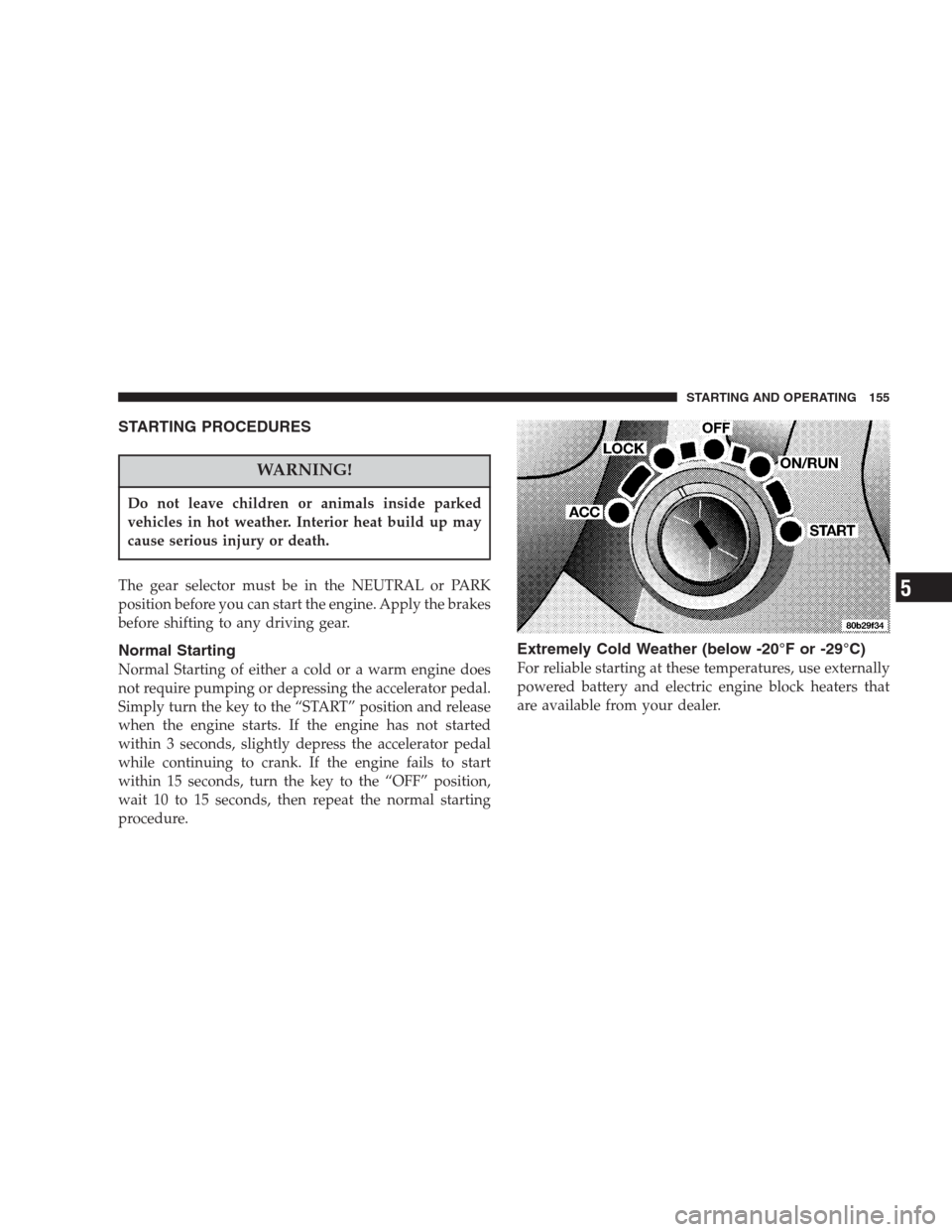
Simply turn the key to the “START” position and release
when the engine starts. If the engine has not started
within 3 seconds, slightly depress the accelerator pedal
while continuing to crank. If the engine fails to start
within 15 seconds, turn the key to the “OFF” position,
wait 10 to 15 seconds, then repeat the normal starting
procedure.
Extremely Cold Weather (below -20°F or -29°C)
For reliable starting at these temperatures, use externally
powered battery and electric engine block heaters that
are available from your dealer.
STARTING AND OPERATING 155
5
Page 161 of 277
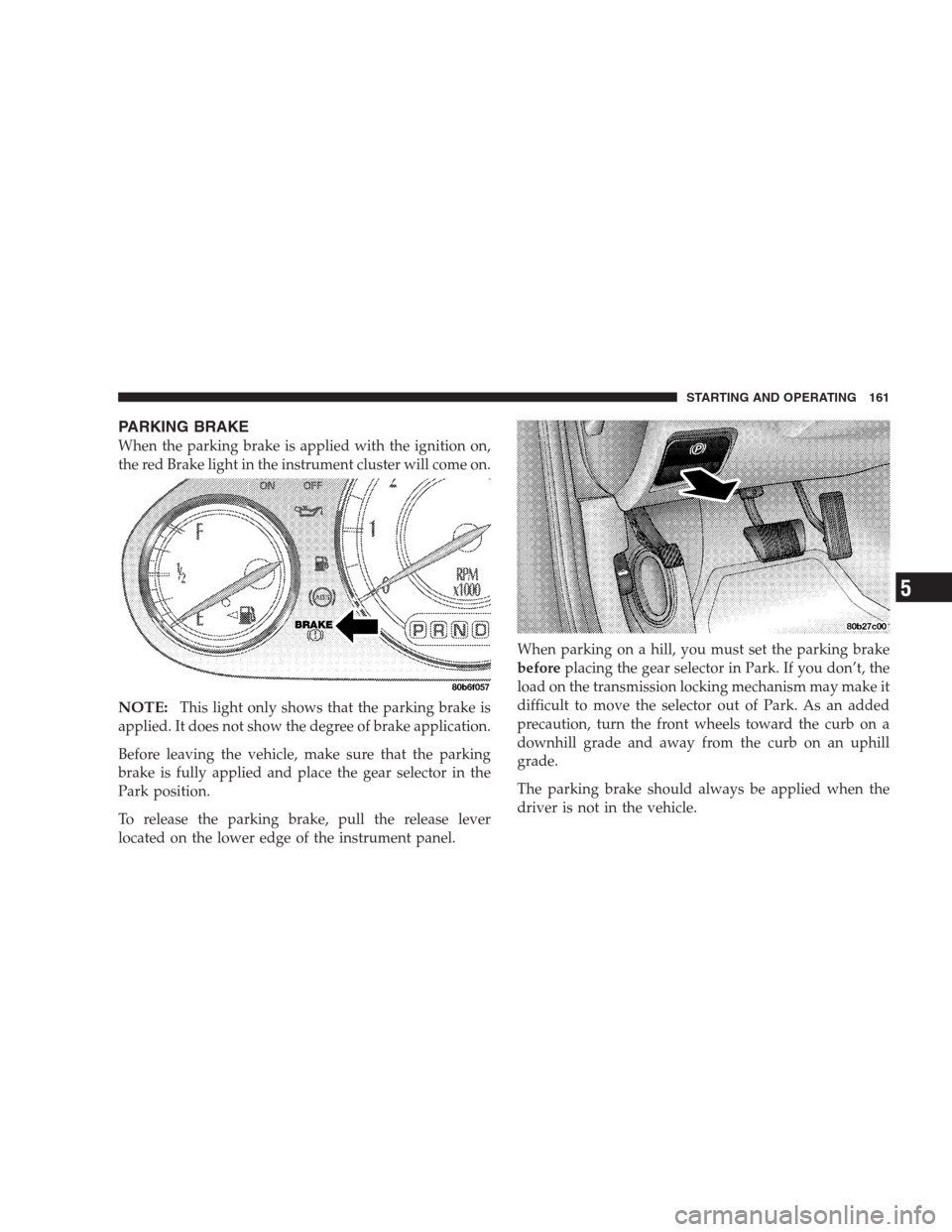
PARKING BRAKE
When the parking brake is applied with the ignition on,
the red Brake light in the instrument cluster will come on.
NOTE:This light only shows that the parking brake is
applied. It does not show the degree of brake application.
Before leaving the vehicle, make sure that the parking
brake is fully applied and place the gear selector in the
Park position.
To release the parking brake, pull the release lever
located on the lower edge of the instrument panel.When parking on a hill, you must set the parking brake
beforeplacing the gear selector in Park. If you don’t, the
load on the transmission locking mechanism may make it
difficult to move the selector out of Park. As an added
precaution, turn the front wheels toward the curb on a
downhill grade and away from the curb on an uphill
grade.
The parking brake should always be applied when the
driver is not in the vehicle.
STARTING AND OPERATING 161
5
Page 164 of 277
•The system has been deactivated to prevent damage to
the brake system due to overheated brake tempera-
tures.
NOTE:Extended heavy use of Traction Control may
cause the system to deactivate and turn on the Traction
Control OFF Light, indicated byTRAC OFF, located in
the instrument cluster.
This is to prevent overheating of the brake system and is
a normal condition. After cooling, the system will auto-
matically reactivate and turn off theTRAC OFFlight.
If your vehicle becomes stuck in mud, ice, or snow, turn
the Traction Control System Off before attempting to
“rock” the vehicle free.
TIRES
Proper tire inflation pressure is essential to the safe and
satisfactory operation of your vehicle. Three primary
areas are affected by improper tire pressure:
1. Safety—
WARNING!
•Improperly inflated tires are dangerous and can
cause accidents.
•Under inflation increases tire flexing and can
result in tire failure.
•Over inflation reduces a tire’s ability to cushion
shock. Objects on the road and chuck holes can cause
damage that results in tire failure.
•Unequal tire pressures can cause steering prob-
lems. You could lose control of your vehicle.
•Overinflated or under inflated tires can affect
vehicle handling and can fail suddenly, resulting in
loss of vehicle control.
•Always drive with each tire inflated to the recom-
mended pressure.
164 STARTING AND OPERATING
Page 175 of 277
FUEL REQUIREMENTS
300M
Your engine is designed to meet all emissions regulations
and provide satisfactory fuel economy and performance
when using high quality unleaded gasoline having an
octane range of 87 to 89 or higher. The manufacturer
recommends the use of 89 octane for optimum perfor-
mance.
300M Special Only
Your engine is designed to meet all emissions regulations
and provide satisfactory fuel economy and performance
when using high quality unleaded gasoline having an
octane range of 87 to 91. The manufacturer recommends
the use of 91 octane premium gasoline for optimum
performance.
Light spark knock at low engine speeds is not harmful to
your engine. However, continued heavy spark knock at
high speeds can cause damage and should be reported to
your dealer immediately. Engine damage resulting from
operating with a heavy spark knock may not be covered
by the new vehicle warranty.Poor quality gasoline can cause problems such as hard
starting, stalling and stumble. If you experience these
problems, try another brand of gasoline before consider-
ing service for the vehicle.
Over 40 automobile manufacturers around the world
have issued and endorsed consistent gasoline specifica-
tions (the World Wide Fuel Charter, WWFC) to define
fuel properties necessary to deliver enhanced emissions,
engine performance, and durability for your vehicle. The
manufacturer recommends the use of gasolines that meet
the WWFC specifications if they are available.
Reformulated Gasoline
Many areas of the country require the use of cleaner
burning fuel referred to as “Reformulated Gasoline”.
Reformulated gasolines contain oxygenates, and are spe-
cially blended to reduce vehicle emissions and improve
air quality.
The manufacturer supports the use of reformulated gaso-
lines. Properly blended reformulated gasolines will pro-
vide excellent performance and durability of engine and
fuel system components.
STARTING AND OPERATING 175
5
Page 177 of 277
Materials Added to Fuel
All gasoline sold in the United States is required to
contain effective detergent additives. Use of additional
detergents or other additives is not needed under normal
conditions and would result in unnecessary cost. There-
fore, you should not have to add anything to the fuel.
Sulfur in Gasoline
If you live in the Northeast United States, your vehicle
may have been designed to meet California low emission
standards with cleaner burning California reformulated
gasoline with low sulfur. If such fuels are not available in
states adopting California emission standards, your ve-
hicle will operate satisfactorily on fuels meeting Federal
specifications, but emission control system performance
may be adversely affected.
Gasoline sold outside of California is permitted to have
higher sulfur levels which may affect the performance of
the vehicle’s catalytic converter. This may cause the
Malfunction Indicator Light to illuminate. The manufac-
turer recommends that you try a different brand ofunleaded gasoline having lower sulfur to determine if the
problem is fuel related prior to returning your vehicle to
an authorized dealer for service.
CAUTION!
If the Malfunction Indicator Light is flashing, imme-
diate service is required. See the On Board Diagnos-
tics paragraph in the Maintenance section of this
manual.
ADDING FUEL
Fuel Filler Cap (Gas Cap)
The gas cap is behind the fuel filler door on the left side
of the vehicle. If the gas cap is lost or damaged, be sure
the replacement cap is for use with this vehicle.
STARTING AND OPERATING 177
5
Page 178 of 277
CAUTION!
Damage to the fuel system or emission control
system could result from using an improper fuel
tank filler tube cap (gas cap). A poorly fitting cap
could let impurities into the fuel system. The Mal-
function Indicator light will come on if the gas cap is
not properly secured.
NOTE:The fuel tank filler tube has a restricting door
about 2 inches (50 mm) down from the opening. If fuel is
poured from a portable container, the container should
have a flexible nozzle long enough to force open the
restricting door.
CAUTION!
To avoid fuel spillage and overfilling, do not “top
off” the fuel tank after filling.
NOTE:
•
When the fuel nozzle “clicks” or shuts off, the fuel
tank is full.
•Tighten the gas cap until you hear a “clicking” sound.
This is an indication that the gas cap is properly
tightened.
The Malfunction Indicator light will come on if the gas
cap is not properly secured. Make sure that the gas cap
is tightened each time the vehicle is refueled.
WARNING!
•Never have any smoking materials lit in or near
the vehicle when the gas cap is removed or the
tank filled.
•Never add fuel to the vehicle when the engine is
running.
•A fire may result if gasoline is pumped into a
portable container that is inside of a vehicle. You
could be burned. Always place gas containers on
the ground while filling.
178 STARTING AND OPERATING
Page 180 of 277
adequate performance. For Example, choose “4” if the
desired speed can be maintained. Choose “3” or “2” if
needed to maintain the desired speed.
Extended driving at high RPM’s should be avoided to
prevent excess heat generation. A reduction in vehicle
speed may be necessary to avoid extended driving at
high RPMs. Return to a higher gear range or vehicle
speed when road conditions and RPM level allow.
•
The trailer tongue load must be considered as part of
the tow vehicle load capacity when loading the ve-
hicle.
•If the trailer weighs more than 1,000 lbs. (450 kg), it
should have its own brakes.
WARNING!
Connecting trailer brakes to your vehicle’s hydraulic
brake lines can overload your brake system and
cause it to fail. You might not have brakes when you
need them and could have an accident.
•Whenever you pull a trailer, regardless of the trailer
size, stop lights and turn signals on the trailer are
recommended for motoring safety.
•The automatic transmission fluid, filter, and hypoid
differential fluid should be changed per Maintenance
Schedule “B” if you tow a trailer.
•If your Engine Coolant Light comes on, see the para-
graph on Overheating in Section 6 of this manual.
NOTE:Check the automatic transmission fluid level
before all towing. Fluid discoloration, or a burnt odor,
shows the need for a transmission fluid and filter change.
180 STARTING AND OPERATING