lock CHRYSLER ASPEN 2008 2.G Service Manual
[x] Cancel search | Manufacturer: CHRYSLER, Model Year: 2008, Model line: ASPEN, Model: CHRYSLER ASPEN 2008 2.GPages: 479, PDF Size: 4.3 MB
Page 139 of 479
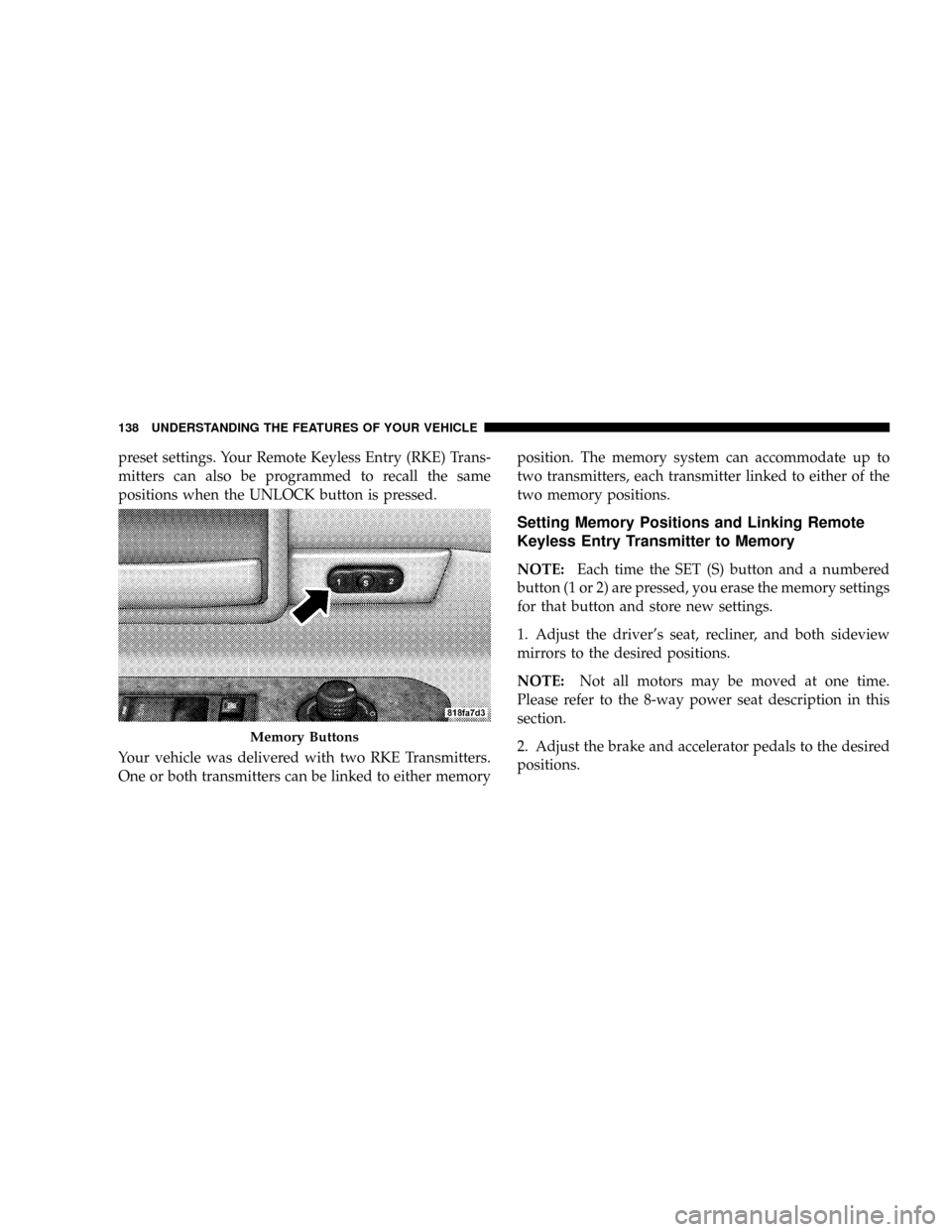
preset settings. Your Remote Keyless Entry (RKE) Trans-
mitters can also be programmed to recall the same
positions when the UNLOCK button is pressed.
Your vehicle was delivered with two RKE Transmitters.
One or both transmitters can be linked to either memoryposition. The memory system can accommodate up to
two transmitters, each transmitter linked to either of the
two memory positions.
Setting Memory Positions and Linking Remote
Keyless Entry Transmitter to Memory
NOTE:Each time the SET (S) button and a numbered
button (1 or 2) are pressed, you erase the memory settings
for that button and store new settings.
1. Adjust the driver's seat, recliner, and both sideview
mirrors to the desired positions.
NOTE:Not all motors may be moved at one time.
Please refer to the 8-way power seat description in this
section.
2. Adjust the brake and accelerator pedals to the desired
positions.
Memory Buttons
138 UNDERSTANDING THE FEATURES OF YOUR VEHICLE
Page 140 of 479
3. Turn on the radio and set the radio station presets (up
to 10 AM and 10 FM stations can be set).
4. Adjust the Automatic Temperature Control (ATC)
while the ATC is in Auto mode.
5. Press and release the SET (S) button located on the
driver's door.
6. Within five seconds, press and release memory button
1 or 2 on the driver's door. The next step must be
performed within 10 seconds if you desire to also use a
RKE Transmitter to recall memory positions.
7. Press and release the LOCK button on one of the
transmitters.
8. Insert the ignition key and turn the ignition switch to
the ON position.9. Repeat the above steps to set the next memory posi-
tion using the other numbered memory button or to link
another RKE Transmitter to memory.
NOTE:A chime sound may be heard if Setting Memory
was inhibited for any reason.
Memory Position Recall
NOTE:
²The driver's seat belt must be unbuckled to recall
memory positions.
²The vehicle must be in PARK to recall memory posi-
tions.
²Not all motors may be moved at one time. Please refer
to the 8-way power seat description in this section.
UNDERSTANDING THE FEATURES OF YOUR VEHICLE 139
3
Page 141 of 479

To recall the memory settings for driver one, press
memory button number 1 on the driver's door or the
UNLOCK button on the Remote Keyless Entry Transmit-
ter linked to memory position 1.
To recall the memory setting for driver two, press
memory button number 2 on the driver's door or the
UNLOCK button on the Remote Keyless Entry transmit-
ter linked to memory position 2.
A recall can be cancelled by pressing any of the memory
buttons on the driver's door during a recall (S, 1, or 2), or
pressing any one of the power seat buttons, or pressing
the adjustable pedals button, or pressing either the LOCK
or UNLOCK button on the Remote Keyless Entry Trans-
mitter when not in the ignition switch. When a recall is
cancelled, the driver's seat, and the pedals stop moving.
A delay of one second will occur before another recall can
be selected.NOTE:A chime sound may be heard if Setting Memory
was inhibited for any reason.
To Disable A Transmitter Linked to Memory
1. Turn the ignition switch to the OFF position and
remove the key.
2. Press and release the memory SET (S) button located
on the driver's door.
3. Within 10 seconds, press and release the UNLOCK
button on the Remote Keyless Entry Transmitter.
To disable another transmitter linked to either memory
position, repeat steps 1-3 for each transmitter.
NOTE:The capability to link RKE Transmitters to
memory is enabled when delivered from the factory. The
capability to link RKE Transmitters to memory can be
disabled (or later reenabled) by a qualified
DaimlerChrysler representative. For vehicles equipped
140 UNDERSTANDING THE FEATURES OF YOUR VEHICLE
Page 142 of 479
with the Electronic vehicle Information Center (EVIC),
refer to ªPersonal Settings (Customer Programmable
Features)º under ªOverhead Console with Electronic
Vehicle Information Center (EVIC) ± If Equippedº in
Section 3.
Self-Limiting Control
To improve vehicle reliability, the memory system in-
cludes a self-limiting control for full travel positioning of
power seat and adjustable pedal movement (all direc-
tions). This self-limiting control may, however, develop
an unintended movement limitation if an obstruction is
encountered sometime during usage. One example of
such an occurrence may include a box or package ob-
structing the full rearward movement of the driver's seat.
Once the obstruction is removed, the self-limiting control
may be restored to maximum position. The self-limiting
control may be restored by first reaching the recently
limited or obstructed position, then release and reactivatethe same button or buttons. Continued seat travel beyond
the obstructed position will indicate the recently encoun-
tered self-limitation has been cleared.
Driver Easy Exit and Easy Entry Control
This additional feature provides automatic driver's seat
positioning which will enhance driver mobility out of
and into the vehicle. The seat cushion will move rear-
ward approximately 2.5 inches (60 mm) when the key is
removed from the ignition switch. The seat will move
forward approximately 2.5 inches (60 mm) when the key
is placed into the ignition and turned out of the LOCK
position. Each stored memory setting will have an asso-
ciated Easy Exit and Easy Entry position. The Easy Exit
and Easy Entry feature may be automatically disabled if
the seat is positioned rearward enough and there is no
benefit in moving the seat any farther rearward.
NOTE:The Easy Entry/Easy Exit feature can be en-
abled or disabled through the programmable features in
UNDERSTANDING THE FEATURES OF YOUR VEHICLE 141
3
Page 144 of 479
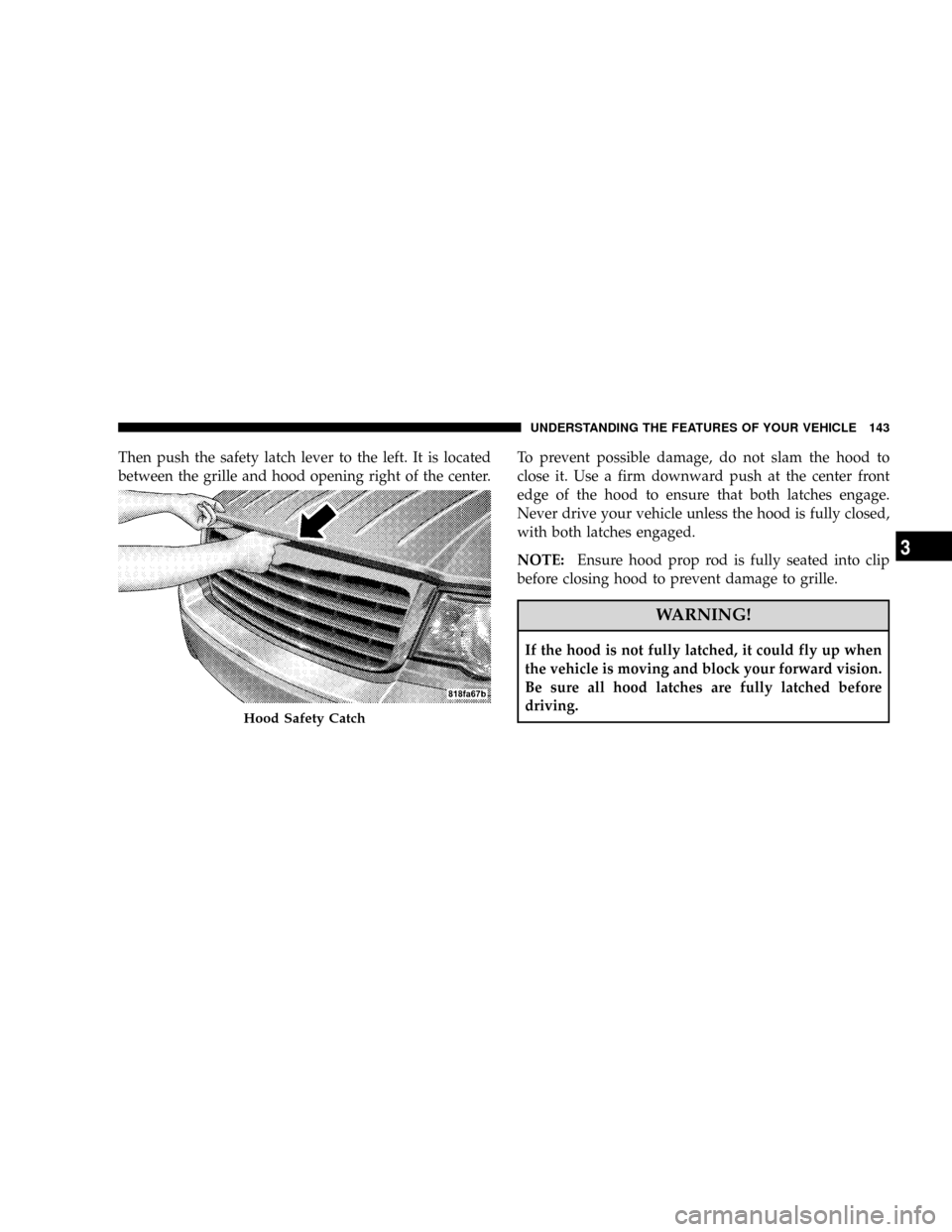
Then push the safety latch lever to the left. It is located
between the grille and hood opening right of the center.To prevent possible damage, do not slam the hood to
close it. Use a firm downward push at the center front
edge of the hood to ensure that both latches engage.
Never drive your vehicle unless the hood is fully closed,
with both latches engaged.
NOTE:Ensure hood prop rod is fully seated into clip
before closing hood to prevent damage to grille.
WARNING!
If the hood is not fully latched, it could fly up when
the vehicle is moving and block your forward vision.
Be sure all hood latches are fully latched before
driving.
Hood Safety Catch
UNDERSTANDING THE FEATURES OF YOUR VEHICLE 143
3
Page 146 of 479

Interior Lights
Courtesy and dome lights are turned on when the front
doors are opened, when the dimmer control (rotating
wheel on the right side of the switch) is rotated to the
second upward detent position, or when the UNLOCK
button is pressed on the key fob. When a door is openand the interior lights are on, rotating the dimmer control
all of the way down to the OFF detent will cause all the
interior lights to go out. This allows the doors to stay
open for extended periods of time without discharging
the vehicle's battery.
The brightness of the instrument panel lighting can be
regulated by rotating the dimmer control up (brighter) or
down (dimmer). When the headlights are ON you can
supplement the brightness of the odometer, trip odom-
eter, radio and overhead console by rotating the control
up until you hear a click. This feature is termed the
9Parade9mode and is useful when headlights are re-
quired during the day.Battery Saver
To protect the life of your vehicle's battery, load shedding
is provided for both the interior and exterior lights.
Dimmer Control
UNDERSTANDING THE FEATURES OF YOUR VEHICLE 145
3
Page 148 of 479
Automatic Headlights Ð If Equipped
Automatic headlights can be activated by rotating the
rotary headlight switch to the symbol ªA.º The head-
lights will turn on when the engine is running and the
ambient light sensor indicates that the headlights should
be activated. The headlights will turn off if the headlight
switch is rotated to the OFF position or 90 seconds after
the ignition is turned to OFF.
Headlights, Parking Lights, Panel Lights
When the headlight switch is rotated to the first position
to the right, the parking lights, taillights, side marker
lights, license plate light and instrument panel lights are
all turned on. The headlights will turn ON when the
switch is rotated to the second position.
Your vehicle is equipped with plastic headlight lenses
that are lighter and less susceptible to stone breakage
than glass headlights.Plastic is not as scratch resistant as glass and therefore
different lens cleaning procedures must be followed.
To minimize the possibility of scratching the lenses and
reducing light output, avoid wiping with a dry cloth. To
remove road dirt, wash with a mild soap solution fol-
lowed by rinsing.
Do not use abrasive cleaning components, solvents, steel
wool or other abrasive materials to clean the lenses.Illuminated Entry
Headlights turn on for 90 seconds, when the Remote
Keyless Entry UNLOCK button is pressed.
The illuminated entry time is programmable on vehicles
equipped with the Electronic Vehicle Information Center
(EVIC). For details, refer to ªPersonal Settings (Customer
Programmable Features)º under ªOverhead Console
with Electronic Vehicle Information Center (EVIC) ± If
Equippedº in Section 3.
UNDERSTANDING THE FEATURES OF YOUR VEHICLE 147
3
Page 155 of 479
TILT STEERING COLUMN
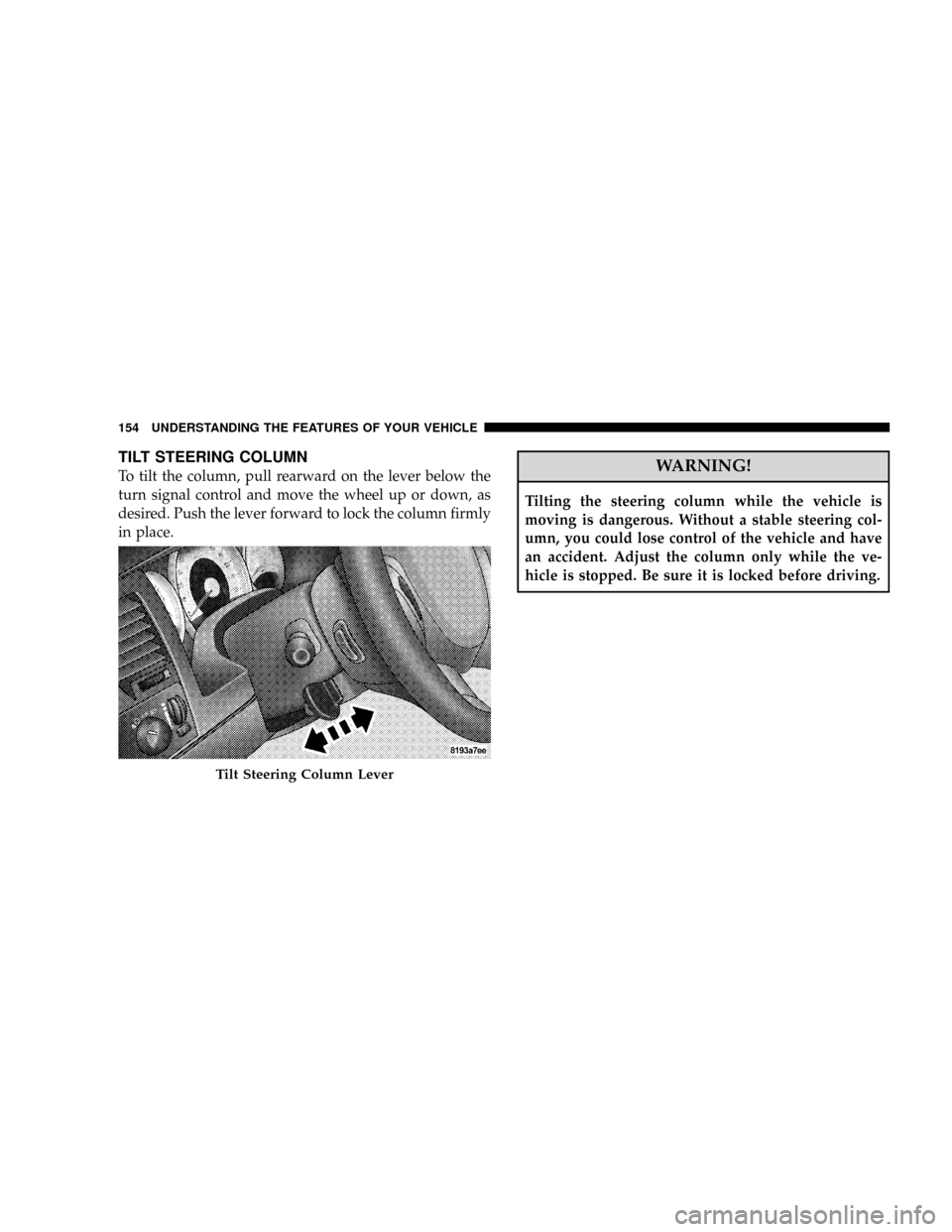
To tilt the column, pull rearward on the lever below the
turn signal control and move the wheel up or down, as
desired. Push the lever forward to lock the column firmly
in place.WARNING!
Tilting the steering column while the vehicle is
moving is dangerous. Without a stable steering col-
umn, you could lose control of the vehicle and have
an accident. Adjust the column only while the ve-
hicle is stopped. Be sure it is locked before driving.
Tilt Steering Column Lever
154 UNDERSTANDING THE FEATURES OF YOUR VEHICLE
Page 160 of 479
To Accelerate For Passing
Depress the accelerator as you would normally. When the
pedal is released, the vehicle will return to the set speed.
NOTE:When driving uphill, at elevations above 2,000 ft
(610 m), or when the vehicle is heavily loaded (especially
when towing) the vehicle may slow below the SET speed.
If the vehicle speed drops below (refer to the previous
table for the speed for your specific engine), the speed
control will automatically disengage. If this happens, you
can push down on the accelerator pedal to maintain the
desired speed.Vehicles equipped with an automatic transmission may
exhibit several downshifts under the above conditions.
To reduce the frequency of the downshifts and to im-
prove vehicle performance, it is advisable to lock out
OVERDRIVE by pressing the ªTOW/HAULº button
located at the end of the gear shifter.
WARNING!
Speed Control can be dangerous where the system
can't maintain a constant speed. Your vehicle could
go too fast for the conditions, and you could lose
control. An accident could be the result. Don't use
Speed Control in heavy traffic or on roads that are
winding, icy, snow-covered, or slippery.
UNDERSTANDING THE FEATURES OF YOUR VEHICLE 159
3
Page 167 of 479

²Electronic Vehicle Information Center (EVIC) Ð If
Equipped
Courtesy/Reading Lights
Near the front of the console is one courtesy and two
reading lights.
All lights illuminate as courtesy lights when a door is
opened, when the dimmer control is rotated to the
courtesy light position (fully upward position), or when
the UNLOCK button is pressed on the Remote Keyless
Entry (RKE) Transmitter, if so equipped. The two round
lamps are also operated individually as reading lights by
pressing the center of each lens.
NOTE:The courtesy/reading lights will remain on until
the switch is pressed a second time, so be sure they have
been turned off before leaving the vehicle. If the interior
lights are left on after the vehicle is turned OFF, they will
turn off after 15 minutes.
OVERHEAD CONSOLE WITH ELECTRONIC
VEHICLE INFORMATION CENTER (EVIC) Ð IF
EQUIPPED
The overhead console contains dome/reading lights, and
an Electronic Vehicle Information Center (EVIC).
Dome/Reading Lights
Located in the overhead console are two dome/reading
lights.
The dome/reading lights illuminate when a door is
opened or when the interior lights are turned on by
rotating the dimmer control located on the headlight
switch.
The reading lights are activated by pressing the center of
each lens.
NOTE:The dome/reading lights will remain on until
the switch is pressed a second time, so be sure they have
been turned off before leaving the vehicle.
166 UNDERSTANDING THE FEATURES OF YOUR VEHICLE