lock CHRYSLER ASPEN 2008 2.G Workshop Manual
[x] Cancel search | Manufacturer: CHRYSLER, Model Year: 2008, Model line: ASPEN, Model: CHRYSLER ASPEN 2008 2.GPages: 479, PDF Size: 4.3 MB
Page 171 of 479
1. Turn the ignition switch to the ON position(Do not
start the engine).
2. Fully depress the accelerator pedal slowly three times
within 10 seconds.
3. Turn the ignition switch to the OFF/LOCK position.
NOTE:If the indicator message illuminates when you
start the vehicle, the oil change indicator system did not
reset. If necessary, repeat this procedure.
Personal Settings (Customer-Programmable
Features)
Personal Settings allows the driver to set and recall
features when the transmission is in PARK. If the trans-
mission is not in PARK the EVIC will display NOT
AVAILABLE and VEHICLE NOT IN PARK.Press and release the MENU button until the
Personal Settings displays on the EVIC.
Use the STEP button to display one of the following:
²ªLANGUAGEº ± When in this display, you may select
one of several different languages for all display
nomenclature, including the trip functions. Press the
RESET button while in this display to select your
preferred language. Then, as you continue, the infor-
mation will display in the selected language.
²ªAUTO DOOR LOCK > ONº ± When ON is selected,
all doors will lock automatically when the vehicle
reaches a speed of 15 mph (24 km/h). To make your
selection, press and release the RESET button until
ªONº or ªOFFº appears.
²ªAUTO UNLOCK ON EXIT > ONº ± When ON is
selected, all doors will unlock when the vehicle is
170 UNDERSTANDING THE FEATURES OF YOUR VEHICLE
Page 172 of 479
stopped and the transmission is in the PARK or
NEUTRAL position and the driver's door is opened.
To make your selection, press and release the RESET
button until ªONº or ªOFFº appears.
²ªRKE UNLOCK DRV DR 1stº ± WhenDRV DR 1stis
selected, only the driver's door will unlock on the first
press of the RKE UNLOCK button. When Driver Door
1st Press is selected, you must press the Remote
Keyless Entry UNLOCK button twice to unlock the
passenger's doors. To make your selection, press and
release the RESET button until ªDRV DR 1st º appears.
²ªRKE UNLOCK ALL DR 1STº ± When AllALL DR
1STis selected, all of the doors will unlock on the first
press of the RKE UNLOCK button. To make your
selection, press and release the RESET button until
ªAll DR 1stº appears.
²MEM. RECALL WITH RKE > ON ± When ON is
selected, pressing the UNLOCK button on the RKEwill recall the memory settings for the seat, mirror and
radio. To make your selection, press and release the
RESET button until ªON9or ªOFFº appears.
²ªSOUND HORN W/LOCK > ONº ± When ON is
selected, a short horn sound will occur when the
Remote Keyless Entry LOCK button is pressed. This
feature may be selected with or without the flash lights
on lock/unlock feature. To make your selection, press
and release the RESET button until ªONº or ªOFFº
appears.
²ªFLASH LAMPS W/LOCK >ONº ± When ON is
selected, the front and rear turn signals will flash when
the doors are locked or unlocked with the RKE Trans-
mitter. This feature may be selected with or without
the sound horn on lock feature selected. To make your
selection, press and release the RESET button until
ªONº or ªOFFº appears.
UNDERSTANDING THE FEATURES OF YOUR VEHICLE 171
3
Page 173 of 479
²ªHEADLAMP OFF DELAY > 0 SECº ± When this
feature is selected, the driver can choose to have the
headlamps remain on for 0, 30, 60, or 90 seconds when
exiting the vehicle. To make your selection, press and
release the RESET button until ª0,º ª30,º ª60,º or ª90º
appears.
NOTE:The headlamp switch must be in the ªAº auto
mode before this feature will work.
²HEADLAMPS W/WIPERS > ON ± When ON is
selected, the headlamps will automatically turn on
when the wiper switch is activated.
²EASY EXIT SEAT > ON ± When ON is selected, and
the key is removed from the ignition, the driver's seat
will automatically move rearward to allow easy exit.
²TILT MIRRORS IN ªRº > ON ± When ON is selected,
and the transmission is put in REVERSE, the outside
mirrors will tilt downward.
²ªKEY OFF POWER DELAY> OFFº ± When this feature
is selected, the power window switches, radio, hands±
free system (if equipped), and power outlets will
remain active for up to 10 minutes after the ignition
switch is turned off. Opening a vehicle door will
cancel this feature. To make your selection, press and
release the RESET button until ªOff,º ª45 sec.,º ª5
min.,º ª10 min.º appears.
²ªILLUMINATED APRCH > OFFº ± When this feature
is selected, the headlights will activate and remain on
for up to 90 seconds when the doors are unlocked with
the RKE Transmitter. To make your selection, press
and release the RESET button until ªOFF,º ª30 sec.,º
ª60 sec.,º or ª90 sec.º appears.
²PARK ASST. SYSTEM > ON ± When YES is selected,
the Rear Park Assist System is activated. When NO is
selected, the System is deactivated.
172 UNDERSTANDING THE FEATURES OF YOUR VEHICLE
Page 182 of 479

Using HomeLinkT
To operate, simply press and release the programmed
HomeLinktbutton. Activation will now occur for the
trained device (i.e., garage door opener, gate operator,
security system, entry door lock, home/office lighting,
etc.) The hand-held transmitter of the device may also be
used at any time.
Reprogramming A Single HomeLinkTButton
To reprogram a channel that has been previously trained,
follow these steps:
1. Turn the ignition switch to the ON/RUN position.
2. Press and hold the desired HomeLinktbutton for 20
seconds until the EVIC display states ªCHANNEL #
TRAINING.ºDo not release the button.
3.Without releasing the button,proceed with Program-
ming HomeLinktStep 2 and follow all remaining steps.
Security
It is advised to erase all channels before you sell or turn
in your vehicle.
To do this, press and hold the two outside buttons for 20
seconds until the EVIC message states ªCHANNELS
CLEARED.º Note that all channels will be erased. Indi-
vidual channels cannot be erased.
The HomeLinktUniversal Transceiver is disabled when
the Vehicle Security Alarm is active.
Troubleshooting Tips
If you are having trouble programming HomeLinkt, here
are some of the most common solutions:
²Replace the battery in the original transmitter.
²Press the learn button on the garage door opener to
complete the training for rolling code.
UNDERSTANDING THE FEATURES OF YOUR VEHICLE 181
3
Page 186 of 479
ELECTRICAL POWER OUTLETS
This vehicle has three auxiliary power outlets that can
provide up to 20 Amps of current for accessories de-
signed for use with the standard power outlet adapters.
The outlet located in the lower portion of the instrument
panel has a snap on plastic cap so that it can be covered
when not in use. As a safety precaution, the outlet in the
instrument panel only operates with the ignition switch
ON. When the optional Cigar Lighter heating element is
used, it heats when pushed in and pops out automati-
cally when ready for use.To preserve the heating
element, do not hold the lighter in the heating position.
There are two additional 12 V/(20 total Amps for both
outlets) power outlets, one located in the storage bin of
the center console and another located in the right rear
cargo area. These outlets can be reconfigured by the
customer to operate only when the ignition is ON(switched battery fed) or with the ignition ON or OFF
(battery fed) to allow for cellular telephone charging and
or operation while the ignition is off.
NOTE:All accessories connected to these outlets should
be removed or turned OFF when the vehicle is not in use
to protect the battery against discharge (unless the cus-
tomer has reconfigured the fuse block to switched battery
feed). (See page 187 for more information.)
115V Inverter Outlet ± If Equipped
This vehicle may also be equipped with a 115 Volt (150
Watts Maximum) outlet on the rear of the front center
console. These outlets can power cell phones, electronics
and other low power devices. This plug is controlled by
a switch located in left lower instrument panel.
Press the switch to turn the power on to the outlet. Press
the switch a second to turn the power off.
UNDERSTANDING THE FEATURES OF YOUR VEHICLE 185
3
Page 189 of 479
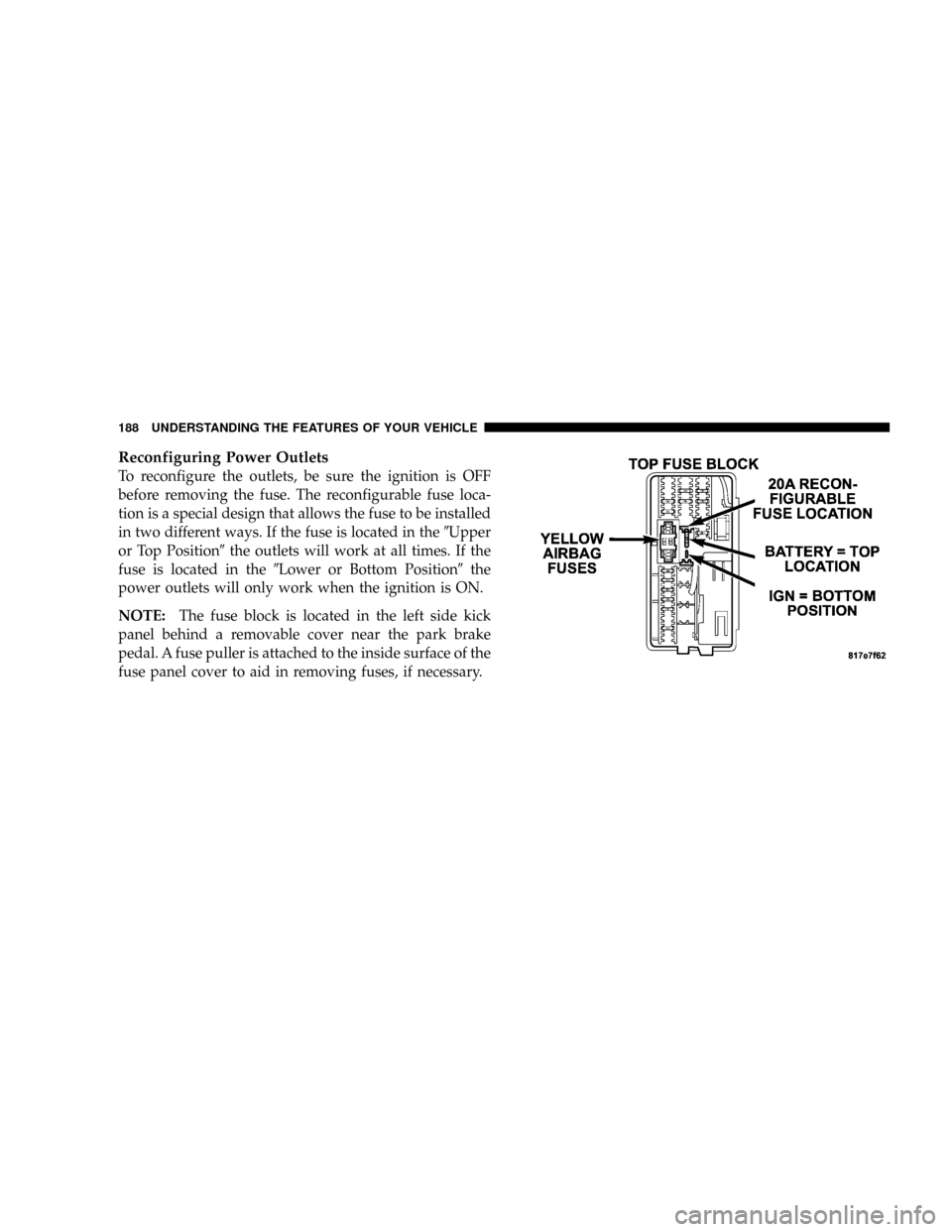
Reconfiguring Power Outlets
To reconfigure the outlets, be sure the ignition is OFF
before removing the fuse. The reconfigurable fuse loca-
tion is a special design that allows the fuse to be installed
in two different ways. If the fuse is located in the9Upper
or Top Position9the outlets will work at all times. If the
fuse is located in the9Lower or Bottom Position9the
power outlets will only work when the ignition is ON.
NOTE:The fuse block is located in the left side kick
panel behind a removable cover near the park brake
pedal. A fuse puller is attached to the inside surface of the
fuse panel cover to aid in removing fuses, if necessary.
188 UNDERSTANDING THE FEATURES OF YOUR VEHICLE
Page 198 of 479
INSTRUMENT PANEL AND CONTROLS
CONTENTS
mInstruments And Controls.................201
mInstrument Cluster......................202
mInstrument Cluster Description.............203
mElectronic Digital Clock..................214
NClock Setting Procedure.................215
mSetting The Analog Clock.................215
mRadio General Information................216
NRadio Broadcast Signals.................216
NTwo Types Of Signals..................216NElectrical Disturbances..................216
NAM Reception.......................216
NFM Reception........................216
mSales Code REN Ð Multimedia System Ð If
Equipped............................217
NOperating Instructions Ð Satellite Radio (If
Equipped)..........................218
NOperating Instructions Ð Voice Recognition
System (VR) (If Equipped)...............2184
Page 199 of 479
NOperating Instructions Ð Hands-Free
Communication (UConnectt) (If Equipped) . . . 218
NClock Setting Procedure.................218
mSales Code RER Ð Multimedia System Ð If
Equipped............................220
NOperating Instructions Ð Satellite Radio.....221
NOperating Instructions Ð Hands-Free
Communication (UConnectt) (If Equipped) . . . 221
NClock Setting Procedure.................221
mSales Code RES Ð AM/FM Stereo Radio With
CD Player (MP3 AUX Jack)................224
NOperating Instructions - Radio Mode.......224
NOperation Instructions - CD Mode For CD And
MP3 Audio Play......................230
NNotes On Playing MP3 Files.............232NList Button (CD Mode For MP3 Play).......235
NInfo Button (CD Mode For MP3 Play).......235
mSatellite Radio (RSC) Ð If Equipped
(RER/REQ/REN Radios Only).............236
NSystem Activation.....................236
NElectronic Serial Number/Sirius Identification
Number (ENS/SID)....................237
NSelecting Satellite Mode.................237
NSatellite Antenna......................238
NReception Quality.....................238
NOperating Instructions - Satellite Mode......238
NOperating Instructions - Hands-Free Phone (If
Equipped)..........................241
198 INSTRUMENT PANEL AND CONTROLS
Page 206 of 479
WARNING!
A hot engine cooling system is dangerous. You or
others could be badly burned by steam or boiling
coolant. You may want to call a service center if your
vehicle overheats. If you decide to look under the
hood yourself, refer to ªCooling System Pressure
Capº under ªCooling Systemº in Section 7. Follow
the warnings under the paragraph.
8. Speedometer
The speedometer shows the speed of the vehicle.
9. Voltage Light
This light monitors the electrical system voltage.
The light should turn on momentarily as the
engine is started. If the light stays on or turns on while
driving, it indicates a problem with the charging system.
See your authorized dealer for service immediately.10. Security Light
This light will flash rapidly for approximately 15 seconds
when the Vehicle Security Alarm is arming. The light will
flash at a slower speed continuously after the alarm is set.
The Security light will also come on for about three
seconds when the ignition is first turned on.
11. ABS Warning Light
This light monitors the Anti-Lock Brake System
(ABS) which is described elsewhere in this
manual. This light will come on when the
ignition key is turned to the ON position and
may stay on for approximately three seconds. If this light
remains on or comes on during driving, it indicates that
the Anti-Lock portion of the brake system is not func-
tioning and that service is required. See your authorized
dealer immediately. With the ABS malfunctioning, the
Brake Assist System (BAS) and Electronic Stability Pro-
gram (ESP) are also switched off. Both malfunction
indicator lights illuminate with the engine running. If the
INSTRUMENT PANEL AND CONTROLS 205
4
Page 209 of 479
Unless reset, this message will continue to display each
time you turn the ignition switch to the ON/RUN
position. To turn off the message temporarily, press and
release the Trip Odometer button on the instrument
cluster. To reset the oil change indicator system (after
performing the scheduled maintenance) refer to the fol-
lowing procedure.
1. Turn the ignition switch to the ON position(Do not
start the engine).
2. Fully depress the accelerator pedal slowly three
times within 10 seconds.
3. Turn the ignition switch to the OFF/LOCK position.
NOTE:If the indicator message illuminates when you
start the vehicle, the oil change indicator system did not
reset. If necessary repeat this procedure.16. Odometer
The odometer shows the total distance the vehicle has
been driven.
U.S. federal regulations require that upon transfer of
vehicle ownership, the seller certify to the purchaser the
correct mileage that the vehicle has been driven. There-
fore, if the odometer reading is changed during repair or
replacement, be sure to keep a record of the reading
before and after the service so that the correct mileage can
be determined.
17. Fog Light Indicator
This light shows when the fog lights are ON.
18. Electronic Stability Program (ESP) Indicator Light
The yellow ESP indicator light in the speedom-
eter area illuminates with the key in the igni-
tion switch turned to the ON/RUN position. It
should go out with the engine running. The
208 INSTRUMENT PANEL AND CONTROLS