Evic CHRYSLER ASPEN 2008 2.G Owners Manual
[x] Cancel search | Manufacturer: CHRYSLER, Model Year: 2008, Model line: ASPEN, Model: CHRYSLER ASPEN 2008 2.GPages: 479, PDF Size: 4.3 MB
Page 18 of 479
General Information
The Sentry Keytsystem complies with FCC rules Part 15
and with RSS-210 of Industry Canada. Operation is
subject to the following conditions:
²This device may not cause harmful interference.
²This device must accept any interference that may be
received, including interference that may cause undes-
ired operation.
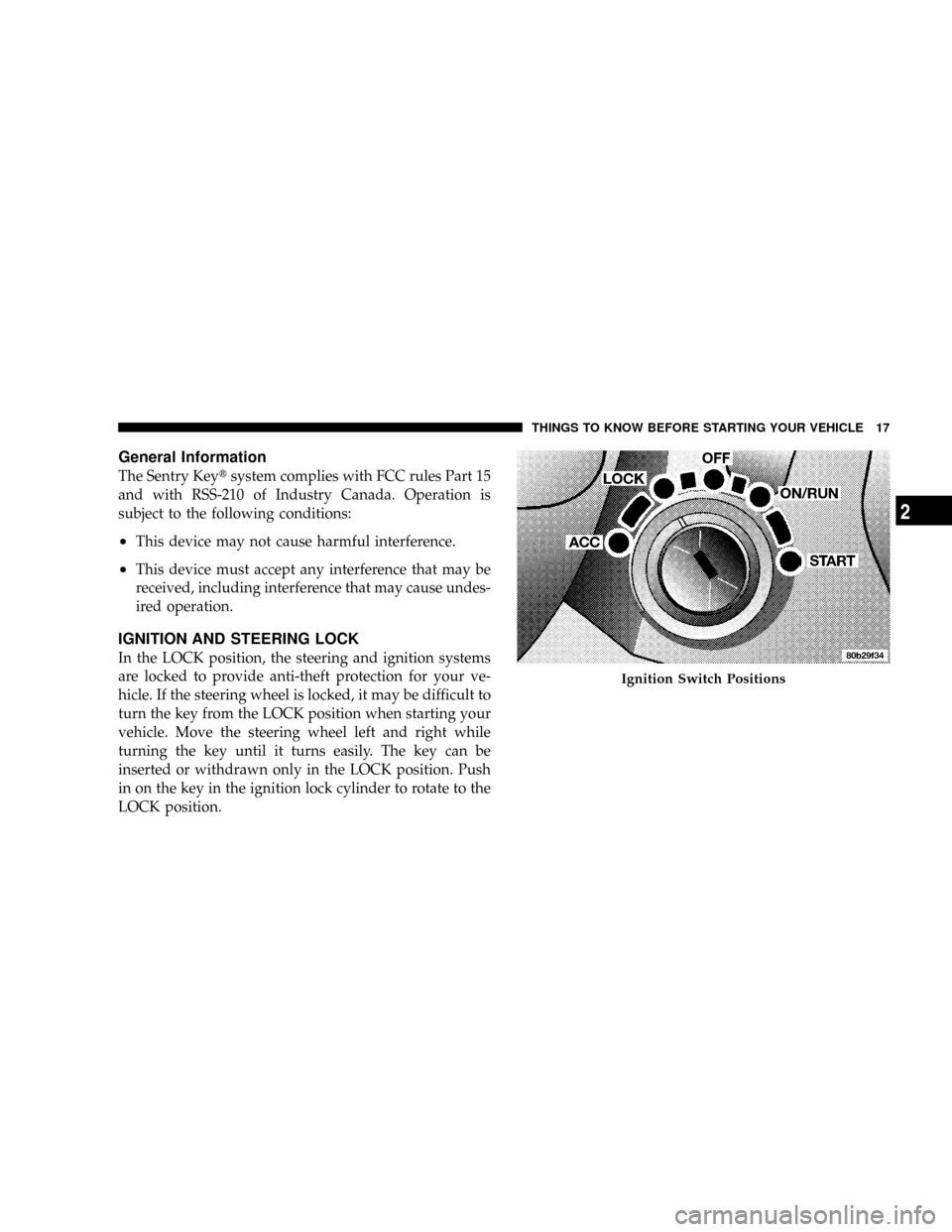
IGNITION AND STEERING LOCK
In the LOCK position, the steering and ignition systems
are locked to provide anti-theft protection for your ve-
hicle. If the steering wheel is locked, it may be difficult to
turn the key from the LOCK position when starting your
vehicle. Move the steering wheel left and right while
turning the key until it turns easily. The key can be
inserted or withdrawn only in the LOCK position. Push
in on the key in the ignition lock cylinder to rotate to the
LOCK position.
Ignition Switch Positions
THINGS TO KNOW BEFORE STARTING YOUR VEHICLE 17
2
Page 19 of 479
WARNING!
The key cannot be turned to LOCK until the shift
lever is in the PARK position. Do not attempt to pull
the shift lever out of PARK after the key is in the
LOCK position.
NOTE:The steering wheel will lock when the key is
removed, and when the steering wheel is turned around
115 degrees clockwise or 65 degrees counterclockwise
from the center position.
Ignition Accessory Delay Feature
The power window switches, radio, hands±free system
(if equipped), and power outlets will remain active for 10
minutes after the ignition switch is turned off. Opening
either front door will cancel this feature.For vehicles equipped with the Electronic Vehicle Infor-
mation Center (EVIC), the time for this feature is pro-
grammable. For details, refer to ªPersonal Settings
(Customer-Programmable Features)º/ªKEY OFF
POWER DELAY > OFFº under ªElectronic Vehicle Infor-
mation Center (EVIC)º in Section 3 of this manual.
SECURITY ALARM SYSTEM Ð IF EQUIPPED
This system monitors the vehicle doors, liftgate, and
ignition for unauthorized operation. When the Security
Alarm System is activated, the system provides both
audible and visual signals. The horn will sound repeat-
edly for three minutes and the headlights and Security
light in the instrument cluster will flash for an additional
15 minutes. The engine will not run until the system is
disarmed.
18 THINGS TO KNOW BEFORE STARTING YOUR VEHICLE
Page 23 of 479
The system can be programmed to unlock all the doors
upon the first UNLOCK button press by following these
procedures:
²For vehicles equipped with the Electronic Vehicle
Information Center (EVIC), refer to ªPersonal Settings
(Customer Programmable Features)º under ªOver-
head Console with Electronic Vehicle Information
Center (EVIC) ± If Equippedº in Section 3.
²For vehicles not equipped with the EVIC:
1. Press and hold the LOCK button on a programmed
key fob.
2. Continue to hold the LOCK button at least four
seconds, but not longer than 10 seconds, then press and
hold the UNLOCK button.
3. Release both buttons at the same time.4. Test the feature while outside of the vehicle, by
pressing the LOCK/UNLOCK button on the key fob.
NOTE:Pressing the LOCK button on the key fob while
you are inside the vehicle will activate the Security
Alarm. Opening a door with the Security Alarm activated
will cause the alarm to sound. Press the UNLOCK button
to deactivate the Security Alarm.
5. If the desired programming was not achieved or to
reactivate this feature, repeat the above steps.
To Lock the Doors and Liftgate:
Press and release the LOCK button on the key fob to lock
all doors and liftgate. If the ignition is OFF when the
doors are locked, the parking lights will flash on once
and the horn will chirp once.
22 THINGS TO KNOW BEFORE STARTING YOUR VEHICLE
Page 24 of 479
Horn Chirp Programming
The horn chirp feature will be activated when shipped
from the assembly plants. If desired, this feature can be
disabled by following these procedures:
²For vehicles equipped with the Electronic Vehicle
Information Center (EVIC), refer to ªPersonal Settings
(Customer Programmable Features)º under ªOver-
head Console with Electronic Vehicle Information
Center (EVIC) ± If Equippedº in Section 3.
²For vehicles not equipped with the EVIC:
1. Press and hold the LOCK button on the key fob.
2. After holding the LOCK button for four seconds, also
press the PANIC button within six seconds.
3. Release both buttons at the same time.
4. To reactivate this feature, repeat the above steps.5. Test the horn chirp feature while outside of the vehicle
by pressing the LOCK button on the key fob with the
ignition in the OFF position and the key removed.
NOTE:Pressing the LOCK button on the key fob while
you are inside the vehicle will activate the Security
Alarm. Opening a door with the Security Alarm activated
will cause the alarm to sound. Press the UNLOCK button
to deactivate the Security Alarm.
6. If the desired programming was not achieved or to
reactivate this feature, repeat the above steps.
Flash Lights with Lock Programming
²
For vehicles equipped with the Electronic Vehicle
Information Center (EVIC), refer to ªPersonal Settings
(Customer Programmable Features)º under ªOver-
head Console with Electronic Vehicle Information
Center (EVIC) ± If Equippedº in Section 3.
THINGS TO KNOW BEFORE STARTING YOUR VEHICLE 23
2
Page 25 of 479
²For vehicles not equipped with the EVIC, perform the
following procedure:
1. Press and hold the UNLOCK button on the key fob.
2. After holding the UNLOCK button for four seconds,
also press the LOCK button within six seconds.
3. Release both buttons at the same time.
4. Test the flash lights with LOCK feature while outside
of the vehicle, by pressing the LOCK button on the key
fob with the ignition in the OFF position and the key
removed.
NOTE:Pressing the LOCK button on the key fob while
you are inside the vehicle will activate the Security
Alarm. Opening a door with the Security Alarm activated
will cause the alarm to sound. Press the UNLOCK button
to deactivate the Security Alarm.5. If the desired programming was not achieved or to
reactivate this feature, repeat the above steps.
Using the Panic Alarm
To activate the PANIC mode, while the ignition is OFF,
press and release the PANIC button on the transmitter
once. When the PANIC mode is activated, the interior
lights will illuminate, the head lights and parking lights
will flash and the horn will sound.
To cancel the PANIC mode, press and release the PANIC
button on the transmitter a second time. PANIC mode
will automatically cancel after three minutes or if the
vehicle is started or exceeds 15 mph (24 km/h). During
the PANIC mode, the door locks and Remote Keyless
Entry systems will function normally. PANIC mode will
not disarm the Security Alarm System on vehicles so
equipped.
24 THINGS TO KNOW BEFORE STARTING YOUR VEHICLE
Page 26 of 479
General Information
This device complies with part 15 of FCC rules and with
RS-210 of Industry Canada. Operation is subject to the
following conditions:
1. This device may not cause harmful interference.
2. This device must accept any interference that may be
received including interference that may cause undesired
operation.
NOTE:Changes or modifications not expressly ap-
proved by the party responsible for compliance could
void the user's authority to operate the equipment.
If your Remote Lock Control fails to operate from a
normal distance, check for these two conditions.
1. Weak batteries in transmitter. The expected life of the
batteries is five years.2. Closeness to a radio transmitter, such as a radio station
tower, airport transmitter, military base, and some mobile
or CB radios.
Programming Additional Transmitters
Vehicles will be shipped from the assembly plants with
two key fob transmitters programmed only for that
vehicle. A total of eight key fobs can be programmed for
your vehicle. Additional key fobs can be programmed to
your vehicle through the use of a currently programmed
fob.
NOTE:When entering program mode using that key
fob, all other programmed key fobs will be erased and
you will have to reprogram them for your vehicle.
Use the following procedure to program additional key
fobs if the vehicle is not equipped with Sentry Keyt:
1. Enter your vehicle and close all doors.
THINGS TO KNOW BEFORE STARTING YOUR VEHICLE 25
2
Page 32 of 479
Automatic Door Locks
If this feature is enabled, your door locks will lock
automatically when the vehicle's speed exceeds 15 mph
(24 km/h).
Automatic Door Lock Programming
This feature is enabled when your vehicle is shipped
from the assembly plant and can be disabled by follow-
ing these procedures:
²For vehicles equipped with the Electronic Vehicle
Information Center (EVIC), refer to ªPersonal Settings
(Customer Programmable Features)º under ªOver-
head Console with Electronic Vehicle Information
Center (EVIC) ± If Equippedº in Section 3.
²For vehicles not equipped with the EVIC:
1. Enter your vehicle and close all doors.2. Fasten your seat belt. Fastening the seat belt will
cancel any chiming that may confuse you during this
programming procedure.
3. Place the key into the ignition.
4. Within 10 seconds, cycle the key from the LOCK
position to the ON position a minimum of four times,
ending in the LOCK position(do not start the engine).
5. Within 30 seconds, press the driver's door lock switch
in the LOCK direction.
6. A single chime will be heard to indicate the feature has
been disabled.
7. To reactivate this feature, repeat the above steps.
8. If a chime is not heard, the program mode was
canceled before the feature could be disabled. If neces-
sary, repeat the above procedure.
THINGS TO KNOW BEFORE STARTING YOUR VEHICLE 31
2
Page 33 of 479
Auto Unlock On Exit Ð If Equipped
This feature unlocks all of the doors of the vehicle when
any door is opened (excluding the liftgate). This will
occur only after the vehicle has been shifted into the
PARK position after the vehicle has been driven (shifted
out of PARK and all doors closed).
This feature will not operate if there is any manual
operation of the power door locks (LOCK or UNLOCK).
Auto Unlock On Exit Programming Ð If Equipped
Customer programming sequence to enable or disable
the Auto Unlock feature:
²For vehicles equipped with the Electronic Vehicle
Information Center (EVIC), refer to ªPersonal Settings
(Customer Programmable Features)º under ªOver-
head Console with Electronic Vehicle Information
Center (EVIC) ± If Equippedº in Section 3.
²For vehicles not equipped with the EVIC, performing
the following procedure:
1. Enter your vehicle and close all doors.
2. Fasten your seat belt. Fastening the seat belt will
cancel any chimes that may be confusing during this
programming procedure.
3. Insert the key into the ignition.
4. Within 15 seconds, cycle the key from the LOCK
position to the ON position a minimum of four times,
ending in the LOCK position(do not start the engine).
5. Within 30 seconds, press the driver's door lock switch
in the UNLOCK direction.
6. A single chime will sound to indicate the feature has
been changed.
7. Repeat the above steps to alternate the availability of
this feature.
32 THINGS TO KNOW BEFORE STARTING YOUR VEHICLE
Page 51 of 479
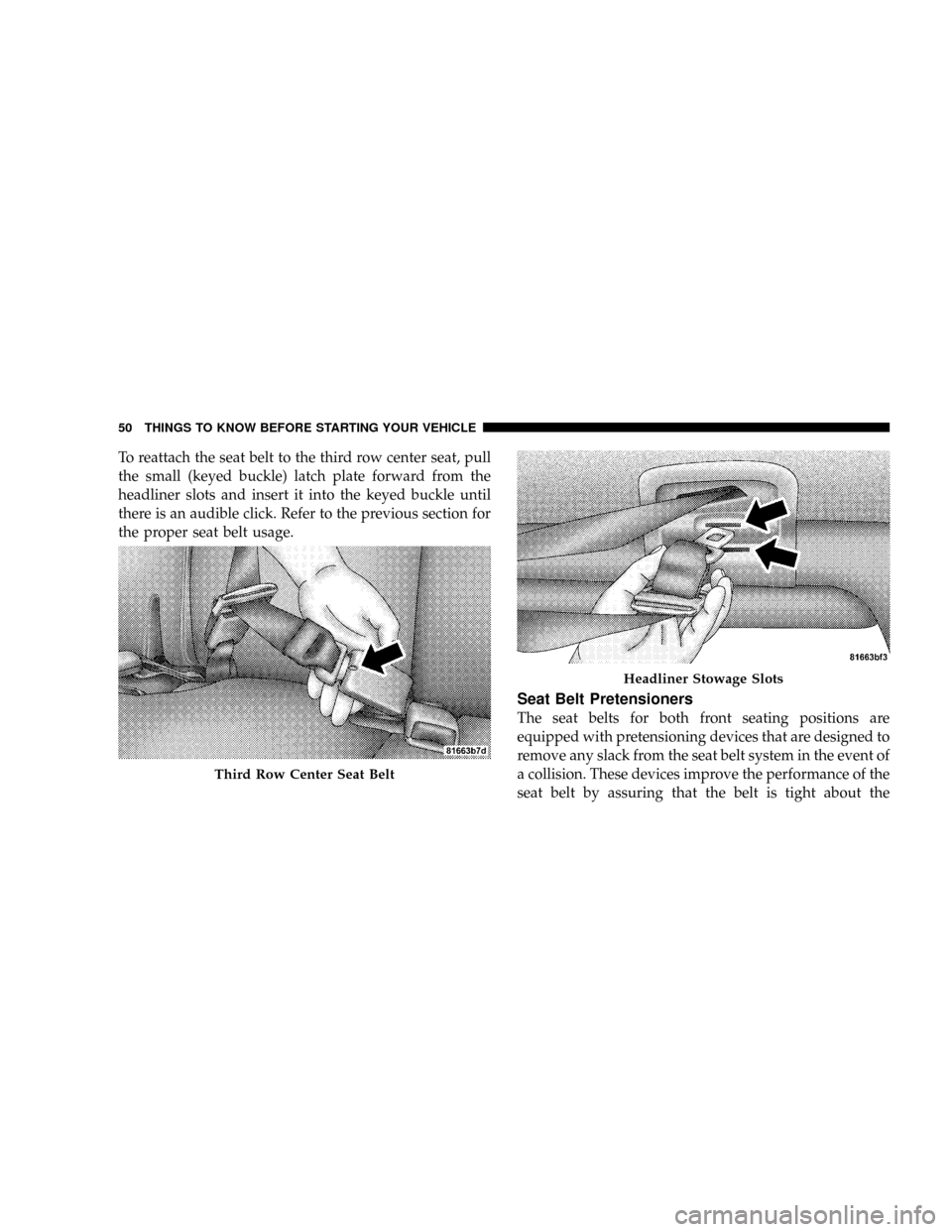
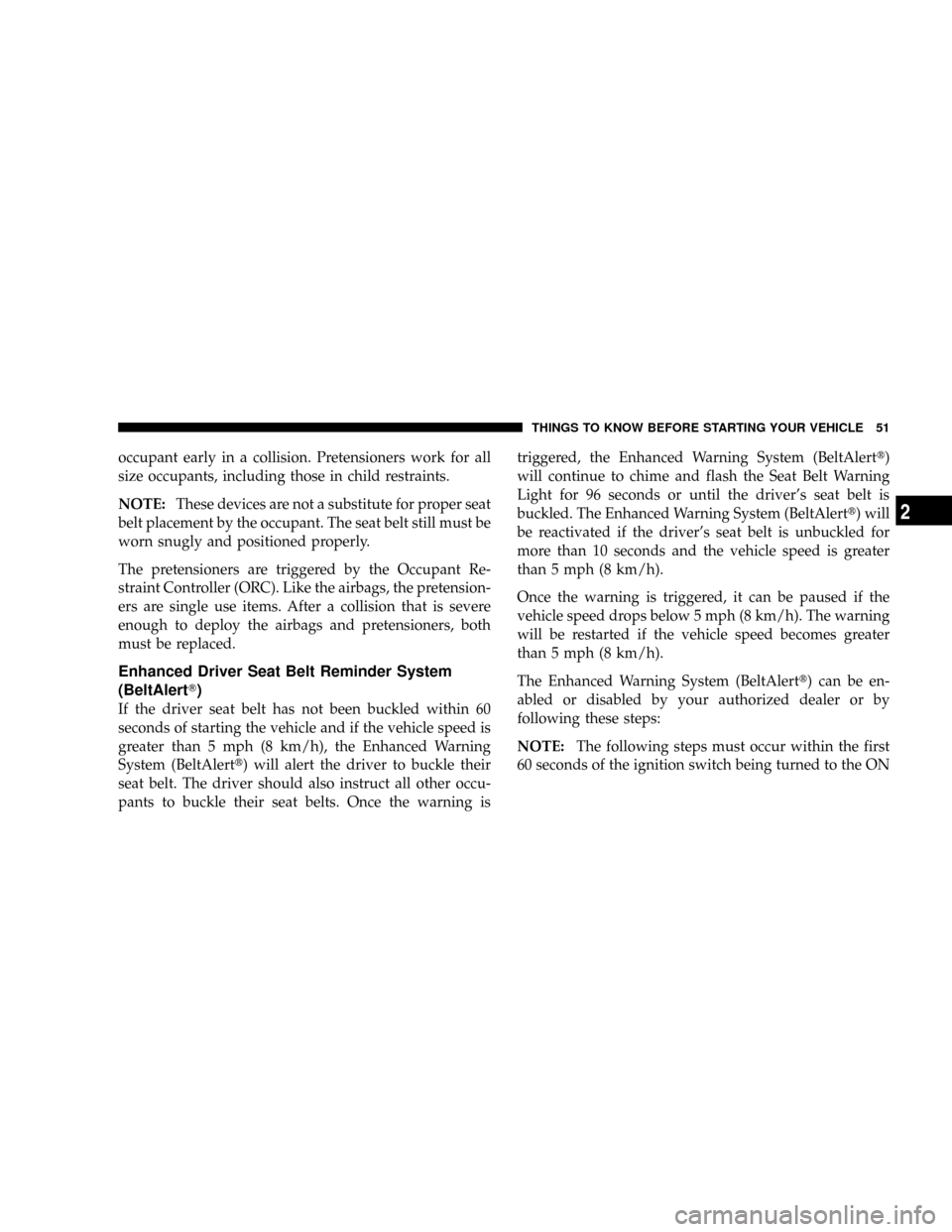
To reattach the seat belt to the third row center seat, pull
the small (keyed buckle) latch plate forward from the
headliner slots and insert it into the keyed buckle until
there is an audible click. Refer to the previous section for
the proper seat belt usage.
Seat Belt Pretensioners
The seat belts for both front seating positions are
equipped with pretensioning devices that are designed to
remove any slack from the seat belt system in the event of
a collision. These devices improve the performance of the
seat belt by assuring that the belt is tight about the
Third Row Center Seat Belt
Headliner Stowage Slots
50 THINGS TO KNOW BEFORE STARTING YOUR VEHICLE
Page 52 of 479
occupant early in a collision. Pretensioners work for all
size occupants, including those in child restraints.
NOTE:These devices are not a substitute for proper seat
belt placement by the occupant. The seat belt still must be
worn snugly and positioned properly.
The pretensioners are triggered by the Occupant Re-
straint Controller (ORC). Like the airbags, the pretension-
ers are single use items. After a collision that is severe
enough to deploy the airbags and pretensioners, both
must be replaced.
Enhanced Driver Seat Belt Reminder System
(BeltAlertT)
If the driver seat belt has not been buckled within 60
seconds of starting the vehicle and if the vehicle speed is
greater than 5 mph (8 km/h), the Enhanced Warning
System (BeltAlertt) will alert the driver to buckle their
seat belt. The driver should also instruct all other occu-
pants to buckle their seat belts. Once the warning istriggered, the Enhanced Warning System (BeltAlertt)
will continue to chime and flash the Seat Belt Warning
Light for 96 seconds or until the driver's seat belt is
buckled. The Enhanced Warning System (BeltAlertt) will
be reactivated if the driver's seat belt is unbuckled for
more than 10 seconds and the vehicle speed is greater
than 5 mph (8 km/h).
Once the warning is triggered, it can be paused if the
vehicle speed drops below 5 mph (8 km/h). The warning
will be restarted if the vehicle speed becomes greater
than 5 mph (8 km/h).
The Enhanced Warning System (BeltAlertt) can be en-
abled or disabled by your authorized dealer or by
following these steps:
NOTE:The following steps must occur within the first
60 seconds of the ignition switch being turned to the ON
THINGS TO KNOW BEFORE STARTING YOUR VEHICLE 51
2