brake CHRYSLER ASPEN 2009 2.G Owner's Guide
[x] Cancel search | Manufacturer: CHRYSLER, Model Year: 2009, Model line: ASPEN, Model: CHRYSLER ASPEN 2009 2.GPages: 481, PDF Size: 9.28 MB
Page 305 of 481
Electronic Stability Program (ESP)
This system enhances directional control and stability of
the vehicle under various driving conditions. ESP cor-
rects for over/under steering of the vehicle by applying
the brake of the appropriate wheel to assist in counter-
acting the over/under steer condition. Engine power
may also be reduced to help the vehicle maintain the
desired path.
ESP uses sensors in the vehicle to determine the vehicle
path intended by the driver and compares it to the actual
path of the vehicle. When the actual path does not match
the intended path, ESP applies the brake of the appropri-
ate wheel to assist in counteracting the oversteer or
understeer condition.
²Oversteer - when the vehicle is turning more than
appropriate for the steering wheel position.
²Understeer - when the vehicle is turning less than
appropriate for the steering wheel position.
ESP/TCS Indicator Light
The ESP/TCS Indicator Light starts to flash as
soon as the tires lose traction and the TCS or
ESP system becomes active. It will also flash
once a swaying trailer is detected and the
Trailer Sway Control (TSC) system activates. If the ESP/
TCS Indicator Light begins to flash during acceleration,
ease up on the accelerator and apply as little throttle as
possible. Be sure to adapt your speed and driving to the
prevailing road conditions.
WARNING!
²ESP cannot prevent the natural laws of physics
from acting on the vehicle, nor can it increase the
traction afforded.
(Continued)
STARTING AND OPERATING 303
5
Page 308 of 481
NOTE:When the vehicle is in 4WD LOW, a feature of
the ESP system remains active whether the ESP is on or
off. This feature functions similar to a limited slip differ-
ential and controls the wheel spin across an axle. If one
wheel on an axle is spinning faster than the other, the
system will apply the brake of the spinning wheel and
allow more engine torque to be applied to the wheel that
is not spinning.
WARNING!
In the Partial Off mode, the engine torque reduction
and stability features are desensitized. Therefore, the
enhanced vehicle stability offered by ESP is
unavailable.
Trailer Sway Control (TSC)
TSC uses sensors in the vehicle to recognize a swaying
trailer and will take the appropriate actions to attempt to
stop the sway. The system will reduce engine power andapply individual brakes that will counter act the sway of
the trailer. TSC will become active automatically once the
swaying trailer is recognized. No driver action is re-
quired. TSC cannot stop all trailers from swaying. Al-
ways use caution when towing a trailer and follow the
tongue weight recommendations. For additional infor-
mation on towing a trailer with your vehicle, refer to
9Trailer Towing9in Section 5.
ESP/BAS Warning Light and ESP/TCS Indicator
Light
The malfunction indicator for the ESP is combined with
the BAS indicator. The yellow ESP/BAS Warning Light
and the yellow ESP/TCS Indicator Light in the instru-
ment cluster both come on when the ignition switch is
turned to the ON position. They should both go out with
the engine running. If the ESP/BAS Warning Light comes
on continuously with the engine running, a malfunction
has been detected in either the ESP or BAS system, or
both. If this light remains on after several ignition cycles,
306 STARTING AND OPERATING
Page 350 of 481
Inflation Pressure (Cold)
This is the cold tire inflation pressure for your vehicle for
all loading conditions up to full GAWR.
Curb Weight
The curb weight of a vehicle is defined as the total weight
of the vehicle with all fluids, including vehicle fuel, at full
capacity conditions, and with no occupants or cargo
loaded into the vehicle. The front and rear curb weight
values are determined by weighing your vehicle on a
commercial scale before any occupants or cargo are
added.
Loading
The actual total weight and the weight of the front and
rear of your vehicle at the ground can best be determined
by weighing it when it is loaded and ready for operation.The entire vehicle should first be weighed on a commer-
cial scale to ensure that the GVWR has not been ex-
ceeded. The weight on the front and rear of the vehicle
should then be determined separately to be sure that the
load is properly distributed over front and rear axle.
Weighing the vehicle may show that the GAWR of either
the front or rear axles has been exceeded but the total
load is within the specified GVWR. If so, weight must be
shifted from front to rear or rear to front as appropriate
until the specified weight limitations are met.
Store heavier items down low and be sure that the weight
is distributed equally. Stow all loose items securely before
driving.
Improper weight distribution can have an adverse effect
on the way your vehicle steers and handles and the way
the brakes operate.
348 STARTING AND OPERATING
Page 353 of 481
Weight-Distributing Hitch
A weight-distributing hitch works by applying leverage
through spring (load) bars. They are typically used for
heavier loads, to distribute trailer tongue weight to the
tow vehicle's front axle and the trailer axle(s). When used
in accordance with the manufacturers' directions, it pro-
vides for a more level ride, offering more consistent
steering and brake control thereby enhancing towing
safety. The addition of a friction/hydraulic sway control
also dampens sway caused by traffic and crosswinds and
contributes positively to tow vehicle and trailer stability.
Trailer sway control and a weight distributing (load
equalizing) hitch are recommended for heavier tongue
weights and may be required depending on vehicle and
trailer configuration/loading to comply with Gross Axle
Weight Rating (GAWR) requirements.WARNING!
An improperly adjusted weight-distributing hitch
may reduce handling, stability, and braking perfor-
mance, and could result in an accident.
Weight-Distributing Systems may not be compatible
with surge brake couplers. Consult with your hitch
and trailer manufacturer or a reputable recreational
vehicle dealer for additional information.
STARTING AND OPERATING 351
5
Page 358 of 481
Perform the maintenance listed in the Maintenance
Schedule. Refer to Section 8 of this manual. When towing
a trailer, never exceed the GAWR or GCWR ratings.
WARNING!
Improper towing can lead to an injury accident.
Follow these guidelines to make your trailer towing
as safe as possible:
Make certain that the load is secured in the trailer
and will not shift during travel. When trailering
cargo that is not fully secured, dynamic load shifts
can occur that may be difficult for the driver to
control. You could lose control of your vehicle and
have an accident.
²When hauling cargo or towing a trailer, do not over-
load your vehicle or trailer. Overloading can cause a
loss of control, poor performance or damage to brakes,
axle, engine, transmission, steering, suspension, chas-
sis structure or tires.
²Safety chains must always be used between your
vehicle and trailer. Always connect the chains to the
frame or hook retainers of the vehicle hitch. Cross the
chains under the trailer tongue and allow enough
slack for turning corners.
²Vehicles with trailers should not be parked on a grade.
When parking, apply the parking brake on the tow
vehicle. Put the tow vehicle automatic transmission in
PARK. For four-wheel drive vehicles, make sure the
transfer case is not in NEUTRAL. Always, block or
9chock9the trailer wheels.
356 STARTING AND OPERATING
Page 360 of 481
Towing Requirements Ð Trailer Brakes
þ
Donotinterconnect the hydraulic brake system or
vacuum system of your vehicle with that of the trailer.
This could cause inadequate braking and possible
personal injury.
þAn electronically actuated trailer brake controller is
required when towing a trailer with electronically
actuated brakes. When towing a trailer equipped with
a hydraulic surge actuated brake system, an electronic
brake controller is not required.
þTrailer brakes are recommended for trailers over 1,000
lbs (454 kg) and required for trailers in excess of 2,000
lbs (907 kg).
CAUTION!
If the trailer weighs more than 1,000 lbs (454 kg)
loaded, it should have its own brakes and they
should be of adequate capacity. Failure to do this
could lead to accelerated brake lining wear, higher
brake pedal effort, and longer stopping distances.
WARNING!
Do not connect trailer brakes to your vehicle's hy-
draulic brake lines. It can overload your brake sys-
tem and cause it to fail. You might not have brakes
when you need them and could have an accident.
Towing any trailer will increase your stopping dis-
tance. When towing you should allow for additional
space between your vehicle and the vehicle in front
of you. Failure to do so could result in an accident.
358 STARTING AND OPERATING
Page 362 of 481
Towing Tips
Before setting out on a trip, practice turning, stopping
and backing the trailer in an area away from heavy
traffic.
Towing Tips Ð Automatic Transmission
The DRIVE range can be selected when towing. How-
ever, if frequent shifting occurs while in this range, the
TOW/HAUL feature should be selected.
NOTE:Using the TOW/HAUL feature while operating
the vehicle under heavy operating conditions will im-
prove performance and extend transmission life by re-
ducing excessive shifting and heat build up. This action
will also provide better engine braking.
The automatic transmission fluid and filter should be
changed if you REGULARLY tow a trailer for more than
45 minutes of continuous operation. For transmission
fluid change intervals, refer to ªMaintenance Scheduleº
in Section 8.
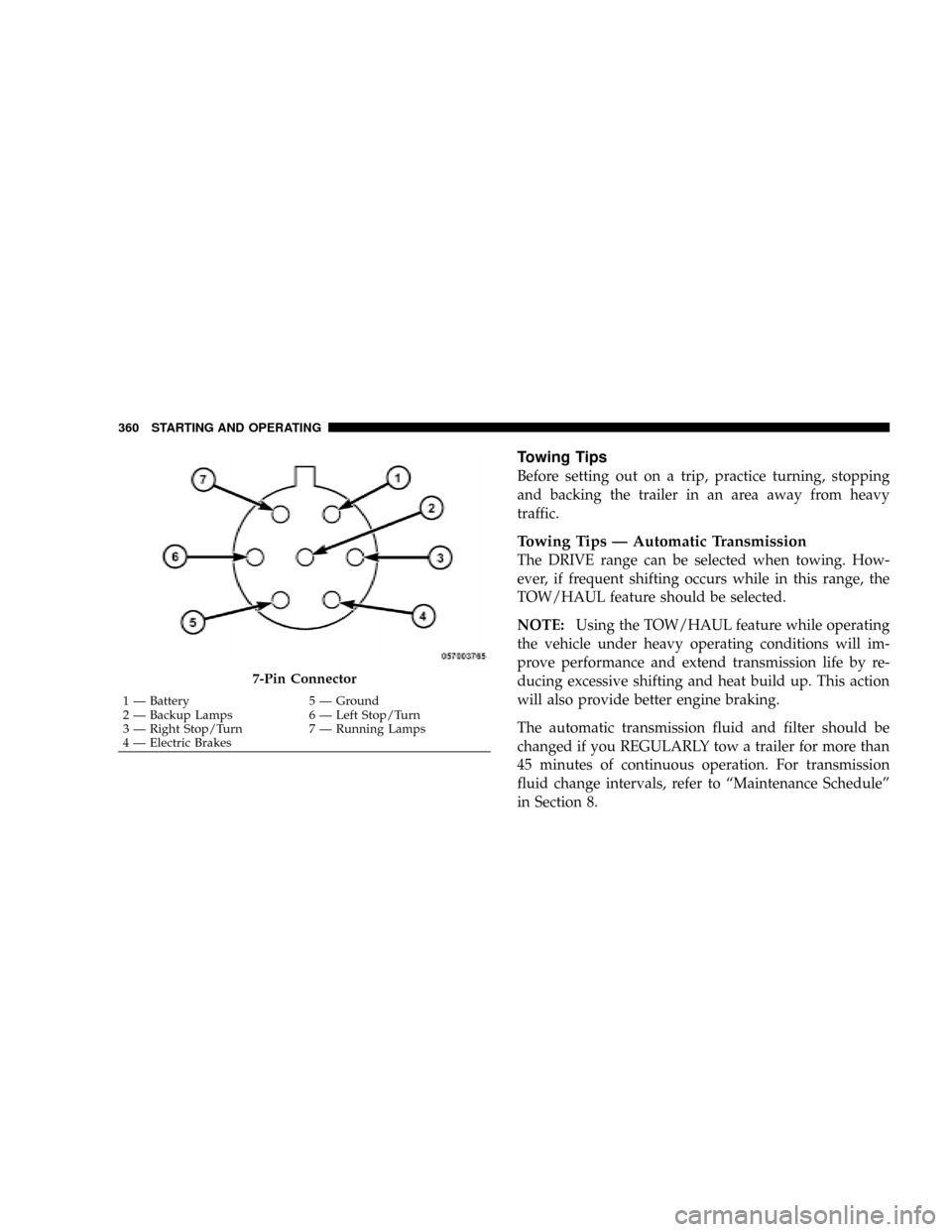
7-Pin Connector
1 Ð Battery 5 Ð Ground
2 Ð Backup Lamps 6 Ð Left Stop/Turn
3 Ð Right Stop/Turn 7 Ð Running Lamps
4 Ð Electric Brakes 360 STARTING AND OPERATING
Page 365 of 481
WARNING!
You or others could be injured if you leave the
vehicle unattended with the transfer case in the
NEUTRAL position without first fully engaging the
parking brake. The transfer case NEUTRAL position
disengages both the front and rear driveshafts from
the powertrain and will allow the vehicle to move
even if the transmission is in PARK. The parking
brake should always be applied when the driver is
not in the vehicle.
CAUTION!
Internal damage to the transfer case will occur if a
front or rear wheel lift is used when recreational
towing.NOTE:The NV 244 Generation II transfer case must be
shifted into NEUTRAL for recreational towing. The NEU-
TRAL selection button is located on the lower left-hand
corner of the 4WD Control Switch. Shifts into and out of
transfer case NEUTRAL can take place with the selector
switch in any mode position.
Shifting into NEUTRAL
Use the following procedure to prepare your vehicle for
recreational towing.
CAUTION!
It is necessary to follow these steps to be certain that
the transfer case is fully in NEUTRAL before recre-
ational towing to prevent damage to internal parts.
1. Bring vehicle to a complete stop.
2. Shut engine OFF.
STARTING AND OPERATING 363
5
Page 366 of 481
3. Turn the ignition key to the ON position without
starting the engine.
4. Depress brake pedal.
5. Shift the transmission into NEUTRAL.
6. Using the point of a ballpoint pen or similar object,
depress the recessed transfer case NEUTRAL button for
four seconds.
7. After shift is completed and the NEUTRAL light
comes on, release the NEUTRAL button.
8. Start the engine.
9. Shift the transmission into REVERSE.
10. Release brake pedal for five seconds and ensure that
there is no vehicle movement.
11. Repeat steps 9 and 10 with the transmission in
DRIVE.12. Turn ignition key to the unlocked OFF position.
13. Shift the transmission into PARK.
14. Attach vehicle to tow vehicle with tow bar.
NOTE:Items 1 through 5 are requirements that must be
met prior to depressing the NEUTRAL selection button,
and must continue to be met until the four seconds
elapses and the shift has been completed.
If any of these requirements (with the exception of Step 3
- Key ON) are not met prior to depressing the NEUTRAL
button or are no longer met during the four second timer,
then the NEUTRAL indicator light will flash continu-
ously until all requirements are met or until the NEU-
TRAL button is released.
NOTE:The ignition key must be ON for a shift to take
place and for the position indicator lights to be operable.
If the key is not ON, the shift will not take place and no
position indicator lights will be on or flashing.
364 STARTING AND OPERATING
Page 367 of 481
CAUTION!
Damage to the transmission may occur if the trans-
mission is shifted into PARK with the transfer case in
NEUTRAL and the engine RUNNING. With the
transfer case in NEUTRAL, ensure that the engine is
OFF prior to shifting the transmission into PARK.
Shifting Out of NEUTRAL
Use the following procedure to prepare your vehicle for
normal usage.
1. Bring vehicle to a complete stop.
2. Shut engine OFF.
3. Turn the ignition key to the ON position without
starting the engine.
4. Depress brake pedal.
5. Shift the transmission into NEUTRAL.6. Using the point of a ballpoint pen or similar object,
depress the recessed transfer case NEUTRAL button for
one second.
7. After the NEUTRAL indicator light turns off, release
the NEUTRAL button.
8. After the NEUTRAL button has been released, the
transfer case will shift to the position identified by the
selector switch.
9. Shift the transmission into PARK.
10. Start the engine.
11. Shift the transmission into DRIVE.
NOTE:Steps 1 through 5 are requirements that must be
met prior to depressing the NEUTRAL selection button,
and must continue to be met until one second elapses and
the shift has been completed.
STARTING AND OPERATING 365
5