warning CHRYSLER ASPEN 2009 2.G Workshop Manual
[x] Cancel search | Manufacturer: CHRYSLER, Model Year: 2009, Model line: ASPEN, Model: CHRYSLER ASPEN 2009 2.GPages: 481, PDF Size: 9.28 MB
Page 161 of 481
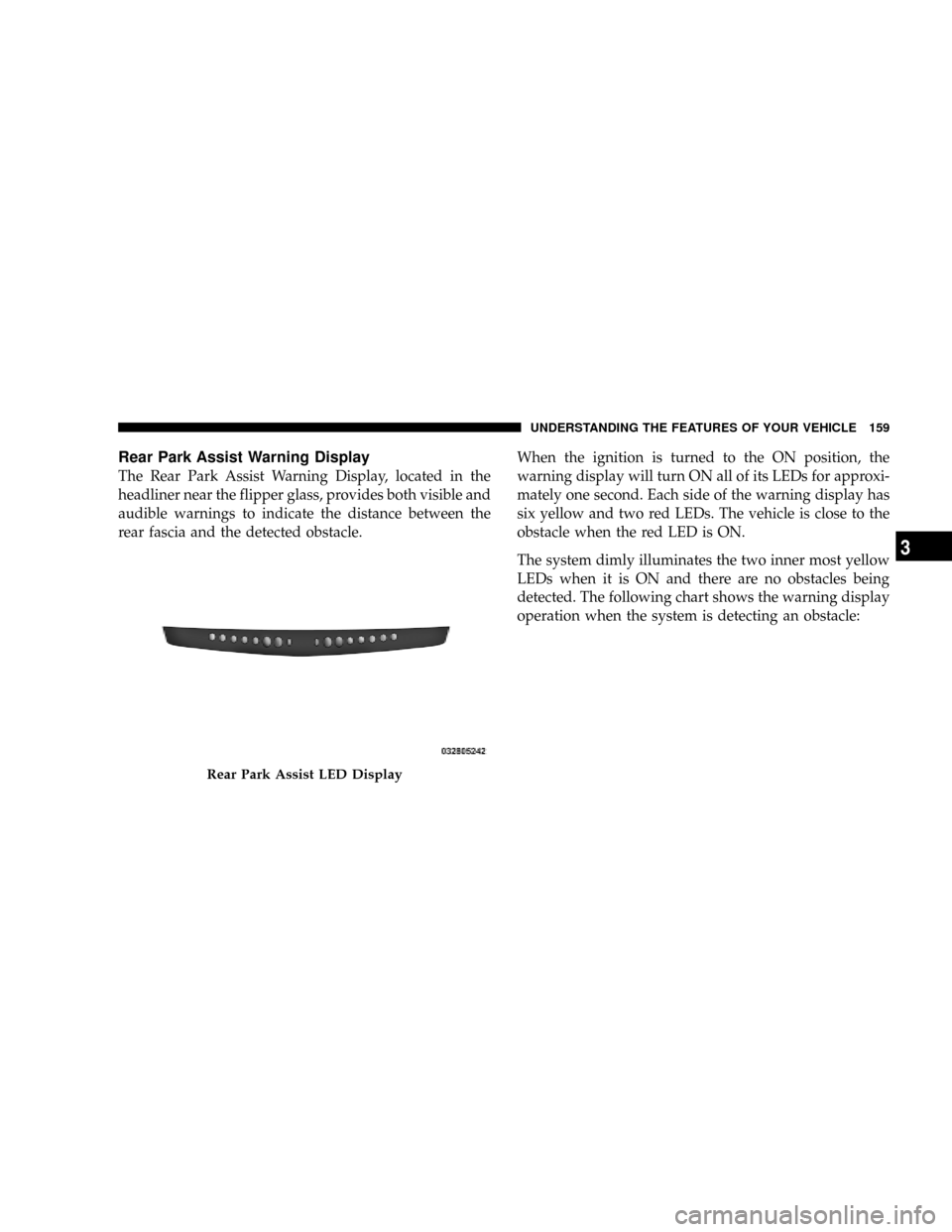
Rear Park Assist Warning Display
The Rear Park Assist Warning Display, located in the
headliner near the flipper glass, provides both visible and
audible warnings to indicate the distance between the
rear fascia and the detected obstacle.When the ignition is turned to the ON position, the
warning display will turn ON all of its LEDs for approxi-
mately one second. Each side of the warning display has
six yellow and two red LEDs. The vehicle is close to the
obstacle when the red LED is ON.
The system dimly illuminates the two inner most yellow
LEDs when it is ON and there are no obstacles being
detected. The following chart shows the warning display
operation when the system is detecting an obstacle:
Rear Park Assist LED Display
UNDERSTANDING THE FEATURES OF YOUR VEHICLE 159
3
Page 162 of 481
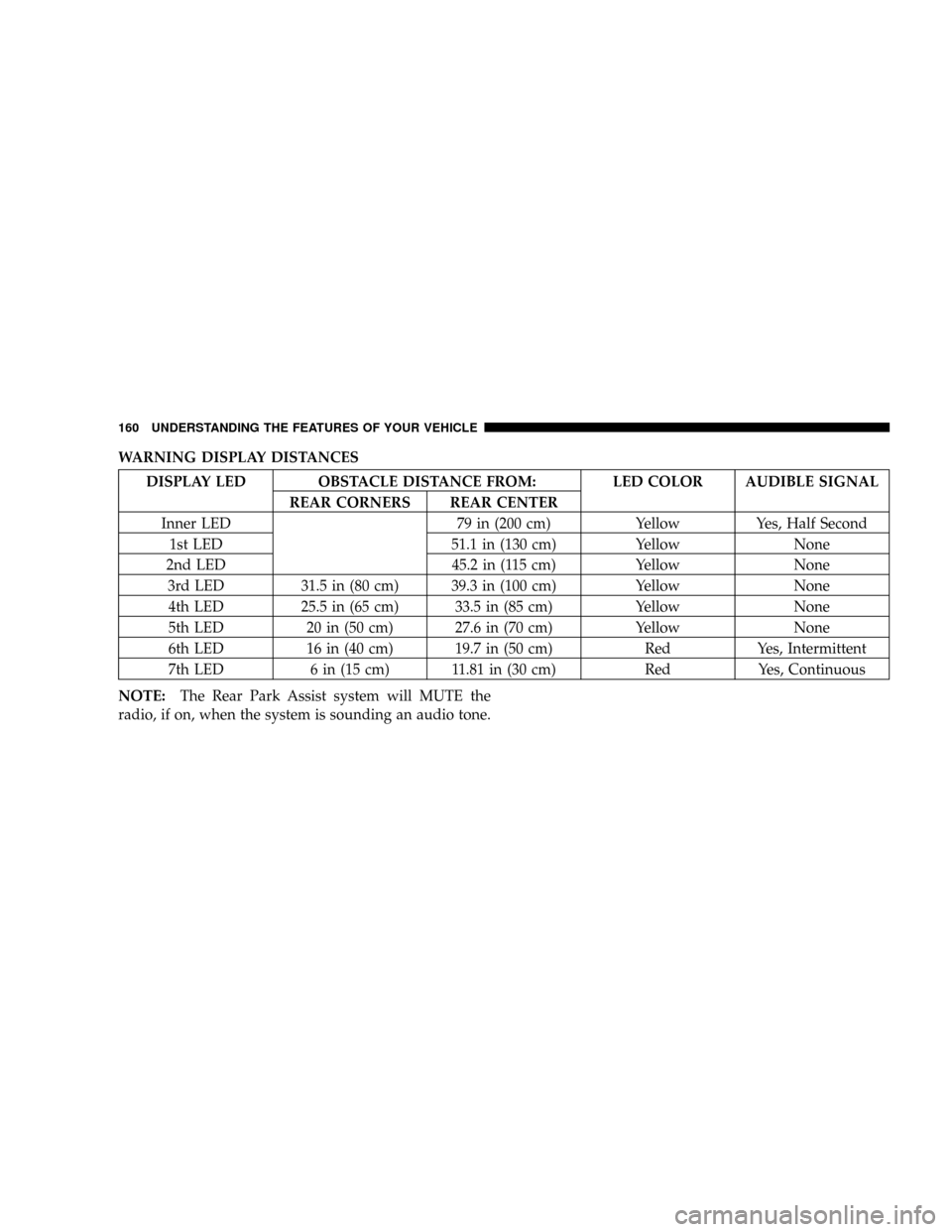
WARNING DISPLAY DISTANCES
DISPLAY LED OBSTACLE DISTANCE FROM: LED COLOR AUDIBLE SIGNAL
REAR CORNERS REAR CENTER
Inner LED 79 in (200 cm) Yellow Yes, Half Second
1st LED 51.1 in (130 cm) Yellow None
2nd LED 45.2 in (115 cm) Yellow None
3rd LED 31.5 in (80 cm) 39.3 in (100 cm) Yellow None
4th LED 25.5 in (65 cm) 33.5 in (85 cm) Yellow None
5th LED 20 in (50 cm) 27.6 in (70 cm) Yellow None
6th LED 16 in (40 cm) 19.7 in (50 cm) Red Yes, Intermittent
7th LED 6 in (15 cm) 11.81 in (30 cm) Red Yes, Continuous
NOTE:The Rear Park Assist system will MUTE the
radio, if on, when the system is sounding an audio tone.
160 UNDERSTANDING THE FEATURES OF YOUR VEHICLE
Page 163 of 481
WARNING!
²Drivers must be careful when backing up, even
when using the Rear Park Assist system. Always
check carefully behind your vehicle, look behind
you, and be sure to check for pedestrians, animals,
other vehicles, obstructions, and blind spots be-
fore backing up. You are responsible for safety and
must continue to pay attention to your surround-
ings. Failure to do so can result in serious injury or
death.
(Continued)
WARNING! (Continued)
²Before using the Rear Park Assist system, it is
strongly recommended that the ball mount and
hitch ball assembly is disconnected from the ve-
hicle when the vehicle is not used for towing.
Failure to do so can result in injury or damage to
vehicles or obstacles because the hitch ball will be
much closer to the obstacle than the rear fascia
when the warning display turns the red LEDs ON.
Also, the sensors could detect the ball mount and
hitch ball assembly, depending on its size and
shape, giving a false indication that an obstacle is
behind the vehicle.
UNDERSTANDING THE FEATURES OF YOUR VEHICLE 161
3
Page 166 of 481
5. Slowly backup as necessary.
6. Place the shift lever into PARK or DRIVE to exit the
Rear Camera system.
WARNING!
Drivers must be careful when backing up even when
using the Rear Camera System. Always check care-
fully behind your vehicle, and be sure to check for
pedestrians, animals, other vehicles, obstructions, or
blind spots before backing up. You are responsible
for the safety of your surroundings and must con-
tinue to pay attention while backing up. Failure to do
so can result in serious injury or death.
CAUTION!
²To avoid vehicle damage, the Rear Camera system
should only be used as a parking aid. The Rear
Camera system is unable to view every obstacle or
object in your drive path.
²To avoid vehicle damage, the vehicle must be
driven slowly when using the Rear Camera Sys-
tem to be able to stop in time when an obstacle is
seen. It is recommended that the driver look fre-
quently over his/her shoulder when using the Rear
Camera System.
NOTE:If snow, ice, mud, or anything else builds up on
the camera lens, clean the lens, rinse with water, and dry
with a soft cloth. Do not cover the lens.
164 UNDERSTANDING THE FEATURES OF YOUR VEHICLE
Page 171 of 481
System Status (EVIC Displays)
When the appropriate conditions exist, the EVIC displays
the following messages:
²TURN SIGNALS ON (with a continuous warning
chime)
²PERSONAL SETTINGS NOT AVAILABLE ± Vehicle
not in PARK
²LEFT/RIGHT FRONT DOOR AJAR (one or more,
with a single chime if speed is above 1 mph/1 km/h)
²LEFT/RIGHT REAR DOOR AJAR (one or more, with
a single chime if speed is above 1 mph/1 km/h)
²DOOR(S) AJAR (with a single chime if vehicle is in
motion)
²LOW WASHER FLUID (with a single chime)
²OIL CHANGE REQUIRED (with a single chime)
²SERVICE PARK ASSIST SYSTEM (with a single chime)
²SERVICE PARK ASSIST SYSTEM
²COOLANT LOW
²LIFTGATE OPEN
²CHECK TPM SYSTEM (with single chime) (Premium
TPM System Only)
OIL CHANGE REQUIRED Ð If Equipped
Your vehicle is equipped with an engine oil change
indicator system. The ªOil Change Requiredº message
will flash in the EVIC display for approximately 10
seconds after a single chime has sounded to indicate the
next scheduled oil change interval. The engine oil change
indicator system is duty cycle based, which means the
engine oil change interval may fluctuate dependent upon
your personal driving style.
UNDERSTANDING THE FEATURES OF YOUR VEHICLE 169
3
Page 179 of 481
WARNING!
Your motorized door or gate will open and close
while you are training the Universal Transceiver. Do
not train the transceiver if people or pets are in the
path of the door or gate. Only use this transceiver
with a garage door opener that has a ªstop and
reverseº feature as required by federal safety stan-
dards. This includes most garage door opener models
manufactured after 1982. Do not use a garage door
opener without these safety features. Call toll-free
1±800±355±3515 or, on the Internet at
www.HomeLink.com for safety information or
assistance.
WARNING!
Vehicle exhaust contains carbon monoxide, a danger-
ous gas. Do not run your vehicle in the garage while
training the transceiver. Exhaust gas can cause seri-
ous injury or death.
Programming HomeLinkT
Before You Begin
If you have not trained any of the HomeLinktbuttons,
erase all channels before you begin training.
To do this, press and hold the two outside buttons for up
to 20 seconds. The EVIC will display ªCLEARING
CHANNELS.º Release the buttons when the EVIC mes-
sage states ªCHANNELS CLEARED.º
UNDERSTANDING THE FEATURES OF YOUR VEHICLE 177
3
Page 186 of 481
To close the sunroof, hold the switch in the forward
position. Again, any release of the switch will stop the
movement and the sunroof will remain in a partial open
condition until the switch is pushed forward again. To
close fully, hold the switch in the forward position until
the glass movement has stopped.
The sunshade can be opened manually. It will also open
as the sunroof opens. The sunshade cannot be closed if
the sunroof is open.
WARNING!
Never leave children alone in a vehicle. Leaving
unattended children in a vehicle is dangerous for a
number of reasons. A child or others could be seri-
ously or fatally injured. Don't leave the key in the
ignition. A child could operate power windows,
other controls, or move the vehicle.
WARNING!
In an accident, there is a greater risk of being thrown
from a vehicle with an open sunroof. You could also
be seriously injured or killed. Always fasten your
seat belt properly and make sure all passengers are
properly secured too.
Do not allow small children to operate the sunroof.
Never allow fingers or other body parts, or any object
to project through the sunroof opening. Injury may
result.
Wind Buffeting
Wind buffeting can be described as the perception of
pressure on the ears or a helicopter type sound in the
ears. Your vehicle may exhibit wind buffeting with the
windows down, or the sunroof (if equipped) in certain
open or partially open positions. This is a normal occur-
rence and can be minimized. If the buffeting occurs with
184 UNDERSTANDING THE FEATURES OF YOUR VEHICLE
Page 191 of 481
NOTE:
²When the inverter switch is pressed, there will be a
delay of approximately one second before the inverter
status indicator turns on. The status Indicator of the
AC power inverter indicates whether the inverter is
producing AC power.
²Due to built-in overload protection, the inverter will
shut down if the power rating is exceeded.
WARNING!
To void serious injury or death:
²Do not use a Three-Prong adapter.
²Do not insert any objects into the receptacles.
²Do not touch with wet hands.
²Close the lid when not in use.
²If this outlet is mishandled it may cause an electric
shock and failure.
FLOOR CONSOLE
Front Floor Console Features
The floor console between the driver's and front passen-
ger's seat, has the following features:
²Miscellaneous storage compartments
²Portable phone storage bin
²Portable phone cord routing on the sides of the console
lid and the base.
²12 Volt reconfigurable power outlet inside storage
compartment
²Side open armrest lid
²Tissue holder and pen holder
²Coin slots
²Removable CD bin
UNDERSTANDING THE FEATURES OF YOUR VEHICLE 189
3
Page 200 of 481
NOTE:Crossbars are offered by Mopartaccessories.
External racks do not increase the total load carrying
capacity of the vehicle. Be sure that the total occupant
and luggage load inside the vehicle, plus the load on the
luggage rack, do not exceed the maximum vehicle load
capacity.
CAUTION!
To avoid damage to the roof rack and vehicle, do not
exceed the maximum roof rack load capacity. Always
distribute heavy loads as evenly as possible and
secure the load appropriately.
Long loads which extend over the windshield, such
as wood panels or surfboards, should be secured to
both the front and rear of the vehicle.
Place a blanket or other protection between the
surface of the roof and the load.
(Continued)
CAUTION! (Continued)
Travel at reduced speeds and turn corners carefully
when carrying large or heavy loads on the roof rack.
Wind forces, due to natural causes or nearby truck
traffic, can add sudden upward loads. This is espe-
cially true on large flat loads and may result in
damage to the cargo or your vehicle.
WARNING!
Cargo must be securely tied down before driving
your vehicle. Improperly secured loads can fly off the
vehicle, particularly at high speeds, resulting in per-
sonal injury or property damage. Follow the roof rack
cautions when carrying cargo on your roof rack.
198 UNDERSTANDING THE FEATURES OF YOUR VEHICLE
Page 206 of 481
INSTRUMENT CLUSTER DESCRIPTION
1. Fuel Gauge
The fuel gauge shows level of fuel in the tank when
ignition switch is in the ON position.
2. Temperature Gauge
The temperature gauge shows engine coolant tempera-
ture. Any reading within the normal range indicates that
the engine cooling system is operating satisfactorily. The
gauge pointer will likely indicate a higher temperature
when driving in hot weather, up mountain grades, or
when towing a trailer. It should not be allowed to exceed
the upper limits of the normal operating range.
CAUTION!
Do not leave your vehicle unattended with the en-
gine running as you would not be able to react to the
temperature indicator if the engine overheats.The gauge pointer will remain near its last reading when
the engine is turned off. It will return to a true reading
when the engine is restarted.
3. Turn Signal Indicators
When a turn signal is activated, a right-pointing or
left-pointing arrow lights up and flashes to indicate the
direction of the turn. These indicators also indicate
proper operation of the front and rear turn signal lights.
If either indicator flashes at a faster rate than normal,
check for a defective bulb. If either indicator fails to light
up when the lever is moved, check for a defective fuse or
turn signal LED. A single chime is activated when the
left/right turn signal is left on with the engine RPM
vehicle speed greater than 15 mph (24 km/h) for more
than one mile.
4. Low Fuel Warning Light
This indicator lights when the fuel gauge reads
1/16 of a tank or less.
204 UNDERSTANDING YOUR INSTRUMENT PANEL