side doors CHRYSLER PACIFICA 2020 User Guide
[x] Cancel search | Manufacturer: CHRYSLER, Model Year: 2020, Model line: PACIFICA, Model: CHRYSLER PACIFICA 2020Pages: 516, PDF Size: 28.69 MB
Page 34 of 516
32GETTING TO KNOW YOUR VEHICLE
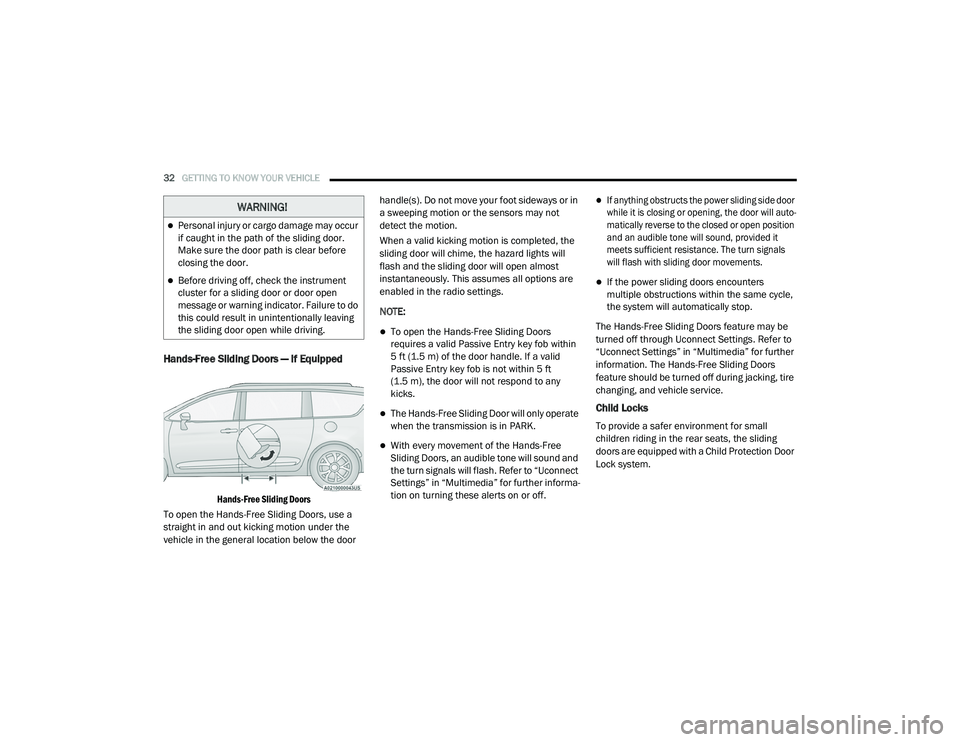
Hands-Free Sliding Doors — If Equipped
Hands-Free Sliding Doors
To open the Hands-Free Sliding Doors, use a
straight in and out kicking motion under the
vehicle in the general location below the door handle(s). Do not move your foot sideways or in
a sweeping motion or the sensors may not
detect the motion.
When a valid kicking motion is completed, the
sliding door will chime, the hazard lights will
flash and the sliding door will open almost
instantaneously. This assumes all options are
enabled in the radio settings.
NOTE:
To open the Hands-Free Sliding Doors
requires a valid Passive Entry key fob within
5 ft (1.5 m) of the door handle. If a valid
Passive Entry key fob is not within 5 ft
(1.5 m), the door will not respond to any
kicks.
The Hands-Free Sliding Door will only operate
when the transmission is in PARK.
With every movement of the Hands-Free
Sliding Doors, an audible tone will sound and
the turn signals will flash. Refer to “Uconnect
Settings” in “Multimedia” for further informa
-
tion on turning these alerts on or off.
If anything obstructs the power sliding side door
while it is closing or opening, the door will auto -
matically reverse to the closed or open position
and an audible tone will sound, provided it
meets sufficient resistance. The turn signals
will flash with sliding door movements.
If the power sliding doors encounters
multiple obstructions within the same cycle,
the system will automatically stop.
The Hands-Free Sliding Doors feature may be
turned off through Uconnect Settings. Refer to
“Uconnect Settings” in “Multimedia” for further
information. The Hands-Free Sliding Doors
feature should be turned off during jacking, tire
changing, and vehicle service.
Child Locks
To provide a safer environment for small
children riding in the rear seats, the sliding
doors are equipped with a Child Protection Door
Lock system.
WARNING!
Personal injury or cargo damage may occur
if caught in the path of the sliding door.
Make sure the door path is clear before
closing the door.
Before driving off, check the instrument
cluster for a sliding door or door open
message or warning indicator. Failure to do
this could result in unintentionally leaving
the sliding door open while driving.
20_RU_OM_EN_US_t.book Page 32
Page 35 of 516
GETTING TO KNOW YOUR VEHICLE33
To Engage The Child Protection Door Lock
1. Open the sliding side door.
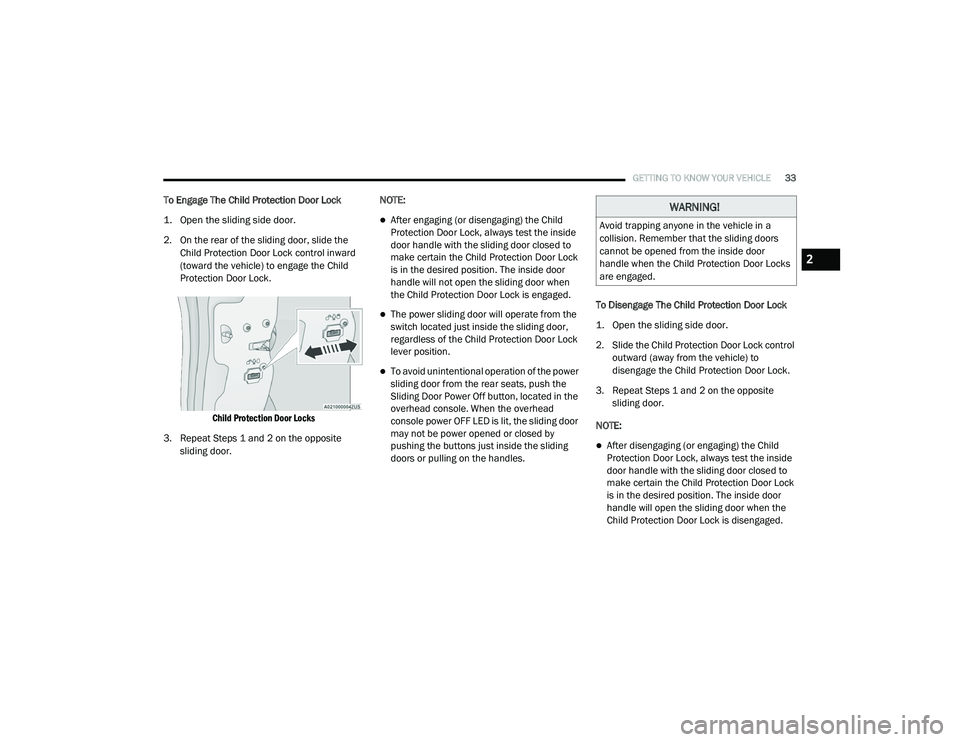
2. On the rear of the sliding door, slide the
Child Protection Door Lock control inward
(toward the vehicle) to engage the Child
Protection Door Lock.
Child Protection Door Locks
3. Repeat Steps 1 and 2 on the opposite sliding door. NOTE:
After engaging (or disengaging) the Child
Protection Door Lock, always test the inside
door handle with the sliding door closed to
make certain the Child Protection Door Lock
is in the desired position. The inside door
handle will not open the sliding door when
the Child Protection Door Lock is engaged.
The power sliding door will operate from the
switch located just inside the sliding door,
regardless of the Child Protection Door Lock
lever position.
To avoid unintentional operation of the power
sliding door from the rear seats, push the
Sliding Door Power Off button, located in the
overhead console. When the overhead
console power OFF LED is lit, the sliding door
may not be power opened or closed by
pushing the buttons just inside the sliding
doors or pulling on the handles.
To Disengage The Child Protection Door Lock
1. Open the sliding side door.
2. Slide the Child Protection Door Lock control
outward (away from the vehicle) to
disengage the Child Protection Door Lock.
3. Repeat Steps 1 and 2 on the opposite sliding door.
NOTE:
After disengaging (or engaging) the Child
Protection Door Lock, always test the inside
door handle with the sliding door closed to
make certain the Child Protection Door Lock
is in the desired position. The inside door
handle will open the sliding door when the
Child Protection Door Lock is disengaged.
WARNING!
Avoid trapping anyone in the vehicle in a
collision. Remember that the sliding doors
cannot be opened from the inside door
handle when the Child Protection Door Locks
are engaged.
2
20_RU_OM_EN_US_t.book Page 33
Page 46 of 516
44GETTING TO KNOW YOUR VEHICLE
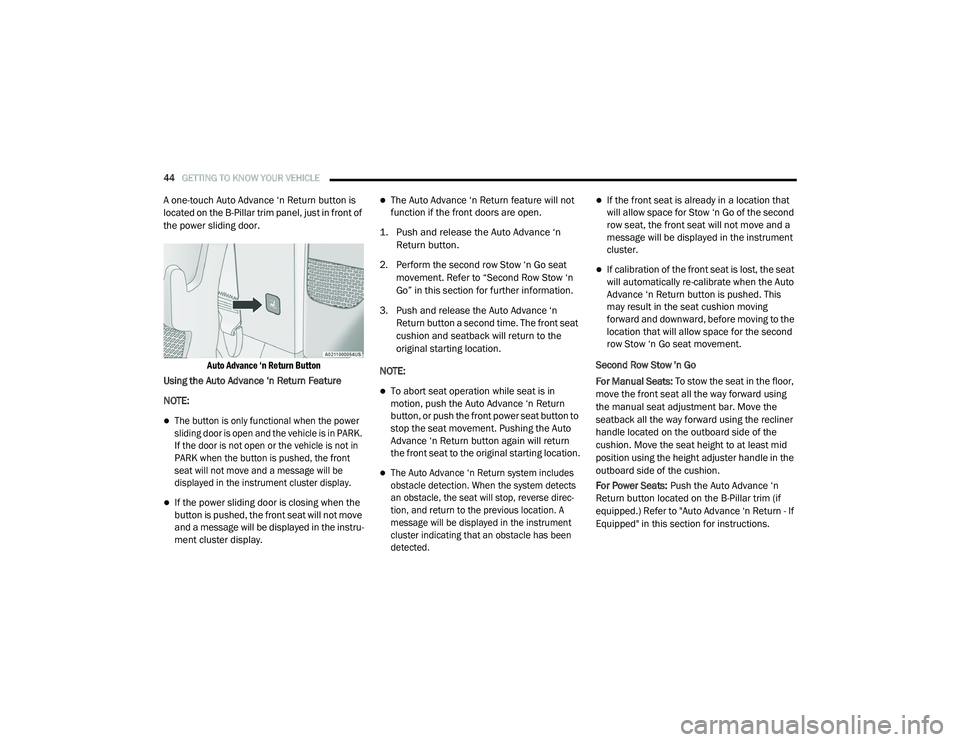
A one-touch Auto Advance ‘n Return button is
located on the B-Pillar trim panel, just in front of
the power sliding door.
Auto Advance ‘n Return Button
Using the Auto Advance ‘n Return Feature
NOTE:
The button is only functional when the power
sliding door is open and the vehicle is in PARK.
If the door is not open or the vehicle is not in
PARK when the button is pushed, the front
seat will not move and a message will be
displayed in the instrument cluster display.
If the power sliding door is closing when the
button is pushed, the front seat will not move
and a message will be displayed in the instru -
ment cluster display.
The Auto Advance ‘n Return feature will not
function if the front doors are open.
1. Push and release the Auto Advance ‘n Return button.
2. Perform the second row Stow ‘n Go seat movement. Refer to “Second Row Stow ‘n
Go” in this section for further information.
3. Push and release the Auto Advance ‘n Return button a second time. The front seat
cushion and seatback will return to the
original starting location.
NOTE:
To abort seat operation while seat is in
motion, push the Auto Advance ‘n Return
button, or push the front power seat button to
stop the seat movement. Pushing the Auto
Advance ‘n Return button again will return
the front seat to the original starting location.
The Auto Advance ‘n Return system includes
obstacle detection. When the system detects
an obstacle, the seat will stop, reverse direc -
tion, and return to the previous location. A
message will be displayed in the instrument
cluster indicating that an obstacle has been
detected.
If the front seat is already in a location that
will allow space for Stow ‘n Go of the second
row seat, the front seat will not move and a
message will be displayed in the instrument
cluster.
If calibration of the front seat is lost, the seat
will automatically re-calibrate when the Auto
Advance ‘n Return button is pushed. This
may result in the seat cushion moving
forward and downward, before moving to the
location that will allow space for the second
row Stow ‘n Go seat movement.
Second Row Stow 'n Go
For Manual Seats: To stow the seat in the floor,
move the front seat all the way forward using
the manual seat adjustment bar. Move the
seatback all the way forward using the recliner
handle located on the outboard side of the
cushion. Move the seat height to at least mid
position using the height adjuster handle in the
outboard side of the cushion.
For Power Seats: Push the Auto Advance ‘n
Return button located on the B-Pillar trim (if
equipped.) Refer to "Auto Advance ‘n Return - If
Equipped" in this section for instructions.
20_RU_OM_EN_US_t.book Page 44
Page 63 of 516
GETTING TO KNOW YOUR VEHICLE61
Power Mirrors — If Equipped
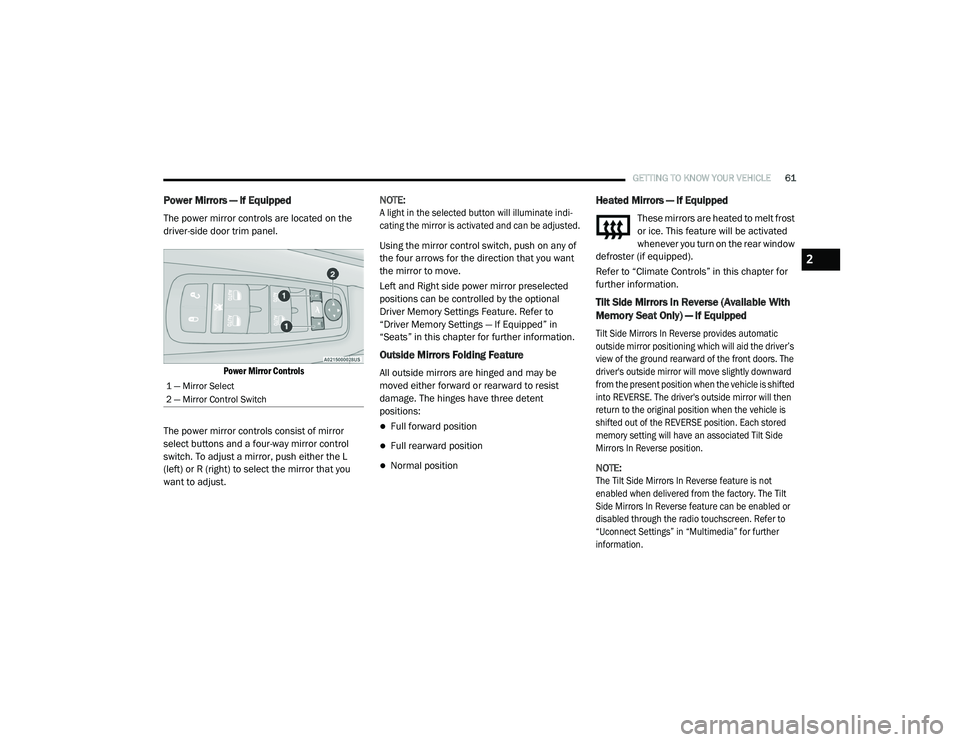
The power mirror controls are located on the
driver-side door trim panel.
Power Mirror Controls
The power mirror controls consist of mirror
select buttons and a four-way mirror control
switch. To adjust a mirror, push either the L
(left) or R (right) to select the mirror that you
want to adjust. NOTE:
A light in the selected button will illuminate indi
-
cating the mirror is activated and can be adjusted.
Using the mirror control switch, push on any of
the four arrows for the direction that you want
the mirror to move.
Left and Right side power mirror preselected
positions can be controlled by the optional
Driver Memory Settings Feature. Refer to
“Driver Memory Settings — If Equipped” in
“Seats” in this chapter for further information.
Outside Mirrors Folding Feature
All outside mirrors are hinged and may be
moved either forward or rearward to resist
damage. The hinges have three detent
positions:
Full forward position
Full rearward position
Normal position
Heated Mirrors — If Equipped
These mirrors are heated to melt frost
or ice. This feature will be activated
whenever you turn on the rear window
defroster (if equipped).
Refer to “Climate Controls” in this chapter for
further information.
Tilt Side Mirrors In Reverse (Available With
Memory Seat Only) — If Equipped
Tilt Side Mirrors In Reverse provides automatic
outside mirror positioning which will aid the driver’s
view of the ground rearward of the front doors. The
driver's outside mirror will move slightly downward
from the present position when the vehicle is shifted
into REVERSE. The driver's outside mirror will then
return to the original position when the vehicle is
shifted out of the REVERSE position. Each stored
memory setting will have an associated Tilt Side
Mirrors In Reverse position.
NOTE:
The Tilt Side Mirrors In Reverse feature is not
enabled when delivered from the factory. The Tilt
Side Mirrors In Reverse feature can be enabled or
disabled through the radio touchscreen. Refer to
“Uconnect Settings” in “Multimedia” for further
information.
1 — Mirror Select
2 — Mirror Control Switch
2
20_RU_OM_EN_US_t.book Page 61
Page 68 of 516
66GETTING TO KNOW YOUR VEHICLE
NOTE:
If either light remains on and does not flash, or
there is a very fast flash rate, check for a defec -
tive outside light bulb. If an indicator fails to
light when the lever is moved, it would suggest
that the indicator bulb is defective.
Turn Signal Warning
If the vehicle electronics sense that the vehicle
has traveled for about 1 mile (1.6 km) with the
turn signals on, a chime will sound and a
message will display in the cluster to alert the
driver.
Lane Change Assist — If Equipped
Tap the multifunction lever up or down once,
without moving beyond the detent, and the turn
signal (right or left) will flash three times then
automatically turn off.
Battery Protection
This feature provides battery protection to avoid
wearing down the battery if the headlights or
parking lights are left on for extended periods of
time when the ignition is in the OFF position.
After eight minutes of the ignition being in the OFF position and the headlight switch in any
position other than OFF or AUTO, the lights will
turn off automatically until the next cycle of the
ignition or headlight switch.
The battery protection feature will be disabled if
the ignition is placed in any position other than
OFF during the eight minute delay.
INTERIOR LIGHTS
Courtesy/Interior Lighting
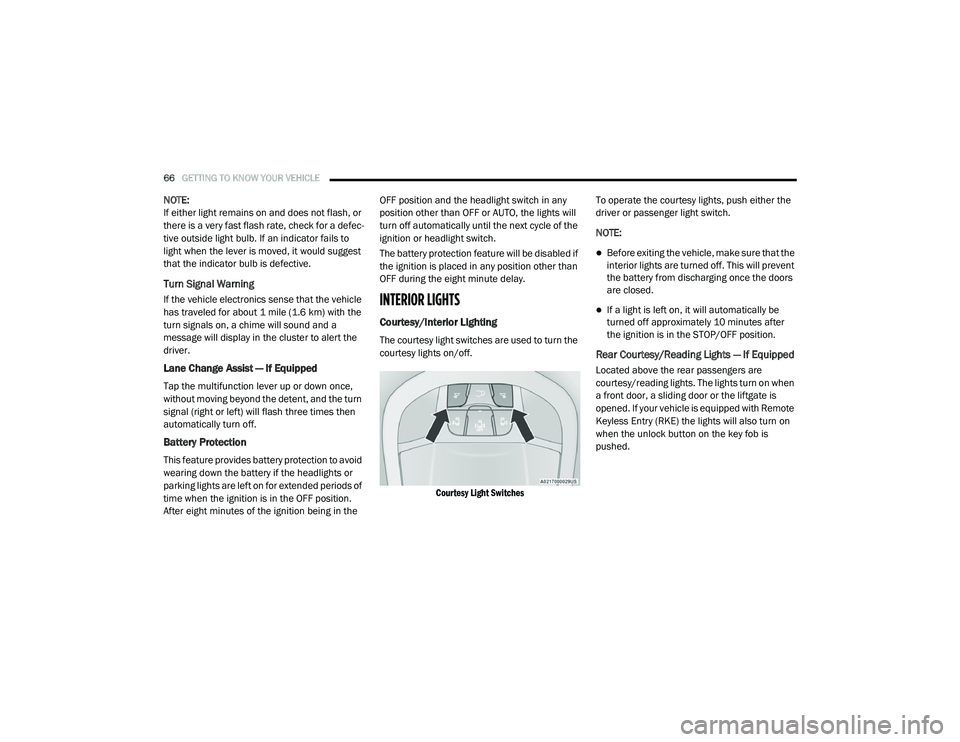
The courtesy light switches are used to turn the
courtesy lights on/off.
Courtesy Light Switches
To operate the courtesy lights, push either the
driver or passenger light switch.
NOTE:
Before exiting the vehicle, make sure that the
interior lights are turned off. This will prevent
the battery from discharging once the doors
are closed.
If a light is left on, it will automatically be
turned off approximately 10 minutes after
the ignition is in the STOP/OFF position.
Rear Courtesy/Reading Lights — If Equipped
Located above the rear passengers are
courtesy/reading lights. The lights turn on when
a front door, a sliding door or the liftgate is
opened. If your vehicle is equipped with Remote
Keyless Entry (RKE) the lights will also turn on
when the unlock button on the key fob is
pushed.
20_RU_OM_EN_US_t.book Page 66
Page 69 of 516
GETTING TO KNOW YOUR VEHICLE67
The courtesy lights also function as reading
lights. Push the lens to turn these lights on while
inside the vehicle. Push the lens a second time
to turn each light off.
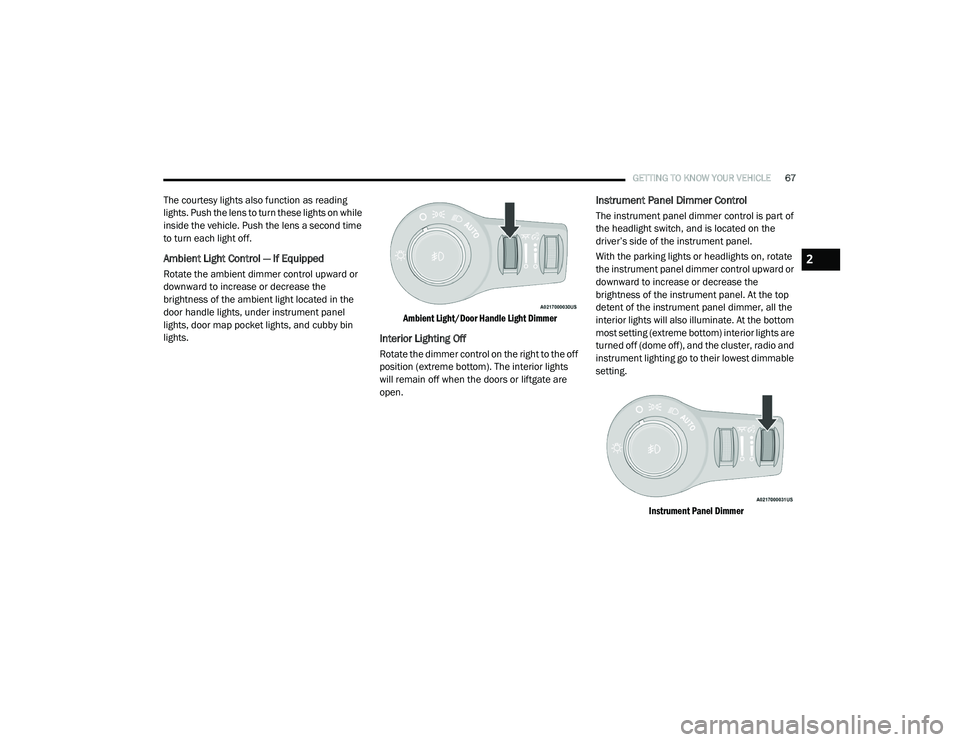
Ambient Light Control — If Equipped
Rotate the ambient dimmer control upward or
downward to increase or decrease the
brightness of the ambient light located in the
door handle lights, under instrument panel
lights, door map pocket lights, and cubby bin
lights.
Ambient Light/Door Handle Light Dimmer
Interior Lighting Off
Rotate the dimmer control on the right to the off
position (extreme bottom). The interior lights
will remain off when the doors or liftgate are
open.
Instrument Panel Dimmer Control
The instrument panel dimmer control is part of
the headlight switch, and is located on the
driver’s side of the instrument panel.
With the parking lights or headlights on, rotate
the instrument panel dimmer control upward or
downward to increase or decrease the
brightness of the instrument panel. At the top
detent of the instrument panel dimmer, all the
interior lights will also illuminate. At the bottom
most setting (extreme bottom) interior lights are
turned off (dome off), and the cluster, radio and
instrument lighting go to their lowest dimmable
setting.
Instrument Panel Dimmer
2
20_RU_OM_EN_US_t.book Page 67
Page 101 of 516
GETTING TO KNOW YOUR VEHICLE99
LIFTGATE
Opening
To Unlock/Enter The Liftgate
The liftgate may be released in several ways:
Overhead console liftgate button
Key fob
Outside handle
Push the liftgate button on the key fob twice
within five seconds to release the liftgate.
The key fob and the overhead console button
will release the liftgate when the liftgate is
locked. The outside handle requires the liftgate
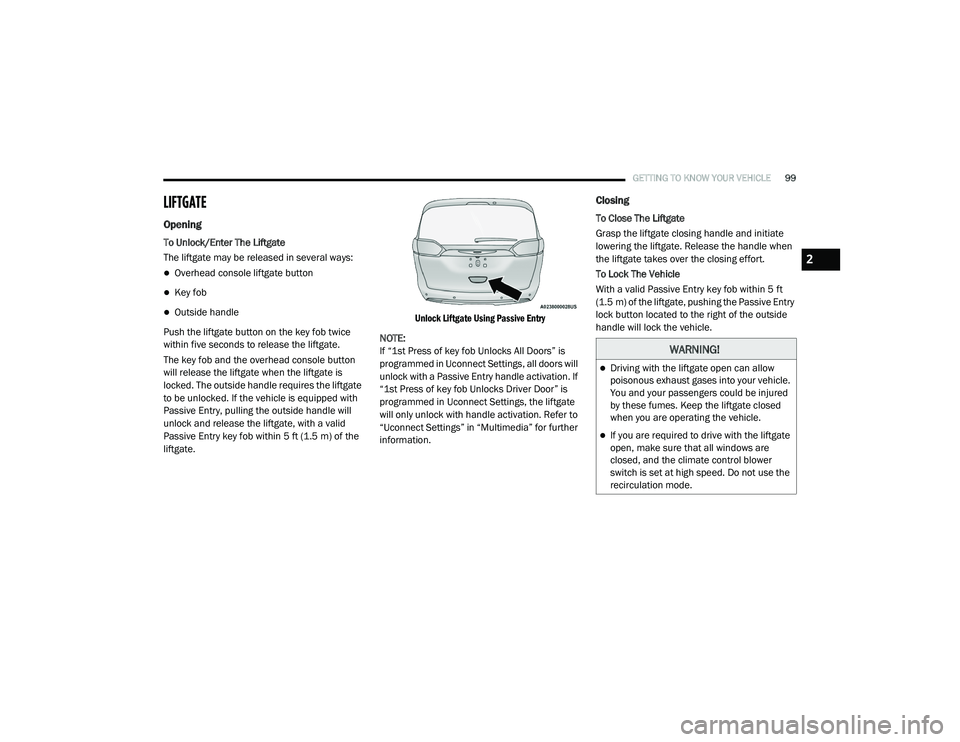
to be unlocked. If the vehicle is equipped with
Passive Entry, pulling the outside handle will
unlock and release the liftgate, with a valid
Passive Entry key fob within 5 ft (1.5 m) of the
liftgate.
Unlock Liftgate Using Passive Entry
NOTE:
If “1st Press of key fob Unlocks All Doors” is
programmed in Uconnect Settings, all doors will
unlock with a Passive Entry handle activation. If
“1st Press of key fob Unlocks Driver Door” is
programmed in Uconnect Settings, the liftgate
will only unlock with handle activation. Refer to
“Uconnect Settings” in “Multimedia” for further
information.
Closing
To Close The Liftgate
Grasp the liftgate closing handle and initiate
lowering the liftgate. Release the handle when
the liftgate takes over the closing effort.
To Lock The Vehicle
With a valid Passive Entry key fob within 5 ft
(1.5 m) of the liftgate, pushing the Passive Entry
lock button located to the right of the outside
handle will lock the vehicle.
WARNING!
Driving with the liftgate open can allow
poisonous exhaust gases into your vehicle.
You and your passengers could be injured
by these fumes. Keep the liftgate closed
when you are operating the vehicle.
If you are required to drive with the liftgate
open, make sure that all windows are
closed, and the climate control blower
switch is set at high speed. Do not use the
recirculation mode.
2
20_RU_OM_EN_US_t.book Page 99
Page 102 of 516
100GETTING TO KNOW YOUR VEHICLE
Power Liftgate — If Equipped
The power liftgate may be opened or closed in
several ways:
Overhead console liftgate button
Key fob
Outside handle (opens liftgate only)
Button just inside the liftgate on the upper
left trim (when liftgate is open)
Hands-Free Liftgate (if equipped) — opens lift -
gate only
Using the above ways:
When the liftgate is fully closed, the liftgate
will open
When the liftgate is fully open, the liftgate will
close
When the liftgate is moving, the liftgate will
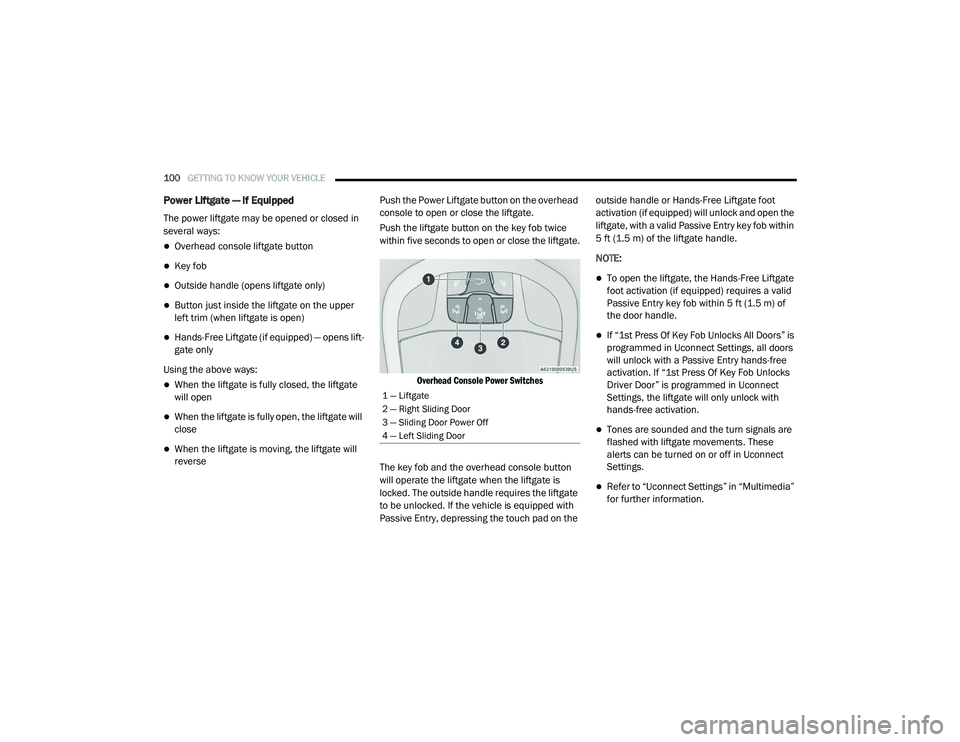
reverse Push the Power Liftgate button on the overhead
console to open or close the liftgate.
Push the liftgate button on the key fob twice
within five seconds to open or close the liftgate.
Overhead Console Power Switches
The key fob and the overhead console button
will operate the liftgate when the liftgate is
locked. The outside handle requires the liftgate
to be unlocked. If the vehicle is equipped with
Passive Entry, depressing the touch pad on the outside handle or Hands-Free Liftgate foot
activation (if equipped) will unlock and open the
liftgate, with a valid Passive Entry key fob within
5 ft (1.5 m) of the liftgate handle.
NOTE:
To open the liftgate, the Hands-Free Liftgate
foot activation (if equipped) requires a valid
Passive Entry key fob within 5 ft (1.5 m) of
the door handle.
If “1st Press Of Key Fob Unlocks All Doors” is
programmed in Uconnect Settings, all doors
will unlock with a Passive Entry hands-free
activation. If “1st Press Of Key Fob Unlocks
Driver Door” is programmed in Uconnect
Settings, the liftgate will only unlock with
hands-free activation.
Tones are sounded and the turn signals are
flashed with liftgate movements. These
alerts can be turned on or off in Uconnect
Settings.
Refer to “Uconnect Settings” in “Multimedia”
for further information.
1 — Liftgate
2 — Right Sliding Door
3 — Sliding Door Power Off
4 — Left Sliding Door
20_RU_OM_EN_US_t.book Page 100
Page 106 of 516
104GETTING TO KNOW YOUR VEHICLE
(Continued)
1. Before Using Vacuum:
Accessory (ACC) Mode Operation - For up to
10 minutes of operation
Always apply the parking brake, shift the
transmission into PARK, and push ignition
button to place ignition in Accessory (ACC)
mode. The engine will not be running in this
mode. Do not leave the key fob in or near
the vehicle, or in a location accessible to
children.
NOTE:
The vacuum system will run for 10 minutes off
battery power and then the vacuum will shut
down. A low battery indication light (LOW PWR)
located below the vacuum nozzle storage loca -
tion will come on one minute before the vacuum
shuts down.
Engine Running (ON) Operation - For more
than 10 minutes of operation
Position vehicle outdoors and fully open
all side windows.
Always apply the parking brake, shift the
transmission into PARK, and leave
engine running.
Do not vacuum any flammable
liquids, such as gasoline, or use
around explosive vapors. Vapors
from flammable liquids may form an
explosive mixture with air and can be ignited
by heat, sparks, or flames. Vapors may travel
to a source of ignition and explode.
Do not vacuum anything that is burning or
smoking, such as cigarettes, matches, or
hot ashes/embers.
Do not allow to be used as a toy. Close
attention is necessary when used by or
near children.
Do not leave the vacuum running while
unattended.
Use only as described in this manual. Use
only attachments provided with your
vehicle.
Do not put any object into openings. Do not
use with any opening blocked; keep free of
dust, lint, hair, and anything that may
reduce air flow.
Do not vacuum toxic material such as chlo -
rine bleach, ammonia, drain cleaner, etc.
WARNING! (Continued)
Do not vacuum hard or sharp objects such
as glass, nails, screws, coins, etc.
Keep hair, loose clothing, fingers, and all
parts of body away from openings and
moving parts.
Only use with filter in place. Periodically
check that the filter is in place and in good
condition.
WARNING!
This equipment incorporates parts such as
switches, motors, or the like that tend to
produce arcs or sparks that can cause an
explosion. When using your vacuum near
gasoline-dispensing equipment or service
stations, park vehicle at least 20 ft (6 m)
away from the exterior enclosure of any
dispensing pump. The vacuum is mounted
more than 18 inches (45 cm) above ground
level in your vehicle.
WARNING! (Continued)
20_RU_OM_EN_US_t.book Page 104
Page 107 of 516
GETTING TO KNOW YOUR VEHICLE105
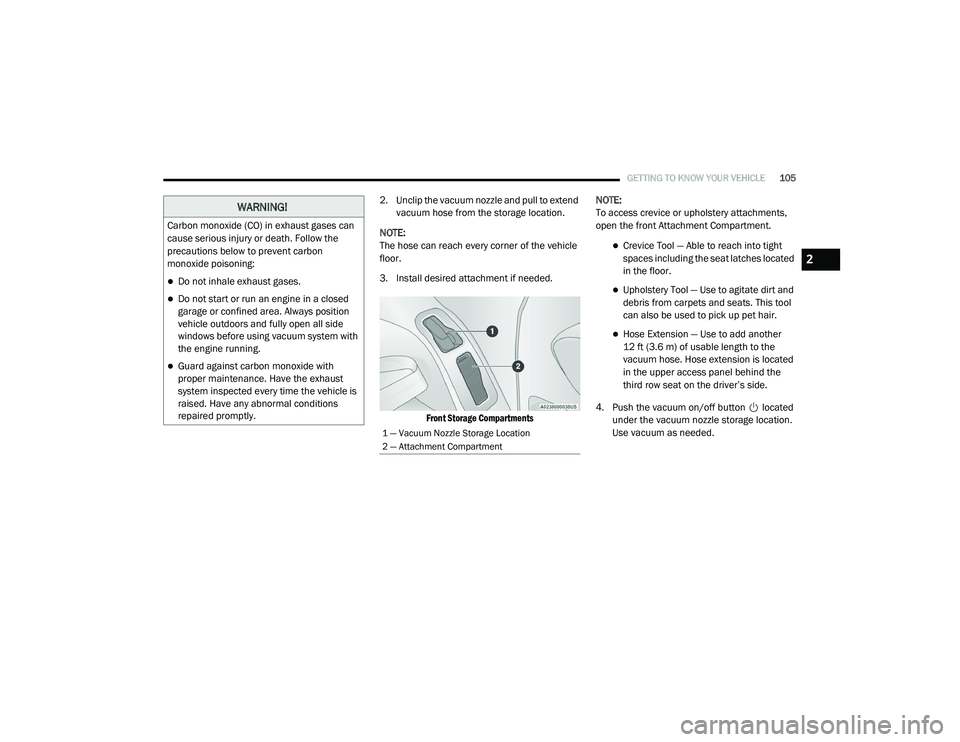
2. Unclip the vacuum nozzle and pull to extend
vacuum hose from the storage location.
NOTE:
The hose can reach every corner of the vehicle
floor.
3. Install desired attachment if needed.
Front Storage Compartments
NOTE:
To access crevice or upholstery attachments,
open the front Attachment Compartment.
Crevice Tool — Able to reach into tight
spaces including the seat latches located
in the floor.
Upholstery Tool — Use to agitate dirt and
debris from carpets and seats. This tool
can also be used to pick up pet hair.
Hose Extension — Use to add another
12 ft (3.6 m) of usable length to the
vacuum hose. Hose extension is located
in the upper access panel behind the
third row seat on the driver’s side.
4. Push the vacuum on/off button located under the vacuum nozzle storage location.
Use vacuum as needed.
WARNING!
Carbon monoxide (CO) in exhaust gases can
cause serious injury or death. Follow the
precautions below to prevent carbon
monoxide poisoning:
Do not inhale exhaust gases.
Do not start or run an engine in a closed
garage or confined area. Always position
vehicle outdoors and fully open all side
windows before using vacuum system with
the engine running.
Guard against carbon monoxide with
proper maintenance. Have the exhaust
system inspected every time the vehicle is
raised. Have any abnormal conditions
repaired promptly.
1 — Vacuum Nozzle Storage Location
2 — Attachment Compartment
2
20_RU_OM_EN_US_t.book Page 105