steering wheel CHRYSLER PACIFICA 2020 Owner's Manual
[x] Cancel search | Manufacturer: CHRYSLER, Model Year: 2020, Model line: PACIFICA, Model: CHRYSLER PACIFICA 2020Pages: 516, PDF Size: 28.69 MB
Page 243 of 516
STARTING AND OPERATING241
Adaptive Cruise Control (ACC) Operation
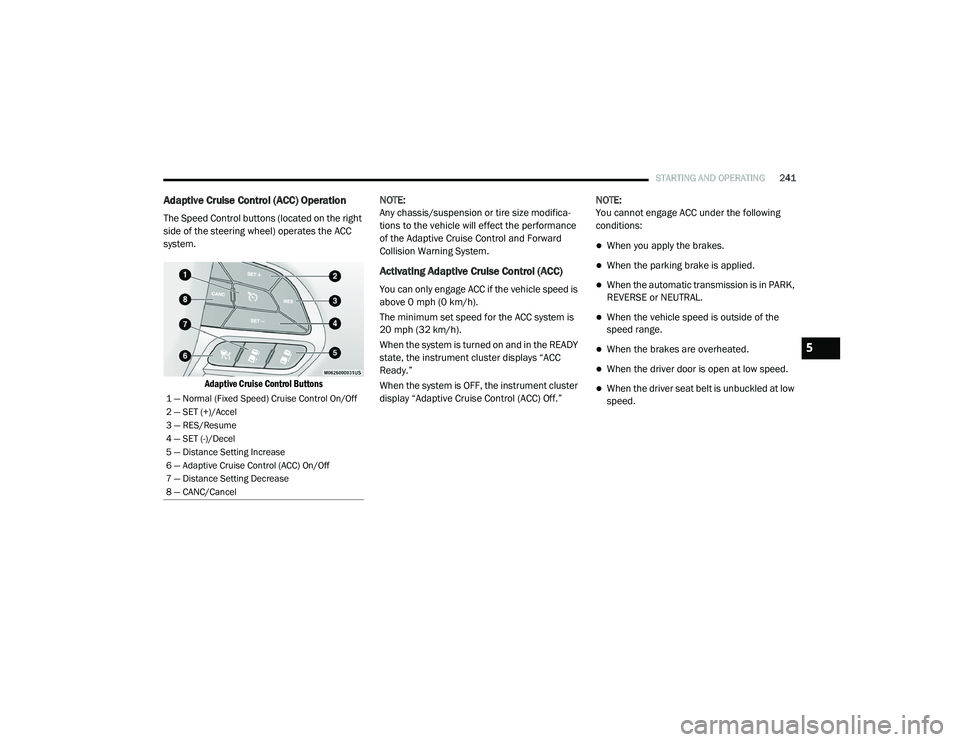
The Speed Control buttons (located on the right
side of the steering wheel) operates the ACC
system.
Adaptive Cruise Control Buttons
NOTE:
Any chassis/suspension or tire size modifica
-
tions to the vehicle will effect the performance
of the Adaptive Cruise Control and Forward
Collision Warning System.
Activating Adaptive Cruise Control (ACC)
You can only engage ACC if the vehicle speed is
above 0 mph (0 km/h).
The minimum set speed for the ACC system is
20 mph (32 km/h).
When the system is turned on and in the READY
state, the instrument cluster displays “ACC
Ready.”
When the system is OFF, the instrument cluster
display “Adaptive Cruise Control (ACC) Off.” NOTE:
You cannot engage ACC under the following
conditions:
When you apply the brakes.
When the parking brake is applied.
When the automatic transmission is in PARK,
REVERSE or NEUTRAL.
When the vehicle speed is outside of the
speed range.
When the brakes are overheated.
When the driver door is open at low speed.
When the driver seat belt is unbuckled at low
speed.1 — Normal (Fixed Speed) Cruise Control On/Off
2 — SET (+)/Accel
3 — RES/Resume
4 — SET (-)/Decel
5 — Distance Setting Increase
6 — Adaptive Cruise Control (ACC) On/Off
7 — Distance Setting Decrease
8 — CANC/Cancel
5
20_RU_OM_EN_US_t.book Page 241
Page 249 of 516
STARTING AND OPERATING247
Adaptive Cruise Control (ACC) Menu
The instrument cluster displays the current ACC
system settings. The instrument cluster display
is located in the center of the instrument
cluster. The information it displays depends on
ACC system status.
Push the Adaptive Cruise Control (ACC) on/off
button (located on the steering wheel) until one
of the following displays in the instrument
cluster display:
Adaptive Cruise Control Off
When ACC is deactivated, the display will read
“Adaptive Cruise Control Off.”
Adaptive Cruise Control Ready
When ACC is activated but the vehicle speed
setting has not been selected, the display will
read “Adaptive Cruise Control Ready.” Push the SET (+) or the SET (-) button (located
on the steering wheel) and the following will
display in the instrument cluster display:
ACC SET
When ACC is set, the set speed will display in
the instrument cluster.
The ACC screen may display once again if any
ACC activity occurs, which may include any of
the following:System Cancel
Driver Override
System Off
ACC Proximity Warning
ACC Unavailable Warning
The instrument cluster display will return to the
last display selected after five seconds of no
ACC display activity
Display Warnings And Maintenance
“Wipe Front Radar Sensor In Front Of
Vehicle” Warning
The “ACC/FCW Unavailable Wipe Front Radar
Sensor” warning will display and also a chime will indicate when conditions temporarily limit
system performance.
This most often occurs at times of poor visibility,
such as in snow or heavy rain. The ACC system
may also become temporarily blinded due to
obstructions, such as mud, dirt or ice. In these
cases, the instrument cluster display will show
“ACC/FCW Unavailable Wipe Front Radar
Sensor” and the system will deactivate.
The “ACC/FCW Unavailable Wipe Front Radar
Sensor” message can sometimes be displayed
while driving in highly reflective areas (i.e.
tunnels with reflective tiles, or ice and snow).
The ACC system will recover after the vehicle
has left these areas. Under rare conditions,
when the radar is not tracking any vehicles or
objects in its path this warning may temporarily
occur.
NOTE:
If the “ACC/FCW Unavailable Wipe Front Radar
Sensor” warning is active Normal (Fixed Speed)
Cruise Control is still available. For additional
information refer to “Normal (Fixed Speed)
Cruise Control Mode” in this section.
WARNING!
When the ACC system is resumed, the driver
must ensure that there are no pedestrians,
vehicles or objects in the path of the vehicle.
Failure to follow these warnings can result in
a collision and death or serious personal
injury.
5
20_RU_OM_EN_US_t.book Page 247
Page 270 of 516
268STARTING AND OPERATING
PARKSENSE ACTIVE PARK ASSIST SYSTEM
— IF EQUIPPED
The ParkSense Active Park Assist system is
intended to assist the driver during parallel and
perpendicular parking maneuvers by identifying
a proper parking space, providing audible/
visual instructions, and controlling the steering
wheel. The ParkSense Active Park Assist system
is defined as “semi-automatic” since the driver
maintains control of the accelerator, gear
selector and brakes. Depending on the driver's
parking maneuver selection, the ParkSense Active Park Assist system is capable of
maneuvering a vehicle into a parallel or a
perpendicular parking space on either side (i.e.,
driver side or passenger side).
NOTE:
The driver is always responsible for
controlling the vehicle, responsible for any
surrounding objects, and must intervene as
required.
The system is provided to assist the driver
and not to substitute the driver.
During a semi-automatic maneuver, if the
driver touches the steering wheel after being
instructed to remove their hands from the
steering wheel, the system will cancel, and
the driver will be required to manually
complete the parking maneuver.
The system may not work in all conditions
(e.g. environmental conditions such as heavy
rain, snow, etc., or if searching for a parking
space that has surfaces that will absorb the
ultrasonic sensor waves).
New vehicles from the dealership must have
at least 30 miles (48 km) accumulated
before the ParkSense Active Park Assist system is fully calibrated and performs accu
-
rately. This is due to the system’s dynamic
vehicle calibration to improve the perfor -
mance of the feature. The system will also
continuously perform the dynamic vehicle
calibration to account for differences such as
over or under inflated tires and new tires.
Enabling And Disabling The ParkSense
Active Park Assist System
The ParkSense Active Park Assist
system can be enabled and disabled
with the ParkSense Active Park Assist
switch, located on the switch panel
below the Uconnect display.
To enable the ParkSense Active Park Assist
system, push the ParkSense Active Park Assist
switch once (LED turns on).
To disable the ParkSense Active Park Assist
system, push the ParkSense Active Park Assist
switch again (LED turns off).
The ParkSense Active Park Assist system will
turn off automatically for any of the following
conditions:
The parking maneuver is completed.
Vehicle speed greater than 18 mph (30 km/h)
when searching for a parking space.
CAUTION!
ParkSense is only a parking aid and it is
unable to recognize every obstacle,
including small obstacles. Parking curbs
might be temporarily detected or not
detected at all. Obstacles located above or
below the sensors will not be detected
when they are in close proximity.
The vehicle must be driven slowly when
using ParkSense in order to be able to stop
in time when an obstacle is detected. It is
recommended that the driver looks over
his/her shoulder when using ParkSense.
20_RU_OM_EN_US_t.book Page 268
Page 271 of 516
STARTING AND OPERATING269
Vehicle speed greater than 5 mph (7 km/h)
during active steering guidance into the
parking space.
Touching the steering wheel during active
steering guidance into the parking space.
Pushing the ParkSense Front and Rear Park
Assist switch.
The driver’s door is opened.
The liftgate is opened.
Electronic Stability Control/Anti-Lock Braking
System intervention.
The ParkSense Active Park Assist system will
allow a maximum of eight shifts between
DRIVE and REVERSE. If the maneuver cannot
be completed within eight shifts, the system
will cancel and the instrument cluster display
will instruct the driver to complete the
maneuver manually. The ParkSense Active Park Assist system will
only operate and search for a parking space
when the following conditions are present:
The gear position is in DRIVE.
The ignition is in the RUN position.
The ParkSense Active Park Assist switch is
activated.
The driver’s door is closed.
The liftgate is closed.
Vehicle speed is less than 15 mph (25 km/h).
NOTE:
If the vehicle is driven above approximately
15 mph (25 km/h), the instrument cluster
display will instruct the driver to slow down. If the
vehicle is driven above approximately 18 mph
(30 km/h), the system will cancel. The driver
must then reactivate the system by pushing the
ParkSense Active Park Assist switch.
The outer surface and the underside of the
front and rear fascias/bumpers are clean
and clear of snow, ice, mud, dirt or other
obstruction.
When pushed, the LED on the ParkSense Active
Park Assist switch will blink momentarily, and
then the LED will turn off if any of the above
conditions are not present.
Parallel Parking Space Assistance
Operation/Display
When the ParkSense Active Park Assist system
is enabled the “Active ParkSense Searching -
Push OK for Perpendicular Park” message will
appear in the instrument cluster display. You
may switch to perpendicular parking if you
desire. Push the OK button on the left side
steering wheel switch to change your parking
space setting.5
20_RU_OM_EN_US_t.book Page 269
Page 273 of 516
STARTING AND OPERATING271
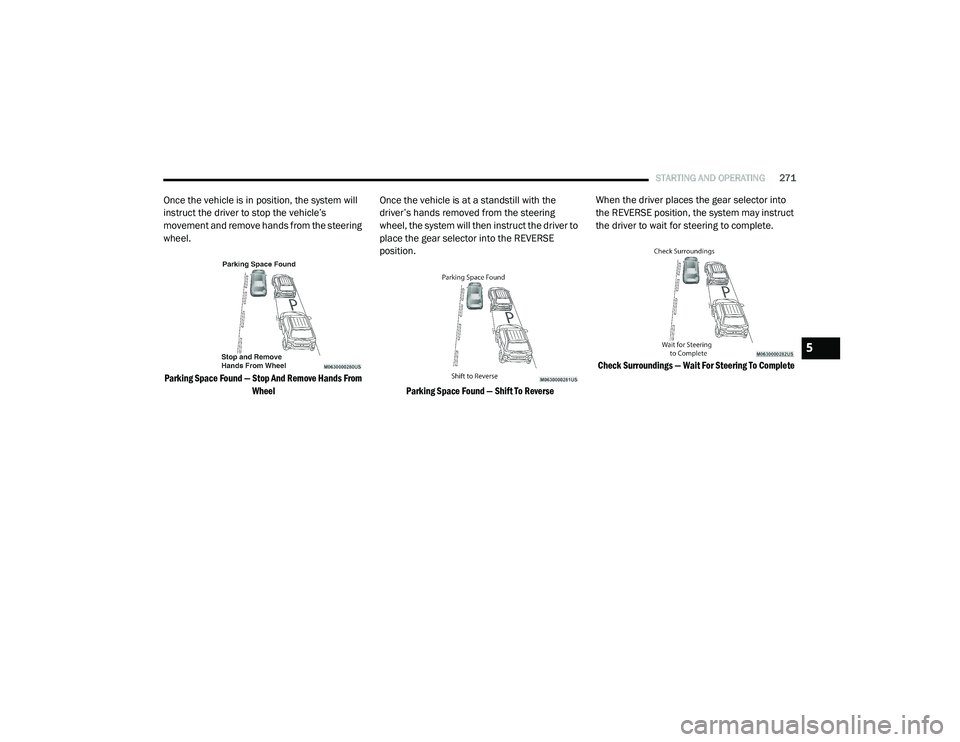
Once the vehicle is in position, the system will
instruct the driver to stop the vehicle’s
movement and remove hands from the steering
wheel.
Parking Space Found — Stop And Remove Hands From Wheel
Once the vehicle is at a standstill with the
driver’s hands removed from the steering
wheel, the system will then instruct the driver to
place the gear selector into the REVERSE
position.
Parking Space Found — Shift To Reverse
When the driver places the gear selector into
the REVERSE position, the system may instruct
the driver to wait for steering to complete.
Check Surroundings — Wait For Steering To Complete
5
20_RU_OM_EN_US_t.book Page 271
Page 274 of 516
272STARTING AND OPERATING
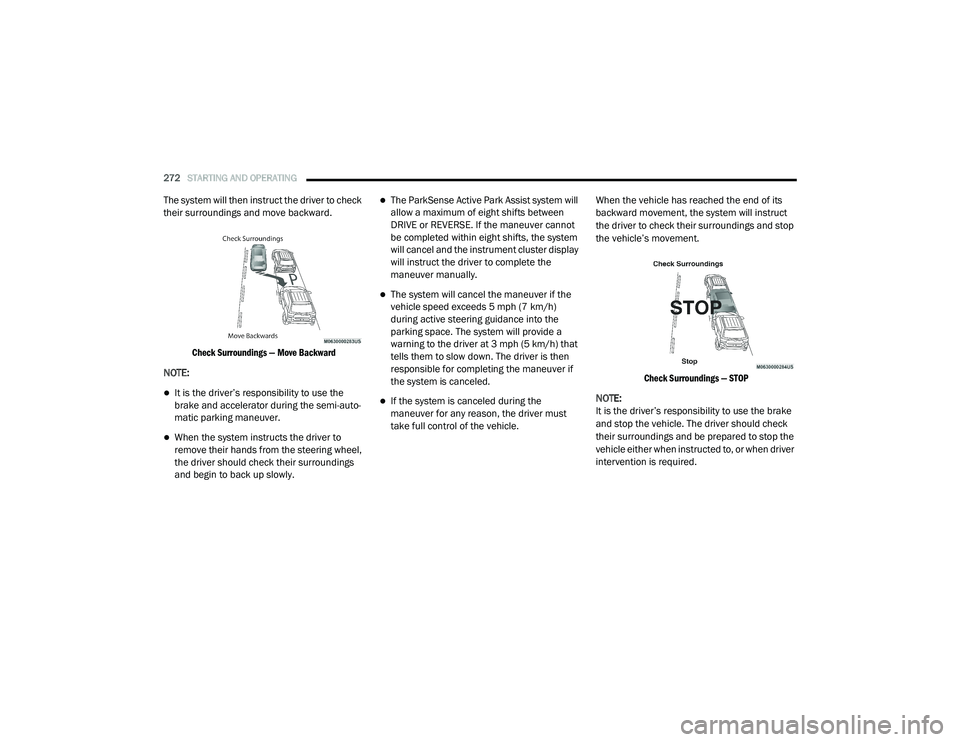
The system will then instruct the driver to check
their surroundings and move backward.
Check Surroundings — Move Backward
NOTE:
It is the driver’s responsibility to use the
brake and accelerator during the semi-auto -
matic parking maneuver.
When the system instructs the driver to
remove their hands from the steering wheel,
the driver should check their surroundings
and begin to back up slowly.
The ParkSense Active Park Assist system will
allow a maximum of eight shifts between
DRIVE or REVERSE. If the maneuver cannot
be completed within eight shifts, the system
will cancel and the instrument cluster display
will instruct the driver to complete the
maneuver manually.
The system will cancel the maneuver if the
vehicle speed exceeds 5 mph (7 km/h)
during active steering guidance into the
parking space. The system will provide a
warning to the driver at 3 mph (5 km/h) that
tells them to slow down. The driver is then
responsible for completing the maneuver if
the system is canceled.
If the system is canceled during the
maneuver for any reason, the driver must
take full control of the vehicle. When the vehicle has reached the end of its
backward movement, the system will instruct
the driver to check their surroundings and stop
the vehicle’s movement.
Check Surroundings — STOP
NOTE:
It is the driver’s responsibility to use the brake
and stop the vehicle. The driver should check
their surroundings and be prepared to stop the
vehicle either when instructed to, or when driver
intervention is required.
20_RU_OM_EN_US_t.book Page 272
Page 276 of 516
274STARTING AND OPERATING
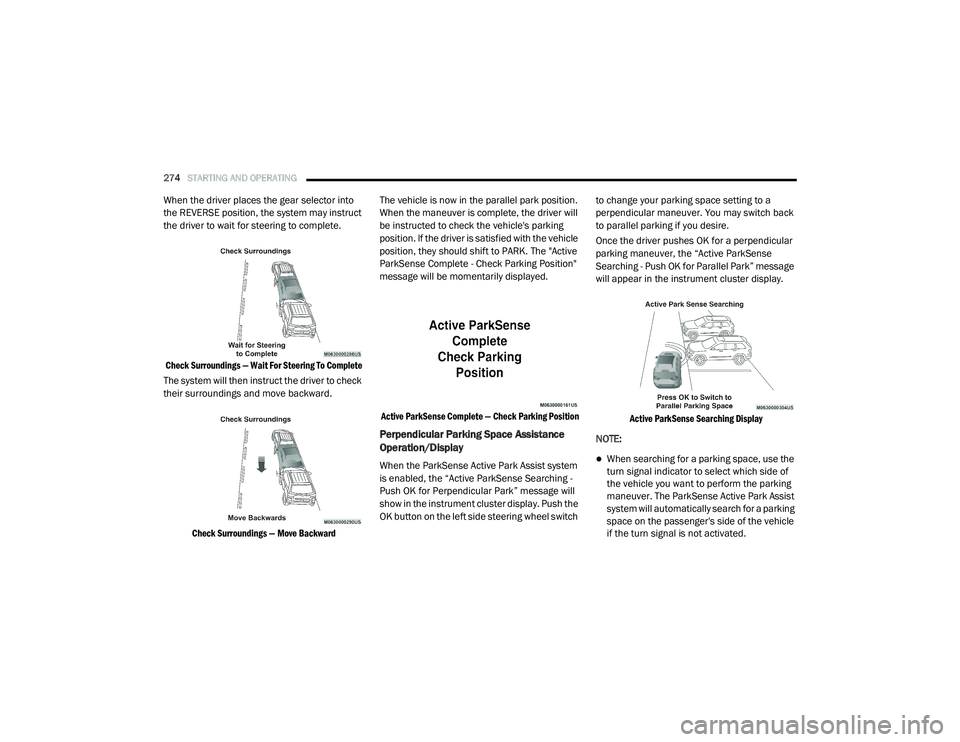
When the driver places the gear selector into
the REVERSE position, the system may instruct
the driver to wait for steering to complete.
Check Surroundings — Wait For Steering To Complete
The system will then instruct the driver to check
their surroundings and move backward.
Check Surroundings — Move Backward
The vehicle is now in the parallel park position.
When the maneuver is complete, the driver will
be instructed to check the vehicle's parking
position. If the driver is satisfied with the vehicle
position, they should shift to PARK. The "Active
ParkSense Complete - Check Parking Position"
message will be momentarily displayed.
Active ParkSense Complete — Check Parking Position
Perpendicular Parking Space Assistance
Operation/Display
When the ParkSense Active Park Assist system
is enabled, the “Active ParkSense Searching -
Push OK for Perpendicular Park” message will
show in the instrument cluster display. Push the
OK button on the left side steering wheel switch to change your parking space setting to a
perpendicular maneuver. You may switch back
to parallel parking if you desire.
Once the driver pushes OK for a perpendicular
parking maneuver, the “Active ParkSense
Searching - Push OK for Parallel Park” message
will appear in the instrument cluster display.
Active ParkSense Searching Display
NOTE:When searching for a parking space, use the
turn signal indicator to select which side of
the vehicle you want to perform the parking
maneuver. The ParkSense Active Park Assist
system will automatically search for a parking
space on the passenger's side of the vehicle
if the turn signal is not activated.
20_RU_OM_EN_US_t.book Page 274
Page 277 of 516
STARTING AND OPERATING275
The driver needs to make sure that the
selected parking space for the maneuver
remains free and clear of any obstructions
(e.g. pedestrians, bicycles, etc.).
The driver is responsible to ensure that the
selected parking space is suitable for the
maneuver and free/clear of anything that
may be overhanging or protruding into the
parking space (e.g., ladders, tailgates, etc.
from surrounding objects/vehicles).
When seeking for a parking space, the driver
should drive as parallel or perpendicular
(depending on the type of maneuver) to other
vehicles as possible.
The feature will only indicate the last
detected parking space (example: if passing
multiple available parking spaces, the
system will only indicate the last detected
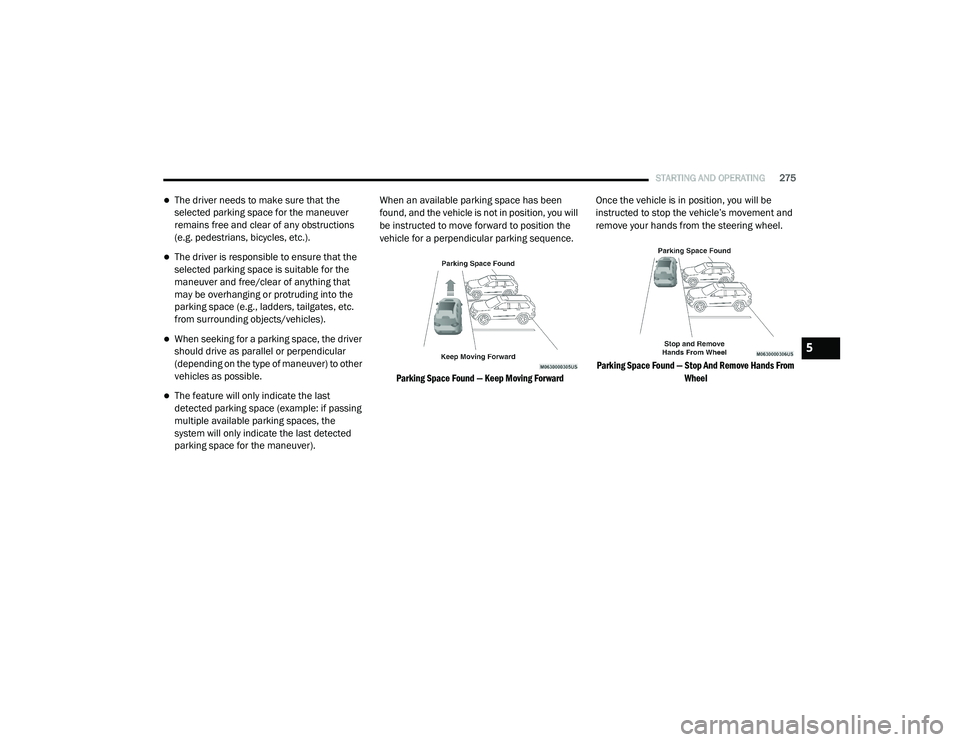
parking space for the maneuver). When an available parking space has been
found, and the vehicle is not in position, you will
be instructed to move forward to position the
vehicle for a perpendicular parking sequence.
Parking Space Found — Keep Moving Forward
Once the vehicle is in position, you will be
instructed to stop the vehicle’s movement and
remove your hands from the steering wheel.
Parking Space Found — Stop And Remove Hands From Wheel
5
20_RU_OM_EN_US_t.book Page 275
Page 278 of 516
276STARTING AND OPERATING
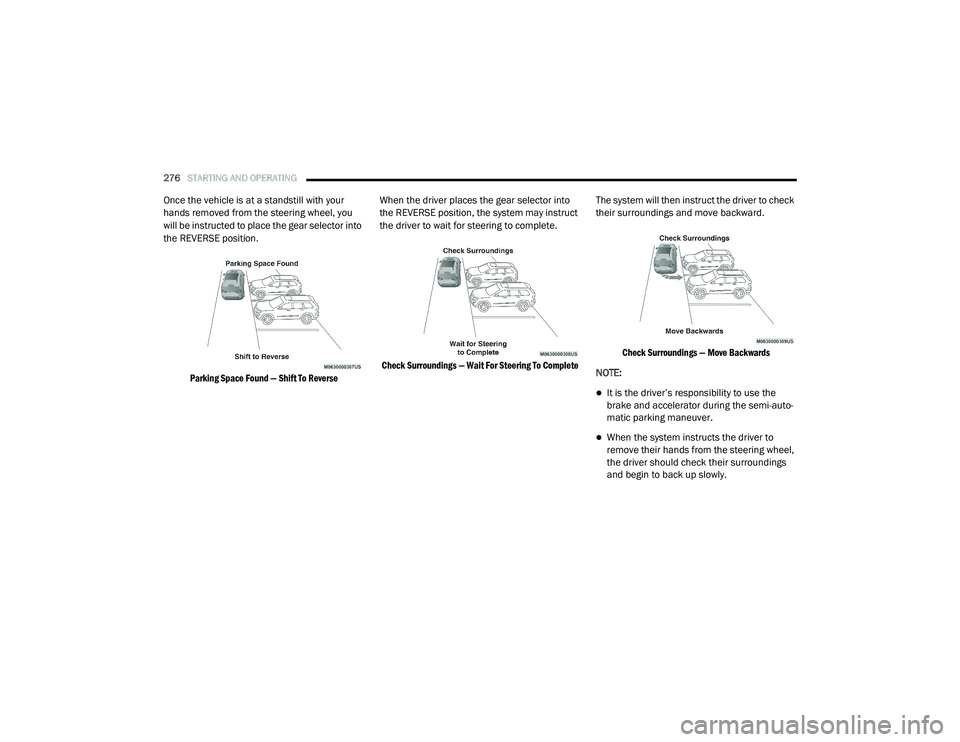
Once the vehicle is at a standstill with your
hands removed from the steering wheel, you
will be instructed to place the gear selector into
the REVERSE position.
Parking Space Found — Shift To Reverse
When the driver places the gear selector into
the REVERSE position, the system may instruct
the driver to wait for steering to complete.
Check Surroundings — Wait For Steering To Complete
The system will then instruct the driver to check
their surroundings and move backward.
Check Surroundings — Move Backwards
NOTE:
It is the driver’s responsibility to use the
brake and accelerator during the semi-auto -
matic parking maneuver.
When the system instructs the driver to
remove their hands from the steering wheel,
the driver should check their surroundings
and begin to back up slowly.
20_RU_OM_EN_US_t.book Page 276
Page 282 of 516
280STARTING AND OPERATING
LANESENSE — IF EQUIPPED
LaneSense Operation
The LaneSense system is operational at speeds
above 37 mph (60 km/h) and below 112 mph
(180 km/h). It uses a forward looking camera to
detect lane markings and measure vehicle
position within the lane boundaries.
When both lane markings are detected and the
driver unintentionally drifts out of the lane (no
turn signal applied), the LaneSense system
provides a haptic warning in the form of torque
applied to the steering wheel to prompt the
driver to remain within the lane boundaries. The
LaneSense system will also provide a visual
warning through the instrument cluster display
to prompt the driver to remain within the lane
boundaries.
The driver may manually override the haptic
warning by applying torque into the steering
wheel at any time. When only a single lane marking is detected
and the driver unintentionally drifts across that
lane marking (no turn signal applied), the
LaneSense system provides a visual warning
through the instrument cluster display to
prompt the driver to remain within the lane.
When only a single lane marking is detected, a
haptic (torque) warning will not be provided.
NOTE:
When operating conditions have been met, the
LaneSense system will monitor if the driver’s
hands are on the steering wheel and provide an
audible and visual warning to the driver when
the driver’s hands are not detected on the
steering wheel. The system will cancel if the
driver does not return their hands to the wheel.
Turning LaneSense On Or Off
The LaneSense button is located on
the switch panel below the Uconnect
display.
To turn the LaneSense system on, push the
LaneSense button (LED turns off). A
“LaneSense On” message is shown in the
instrument cluster display.
Lane Sense On Message
To turn the LaneSense system off, push the
LaneSense button again (LED turns on).
NOTE:
The LaneSense system will retain the last
system state on or off from the last ignition
cycle when the ignition is changed to the ON/
RUN position.
20_RU_OM_EN_US_t.book Page 280