change time CHRYSLER PACIFICA 2020 Workshop Manual
[x] Cancel search | Manufacturer: CHRYSLER, Model Year: 2020, Model line: PACIFICA, Model: CHRYSLER PACIFICA 2020Pages: 516, PDF Size: 28.69 MB
Page 477 of 516
MULTIMEDIA475
General Information
The following regulatory statement applies to all
Radio Frequency (RF) devices equipped in this
vehicle:
This device complies with Part 15 of the FCC
Rules and with Innovation, Science and
Economic Development Canada license-exempt
RSS standard(s). Operation is subject to the
following two conditions:
1. This device may not cause harmful
interference, and
2. This device must accept any interference received, including interference that may
cause undesired operation.
Brand: Delphi
Model: FCA REMOTE
Le présent appareil est conforme aux CNR
d`Innovation, Science and Economic
Development applicables aux appareils radio
exempts de licence. L'exploitation est autorisée
aux deux conditions suivantes:
1. l'appareil ne doit pas produire de
brouillage, et
2. l'utilisateur de l'appareil doit accepter tout brouillage radioélectrique subi, même si le
brouillage est susceptible d'en compro -
mettre le fonctionnement.
Marque: Delphi
Modèle: FCA REMOTE
La operación de este equipo está sujeta a las
siguientes dos condiciones:
1. es posible que este equipo o dispositivo no cause interferencia perjudicial y
2. este equipo o dispositivo debe aceptar cualquier interferencia, incluyendo la que
pueda causar su operación no deseada.
Marca: Delphi
Modelo: FCA REMOTE
NOTE:
Changes or modifications not expressly
approved by the party responsible for compli -
ance could void the user’s authority to operate
the equipment.
Play A DVD/Blu-ray™ Or USB Media File
From Uconnect System
1. Insert a Blu-ray™ Disc or DVD disc into the disc player with the label facing up, or
insert a USB drive into rear Video USB port.
NOTE:
The DVD/Blu-ray™ Disc player and Video USB
port are both located under the radio controls in
the instrument panel.
2. Press the Uconnect Theater button on the radio touchscreen.
Refer to “Accessing The System From The
Uconnect System” in this section for further
information.
3. Select Disc or USB from the source controls (i.e. select the desired source from the
“Select Input 1” or “Select Input 2” menu
for the respective screen).
9
20_RU_OM_EN_US_t.book Page 475
Page 483 of 516
MULTIMEDIA481
Replacing The Headphone Batteries
Each set of headphones requires two AAA
batteries for operation.
To replace the batteries:
1. Locate the battery compartment on the left
ear cup of the headphones, and then slide
the battery cover downward.
2. Remove the old batteries and follow battery recycling procedures for your area.
3. Install new batteries, making sure to orient them according to the polarity diagram
shown inside the battery compartment.
4. Replace the battery compartment cover.
Stereo Headphone Lifetime Limited
Warranty
Who Does This Warranty Cover? This warranty
covers the initial user or purchaser ("you" or
"your") of this particular Aptiv PLC (“Aptiv”)
wireless headphone ("Product"). The warranty is
not transferable.
How Long Does the Coverage Last? This
warranty lasts as long as you own the Product. What Does This Warranty Cover?
Except as
specified below, this warranty covers any
Product that in normal use is defective in
workmanship or materials.
What Does This Warranty Not Cover? This
warranty does not cover any damage or defect
that results from misuse, abuse or modification
of the Product other than by Aptiv. Foam
earpieces, which will wear over time through
normal use, are specifically not covered
(replacement foam is available for a nominal
charge). APTIV IS NOT LIABLE FOR ANY
INJURIES OR DAMAGES TO PERSONS OR
PROPERTY RESULTING FROM THE USE OF, OR
ANY FAILURE OR DEFECT IN, THE PRODUCT,
NOR IS APTIV LIABLE FOR ANY GENERAL,
SPECIAL, DIRECT, INDIRECT, INCIDENTAL,
CONSEQUENTIAL, EXEMPLARY, PUNITIVE OR
OTHER DAMAGES OF ANY KIND OR NATURE
WHATSOEVER. Some states and jurisdictions
may not allow the exclusion or limitation of
incidental or consequential damages, so the
above limitation may not apply to you. This
warranty gives you specific legal rights. You may
also have other rights, which vary from
jurisdiction to jurisdiction. What Will Aptiv Do?
Aptiv, at its option, will
repair or replace any defective Product. Aptiv
reserves the right to replace any discontinued
Product with a comparable model. THIS
WARRANTY IS THE SOLE WARRANTY FOR THIS
PRODUCT, SETS FORTH YOUR EXCLUSIVE
REMEDY REGARDING DEFECTIVE PRODUCTS,
AND IS IN LIEU OF ALL OTHER WARRANTIES
(EXPRESS OR IMPLIED), INCLUDING ANY
WARRANTY FOR MERCHANTABILITY OR
FITNESS FOR A PARTICULAR PURPOSE.
If you have any questions or comments
regarding your Aptiv wireless headphones,
please email [email protected] or phone:
888-293-3332
Display Settings
When watching a video source, pressing the
Settings icon on the touchscreen activates
the Settings menu. These settings control the
appearance of the video on the screen. The
factory default settings are already set for
optimum viewing, so there is no need to change
these settings under normal circumstances.
To change the settings, use one of the
touchscreens or remote. To reset all values
back to the original settings, select “Reset to
Defaults”, then select “YES.”
9
20_RU_OM_EN_US_t.book Page 481
Page 488 of 516
486MULTIMEDIA
format and is playable on other players. To help
avoid playback problems, use the following
guidelines when recording discs.
Open sessions are ignored. Only sessions
that are closed are playable.
For multi-session CDs that contain only
multiple CD-Audio sessions, the player will
renumber the tracks so each track number is
unique.
For CD Data (or CD-ROM) discs, always use
the ISO-9660 (Level 1 or Level 2), Joliet, or
Romeo format. Other formats (such as HFS,
or others) are not supported.
The player recognizes a maximum of 2000
files and 255 folders (includes the ROOT
folder) per CD-R and CD-RW disc.
Mixed media recordable DVD formats will
only play the Video_TS portion of the disc.
If you are still having trouble writing a disc that
is playable in the Blu-ray™ Disc player, check
with the disc recording software publisher for
more information about burning playable discs. The recommended method for labeling
recordable discs (CD-R, CD-RW, and DVD-R) is
with a permanent marker. Do not use adhesive
labels as they may separate from the disc,
become stuck, and cause permanent damage
to the DVD player.
Compressed Audio Files (MP3, WMA and AAC)
The Blu-ray™ Disc player is capable of playing
MP3 (MPEG-1 Audio Layer 3), WMA (Windows
Media Audio) files and AAC (Advanced Audio
Coding) from a CD Data disc (usually a CD-R or
CD-RW) or DVD Data disc (usually a DVD-R or
DVD-RW).
The Blu-ray™ Disc player always uses the file
extension to determine the audio format, so
MP3 files must always end with the extension
“.mp3” or “.MP3” and WMA files must always
end with the extension “.wma” or “.WMA”
and AAC files must always end with the exten
-
sion and “.aac” or “.AAC” or “m4a”. To
prevent incorrect playback, do not use these
extensions for any other types of files.
For MP3 files, ID3v1, ID3v2 tag data (such as
artist name, track title, album, etc.) are
supported.
Any file that is copy protected (such as those
downloaded from many online music stores)
will not play. The Blu-ray™ player will auto -
matically skip the file and begin playing the
next available file.
Other compression formats such as MP3 Pro,
Ogg Vorbis, and ATRAC3 will not play. The
Blu-ray™ player will automatically skip the file
and begin playing the next available file.
If you are creating your own files, the recom -
mended fixed bit rate for MP3 files is
between 32 and 320Kbps and the recom -
mended fixed bit rate for WMA files is
between 16 and 192Kbps. Variable bit rates
are also supported. For both formats, the
recommended sample rate is either 44.1kHz
or 48kHz.
To change the current file, use the remote
control “Seek Forward” or “Seek Back”
buttons to return to the start of the current or
previous file.
20_RU_OM_EN_US_t.book Page 486
Page 491 of 516
MULTIMEDIA489
Cinavia
"Cinavia Notice This product uses Cinavia
technology to limit the use of unauthorized
copies of some commercially-produced film and
videos and their soundtracks. When a
prohibited use of an unauthorized copy is
detected, a message will be displayed and
playback or copying will be interrupted. More
information about Cinavia technology is
provided at the Cinavia Online Consumer
Information Center at http://www.cinavia.com/
. To request additional information about
Cinavia by mail, send a postcard with your
mailing address to: Cinavia Consumer
Information Center, P.O. Box 86851, San Diego,
CA, 92138, USA.” “This product incorporates
proprietary technology under license from
Verance Corporation and is protected by US
Patent 7,369,677 and other US and worldwide
patents issued and pending as well as copyright
and trade secret protection for certain aspects
of such technology. Cinavia is a trademark of
Verance Corporation. Copyright 2004-2012
Verance Corporation. All rights reserved by
Verance. Reverse engineering or disassembly is
prohibited.
General Information
The following regulatory statement applies to all
Radio Frequency (RF) devices equipped in this
vehicle:
This device complies with Part 15 of the FCC
Rules and with Innovation, Science and
Economic Development Canada license-exempt
RSS standard(s). Operation is subject to the
following two conditions:
1. This device may not cause harmful
interference, and
2. This device must accept any interference received, including interference that may
cause undesired operation.
Le présent appareil est conforme aux CNR
d`Innovation, Science and Economic
Development applicables aux appareils radio exempts de licence. L'exploitation est autorisée
aux deux conditions suivantes:
1. l'appareil ne doit pas produire de
brouillage, et
2. l'utilisateur de l'appareil doit accepter tout brouillage radioélectrique subi, même si le
brouillage est susceptible d'en compro -
mettre le fonctionnement.
La operación de este equipo está sujeta a las
siguientes dos condiciones:
1. es posible que este equipo o dispositivo no cause interferencia perjudicial y
2. este equipo o dispositivo debe aceptar cualquier interferencia, incluyendo la que
pueda causar su operación no deseada.
NOTE:
Changes or modifications not expressly
approved by the party responsible for compli -
ance could void the user’s authority to operate
the equipment.
WARNING!
Use of controls or adjustments or
performance of procedures other than those
specified herein may result in hazardous
radiation exposure.
9
20_RU_OM_EN_US_t.book Page 489
Page 492 of 516
490MULTIMEDIA
FCC/IC Regulatory Notices
Modification Statement
Any changes or modifications not expressly
approved by the party responsible for
compliance could void the user's authority to
operate this equipment.
Interference Statement
This device complies with Part 15 of the FCC
Rules and with Innovation, Science and
Economic Development Canada license-exempt
RSS standard(s). Operation is subject to the
following two conditions:
1. This device may not cause harmful
interference, and
2. This device must accept any interference received, including interference that may
cause undesired operation.
Le présent appareil est conforme aux CNR
d`Innovation, Science and Economic
Development applicables aux appareils radio
exempts de licence. L'exploitation est autorisée
aux deux conditions suivantes:
1. l'appareil ne doit pas produire de
brouillage, et
2. l'utilisateur de l'appareil doit accepter tout brouillage radioélectrique subi, même si le
brouillage est susceptible d'en compro -
mettre le fonctionnement.
La operación de este equipo está sujeta a las
siguientes dos condiciones:
1. es posible que este equipo o dispositivo no cause interferencia perjudicial y
2. este equipo o dispositivo debe aceptar cualquier interferencia, incluyendo la que
pueda causar su operación no deseada. Wireless Notice
This device complies with FCC/IC radiation
exposure limits set forth for an uncontrolled
environment and meets the FCC radio
frequency (RF) Exposure Guidelines and
RSS-102 of the IC radio frequency (RF)
Exposure rules. This transmitter must not be
co-located or operating in conjunction with any
other antenna or transmitter.
FCC Class B Digital Device Notice
This equipment has been tested and found to
comply with the limits for a Class B digital
device, pursuant to part 15 of the FCC Rules.
These limits are designed to provide reasonable
protection against harmful interference in a
residential installation. This equipment
generates, uses and can radiate radio
frequency energy and, if not installed and used
in accordance with the instructions, may cause
harmful interference to radio communications.
However, there is no guarantee that
interference will not occur in a particular
installation. If this equipment does cause
20_RU_OM_EN_US_t.book Page 490
Page 494 of 516
492MULTIMEDIA
This device complies with Part 15 of the FCC
Rules and with Innovation, Science and
Economic Development Canada license-exempt
RSS standard(s). Operation is subject to the
following two conditions:
1. This device may not cause harmful
interference, and
2. This device must accept any interference received, including interference that may
cause undesired operation.
Le présent appareil est conforme aux CNR
d`Innovation, Science and Economic
Development applicables aux appareils radio
exempts de licence. L'exploitation est autorisée
aux deux conditions suivantes:
1. l'appareil ne doit pas produire de brouillage, et
2. l'utilisateur de l'appareil doit accepter tout brouillage radioélectrique subi, même si le
brouillage est susceptible d'en compro -
mettre le fonctionnement. La operación de este equipo está sujeta a las
siguientes dos condiciones:
1. es posible que este equipo o dispositivo no
cause interferencia perjudicial y
2. este equipo o dispositivo debe aceptar cualquier interferencia, incluyendo la que
pueda causar su operación no deseada.
NOTE:
Changes or modifications not expressly
approved by the party responsible for compli -
ance could void the user’s authority to operate
the equipment.
NOTE:
This equipment has been tested and found to
comply with the limits for a Class B digital
device, pursuant to Part 15 of the FCC Rules.
These limits are designed to provide reason -
able protection against harmful interference
in a residential installation. This equipment
generates, uses and can radiate radio frequency energy and, if not installed and
used in accordance with the instructions,
may cause harmful interference to radio
communications. However, there is no guar
-
antee that interference will not occur in a
particular installation.
If this equipment does cause harmful inter -
ference to radio or television reception,
which can be determined by turning the
equipment off and on, the user is encour -
aged to try to correct the interference by one
or more of the following measures:
a. Increase the separation between the equipment and receiver.
b. Consult an authorized dealer or an expe -
rienced radio technician for help.
20_RU_OM_EN_US_t.book Page 492
Page 496 of 516
494MULTIMEDIA
Each time you give a Voice Command, you
must first push either the Voice Recognition
(VR) or Phone button, wait until after the
beep, then say your Voice Command.
You can interrupt the help message or
system prompts by pushing the VR or Phone
button and saying a Voice Command from
the current category.
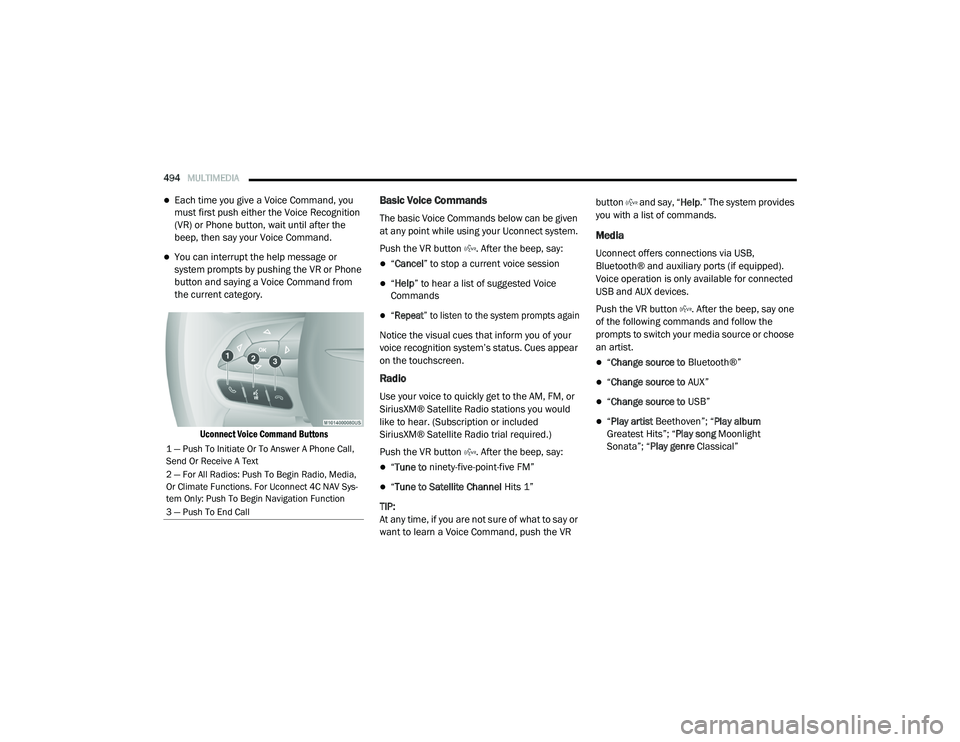
Uconnect Voice Command Buttons
Basic Voice Commands
The basic Voice Commands below can be given
at any point while using your Uconnect system.
Push the VR button . After the beep, say:
“Cancel ” to stop a current voice session
“Help ” to hear a list of suggested Voice
Commands
“Repeat ” to listen to the system prompts again
Notice the visual cues that inform you of your
voice recognition system’s status. Cues appear
on the touchscreen.
Radio
Use your voice to quickly get to the AM, FM, or
SiriusXM® Satellite Radio stations you would
like to hear. (Subscription or included
SiriusXM® Satellite Radio trial required.)
Push the VR button . After the beep, say:
“ Tune to ninety-five-point-five FM”
“Tune to Satellite Channel Hits 1”
TIP:
At any time, if you are not sure of what to say or
want to learn a Voice Command, push the VR button and say, “
Help.” The system provides
you with a list of commands.
Media
Uconnect offers connections via USB,
Bluetooth® and auxiliary ports (if equipped).
Voice operation is only available for connected
USB and AUX devices.
Push the VR button . After the beep, say one
of the following commands and follow the
prompts to switch your media source or choose
an artist.
“ Change source to Bluetooth®”
“Change source to AUX”
“Change source to USB”
“Play artist Beethoven”; “ Play album
Greatest Hits”; “ Play song Moonlight
Sonata”; “ Play genre Classical”
1 — Push To Initiate Or To Answer A Phone Call,
Send Or Receive A Text
2 — For All Radios: Push To Begin Radio, Media,
Or Climate Functions. For Uconnect 4C NAV Sys-
tem Only: Push To Begin Navigation Function
3 — Push To End Call
20_RU_OM_EN_US_t.book Page 494
Page 500 of 516
498MULTIMEDIA
NOTE:
Requires compatible iPhone®. See dealer for
phone compatibility. Data plan rates apply.
Vehicle user interface is a product of Apple®.
Apple CarPlay® is a trademark of Apple® Inc.
iPhone® is a trademark of Apple® Inc., regis -
tered in the US and other countries. Apple®
terms of use and privacy statements apply.
General Information
The following regulatory statement applies to all
Radio Frequency (RF) devices equipped in this
vehicle:
This device complies with Part 15 of the FCC
Rules and with Innovation, Science and
Economic Development Canada license-exempt
RSS standard(s). Operation is subject to the
following two conditions:
1. This device may not cause harmful interference, and
2. This device must accept any interference received, including interference that may
cause undesired operation. Le présent appareil est conforme aux CNR
d`Innovation, Science and Economic
Development applicables aux appareils radio
exempts de licence. L'exploitation est autorisée
aux deux conditions suivantes:
1. l'appareil ne doit pas produire de
brouillage, et
2. l'utilisateur de l'appareil doit accepter tout brouillage radioélectrique subi, même si le
brouillage est susceptible d'en compro -
mettre le fonctionnement.
La operación de este equipo está sujeta a las
siguientes dos condiciones:
1. es posible que este equipo o dispositivo no cause interferencia perjudicial y
2. este equipo o dispositivo debe aceptar cualquier interferencia, incluyendo la que
pueda causar su operación no deseada.
NOTE:
Changes or modifications not expressly
approved by the party responsible for compli -
ance could void the user’s authority to operate
the equipment. Additional Information
© 202 1 FCA US LLC. All rights reserved.
Mopar and Uconnect are registered
trademarks and Mopar Owner Connect is a
trademark of FCA US LLC. Android™ is a
trademark of Google Inc. SiriusXM® and all
related marks and logos are trademarks of
SiriusXM® Radio Inc.
Uconnect System Support:US residents visit www.DriveUconnect.com or
call: 1-877-855-8400 (24 hours a day 7 days
a week)
Canadian residents visit www.DriveUcon -
nect.ca or call: 1-800-465-2001 (English) or
1-800-387-9983 (French)
SiriusXM Guardian™ services support:
US residents visitwww.driveuconnect.com/
sirius-xm-guardian or call: 1-844-796-4827
Canadian residents visitwww.siriusxm.ca/
guardian-v1/ or call: 1-877-324-9091
20_RU_OM_EN_US_t.book Page 498
Page 509 of 516
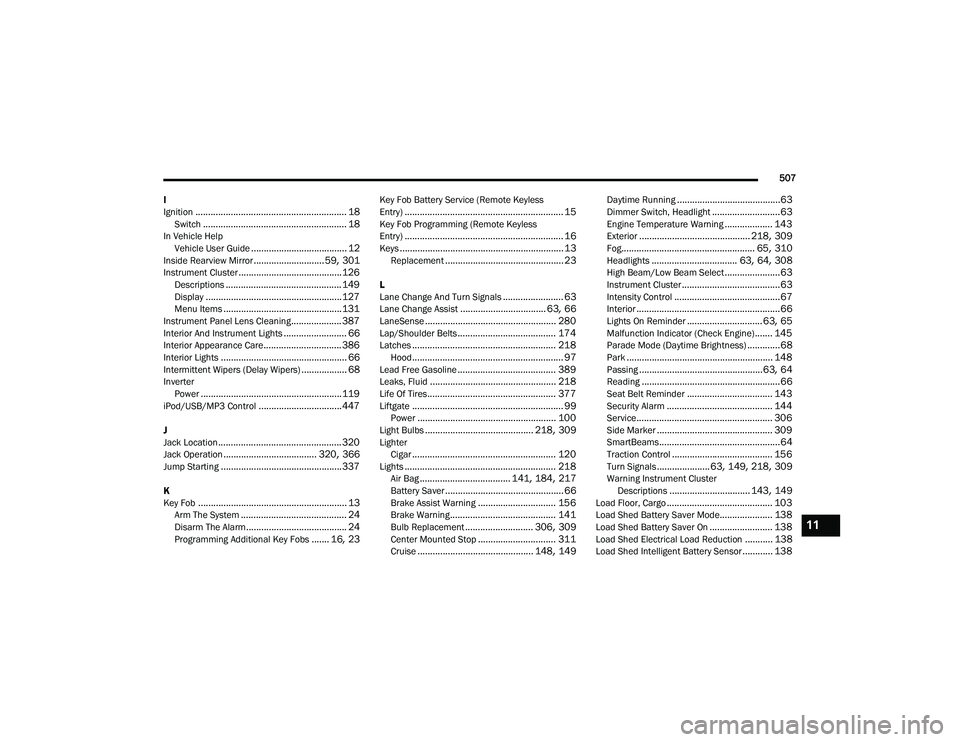
507
I
Ignition
............................................................ 18Switch......................................................... 18In Vehicle Help Vehicle User Guide...................................... 12Inside Rearview Mirror............................ 59, 301Instrument Cluster......................................... 126Descriptions.............................................. 149Display...................................................... 127Menu Items............................................... 131Instrument Panel Lens Cleaning.................... 387Interior And Instrument Lights......................... 66Interior Appearance Care............................... 386Interior Lights.................................................. 66Intermittent Wipers (Delay Wipers).................. 68InverterPower........................................................ 119iPod/USB/MP3 Control................................. 447
J
Jack Location................................................. 320Jack Operation..................................... 320, 366Jump Starting................................................ 337
K
Key Fob........................................................... 13Arm The System.......................................... 24Disarm The Alarm........................................ 24Programming Additional Key Fobs....... 16, 23
Key Fob Battery Service (Remote Keyless
Entry)............................................................... 15Key Fob Programming (Remote Keyless
Entry)............................................................... 16Keys................................................................. 13Replacement............................................... 23
L
Lane Change And Turn Signals........................ 63Lane Change Assist.................................. 63, 66LaneSense.................................................... 280Lap/Shoulder Belts....................................... 174Latches......................................................... 218Hood............................................................ 97Lead Free Gasoline....................................... 389Leaks, Fluid.................................................. 218Life Of Tires................................................... 377Liftgate............................................................ 99Power....................................................... 100Light Bulbs........................................... 218, 309LighterCigar......................................................... 120Lights............................................................ 218Air Bag.................................... 141, 184, 217Battery Saver............................................... 66Brake Assist Warning............................... 156Brake Warning.......................................... 141Bulb Replacement........................... 306, 309Center Mounted Stop............................... 311Cruise.............................................. 148, 149
Daytime Running.........................................63Dimmer Switch, Headlight...........................63Engine Temperature Warning................... 143Exterior............................................ 218, 309Fog..................................................... 65, 310Headlights.................................. 63, 64, 308High Beam/Low Beam Select......................63Instrument Cluster.......................................63Intensity Control..........................................67Interior.........................................................66Lights On Reminder..............................63, 65Malfunction Indicator (Check Engine)....... 145Parade Mode (Daytime Brightness).............68Park.......................................................... 148Passing.................................................63, 64Reading.......................................................66Seat Belt Reminder.................................. 143Security Alarm.......................................... 144Service...................................................... 306Side Marker.............................................. 309SmartBeams................................................64Traction Control........................................ 156Turn Signals..................... 63, 149, 218, 309Warning Instrument Cluster Descriptions................................ 143, 149Load Floor, Cargo.......................................... 103Load Shed Battery Saver Mode..................... 138Load Shed Battery Saver On......................... 138Load Shed Electrical Load Reduction........... 138Load Shed Intelligent Battery Sensor............ 138
11
20_RU_OM_EN_US_t.book Page 507