auto off CHRYSLER PACIFICA 2020 Manual PDF
[x] Cancel search | Manufacturer: CHRYSLER, Model Year: 2020, Model line: PACIFICA, Model: CHRYSLER PACIFICA 2020Pages: 516, PDF Size: 28.69 MB
Page 363 of 516
SERVICING AND MAINTENANCE361
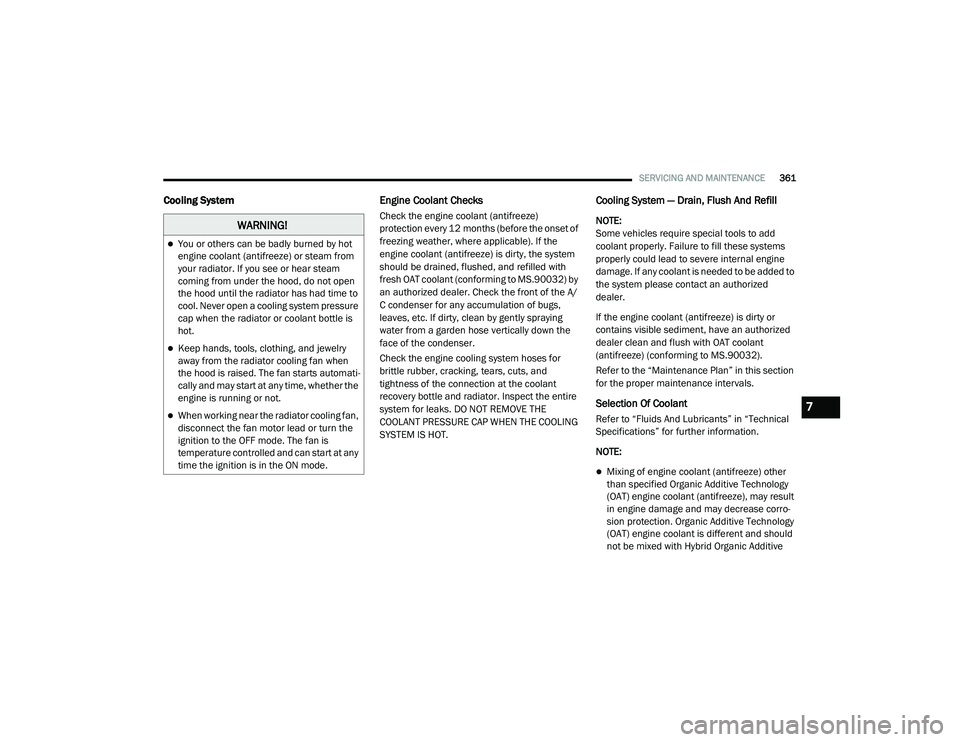
Cooling System Engine Coolant Checks
Check the engine coolant (antifreeze)
protection every 12 months (before the onset of
freezing weather, where applicable). If the
engine coolant (antifreeze) is dirty, the system
should be drained, flushed, and refilled with
fresh OAT coolant (conforming to MS.90032) by
an authorized dealer. Check the front of the A/
C condenser for any accumulation of bugs,
leaves, etc. If dirty, clean by gently spraying
water from a garden hose vertically down the
face of the condenser.
Check the engine cooling system hoses for
brittle rubber, cracking, tears, cuts, and
tightness of the connection at the coolant
recovery bottle and radiator. Inspect the entire
system for leaks. DO NOT REMOVE THE
COOLANT PRESSURE CAP WHEN THE COOLING
SYSTEM IS HOT.
Cooling System — Drain, Flush And Refill
NOTE:
Some vehicles require special tools to add
coolant properly. Failure to fill these systems
properly could lead to severe internal engine
damage. If any coolant is needed to be added to
the system please contact an authorized
dealer.
If the engine coolant (antifreeze) is dirty or
contains visible sediment, have an authorized
dealer clean and flush with OAT coolant
(antifreeze) (conforming to MS.90032).
Refer to the “Maintenance Plan” in this section
for the proper maintenance intervals.
Selection Of Coolant
Refer to “Fluids And Lubricants” in “Technical
Specifications” for further information.
NOTE:
Mixing of engine coolant (antifreeze) other
than specified Organic Additive Technology
(OAT) engine coolant (antifreeze), may result
in engine damage and may decrease corro-
sion protection. Organic Additive Technology
(OAT) engine coolant is different and should
not be mixed with Hybrid Organic Additive
WARNING!
You or others can be badly burned by hot
engine coolant (antifreeze) or steam from
your radiator. If you see or hear steam
coming from under the hood, do not open
the hood until the radiator has had time to
cool. Never open a cooling system pressure
cap when the radiator or coolant bottle is
hot.
Keep hands, tools, clothing, and jewelry
away from the radiator cooling fan when
the hood is raised. The fan starts automati -
cally and may start at any time, whether the
engine is running or not.
When working near the radiator cooling fan,
disconnect the fan motor lead or turn the
ignition to the OFF mode. The fan is
temperature controlled and can start at any
time the ignition is in the ON mode.7
20_RU_OM_EN_US_t.book Page 361
Page 401 of 516
MULTIMEDIA399
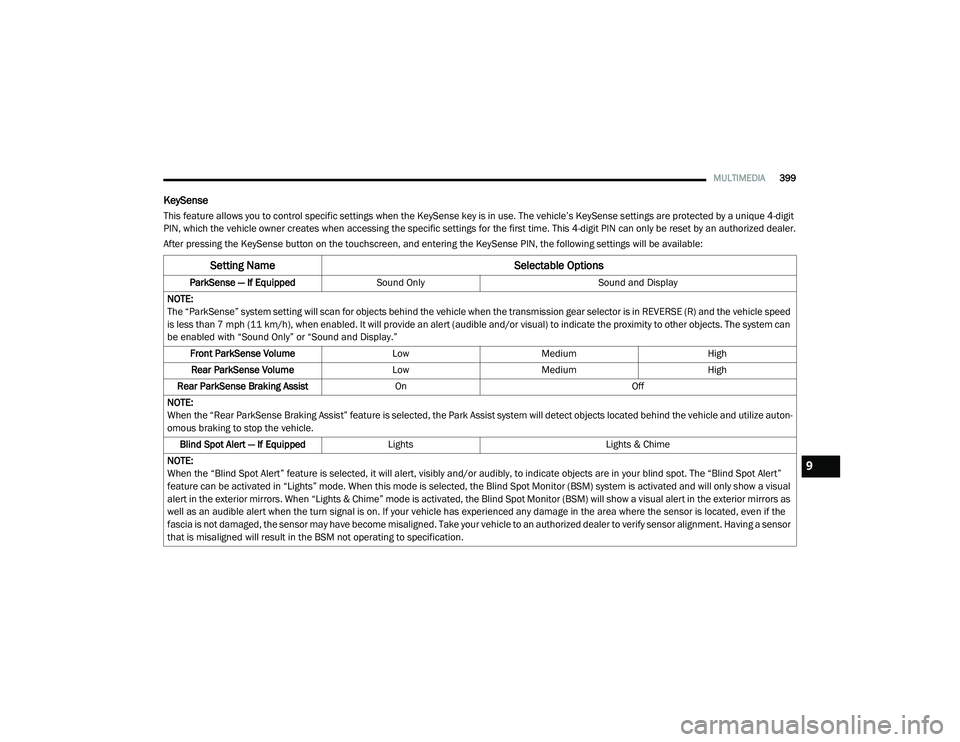
KeySense
This feature allows you to control specific settings when the KeySense key is in use. The vehicle’s KeySense settings are protected by a unique 4-digit
PIN, which the vehicle owner creates when accessing the specific settings for the first time. This 4-digit PIN can only be reset by an authorized dealer.
After pressing the KeySense button on the touchscreen, and entering the KeySense PIN, the following settings will be available:
Setting Name Selectable Options
ParkSense — If EquippedSound Only Sound and Display
NOTE:
The “ParkSense” system setting will scan for objects behind the vehicle when the transmission gear selector is in REVERSE (R) and the vehicle speed
is less than 7 mph (11 km/h), when enabled. It will provide an alert (audible and/or visual) to indicate the proximity to other objects. The system can be enabled with “Sound Only” or “Sound and Display.”
Front ParkSense Volume LowMedium High
Rear ParkSense Volume LowMedium High
Rear ParkSense Braking Assist On Off
NOTE:
When the “Rear ParkSense Braking Assist” feature is selected, the Park Assist system will detect objects located behind the vehicle and utilize auton -
omous braking to stop the vehicle.
Blind Spot Alert — If Equipped Lights Lights & Chime
NOTE:
When the “Blind Spot Alert” feature is selected, it will alert, visibly and/or audibly, to indicate objects are in your blind spot. The “Blind Spot Alert”
feature can be activated in “Lights” mode. When this mode is selected, the Blind Spot Monitor (BSM) system is activated and will only show a visual
alert in the exterior mirrors. When “Lights & Chime” mode is activated, the Blind Spot Monitor (BSM) will show a visual alert in the exterior mirrors as
well as an audible alert when the turn signal is on. If your vehicle has experienced any damage in the area where the sensor is located, even if the
fascia is not damaged, the sensor may have become misaligned. Take your vehicle to an authorized dealer to verify sensor alignment. Having a sensor
that is misaligned will result in the BSM not operating to specification.
9
20_RU_OM_EN_US_t.book Page 399
Page 402 of 516
400MULTIMEDIA
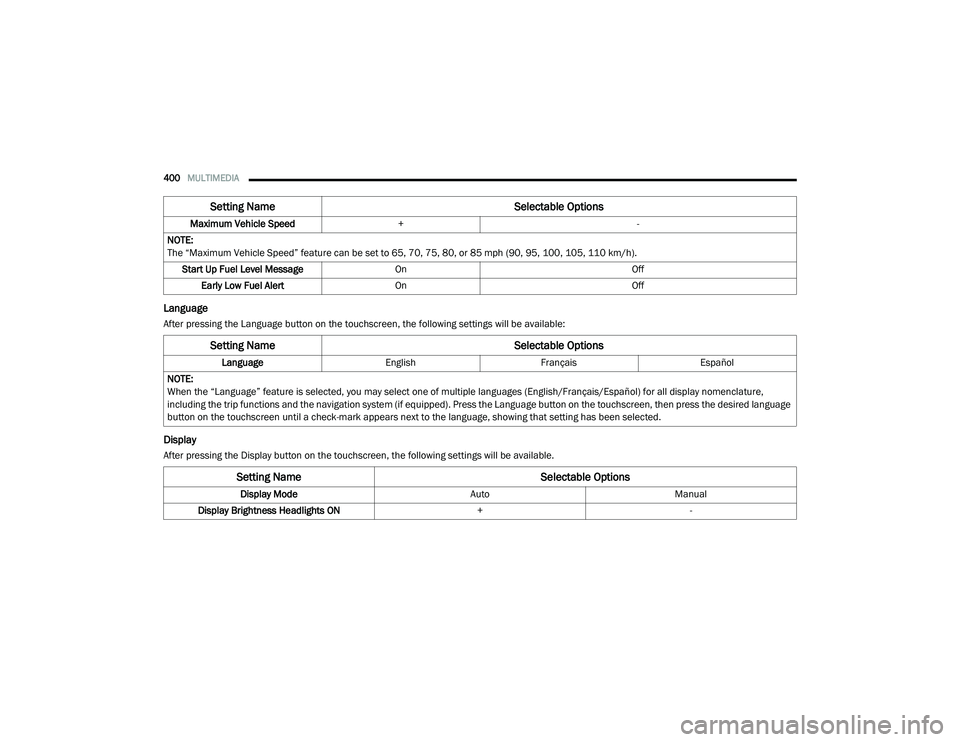
Language
After pressing the Language button on the touchscreen, the following settings will be available:
Display
After pressing the Display button on the touchscreen, the following settings will be available.Maximum Vehicle Speed
+ -
NOTE:
The “Maximum Vehicle Speed” feature can be set to 65, 70, 75, 80, or 85 mph (90, 95, 100, 105, 110 km/h). Start Up Fuel Level Message On Off
Early Low Fuel Alert On Off
Setting Name Selectable Options
Setting NameSelectable Options
LanguageEnglishFrançais Español
NOTE:
When the “Language” feature is selected, you may select one of multiple languages (English/Français/Español) for all display nomenclature,
including the trip functions and the navigation system (if equipped). Press the Language button on the touchscreen, then press the desired language
button on the touchscreen until a check-mark appears next to the language, showing that setting has been selected.
Setting Name Selectable Options
Display ModeAutoManual
Display Brightness Headlights ON +-
20_RU_OM_EN_US_t.book Page 400
Page 408 of 516
406MULTIMEDIA
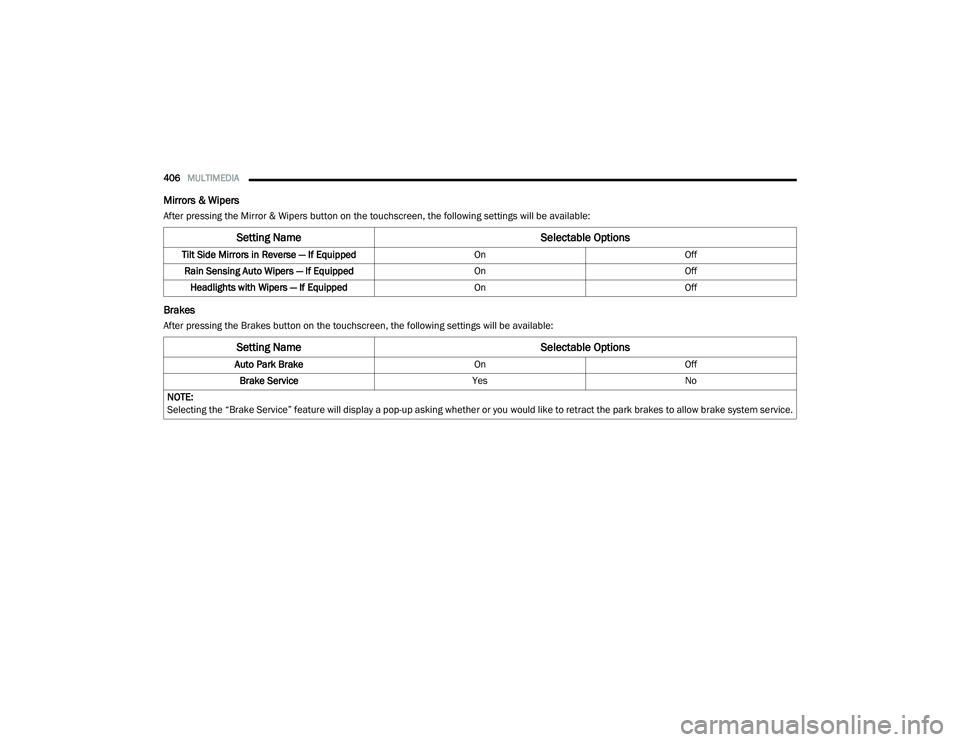
Mirrors & Wipers
After pressing the Mirror & Wipers button on the touchscreen, the following settings will be available:
Brakes
After pressing the Brakes button on the touchscreen, the following settings will be available:
Setting Name Selectable Options
Tilt Side Mirrors in Reverse — If Equipped OnOff
Rain Sensing Auto Wipers — If Equipped OnOff
Headlights with Wipers — If Equipped OnOff
Setting Name Selectable Options
Auto Park BrakeOnOff
Brake Service YesNo
NOTE:
Selecting the “Brake Service” feature will display a pop-up asking whether or you would like to retract the park brakes to allow brake system service.
20_RU_OM_EN_US_t.book Page 406
Page 409 of 516
MULTIMEDIA407
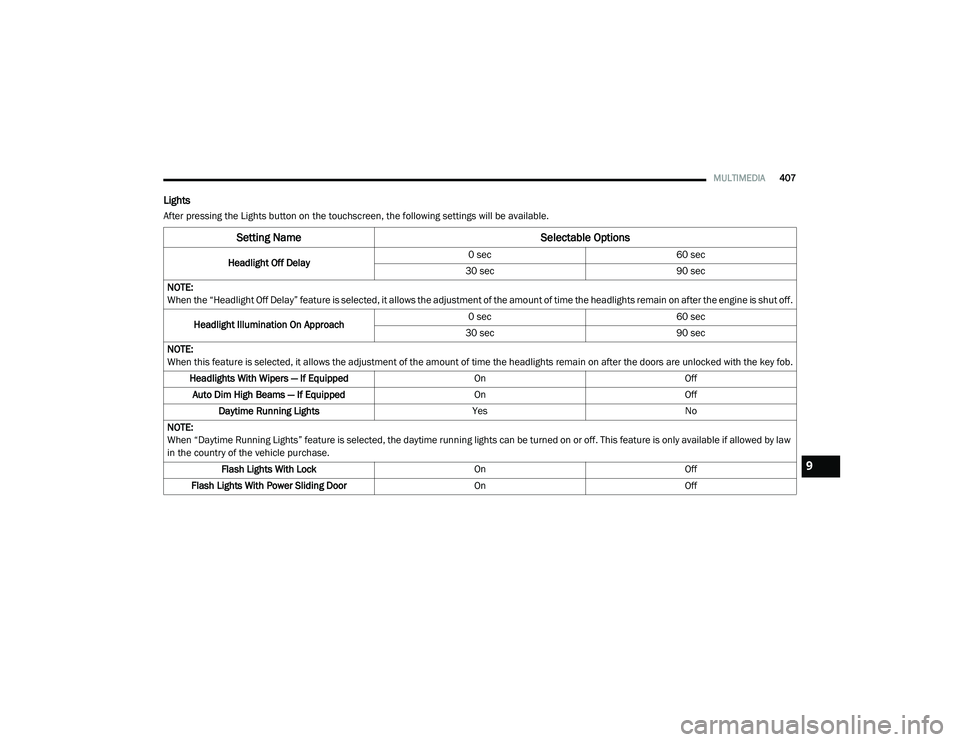
Lights
After pressing the Lights button on the touchscreen, the following settings will be available.
Setting Name Selectable Options
Headlight Off Delay0 sec
60 sec
30 sec 90 sec
NOTE:
When the “Headlight Off Delay” feature is selected, it allows the adjustment of the amount of time the headlights remain on after the engine is shut off.
Headlight Illumination On Approach 0 sec
60 sec
30 sec 90 sec
NOTE:
When this feature is selected, it allows the adjustment of the amount of time the headlights remain on after the doors are unlocked with the key fob. Headlights With Wipers — If Equipped OnOff
Auto Dim High Beams — If Equipped OnOff
Daytime Running Lights YesNo
NOTE:
When “Daytime Running Lights” feature is selected, the daytime running lights can be turned on or off. This feature is only available if allowed by law
in the country of the vehicle purchase. Flash Lights With Lock OnOff
Flash Lights With Power Sliding Door OnOff
9
20_RU_OM_EN_US_t.book Page 407
Page 410 of 516
408MULTIMEDIA
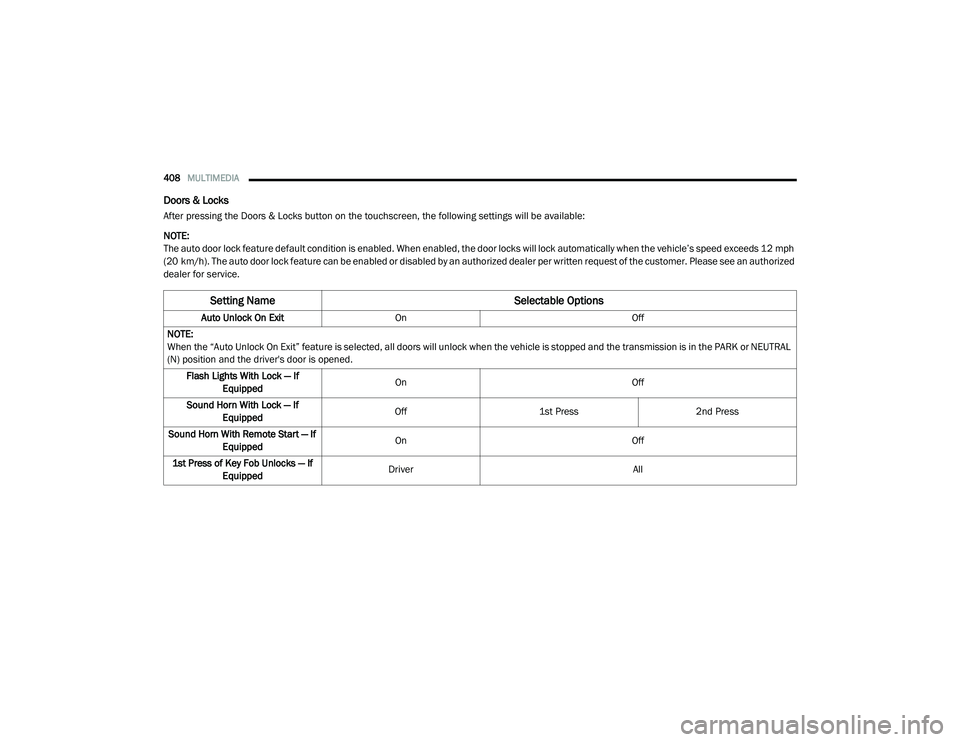
Doors & Locks
After pressing the Doors & Locks button on the touchscreen, the following settings will be available:
NOTE:
The auto door lock feature default condition is enabled. When enabled, the door locks will lock automatically when the vehicle’s speed exceeds 12 mph
(20 km/h). The auto door lock feature can be enabled or disabled by an authorized dealer per written request of the customer. Please see an authorized
dealer for service.
Setting Name Selectable Options
Auto Unlock On ExitOn Off
NOTE:
When the “Auto Unlock On Exit” feature is selected, all doors will unlock when the vehicle is stopped and the transmission is in the PARK or NEUTRAL
(N) position and the driver's door is opened. Flash Lights With Lock — If Equipped On
Off
Sound Horn With Lock — If Equipped Off
1st Press 2nd Press
Sound Horn With Remote Start — If Equipped On
Off
1st Press of Key Fob Unlocks — If Equipped Driver
All
20_RU_OM_EN_US_t.book Page 408
Page 412 of 516
410MULTIMEDIA
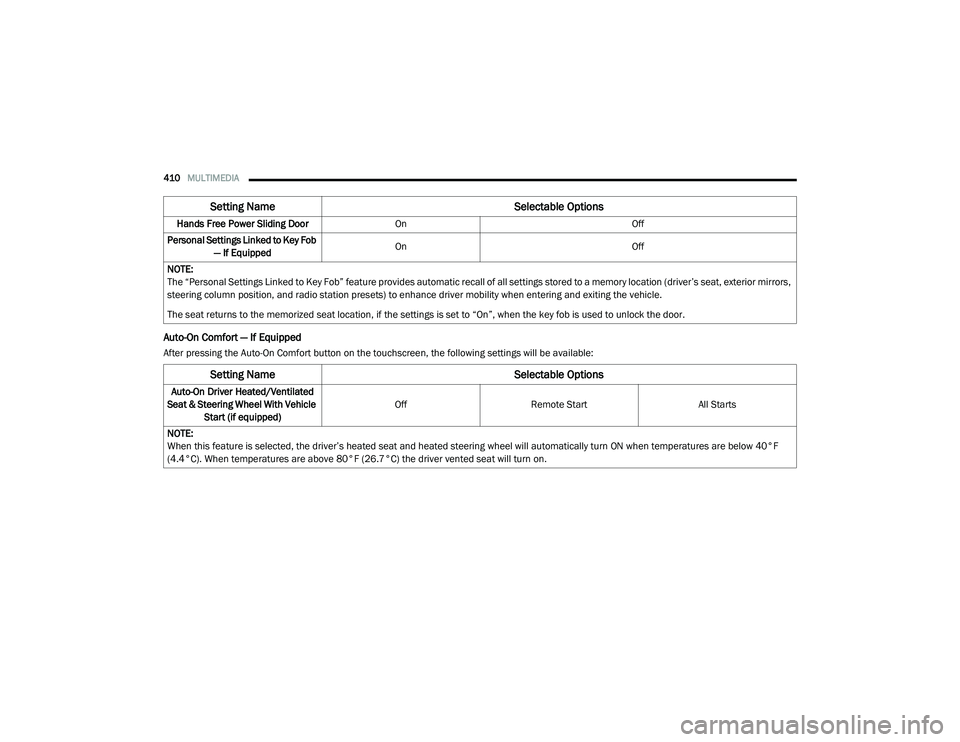
Auto-On Comfort — If Equipped
After pressing the Auto-On Comfort button on the touchscreen, the following settings will be available:Hands Free Power Sliding Door
On Off
Personal Settings Linked to Key Fob — If Equipped On
Off
NOTE:
The “Personal Settings Linked to Key Fob” feature provides automatic recall of all settings stored to a memory location (driver’s seat, exterior mirrors,
steering column position, and radio station presets) to enhance driver mobility when entering and exiting the vehicle.
The seat returns to the memorized seat location, if the settings is set to “On”, when the key fob is used to unlock the door.
Setting Name Selectable Options
Setting NameSelectable Options
Auto-On Driver Heated/Ventilated
Seat & Steering Wheel With Vehicle Start (if equipped) Off
Remote Start All Starts
NOTE:
When this feature is selected, the driver’s heated seat and heated steering wheel will automatically turn ON when temperatures are below 40°F
(4.4°C). When temperatures are above 80°F (26.7°C) the driver vented seat will turn on.
20_RU_OM_EN_US_t.book Page 410
Page 413 of 516
MULTIMEDIA411
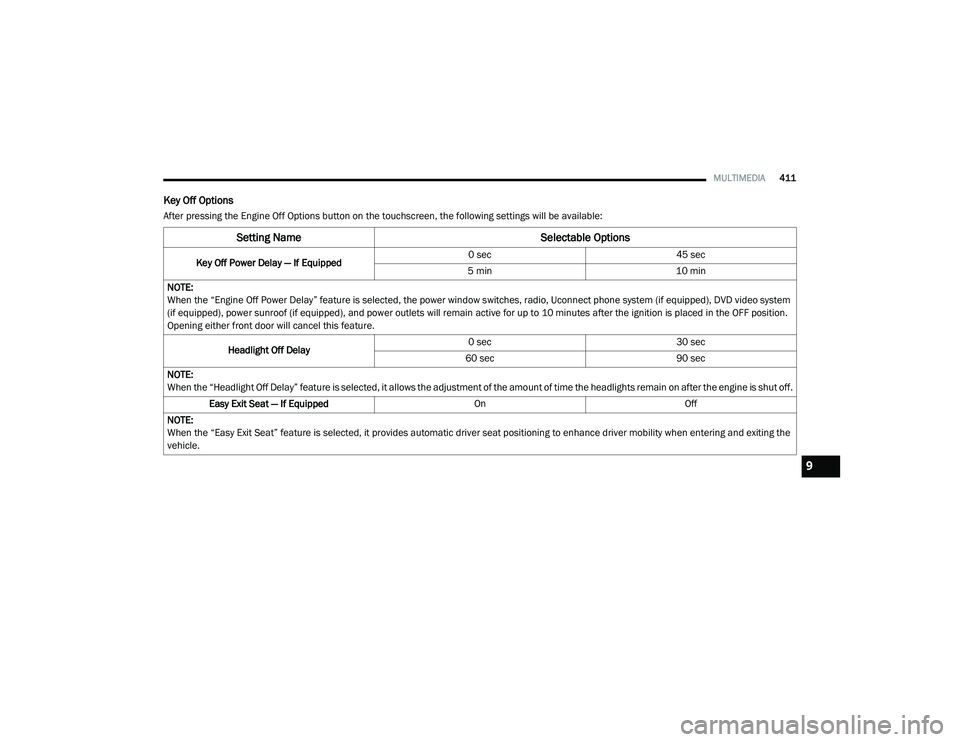
Key Off Options
After pressing the Engine Off Options button on the touchscreen, the following settings will be available:
Setting Name Selectable Options
Key Off Power Delay — If Equipped 0 sec
45 sec
5 min 10 min
NOTE:
When the “Engine Off Power Delay” feature is selected, the power window switches, radio, Uconnect phone system (if equipped), DVD video system
(if equipped), power sunroof (if equipped), and power outlets will remain active for up to 10 minutes after the ignition is placed in the OFF position.
Opening either front door will cancel this feature.
Headlight Off Delay 0 sec
30 sec
60 sec 90 sec
NOTE:
When the “Headlight Off Delay” feature is selected, it allows the adjustment of the amount of time the headlights remain on after the engine is shut off. Easy Exit Seat — If Equipped OnOff
NOTE:
When the “Easy Exit Seat” feature is selected, it provides automatic driver seat positioning to enhance driver mobility when entering and exiting the
vehicle.
9
20_RU_OM_EN_US_t.book Page 411
Page 414 of 516
412MULTIMEDIA
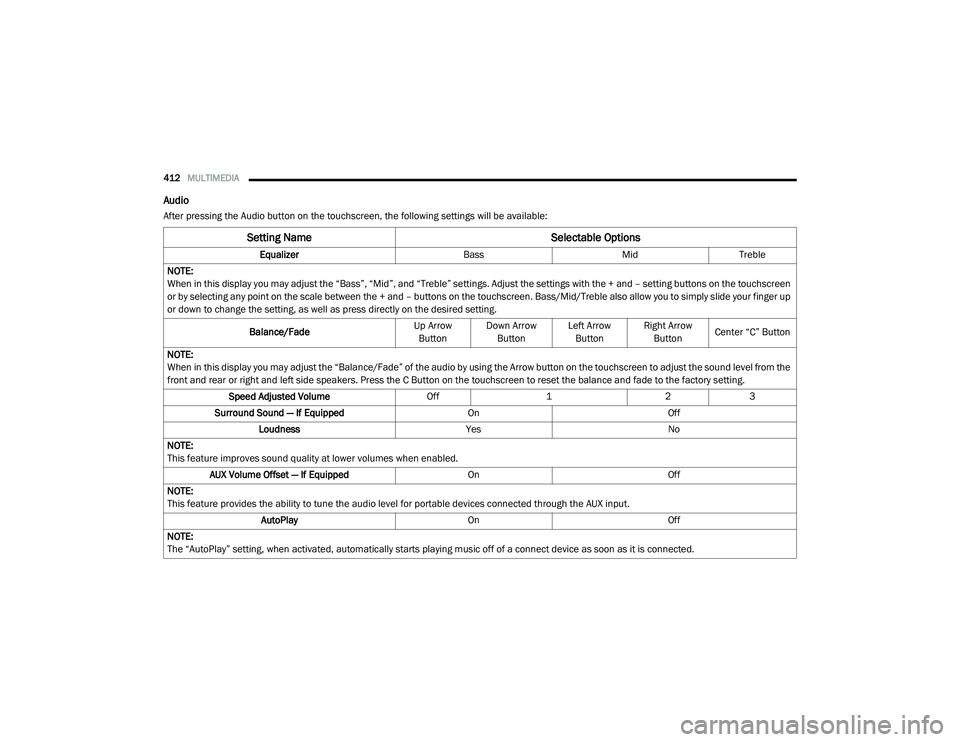
Audio
After pressing the Audio button on the touchscreen, the following settings will be available:
Setting Name Selectable Options
EqualizerBassMidTreble
NOTE:
When in this display you may adjust the “Bass”, “Mid”, and “Treble” settings. Adjust the settings with the + and – setting buttons on the touchscreen
or by selecting any point on the scale between the + and – buttons on the touchscreen. Bass/Mid/Treble also allow you to simply slide your finger up
or down to change the setting, as well as press directly on the desired setting.
Balance/Fade Up Arrow
Button Down Arrow
Button Left Arrow
Button Right Arrow
Button Center “C” Button
NOTE:
When in this display you may adjust the “Balance/Fade” of the audio by using the Arrow button on the touchscreen to adjust the sound level from the
front and rear or right and left side speakers. Press the C Button on the touchscreen to reset the balance and fade to the factory setting. Speed Adjusted Volume Off123
Surround Sound — If Equipped OnOff
Loudness YesNo
NOTE:
This feature improves sound quality at lower volumes when enabled. AUX Volume Offset — If Equipped OnOff
NOTE:
This feature provides the ability to tune the audio level for portable devices connected through the AUX input. AutoPlay OnOff
NOTE:
The “AutoPlay” setting, when activated, automatically starts playing music off of a connect device as soon as it is connected.
20_RU_OM_EN_US_t.book Page 412
Page 415 of 516
MULTIMEDIA413
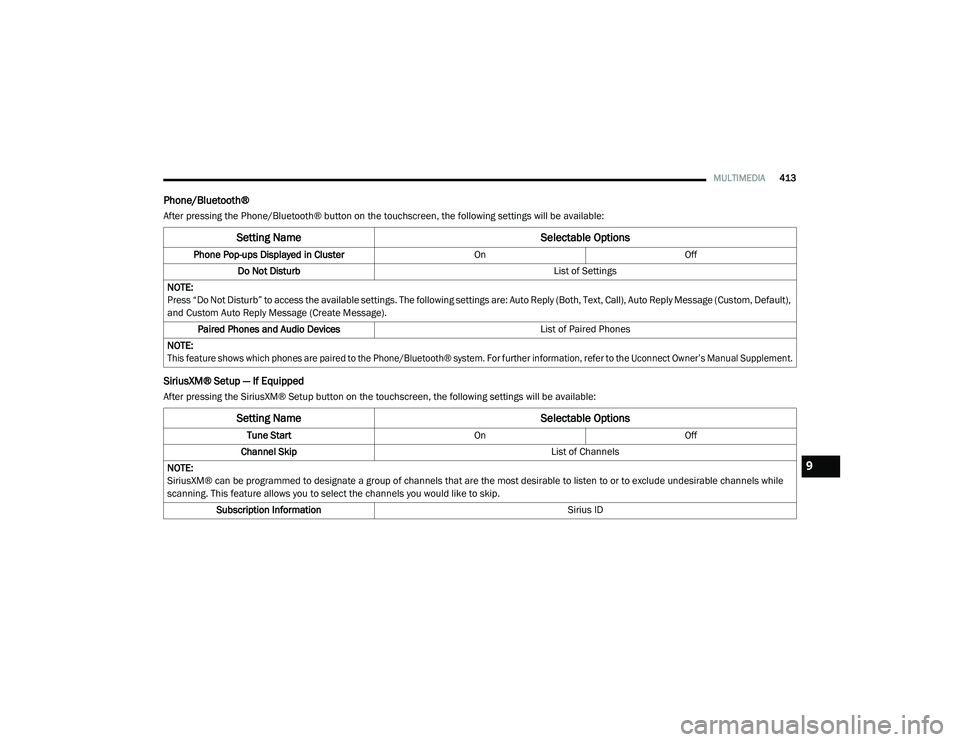
Phone/Bluetooth®
After pressing the Phone/Bluetooth® button on the touchscreen, the following settings will be available:
SiriusXM® Setup — If Equipped
After pressing the SiriusXM® Setup button on the touchscreen, the following settings will be available:
Setting Name Selectable Options
Phone Pop-ups Displayed in Cluster OnOff
Do Not Disturb List of Settings
NOTE:
Press “Do Not Disturb” to access the available settings. The following settings are: Auto Reply (Both, Text, Call), Auto Reply Message (Custom, Default),
and Custom Auto Reply Message (Create Message). Paired Phones and Audio Devices List of Paired Phones
NOTE:
This feature shows which phones are paired to the Phone/Bluetooth® system. For further information, refer to the Uconnect Owner’s Manual Supplement.
Setting Name Selectable Options
Tune StartOnOff
Channel Skip List of Channels
NOTE:
SiriusXM® can be programmed to designate a group of channels that are the most desirable to listen to or to exclude undesirable channels while
scanning. This feature allows you to select the channels you would like to skip. Subscription Information Sirius ID
9
20_RU_OM_EN_US_t.book Page 413