Eco CHRYSLER PACIFICA 2020 Owners Manual
[x] Cancel search | Manufacturer: CHRYSLER, Model Year: 2020, Model line: PACIFICA, Model: CHRYSLER PACIFICA 2020Pages: 516, PDF Size: 28.69 MB
Page 2 of 516
WARNING: Operating, servicing and maintaining a passenger vehicle or off-highway motor vehicle can
expose you to chemicals including engine exhaust, carbon monoxide, phthalates, and lead, which are known to the
State of California to cause cancer and birth defects or other reproductive harm. To minimize exposure, avoid
breathing exhaust, do not idle the engine except as necessary, service your vehicle in a well-ventilated area and
wear gloves or wash your hands frequently when servicing your vehicle. For more information go to
www.P65Warnings.ca.gov/passenger-vehicle.
This Owner’s Manual illustrates and describes the operation of features and equipment that are either standard or optional on this vehicle. This manual may also include a
description of features and equipment that are no longer available or were not ordered on this vehicle. Please disregard any features and equipment described in this manual
that are not on this vehicle. FCA US LLC reserves the right to make changes in design and specifications, and/or make additions to or improvements to its products without
imposing any obligation upon itself to install them on products previously manufactured.
With respect to any vehicles sold in Canada, the name FCA US LLC shall be deemed to be deleted and the name FCA Canada Inc.
used in substitution therefore.
If you are the first registered retail owner of your vehicle, you may obtain a complimentary printed copy of the Warranty Booklet by calling 1-800-247-9753 (U.S.)
or 1-800 -387-1143 (Canada) or by contacting your dealer.
This Owner’s Manual is intended to familiarize you with the important features of your vehicle. Your most up-to-date Owner’s Manual, Navigation/ Uconnect manuals and
Warranty Booklet can be found by visiting the website on the back cover. U.S. residents can purchase replacement kits by visiting www.techauthority.com and Canadian
residents can purchase replacement kits by calling 1-800 -387-1143.
The driver’s primary responsibility is the safe operation of the vehicle. Driving while distracted can result in loss of vehicle control, resulting in an accident and personal
injury. FCA US LLC strongly recommends that the driver use extreme caution when using any device or feature that may take their attention off the road. Use of any
electrical devices, such as cellular telephones, computers, portable radios, vehicle navigation or other devices, by the driver while the vehicle is moving is dangerous and
could lead to a serious accident. Texting while driving is also dangerous and should never be done while the vehicle is moving. If you find yourself unable to devote your
full attention to vehicle operation, pull off the road to a safe location and stop your vehicle. Some states or provinces prohibit the use of cellular telephones or texting
while driving. It is always the driver’s responsibility to comply with all local laws.
This Owner’s Manual has been prepared to help you get acquainted with your new Chrysler brand vehicle and to provide a convenient reference source
for common questions.
Not all features shown in this manual may apply to your vehicle. For additional information, visit www.mopar.com (U.S.), www.mopar.ca (Canada) or your
local Chrysler brand dealer.
Drunk driving is one of the most frequent causes of accidents. Your driving ability can be seriously impaired with blood
alcohol levels far below the legal minimum. If you are drinking, don’t drive. Ride with a designated non-drinking driver,
call a cab, a friend or use public transportation.
DRIVING AND ALCOHOL
Driving after drinking can lead to an accident. Your perceptions are less sharp, your reflexes are slower and your judgment
is impaired when you have been drinking. Never drink and then drive.
WARNING!
Page 4 of 516
2
INTRODUCTION
HOW TO USE THIS MANUAL ................................10
Essential Information .................................. 10
Symbols ........................................................ 10
WARNINGS AND CAUTIONS ...............................10
VEHICLE MODIFICATIONS/ALTERATIONS ........11
GETTING TO KNOW YOUR VEHICLE
VEHICLE USER GUIDE — IF EQUIPPED ...............12
KEYS ......................................................................13
Key Fob......................................................... 13
IGNITION SWITCH .................................................18
Keyless Enter-N-Go — Ignition ..................... 18
REMOTE STARTING SYSTEM — IF EQUIPPED ...19
How To Use Remote Start ........................... 20
Remote Start Cancel Message —
If Equipped ................................................... 20 To Enter Remote Start Mode ...................... 21
To Exit Remote Start Mode Without Driving
The Vehicle .................................................. 21 To Exit Remote Start Mode And Drive The
Vehicle .......................................................... 21 Remote Start Comfort Systems —
If Equipped ................................................... 21 General Information .................................... 22 SENTRY KEY.......................................................... 22
Key Programming ....................................... 23
Replacement Keys....................................... 23
General Information .................................... 23
VEHICLE SECURITY ALARM — IF EQUIPPED ..... 24
To Arm The System ..................................... 24
To Disarm The System ................................ 24
Rearming Of The System............................. 25
DOORS ................................................................... 25
Manual Lock ................................................ 25
Central Lock/Unlock — If Equipped ............ 26
Unlock Doors Automatically On Exit — If
Equipped ...................................................... 27 Keyless Enter-N-Go — Passive Entry........... 27
Manual Sliding Side Door............................ 30
Power Sliding Side Door — If Equipped ...... 30
Hands-Free Sliding Doors — If Equipped.... 32
Child Locks ................................................... 32
DRIVER MEMORY SETTINGS — IF EQUIPPED .. 34
Programming The Memory Feature............ 34
Linking And Unlinking The Key Fob To
Memory ........................................................ 34 Memory Position Recall............................... 35 SEATS ....................................................................35
Manual Adjustment (Front Seats) — If
Equipped ...................................................... 35 Manual Adjustment (Rear Seats) ............... 37
Power Adjustment (Front Seats) —
If Equipped ................................................... 48 Power Adjustment (Rear Seats) —
If Equipped ................................................... 50 Heated Seats ............................................... 53
Ventilated Seats — If Equipped................... 54
Adjustable Armrest (Front Seats) —
If Equipped ................................................... 54 Plastic Grocery Bag Retainer Hooks .......... 54
HEAD RESTRAINTS ..............................................55
Head Restraints — Front Seats................... 55
Head Restraints — Second Row
Quad Seats .................................................. 56 Head Restraints — Second Row Bench...... 56
Head Restraints — Third Row ..................... 57
STEERING WHEEL.................................................58
Tilt/Telescoping Steering Column .............. 58
Heated Steering Wheel — If Equipped ....... 58
20_RU_OM_EN_US_t.book Page 2
Page 6 of 516
4
GETTING TO KNOW YOUR INSTRUMENT PANEL
INSTRUMENT CLUSTER..................................... 125
Instrument Cluster Descriptions ...............126
INSTRUMENT CLUSTER DISPLAY ................... 127
Instrument Cluster Display Location And
Controls ......................................................128 Oil Life Reset ..............................................129
Fuel And Oil Refresh Mode .......................129
KeySense Cluster Messages —
If Equipped .................................................130 Instrument Cluster Display Menu Items ..131
Battery Saver On/Battery Saver Mode
Message — Electrical Load Reduction
Actions — If Equipped ................................138 Instrument Cluster Display Programmable
Features Screen Setup.............................. 139
TRIP COMPUTER ............................................... 140
WARNING LIGHTS AND MESSAGES ............... 141
Red Warning Lights....................................141
Yellow Warning Lights ...............................144
Yellow Indicator Lights...............................147
Green Indicator Lights ...............................148
Blue Indicator Lights ..................................149White Indicator Lights................................149
ONBOARD DIAGNOSTIC SYSTEM — OBD II .... 150
Onboard Diagnostic System (OBD II)
Cybersecurity..............................................150
EMISSIONS INSPECTION AND MAINTENANCE
PROGRAMS ........................................................ 151
SAFETY
SAFETY FEATURES .............................................152 Anti-Lock Brake System (ABS) ................. 152
Electronic Brake Control (EBC) System ... 153
AUXILIARY DRIVING SYSTEMS.........................159 Blind Spot Monitoring (BSM) —
If Equipped ................................................. 159 Forward Collision Warning (FCW) With
Mitigation — If Equipped............................ 164 Tire Pressure Monitoring
System (TPMS) .......................................... 167
OCCUPANT RESTRAINT SYSTEMS .................. 171 Occupant Restraint Systems Features .... 171
Important Safety Precautions ................... 172
Seat Belt Systems ..................................... 172
Supplemental Restraint Systems (SRS)... 184
Child Restraints ......................................... 198
Transporting Pets ...................................... 215
SAFETY TIPS ....................................................... 216 Transporting Passengers .......................... 216Exhaust Gas .............................................. 216
Safety Checks You Should Make Inside
The Vehicle ................................................ 217 Periodic Safety Checks You Should Make
Outside The Vehicle ................................... 218
STARTING AND OPERATING
STARTING THE ENGINE .....................................219 Normal Starting.......................................... 219Cold Weather Operation (Below –22°F
Or −30°C) ................................................. 223 After Starting — Warming Up The
Engine ........................................................ 223 If Engine Fails To Start ............................. 223
To Turn Off The Engine Using ENGINE
START/STOP Button .................................. 223
ENGINE BLOCK HEATER — IF EQUIPPED ....... 224
ENGINE BREAK-IN RECOMMENDATIONS ...... 224
PARK BRAKE...................................................... 225 Electric Park Brake (EPB) ......................... 225
AUTOMATIC TRANSMISSION ........................... 228 Ignition Park Interlock ............................... 229Brake/Transmission Shift Interlock
System........................................................ 229 Nine-Speed Automatic Transmission ...... 230
Gear Ranges .............................................. 230
ACTIVE NOISE CANCELLATION ........................ 234
POWER STEERING............................................. 234
STOP/START SYSTEM — IF EQUIPPED ........... 235
Auto Stop/Start.......................................... 235
Possible Reasons The Engine Does Not
Autostop ..................................................... 235 To Start The Engine While In Auto
Stop/Start .................................................. 236 To Manually Turn Off The Stop/Start
System........................................................ 236 To Manually Turn On The Stop/Start
System........................................................ 237 System Malfunction................................... 237
20_RU_OM_EN_US_t.book Page 4
Page 8 of 516
6
IN CASE OF EMERGENCY
HAZARD WARNING FLASHERS ....................... 301
ASSIST AND SOS MIRROR — IF EQUIPPED.... 301
General Information ..................................305
BULB REPLACEMENT ....................................... 306
Replacement Bulbs ...................................306
Replacing Exterior Bulbs ...........................308
FUSES .................................................................. 311
General Information ..................................311Fuse Location.............................................312Underhood Fuses.......................................312
JACKING AND TIRE CHANGING —
IF EQUIPPED ....................................................... 320
Jack And Spare Tire Location....................320
Equipment Removal .................................320
Preparations For Jacking ..........................321
Jacking Instructions ..................................322Road Tire Installation ................................325Portable Air Compressor — If Equipped....327
Tire Service Kit For Inflating Tire —
If Equipped .................................................328 Return Inflatable Spare Tire ......................330
TIRE SERVICE KIT — IF EQUIPPED ................... 330
JUMP STARTING................................................. 337
Preparations For Jump Start .....................337Jump Starting Procedure...........................338
REFUELING IN EMERGENCY ............................ 339
IF YOUR ENGINE OVERHEATS .......................... 339 MANUAL PARK RELEASE ................................. 340
FREEING A STUCK VEHICLE .............................341
TOWING A DISABLED VEHICLE .......................342
ENHANCED ACCIDENT RESPONSE SYSTEM
(EARS) .................................................................344
EVENT DATA RECORDER (EDR) .......................344
SERVICING AND MAINTENANCE
SCHEDULED SERVICING .................................. 345
Maintenance Plan ..................................... 345
ENGINE COMPARTMENT ................................... 349
3.6L Engine ................................................ 349
Checking Oil Level ..................................... 350
Adding Washer Fluid ................................. 350
Maintenance-Free Battery ....................... 350
Pressure Washing...................................... 351
DEALER SERVICE ..............................................351
Engine Oil .................................................. 351
Engine Oil Filter .......................................... 352Engine Air Cleaner ..................................... 353
Accessory Drive Belt Inspection ............... 353
Air Conditioner Maintenance .................... 354
Body Lubrication ........................................ 356
Windshield Wiper Blades .......................... 356Exhaust System ........................................ 359
Cooling System .......................................... 361Brake System ............................................ 364Automatic Transmission ........................... 365 RAISING THE VEHICLE ...................................... 366
TIRES .................................................................. 366
Tire Safety Information.............................. 366
Tires — General Information .................... 374Tire Types ................................................... 378
Spare Tires — If Equipped ......................... 379
Wheel And Wheel Trim Care ..................... 381
Tire Chains (Traction Devices) ................. 382
Tire Rotation Recommendations.............. 382
DEPARTMENT OF TRANSPORTATION UNIFORM
TIRE QUALITY GRADES .................................... 383
Treadwear .................................................. 383
Traction Grades ......................................... 383Temperature Grades ................................. 384
STORING THE VEHICLE ..................................... 384
BODYWORK ........................................................ 385
Protection From Atmospheric Agents....... 385
Body And Underbody Maintenance .......... 385Preserving The Bodywork.......................... 385
INTERIORS ......................................................... 386
Seats And Fabric Parts .............................. 386
Plastic And Coated Parts........................... 387
Leather Parts ............................................. 387
Glass Surfaces .......................................... 387
20_RU_OM_EN_US_t.book Page 6
Page 9 of 516
7
TECHNICAL SPECIFICATIONS
IDENTIFICATION DATA ...................................... 388Vehicle Identification Number ..................388
BRAKE SYSTEM ................................................. 388
WHEEL AND TIRE TORQUE
SPECIFICATIONS ................................................ 388 Torque Specifications ................................388
FUEL REQUIREMENTS ...................................... 389 3.6L Engine ...............................................389Reformulated Gasoline .............................390Materials Added To Fuel ..........................390
Gasoline/Oxygenate Blends......................390
Do Not Use E-85 In Non-Flex Fuel
Vehicles ......................................................391 CNG And LP Fuel System Modifications ...391MMT In Gasoline ........................................391
Fuel System Cautions ................................391Carbon Monoxide Warnings .....................392
FLUID CAPACITIES ............................................. 393
FLUIDS AND LUBRICANTS ................................ 394 Engine.........................................................394
Chassis .......................................................396
MULTIMEDIA
UCONNECT SYSTEMS ....................................... 397
CYBERSECURITY ............................................... 397
UCONNECT SETTINGS ....................................... 398
Customer Programmable Features —
Uconnect 4 Settings .................................398 Customer Programmable Features —
Uconnect 4C/4C NAV Settings ................. 415 SAFETY AND GENERAL INFORMATION ........... 436
Safety Guidelines....................................... 436
UCONNECT 4 WITH 7-INCH DISPLAY ..............437
Introduction................................................ 437
Radio Mode ................................................ 438
Media Mode ............................................... 447Phone Mode ............................................... 454
STEERING WHEEL AUDIO CONTROLS — IF
EQUIPPED ..........................................................467
Radio Operation ......................................... 467
Media Mode ............................................... 467
AUX/USB/MP3 CONTROL ................................. 468
UCONNECT THEATER — IF EQUIPPED ............. 469
Uconnect Theater Overview ...................... 469
Getting Started .......................................... 469Accessing The System From The Uconnect
System ........................................................ 469 Uconnect Theater Controls ....................... 470
Accessing The System From The Uconnect
Theater Rear Screens................................ 470 Pairing The Remote ................................... 471
Unpairing The Remote............................... 472Media Sources ........................................... 472
Uconnect Theater Remote Control ........... 473
Uconnect Theater Home Screen And
Controls ...................................................... 474 General Information .................................. 475
Play A DVD/Blu-ray™ Or USB Media File
From Uconnect System ............................. 475 Disc Menu .................................................. 477
Blu-ray™ Controls – Disc Specific
Functions ................................................... 477 Uconnect Theater Apps ............................. 477
Using The Rear Video USB Port ................ 479
Play Video Games ...................................... 479
Headphones Operation ............................. 480
Display Settings ......................................... 481Listening To Audio With The Screen
Closed......................................................... 482 Rear Climate Controls ............................... 482Accessibility — If Equipped ........................ 484
Wireless Streaming — If Equipped............ 484
BD And DVD Region Codes ....................... 485Product Agreement.................................... 487General Information .................................. 489
FCC/IC Regulatory Notices........................ 490
RADIO OPERATION AND MOBILE PHONES.... 491
Regulatory And Safety Information .......... 491
UCONNECT VOICE RECOGNITION QUICK
TIPS .................................................................... 493
Introducing Uconnect ................................ 493
Get Started................................................. 493Basic Voice Commands ............................ 494Radio .......................................................... 494
20_RU_OM_EN_US_t.book Page 7
Page 11 of 516
9
INTRODUCTION
Dear Customer,
Congratulations on selecting your new vehicle. Be assured that it represents precision workmanship, distinctive styling, and high quality. This Owner's
Manual has been prepared with the assistance of service and engineering specialists to acquaint you with the operation and maintenance of your
vehicle. It is supplemented by Warranty Information, and customer-oriented documents. Within this information, you will find a description of the
services that FCA US LLC offers to its customers, the vehicle's warranty coverage, and the details of the terms and conditions for maintaining its validity.
Please take the time to read all of these publications carefully before driving your vehicle for the first time. Following the instructions, recommendations,
tips, and important warnings in this manual will help assure safe and enjoyable operation of your vehicle.
This Owner's Manual describes all versions of this vehicle. Options and equipment dedicated to specific markets or versions are not expressly indicated
in the text. Therefore, you should only consider the information which is related to the trim level, engine, and version that you have purchased. Any
content introduced throughout the Owner's Information, that may or may not be applicable to your vehicle, will be identified with the wording “If
Equipped”. All data contained in this publication are intended to help you use your vehicle in the best possible way. FCA US LLC aims at a constant
improvement of the vehicles produced. For this reason, it reserves the right to make changes to the model described for technical and/or commercial
reasons. For further information, contact an authorized dealer.
When it comes to service, remember that authorized dealers know your vehicle best, have factory-trained technicians and genuine MOPAR® parts, and
care about your satisfaction.1
20_RU_OM_EN_US_t.book Page 9
Page 15 of 516
GETTING TO KNOW YOUR VEHICLE13
Features/Benefits
Pre-installed on your Uconnect touchscreen radio
Enhanced search and browsing capability
Robust NAV application (if equipped)
Add selected topics to a fast-access Favor -
ites category
Icon and symbol glossary
Warranty information
Crucial driver information and assistance:
Operating Instructions
Warranty Information
Fluid Level Standards
Maintenance Schedules
Emergency Procedures
911 Contact and More
TIP:
When viewing a topic, tap the star icon to add it
to your Favorites, for easy access in the future.
KEYS
Key Fob
Your vehicle uses a keyless ignition system. The
ignition system consists of a key fob with
Remote Keyless Entry (RKE) and a START/STOP
push button ignition system. The RKE system
uses a receiver module in the vehicle that
wirelessly links with the key fob.
NOTE:
The key fob may not be found if it is located next
to a mobile phone, laptop or other electronic
device; these devices may block the key fob’s
wireless signal.
This system allows you to lock or unlock the
doors and liftgate, activate the Panic Alarm,
optional power liftgate, left power sliding door,
and right power sliding door from distances up
to approximately 66 ft (20 m) using a key fob.
When any button on the key fob is pushed, or when any signal is being transferred between
the key fob and the vehicle, an LED light on the
key fob will flash as an indicator. The key fob
does not need to be pointed at the vehicle to
activate the system.
NOTE:
The emergency key allows for entry into the
vehicle should the battery in the vehicle or the
key fob become depleted. The emergency key is
also for locking/unlocking the glove compart
-
ment. You can keep the emergency key with you
when valet parking.
2
20_RU_OM_EN_US_t.book Page 13
Page 16 of 516
14GETTING TO KNOW YOUR VEHICLE
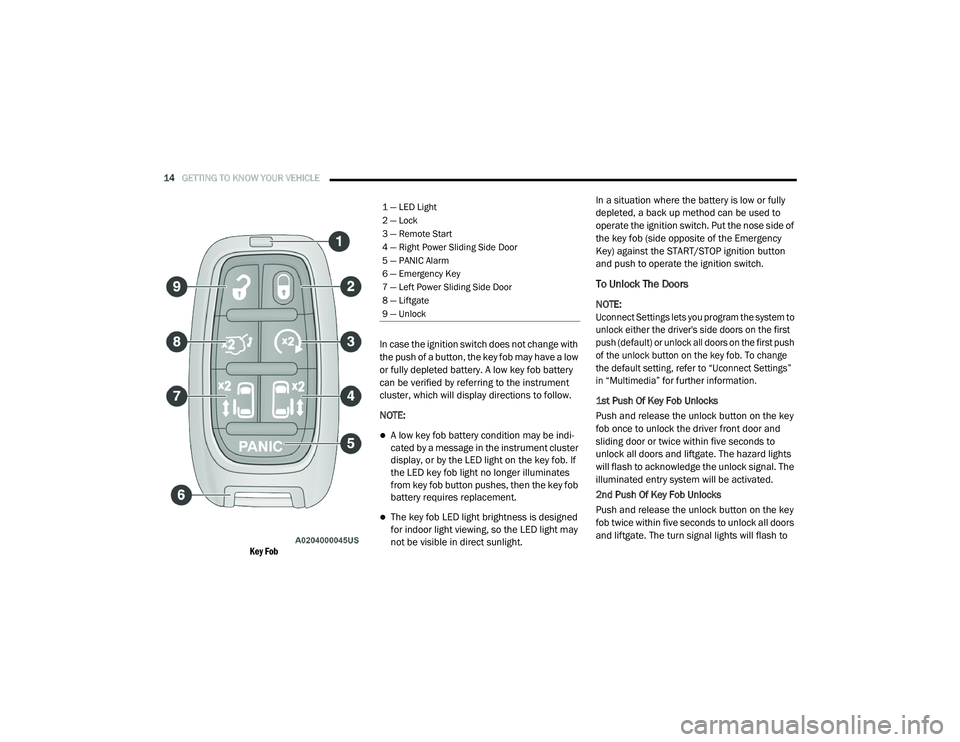
Key Fob
In case the ignition switch does not change with
the push of a button, the key fob may have a low
or fully depleted battery. A low key fob battery
can be verified by referring to the instrument
cluster, which will display directions to follow.
NOTE:
A low key fob battery condition may be indi
-
cated by a message in the instrument cluster
display, or by the LED light on the key fob. If
the LED key fob light no longer illuminates
from key fob button pushes, then the key fob
battery requires replacement.
The key fob LED light brightness is designed
for indoor light viewing, so the LED light may
not be visible in direct sunlight. In a situation where the battery is low or fully
depleted, a back up method can be used to
operate the ignition switch. Put the nose side of
the key fob (side opposite of the Emergency
Key) against the START/STOP ignition button
and push to operate the ignition switch.
To Unlock The Doors
NOTE:
Uconnect Settings lets you program the system to
unlock either the driver's side doors on the first
push (default) or unlock all doors on the first push
of the unlock button on the key fob. To change
the default setting, refer to “Uconnect Settings”
in “Multimedia” for further information.
1st Push Of Key Fob Unlocks
Push and release the unlock button on the key
fob once to unlock the driver front door and
sliding door or twice within five seconds to
unlock all doors and liftgate. The hazard lights
will flash to acknowledge the unlock signal. The
illuminated entry system will be activated.
2nd Push Of Key Fob Unlocks
Push and release the unlock button on the key
fob twice within five seconds to unlock all doors
and liftgate. The turn signal lights will flash to
1 — LED Light
2 — Lock
3 — Remote Start
4 — Right Power Sliding Side Door
5 — PANIC Alarm
6 — Emergency Key
7 — Left Power Sliding Side Door
8 — Liftgate
9 — Unlock
20_RU_OM_EN_US_t.book Page 14
Page 17 of 516
GETTING TO KNOW YOUR VEHICLE15
acknowledge the unlock signal. The illuminated
entry system will be activated.
This feature lets you program the system to
unlock either the driver's side doors or all doors
on the first push of the unlock button on the key
fob. To change the current setting, refer to
“Uconnect Settings” in “Multimedia” for further
information.
NOTE:
Your vehicle is equipped with Passive Entry;
refer to “Keyless Enter-N-Go — Passive Entry” in
this chapter for further information.
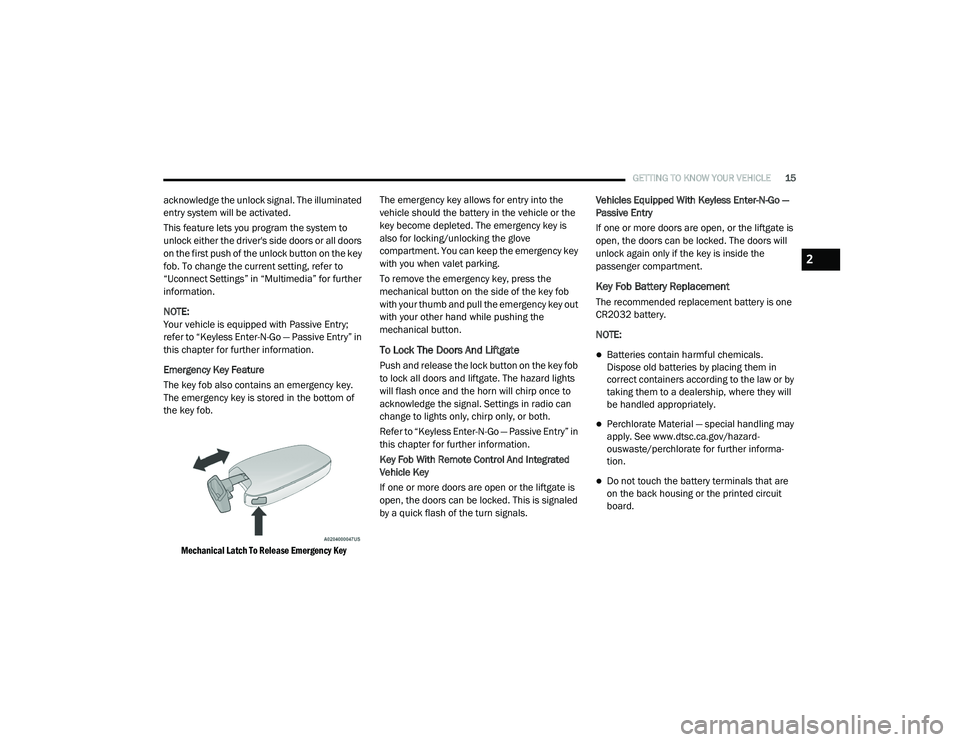
Emergency Key Feature
The key fob also contains an emergency key.
The emergency key is stored in the bottom of
the key fob.
Mechanical Latch To Release Emergency Key
The emergency key allows for entry into the
vehicle should the battery in the vehicle or the
key become depleted. The emergency key is
also for locking/unlocking the glove
compartment. You can keep the emergency key
with you when valet parking.
To remove the emergency key, press the
mechanical button on the side of the key fob
with your thumb and pull the emergency key out
with your other hand while pushing the
mechanical button.
To Lock The Doors And Liftgate
Push and release the lock button on the key fob
to lock all doors and liftgate. The hazard lights
will flash once and the horn will chirp once to
acknowledge the signal. Settings in radio can
change to lights only, chirp only, or both.
Refer to “Keyless Enter-N-Go — Passive Entry” in
this chapter for further information.
Key Fob With Remote Control And Integrated
Vehicle Key
If one or more doors are open or the liftgate is
open, the doors can be locked. This is signaled
by a quick flash of the turn signals.
Vehicles Equipped With Keyless Enter-N-Go —
Passive Entry
If one or more doors are open, or the liftgate is
open, the doors can be locked. The doors will
unlock again only if the key is inside the
passenger compartment.
Key Fob Battery Replacement
The recommended replacement battery is one
CR2032 battery.
NOTE:
Batteries contain harmful chemicals.
Dispose old batteries by placing them in
correct containers according to the law or by
taking them to a dealership, where they will
be handled appropriately.
Perchlorate Material — special handling may
apply. See www.dtsc.ca.gov/hazard
-
ouswaste/perchlorate for further informa -
tion.
Do not touch the battery terminals that are
on the back housing or the printed circuit
board.
2
20_RU_OM_EN_US_t.book Page 15
Page 20 of 516
18GETTING TO KNOW YOUR VEHICLE
General Information
The following regulatory statement applies to all
Radio Frequency (RF) devices equipped in this
vehicle:
This device complies with Part 15 of the FCC
Rules and with Innovation, Science and
Economic Development Canada license-exempt
RSS standard(s). Operation is subject to the
following two conditions:
1. This device may not cause harmful
interference, and
2. This device must accept any interference received, including interference that may
cause undesired operation.
Le présent appareil est conforme aux CNR
d`Innovation, Science and Economic
Development applicables aux appareils radio
exempts de licence. L'exploitation est autorisée
aux deux conditions suivantes:
1. l'appareil ne doit pas produire de brouillage, et
2. l'utilisateur de l'appareil doit accepter tout brouillage radioélectrique subi, même si le
brouillage est susceptible d'en compro -
mettre le fonctionnement. La operación de este equipo está sujeta a las
siguientes dos condiciones:
1. es posible que este equipo o dispositivo no
cause interferencia perjudicial y
2. este equipo o dispositivo debe aceptar cualquier interferencia, incluyendo la que
pueda causar su operación no deseada.
NOTE:
Changes or modifications not expressly
approved by the party responsible for compli -
ance could void the user’s authority to operate
the equipment.
IGNITION SWITCH
Keyless Enter-N-Go — Ignition
If applicable, refer to the “Hybrid Supplement”
for additional information.
This feature allows the driver to start the vehicle
with the push of a button, as long as the key fob
is in the passenger compartment, and the
drivers foot is on the brake pedal.
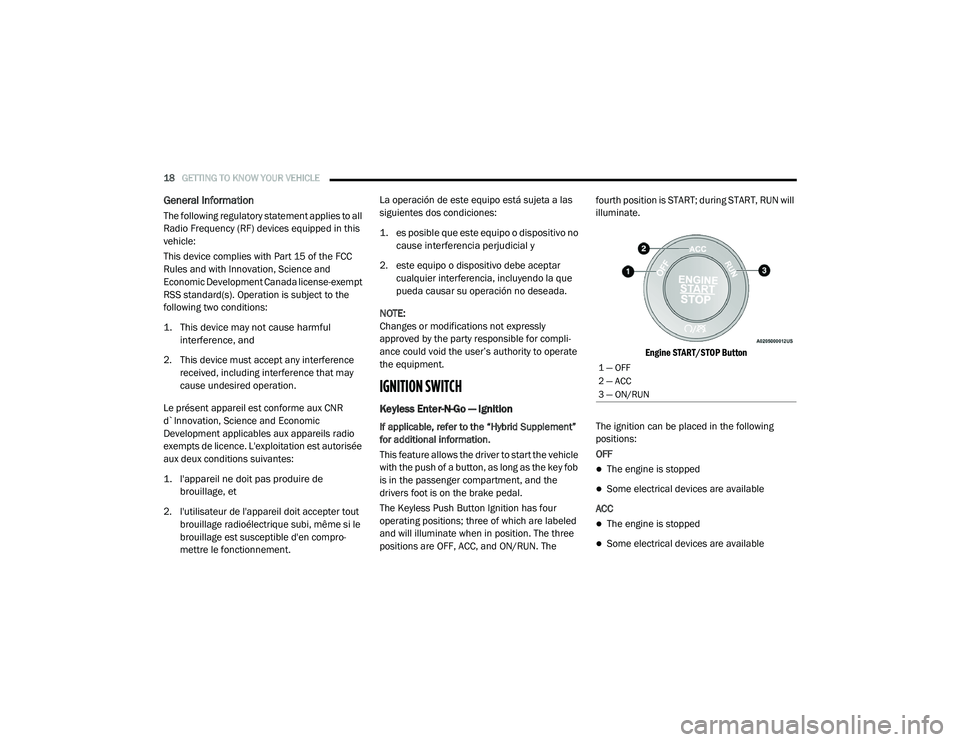
The Keyless Push Button Ignition has four
operating positions; three of which are labeled
and will illuminate when in position. The three
positions are OFF, ACC, and ON/RUN. The fourth position is START; during START, RUN will
illuminate.
Engine START/STOP Button
The ignition can be placed in the following
positions:
OFF
The engine is stopped
Some electrical devices are available
ACC
The engine is stopped
Some electrical devices are available
1 — OFF
2 — ACC
3 — ON/RUN
20_RU_OM_EN_US_t.book Page 18