Eco CHRYSLER PACIFICA 2020 User Guide
[x] Cancel search | Manufacturer: CHRYSLER, Model Year: 2020, Model line: PACIFICA, Model: CHRYSLER PACIFICA 2020Pages: 516, PDF Size: 28.69 MB
Page 22 of 516
20GETTING TO KNOW YOUR VEHICLE
The Remote Starting System also activates the
Climate Control, vented seats (if equipped) in
temperatures above 80°F (26.7°C), and the
optional heated seats, and optional heated
steering wheel in temperatures below 40°F
(4.4°C).
NOTE:
The vehicle must be equipped with an auto -
matic transmission to be equipped with
Remote Start.
Obstructions between the vehicle and key
fob may reduce this range.
How To Use Remote Start
If applicable, refer to the “Hybrid Supplement”
for additional information.
Push Remote Start button on the key fob twice
within five seconds. Pushing the Remote Start
button a third time shuts the engine off.
To drive the vehicle, push the unlock button,
and place the ignition in the ON/RUN position.
With remote start, the engine will only run for
15 minutes (timeout) unless the ignition key
is placed in the ON/RUN position.
The vehicle must be started with the key after
two consecutive timeouts.
All of the following conditions must be met
before the engine will remote start:
Gear selector in PARK
Doors closed
Hood closed
Liftgate closed
Hazard switch off
Brake switch inactive (brake pedal not
pushed)
Battery at an acceptable charge level
Key fob PANIC button not pushed
System not disabled from previous remote
start event
Vehicle alarm system indicator flashing
Ignition in STOP/OFF position
Fuel level meets minimum requirement
Malfunction Indicator Light is not illuminated
Remote Start Cancel Message — If Equipped
The following messages will display in the
instrument cluster if the vehicle fails to remote
start or exits remote start prematurely:
Remote Start Cancelled — Door Open
Remote Start Cancelled — Hood Open
Remote Start Cancelled — Fuel Low
Remote Start Cancelled — Liftgate Open
WARNING!
Do not start or run an engine in a closed
garage or confined area. Exhaust gas
contains Carbon Monoxide (CO) which is
odorless and colorless. Carbon Monoxide is
poisonous and can cause serious injury or
death when inhaled.
Keep key fobs away from children. Opera -
tion of the Remote Start System, windows,
door locks or other controls could cause
serious injury or death.
20_RU_OM_EN_US_t.book Page 20
Page 23 of 516
GETTING TO KNOW YOUR VEHICLE21
Remote Start Cancelled — Too Cold
Remote Start Cancelled — Time Expired
Remote Start Disabled — Start Vehicle To
Reset
The message will stay active until the ignition is
placed in the ON/RUN position.
To Enter Remote Start Mode
If applicable, refer to the “Hybrid Supplement”
for additional information.
Push and release the Remote Start button on
the key fob twice within five seconds. The
vehicle doors will lock, the turn signals will flash
twice, and the horn will chirp twice. Then the
engine will start, and the vehicle will remain in
the Remote Start mode for a 15 minute cycle.
NOTE:
If an engine fault is present or fuel level is
low, the vehicle will start and then shut down
in 10 seconds.
The park lamps will turn on and remain on
during Remote Start mode.
For security, power window operation is
disabled when the vehicle is in the Remote
Start mode.
The engine can be started two consecutive
times (two 15 minute cycles) with the key
fob. However, the ignition must be placed in
the ON/RUN position before you can repeat
the start sequence for a third cycle.
To Exit Remote Start Mode Without Driving
The Vehicle
If applicable, refer to the “Hybrid Supplement”
for additional information.
Push and release the Remote Start button one
time or allow the remote start cycle to complete
the entire 15 minute cycle.
NOTE:
To avoid unintentional shutdowns, the system
will disable for two seconds after receiving a
valid Remote Start request.
To Exit Remote Start Mode And Drive The
Vehicle
Before the end of 15 minute cycle, push and
release the unlock button on the key fob to
unlock the doors, or unlock the vehicle using
Keyless Enter-N-Go — Passive Entry via the door handles, and disarm the vehicle security alarm
(if equipped). Then, prior to the end of the
15 minute cycle, push and release the START/
STOP ignition button.
NOTE:
For vehicles equipped with the Keyless
Enter-N-Go — Passive Entry feature, the
message “Remote Start Active — Push Start
Button” will display in the instrument cluster
display until you push the START/STOP ignition
button.
Remote Start Comfort Systems — If
Equipped
When Remote Start is activated, the Climate
Control, vented seats (if equipped) are also
activated in temperatures above 80°F
(26.7°C), and the optional heated seats, and
optional heated steering wheel in temperatures
below 40°F (4.4°C). These features will stay on
through the duration of Remote Start, or until
the ignition switch is placed in the ON/RUN
position.
2
20_RU_OM_EN_US_t.book Page 21
Page 24 of 516
22GETTING TO KNOW YOUR VEHICLE
General Information
The following regulatory statement applies to all
Radio Frequency (RF) devices equipped in this
vehicle:
This device complies with Part 15 of the FCC
Rules and with Innovation, Science and
Economic Development Canada license-exempt
RSS standard(s). Operation is subject to the
following two conditions:
1. This device may not cause harmful
interference, and
2. This device must accept any interference received, including interference that may
cause undesired operation.
Le présent appareil est conforme aux CNR
d`Innovation, Science and Economic
Development applicables aux appareils radio
exempts de licence. L'exploitation est autorisée
aux deux conditions suivantes:
1. l'appareil ne doit pas produire de brouillage, et
2. l'utilisateur de l'appareil doit accepter tout brouillage radioélectrique subi, même si le brouillage est susceptible d'en compro
-
mettre le fonctionnement.
La operación de este equipo está sujeta a las
siguientes dos condiciones:
1. es posible que este equipo o dispositivo no cause interferencia perjudicial y
2. este equipo o dispositivo debe aceptar cualquier interferencia, incluyendo la que
pueda causar su operación no deseada.
NOTE:
Changes or modifications not expressly
approved by the party responsible for compli -
ance could void the user’s authority to operate
the equipment.
SENTRY KEY
The Sentry Key Immobilizer system prevents
unauthorized vehicle operation by disabling the
engine. The system does not need to be armed
or activated. Operation is automatic, regardless
of whether the vehicle is locked or unlocked. The system uses a key fob, keyless push button
ignition and a Radio Frequency (RF) receiver to
prevent unauthorized vehicle operation.
Therefore, only key fobs that are programmed
to the vehicle can be used to start and operate
the vehicle. The system cannot reprogram a key
fob obtained from another vehicle.
After placing the ignition switch in the ON/RUN
position, the vehicle security light will turn on for
three seconds for a bulb check. If the light
remains on after the bulb check, it indicates
that there is a problem with the electronics. In
addition, if the light begins to flash after the
bulb check, it indicates that someone
attempted to start the engine with an invalid key
fob. In the event that a valid key fob is used to
start the engine but there is an issue with the
vehicle electronics, the engine will start and
shut off after two seconds.
If the vehicle security light turns on during
normal vehicle operation (vehicle running for
longer than 10 seconds), it indicates that there
is a fault in the electronics. Should this occur,
have the vehicle serviced as soon as possible by
an authorized dealer.
20_RU_OM_EN_US_t.book Page 22
Page 25 of 516
GETTING TO KNOW YOUR VEHICLE23
All of the key fobs provided with your new
vehicle have been programmed to the vehicle
electronics.
Key Programming
Key fob programming is performed at an
authorized dealer.
Replacement Keys
NOTE:
Only key fobs that are programmed to the
vehicle electronics can be used to start and
operate the vehicle. Once a key fob is
programmed to a vehicle, it cannot be
programmed to any other vehicle. NOTE:
Duplication of key fobs may be performed at an
authorized dealer. This procedure consists of
programming a blank key fob to the vehicle
electronics. A blank key fob is one that has
never been programmed.
When having the Sentry Key Immobilizer
System serviced, bring all vehicle keys with you
to an authorized dealer.
General Information
The following regulatory statement applies to all
Radio Frequency (RF) devices equipped in this
vehicle:
This device complies with Part 15 of the FCC
Rules and with Innovation, Science and
Economic Development Canada license-exempt
RSS standard(s). Operation is subject to the
following two conditions:
1. This device may not cause harmful
interference, and
2. This device must accept any interference received, including interference that may
cause undesired operation. Le présent appareil est conforme aux CNR
d`Innovation, Science and Economic
Development applicables aux appareils radio
exempts de licence. L'exploitation est autorisée
aux deux conditions suivantes:
1. l'appareil ne doit pas produire de
brouillage, et
2. l'utilisateur de l'appareil doit accepter tout brouillage radioélectrique subi, même si le
brouillage est susceptible d'en compro -
mettre le fonctionnement.
La operación de este equipo está sujeta a las
siguientes dos condiciones:
1. es posible que este equipo o dispositivo no cause interferencia perjudicial y
2. este equipo o dispositivo debe aceptar cualquier interferencia, incluyendo la que
pueda causar su operación no deseada.
NOTE:
Changes or modifications not expressly
approved by the party responsible for compli -
ance could void the user’s authority to operate
the equipment.
CAUTION!
The Sentry Key Immobilizer system is not
compatible with some aftermarket remote
starting systems. Use of these systems may
result in vehicle starting problems and loss of
security protection.
CAUTION!
Always remove the key fobs from the vehicle
and lock all doors when leaving the vehicle
unattended.
2
20_RU_OM_EN_US_t.book Page 23
Page 27 of 516
GETTING TO KNOW YOUR VEHICLE25
The vehicle security alarm is designed to protect
your vehicle. However, you can create
conditions where the system will give you a false
alarm. If one of the previously described arming
sequences has occurred, the vehicle security
alarm will arm regardless of whether you are in
the vehicle or not. If you remain in the vehicle
and open a door, the alarm will sound. If this
occurs, disarm the vehicle security alarm.
If the vehicle security alarm is armed and the
battery becomes disconnected, the vehicle
security alarm will remain armed when the
battery is reconnected; the exterior lights will
flash, and the horn will sound. If this occurs,
disarm the vehicle security alarm.
Rearming Of The System
If something triggers the alarm, and no action is
taken to disarm it, the vehicle security alarm will
turn the horn off after 29 seconds, 5 seconds
between cycles, up to 8 cycles if the trigger
remains active and then the vehicle security
alarm will rearm itself.
DOORS
Manual Lock
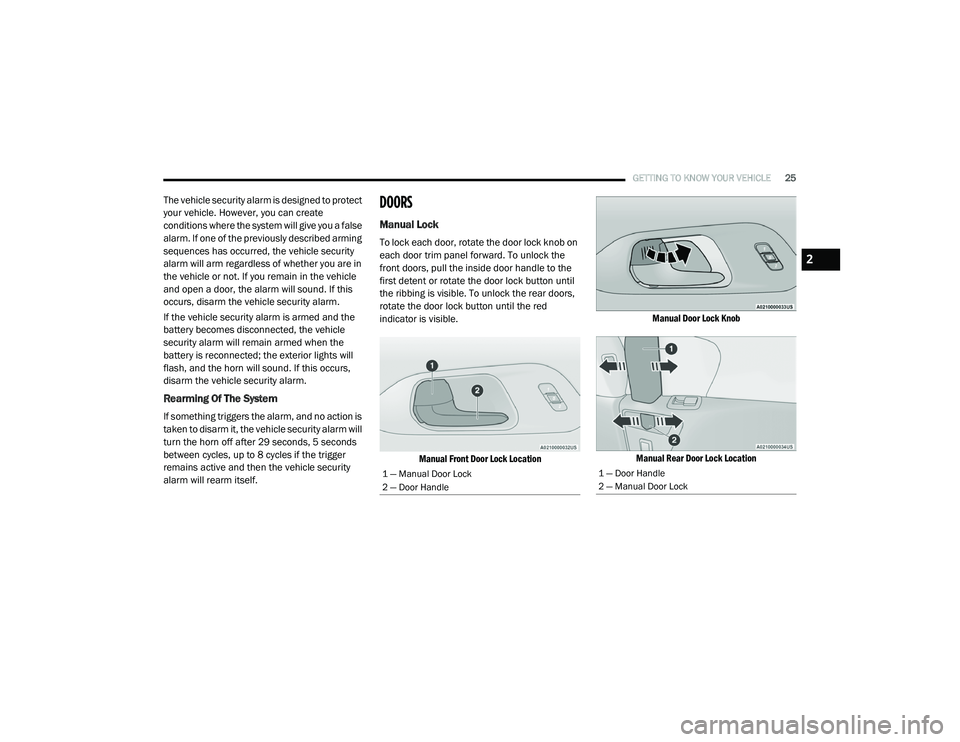
To lock each door, rotate the door lock knob on
each door trim panel forward. To unlock the
front doors, pull the inside door handle to the
first detent or rotate the door lock button until
the ribbing is visible. To unlock the rear doors,
rotate the door lock button until the red
indicator is visible.
Manual Front Door Lock Location Manual Door Lock Knob
Manual Rear Door Lock Location
1 — Manual Door Lock
2 — Door Handle1 — Door Handle
2 — Manual Door Lock
2
20_RU_OM_EN_US_t.book Page 25
Page 29 of 516
GETTING TO KNOW YOUR VEHICLE27
sound if the ignition is in the ACC or ON/RUN
position and a door is open, as a reminder to
place the ignition in the OFF position and
remove the key fob.
Unlock Doors Automatically On Exit — If
Equipped
The Unlock Doors Automatically On Exit feature
unlocks all of the vehicle doors when any door
is opened. This will occur only after the gear
selector has been placed into the PARK
position, after the vehicle has been driven (the
gear selector has been placed out of PARK and
all doors closed).
The Unlock Doors Automatically On Exit feature
will not operate if there is any manual operation
of the door locks (lock or unlock).
For further information, refer to “Uconnect
Settings” in “Multimedia”.
Keyless Enter-N-Go — Passive Entry
The Passive Entry system is an enhancement to
the vehicle’s Remote Keyless Entry (RKE)
system and a feature of Keyless Enter-N-Go.
This feature allows you to lock and unlock the
vehicle’s door(s) without having to push the key
fob lock or unlock buttons. NOTE:
Passive Entry may be programmed on/off.
Refer to “Uconnect Settings” in “Multimedia”
for further information.
If wearing gloves on your hands, or if it has
been raining/snowing on the Passive Entry
door handle, the unlock sensitivity can be
affected, resulting in a slower response time.
If the vehicle is unlocked by Passive Entry
and no door is opened within 60 seconds, the
vehicle will re-lock and will arm the security
alarm (if equipped).
The sliding side doors can be unlocked from
the outside using the hands free or Passive
Entry system.
The key fob may not be able to be detected by
the vehicle passive entry system if it is
located next to a mobile phone, laptop, or
other electronic device; these devices may
block the key fob’s wireless signal and
prevent the passive entry handle from
locking/unlocking the vehicle.
If set by the customer in the Uconnect
Settings, unlocking with Passive Entry will
initiate illuminated approach (low beams,
license plate lamp, position lamps) for the
time 0, 30 (default), 60 or 90 seconds.
Passive Entry also initiates two flashes of the
turn lamps.
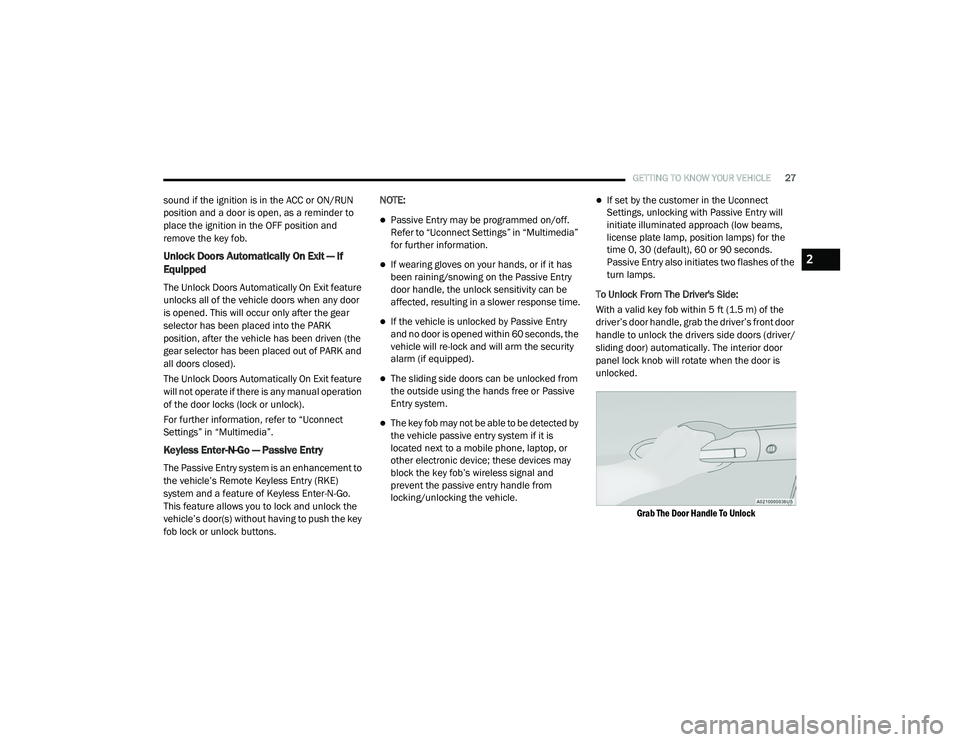
To Unlock From The Driver's Side:
With a valid key fob within 5 ft (1.5 m) of the
driver’s door handle, grab the driver’s front door
handle to unlock the drivers side doors (driver/
sliding door) automatically. The interior door
panel lock knob will rotate when the door is
unlocked.
Grab The Door Handle To Unlock
2
20_RU_OM_EN_US_t.book Page 27
Page 31 of 516
GETTING TO KNOW YOUR VEHICLE29
release handle is pulled. To select between
“Unlock Driver Door 1st Press” and “Unlock All
Doors 1st Press,” refer to “Uconnect Settings”
in “Multimedia” for further information.
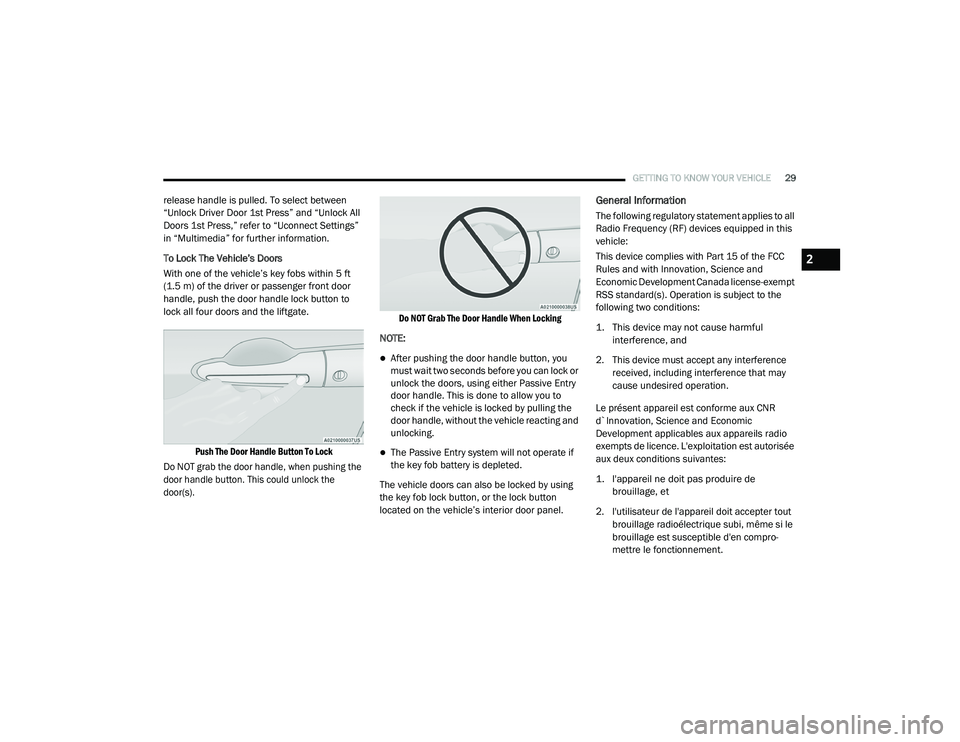
To Lock The Vehicle’s Doors
With one of the vehicle’s key fobs within 5 ft
(1.5 m) of the driver or passenger front door
handle, push the door handle lock button to
lock all four doors and the liftgate.
Push The Door Handle Button To Lock
Do NOT grab the door handle, when pushing the
door handle button. This could unlock the
door(s). Do NOT Grab The Door Handle When Locking
NOTE:
After pushing the door handle button, you
must wait two seconds before you can lock or
unlock the doors, using either Passive Entry
door handle. This is done to allow you to
check if the vehicle is locked by pulling the
door handle, without the vehicle reacting and
unlocking.
The Passive Entry system will not operate if
the key fob battery is depleted.
The vehicle doors can also be locked by using
the key fob lock button, or the lock button
located on the vehicle’s interior door panel.
General Information
The following regulatory statement applies to all
Radio Frequency (RF) devices equipped in this
vehicle:
This device complies with Part 15 of the FCC
Rules and with Innovation, Science and
Economic Development Canada license-exempt
RSS standard(s). Operation is subject to the
following two conditions:
1. This device may not cause harmful interference, and
2. This device must accept any interference received, including interference that may
cause undesired operation.
Le présent appareil est conforme aux CNR
d`Innovation, Science and Economic
Development applicables aux appareils radio
exempts de licence. L'exploitation est autorisée
aux deux conditions suivantes:
1. l'appareil ne doit pas produire de brouillage, et
2. l'utilisateur de l'appareil doit accepter tout brouillage radioélectrique subi, même si le
brouillage est susceptible d'en compro -
mettre le fonctionnement.
2
20_RU_OM_EN_US_t.book Page 29
Page 33 of 516
GETTING TO KNOW YOUR VEHICLE31
Push the button on the key fob twice
within five seconds to open, close, or
reverse a power sliding door.
The key fob and the overhead console
button will operate the door when the door is
locked. All other ways require the sliding door to
be unlocked. If the vehicle is equipped with
Passive Entry, pressing the button on the
outside handle or Hands-Free feature (if
equipped) will unlock and open the sliding door,
with a valid Passive Entry key fob within 5 ft
(1.5 m) of the door handle.
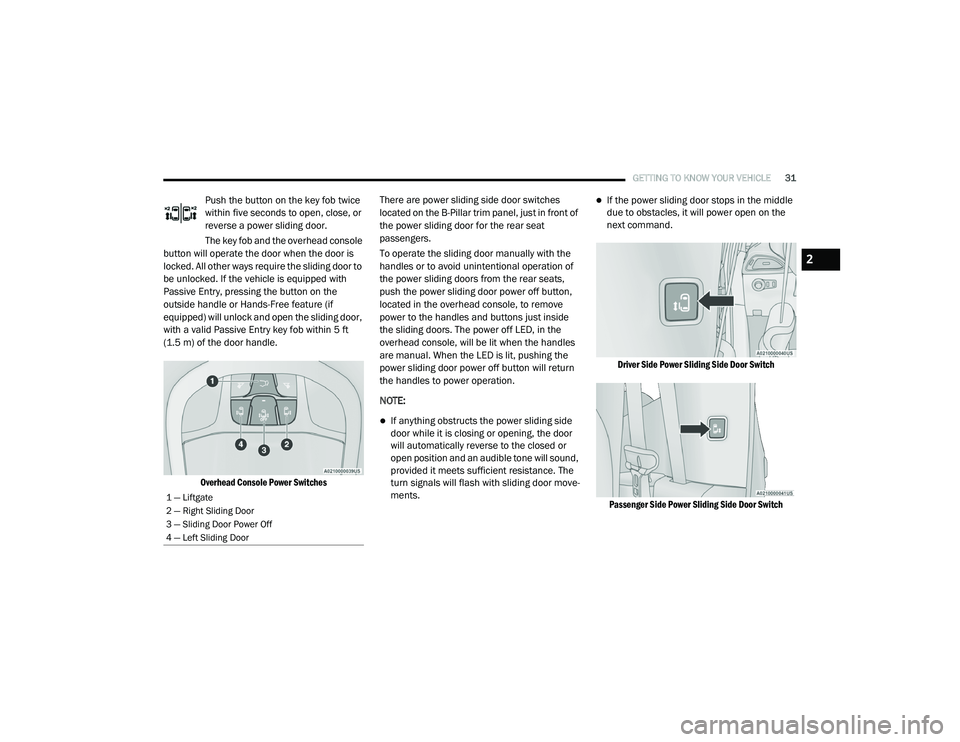
Overhead Console Power Switches
There are power sliding side door switches
located on the B-Pillar trim panel, just in front of
the power sliding door for the rear seat
passengers.
To operate the sliding door manually with the
handles or to avoid unintentional operation of
the power sliding doors from the rear seats,
push the power sliding door power off button,
located in the overhead console, to remove
power to the handles and buttons just inside
the sliding doors. The power off LED, in the
overhead console, will be lit when the handles
are manual. When the LED is lit, pushing the
power sliding door power off button will return
the handles to power operation.
NOTE:
If anything obstructs the power sliding side
door while it is closing or opening, the door
will automatically reverse to the closed or
open position and an audible tone will sound,
provided it meets sufficient resistance. The
turn signals will flash with sliding door move
-
ments.
If the power sliding door stops in the middle
due to obstacles, it will power open on the
next command.
Driver Side Power Sliding Side Door Switch
Passenger Side Power Sliding Side Door Switch
1 — Liftgate
2 — Right Sliding Door
3 — Sliding Door Power Off
4 — Left Sliding Door
2
20_RU_OM_EN_US_t.book Page 31
Page 36 of 516
34GETTING TO KNOW YOUR VEHICLE
DRIVER MEMORY SETTINGS — IF EQUIPPED
This feature allows the driver to save up to two
different memory profiles for easy recall
through a memory switch. Each memory profile
saves desired position settings for the following
features:
Driver’s seat
Easy Entry/Exit seat operation (on/off) (if
equipped)
Power steering wheel position (if equipped)
Side mirrors (if equipped)
A set of desired radio station presets
NOTE:
Your vehicle is equipped with two key fobs, each
can be linked to either memory position 1 or 2.
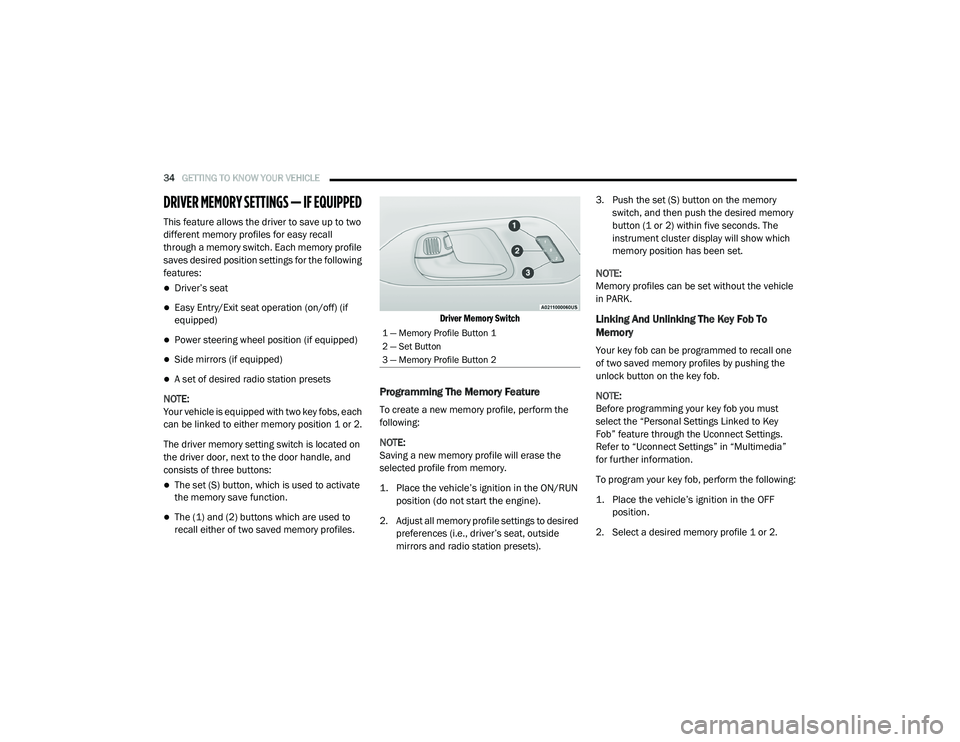
The driver memory setting switch is located on
the driver door, next to the door handle, and
consists of three buttons:
The set (S) button, which is used to activate
the memory save function.
The (1) and (2) buttons which are used to
recall either of two saved memory profiles.
Driver Memory Switch
Programming The Memory Feature
To create a new memory profile, perform the
following:
NOTE:
Saving a new memory profile will erase the
selected profile from memory.
1. Place the vehicle’s ignition in the ON/RUN
position (do not start the engine).
2. Adjust all memory profile settings to desired preferences (i.e., driver’s seat, outside
mirrors and radio station presets). 3. Push the set (S) button on the memory
switch, and then push the desired memory
button (1 or 2) within five seconds. The
instrument cluster display will show which
memory position has been set.
NOTE:
Memory profiles can be set without the vehicle
in PARK.
Linking And Unlinking The Key Fob To
Memory
Your key fob can be programmed to recall one
of two saved memory profiles by pushing the
unlock button on the key fob.
NOTE:
Before programming your key fob you must
select the “Personal Settings Linked to Key
Fob” feature through the Uconnect Settings.
Refer to “Uconnect Settings” in “Multimedia”
for further information.
To program your key fob, perform the following:
1. Place the vehicle’s ignition in the OFF position.
2. Select a desired memory profile 1 or 2.
1 — Memory Profile Button 1
2 — Set Button
3 — Memory Profile Button 2
20_RU_OM_EN_US_t.book Page 34
Page 37 of 516
GETTING TO KNOW YOUR VEHICLE35
(Continued)
3. Once the profile has been recalled, push and release the set (S) button on the
memory switch.
4. Push and release button (1) or (2) accordingly. “Memory Profile Set” (1 or 2)
will display in the instrument cluster.
5. Push and release the lock button on the key fob within 10 seconds.
NOTE:
Your key fob can be unlinked to your memory
settings by pushing the set (S) button, and then,
within 10 seconds, pushing the unlock button
on the key fob.
Memory Position Recall
NOTE:
The vehicle speed must be less than or equal to
5 mph (8 km/h) to recall memory positions. If a
recall is attempted when the vehicle speed is
greater than 5 mph (8 km/h), a message will be
displayed in the instrument cluster display. To recall the memory settings for driver one or
two, push the desired memory button (1 or 2) on
the driver's door or the unlock button on the key
fob linked to the desired memory position.
A recall can be cancelled by pushing any of the
memory buttons on the driver's door during a
recall (S, 1, or 2). When a recall is cancelled, the
driver's seat stops moving. A delay of one
second will occur before another recall can be
selected.
NOTE:
Pushing the mirror adjust switch will cancel the
memory mirror recall.
SEATS
Seats are a part of the Occupant Restraint
System of the vehicle.
Manual Adjustment (Front Seats) — If
Equipped
WARNING!
It is dangerous to ride in a cargo area,
inside or outside of a vehicle. In a collision,
people riding in these areas are more likely
to be seriously injured or killed.
Do not allow people to ride in any area of
your vehicle that is not equipped with seats
and seat belts. In a collision, people riding
in these areas are more likely to be seri
-
ously injured or killed.
Be sure everyone in your vehicle is in a seat
and using a seat belt properly.
WARNING!
Adjusting a seat while the vehicle is moving
is dangerous. The sudden movement of the
seat could cause you to lose control. The
seat belt might not be adjusted properly
and you could be injured. Adjust the seat
only while the vehicle is parked.
Do not ride with the seatback reclined so
that the shoulder belt is no longer resting
against your chest. In a collision you could
slide under the seat belt and be seriously or
even fatally injured. Use the recliner only
when the vehicle is parked.
WARNING! (Continued)
2
20_RU_OM_EN_US_t.book Page 35