audio CHRYSLER PACIFICA 2021 User Guide
[x] Cancel search | Manufacturer: CHRYSLER, Model Year: 2021, Model line: PACIFICA, Model: CHRYSLER PACIFICA 2021Pages: 401, PDF Size: 26.88 MB
Page 197 of 401
MULTIMEDIA195
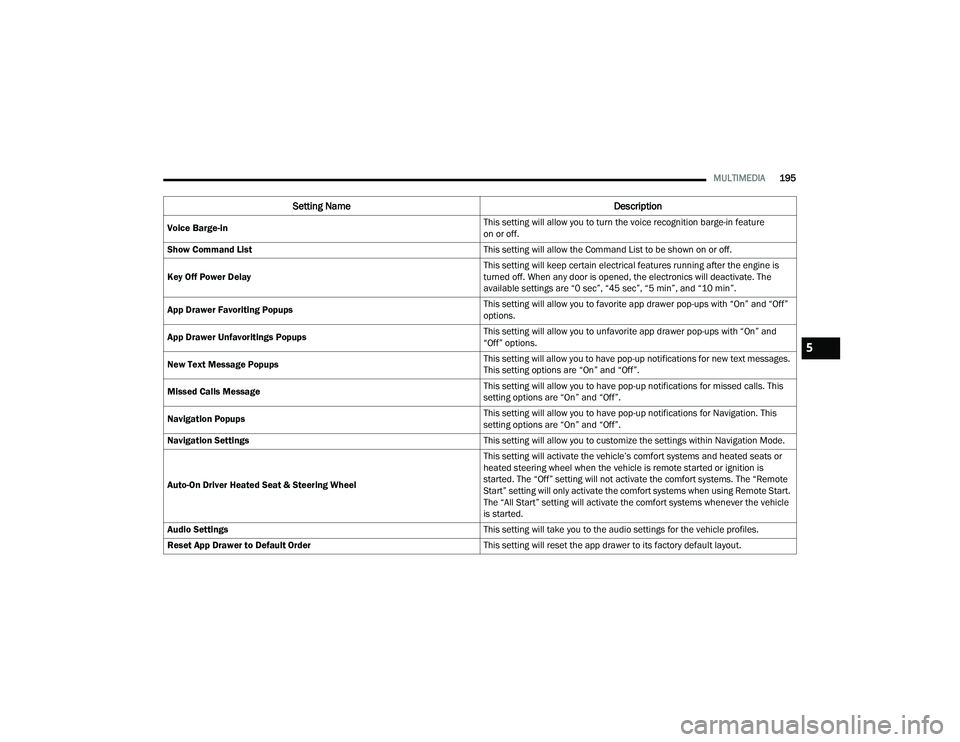
Voice Barge-in This setting will allow you to turn the voice recognition barge-in feature
on or off.
Show Command List This setting will allow the Command List to be shown on or off.
Key Off Power Delay This setting will keep certain electrical features running after the engine is
turned off. When any door is opened, the electronics will deactivate. The
available settings are “0 sec”, “45 sec”, “5 min”, and “10 min”.
App Drawer Favoriting Popups This setting will allow you to favorite app drawer pop-ups with “On” and “Off”
options.
App Drawer Unfavoritings Popups This setting will allow you to unfavorite app drawer pop-ups with “On” and
“Off” options.
New Text Message Popups This setting will allow you to have pop-up notifications for new text messages.
This setting options are “On” and “Off”.
Missed Calls Message This setting will allow you to have pop-up notifications for missed calls. This
setting options are “On” and “Off”.
Navigation Popups This setting will allow you to have pop-up notifications for Navigation. This
setting options are “On” and “Off”.
Navigation Settings This setting will allow you to customize the settings within Navigation Mode.
Auto-On Driver Heated Seat & Steering Wheel This setting will activate the vehicle’s comfort systems and heated seats or
heated steering wheel when the vehicle is remote started or ignition is
started. The “Off” setting will not activate the comfort systems. The “Remote
Start” setting will only activate the comfort systems when using Remote Start.
The “All Start” setting will activate the comfort systems whenever the vehicle
is started.
Audio Settings This setting will take you to the audio settings for the vehicle profiles.
Reset App Drawer to Default Order This setting will reset the app drawer to its factory default layout.
Setting NameDescription
5
21_RUP_OM_EN_USC_t.book Page 195
Page 201 of 401
MULTIMEDIA199
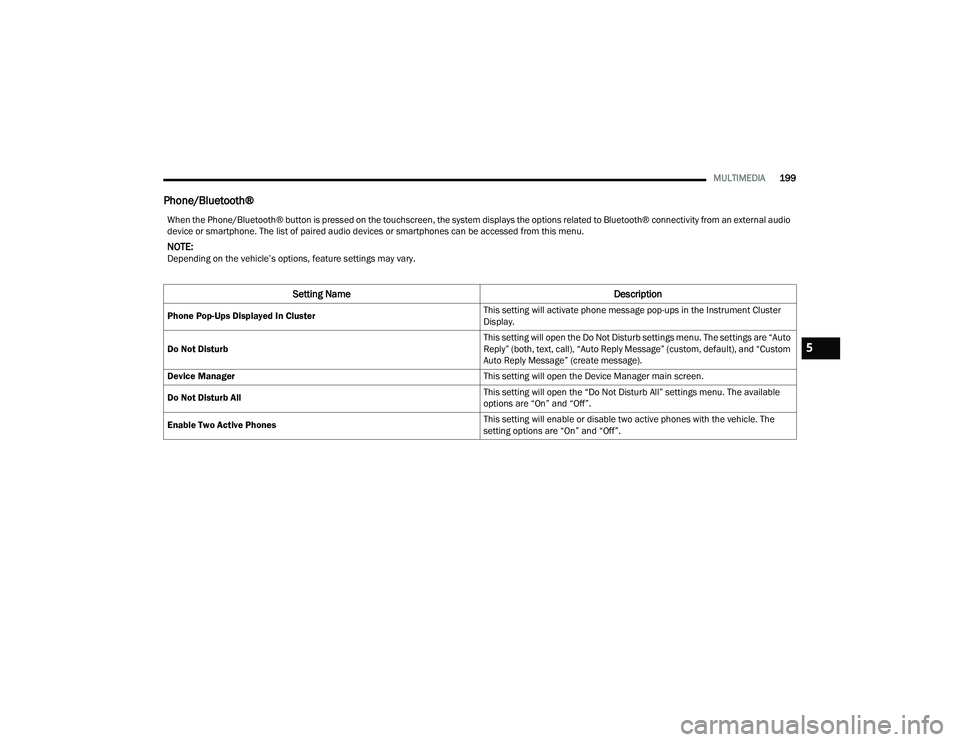
Phone/Bluetooth®
When the Phone/Bluetooth® button is pressed on the touchscreen, the system displays the options related to Bluetooth® connectivity from an external audio
device or smartphone. The list of paired audio devices or smartphones can be accessed from this menu.
NOTE:Depending on the vehicle’s options, feature settings may vary.
Setting Name Description
Phone Pop-Ups Displayed In Cluster This setting will activate phone message pop-ups in the Instrument Cluster
Display.
Do Not Disturb This setting will open the Do Not Disturb settings menu. The settings are “Auto
Reply” (both, text, call), “Auto Reply Message” (custom, default), and “Custom
Auto Reply Message” (create message).
Device Manager This setting will open the Device Manager main screen.
Do Not Disturb All This setting will open the “Do Not Disturb All” settings menu. The available
options are “On” and “Off”.
Enable Two Active Phones This setting will enable or disable two active phones with the vehicle. The
setting options are “On” and “Off”.
5
21_RUP_OM_EN_USC_t.book Page 199
Page 210 of 401
208MULTIMEDIA
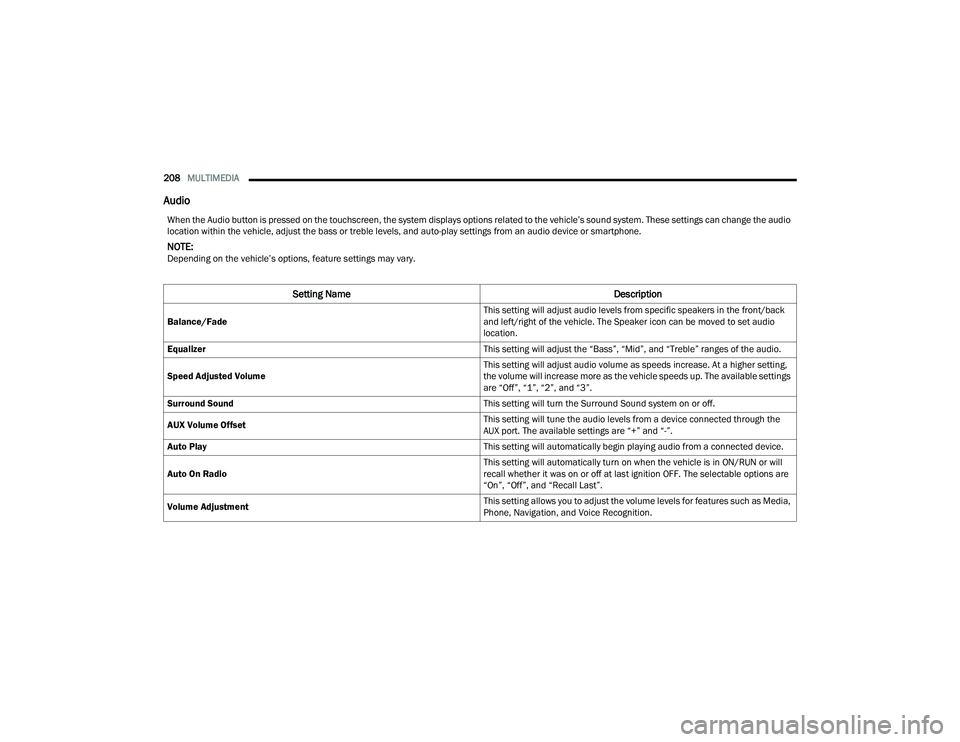
Audio
When the Audio button is pressed on the touchscreen, the system displays options related to the vehicle’s sound system. These settings can change the audio
location within the vehicle, adjust the bass or treble levels, and auto-play settings from an audio device or smartphone.
NOTE:Depending on the vehicle’s options, feature settings may vary.
Setting Name Description
Balance/Fade This setting will adjust audio levels from specific speakers in the front/back
and left/right of the vehicle. The Speaker icon can be moved to set audio
location.
Equalizer This setting will adjust the “Bass”, “Mid”, and “Treble” ranges of the audio.
Speed Adjusted Volume This setting will adjust audio volume as speeds increase. At a higher setting,
the volume will increase more as the vehicle speeds up. The available settings
are “Off”, “1”, “2”, and “3”.
Surround Sound This setting will turn the Surround Sound system on or off.
AUX Volume Offset This setting will tune the audio levels from a device connected through the
AUX port. The available settings are “+” and “-”.
Auto Play This setting will automatically begin playing audio from a connected device.
Auto On Radio This setting will automatically turn on when the vehicle is in ON/RUN or will
recall whether it was on or off at last ignition OFF. The selectable options are
“On”, “Off”, and “Recall Last”.
Volume Adjustment This setting allows you to adjust the volume levels for features such as Media,
Phone, Navigation, and Voice Recognition.
21_RUP_OM_EN_USC_t.book Page 208
Page 216 of 401
214MULTIMEDIA
UCONNECT THEATER — UCONNECT 5/5 NAV
WITH 10.1-INCH DISPLAY (IF EQUIPPED)
UCONNECT THEATER OVERVIEW
Your Uconnect Theater is designed to give your
family years of enjoyment.
There are multiple ways to interact with your
Uconnect Theater system:
Play your favorite CDs, DVDs, or Blu-ray™ Discs
Plug and play a variety of standard video games
or devices into the HDMI port
Listen to audio over the wireless headphones
Plug and play a variety of devices into the Video
USB port
Plug in standard headphones to listen to audio
Project your mobile phone or tablet screen onto
the rear Uconnect Theater touchscreens
Please review this Owner's Manual to become
familiar with its features and operation.
GETTING STARTED
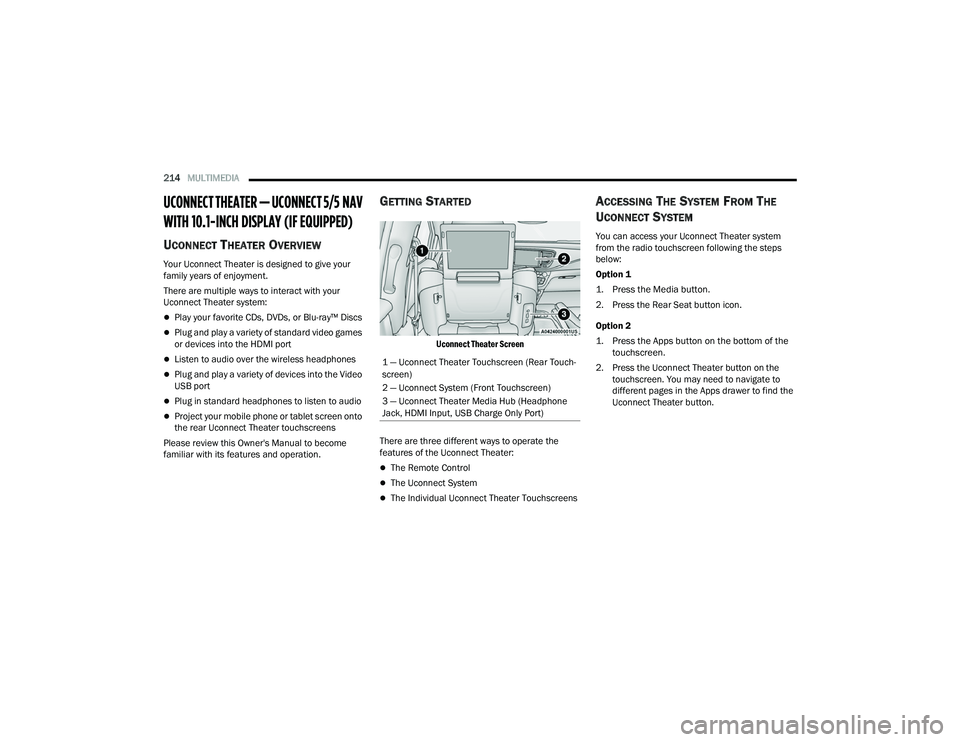
Uconnect Theater Screen
There are three different ways to operate the
features of the Uconnect Theater:
The Remote Control
The Uconnect System
The Individual Uconnect Theater Touchscreens
ACCESSING THE SYSTEM FROM THE
U
CONNECT SYSTEM
You can access your Uconnect Theater system
from the radio touchscreen following the steps
below:
Option 1
1. Press the Media button.
2. Press the Rear Seat button icon.
Option 2
1. Press the Apps button on the bottom of the
touchscreen.
2. Press the Uconnect Theater button on the touchscreen. You may need to navigate to
different pages in the Apps drawer to find the
Uconnect Theater button.
1 — Uconnect Theater Touchscreen (Rear Touch
-
screen)
2 — Uconnect System (Front Touchscreen)
3 — Uconnect Theater Media Hub (Headphone
Jack, HDMI Input, USB Charge Only Port)
21_RUP_OM_EN_USC_t.book Page 214
Page 219 of 401
MULTIMEDIA217
Users can select content for each screen from the
front radio touchscreen by choosing desired
content from the “Select Input” drop-down menu.
Options include “Blu-ray™ Disc”, “HDMI”, “USB”,
“Apps”, and “Viewing the other rear screen”.
NOTE:Use the “View Screen” function to pull content
from one screen to the other with a single press of
a button. Doing this however will disable and gray
out certain player controls on the screen viewing
the other screen's content.
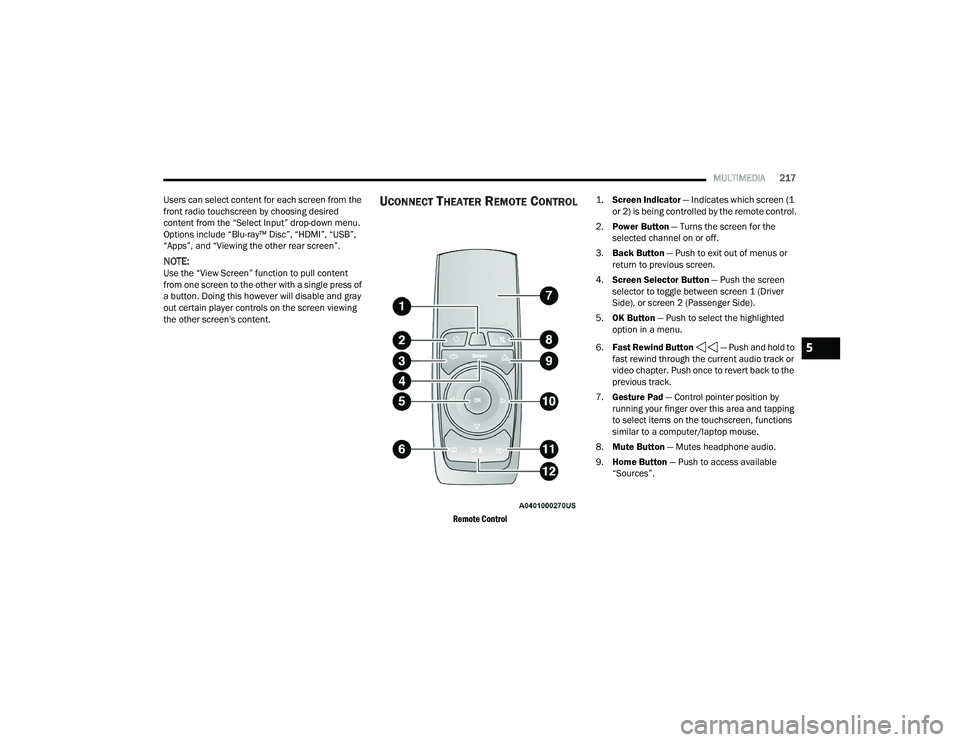
UCONNECT THEATER REMOTE CONTROL
Remote Control
1.
Screen Indicator
— Indicates which screen (1
or 2) is being controlled by the remote control.
2. Power Button — Turns the screen for the
selected channel on or off.
3. Back Button — Push to exit out of menus or
return to previous screen.
4. Screen Selector Button — Push the screen
selector to toggle between screen 1 (Driver
Side), or screen 2 (Passenger Side).
5. OK Button — Push to select the highlighted
option in a menu.
6. Fast Rewind Button — Push and hold to
fast rewind through the current audio track or
video chapter. Push once to revert back to the
previous track.
7. Gesture Pad — Control pointer position by
running your finger over this area and tapping
to select items on the touchscreen, functions
similar to a computer/laptop mouse.
8. Mute Button — Mutes headphone audio.
9. Home Button — Push to access available
“Sources”.
5
21_RUP_OM_EN_USC_t.book Page 217
Page 220 of 401
218MULTIMEDIA
10. Arrow Buttons — Push the Arrow
buttons to highlight an item or scroll through
menus.
11. Fast Forward Button — Push and hold
to fast forward through the current audio track
or video chapter. Push once to skip to the next
track.
12. Play/Pause Button — Begin/resume or pause
disc play.
Replacing The Remote Control Batteries
Each remote control requires two AAA batteries for
operation.
To replace the batteries:
1. Locate the battery compartment on the back of the remote, then slide the battery cover
downward.
2. Remove the old batteries and follow battery recycling procedures for your area.
3. Install new batteries, making sure to orient them according to the polarity diagram shown
inside the battery compartment.
4. Replace the battery compartment cover.
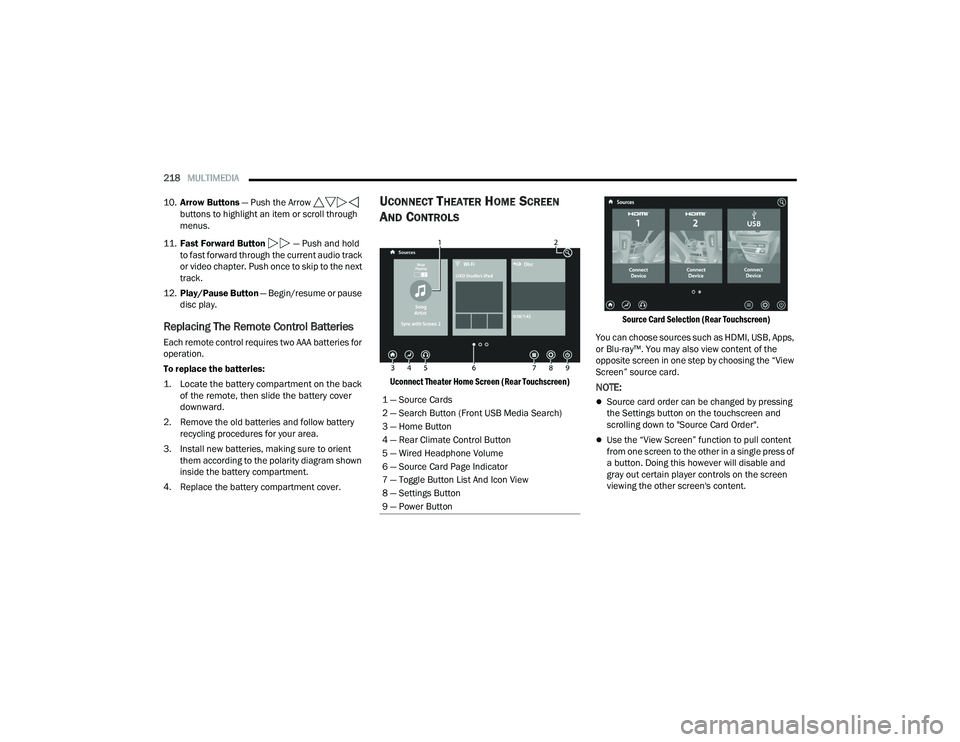
UCONNECT THEATER HOME SCREEN
A
ND CONTROLS
Uconnect Theater Home Screen (Rear Touchscreen) Source Card Selection (Rear Touchscreen)
You can choose sources such as HDMI, USB, Apps,
or Blu-ray™. You may also view content of the
opposite screen in one step by choosing the “View
Screen” source card.NOTE:
Source card order can be changed by pressing
the Settings button on the touchscreen and
scrolling down to "Source Card Order".
Use the “View Screen” function to pull content
from one screen to the other in a single press of
a button. Doing this however will disable and
gray out certain player controls on the screen
viewing the other screen's content.
1 — Source Cards
2 — Search Button (Front USB Media Search)
3 — Home Button
4 — Rear Climate Control Button
5 — Wired Headphone Volume
6 — Source Card Page Indicator
7 — Toggle Button List And Icon View
8 — Settings Button
9 — Power Button
21_RUP_OM_EN_USC_t.book Page 218
Page 222 of 401
220MULTIMEDIA
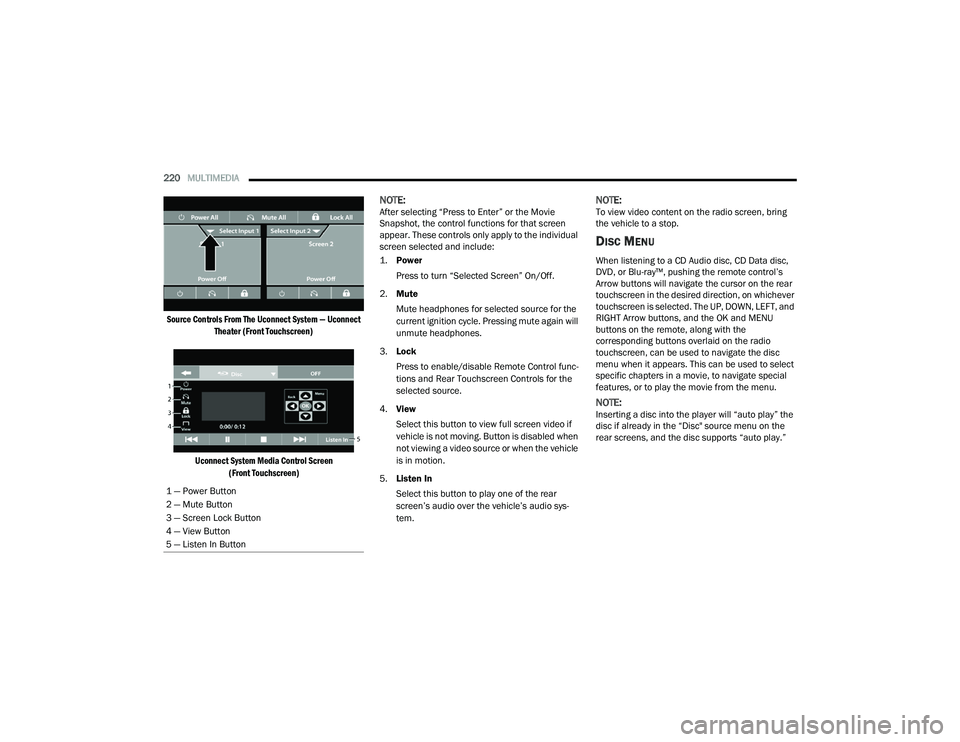
Source Controls From The Uconnect System — Uconnect Theater (Front Touchscreen)
Uconnect System Media Control Screen (Front Touchscreen)
NOTE:After selecting “Press to Enter” or the Movie
Snapshot, the control functions for that screen
appear. These controls only apply to the individual
screen selected and include:
1.
Power
Press to turn “Selected Screen” On/Off.
2. Mute
Mute headphones for selected source for the
current ignition cycle. Pressing mute again will
unmute headphones.
3. Lock
Press to enable/disable Remote Control func -
tions and Rear Touchscreen Controls for the
selected source.
4. View
Select this button to view full screen video if
vehicle is not moving. Button is disabled when
not viewing a video source or when the vehicle
is in motion.
5. Listen In
Select this button to play one of the rear
screen’s audio over the vehicle’s audio sys -
tem.NOTE:To view video content on the radio screen, bring
the vehicle to a stop.
DISC MENU
When listening to a CD Audio disc, CD Data disc,
DVD, or Blu-ray™, pushing the remote control’s
Arrow buttons will navigate the cursor on the rear
touchscreen in the desired direction, on whichever
touchscreen is selected. The UP, DOWN, LEFT, and
RIGHT Arrow buttons, and the OK and MENU
buttons on the remote, along with the
corresponding buttons overlaid on the radio
touchscreen, can be used to navigate the disc
menu when it appears. This can be used to select
specific chapters in a movie, to navigate special
features, or to play the movie from the menu.
NOTE:Inserting a disc into the player will “auto play” the
disc if already in the “Disc" source menu on the
rear screens, and the disc supports “auto play.”
1 — Power Button
2 — Mute Button
3 — Screen Lock Button
4 — View Button
5 — Listen In Button
21_RUP_OM_EN_USC_t.book Page 220
Page 225 of 401
MULTIMEDIA223
USING THE REAR VIDEO USB PORT
Plug in a USB drive or mass storage device and
play your favorite music or movies.
NOTE:To view USB media on the rear theater screens,
insert a USB drive into the port next to the DVD/
Blu-ray™ Disc player. The USB drive port is located
under the radio controls in the instrument panel.
Search Screen (Rear Touchscreen)
On the rear screen you can browse the content of
the USB device by going to the USB source. Use the
search feature to find your music faster.
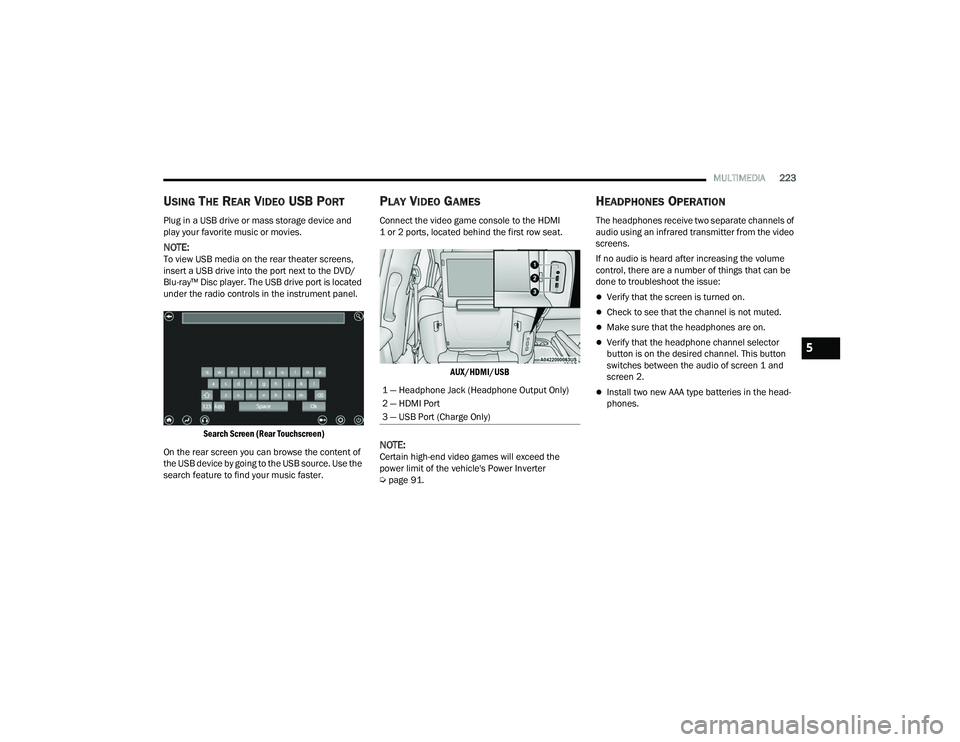
PLAY VIDEO GAMES
Connect the video game console to the HDMI
1 or 2 ports, located behind the first row seat.
AUX/HDMI/USB
NOTE:Certain high-end video games will exceed the
power limit of the vehicle's Power Inverter
Úpage 91.
HEADPHONES OPERATION
The headphones receive two separate channels of
audio using an infrared transmitter from the video
screens.
If no audio is heard after increasing the volume
control, there are a number of things that can be
done to troubleshoot the issue:
Verify that the screen is turned on.
Check to see that the channel is not muted.
Make sure that the headphones are on.
Verify that the headphone channel selector
button is on the desired channel. This button
switches between the audio of screen 1 and
screen 2.
Install two new AAA type batteries in the head -
phones.1 — Headphone Jack (Headphone Output Only)
2 — HDMI Port
3 — USB Port (Charge Only)
5
21_RUP_OM_EN_USC_t.book Page 223
Page 226 of 401
224MULTIMEDIA
Uconnect Theater Headphones
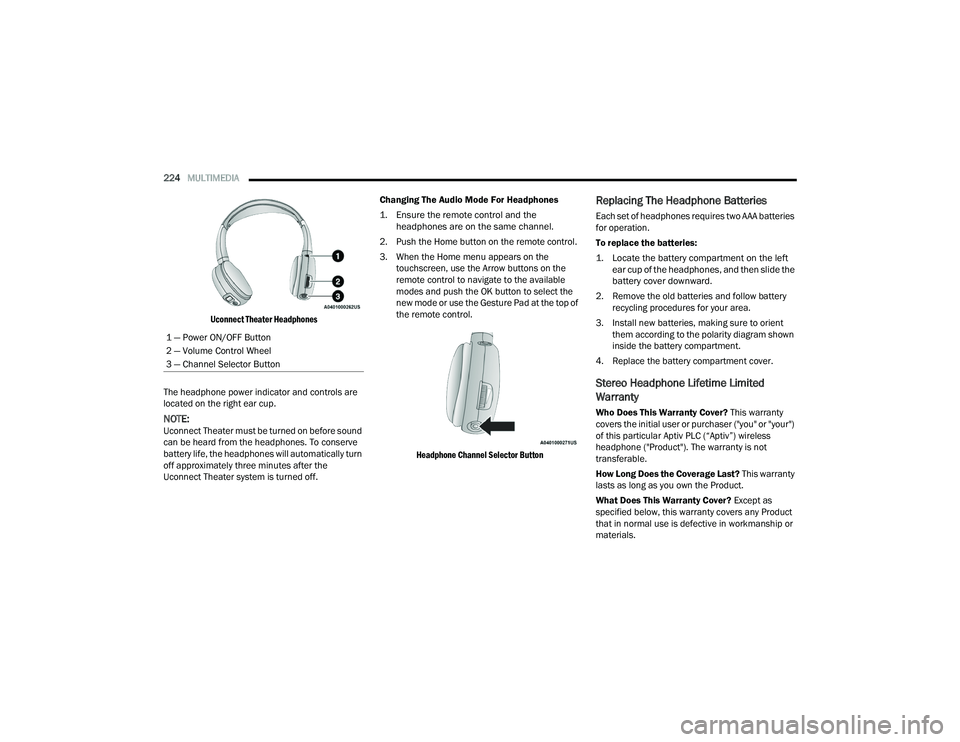
The headphone power indicator and controls are
located on the right ear cup.
NOTE:Uconnect Theater must be turned on before sound
can be heard from the headphones. To conserve
battery life, the headphones will automatically turn
off approximately three minutes after the
Uconnect Theater system is turned off. Changing The Audio Mode For Headphones
1. Ensure the remote control and the
headphones are on the same channel.
2. Push the Home button on the remote control.
3. When the Home menu appears on the touchscreen, use the Arrow buttons on the
remote control to navigate to the available
modes and push the OK button to select the
new mode or use the Gesture Pad at the top of
the remote control.
Headphone Channel Selector Button
Replacing The Headphone Batteries
Each set of headphones requires two AAA batteries
for operation.
To replace the batteries:
1. Locate the battery compartment on the left ear cup of the headphones, and then slide the
battery cover downward.
2. Remove the old batteries and follow battery recycling procedures for your area.
3. Install new batteries, making sure to orient them according to the polarity diagram shown
inside the battery compartment.
4. Replace the battery compartment cover.
Stereo Headphone Lifetime Limited
Warranty
Who Does This Warranty Cover? This warranty
covers the initial user or purchaser ("you" or "your")
of this particular Aptiv PLC (“Aptiv”) wireless
headphone ("Product"). The warranty is not
transferable.
How Long Does the Coverage Last? This warranty
lasts as long as you own the Product.
What Does This Warranty Cover? Except as
specified below, this warranty covers any Product
that in normal use is defective in workmanship or
materials.
1 — Power ON/OFF Button
2 — Volume Control Wheel
3 — Channel Selector Button
21_RUP_OM_EN_USC_t.book Page 224
Page 227 of 401
MULTIMEDIA225
What Does This Warranty Not Cover? This
warranty does not cover any damage or defect that
results from misuse, abuse or modification of the
Product other than by Aptiv. Foam earpieces,
which will wear over time through normal use, are
specifically not covered (replacement foam is
available for a nominal charge). APTIV IS NOT
LIABLE FOR ANY INJURIES OR DAMAGES TO
PERSONS OR PROPERTY RESULTING FROM THE
USE OF, OR ANY FAILURE OR DEFECT IN, THE
PRODUCT, NOR IS APTIV LIABLE FOR ANY
GENERAL, SPECIAL, DIRECT, INDIRECT,
INCIDENTAL, CONSEQUENTIAL, EXEMPLARY,
PUNITIVE OR OTHER DAMAGES OF ANY KIND OR
NATURE WHATSOEVER. Some states and
jurisdictions may not allow the exclusion or
limitation of incidental or consequential damages,
so the above limitation may not apply to you. This
warranty gives you specific legal rights. You may
also have other rights, which vary from jurisdiction
to jurisdiction.
What Will Aptiv Do? Aptiv, at its option, will repair
or replace any defective Product. Aptiv reserves
the right to replace any discontinued Product with
a comparable model. THIS WARRANTY IS THE
SOLE WARRANTY FOR THIS PRODUCT, SETS
FORTH YOUR EXCLUSIVE REMEDY REGARDING
DEFECTIVE PRODUCTS, AND IS IN LIEU OF ALL
OTHER WARRANTIES (EXPRESS OR IMPLIED), INCLUDING ANY WARRANTY FOR
MERCHANTABILITY OR FITNESS FOR A
PARTICULAR PURPOSE.
If you have any questions or comments regarding
your Aptiv wireless headphones, please email
[email protected] or phone: 888-293-3332.
DISPLAY SETTINGS
When watching a video source, pressing the
Settings icon on the touchscreen activates the
Settings menu. These settings control the
appearance of the video on the screen. The factory
default settings are already set for optimum
viewing, so there is no need to change these
settings under normal circumstances.
To change the settings, use one of the
touchscreens or remote. To reset all values back to
the original settings, select “Reset to Defaults”,
then select “YES.”
LISTENING TO AUDIO WITH THE SCREEN
C
LOSED
To listen to only the audio portion of the channel
with the screen closed:
Set the audio to the desired source and
channel.
Close the video screen.
When the screen is reopened, the video screen
will automatically turn back on and show the
appropriate display menu or media.
If the screen is closed and there is no audio heard,
verify that the headphones are turned on (the ON
indicator is illuminated) and the headphone
selector switch is on the desired channel. If the
headphones are turned on, push the remote
control’s power button to turn audio on. If audio is
still not heard, check that fully charged batteries
are installed in the headphones.
REAR CLIMATE CONTROLS
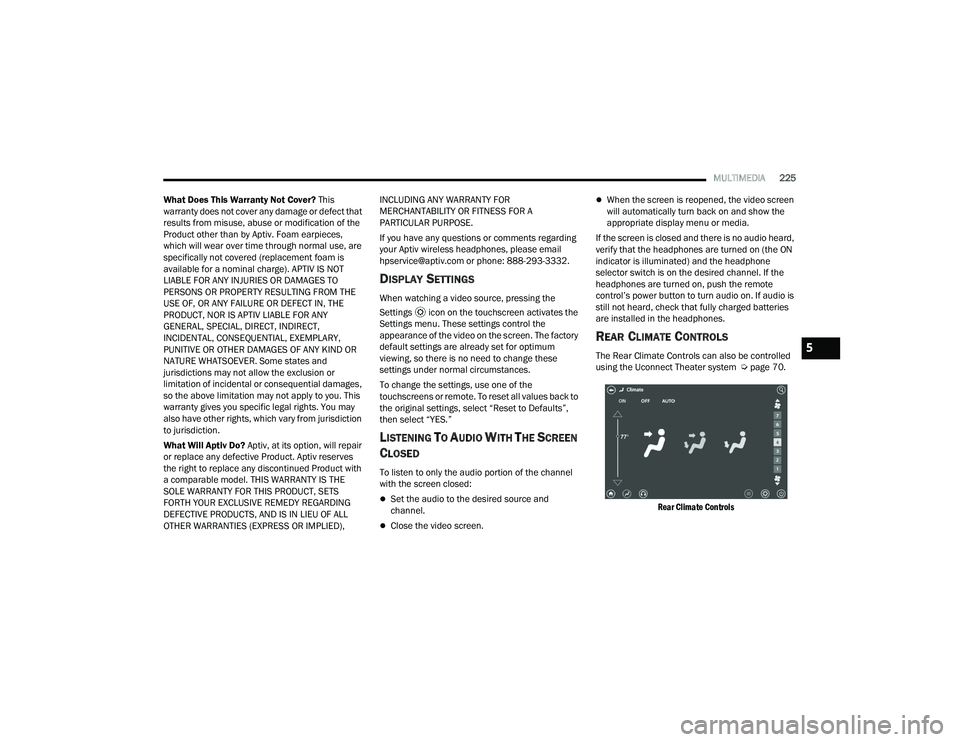
The Rear Climate Controls can also be controlled
using the Uconnect Theater system Ú page 70.
Rear Climate Controls
5
21_RUP_OM_EN_USC_t.book Page 225