ACC not available CHRYSLER PACIFICA 2021 Owner's Manual
[x] Cancel search | Manufacturer: CHRYSLER, Model Year: 2021, Model line: PACIFICA, Model: CHRYSLER PACIFICA 2021Pages: 401, PDF Size: 26.88 MB
Page 226 of 401
224MULTIMEDIA
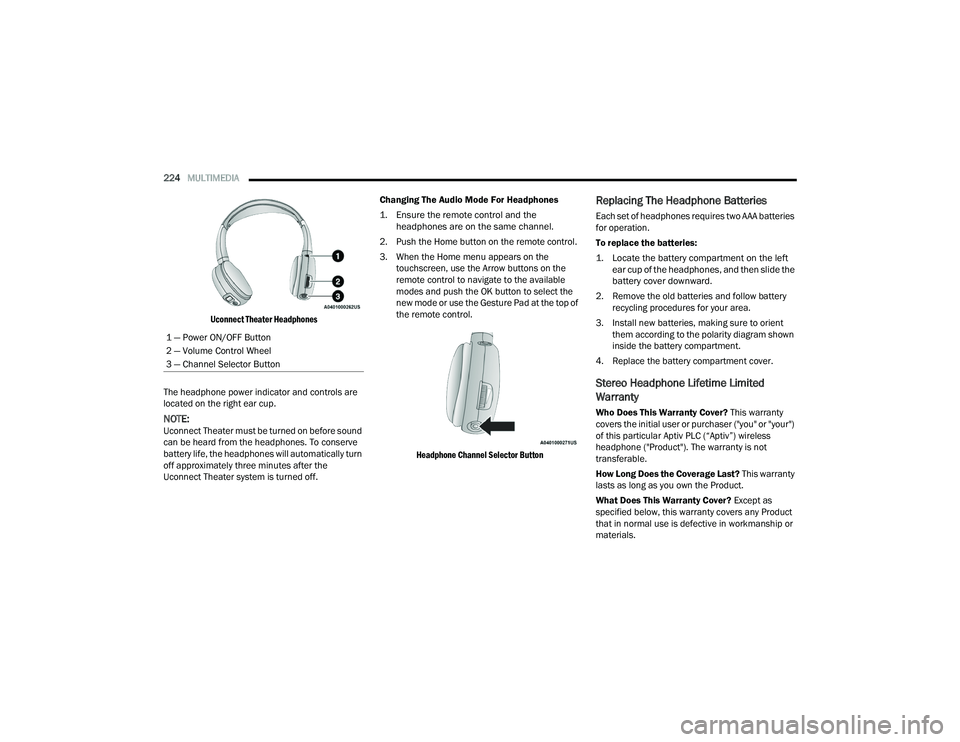
Uconnect Theater Headphones
The headphone power indicator and controls are
located on the right ear cup.
NOTE:Uconnect Theater must be turned on before sound
can be heard from the headphones. To conserve
battery life, the headphones will automatically turn
off approximately three minutes after the
Uconnect Theater system is turned off. Changing The Audio Mode For Headphones
1. Ensure the remote control and the
headphones are on the same channel.
2. Push the Home button on the remote control.
3. When the Home menu appears on the touchscreen, use the Arrow buttons on the
remote control to navigate to the available
modes and push the OK button to select the
new mode or use the Gesture Pad at the top of
the remote control.
Headphone Channel Selector Button
Replacing The Headphone Batteries
Each set of headphones requires two AAA batteries
for operation.
To replace the batteries:
1. Locate the battery compartment on the left ear cup of the headphones, and then slide the
battery cover downward.
2. Remove the old batteries and follow battery recycling procedures for your area.
3. Install new batteries, making sure to orient them according to the polarity diagram shown
inside the battery compartment.
4. Replace the battery compartment cover.
Stereo Headphone Lifetime Limited
Warranty
Who Does This Warranty Cover? This warranty
covers the initial user or purchaser ("you" or "your")
of this particular Aptiv PLC (“Aptiv”) wireless
headphone ("Product"). The warranty is not
transferable.
How Long Does the Coverage Last? This warranty
lasts as long as you own the Product.
What Does This Warranty Cover? Except as
specified below, this warranty covers any Product
that in normal use is defective in workmanship or
materials.
1 — Power ON/OFF Button
2 — Volume Control Wheel
3 — Channel Selector Button
21_RUP_OM_EN_USC_t.book Page 224
Page 230 of 401
228MULTIMEDIA
NOTE:For system compatibility, consult your device's
Owner's Manual or www.uconnectphone.com to
see if your device supports wireless streaming
technology compatibility. Apple® devices do not
support this feature.
To link your device to the rear Uconnect Theater
touchscreens:
1. Enable your device’s Wi-Fi.
2. Select the Wireless Streaming feature on your device. The name of this feature is device
dependent and could include: mirror, cast, or
smart view.
NOTE:Refer to your device's Owner’s Manual or www.uconnectphone.com for further infor -
mation.
3. Select “Pacifica Wireless Network” from the list of available networks on your device. 4. When prompted by an Authentication Screen,
press Accept on the touchscreen to begin
wireless streaming on your device. If
prompted, verify that the code on the rear
touchscreen and the device match.
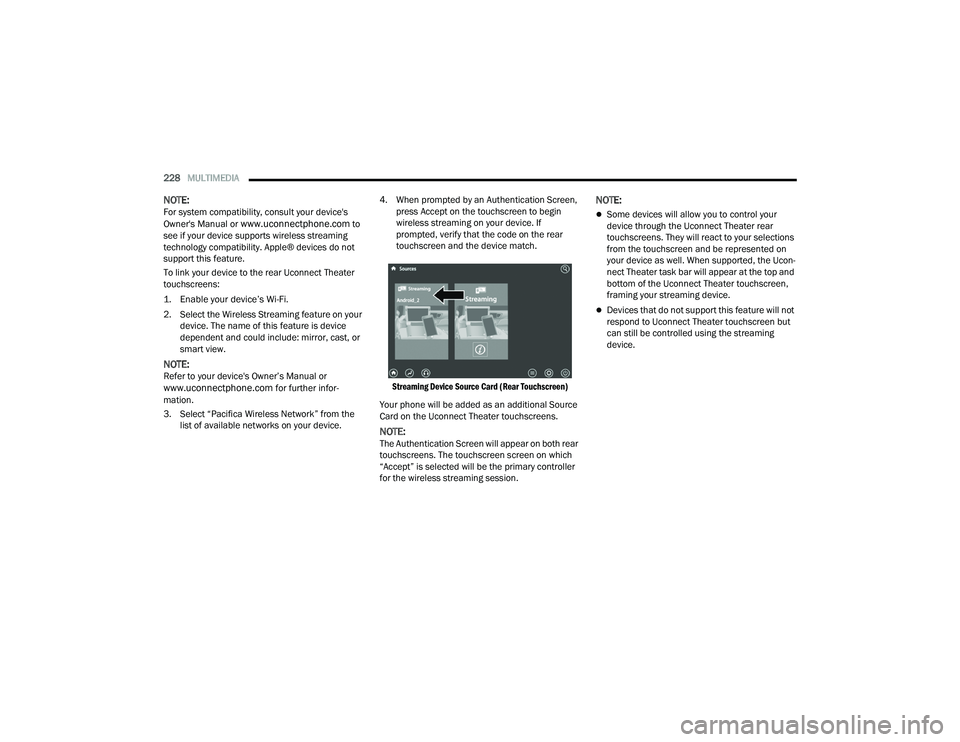
Streaming Device Source Card (Rear Touchscreen)
Your phone will be added as an additional Source
Card on the Uconnect Theater touchscreens.
NOTE:The Authentication Screen will appear on both rear
touchscreens. The touchscreen screen on which
“Accept” is selected will be the primary controller
for the wireless streaming session.
NOTE:
Some devices will allow you to control your
device through the Uconnect Theater rear
touchscreens. They will react to your selections
from the touchscreen and be represented on
your device as well. When supported, the Ucon -
nect Theater task bar will appear at the top and
bottom of the Uconnect Theater touchscreen,
framing your streaming device.
Devices that do not support this feature will not
respond to Uconnect Theater touchscreen but
can still be controlled using the streaming
device.
21_RUP_OM_EN_USC_t.book Page 228
Page 247 of 401
SAFETY245
It is unsafe to test the FCW system. To prevent
such misuse of the system, after four Active
Braking events within a key cycle, the Active
Braking portion of FCW will be deactivated until
the next key cycle.
The FCW system is intended for on-road use
only. If the vehicle is taken off-road, the FCW
system should be deactivated to prevent unnec -
essary warnings to the surroundings.
Turning FCW On Or Off
The Forward Collision menu setting is located in
the Uconnect settings.
NOTE:The default status of FCW is “on”, this allows the
system to warn you of a possible collision with the
vehicle in front of you. Changing the FCW status to “off” deactivates the
system, so no warning or active braking will be
available in case of a possible collision.
NOTE:
The FCW system state is kept in memory from
one key cycle to the next. If the system is turned
off, it will remain off when the vehicle is
restarted.
FCW can work in conjunction with the KeySense
function of the vehicle (if equipped)
Ú
page 115.
FCW Braking Status And Sensitivity
The FCW Sensitivity and Active Braking status are
programmable through the Uconnect system
Úpage 189.
The default sensitivity of FCW is the “Medium”
setting and the system status is “Warning &
Braking”. This allows the system to warn the driver
of a possible collision with the vehicle in front using
audible/visual warnings and it applies
autonomous braking.
By changing the FCW status setting to "Far", the
system provides possible collision warnings on
objects farther away. This results in earlier
warnings and provides the most reaction time to
avoid possible collisions By changing the FCW status setting to "Near", the
system provides possible collision warnings on
objects closer to the vehicle. This results in later
warnings and provides less reaction time than the
"Far" and "Medium" settings, which allows for a
more dynamic driving experience.
NOTE:
Changing the FCW status to “Only Warning”
prevents the system from providing limited
active braking, or additional brake support if the
driver is not braking adequately in the event of
a potential frontal collision, but maintains the
audible and visual warnings.
Changing the FCW status to “Off” prevents the
system from providing autonomous braking, or
additional brake support if the driver is not
braking adequately in the event of a potential
frontal collision.
The system will retain the last setting selected
by the driver after ignition shut down.
FCW may not react to irrelevant objects such as
overhead objects, ground reflections, objects
not in the path of the vehicle, stationary objects
that are far away, oncoming traffic, or leading
vehicles with the same or higher rates of speed.
FCW will be disabled like ACC, with the
unavailable screens.
WARNING!
Forward Collision Warning (FCW) is not intended
to avoid a collision on its own, nor can FCW
detect every type of potential collision. The driver
has the responsibility to avoid a collision by
controlling the vehicle via braking and steering.
Failure to follow this warning could lead to
serious injury or death.
6
21_RUP_OM_EN_USC_t.book Page 245
Page 248 of 401
246SAFETY
FCW Limited Warning
If the instrument cluster displays “ACC/FCW
Limited Functionality” or “ACC/FCW Limited
Functionality Clean Front Windshield”
momentarily, there may be a condition that limits
FCW functionality. Although the vehicle is still
drivable under normal conditions, the active
braking may not be fully available. Once the
condition that limited the system performance is
no longer present, the system will return to its full
performance state. If the problem persists, see an
authorized dealer.
Service FCW Warning
If the system turns off, and the instrument cluster
displays:
ACC/FCW Unavailable Service Required
Cruise/FCW Unavailable Service Required
This indicates there is an internal system fault.
Although the vehicle is still drivable under normal
conditions, have the system checked by an
authorized dealer.
Pedestrian Emergency Braking (PEB) — If
Equipped
The Pedestrian Emergency Braking (PEB) is a
subsystem of the FCW system which provides the
driver with audible and visual warnings in the
instrument cluster display, and may apply
automatic braking when it detects a potential
frontal collision with a pedestrian.
If a PEB event begins at a speed below 37 mph
(60 km/h), the system may provide braking to
mitigate the potential collision with a pedestrian. If
the PEB event stops the vehicle completely, the
system will hold the vehicle at a standstill for two
seconds and then release the brakes. When the
system determines a collision with the pedestrian
in front of you is no longer probable, the warning
message will be deactivated.
The minimum speed for PEB activation is 3 mph
(5 km/h). Turning PEB On Or Off
NOTE:The default status of PEB is “On.” This allows the
system to warn you of a possible frontal collision
with the pedestrian.
The PEB button is located in the Uconnect display
in the Controls settings Ú
page 189.
To turn the PEB system off, push the Pedestrian
Emergency Braking OFF button.
To turn the PEB system back on, push the Warning
Active Braking button.
Changing the PEB status to “Off” deactivates the
system, so no warning or active braking will be
available in case of a possible frontal collision with
the pedestrian.
NOTE:The PEB system will NOT retain the last setting
selected by the driver after ignition shut down. The
system will reset to the default setting when the
vehicle is restarted.
WARNING!
Pedestrian Emergency Braking (PEB) is not
intended to avoid a collision on its own, nor can
PEB detect every type of potential collision with
a pedestrian. The driver has the responsibility to
avoid a collision by controlling the vehicle via
braking and steering. Failure to follow this
warning could lead to serious injury or death.
21_RUP_OM_EN_USC_t.book Page 246
Page 277 of 401
SAFETY275
These data can help provide a better
understanding of the circumstances in which
crashes and injuries occur.
NOTE:EDR data are recorded by your vehicle only if a
non-trivial crash situation occurs; no data are
recorded by the EDR under normal driving condi -
tions and no personal data (e.g., name, gender,
age, and crash location) are recorded. However,
other parties, such as law enforcement, could
combine the EDR data with the type of personally
identifying data routinely acquired during a crash
investigation.
To read data recorded by an EDR, special
equipment is required, and access to the vehicle or
the EDR is needed. In addition to the vehicle
manufacturer, other parties, such as law
enforcement, that have the special equipment,
can read the information if they have access to the
vehicle or the EDR.
CHILD RESTRAINTS
Everyone in your vehicle needs to be buckled up at
all times, including babies and children. Every
state in the United States, and every Canadian
province, requires that small children ride in
proper restraint systems. This is the law, and you
can be prosecuted for ignoring it.
Children 12 years or younger should ride properly
buckled up in a rear seat, if available. According to
crash statistics, children are safer when properly
restrained in the rear seats rather than in the front. There are different sizes and types of restraints for
children from newborn size to the child almost
large enough for an adult safety belt. Always check
the child seat Owner’s Manual to make sure you
have the correct seat for your child. Carefully read
and follow all the instructions and warnings in the
child restraint Owner’s Manual and on all the
labels attached to the child restraint.
Before buying any restraint system, make sure that
it has a label certifying that it meets all applicable
Safety Standards. You should also make sure that
you can install it in the vehicle where you will use it.
NOTE:
For additional information, refer to http://
www.nhtsa.gov/parents-and-caregivers or
call: 1–888–327–4236
Canadian residents should refer to Transport
Canada’s website for additional information:
http://www.tc.gc.ca/en/services/road/
child-car-seat-safety.html
WARNING!
In a collision, an unrestrained child can become
a projectile inside the vehicle. The force required
to hold even an infant on your lap could become
so great that you could not hold the child, no
matter how strong you are. The child and others
could be badly injured or killed. Any child riding
in your vehicle should be in a proper restraint for
the child’s size.6
21_RUP_OM_EN_USC_t.book Page 275
Page 292 of 401
290SAFETY
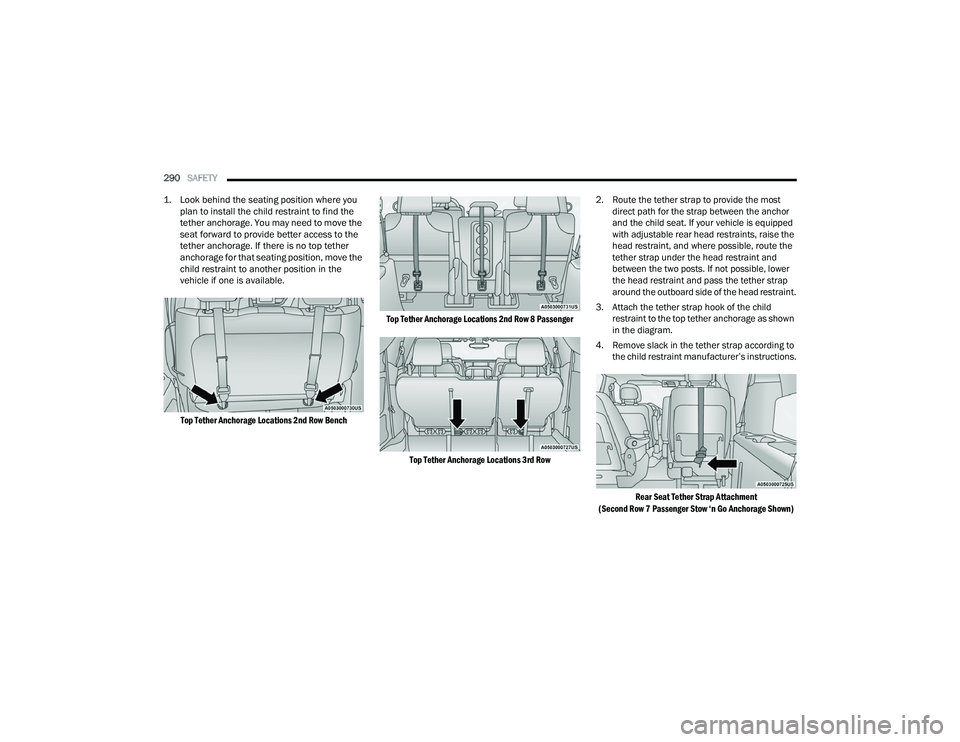
1. Look behind the seating position where you plan to install the child restraint to find the
tether anchorage. You may need to move the
seat forward to provide better access to the
tether anchorage. If there is no top tether
anchorage for that seating position, move the
child restraint to another position in the
vehicle if one is available.
Top Tether Anchorage Locations 2nd Row Bench Top Tether Anchorage Locations 2nd Row 8 Passenger
Top Tether Anchorage Locations 3rd Row
2. Route the tether strap to provide the most
direct path for the strap between the anchor
and the child seat. If your vehicle is equipped
with adjustable rear head restraints, raise the
head restraint, and where possible, route the
tether strap under the head restraint and
between the two posts. If not possible, lower
the head restraint and pass the tether strap
around the outboard side of the head restraint.
3. Attach the tether strap hook of the child restraint to the top tether anchorage as shown
in the diagram.
4. Remove slack in the tether strap according to the child restraint manufacturer’s instructions.
Rear Seat Tether Strap Attachment
(Second Row 7 Passenger Stow ‘n Go Anchorage Shown)
21_RUP_OM_EN_USC_t.book Page 290
Page 320 of 401
318IN CASE OF EMERGENCY
Remove The Bottle
NOTE:
For sealant bottle installation, follow these
steps reverse order.
Replacement sealant bottles are available at
authorized service centers.
JUMP STARTING
If your vehicle has a discharged battery it can be
jump started using a set of jumper cables and a
battery in another vehicle or by using a portable
battery booster pack. Jump starting can be
dangerous if done improperly so please follow the
procedures in this section carefully.
NOTE:When using a portable battery booster pack follow
the manufacturer’s operating instructions and
precautions.
PREPARATIONS FOR JUMP START
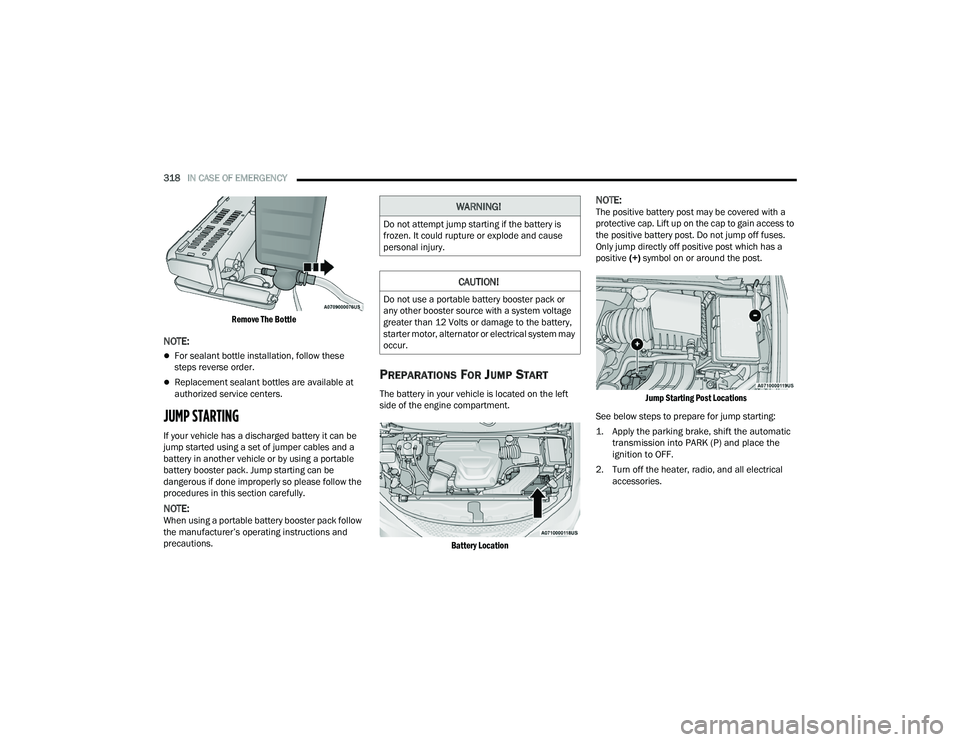
The battery in your vehicle is located on the left
side of the engine compartment.
Battery Location
NOTE:The positive battery post may be covered with a
protective cap. Lift up on the cap to gain access to
the positive battery post. Do not jump off fuses.
Only jump directly off positive post which has a
positive (+) symbol on or around the post.
Jump Starting Post Locations
See below steps to prepare for jump starting:
1. Apply the parking brake, shift the automatic transmission into PARK (P) and place the
ignition to OFF.
2. Turn off the heater, radio, and all electrical accessories.WARNING!
Do not attempt jump starting if the battery is
frozen. It could rupture or explode and cause
personal injury.
CAUTION!
Do not use a portable battery booster pack or
any other booster source with a system voltage
greater than 12 Volts or damage to the battery,
starter motor, alternator or electrical system may
occur.
21_RUP_OM_EN_USC_t.book Page 318
Page 324 of 401
322IN CASE OF EMERGENCY
To move the vehicle in cases where the
transmission will not shift out of PARK (P) (such as
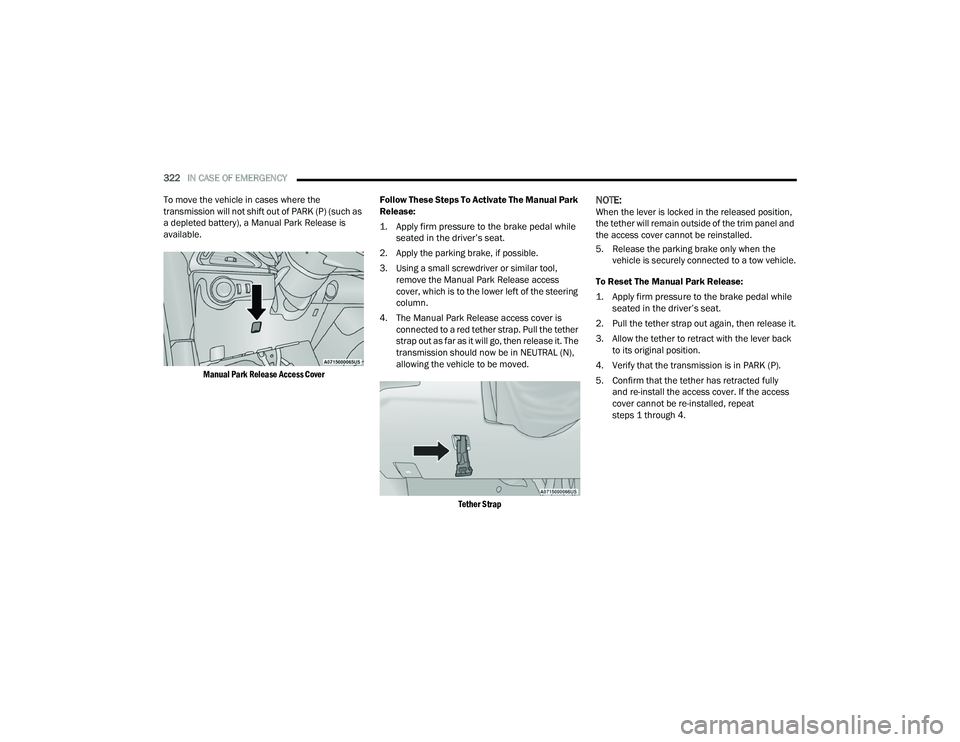
a depleted battery), a Manual Park Release is
available.
Manual Park Release Access Cover
Follow These Steps To Activate The Manual Park
Release:
1. Apply firm pressure to the brake pedal while
seated in the driver’s seat.
2. Apply the parking brake, if possible.
3. Using a small screwdriver or similar tool, remove the Manual Park Release access
cover, which is to the lower left of the steering
column.
4. The Manual Park Release access cover is connected to a red tether strap. Pull the tether
strap out as far as it will go, then release it. The
transmission should now be in NEUTRAL (N),
allowing the vehicle to be moved.
Tether Strap
NOTE:When the lever is locked in the released position,
the tether will remain outside of the trim panel and
the access cover cannot be reinstalled.
5. Release the parking brake only when the vehicle is securely connected to a tow vehicle.
To Reset The Manual Park Release:
1. Apply firm pressure to the brake pedal while seated in the driver’s seat.
2. Pull the tether strap out again, then release it.
3. Allow the tether to retract with the lever back to its original position.
4. Verify that the transmission is in PARK (P).
5. Confirm that the tether has retracted fully and re-install the access cover. If the access
cover cannot be re-installed, repeat
steps 1 through 4.
21_RUP_OM_EN_USC_t.book Page 322
Page 326 of 401
324IN CASE OF EMERGENCY
TOWING A DISABLED VEHICLE
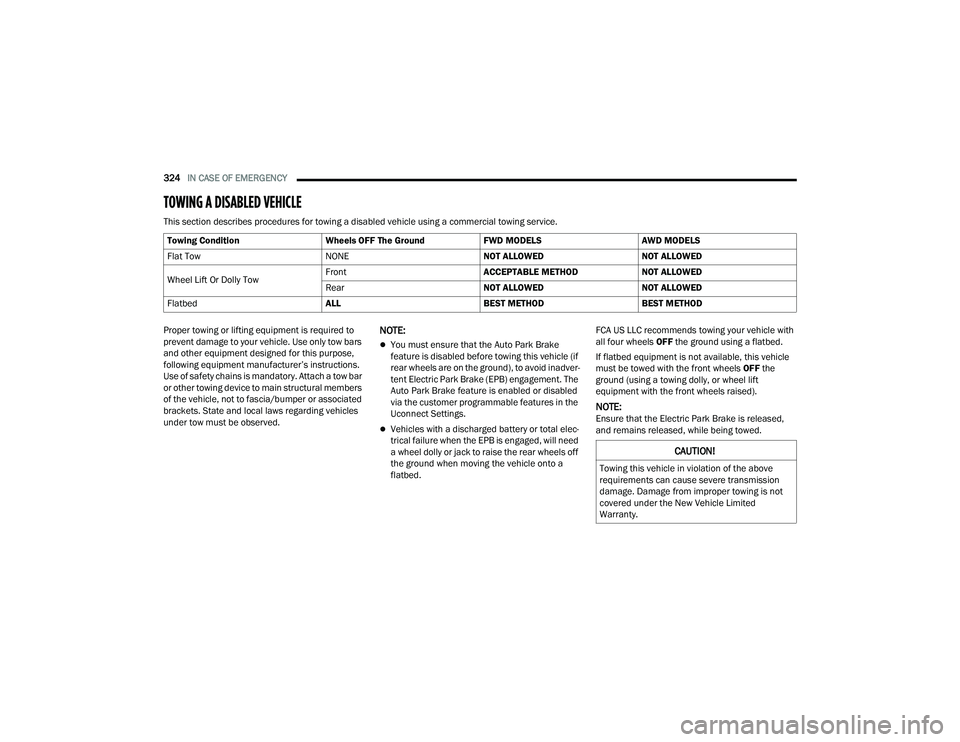
This section describes procedures for towing a disabled vehicle using a commercial towing service.
Proper towing or lifting equipment is required to
prevent damage to your vehicle. Use only tow bars
and other equipment designed for this purpose,
following equipment manufacturer’s instructions.
Use of safety chains is mandatory. Attach a tow bar
or other towing device to main structural members
of the vehicle, not to fascia/bumper or associated
brackets. State and local laws regarding vehicles
under tow must be observed.
NOTE:
You must ensure that the Auto Park Brake
feature is disabled before towing this vehicle (if
rear wheels are on the ground), to avoid inadver -
tent Electric Park Brake (EPB) engagement. The
Auto Park Brake feature is enabled or disabled
via the customer programmable features in the
Uconnect Settings.
Vehicles with a discharged battery or total elec -
trical failure when the EPB is engaged, will need
a wheel dolly or jack to raise the rear wheels off
the ground when moving the vehicle onto a
flatbed. FCA US LLC recommends towing your vehicle with
all four wheels
OFF the ground using a flatbed.
If flatbed equipment is not available, this vehicle
must be towed with the front wheels OFF the
ground (using a towing dolly, or wheel lift
equipment with the front wheels raised).
NOTE:Ensure that the Electric Park Brake is released,
and remains released, while being towed.
Towing Condition
Wheels OFF The GroundFWD MODELSAWD MODELS
Flat Tow NONENOT ALLOWEDNOT ALLOWED
Wheel Lift Or Dolly Tow Front
ACCEPTABLE METHODNOT ALLOWED
Rear NOT ALLOWEDNOT ALLOWED
Flatbed ALLBEST METHODBEST METHOD
CAUTION!
Towing this vehicle in violation of the above
requirements can cause severe transmission
damage. Damage from improper towing is not
covered under the New Vehicle Limited
Warranty.
21_RUP_OM_EN_USC_t.book Page 324
Page 328 of 401
326IN CASE OF EMERGENCY
NOTE:The Safehold feature will engage the Electric Park
Brake whenever the driver's door is opened (if the
ignition is ON, transmission is not in PARK, and
brake pedal is released). If you are towing this
vehicle with the ignition in the ON/RUN mode, you
must manually disable the Electric Park Brake
each time the driver's door is opened, by pressing
the brake pedal and then releasing the EPB.
If the key fob is unavailable or the vehicle's battery
is discharged, detailed instructions on shifting the
transmission out of PARK in order to move the
vehicle Úpage 321.
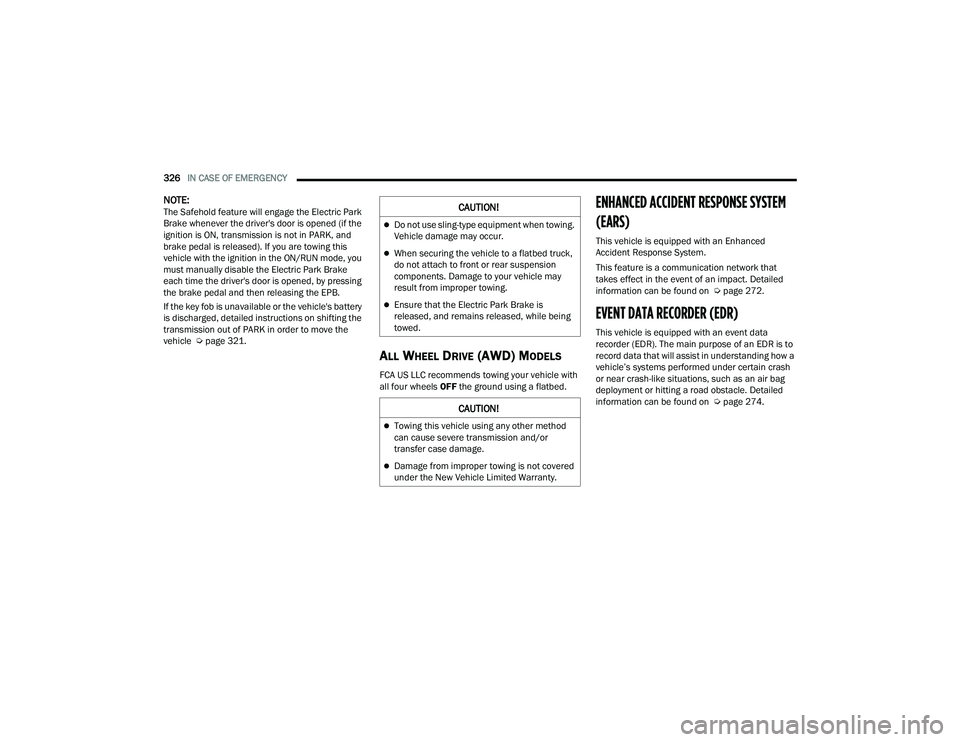
ALL WHEEL DRIVE (AWD) MODELS
FCA US LLC recommends towing your vehicle with
all four wheels OFF the ground using a flatbed.
ENHANCED ACCIDENT RESPONSE SYSTEM
(EARS)
This vehicle is equipped with an Enhanced
Accident Response System.
This feature is a communication network that
takes effect in the event of an impact. Detailed
information can be found on Ú page 272.
EVENT DATA RECORDER (EDR)
This vehicle is equipped with an event data
recorder (EDR). The main purpose of an EDR is to
record data that will assist in understanding how a
vehicle’s systems performed under certain crash
or near crash-like situations, such as an air bag
deployment or hitting a road obstacle. Detailed
information can be found on Úpage 274.
CAUTION!
Do not use sling-type equipment when towing.
Vehicle damage may occur.
When securing the vehicle to a flatbed truck,
do not attach to front or rear suspension
components. Damage to your vehicle may
result from improper towing.
Ensure that the Electric Park Brake is
released, and remains released, while being
towed.
CAUTION!
Towing this vehicle using any other method
can cause severe transmission and/or
transfer case damage.
Damage from improper towing is not covered
under the New Vehicle Limited Warranty.
21_RUP_OM_EN_USC_t.book Page 326