camera CHRYSLER PACIFICA HYBRID 2017 2.G User Guide
[x] Cancel search | Manufacturer: CHRYSLER, Model Year: 2017, Model line: PACIFICA HYBRID, Model: CHRYSLER PACIFICA HYBRID 2017 2.GPages: 592, PDF Size: 6.73 MB
Page 375 of 592
Front ViewThe Front view will show you what is
immediately in front of the vehicle and
is always paired with the Top view of
the vehicle.
Front Cross Path View Pressing the Front Cross Path soft key
will give the driver a wider angle view
of the front camera system. The Top
view will be disabled when this is se-
lected.
Deactivation
The system can be deactivated in the following conditions:
• The speed of the vehicle reaches greater than 8 mph
(13 km/h).
• The vehicle is out of REVERSE for greater than 10
seconds.
• The vehicle shifted into PARK from a different gear. •
If the vehicle is in any gear other than REVERSE, Press
the “X” button.
NOTE:
• If snow, ice, mud, or any foreign substance builds up on
the camera lenses, clean the lenses, rinse with water, and
dry with a soft cloth. Do not cover the lenses.
• If a malfunction with the system has occurred, see your
nearest authorized dealer.
WARNING!
Drivers must be careful when backing up even when
using the Surround View Camera. Always check care-
fully behind your vehicle, and be sure to check for
pedestrians, animals, other vehicles, obstructions, or
blind spots before backing up. You are responsible for
the safety of your surroundings and must continue to
pay attention while backing up. Failure to do so can
result in serious injury or death.
6
STARTING AND OPERATING 373
Page 376 of 592
CAUTION!
•To avoid vehicle damage, Surround View should
only be used as a parking aid. The Surround View
camera is unable to view every obstacle or object in
your drive path.
• To avoid vehicle damage, the vehicle must be driven
slowly when using Surround View to be able to stop
in time when an obstacle is seen. It is recommended
that the driver look frequently over his/her shoulder
when using Surround View.
REFUELING THE VEHICLE
1. Press the fuel filler door release button (located in the driver ’s door). 2. The button press will initiate a sequence of events to
depressurize the fuel system. A message will display in
the cluster letting you know when the vehicle is ready to
be fueled.
Fuel Filler Door Release Switch
374 STARTING AND OPERATING
Page 408 of 592
CavityCartridge Fuse Blade FuseDescription
F92B ––Not Used
F93 ––Not Used
F94 40 Amp Green –ESP - Motor Pump
F95A –10 Amp Red USB Charge Only Port
F95B – Selectable Fuse Location
F96 –10 Amp RedOccupant Restraint Con-
troller (ORC) (Airbag)
F97 –10 Amp RedOccupant Restraint Con-
troller (ORC) (Airbag)
F98 ––Not Used
F99 ––Not Used
F100A –10 Amp Red QVPM / AHLM
F100B – Rr Camera / LBSS / RBSS
/ CVPM / Humidity Snsr / In Car Temp Snsr
TIRE SERVICE KIT — IF EQUIPPED
Your vehicle may be equipped with a Tire Service Kit.
Small punctures up to 1/4 inch (6 mm) in the tire tread can
be sealed with Tire Service Kit. Foreign objects (e.g., screws
or nails) should not be removed from the tire. Tire Service Kit can be used in outside temperatures down to approxi-
mately -4°F (-20°C). This kit will provide a temporary tire
seal, allowing you to drive your vehicle up to 100 miles
(160 km) with a maximum speed of 50 mph (80 km/h).
406 IN CASE OF EMERGENCY
Page 507 of 592
Safety & Driving Assistance
After pressing the “Safety & Driving Assistance” button on
the touchscreen the following settings will be available:
Setting NameSelectable Options
ParkView Backup Camera Delay — If Equipped On
Off
NOTE:
The “ParkView Backup Camera Delay” setting determines whether or not the screen will display the rear view image
with dynamic grid lines for up to 10 seconds after the vehicle is shifted out of REVERSE. This delay will be canceled
if the vehicle’s speed exceeds 8 mph (13 km/h), the transmission is shifted into PARK, or the ignition is switched to
the OFF position. ParkView Backup Camera Active Guide Lines — If Equipped
NOTE:
The “ParkView Backup Camera Active Guide Lines” feature overlays the Rear Backup Camera image with active, or
dynamic, grid lines to help illustrate the width of the vehicle and its project back up path, based on the steering
wheel position when the option is checked. A dashed center line overlay indicates the center of the vehicle to assist
with parking or aligning to a hitch/receiver.
10
MULTIMEDIA 505
Page 508 of 592
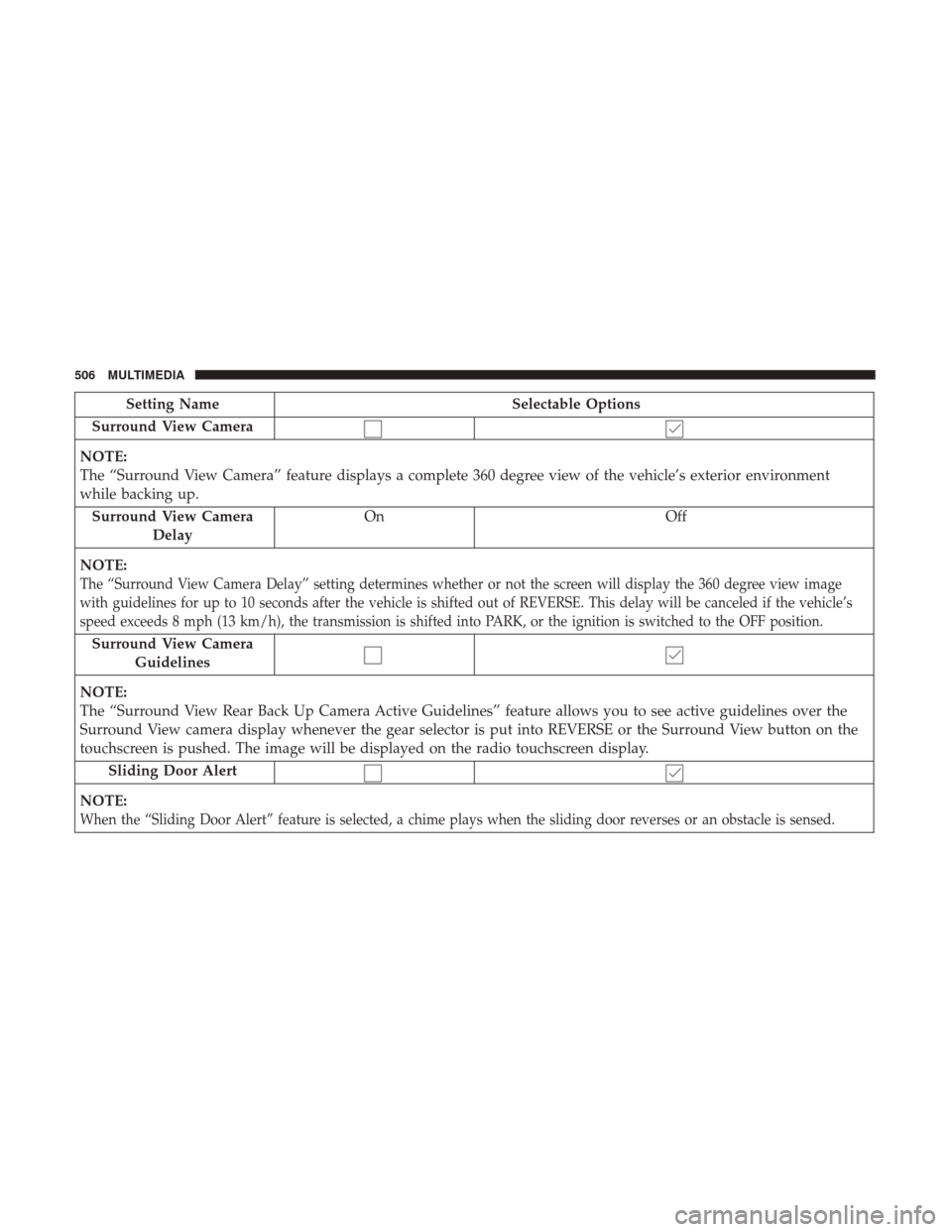
Setting NameSelectable Options
Surround View Camera
NOTE:
The “Surround View Camera” feature displays a complete 360 degree view of the vehicle’s exterior environment
while backing up. Surround View Camera Delay On
Off
NOTE:
The “Surround View Camera Delay” setting determines whether or not the screen will display the 360 degree view image
with guidelines for up to 10 seconds after the vehicle is shifted out of REVERSE. This delay will be canceled if the vehicle’s
speed exceeds 8 mph (13 km/h), the transmission is shifted into PARK, or the ignition is switched to the OFF position.
Surround View Camera Guidelines
NOTE:
The “Surround View Rear Back Up Camera Active Guidelines” feature allows you to see active guidelines over the
Surround View camera display whenever the gear selector is put into REVERSE or the Surround View button on the
touchscreen is pushed. The image will be displayed on the radio touchscreen display. Sliding Door Alert
NOTE:
When the “Sliding Door Alert” feature is selected, a chime plays when the sliding door reverses or an obstacle is sensed.
506 MULTIMEDIA
Page 579 of 592
Auxiliary Power Outlet..................... .138
Axle Lubrication .......................... .492
Battery .............................. .171, 435
Charging System Light ....................171
Jump Starting .......................... .417
Key Fob Battery Replacement .................43
Keyless Key Fob Replacement ................43
Remote Battery Replacement .................43
Saving Feature (Protection) ..................98
Belts, Seat ............................... .276
Blind Spot Monitoring ...................... .203
Body Mechanism Lubrication ..................441
B-Pillar Location .......................... .458
Brake Assist System ........................ .196
Brake Control System, Electronic ................195
Brake Fluid .............................. .492
Brake System ............................ .453
Fluid Check ........................ .453, 492
Master Cylinder ........................ .453
Parking .............................. .285
Warning Light .......................... .169
Brightness, Interior Lights ....................100
Bulb Replacement ......................... .396Bulbs, Light
....................... .278, 392, 396
Camera, Rear ......................... .368, 370
Capacities, Fluid .......................... .489
Caps, Filler Fuel .............................. .374, 421
Radiator (Coolant Pressure) .................451
Carbon Monoxide Warning ................275, 488
Cargo Compartment Luggage Carrier ........................ .144
Cargo (Vehicle Loading) ..................... .134
Car Washes .............................. .479
Cellular Phone ........................... .552
Center High Mounted Stop Light ...............398
Certification Label ......................... .377
Chains,
Tire ............................. .474
Changing A Flat Tire ....................... .455
Checking Your Vehicle For Safety ...............275
Checks, Safety ............................ .275
Child Restraint ........................... .253
Child Restraints Booster Seats ........................... .258
Center Seat LATCH ...................... .265
Child Restraints ........................ .253
Child Seat Installation ..................268, 270
12
INDEX 577
Page 586 of 592
Pregnant Women And Seat Belts................232
Pretensioners Seat Belts ............................. .232
Radial Ply Tires ........................... .465
Radiator Cap (Coolant Pressure Cap) .............451
Radio Frequency General Information .....................40, 52
Radio Operation .......................... .552
Radio Remote Controls ..................... .520
Rear Air Conditioning .......................115
Rear Camera ......................... .368, 370
Rear Cross Path ........................... .208
Rear ParkSense System ...................319, 329
Rearview Mirrors ...........................89
Reclining Front Seats .........................70
Recreational Towing ........................ .380
Reformulated Gasoline ...................... .486
Reminder, Seat Belt ........................ .221
Remote Control Starting System ...........................49
Remote Keyless Entry Arm The Alarm ..........................53
Disarm The Alarm ........................54
Key Fob Battery Replacement .................43 Remote Battery Replacement
.................43
Remote Sound System (Radio) Controls ...........520
Remote Starting Exit Remote Start Mode .....................51
Uconnect Customer Programmable Features . . .52, 514
Uconnect Settings ..................... .52, 514
Remote Starting System .......................49
Replacement Bulbs ........................ .392
Replacement Tires ......................... .468
Reporting Safety Defects .....................573
Restraint, Head .............................84
Restraints, Child .......................... .253
Roof Rack (Luggage Rack) ....................144
Rotation, Tires ............................ .475
Safety Checks Inside Vehicle ...................276
Safety Checks Outside Vehicle .................278
Safety Defects, Reporting .....................573
Safety, Exhaust Gas ........................ .275
Safety
Information, Tire ..................... .455
Safety Tips .............................. .275
Schedule, Maintenance ...................... .429
Seat Belt Adjustable Upper Shoulder Belt Anchorage ......226
Automatic Locking Retractor (ALR) ...........233
584 INDEX