door switch CHRYSLER PACIFICA HYBRID 2017 2.G Owner's Manual
[x] Cancel search | Manufacturer: CHRYSLER, Model Year: 2017, Model line: PACIFICA HYBRID, Model: CHRYSLER PACIFICA HYBRID 2017 2.GPages: 592, PDF Size: 6.73 MB
Page 131 of 592
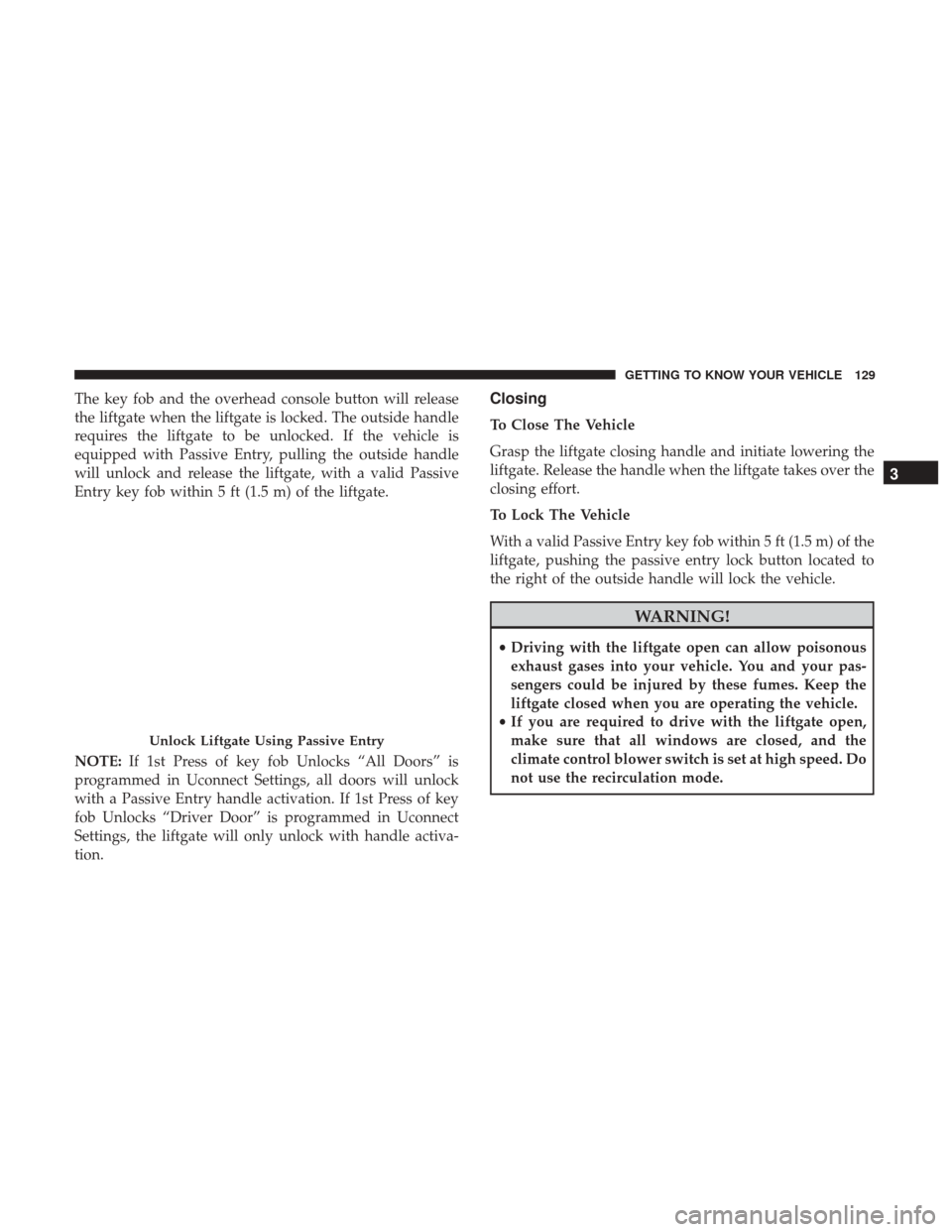
The key fob and the overhead console button will release
the liftgate when the liftgate is locked. The outside handle
requires the liftgate to be unlocked. If the vehicle is
equipped with Passive Entry, pulling the outside handle
will unlock and release the liftgate, with a valid Passive
Entry key fob within 5 ft (1.5 m) of the liftgate.
NOTE:If 1st Press of key fob Unlocks “All Doors” is
programmed in Uconnect Settings, all doors will unlock
with a Passive Entry handle activation. If 1st Press of key
fob Unlocks “Driver Door” is programmed in Uconnect
Settings, the liftgate will only unlock with handle activa-
tion.Closing
To Close The Vehicle
Grasp the liftgate closing handle and initiate lowering the
liftgate. Release the handle when the liftgate takes over the
closing effort.
To Lock The Vehicle
With a valid Passive Entry key fob within 5 ft (1.5 m) of the
liftgate, pushing the passive entry lock button located to
the right of the outside handle will lock the vehicle.
WARNING!
• Driving with the liftgate open can allow poisonous
exhaust gases into your vehicle. You and your pas-
sengers could be injured by these fumes. Keep the
liftgate closed when you are operating the vehicle.
• If you are required to drive with the liftgate open,
make sure that all windows are closed, and the
climate control blower switch is set at high speed. Do
not use the recirculation mode.
Unlock Liftgate Using Passive Entry
3
GETTING TO KNOW YOUR VEHICLE 129
Page 132 of 592
Power Liftgate — If Equipped
The power liftgate may be opened or closed in several
ways:
•Overhead console liftgate button
• Key fob
• Outside handle (opens liftgate only)
• Button just inside the liftgate on the upper left trim
(when liftgate is open)
• Hands-Free Liftgate (opens liftgate only) — If Equipped
Using the above ways:
• When the liftgate is fully closed, the liftgate will open
• When the liftgate is fully open, the liftgate will close
• When the liftgate is moving, the liftgate will reverse
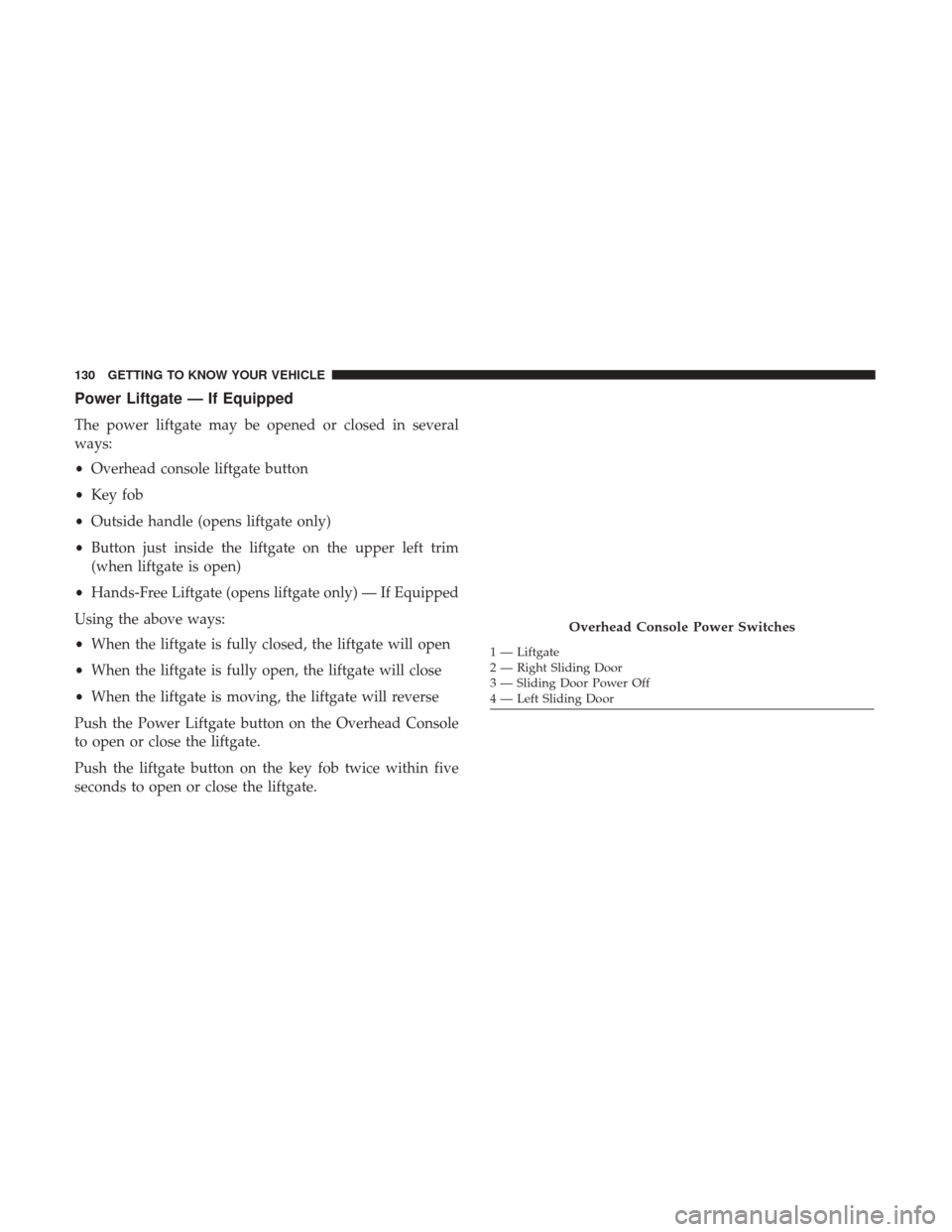
Push the Power Liftgate button on the Overhead Console
to open or close the liftgate.
Push the liftgate button on the key fob twice within five
seconds to open or close the liftgate.
Overhead Console Power Switches
1 — Liftgate
2 — Right Sliding Door
3 — Sliding Door Power Off
4 — Left Sliding Door
130 GETTING TO KNOW YOUR VEHICLE
Page 133 of 592
The key fob and the overhead console button will operate
the liftgate when the liftgate is locked. The outside handle
requires the liftgate to be unlocked. If the vehicle is
equipped with Passive Entry, depressing the touch pad on
the outside handle or Hands-Free Liftgate foot activation
(if equipped) will unlock and open the liftgate, with a valid
Passive Entry key fob within 5 ft (1.5 m) of the liftgate
handle.
NOTE:
•To open the liftgate, the Hands-Free Liftgate foot activa-
tion (if equipped) requires a valid Passive Entry key fob
within 5 ft (1.5 m) of the door handle.
• If 1st Press of key fob Unlocks “All Doors” is pro-
grammed in Uconnect Settings, all doors will unlock
with a Passive Entry hands-free activation. If 1st Press of
key fob Unlocks “Driver Door” is programmed in
Uconnect Settings, the liftgate will only unlock with
hands-free activation. Refer to “Uconnect Settings” in
“Multimedia” for further information.
• Tones are sounded and the turn signals are flashed with
liftgate movements. These alerts can be turned on or off
in Uconnect Settings. Refer to “Uconnect Settings” in
“Multimedia” for further information. To Close The Liftgate
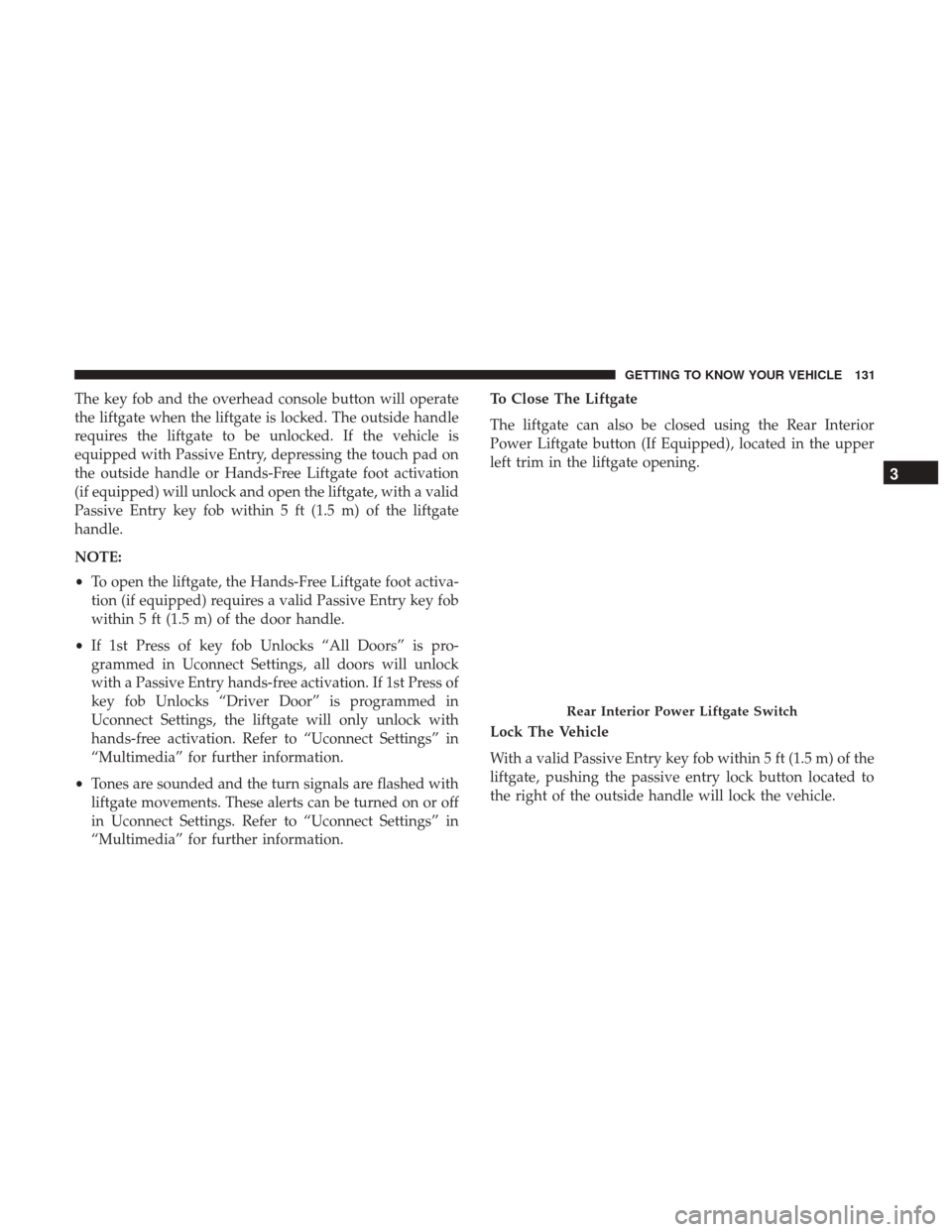
The liftgate can also be closed using the Rear Interior
Power Liftgate button (If Equipped), located in the upper
left trim in the liftgate opening.
Lock The Vehicle
With a valid Passive Entry key fob within 5 ft (1.5 m) of the
liftgate, pushing the passive entry lock button located to
the right of the outside handle will lock the vehicle.
Rear Interior Power Liftgate Switch
3
GETTING TO KNOW YOUR VEHICLE 131
Page 157 of 592
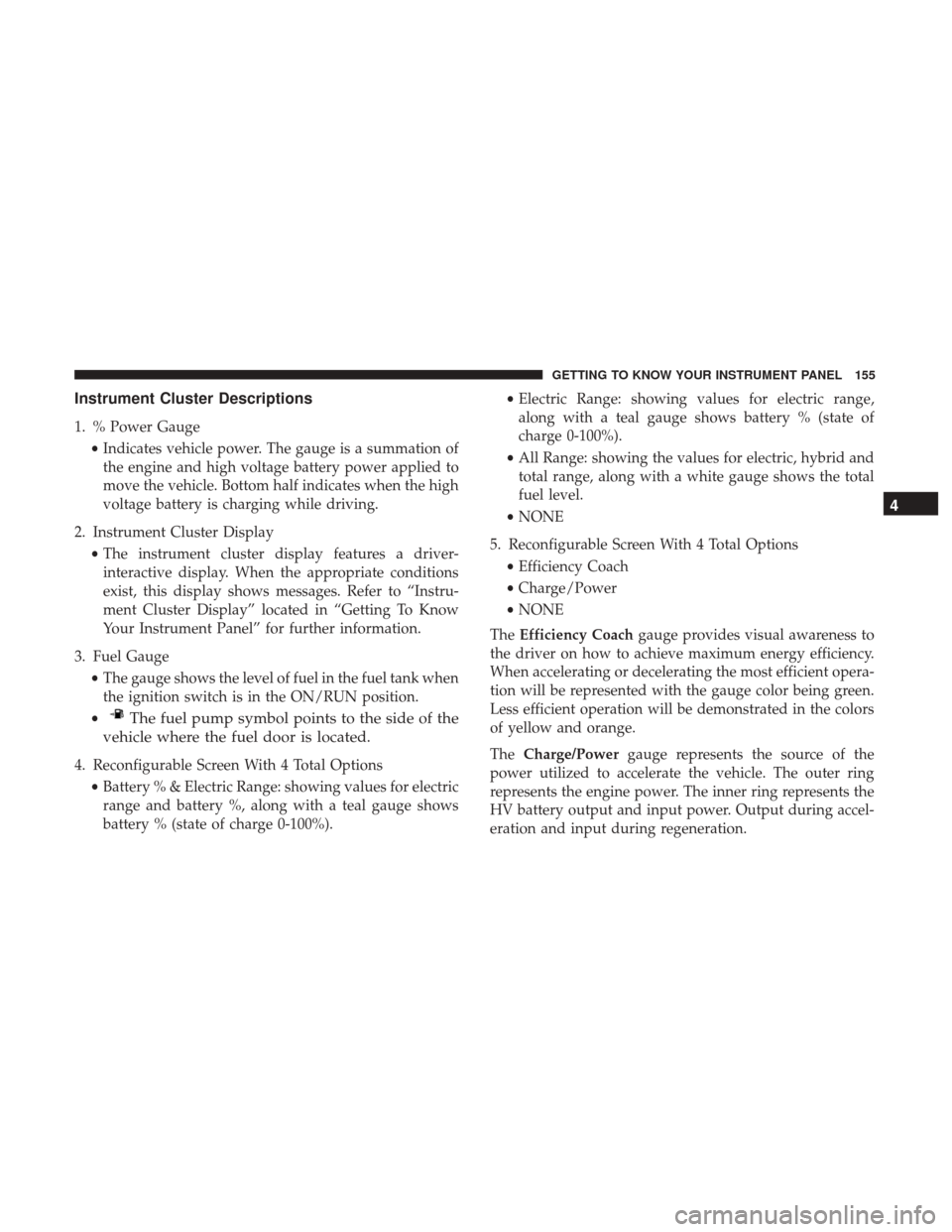
Instrument Cluster Descriptions
1. % Power Gauge•Indicates vehicle power. The gauge is a summation of
the engine and high voltage battery power applied to
move the vehicle. Bottom half indicates when the high
voltage battery is charging while driving.
2. Instrument Cluster Display •The instrument cluster display features a driver-
interactive display. When the appropriate conditions
exist, this display shows messages. Refer to “Instru-
ment Cluster Display” located in “Getting To Know
Your Instrument Panel” for further information.
3. Fuel Gauge •The gauge shows the level of fuel in the fuel tank when
the ignition switch is in the ON/RUN position.
•
The fuel pump symbol points to the side of the
vehicle where the fuel door is located.
4. Reconfigurable Screen With 4 Total Options
•Battery % & Electric Range: showing values for electric
range and battery %, along with a teal gauge shows
battery % (state of charge 0-100%). •
Electric Range: showing values for electric range,
along with a teal gauge shows battery % (state of
charge 0-100%).
• All Range: showing the values for electric, hybrid and
total range, along with a white gauge shows the total
fuel level.
• NONE
5. Reconfigurable Screen With 4 Total Options •Efficiency Coach
• Charge/Power
• NONE
The Efficiency Coach gauge provides visual awareness to
the driver on how to achieve maximum energy efficiency.
When accelerating or decelerating the most efficient opera-
tion will be represented with the gauge color being green.
Less efficient operation will be demonstrated in the colors
of yellow and orange.
The Charge/Power gauge represents the source of the
power utilized to accelerate the vehicle. The outer ring
represents the engine power. The inner ring represents the
HV battery output and input power. Output during accel-
eration and input during regeneration.
4
GETTING TO KNOW YOUR INSTRUMENT PANEL 155
Page 254 of 592
In order to reset the High Voltage Battery and Engine, the
vehicle must be towed to an authorized dealer immedi-
ately to be inspected and have the Enhanced Accident
Response System reset.
In order to immediately reset the Hazard Flashers, Interior
Lights, Power Door Locks, HVAC Blower Motor, the igni-
tion switch must be changed from START or ON/RUN to
ignition OFF.
Maintaining Your Air Bag System
WARNING!
•Modifications to any part of the air bag system could
cause it to fail when you need it. You could be
injured if the air bag system is not there to protect
you. Do not modify the components or wiring, in-
cluding adding any kind of badges or stickers to the
steering wheel hub trim cover or the upper right side
of the instrument panel. Do not modify the front
bumper, vehicle body structure, or add aftermarket
side steps or running boards.
(Continued)
WARNING! (Continued)
•It is dangerous to try to repair any part of the air bag
system yourself. Be sure to tell anyone who works on
your vehicle that it has an air bag system.
• Do not attempt to modify any part of your air bag
system. The air bag may inflate accidentally or may
not function properly if modifications are made.
Take your vehicle to an authorized dealer for any air
bag system service. If your seat, including your trim
cover and cushion, needs to be serviced in any way
(including removal or loosening/tightening of seat
attachment bolts), take the vehicle to your authorized
dealer. Only manufacturer approved seat accessories
may be used. If it is necessary to modify the air bag
system for persons with disabilities, contact your
authorized dealer.
252 SAFETY
Page 277 of 592
Pets should be restrained in the rear seat in pet harnesses or
pet carriers that are secured by seat belts.
SAFETY TIPS
Transporting Passengers
NEVER TRANSPORT PASSENGERS IN THE CARGO
AREA.
WARNING!
•Do not leave children or animals inside parked
vehicles in hot weather. Interior heat build-up may
cause serious injury or death.
• It is extremely dangerous to ride in a cargo area,
inside or outside of a vehicle. In a collision, people
riding in these areas are more likely to be seriously
injured or killed.
• Do not allow people to ride in any area of your
vehicle that is not equipped with seats and seat belts.
• Be sure everyone in your vehicle is in a seat and
using a seat belt properly.
Exhaust Gas
WARNING!
Exhaust gases can injure or kill. They contain carbon
monoxide (CO), which is colorless and odorless.
Breathing it can make you unconscious and can even-
tually poison you. To avoid breathing (CO), follow
these safety tips since vehicle equipped with a gas
engine the following applies:
• Do not run the vehicle in a closed garage or in
confined areas any longer than needed to move your
vehicle in or out of the area.
• If you are required to drive with the trunk/liftgate/
rear doors open, make sure that all windows are
closed and the climate control BLOWER switch is set
at high speed. DO NOT use the recirculation mode.
• If it is necessary to sit in a parked vehicle with the
vehicle running, adjust your heating or cooling con-
trols to force outside air into the vehicle. Set the
blower at high speed.
The best protection against carbon monoxide entry into the
vehicle body is a properly maintained engine exhaust
system.
5
SAFETY 275
Page 290 of 592
To disengage the park brake while the vehicle is in motion,
release the switch. If the vehicle is brought to a complete
stop using the park brake, when the vehicle reaches
approximately 3 mph (4.8 km/h), the park brake will
remain engaged.
In the unlikely event of a malfunction of the Electric Park
Brake system, a yellow EPB fault lamp will illuminate. This
may be accompanied by the BRAKE warning lamp flash-
ing. In this case, urgent service of the electric park brake
system is required. Do not rely on the park brake to hold
the vehicle stationary.
Auto Park Brake
The Electric Park Brake can be programmed to be applied
automatically whenever the vehicle is at a standstill and
the automatic transmission is placed in PARK. Auto Park
Brake is enabled and disabled by customer selection
through the “Customer Programmable Features” section of
the “Uconnect Settings”.
SafeHold
SafeHold is a safety feature of the Electric Park Brake
System that will engage the park brake automatically if the
vehicle is left unsecured. If the automatic transmission is
not in PARK, the seat belt is unbuckled, the driver door isopen, the vehicle is at a standstill, and there is no attempt
to depress the brake pedal or accelerator pedal, the park
brake will automatically engage to prevent the vehicle
from rolling.
SafeHold can be temporarily bypassed by pushing the
Electric Park Brake Switch while the driver door is open
and brake pedal is pressed. Once manually bypassed,
SafeHold will be enabled again once the vehicle reaches
12 mph (20 km/h) or the ignition is cycled to the OFF
position and back to ON again.
Brake Service Mode
We recommend having your brakes serviced by your autho-
rized dealer. You should only make repairs for which you
have the knowledge and the right equipment. You should
only enter Brake Service Mode during brake service.
When servicing your rear brakes, it may be necessary for
you or your technician to push the rear piston into the rear
caliper bore. With the Electric Park Brake system, this can
only be done after retracting the Electric Park Brake
actuator. Fortunately, actuator retraction can be done easily
by entering the “Brake Service” through the “Uconnect
Settings” in your vehicle. This menu based system will
guide you through the steps necessary to retract the EPB
actuator in order to perform rear brake service.
288 STARTING AND OPERATING
Page 347 of 592
•Vehicle speed greater than 5 mph (7 km/h) during active
steering guidance into the parking space.
• Touching the steering wheel during active steering guid-
ance into the parking space.
• Pushing the ParkSense Front and Rear Park Assist
switch.
• The Driver ’s door is opened.
• The liftgate is opened.
• Electronic Stability Control/Anti-lock Braking System
intervention.
• The ParkSense Active Park Assist system will allow a
maximum of six shifts between DRIVE and REVERSE. If
the maneuver cannot be completed within six shifts, the
system will cancel and the instrument cluster display
will instruct the driver to complete the maneuver manu-
ally.
The ParkSense Active Park Assist system will only operate
and search for a parking space when the following condi-
tions are present:
• The gear position is in DRIVE.
• The ignition is in the RUN position. •
The ParkSense Active Park Assist switch is activated.
• The Driver ’s door is closed.
• The liftgate is closed.
• Vehicle speed is less than 15 mph (25 km/h).
NOTE: If the vehicle is driven above approximately
15 mph (25 km/h), the instrument cluster display will
instruct the driver to slow down. If the vehicle is driven
above approximately 18 mph (30 km/h), the system will
cancel. The driver must then reactivate the system by
pushing the ParkSense Active Park Assist switch.
• The outer surface and the underside of the front and rear
fascias/bumpers are clean and clear of snow, ice, mud,
dirt or other obstruction.
When pushed, the LED on the ParkSense Active Park
Assist switch will blink momentarily, and then the LED
will turn OFF if any of the above conditions are not
present.
6
STARTING AND OPERATING 345
Page 376 of 592
CAUTION!
•To avoid vehicle damage, Surround View should
only be used as a parking aid. The Surround View
camera is unable to view every obstacle or object in
your drive path.
• To avoid vehicle damage, the vehicle must be driven
slowly when using Surround View to be able to stop
in time when an obstacle is seen. It is recommended
that the driver look frequently over his/her shoulder
when using Surround View.
REFUELING THE VEHICLE
1. Press the fuel filler door release button (located in the driver ’s door). 2. The button press will initiate a sequence of events to
depressurize the fuel system. A message will display in
the cluster letting you know when the vehicle is ready to
be fueled.
Fuel Filler Door Release Switch
374 STARTING AND OPERATING
Page 480 of 592
NOTE:The hybrid has feature of periodic wake-up that
occurs every 21 days. This feature charges the 12V battery
from the high voltage battery. This will happen as long as
the high voltage battery remains above the minimum state
of charge. Refer to “Starting Procedures” in “Starting And
Operating” for further information.
CAUTION!
Before removal of the positive and negative terminals
to the battery, wait at least a minute with ignition
switch in the OFF position and close the drivers door.
When reconnecting the positive and negative terminals
to the battery be sure the ignition switch is in the OFF
position and the drivers door is closed.
BODYWORK
Protection From Atmospheric Agents
Vehicle body care requirements vary according to geo-
graphic locations and usage. Chemicals that make roads
passable in snow and ice and those that are sprayed on
trees and road surfaces during other seasons are highly
corrosive to the metal in your vehicle. Outside parking,
which exposes your vehicle to airborne contaminants, road
surfaces on which the vehicle is operated, extreme hot or cold weather and other extreme conditions will have an
adverse effect on paint, metal trim, and underbody protec-
tion.
The following maintenance recommendations will enable
you to obtain maximum benefit from the corrosion resis-
tance built into your vehicle.
What Causes Corrosion?
Corrosion is the result of deterioration or removal of paint
and protective coatings from your vehicle.
The most common causes are:
•
Road salt, dirt and moisture accumulation.
• Stone and gravel impact.
• Insects, tree sap and tar.
• Salt in the air near seacoast localities.
• Atmospheric fallout/industrial pollutants.
Body And Underbody Maintenance
Cleaning Headlights
Your vehicle is equipped with plastic headlights and fog
lights that are lighter and less susceptible to stone breakage
than glass headlights.
478 SERVICING AND MAINTENANCE