service CHRYSLER VOYAGER 1996 Service Manual
[x] Cancel search | Manufacturer: CHRYSLER, Model Year: 1996, Model line: VOYAGER, Model: CHRYSLER VOYAGER 1996Pages: 1938, PDF Size: 55.84 MB
Page 341 of 1938
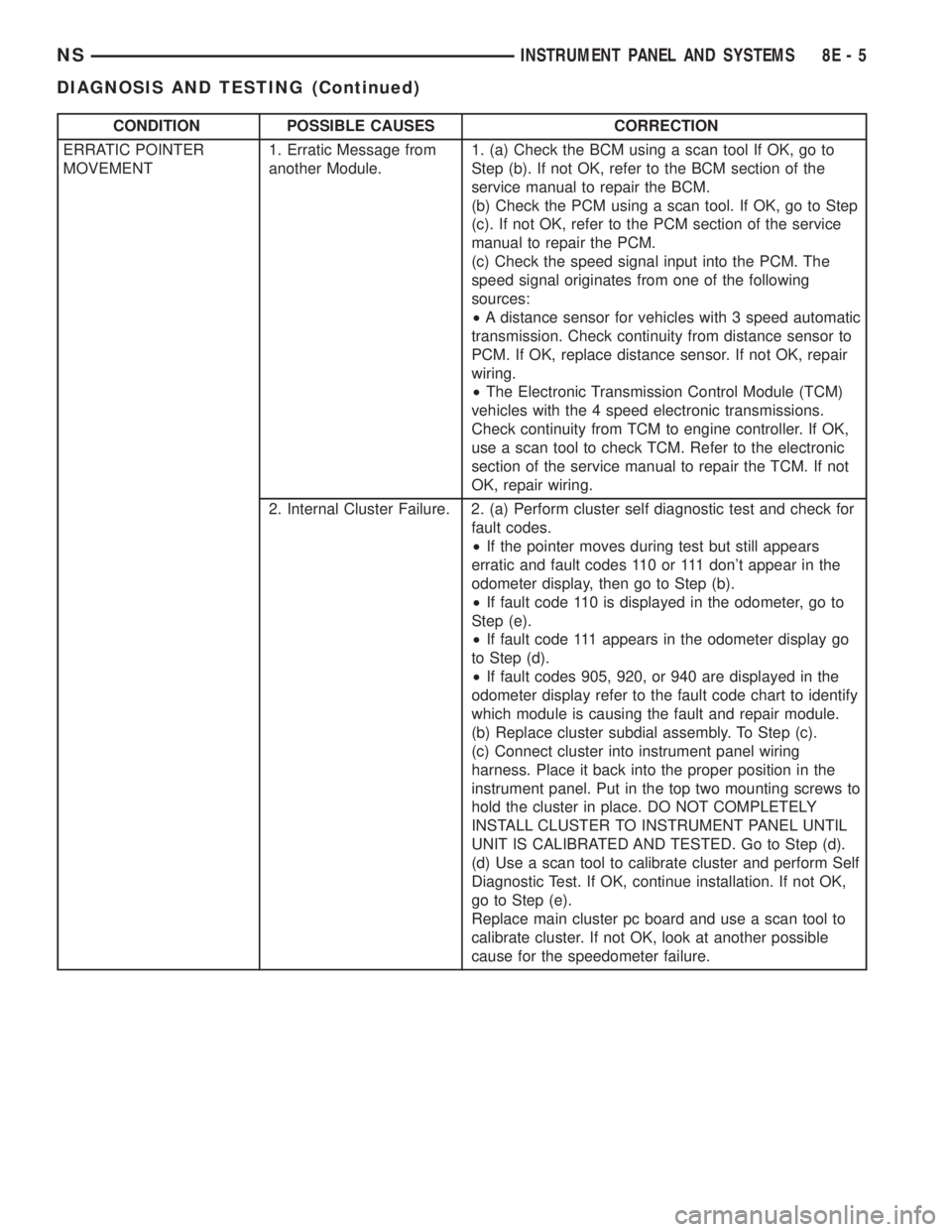
CONDITION POSSIBLE CAUSES CORRECTION
ERRATIC POINTER
MOVEMENT1. Erratic Message from
another Module.1. (a) Check the BCM using a scan tool If OK, go to
Step (b). If not OK, refer to the BCM section of the
service manual to repair the BCM.
(b) Check the PCM using a scan tool. If OK, go to Step
(c). If not OK, refer to the PCM section of the service
manual to repair the PCM.
(c) Check the speed signal input into the PCM. The
speed signal originates from one of the following
sources:
²A distance sensor for vehicles with 3 speed automatic
transmission. Check continuity from distance sensor to
PCM. If OK, replace distance sensor. If not OK, repair
wiring.
²The Electronic Transmission Control Module (TCM)
vehicles with the 4 speed electronic transmissions.
Check continuity from TCM to engine controller. If OK,
use a scan tool to check TCM. Refer to the electronic
section of the service manual to repair the TCM. If not
OK, repair wiring.
2. Internal Cluster Failure. 2. (a) Perform cluster self diagnostic test and check for
fault codes.
²If the pointer moves during test but still appears
erratic and fault codes 110 or 111 don't appear in the
odometer display, then go to Step (b).
²If fault code 110 is displayed in the odometer, go to
Step (e).
²If fault code 111 appears in the odometer display go
to Step (d).
²If fault codes 905, 920, or 940 are displayed in the
odometer display refer to the fault code chart to identify
which module is causing the fault and repair module.
(b) Replace cluster subdial assembly. To Step (c).
(c) Connect cluster into instrument panel wiring
harness. Place it back into the proper position in the
instrument panel. Put in the top two mounting screws to
hold the cluster in place. DO NOT COMPLETELY
INSTALL CLUSTER TO INSTRUMENT PANEL UNTIL
UNIT IS CALIBRATED AND TESTED. Go to Step (d).
(d) Use a scan tool to calibrate cluster and perform Self
Diagnostic Test. If OK, continue installation. If not OK,
go to Step (e).
Replace main cluster pc board and use a scan tool to
calibrate cluster. If not OK, look at another possible
cause for the speedometer failure.
NSINSTRUMENT PANEL AND SYSTEMS 8E - 5
DIAGNOSIS AND TESTING (Continued)
Page 342 of 1938

CONDITION POSSIBLE CAUSES CORRECTION
SPEEDOMETER
INACCURATE.1. Speedometer Out of
Calibration.1. (a) Perform Cluster Self Diagnostic Test.
²If speedometer is accurate to the calibration points
then look for another possible cause of inaccuracy.
²If speedometer is not accurate to the calibration
points, go to Step (b).
(b) Use a scan tool to calibrate speedometer.
2. Wrong Speedometer
Pinion Size For Tire Size.2. (a) If vehicle has a 4 speed electronic transmission
go to Step (c). Otherwise go to Step (b).
(b) Check if correct speedometer pinion is being used
with tires on vehicle. Refer to transmission section of
manual for test and repair procedure.
²If the incorrect pinion is in transmission then replace
with correct pinion.
²If the correct pinion is in the transmission calibrate
speedometer using a scan tool to correct for the
inaccuracy.
(c) use a scan tool to check the TCM to see if the
correct tire size has been programmed into the TCM.
²If the incorrect tire size was selected, select the
proper tire size.
²If the correct tire size was selected, calibrate
speedometer to correct for the inaccuracy.
3. Bad Speed Sensor. 3. Refer to the proper section of the service manual for
test and repair procedure.
8E - 6 INSTRUMENT PANEL AND SYSTEMSNS
DIAGNOSIS AND TESTING (Continued)
Page 345 of 1938
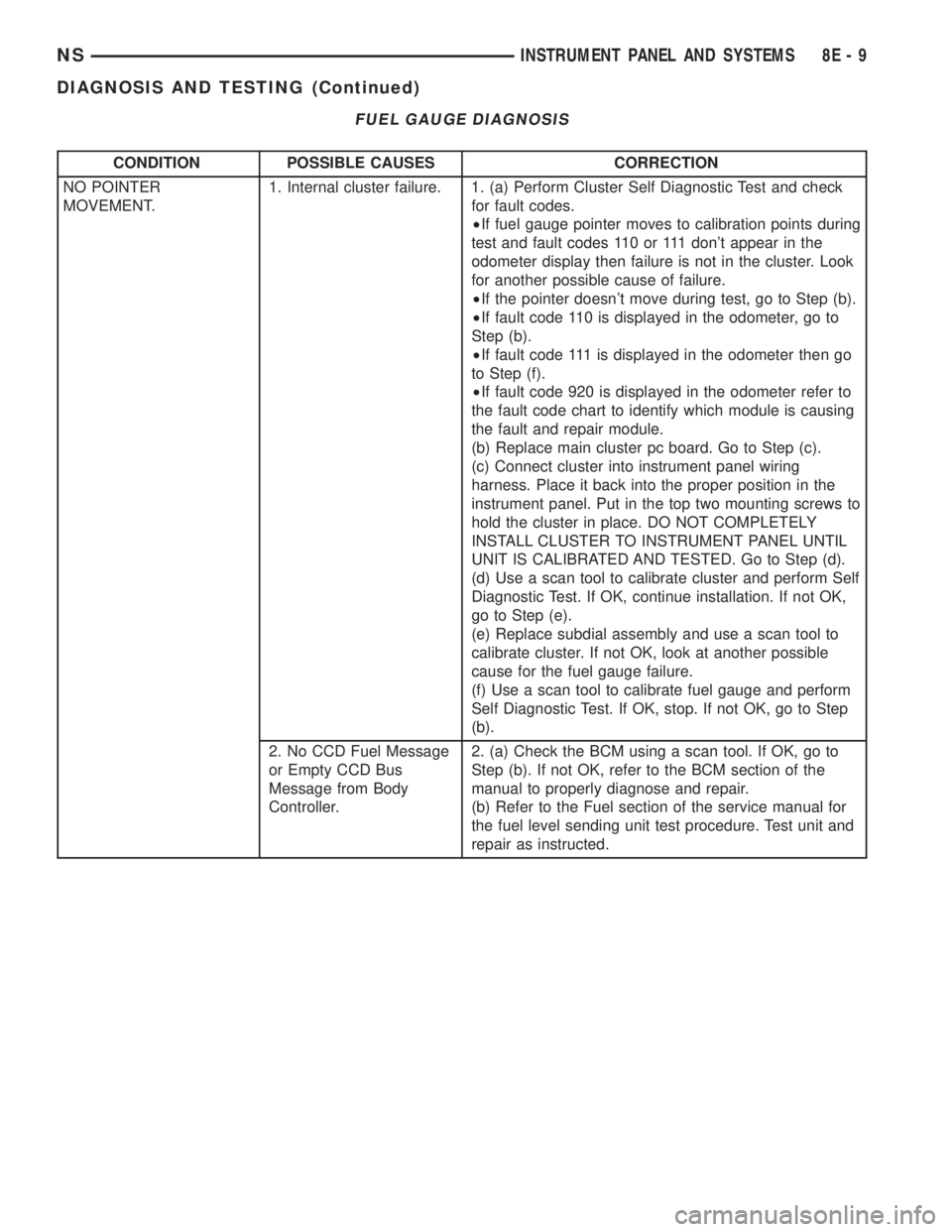
FUEL GAUGE DIAGNOSIS
CONDITION POSSIBLE CAUSES CORRECTION
NO POINTER
MOVEMENT.1. Internal cluster failure. 1. (a) Perform Cluster Self Diagnostic Test and check
for fault codes.
²If fuel gauge pointer moves to calibration points during
test and fault codes 110 or 111 don't appear in the
odometer display then failure is not in the cluster. Look
for another possible cause of failure.
²If the pointer doesn't move during test, go to Step (b).
²If fault code 110 is displayed in the odometer, go to
Step (b).
²If fault code 111 is displayed in the odometer then go
to Step (f).
²If fault code 920 is displayed in the odometer refer to
the fault code chart to identify which module is causing
the fault and repair module.
(b) Replace main cluster pc board. Go to Step (c).
(c) Connect cluster into instrument panel wiring
harness. Place it back into the proper position in the
instrument panel. Put in the top two mounting screws to
hold the cluster in place. DO NOT COMPLETELY
INSTALL CLUSTER TO INSTRUMENT PANEL UNTIL
UNIT IS CALIBRATED AND TESTED. Go to Step (d).
(d) Use a scan tool to calibrate cluster and perform Self
Diagnostic Test. If OK, continue installation. If not OK,
go to Step (e).
(e) Replace subdial assembly and use a scan tool to
calibrate cluster. If not OK, look at another possible
cause for the fuel gauge failure.
(f) Use a scan tool to calibrate fuel gauge and perform
Self Diagnostic Test. If OK, stop. If not OK, go to Step
(b).
2. No CCD Fuel Message
or Empty CCD Bus
Message from Body
Controller.2. (a) Check the BCM using a scan tool. If OK, go to
Step (b). If not OK, refer to the BCM section of the
manual to properly diagnose and repair.
(b) Refer to the Fuel section of the service manual for
the fuel level sending unit test procedure. Test unit and
repair as instructed.
NSINSTRUMENT PANEL AND SYSTEMS 8E - 9
DIAGNOSIS AND TESTING (Continued)
Page 346 of 1938
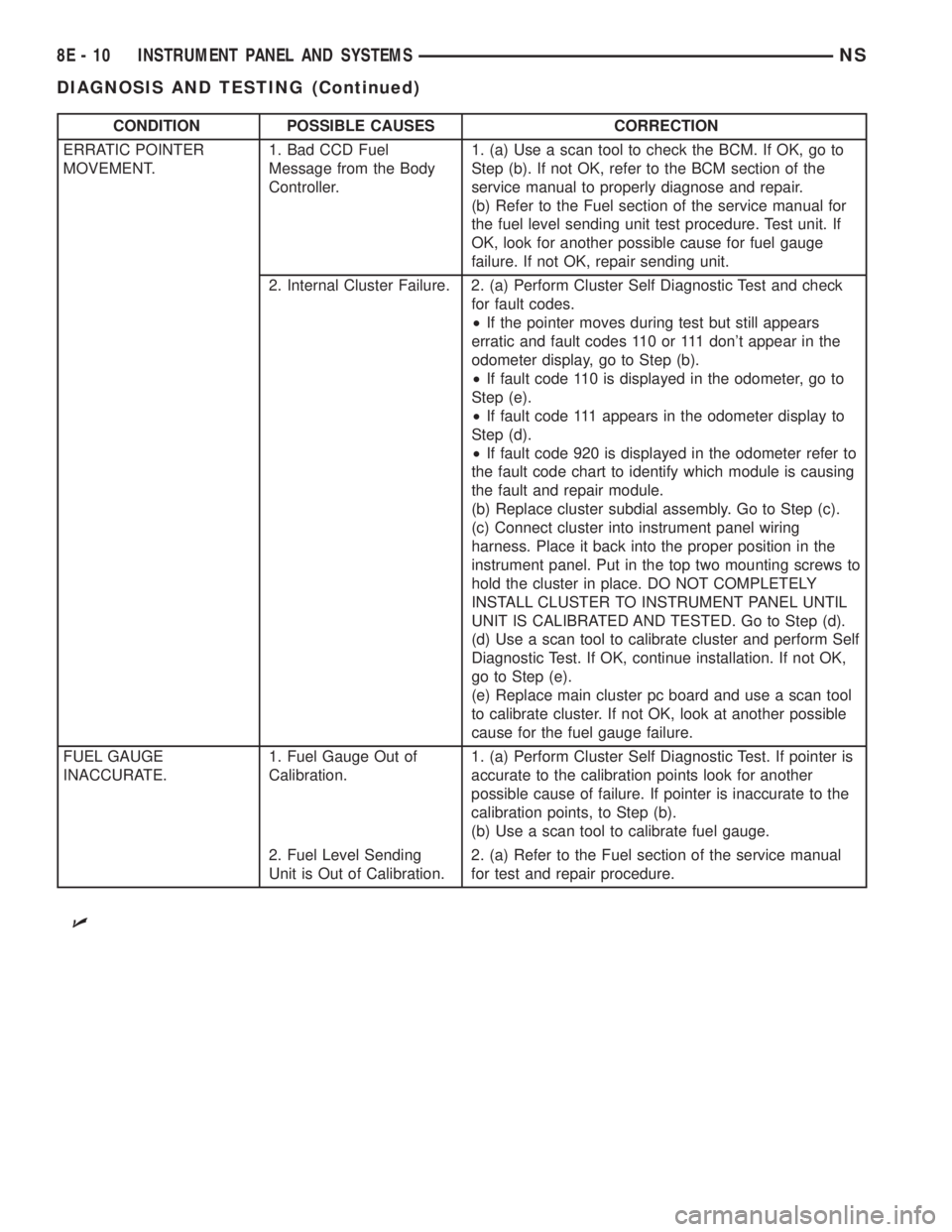
CONDITION POSSIBLE CAUSES CORRECTION
ERRATIC POINTER
MOVEMENT.1. Bad CCD Fuel
Message from the Body
Controller.1. (a) Use a scan tool to check the BCM. If OK, go to
Step (b). If not OK, refer to the BCM section of the
service manual to properly diagnose and repair.
(b) Refer to the Fuel section of the service manual for
the fuel level sending unit test procedure. Test unit. If
OK, look for another possible cause for fuel gauge
failure. If not OK, repair sending unit.
2. Internal Cluster Failure. 2. (a) Perform Cluster Self Diagnostic Test and check
for fault codes.
²If the pointer moves during test but still appears
erratic and fault codes 110 or 111 don't appear in the
odometer display, go to Step (b).
²If fault code 110 is displayed in the odometer, go to
Step (e).
²If fault code 111 appears in the odometer display to
Step (d).
²If fault code 920 is displayed in the odometer refer to
the fault code chart to identify which module is causing
the fault and repair module.
(b) Replace cluster subdial assembly. Go to Step (c).
(c) Connect cluster into instrument panel wiring
harness. Place it back into the proper position in the
instrument panel. Put in the top two mounting screws to
hold the cluster in place. DO NOT COMPLETELY
INSTALL CLUSTER TO INSTRUMENT PANEL UNTIL
UNIT IS CALIBRATED AND TESTED. Go to Step (d).
(d) Use a scan tool to calibrate cluster and perform Self
Diagnostic Test. If OK, continue installation. If not OK,
go to Step (e).
(e) Replace main cluster pc board and use a scan tool
to calibrate cluster. If not OK, look at another possible
cause for the fuel gauge failure.
FUEL GAUGE
INACCURATE.1. Fuel Gauge Out of
Calibration.1. (a) Perform Cluster Self Diagnostic Test. If pointer is
accurate to the calibration points look for another
possible cause of failure. If pointer is inaccurate to the
calibration points, to Step (b).
(b) Use a scan tool to calibrate fuel gauge.
2. Fuel Level Sending
Unit is Out of Calibration.2. (a) Refer to the Fuel section of the service manual
for test and repair procedure.
U
8E - 10 INSTRUMENT PANEL AND SYSTEMSNS
DIAGNOSIS AND TESTING (Continued)
Page 347 of 1938
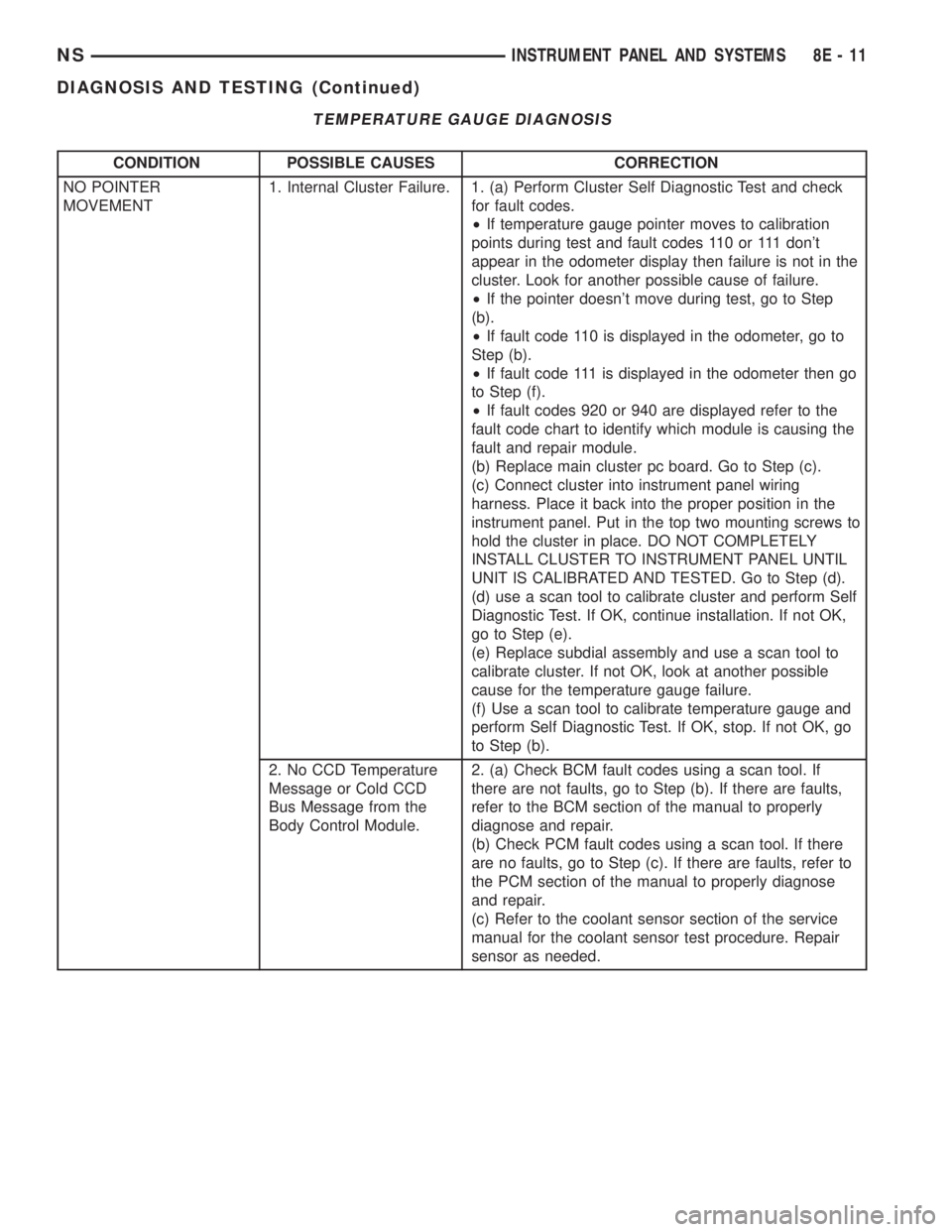
TEMPERATURE GAUGE DIAGNOSIS
CONDITION POSSIBLE CAUSES CORRECTION
NO POINTER
MOVEMENT1. Internal Cluster Failure. 1. (a) Perform Cluster Self Diagnostic Test and check
for fault codes.
²If temperature gauge pointer moves to calibration
points during test and fault codes 110 or 111 don't
appear in the odometer display then failure is not in the
cluster. Look for another possible cause of failure.
²If the pointer doesn't move during test, go to Step
(b).
²If fault code 110 is displayed in the odometer, go to
Step (b).
²If fault code 111 is displayed in the odometer then go
to Step (f).
²If fault codes 920 or 940 are displayed refer to the
fault code chart to identify which module is causing the
fault and repair module.
(b) Replace main cluster pc board. Go to Step (c).
(c) Connect cluster into instrument panel wiring
harness. Place it back into the proper position in the
instrument panel. Put in the top two mounting screws to
hold the cluster in place. DO NOT COMPLETELY
INSTALL CLUSTER TO INSTRUMENT PANEL UNTIL
UNIT IS CALIBRATED AND TESTED. Go to Step (d).
(d) use a scan tool to calibrate cluster and perform Self
Diagnostic Test. If OK, continue installation. If not OK,
go to Step (e).
(e) Replace subdial assembly and use a scan tool to
calibrate cluster. If not OK, look at another possible
cause for the temperature gauge failure.
(f) Use a scan tool to calibrate temperature gauge and
perform Self Diagnostic Test. If OK, stop. If not OK, go
to Step (b).
2. No CCD Temperature
Message or Cold CCD
Bus Message from the
Body Control Module.2. (a) Check BCM fault codes using a scan tool. If
there are not faults, go to Step (b). If there are faults,
refer to the BCM section of the manual to properly
diagnose and repair.
(b) Check PCM fault codes using a scan tool. If there
are no faults, go to Step (c). If there are faults, refer to
the PCM section of the manual to properly diagnose
and repair.
(c) Refer to the coolant sensor section of the service
manual for the coolant sensor test procedure. Repair
sensor as needed.
NSINSTRUMENT PANEL AND SYSTEMS 8E - 11
DIAGNOSIS AND TESTING (Continued)
Page 348 of 1938
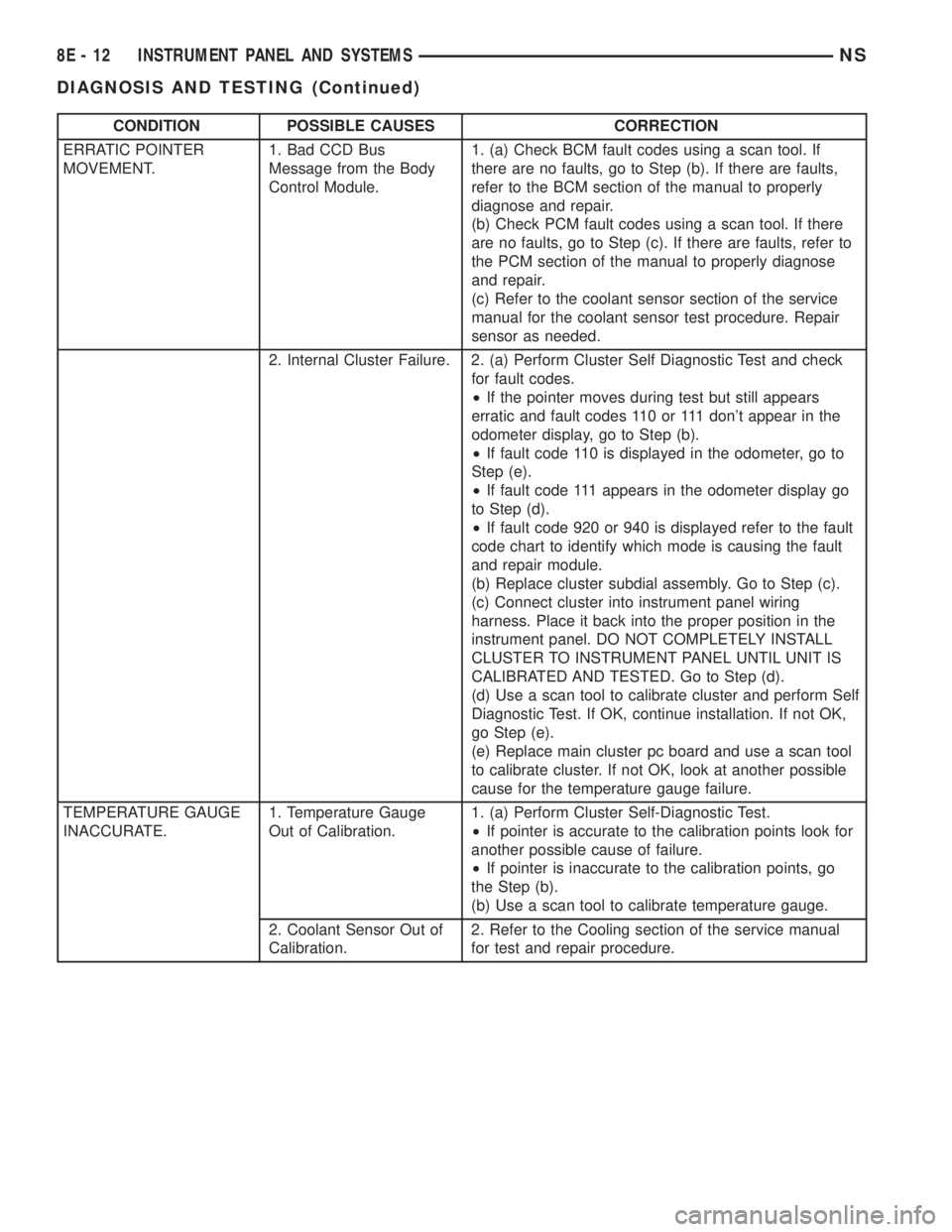
CONDITION POSSIBLE CAUSES CORRECTION
ERRATIC POINTER
MOVEMENT.1. Bad CCD Bus
Message from the Body
Control Module.1. (a) Check BCM fault codes using a scan tool. If
there are no faults, go to Step (b). If there are faults,
refer to the BCM section of the manual to properly
diagnose and repair.
(b) Check PCM fault codes using a scan tool. If there
are no faults, go to Step (c). If there are faults, refer to
the PCM section of the manual to properly diagnose
and repair.
(c) Refer to the coolant sensor section of the service
manual for the coolant sensor test procedure. Repair
sensor as needed.
2. Internal Cluster Failure. 2. (a) Perform Cluster Self Diagnostic Test and check
for fault codes.
²If the pointer moves during test but still appears
erratic and fault codes 110 or 111 don't appear in the
odometer display, go to Step (b).
²If fault code 110 is displayed in the odometer, go to
Step (e).
²If fault code 111 appears in the odometer display go
to Step (d).
²If fault code 920 or 940 is displayed refer to the fault
code chart to identify which mode is causing the fault
and repair module.
(b) Replace cluster subdial assembly. Go to Step (c).
(c) Connect cluster into instrument panel wiring
harness. Place it back into the proper position in the
instrument panel. DO NOT COMPLETELY INSTALL
CLUSTER TO INSTRUMENT PANEL UNTIL UNIT IS
CALIBRATED AND TESTED. Go to Step (d).
(d) Use a scan tool to calibrate cluster and perform Self
Diagnostic Test. If OK, continue installation. If not OK,
go Step (e).
(e) Replace main cluster pc board and use a scan tool
to calibrate cluster. If not OK, look at another possible
cause for the temperature gauge failure.
TEMPERATURE GAUGE
INACCURATE.1. Temperature Gauge
Out of Calibration.1. (a) Perform Cluster Self-Diagnostic Test.
²If pointer is accurate to the calibration points look for
another possible cause of failure.
²If pointer is inaccurate to the calibration points, go
the Step (b).
(b) Use a scan tool to calibrate temperature gauge.
2. Coolant Sensor Out of
Calibration.2. Refer to the Cooling section of the service manual
for test and repair procedure.
8E - 12 INSTRUMENT PANEL AND SYSTEMSNS
DIAGNOSIS AND TESTING (Continued)
Page 361 of 1938

(8) Using the indicator adjuster thumbwheel on
the indicator clip below the steering column. Rotate
the indicator thumbwheel to position the indicator
calibration arrow to the center of the N slot on the
instrument cluster mask.
(9) After the indicator has been properly adjusted,
move the shift lever through each gear position to
verify the appropriate gear position has been selected
and the slot is fully covered by the indicator. The left
edge of the indicator will just peek at the left edge of
the P slot in Park.
(10) If the indicator is not covering each of the
selected gear positions when selected, place the shift
lever back into neutral N and readjust the indicator.
Repeat the process until each gear is covered when
selected.
(11) Install the metal knee blocker panel.
(12) Install the lower steering column cover.
INSTRUMENT PANEL
The instrument panel is removed as a unit. The
steering column and wiring harnesses are assembled
into the panel before installation. Service procedures
for interior trim not related to the instrument panel
can be found in Group 23, Body.
REMOVAL
(1) Disconnect the battery, negative cable first.
(2) Remove the lower console.
(3) Remove the screw holding the lower heat duct
to the instrument panel support (Fig. 26).
(4) Disconnect the heat duct from the vehicle.
(5) Remove the bolts holding the lower supports to
the instrument panel frame (Fig. 27).(6) Remove the bolts holding the lower supports to
the floor pan.
(7) Remove the right and left end covers.
(8) Disconnect the wire connectors from the Pas-
senger Airbag Module.
(9) Remove the front door sill trim covers.
(10) Remove the A-pillar trim covers.
(11) Remove the glove box.
(12) Disconnect the antenna lead connector from
behind the glove box.
(13) Remove the lower steering column cover.
(14) Remove the knee blocker panel.
(15) Disconnect the lower two, forty pin wire har-
ness connectors, from the main Junction Block near
left cowl side panel (Fig. 28).
(16) Disconnect the instrument panel wire harness
connector from the bottom of Body Control Module.
(17) Disconnect the two forty pin connectors from
the right of the steering column (Fig. 29).
(18) Remove the clinch bolt holding upper the
steering shaft to the lower steering shaft (Fig. 29).
Fig. 25 Range Indicator Cable
Fig. 26 Heat Duct
Fig. 27 Lower Supports
NSINSTRUMENT PANEL AND SYSTEMS 8E - 25
REMOVAL AND INSTALLATION (Continued)
Page 364 of 1938
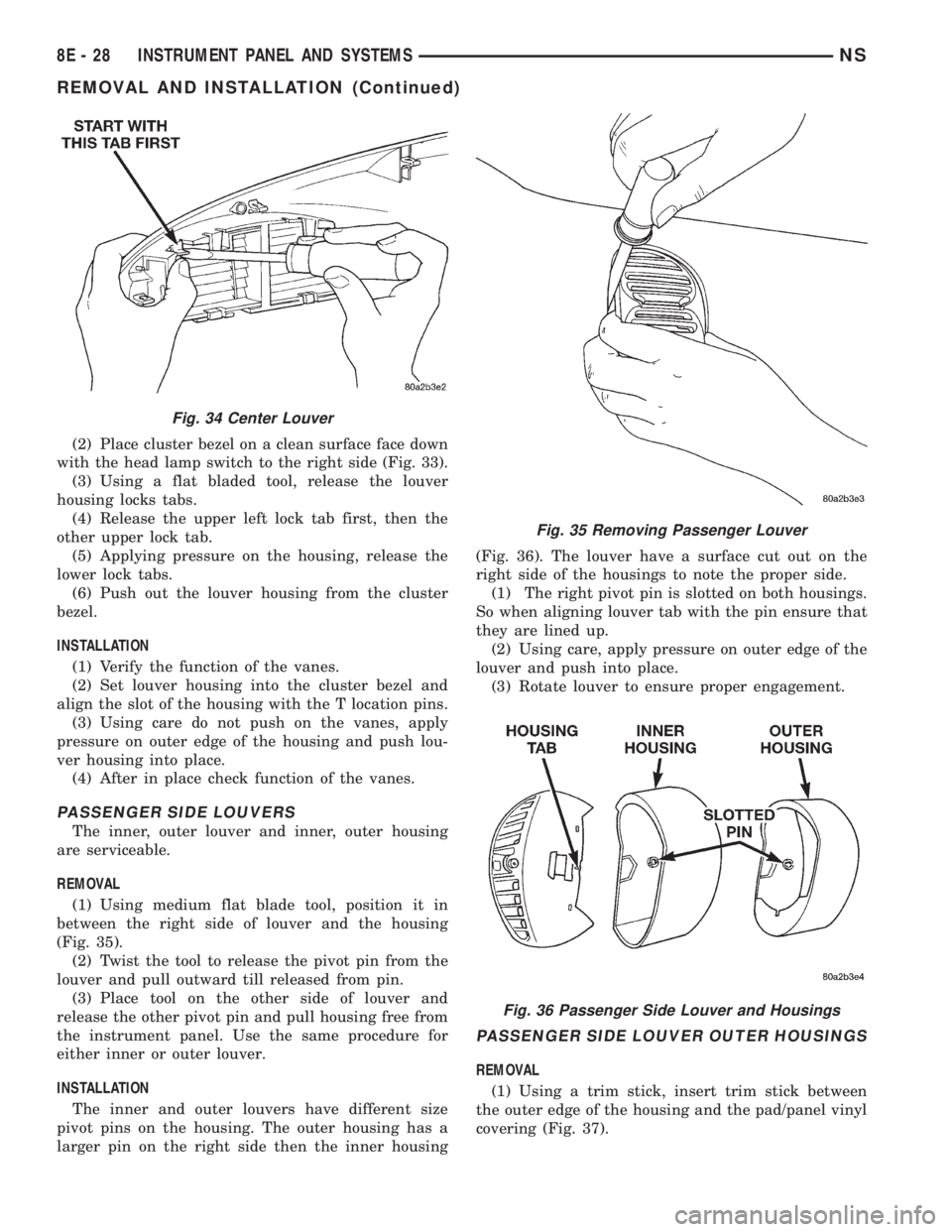
(2) Place cluster bezel on a clean surface face down
with the head lamp switch to the right side (Fig. 33).
(3) Using a flat bladed tool, release the louver
housing locks tabs.
(4) Release the upper left lock tab first, then the
other upper lock tab.
(5) Applying pressure on the housing, release the
lower lock tabs.
(6) Push out the louver housing from the cluster
bezel.
INSTALLATION
(1) Verify the function of the vanes.
(2) Set louver housing into the cluster bezel and
align the slot of the housing with the T location pins.
(3) Using care do not push on the vanes, apply
pressure on outer edge of the housing and push lou-
ver housing into place.
(4) After in place check function of the vanes.
PASSENGER SIDE LOUVERS
The inner, outer louver and inner, outer housing
are serviceable.
REMOVAL
(1) Using medium flat blade tool, position it in
between the right side of louver and the housing
(Fig. 35).
(2) Twist the tool to release the pivot pin from the
louver and pull outward till released from pin.
(3) Place tool on the other side of louver and
release the other pivot pin and pull housing free from
the instrument panel. Use the same procedure for
either inner or outer louver.
INSTALLATION
The inner and outer louvers have different size
pivot pins on the housing. The outer housing has a
larger pin on the right side then the inner housing(Fig. 36). The louver have a surface cut out on the
right side of the housings to note the proper side.
(1) The right pivot pin is slotted on both housings.
So when aligning louver tab with the pin ensure that
they are lined up.
(2) Using care, apply pressure on outer edge of the
louver and push into place.
(3) Rotate louver to ensure proper engagement.
PASSENGER SIDE LOUVER OUTER HOUSINGS
REMOVAL
(1) Using a trim stick, insert trim stick between
the outer edge of the housing and the pad/panel vinyl
covering (Fig. 37).
Fig. 34 Center Louver
Fig. 35 Removing Passenger Louver
Fig. 36 Passenger Side Louver and Housings
8E - 28 INSTRUMENT PANEL AND SYSTEMSNS
REMOVAL AND INSTALLATION (Continued)
Page 373 of 1938
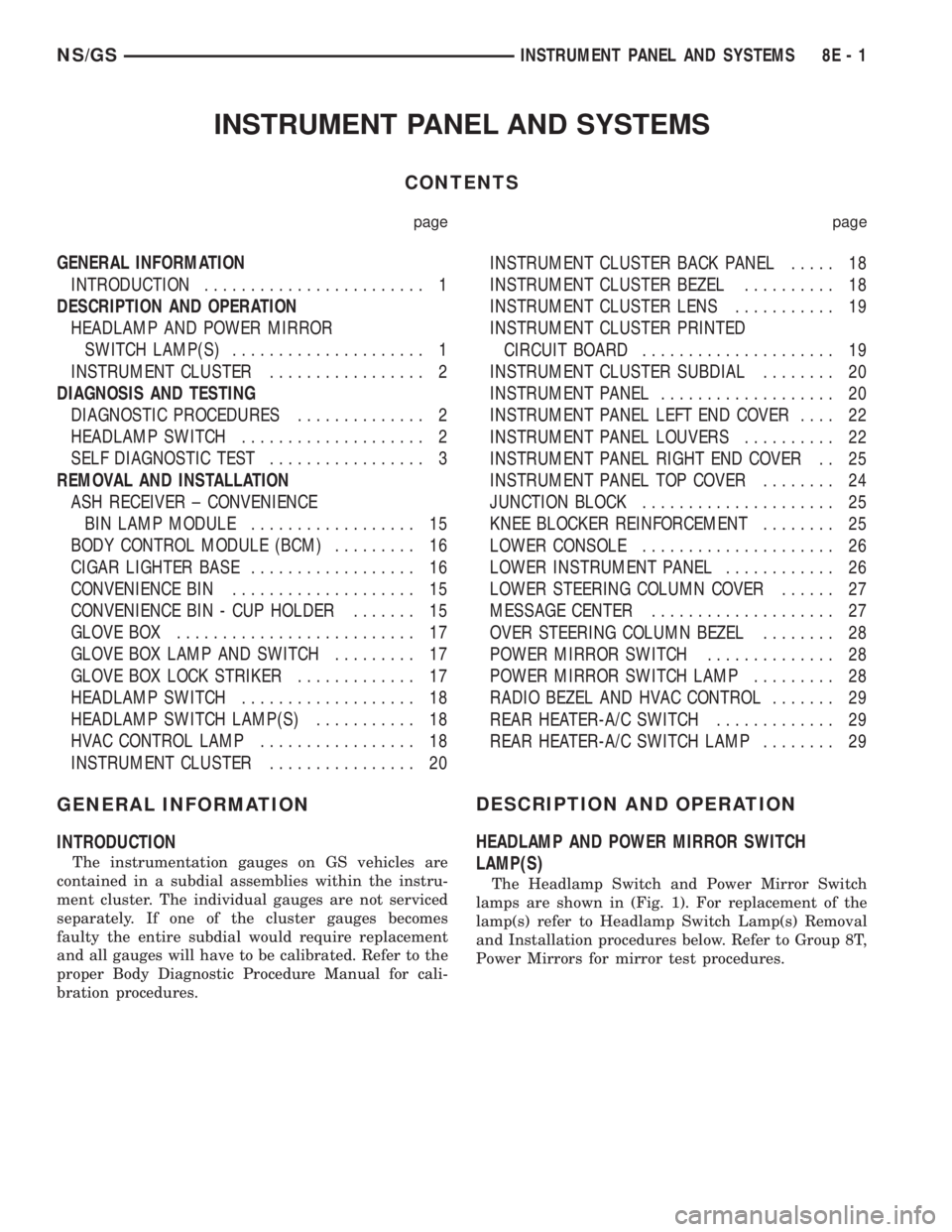
INSTRUMENT PANEL AND SYSTEMS
CONTENTS
page page
GENERAL INFORMATION
INTRODUCTION........................ 1
DESCRIPTION AND OPERATION
HEADLAMP AND POWER MIRROR
SWITCH LAMP(S)..................... 1
INSTRUMENT CLUSTER................. 2
DIAGNOSIS AND TESTING
DIAGNOSTIC PROCEDURES.............. 2
HEADLAMP SWITCH.................... 2
SELF DIAGNOSTIC TEST................. 3
REMOVAL AND INSTALLATION
ASH RECEIVER ± CONVENIENCE
BIN LAMP MODULE.................. 15
BODY CONTROL MODULE (BCM)......... 16
CIGAR LIGHTER BASE.................. 16
CONVENIENCE BIN.................... 15
CONVENIENCE BIN - CUP HOLDER....... 15
GLOVE BOX.......................... 17
GLOVE BOX LAMP AND SWITCH......... 17
GLOVE BOX LOCK STRIKER............. 17
HEADLAMP SWITCH................... 18
HEADLAMP SWITCH LAMP(S)........... 18
HVAC CONTROL LAMP................. 18
INSTRUMENT CLUSTER................ 20INSTRUMENT CLUSTER BACK PANEL..... 18
INSTRUMENT CLUSTER BEZEL.......... 18
INSTRUMENT CLUSTER LENS........... 19
INSTRUMENT CLUSTER PRINTED
CIRCUIT BOARD..................... 19
INSTRUMENT CLUSTER SUBDIAL........ 20
INSTRUMENT PANEL................... 20
INSTRUMENT PANEL LEFT END COVER.... 22
INSTRUMENT PANEL LOUVERS.......... 22
INSTRUMENT PANEL RIGHT END COVER . . 25
INSTRUMENT PANEL TOP COVER........ 24
JUNCTION BLOCK..................... 25
KNEE BLOCKER REINFORCEMENT........ 25
LOWER CONSOLE..................... 26
LOWER INSTRUMENT PANEL............ 26
LOWER STEERING COLUMN COVER...... 27
MESSAGE CENTER.................... 27
OVER STEERING COLUMN BEZEL........ 28
POWER MIRROR SWITCH.............. 28
POWER MIRROR SWITCH LAMP......... 28
RADIO BEZEL AND HVAC CONTROL....... 29
REAR HEATER-A/C SWITCH............. 29
REAR HEATER-A/C SWITCH LAMP........ 29
GENERAL INFORMATION
INTRODUCTION
The instrumentation gauges on GS vehicles are
contained in a subdial assemblies within the instru-
ment cluster. The individual gauges are not serviced
separately. If one of the cluster gauges becomes
faulty the entire subdial would require replacement
and all gauges will have to be calibrated. Refer to the
proper Body Diagnostic Procedure Manual for cali-
bration procedures.
DESCRIPTION AND OPERATION
HEADLAMP AND POWER MIRROR SWITCH
LAMP(S)
The Headlamp Switch and Power Mirror Switch
lamps are shown in (Fig. 1). For replacement of the
lamp(s) refer to Headlamp Switch Lamp(s) Removal
and Installation procedures below. Refer to Group 8T,
Power Mirrors for mirror test procedures.
NS/GSINSTRUMENT PANEL AND SYSTEMS 8E - 1
Page 392 of 1938
(5) Remove the screws holding printed circuit
board to the cluster shell.
(6) Remove the printed circuit board from the clus-
ter.
INSTALLATION
For installation, reverse the above procedures.
After installing the print circuit board it will have to
be calibrated using a scan tool (DRB III). Refer to the
proper Body Diagnostic Procedure Manual for cali-
bration procedures.
NOTE: Speedometer and/or Tachometer will not
operate properly until all gauges have been cali-
brated
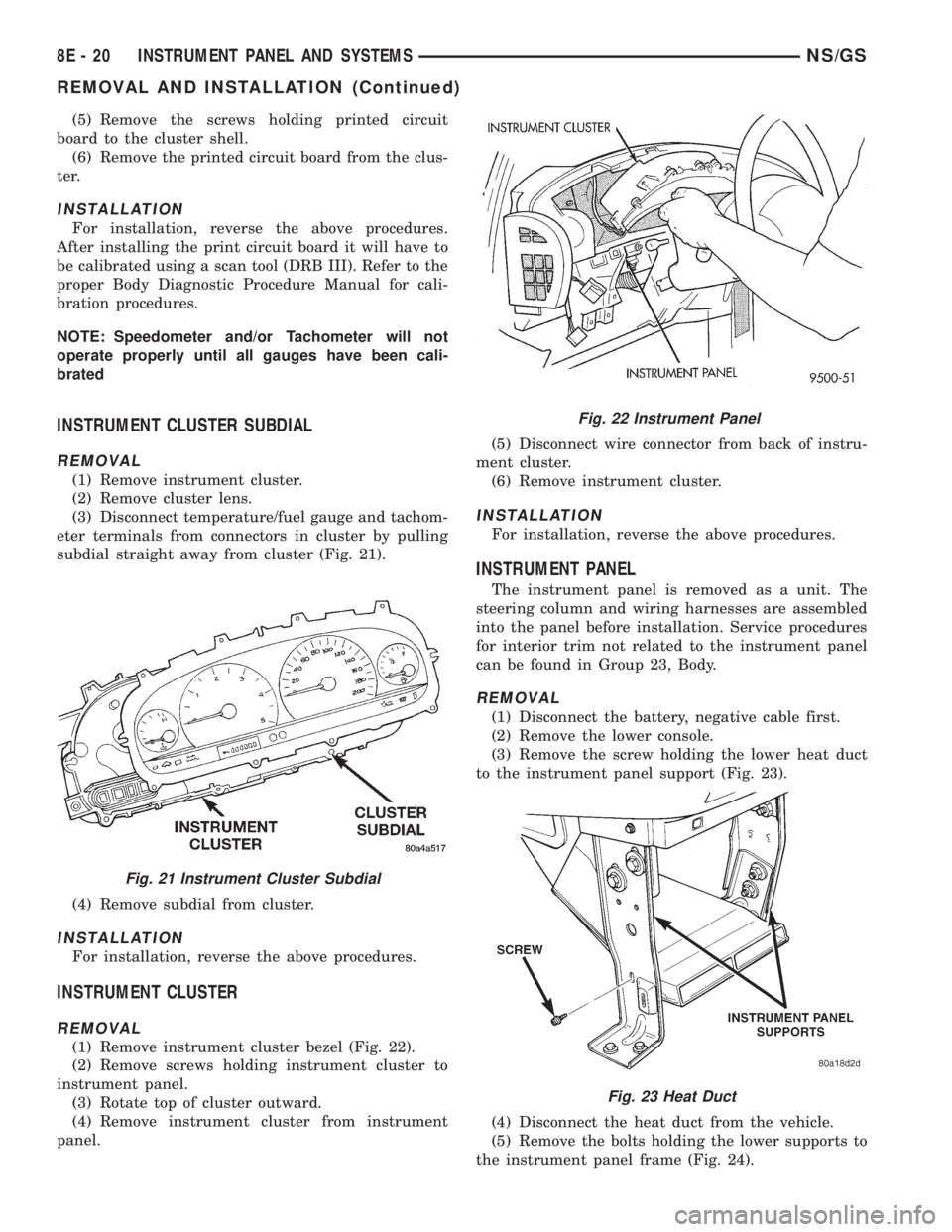
INSTRUMENT CLUSTER SUBDIAL
REMOVAL
(1) Remove instrument cluster.
(2) Remove cluster lens.
(3) Disconnect temperature/fuel gauge and tachom-
eter terminals from connectors in cluster by pulling
subdial straight away from cluster (Fig. 21).
(4) Remove subdial from cluster.
INSTALLATION
For installation, reverse the above procedures.
INSTRUMENT CLUSTER
REMOVAL
(1) Remove instrument cluster bezel (Fig. 22).
(2) Remove screws holding instrument cluster to
instrument panel.
(3) Rotate top of cluster outward.
(4) Remove instrument cluster from instrument
panel.(5) Disconnect wire connector from back of instru-
ment cluster.
(6) Remove instrument cluster.
INSTALLATION
For installation, reverse the above procedures.
INSTRUMENT PANEL
The instrument panel is removed as a unit. The
steering column and wiring harnesses are assembled
into the panel before installation. Service procedures
for interior trim not related to the instrument panel
can be found in Group 23, Body.
REMOVAL
(1) Disconnect the battery, negative cable first.
(2) Remove the lower console.
(3) Remove the screw holding the lower heat duct
to the instrument panel support (Fig. 23).
(4) Disconnect the heat duct from the vehicle.
(5) Remove the bolts holding the lower supports to
the instrument panel frame (Fig. 24).
Fig. 21 Instrument Cluster Subdial
Fig. 22 Instrument Panel
Fig. 23 Heat Duct
8E - 20 INSTRUMENT PANEL AND SYSTEMSNS/GS
REMOVAL AND INSTALLATION (Continued)