radio CHRYSLER VOYAGER 1996 Owner's Manual
[x] Cancel search | Manufacturer: CHRYSLER, Model Year: 1996, Model line: VOYAGER, Model: CHRYSLER VOYAGER 1996Pages: 1938, PDF Size: 55.84 MB
Page 405 of 1938

bracket behind the junction block/body control mod-
ule (Fig. 5).
REMOTE RADIO SWITCHES
A remote radio control switch option is available on
LXI models sold in North America with the AM/FM/
cassette/5-band graphic equalizer with CD changer
control feature (RBN sales code), or the AM/FM/CD/
cassette/3-band graphic equalizer (RAZ sales code)
radio receivers. Two rocker-type switches are
mounted on the back (instrument panel side) of the
steering wheel spokes. The switch on the left spoke is
the seek switch and has seek up, seek down, and pre-
set station advance functions. The switch on the
right spoke is the volume control switch and has vol-
ume up, and volume down functions (Fig. 6).
These switches are resistor multiplexed units that
are hard-wired to the Body Control Module (BCM)
through the clockspring. The BCM sends the propermessages on the Chrysler Collision Detection (CCD)
data bus network to the radio receiver. For diagnosis
of the BCM or the CCD data bus, the use of a DRB
scan tool and the proper Diagnostic Procedures man-
ual are recommended. For more information on the
operation of the remote radio switch controls, refer to
the owner's manual in the vehicle glove box.
NAME BRAND SPEAKER RELAY
Relay is located in the junction block. To test relay
refer to the Audio Diagnostic Test Procedures or use
a known good relay.
DIAGNOSIS AND TESTING
ANTENNA
WARNING: ON VEHICLES EQUIPPED WITH AIR-
BAGS, REFER TO GROUP 8M - PASSIVE
RESTRAINT SYSTEMS BEFORE ATTEMPTING ANY
STEERING WHEEL, STEERING COLUMN, OR
INSTRUMENT PANEL COMPONENT DIAGNOSIS OR
SERVICE. FAILURE TO TAKE THE PROPER PRE-
CAUTIONS COULD RESULT IN ACCIDENTAL AIR-
BAG DEPLOYMENT AND POSSIBLE PERSONAL
INJURY.
The following four tests are used to diagnose the
antenna with an ohmmeter:
²Test 1- Mast to ground test
²Test 2- Tip-of-mast to tip-of-conductor test
²Test 3- Body ground to battery ground test
²Test 4- Body ground to coaxial shield test.
The ohmmeter test lead connections for each test
are shown in Antenna Tests (Fig. 7).
NOTE: This model has a two-piece antenna coaxial
cable. Tests 2 and 4 must be conducted in two
steps to isolate a coaxial cable problem; from the
coaxial cable connection under the right end of the
instrument panel near the right cowl side panel to
the antenna base, and then from the coaxial cable
connection to the radio chassis connection.
TEST 1
Test 1 determines if the antenna mast is insulated
from the base. Proceed as follows:
(1) Unplug the antenna coaxial cable connector
from the radio chassis and isolate.
(2) Connect one ohmmeter test lead to the tip of
the antenna mast. Connect the other test lead to the
antenna base. Check for continuity.
(3) There should be no continuity. If continuity is
found, replace the faulty or damaged antenna base
and cable assembly.
Fig. 5 Choke Location
Fig. 6 Remote Radio Switch Operational View
NSAUDIO SYSTEMS 8F - 3
DESCRIPTION AND OPERATION (Continued)
Page 406 of 1938
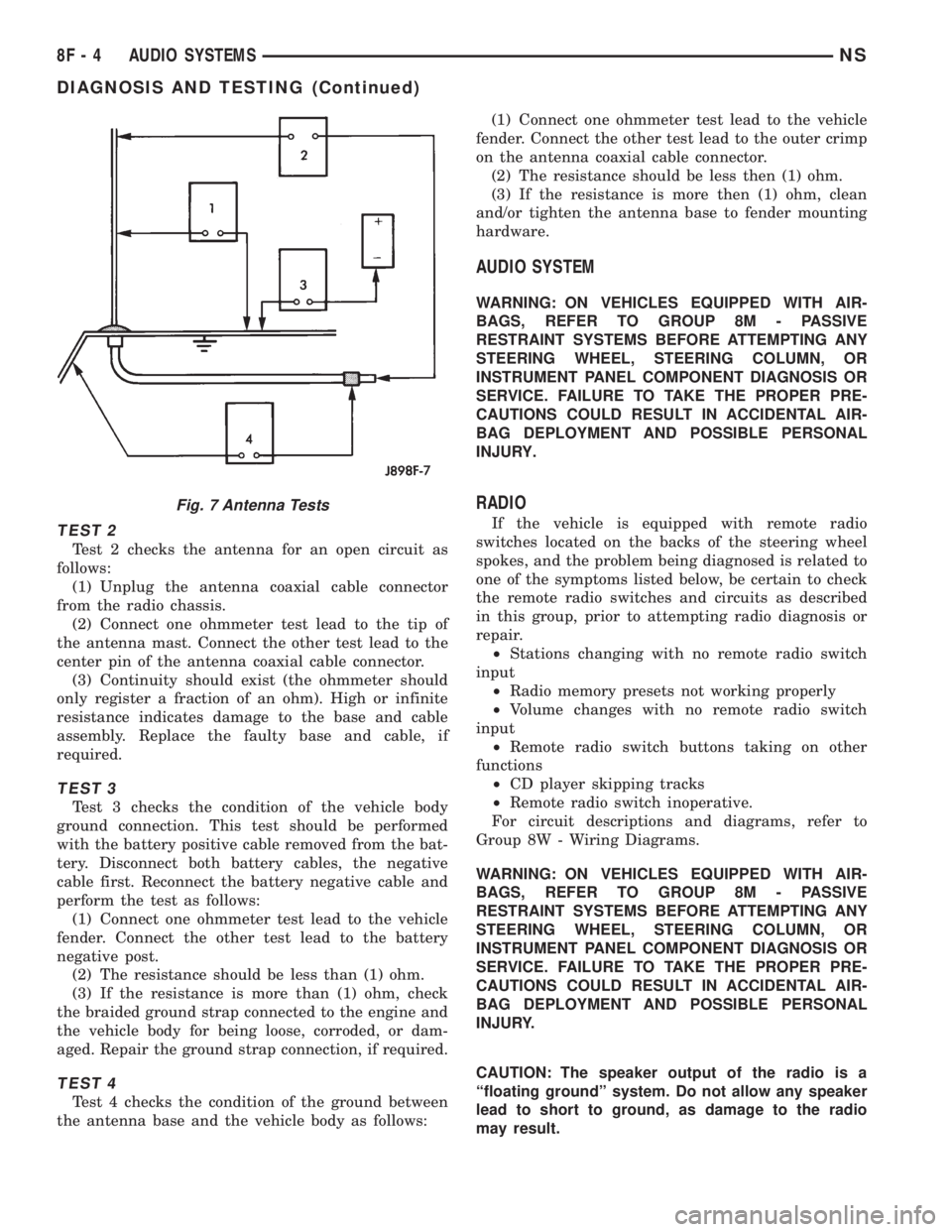
TEST 2
Test 2 checks the antenna for an open circuit as
follows:
(1) Unplug the antenna coaxial cable connector
from the radio chassis.
(2) Connect one ohmmeter test lead to the tip of
the antenna mast. Connect the other test lead to the
center pin of the antenna coaxial cable connector.
(3) Continuity should exist (the ohmmeter should
only register a fraction of an ohm). High or infinite
resistance indicates damage to the base and cable
assembly. Replace the faulty base and cable, if
required.
TEST 3
Test 3 checks the condition of the vehicle body
ground connection. This test should be performed
with the battery positive cable removed from the bat-
tery. Disconnect both battery cables, the negative
cable first. Reconnect the battery negative cable and
perform the test as follows:
(1) Connect one ohmmeter test lead to the vehicle
fender. Connect the other test lead to the battery
negative post.
(2) The resistance should be less than (1) ohm.
(3) If the resistance is more than (1) ohm, check
the braided ground strap connected to the engine and
the vehicle body for being loose, corroded, or dam-
aged. Repair the ground strap connection, if required.
TEST 4
Test 4 checks the condition of the ground between
the antenna base and the vehicle body as follows:(1) Connect one ohmmeter test lead to the vehicle
fender. Connect the other test lead to the outer crimp
on the antenna coaxial cable connector.
(2) The resistance should be less then (1) ohm.
(3) If the resistance is more then (1) ohm, clean
and/or tighten the antenna base to fender mounting
hardware.
AUDIO SYSTEM
WARNING: ON VEHICLES EQUIPPED WITH AIR-
BAGS, REFER TO GROUP 8M - PASSIVE
RESTRAINT SYSTEMS BEFORE ATTEMPTING ANY
STEERING WHEEL, STEERING COLUMN, OR
INSTRUMENT PANEL COMPONENT DIAGNOSIS OR
SERVICE. FAILURE TO TAKE THE PROPER PRE-
CAUTIONS COULD RESULT IN ACCIDENTAL AIR-
BAG DEPLOYMENT AND POSSIBLE PERSONAL
INJURY.
RADIO
If the vehicle is equipped with remote radio
switches located on the backs of the steering wheel
spokes, and the problem being diagnosed is related to
one of the symptoms listed below, be certain to check
the remote radio switches and circuits as described
in this group, prior to attempting radio diagnosis or
repair.
²Stations changing with no remote radio switch
input
²Radio memory presets not working properly
²Volume changes with no remote radio switch
input
²Remote radio switch buttons taking on other
functions
²CD player skipping tracks
²Remote radio switch inoperative.
For circuit descriptions and diagrams, refer to
Group 8W - Wiring Diagrams.
WARNING: ON VEHICLES EQUIPPED WITH AIR-
BAGS, REFER TO GROUP 8M - PASSIVE
RESTRAINT SYSTEMS BEFORE ATTEMPTING ANY
STEERING WHEEL, STEERING COLUMN, OR
INSTRUMENT PANEL COMPONENT DIAGNOSIS OR
SERVICE. FAILURE TO TAKE THE PROPER PRE-
CAUTIONS COULD RESULT IN ACCIDENTAL AIR-
BAG DEPLOYMENT AND POSSIBLE PERSONAL
INJURY.
CAUTION: The speaker output of the radio is a
ªfloating groundº system. Do not allow any speaker
lead to short to ground, as damage to the radio
may result.
Fig. 7 Antenna Tests
8F - 4 AUDIO SYSTEMSNS
DIAGNOSIS AND TESTING (Continued)
Page 407 of 1938
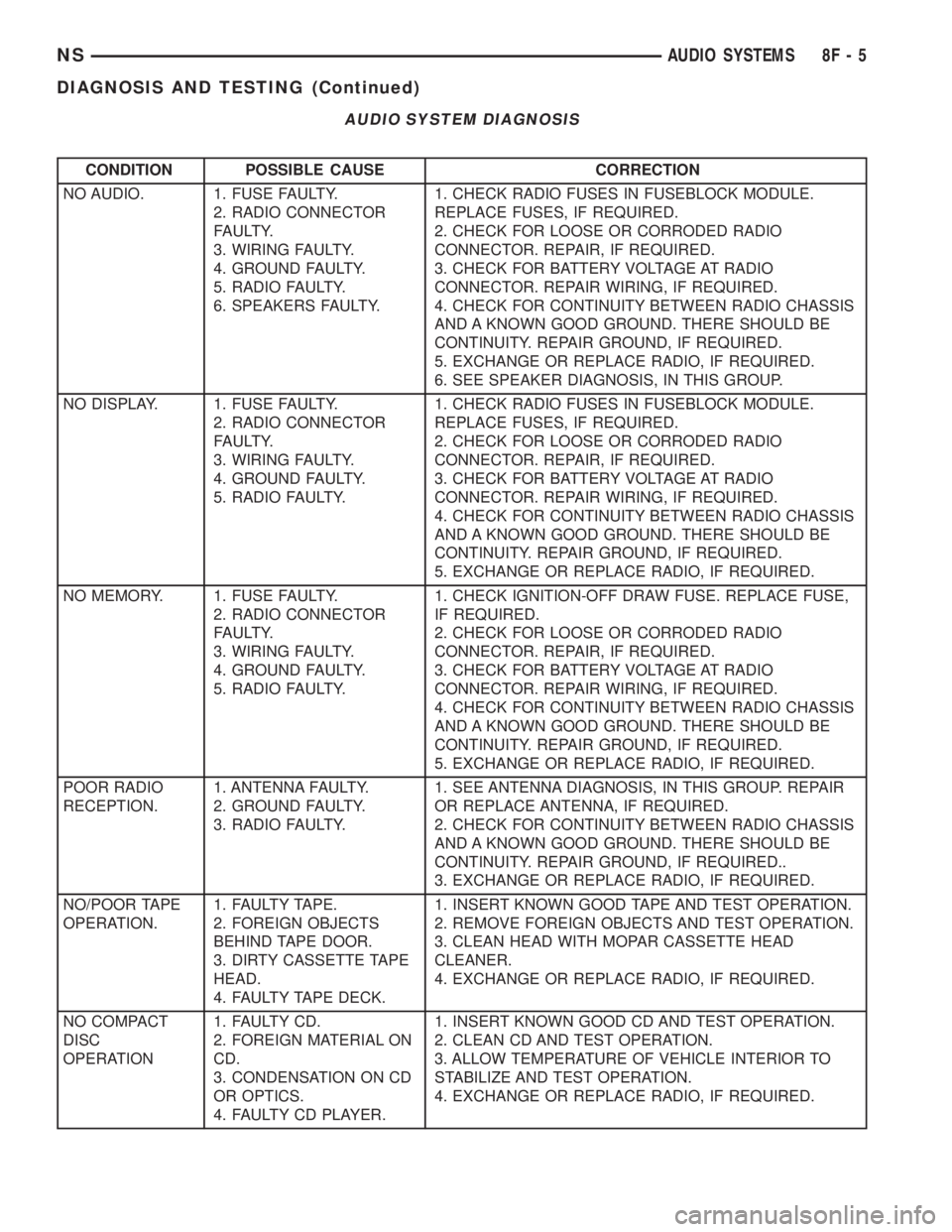
CONDITION POSSIBLE CAUSE CORRECTION
NO AUDIO. 1. FUSE FAULTY.
2. RADIO CONNECTOR
FAULTY.
3. WIRING FAULTY.
4. GROUND FAULTY.
5. RADIO FAULTY.
6. SPEAKERS FAULTY.1. CHECK RADIO FUSES IN FUSEBLOCK MODULE.
REPLACE FUSES, IF REQUIRED.
2. CHECK FOR LOOSE OR CORRODED RADIO
CONNECTOR. REPAIR, IF REQUIRED.
3. CHECK FOR BATTERY VOLTAGE AT RADIO
CONNECTOR. REPAIR WIRING, IF REQUIRED.
4. CHECK FOR CONTINUITY BETWEEN RADIO CHASSIS
AND A KNOWN GOOD GROUND. THERE SHOULD BE
CONTINUITY. REPAIR GROUND, IF REQUIRED.
5. EXCHANGE OR REPLACE RADIO, IF REQUIRED.
6. SEE SPEAKER DIAGNOSIS, IN THIS GROUP.
NO DISPLAY. 1. FUSE FAULTY.
2. RADIO CONNECTOR
FAULTY.
3. WIRING FAULTY.
4. GROUND FAULTY.
5. RADIO FAULTY.1. CHECK RADIO FUSES IN FUSEBLOCK MODULE.
REPLACE FUSES, IF REQUIRED.
2. CHECK FOR LOOSE OR CORRODED RADIO
CONNECTOR. REPAIR, IF REQUIRED.
3. CHECK FOR BATTERY VOLTAGE AT RADIO
CONNECTOR. REPAIR WIRING, IF REQUIRED.
4. CHECK FOR CONTINUITY BETWEEN RADIO CHASSIS
AND A KNOWN GOOD GROUND. THERE SHOULD BE
CONTINUITY. REPAIR GROUND, IF REQUIRED.
5. EXCHANGE OR REPLACE RADIO, IF REQUIRED.
NO MEMORY. 1. FUSE FAULTY.
2. RADIO CONNECTOR
FAULTY.
3. WIRING FAULTY.
4. GROUND FAULTY.
5. RADIO FAULTY.1. CHECK IGNITION-OFF DRAW FUSE. REPLACE FUSE,
IF REQUIRED.
2. CHECK FOR LOOSE OR CORRODED RADIO
CONNECTOR. REPAIR, IF REQUIRED.
3. CHECK FOR BATTERY VOLTAGE AT RADIO
CONNECTOR. REPAIR WIRING, IF REQUIRED.
4. CHECK FOR CONTINUITY BETWEEN RADIO CHASSIS
AND A KNOWN GOOD GROUND. THERE SHOULD BE
CONTINUITY. REPAIR GROUND, IF REQUIRED.
5. EXCHANGE OR REPLACE RADIO, IF REQUIRED.
POOR RADIO
RECEPTION.1. ANTENNA FAULTY.
2. GROUND FAULTY.
3. RADIO FAULTY.1. SEE ANTENNA DIAGNOSIS, IN THIS GROUP. REPAIR
OR REPLACE ANTENNA, IF REQUIRED.
2. CHECK FOR CONTINUITY BETWEEN RADIO CHASSIS
AND A KNOWN GOOD GROUND. THERE SHOULD BE
CONTINUITY. REPAIR GROUND, IF REQUIRED..
3. EXCHANGE OR REPLACE RADIO, IF REQUIRED.
NO/POOR TAPE
OPERATION.1. FAULTY TAPE.
2. FOREIGN OBJECTS
BEHIND TAPE DOOR.
3. DIRTY CASSETTE TAPE
HEAD.
4. FAULTY TAPE DECK.1. INSERT KNOWN GOOD TAPE AND TEST OPERATION.
2. REMOVE FOREIGN OBJECTS AND TEST OPERATION.
3. CLEAN HEAD WITH MOPAR CASSETTE HEAD
CLEANER.
4. EXCHANGE OR REPLACE RADIO, IF REQUIRED.
NO COMPACT
DISC
OPERATION1. FAULTY CD.
2. FOREIGN MATERIAL ON
CD.
3. CONDENSATION ON CD
OR OPTICS.
4. FAULTY CD PLAYER.1. INSERT KNOWN GOOD CD AND TEST OPERATION.
2. CLEAN CD AND TEST OPERATION.
3. ALLOW TEMPERATURE OF VEHICLE INTERIOR TO
STABILIZE AND TEST OPERATION.
4. EXCHANGE OR REPLACE RADIO, IF REQUIRED.
AUDIO SYSTEM DIAGNOSIS
NSAUDIO SYSTEMS 8F - 5
DIAGNOSIS AND TESTING (Continued)
Page 408 of 1938
(1) Check the fuse(s) in the junction block and the
Power Distribution Center (PDC). If OK, go to Step
2. If not OK, repair the shorted circuit or component
as required and replace the faulty fuse(s).
(2) Check for battery voltage at the fuse in the
PDC. If OK, go to Step 3. If not OK, repair the open
circuit to the battery as required.
(3) Turn the ignition switch to the ON position.
Check for battery voltage at the fuse in the junction
block. If OK, go to Step 4. If not OK, repair the open
circuit to the ignition switch as required.
(4) Turn the ignition switch to the OFF position.
Disconnect and isolate the battery negative cable.
Remove the instrument cluster center bezel. Remove
the radio, but do not unplug the wire harness connec-
tors. Check for continuity between the radio chassis
and a good ground. There should be continuity. If
OK, go to Step 5. If not OK, repair the open radio
chassis ground circuit as required.
(5) Connect the battery negative cable. Turn the
ignition switch to the ON position. Check for battery
voltage at the fused ignition switch output circuit
cavity of the left (gray) radio wire harness connector.
If OK, go to Step 6. If not OK, repair the open circuit
as required.
(6) Turn the ignition switch to the OFF position.
Check for battery voltage at the fused B(+) circuit
cavity of the left (gray) radio wire harness connector.
If OK, replace the faulty radio. If not OK, repair the
open circuit to the Ignition-Off Draw (IOD) fuse as
required.
REMOTE RADIO SWITCHES
WARNING: ON VEHICLES EQUIPPED WITH AIR-
BAGS, REFER TO GROUP 8M - PASSIVE
RESTRAINT SYSTEMS BEFORE ATTEMPTING ANY
STEERING WHEEL, STEERING COLUMN, OR
INSTRUMENT PANEL COMPONENT DIAGNOSIS OR
SERVICE. FAILURE TO TAKE THE PROPER PRE-
CAUTIONS COULD RESULT IN ACCIDENTAL AIR-
BAG DEPLOYMENT AND POSSIBLE PERSONAL
INJURY.
(1) Disconnect and isolate the battery negative
cable. Wait two minutes for the airbag system capac-
itor to discharge before further service.
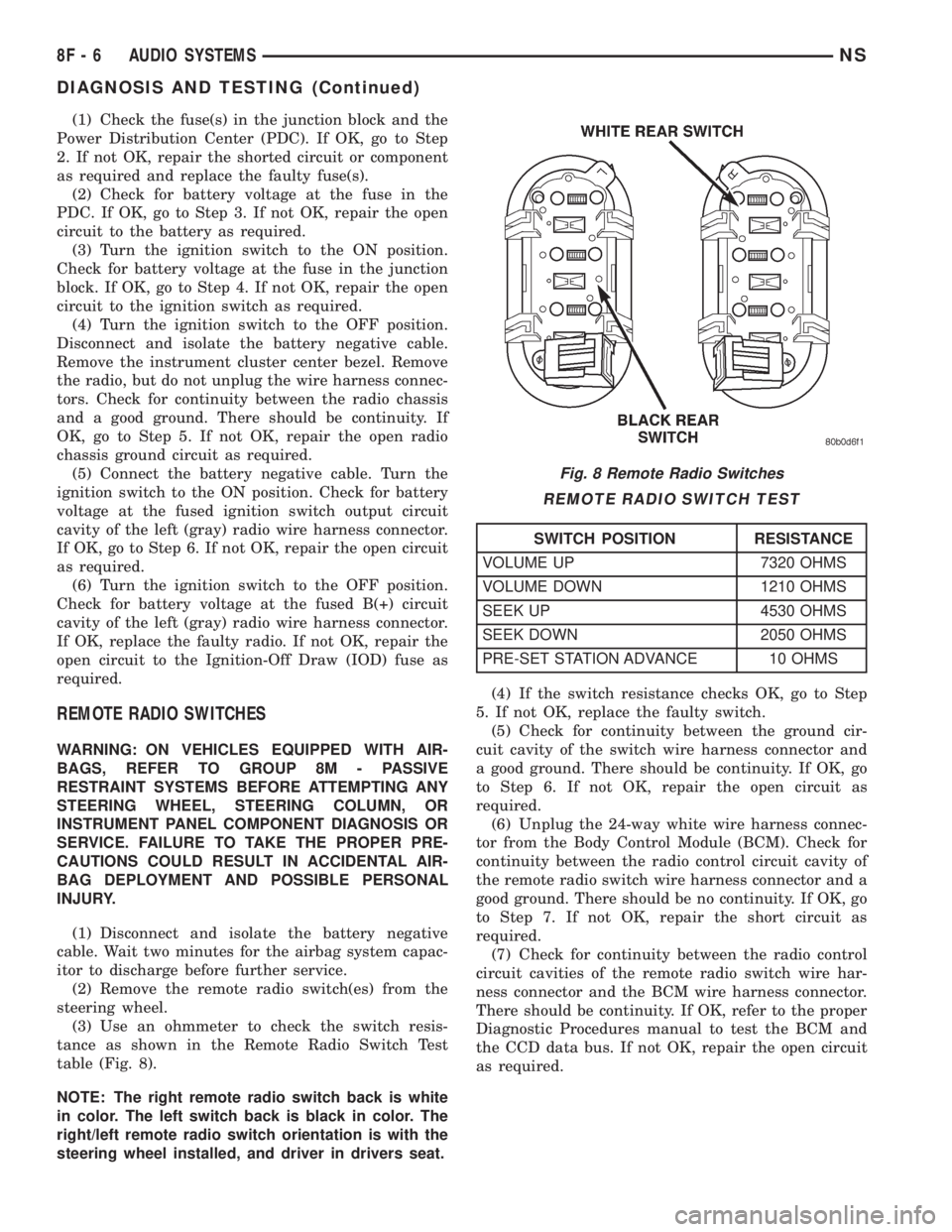
(2) Remove the remote radio switch(es) from the
steering wheel.
(3) Use an ohmmeter to check the switch resis-
tance as shown in the Remote Radio Switch Test
table (Fig. 8).
NOTE: The right remote radio switch back is white
in color. The left switch back is black in color. The
right/left remote radio switch orientation is with the
steering wheel installed, and driver in drivers seat.(4) If the switch resistance checks OK, go to Step
5. If not OK, replace the faulty switch.
(5) Check for continuity between the ground cir-
cuit cavity of the switch wire harness connector and
a good ground. There should be continuity. If OK, go
to Step 6. If not OK, repair the open circuit as
required.
(6) Unplug the 24-way white wire harness connec-
tor from the Body Control Module (BCM). Check for
continuity between the radio control circuit cavity of
the remote radio switch wire harness connector and a
good ground. There should be no continuity. If OK, go
to Step 7. If not OK, repair the short circuit as
required.
(7) Check for continuity between the radio control
circuit cavities of the remote radio switch wire har-
ness connector and the BCM wire harness connector.
There should be continuity. If OK, refer to the proper
Diagnostic Procedures manual to test the BCM and
the CCD data bus. If not OK, repair the open circuit
as required.
Fig. 8 Remote Radio Switches
REMOTE RADIO SWITCH TEST
SWITCH POSITION RESISTANCE
VOLUME UP 7320 OHMS
VOLUME DOWN 1210 OHMS
SEEK UP 4530 OHMS
SEEK DOWN 2050 OHMS
PRE-SET STATION ADVANCE 10 OHMS
8F - 6 AUDIO SYSTEMSNS
DIAGNOSIS AND TESTING (Continued)
Page 409 of 1938
REMOVAL AND INSTALLATION
ANTENNA MAST AND CABLE LEAD
REMOVAL
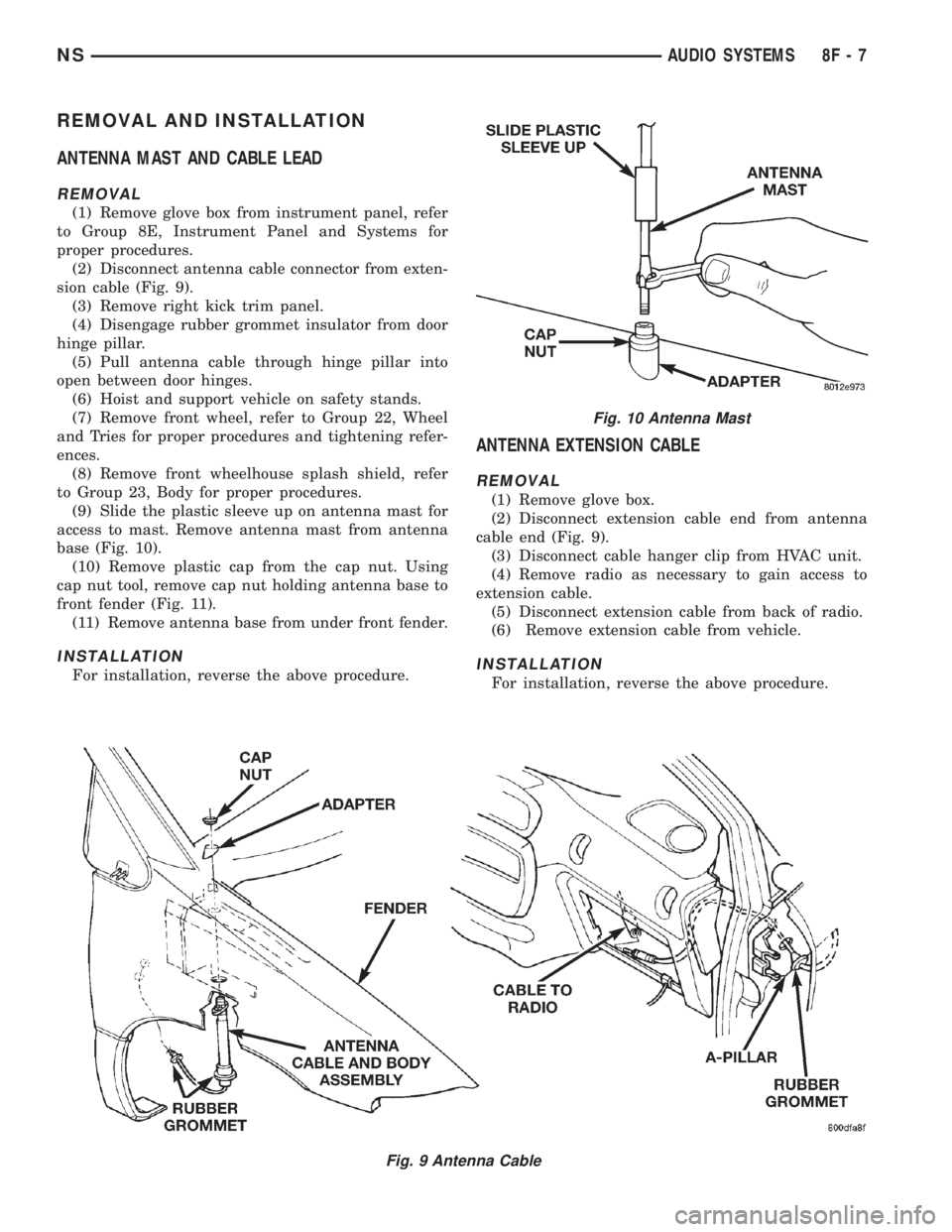
(1) Remove glove box from instrument panel, refer
to Group 8E, Instrument Panel and Systems for
proper procedures.
(2) Disconnect antenna cable connector from exten-
sion cable (Fig. 9).
(3) Remove right kick trim panel.
(4) Disengage rubber grommet insulator from door
hinge pillar.
(5) Pull antenna cable through hinge pillar into
open between door hinges.
(6) Hoist and support vehicle on safety stands.
(7) Remove front wheel, refer to Group 22, Wheel
and Tries for proper procedures and tightening refer-
ences.
(8) Remove front wheelhouse splash shield, refer
to Group 23, Body for proper procedures.
(9) Slide the plastic sleeve up on antenna mast for
access to mast. Remove antenna mast from antenna
base (Fig. 10).
(10) Remove plastic cap from the cap nut. Using
cap nut tool, remove cap nut holding antenna base to
front fender (Fig. 11).
(11) Remove antenna base from under front fender.
INSTALLATION
For installation, reverse the above procedure.
ANTENNA EXTENSION CABLE
REMOVAL
(1) Remove glove box.
(2) Disconnect extension cable end from antenna
cable end (Fig. 9).
(3) Disconnect cable hanger clip from HVAC unit.
(4) Remove radio as necessary to gain access to
extension cable.
(5) Disconnect extension cable from back of radio.
(6) Remove extension cable from vehicle.
INSTALLATION
For installation, reverse the above procedure.
Fig. 9 Antenna Cable
Fig. 10 Antenna Mast
NSAUDIO SYSTEMS 8F - 7
Page 410 of 1938
RADIO/TAPE/CD PLAYER
REMOVAL
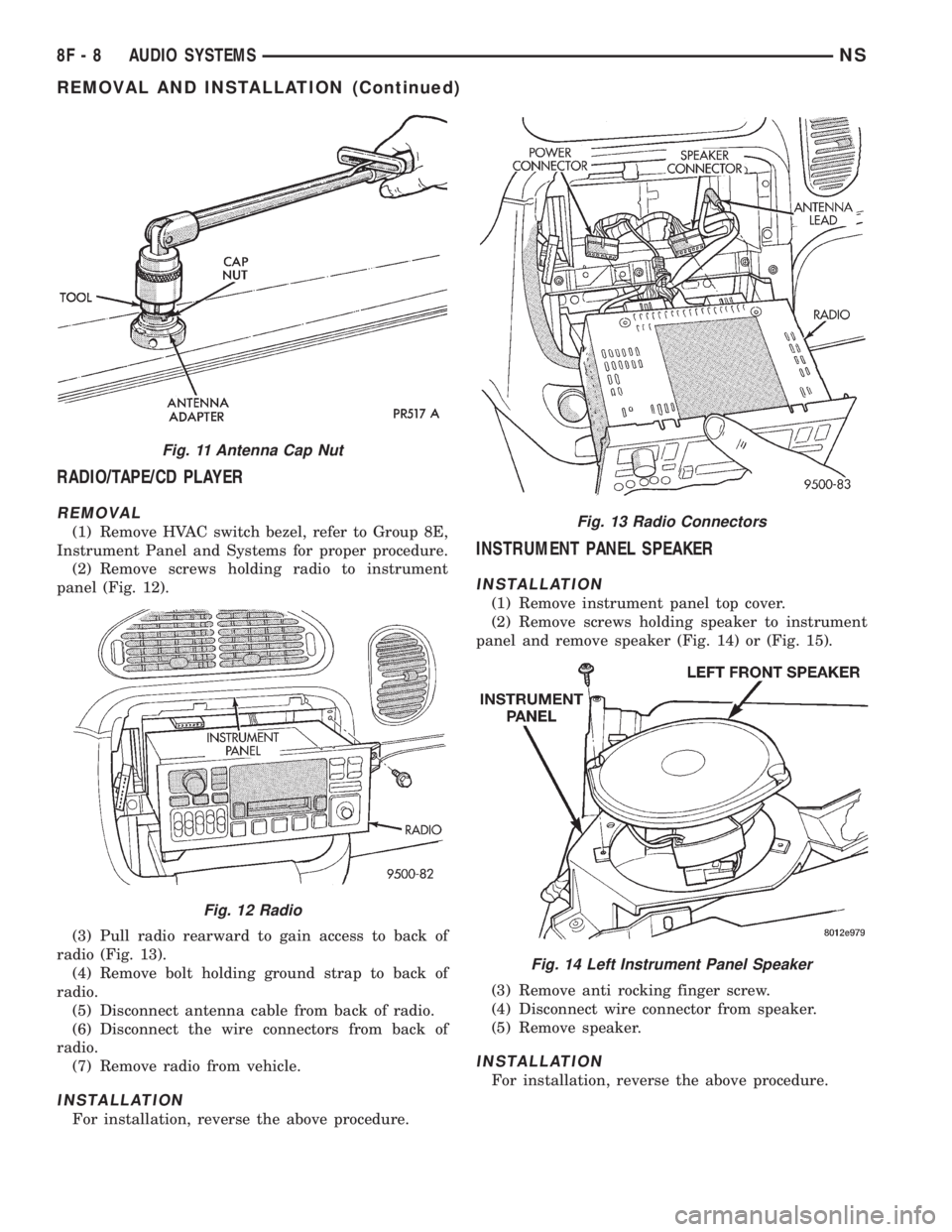
(1) Remove HVAC switch bezel, refer to Group 8E,
Instrument Panel and Systems for proper procedure.
(2) Remove screws holding radio to instrument
panel (Fig. 12).
(3) Pull radio rearward to gain access to back of
radio (Fig. 13).
(4) Remove bolt holding ground strap to back of
radio.
(5) Disconnect antenna cable from back of radio.
(6) Disconnect the wire connectors from back of
radio.
(7) Remove radio from vehicle.
INSTALLATION
For installation, reverse the above procedure.
INSTRUMENT PANEL SPEAKER
INSTALLATION
(1) Remove instrument panel top cover.
(2) Remove screws holding speaker to instrument
panel and remove speaker (Fig. 14) or (Fig. 15).
(3) Remove anti rocking finger screw.
(4) Disconnect wire connector from speaker.
(5) Remove speaker.
INSTALLATION
For installation, reverse the above procedure.
Fig. 11 Antenna Cap Nut
Fig. 12 Radio
Fig. 13 Radio Connectors
Fig. 14 Left Instrument Panel Speaker
8F - 8 AUDIO SYSTEMSNS
REMOVAL AND INSTALLATION (Continued)
Page 411 of 1938
FRONT DOOR SPEAKER
REMOVAL
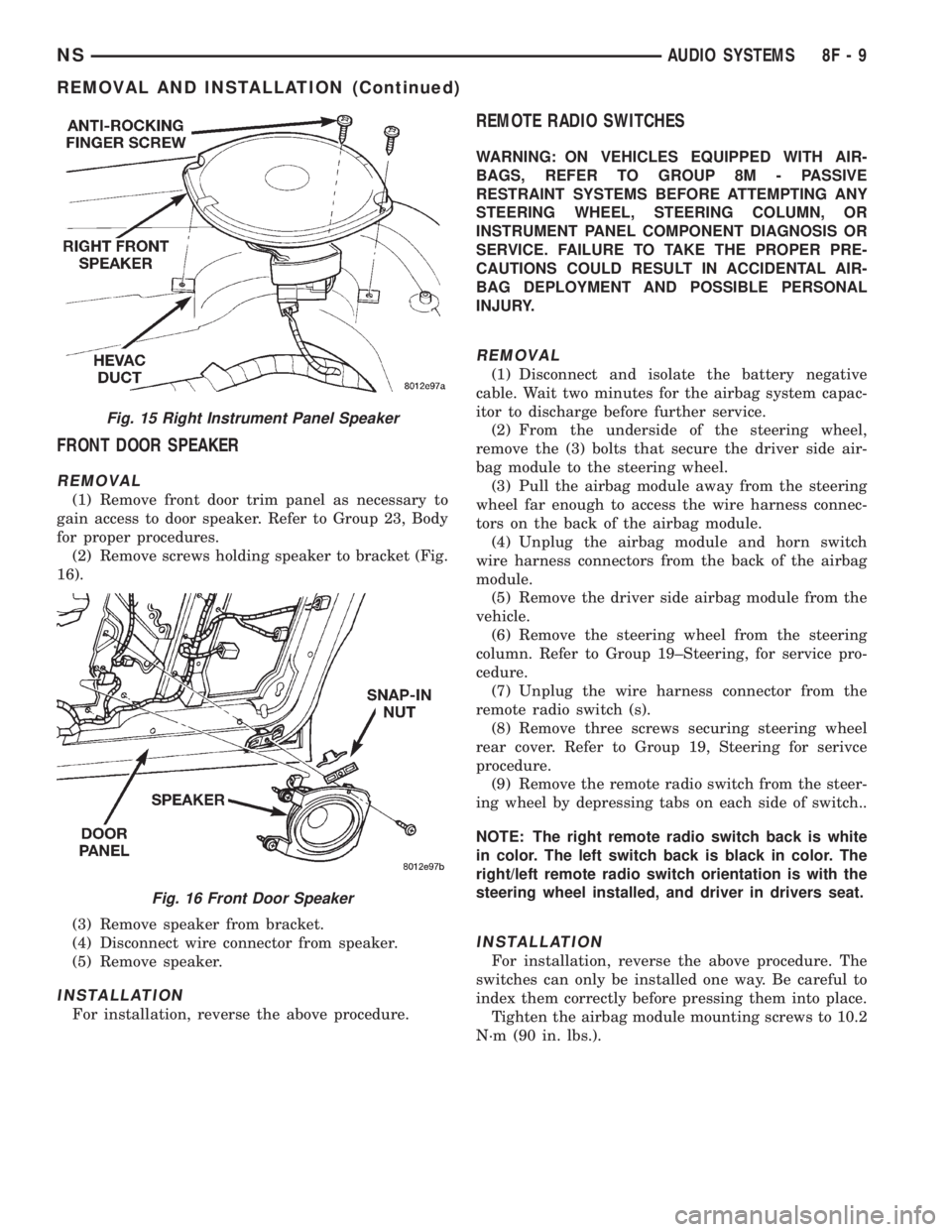
(1) Remove front door trim panel as necessary to
gain access to door speaker. Refer to Group 23, Body
for proper procedures.
(2) Remove screws holding speaker to bracket (Fig.
16).
(3) Remove speaker from bracket.
(4) Disconnect wire connector from speaker.
(5) Remove speaker.
INSTALLATION
For installation, reverse the above procedure.
REMOTE RADIO SWITCHES
WARNING: ON VEHICLES EQUIPPED WITH AIR-
BAGS, REFER TO GROUP 8M - PASSIVE
RESTRAINT SYSTEMS BEFORE ATTEMPTING ANY
STEERING WHEEL, STEERING COLUMN, OR
INSTRUMENT PANEL COMPONENT DIAGNOSIS OR
SERVICE. FAILURE TO TAKE THE PROPER PRE-
CAUTIONS COULD RESULT IN ACCIDENTAL AIR-
BAG DEPLOYMENT AND POSSIBLE PERSONAL
INJURY.
REMOVAL
(1) Disconnect and isolate the battery negative
cable. Wait two minutes for the airbag system capac-
itor to discharge before further service.
(2) From the underside of the steering wheel,
remove the (3) bolts that secure the driver side air-
bag module to the steering wheel.
(3) Pull the airbag module away from the steering
wheel far enough to access the wire harness connec-
tors on the back of the airbag module.
(4) Unplug the airbag module and horn switch
wire harness connectors from the back of the airbag
module.
(5) Remove the driver side airbag module from the
vehicle.
(6) Remove the steering wheel from the steering
column. Refer to Group 19±Steering, for service pro-
cedure.
(7) Unplug the wire harness connector from the
remote radio switch (s).
(8) Remove three screws securing steering wheel
rear cover. Refer to Group 19, Steering for serivce
procedure.
(9) Remove the remote radio switch from the steer-
ing wheel by depressing tabs on each side of switch..
NOTE: The right remote radio switch back is white
in color. The left switch back is black in color. The
right/left remote radio switch orientation is with the
steering wheel installed, and driver in drivers seat.
INSTALLATION
For installation, reverse the above procedure. The
switches can only be installed one way. Be careful to
index them correctly before pressing them into place.
Tighten the airbag module mounting screws to 10.2
N´m (90 in. lbs.).
Fig. 15 Right Instrument Panel Speaker
Fig. 16 Front Door Speaker
NSAUDIO SYSTEMS 8F - 9
REMOVAL AND INSTALLATION (Continued)
Page 514 of 1938
SERVICE PROCEDURES
HORN CHIRP DISABLE OR ENABLE
The horn chirp can be DISABLED or ENABLED
using the following procedure.
To DISABLE (cancelling) the horn chirp feature,
press and hold the transmitter LOCK button for a
minimum four seconds. While pressing LOCK button
in, press the UNLOCK button. The horn chirp fea-
ture will not function until the above procedure is
repeated. To ENABLE (reinstate) the horn chirp fea-
ture, use any one of the four key fob transmitters
and reverse the above procedures. It will ENABLE
the horn chirp feature for all transmitters.
REMOVAL AND INSTALLATION
RKE MODULE
REMOVAL
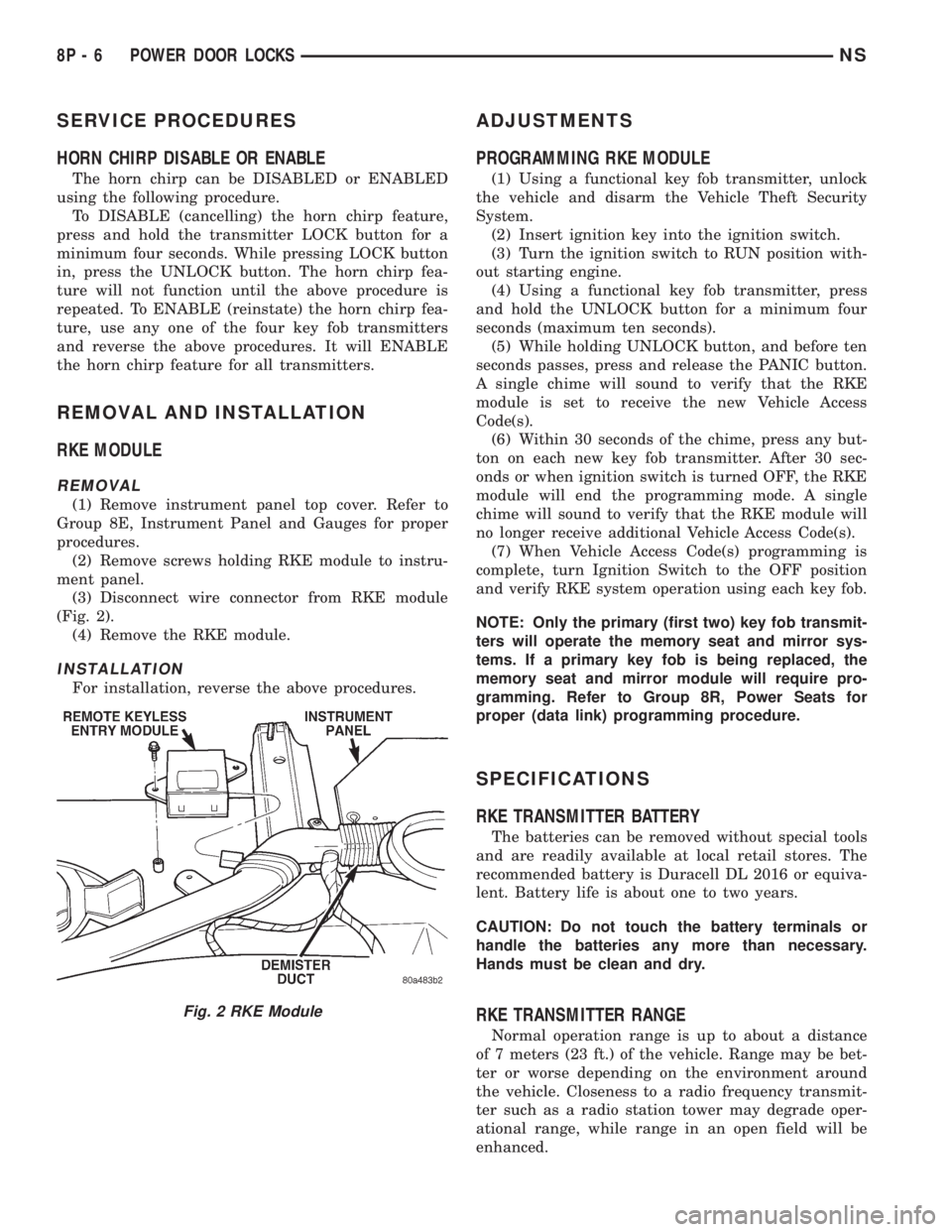
(1) Remove instrument panel top cover. Refer to
Group 8E, Instrument Panel and Gauges for proper
procedures.
(2) Remove screws holding RKE module to instru-
ment panel.
(3) Disconnect wire connector from RKE module
(Fig. 2).
(4) Remove the RKE module.
INSTALLATION
For installation, reverse the above procedures.
ADJUSTMENTS
PROGRAMMING RKE MODULE
(1) Using a functional key fob transmitter, unlock
the vehicle and disarm the Vehicle Theft Security
System.
(2) Insert ignition key into the ignition switch.
(3) Turn the ignition switch to RUN position with-
out starting engine.
(4) Using a functional key fob transmitter, press
and hold the UNLOCK button for a minimum four
seconds (maximum ten seconds).
(5) While holding UNLOCK button, and before ten
seconds passes, press and release the PANIC button.
A single chime will sound to verify that the RKE
module is set to receive the new Vehicle Access
Code(s).
(6) Within 30 seconds of the chime, press any but-
ton on each new key fob transmitter. After 30 sec-
onds or when ignition switch is turned OFF, the RKE
module will end the programming mode. A single
chime will sound to verify that the RKE module will
no longer receive additional Vehicle Access Code(s).
(7) When Vehicle Access Code(s) programming is
complete, turn Ignition Switch to the OFF position
and verify RKE system operation using each key fob.
NOTE: Only the primary (first two) key fob transmit-
ters will operate the memory seat and mirror sys-
tems. If a primary key fob is being replaced, the
memory seat and mirror module will require pro-
gramming. Refer to Group 8R, Power Seats for
proper (data link) programming procedure.
SPECIFICATIONS
RKE TRANSMITTER BATTERY
The batteries can be removed without special tools
and are readily available at local retail stores. The
recommended battery is Duracell DL 2016 or equiva-
lent. Battery life is about one to two years.
CAUTION: Do not touch the battery terminals or
handle the batteries any more than necessary.
Hands must be clean and dry.
RKE TRANSMITTER RANGE
Normal operation range is up to about a distance
of 7 meters (23 ft.) of the vehicle. Range may be bet-
ter or worse depending on the environment around
the vehicle. Closeness to a radio frequency transmit-
ter such as a radio station tower may degrade oper-
ational range, while range in an open field will be
enhanced.
Fig. 2 RKE Module
8P - 6 POWER DOOR LOCKSNS
Page 519 of 1938
VEHICLE THEFT/SECURITY SYSTEMS
CONTENTS
page page
GENERAL INFORMATION
INTRODUCTION........................ 1
SMART KEY IMMOBILIZER SYSTEM....... 1
DESCRIPTION AND OPERATION
SMART KEY IMMOBILIZER MODULE....... 1
SMART KEY IMMOBILIZER SYSTEM
INDICATOR LAMP..................... 3
SMART KEY IMMOBILIZER TRANSPONDER . 2DIAGNOSIS AND TESTING
SMART KEY IMMOBILIZER SYSTEM....... 3
SERVICE PROCEDURES
SMART KEY IMMOBILIZER SYSTEM
TRANSPONDER PROGRAMMING......... 4
REMOVAL AND INSTALLATION
SMART KEY IMMOBILIZER MODULE....... 4
GENERAL INFORMATION
INTRODUCTION
The Smart Key Immobilizer System (SKIS) is
available factory-installed optional equipment for this
model. Following are some general descriptions of the
features and components of the SKIS. Refer to the
vehicle owner's manual for more information on the
use and operation of the SKIS. Refer to 8W-30 - Fuel/
Ignition System in Group 8W - Wiring Diagrams for
complete circuit descriptions and diagrams.
SMART KEY IMMOBILIZER SYSTEM
The Smart Key Immobilizer System (SKIS) is
designed to provide passive protection against unau-
thorized vehicle use by preventing the engine from
operating while the system is armed. The primary
components of this system are the Smart Key Immo-
bilizer Module (SKIM), the Smart Key transponder,
the SKIS indicator lamp, and the Powertrain Control
Module (PCM), for gasoline engines, and the Body
Control Module (BCM) for diesel engines.
The SKIM is installed on the steering column near
the ignition lock cylinder. The transponder is located
under the molded rubber cap on the head of the igni-
tion key. The SKIS indicator lamp is located in the
instrument cluster.
The SKIS includes two valid Smart Key transpon-
ders from the factory. If the customer wishes, addi-
tional non-coded blank Smart Keys are available.
These blank keys can be cut to match a valid ignition
key, but the engine will not start unless the key tran-
sponder is also programmed to the vehicle. The SKIS
will recognize no more than eight valid Smart Key
transponders at any one time.
The SKIS performs a self-test each time the igni-
tion switch is turned to the On position, and will
store Diagnostic Trouble Codes (DTCs) if a systemmalfunction is detected. The SKIS can be diagnosed,
and any stored DTC can be retrieved using a DRB
scan tool as described in the proper Diagnostic Pro-
cedures manual.
DESCRIPTION AND OPERATION
SMART KEY IMMOBILIZER MODULE
The Smart Key Immobilizer Module (SKIM) con-
tains a Radio Frequency (RF) transceiver and a cen-
tral processing unit, which includes the Smart Key
Immobilizer System (SKIS) program logic. The SKIS
programming enables the SKIM to program and
retain in memory the codes of at least two, but no
more than eight electronically coded Smart Key tran-
sponders. The SKIS programming also enables the
SKIM to communicate over the Chrysler Collision
Detection (CCD) data bus network with the Power-
train Control Module (PCM), the instrument cluster
and/or the DRB scan tool.
The SKIM transmits and receives RF signals
through a tuned antenna enclosed within a molded
plastic ring formation that is integral to the SKIM
housing. When the SKIM is properly installed on the
steering column, the antenna ring is oriented around
the circumference of the ignition lock cylinder hous-
ing. This antenna ring must be located within eight
millimeters (0.31 inches) of the Smart Key in order
to ensure proper RF communication between the
SKIM and the Smart Key transponder.
For added system security, each SKIM is pro-
grammed with a unique ªSecret Keyº code and a
security code. The SKIM keeps the ªSecret Keyº code
in memory and sends the code over the CCD data
bus to the PCM, which also keeps this code in its
memory. The SKIM also sends the ªSecret Keyº code
to each of the programmed Smart Key transponders.
The security code is used by the assembly plant to
NS/GSVEHICLE THEFT/SECURITY SYSTEMS 8Q - 1
Page 520 of 1938
access the SKIS for initialization, or by the dealer
technician to access the system for service. The
SKIM also stores in its memory the Vehicle Identifi-
cation Number (VIN), which it learns through a CCD
data bus message from the PCM during initializa-
tion.
The SKIM and the PCM both use software that
includes a rolling code algorithm strategy, which
helps to reduce the possibility of unauthorized SKIS
disarming. The rolling code algorithm ensures secu-
rity by preventing an override of the SKIS through
the unauthorized substitution of the SKIM or the
PCM. However, the use of this strategy also means
that replacement of either the SKIM or the PCM
units will require a system initialization procedure to
restore system operation.
When the ignition switch is turned to the On or
Start positions, the SKIM transmits an RF signal to
excite the Smart Key transponder. The SKIM then
listens for a return RF signal from the transponder
of the Smart Key that is inserted in the ignition lock
cylinder. If the SKIM receives an RF signal with
valid ªSecret Keyº and transponder identification
codes, the SKIM sends a ªvalid keyº message to the
PCM over the CCD data bus. If the SKIM receives
an invalid RF signal or no response, it sends ªinvalid
keyº messages to the PCM. The PCM will enable or
disable engine operation based upon the status of the
SKIM messages.
The SKIM also sends messages to the instrument
cluster over the CCD data bus network to control the
SKIS indicator lamp. The SKIM sends messages to
the instrument cluster to turn the lamp on for about
three seconds when the ignition switch is turned to
the On position as a bulb test. After completion of
the bulb test, the SKIM sends bus messages to keep
the lamp off for a duration of about one second. Then
the SKIM sends messages to turn the lamp on or off
based upon the results of the SKIS self-tests. If the
SKIS indicator lamp comes on and stays on after the
bulb test, it indicates that the SKIM has detected a
system malfunction and/or that the SKIS has become
inoperative.
If the SKIM detects an invalid key when the igni-
tion switch is turned to the On position, it sends
messages to the instrument cluster to flash the SKIS
indicator lamp. The SKIM can also send messages to
the instrument cluster to flash the lamp and to gen-
erate a single audible chime tone.
For diagnosis or initialization of the SKIM and the
PCM, a DRB scan tool and the proper Diagnostic
Procedures manual are required. The SKIM cannot
be repaired and, if faulty or damaged, the unit must
be replaced.SMART KEY IMMOBILIZER TRANSPONDER
The Smart Key Immobilizer System (SKIS) uses a
transponder that is integral to each of the two igni-
tion keys that are supplied with the vehicle when it
is shipped from the factory. The transponder chip is
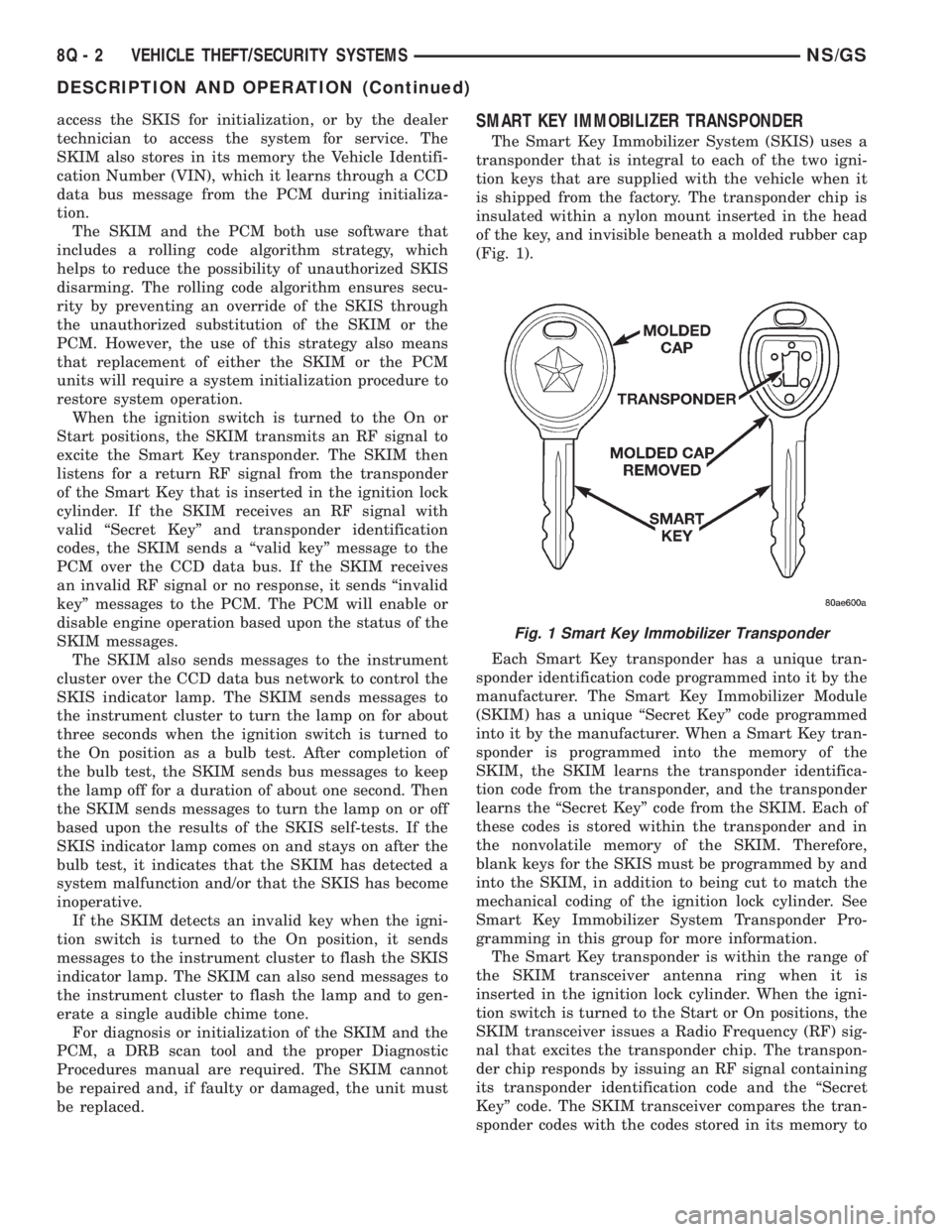
insulated within a nylon mount inserted in the head
of the key, and invisible beneath a molded rubber cap
(Fig. 1).
Each Smart Key transponder has a unique tran-
sponder identification code programmed into it by the
manufacturer. The Smart Key Immobilizer Module
(SKIM) has a unique ªSecret Keyº code programmed
into it by the manufacturer. When a Smart Key tran-
sponder is programmed into the memory of the
SKIM, the SKIM learns the transponder identifica-
tion code from the transponder, and the transponder
learns the ªSecret Keyº code from the SKIM. Each of
these codes is stored within the transponder and in
the nonvolatile memory of the SKIM. Therefore,
blank keys for the SKIS must be programmed by and
into the SKIM, in addition to being cut to match the
mechanical coding of the ignition lock cylinder. See
Smart Key Immobilizer System Transponder Pro-
gramming in this group for more information.
The Smart Key transponder is within the range of
the SKIM transceiver antenna ring when it is
inserted in the ignition lock cylinder. When the igni-
tion switch is turned to the Start or On positions, the
SKIM transceiver issues a Radio Frequency (RF) sig-
nal that excites the transponder chip. The transpon-
der chip responds by issuing an RF signal containing
its transponder identification code and the ªSecret
Keyº code. The SKIM transceiver compares the tran-
sponder codes with the codes stored in its memory to
Fig. 1 Smart Key Immobilizer Transponder
8Q - 2 VEHICLE THEFT/SECURITY SYSTEMSNS/GS
DESCRIPTION AND OPERATION (Continued)